The bulk of the text of this specification is also
available in the WHATWG Web Applications 1.0 specification, under a license that permits
reuse of the specification text.
Abstract
This specification defines the 5th major revision of the core
language of the World Wide Web: the Hypertext Markup Language
(HTML). In this version, new features are introduced to help Web
application authors, new elements are introduced based on research
into prevailing authoring practices, and special attention has been
given to defining clear conformance criteria for user agents in an
effort to improve interoperability.
Status of This document
This section describes the status of this document at the
time of its publication. Other documents may supersede this
document. A list of current W3C publications and the most recently
formally published revision of this technical report can be found in
the W3C technical reports index
at http://www.w3.org/TR/.
If you wish to make comments regarding this document in a manner
that is tracked by the W3C, please submit them via using our
public bug database. If you do not have an account then you can
enter feedback using this form:
If you cannot do this then you can also e-mail feedback to public-html-comments@w3.org
(subscribe,
archives),
and arrangements will be made to transpose the comments to our
public bug database.
Alternatively, you can e-mail feedback to whatwg@whatwg.org (subscribe,
archives).
The editor guarantees that all substantive feedback sent to this
list will receive a reply. However, such feedback is not considered
formal feedback for the W3C process.
All feedback is welcome.
Implementors should be aware that this specification is not
stable. Implementors who are not taking part in the
discussions are likely to find the specification changing out from
under them in incompatible ways. Vendors interested in
implementing this specification before it eventually reaches the
Candidate Recommendation stage should join the aforementioned
mailing lists and take part in the discussions.
This is a work in
progress! For the latest updates from the HTML WG, possibly
including important bug fixes, please look at the editor's draft instead.
The publication of this document by the W3C as a W3C Working
Draft does not imply that all of the participants in the W3C HTML
working group endorse the contents of the specification. Indeed, for
any section of the specification, one can usually find many members
of the working group or of the W3C as a whole who object strongly to
the current text, the existence of the section at all, or the idea
that the working group should even spend time discussing the concept
of that section.
The latest stable version of the editor's draft of this
specification is always available on the W3C CVS server and in the WHATWG Subversion
repository. The latest
editor's working copy (which may contain unfinished text in the
process of being prepared) contains the latest draft text of this
specification (amongst others). For more details, please see the WHATWG
FAQ.
There are various ways to follow the change history for the
HTML specifications:
Raw Subversion interface: svn checkout http://svn.whatwg.org/webapps/
The W3C HTML Working
Group is the W3C working group responsible for this
specification's progress along the W3C Recommendation
track.
This specification is the 24 May 2011 Working Draft.
Work on this specification is also done at the WHATWG. The W3C HTML working group
actively pursues convergence with the WHATWG, as required by the W3C HTML working
group charter.
The World Wide Web's markup language has always been HTML. HTML
was primarily designed as a language for semantically describing
scientific documents, although its general design and adaptations
over the years have enabled it to be used to describe a number of
other types of documents.
The main area that has not been adequately addressed by HTML is a
vague subject referred to as Web Applications. This specification
attempts to rectify this, while at the same time updating the HTML
specifications to address issues raised in the past few years.
1.2 Audience
This section is non-normative.
This specification is intended for authors of documents and
scripts that use the features defined in this specification, implementors of tools that operate on pages that use
the features defined in this specification, and individuals wishing
to establish the correctness of documents or implementations with
respect to the requirements of this specification.
This document is probably not suited to readers who do not
already have at least a passing familiarity with Web technologies,
as in places it sacrifices clarity for precision, and brevity for
completeness. More approachable tutorials and authoring guides can
provide a gentler introduction to the topic.
In particular, familiarity with the basics of DOM Core and DOM
Events is necessary for a complete understanding of some of the more
technical parts of this specification. An understanding of Web IDL,
HTTP, XML, Unicode, character encodings, JavaScript, and CSS will
also be helpful in places but is not essential.
1.3 Scope
This section is non-normative.
This specification is limited to providing a semantic-level
markup language and associated semantic-level scripting APIs for
authoring accessible pages on the Web ranging from static documents
to dynamic applications.
The scope of this specification does not include providing
mechanisms for media-specific customization of presentation
(although default rendering rules for Web browsers are included at
the end of this specification, and several mechanisms for hooking
into CSS are provided as part of the language).
The scope of this specification is not to describe an entire
operating system. In particular, hardware configuration software,
image manipulation tools, and applications that users would be
expected to use with high-end workstations on a daily basis are out
of scope. In terms of applications, this specification is targeted
specifically at applications that would be expected to be used by
users on an occasional basis, or regularly but from disparate
locations, with low CPU requirements. For instance online purchasing
systems, searching systems, games (especially multiplayer online
games), public telephone books or address books, communications
software (e-mail clients, instant messaging clients, discussion
software), document editing software, etc.
1.4 History
This section is non-normative.
For its first five years (1990-1995), HTML went through a number
of revisions and experienced a number of extensions, primarily
hosted first at CERN, and then at the IETF.
With the creation of the W3C, HTML's development changed venue
again. A first abortive attempt at extending HTML in 1995 known as
HTML 3.0 then made way to a more pragmatic approach known as HTML
3.2, which was completed in 1997. HTML4 followed, reaching
completion in 1998.
At this time, the W3C membership decided to stop evolving HTML
and instead begin work on an XML-based equivalent, called
XHTML. This effort started with a reformulation of HTML4 in XML,
known as XHTML 1.0, which added no new features except the new
serialization, and which was completed in 2000. After XHTML 1.0, the
W3C's focus turned to making it easier for other working groups to
extend XHTML, under the banner of XHTML Modularization. In parallel
with this, the W3C also worked on a new language that was not
compatible with the earlier HTML and XHTML languages, calling it
XHTML2.
Around the time that HTML's evolution was stopped in 1998, parts
of the API for HTML developed by browser vendors were specified and
published under the name DOM Level 1 (in 1998) and DOM Level 2 Core
and DOM Level 2 HTML (starting in 2000 and culminating in
2003). These efforts then petered out, with some DOM Level 3
specifications published in 2004 but the working group being closed
before all the Level 3 drafts were completed.
In 2003, the publication of XForms, a technology which was
positioned as the next generation of Web forms, sparked a renewed
interest in evolving HTML itself, rather than finding replacements
for it. This interest was borne from the realization that XML's
deployment as a Web technology was limited to entirely new
technologies (like RSS and later Atom), rather than as a replacement
for existing deployed technologies (like HTML).
A proof of concept to show that it was possible to extend HTML4's
forms to provide many of the features that XForms 1.0 introduced,
without requiring browsers to implement rendering engines that were
incompatible with existing HTML Web pages, was the first result of
this renewed interest. At this early stage, while the draft was
already publicly available, and input was already being solicited
from all sources, the specification was only under Opera Software's
copyright.
The idea that HTML's evolution should be reopened was tested at a
W3C workshop in 2004, where some of the principles that underlie the
HTML5 work (described below), as well as the aforementioned early
draft proposal covering just forms-related features, were presented
to the W3C jointly by Mozilla and Opera. The proposal was rejected
on the grounds that the proposal conflicted with the previously
chosen direction for the Web's evolution; the W3C staff and
membership voted to continue developing XML-based replacements
instead.
Shortly thereafter, Apple, Mozilla, and Opera jointly announced
their intent to continue working on the effort under the umbrella of
a new venue called the WHATWG. A public mailing list was created,
and the draft was moved to the WHATWG site. The copyright was
subsequently amended to be jointly owned by all three vendors, and
to allow reuse of the specification.
The WHATWG was based on several core principles, in particular
that technologies need to be backwards compatible, that
specifications and implementations need to match even if this means
changing the specification rather than the implementations, and that
specifications need to be detailed enough that implementations can
achieve complete interoperability without reverse-engineering each
other.
The latter requirement in particular required that the scope of
the HTML5 specification include what had previously been specified
in three separate documents: HTML4, XHTML1, and DOM2 HTML. It also
meant including significantly more detail than had previously been
considered the norm.
In 2006, the W3C indicated an interest to participate in the
development of HTML5 after all, and in 2007 formed a working group
chartered to work with the WHATWG on the development of the HTML5
specification. Apple, Mozilla, and Opera allowed the W3C to publish
the specification under the W3C copyright, while keeping a version
with the less restrictive license on the WHATWG site.
Since then, both groups have been working together.
The HTML
specification published by the WHATWG is not identical to
this specification. At the time of this publication, the main
differences were that the WHATWG version included features not
included in this W3C version: some features have been omitted, but
may be considered for future revisions of HTML beyond HTML5; and
other features were omitted because at the W3C they are published as
separate specifications.
A separate document has been published by the W3C HTML working
group to document the differences between this specification and the
language described in the HTML4 specification. [HTMLDIFF]
1.5 Design notes
This section is non-normative.
It must be admitted that many aspects of HTML appear at first
glance to be nonsensical and inconsistent.
HTML, its supporting DOM APIs, as well as many of its supporting
technologies, have been developed over a period of several decades
by a wide array of people with different priorities who, in many
cases, did not know of each other's existence.
Features have thus arisen from many sources, and have not always
been designed in especially consistent ways. Furthermore, because of
the unique characteristics of the Web, implementation bugs have
often become de-facto, and now de-jure, standards, as content is
often unintentionally written in ways that rely on them before they
can be fixed.
Despite all this, efforts have been made to adhere to certain
design goals. These are described in the next few subsections.
1.5.1 Serializability of script execution
This section is non-normative.
To avoid exposing Web authors to the complexities of
multithreading, the HTML and DOM APIs are designed such that no
script can ever detect the simultaneous execution of other
scripts. Even with workers, the intent
is that the behavior of implementations can be thought of as
completely serializing the execution of all scripts in all browsing contexts.
The navigator.yieldForStorageUpdates()
method, in this model, is equivalent to allowing other scripts to
run while the calling script is blocked.
1.5.2 Compliance with other specifications
This section is non-normative.
This specification interacts with and relies on a wide variety of
other specifications. In certain circumstances, unfortunately,
conflicting needs have led to this specification violating the
requirements of these other specifications. Whenever this has
occurred, the transgressions have each been noted as a "willful
violation", and the reason for the violation has been
noted.
1.6 HTML vs XHTML
This section is non-normative.
This specification defines an abstract language for describing
documents and applications, and some APIs for interacting with
in-memory representations of resources that use this language.
The in-memory representation is known as "DOM HTML", or "the DOM"
for short. This specification defines version 5 of DOM HTML, known
as "DOM5 HTML".
There are various concrete syntaxes that can be used to transmit
resources that use this abstract language, two of which are defined
in this specification.
The first such concrete syntax is the HTML syntax. This is the
format suggested for most authors. It is compatible with most legacy
Web browsers. If a document is transmitted with an HTML MIME
type, such as text/html, then it will be
processed as an HTML document by Web browsers.
This specification defines version 5 of the HTML syntax, known as
"HTML5".
The second concrete syntax is the XHTML syntax, which is an
application of XML. When a document is transmitted with an XML
MIME type, such as application/xhtml+xml, then
it is treated as an XML document by Web browsers, to be parsed by an
XML processor. Authors are reminded that the processing for XML and
HTML differs; in particular, even minor syntax errors will prevent a
document labeled as XML from being rendered fully, whereas they
would be ignored in the HTML syntax.
This specification defines version 5 of the XHTML syntax, known as
"XHTML5".
The DOM, the HTML syntax, and XML cannot all represent the same
content. For example, namespaces cannot be represented using the
HTML syntax, but they are supported in the DOM and in XML.
Similarly, documents that use the noscript feature can
be represented using the HTML syntax, but cannot be represented with
the DOM or in XML. Comments that contain the string "-->" can only be represented in the DOM, not in
the HTML and XML syntaxes.
1.7 Structure of this specification
This section is non-normative.
This specification is divided into the following major
sections:
Documents are built from elements. These elements form a tree
using the DOM. This section defines the features of this DOM, as
well as introducing the features common to all elements, and the
concepts used in defining elements.
Each element has a predefined meaning, which is explained in
this section. Rules for authors on how to use the element, along with user agent requirements for how to handle
each element, are also given.
All of these features would be for naught if they couldn't be
represented in a serialized form and sent to other people, and so
these sections define the syntaxes of HTML, along with rules for
how to parse content using those syntaxes.
This specification should be read like all other specifications.
First, it should be read cover-to-cover, multiple times. Then, it
should be read backwards at least once. Then it should be read by
picking random sections from the contents list and following all the
cross-references.
1.7.2 Typographic conventions
This is a definition, requirement, or explanation.
This is a note.
This is an example.
This is an open issue.
This is a warning.
interface Example {
  // this is an IDL definition
};
This is a note to authors describing the usage of an interface.
/* this is a CSS fragment */
The defining instance of a term is marked up like this. Uses of that term are marked up like
this or like this.
The defining instance of an element, attribute, or API is marked
up like this. References to
that element, attribute, or API are marked up like this.
Other code fragments are marked up like
this.
Variables are marked up like this.
This is an implementation requirement.
1.8 A quick introduction to HTML
This section is non-normative.
A basic HTML document looks like this:
<!DOCTYPE html>
<html>
 <head>
  <title>Sample page</title>
 </head>
 <body>
  <h1>Sample page</h1>
  <p>This is a <a href="demo.html">simple</a> sample.</p>
  <!-- this is a comment -->
 </body>
</html>
HTML documents consist of a tree of elements and text. Each
element is denoted in the source by a start tag, such as "<body>", and an end
tag, such as "</body>". (Certain
start tags and end tags can in certain cases be omitted and are implied by other
tags.)
Tags have to be nested such that elements are all completely
within each other, without overlapping:
<p>This is <em>very <strong>wrong</em>!</strong></p>
<p>This <em>is <strong>correct</strong>.</em></p>
This specification defines a set of elements that can be used in
HTML, along with rules about the ways in which the elements can be
nested.
Elements can have attributes, which control how the elements
work. In the example below, there is a hyperlink,
formed using the a element and its href attribute:
<a href="demo.html">simple</a>
Attributes are placed
inside the start tag, and consist of a name and a value, separated by an "=" character. The attribute value can remain unquoted if it doesn't contain spaces or any of
"'`=<
or >. Otherwise, it has to be quoted using
either single or double quotes. The value, along with the "=" character, can be omitted altogether if the value
is the empty string.
<!-- empty attributes -->
<input name=address disabled>
<input name=address disabled="">

<!-- attributes with a value -->
<input name=address maxlength=200>
<input name=address maxlength='200'>
<input name=address maxlength="200">
HTML user agents (e.g. Web browsers) then parse this
markup, turning it into a DOM (Document Object Model) tree. A DOM
tree is an in-memory representation of a document.
DOM trees contain several kinds of nodes, in particular a DOCTYPE
node, elements, text nodes, and comment nodes.
The root element of this tree is the
html element, which is the element always found at the
root of HTML documents. It contains two elements, head
and body, as well as a text node between them.
There are many more text nodes in the DOM tree than one would
initially expect, because the source contains a number of spaces
(represented here by "␣") and line breaks ("⏎") that
all end up as text nodes in the DOM. However, for historical reasons
not all of the spaces and line breaks in the original markup appear
in the DOM. In particular, all the whitespace before
head start tag ends up being dropped silently, and all
the whitespace after the body end tag ends up placed at
the end of the body.
The head element contains a title
element, which itself contains a text node with the text "Sample
page". Similarly, the body element contains an
h1 element, a p element, and a
comment.
This DOM tree can be manipulated from scripts in the
page. Scripts (typically in JavaScript) are small programs that can
be embedded using the script element or using
event handler content attributes. For example, here is
a form with a script that sets the value of the form's
output element to say "Hello World":
Each element in the DOM tree is represented by an object, and
these objects have APIs so that they can be manipulated. For
instance, a link (e.g. the a element in the tree above)
can have its "href"
attribute changed in several ways:
var a = document.links[0]; // obtain the first link in the document
a.href = 'sample.html'; // change the destination URL of the link
a.protocol = 'https'; // change just the scheme part of the URL
a.setAttribute('href', 'http://example.com/'); // change the content attribute directly
Since DOM trees are used as the way to represent HTML documents
when they are processed and presented by implementations (especially
interactive implementations like Web browsers), this specification
is mostly phrased in terms of DOM trees, instead of the markup
described above.
HTML documents represent a media-independent description of
interactive content. HTML documents might be rendered to a screen,
or through a speech synthesizer, or on a braille display. To
influence exactly how such rendering takes place, authors can use a
styling language such as CSS.
In the following example, the page has been made yellow-on-blue
using CSS.
<!DOCTYPE html>
<html>
 <head>
  <title>Sample styled page</title>
  <style>
   body { background: navy; color: yellow; }
  </style>
 </head>
 <body>
  <h1>Sample styled page</h1>
  <p>This page is just a demo.</p>
 </body>
</html>
For more details on how to use HTML, authors are encouraged to
consult tutorials and guides. Some of the examples included in this
specification might also be of use, but the novice author is
cautioned that this specification, by necessity, defines the
language with a level of detail that might be difficult to
understand at first.
1.9 Conformance requirements for authors
This section is non-normative.
Unlike previous versions of the HTML specification, this
specification defines in some detail the required processing for
invalid documents as well as valid documents.
However, even though the processing of invalid content is in most
cases well-defined, conformance requirements for documents are still
important: in practice, interoperability (the situation in which all
implementations process particular content in a reliable and
identical or equivalent way) is not the only goal of document
conformance requirements. This section details some of the more
common reasons for still distinguishing between a conforming
document and one with errors.
1.9.1 Presentational markup
This section is non-normative.
The majority of presentational features from previous versions of
HTML are no longer allowed. Presentational markup in general has
been found to have a number of problems:
The use of presentational elements leads to poorer accessibility
While it is possible to use presentational markup in a way that
provides users of assistive technologies (ATs) with an acceptable
experience (e.g. using ARIA), doing so is significantly more
difficult than doing so when using semantically-appropriate
markup. Furthermore, even using such techniques doesn't help make
pages accessible for non-AT non-graphical users, such as users of
text-mode browsers.
Using media-independent markup, on the other hand, provides an
easy way for documents to be authored in such a way that they work
for more users (e.g. text browsers).
Higher cost of maintenance
It is significantly easier to maintain a site written in such a
way that the markup is style-independent. For example, changing
the color of a site that uses <font color="">
throughout requires changes across the entire site, whereas a
similar change to a site based on CSS can be done by changing a
single file.
Higher document sizes
Presentational markup tends to be much more redundant, and thus
results in larger document sizes.
For those reasons, presentational markup has been removed from
HTML in this version. This change should not come as a surprise;
HTML4 deprecated presentational markup many years ago and provided a
mode (HTML4 Transitional) to help authors move away from
presentational markup; later, XHTML 1.1 went further and obsoleted
those features altogether.
The only remaining presentational markup features in HTML are the
style attribute and the
style element. Use of the style attribute is somewhat discouraged in
production environments, but it can be useful for rapid prototyping
(where its rules can be directly moved into a separate style sheet
later) and for providing specific styles in unusual cases where a
separate style sheet would be inconvenient. Similarly, the
style element can be useful in syndication or for
page-specific styles, but in general an external style sheet is
likely to be more convenient when the styles apply to multiple
pages.
It is also worth noting that some elements that were previously
presentational have been redefined in this specification to be
media-independent: b, i, hr,
s, small, and u.
1.9.2 Syntax errors
This section is non-normative.
The syntax of HTML is constrained to avoid a wide variety of
problems.
Unintuitive error-handling behavior
Certain invalid syntax constructs, when parsed, result in DOM
trees that are highly unintuitive.
For example, the following markup fragment results in a DOM
with an hr element that is an earlier
sibling of the corresponding table element:
<table><hr>...
Errors with optional error recovery
To allow user agents to be used in controlled environments
without having to implement the more bizarre and convoluted error
handling rules, user agents are permitted to fail whenever
encountering a parse error.
Errors where the error-handling behavior is not compatible with streaming user agents
Some error-handling behavior, such as the behavior for the
<table><hr>... example mentioned
above, are incompatible with streaming user agents (user agents
that process HTML files in one pass, without storing state). To
avoid interoperability problems with such user agents, any syntax
resulting in such behavior is considered invalid.
Errors that can result in infoset coercion
When a user agent based on XML is connected to an HTML parser,
it is possible that certain invariants that XML enforces, such as
comments never containing two consecutive hyphens, will be
violated by an HTML file. Handling this can require that the
parser coerce the HTML DOM into an XML-compatible infoset. Most
syntax constructs that require such handling are considered
invalid.
Errors that result in disproportionally poor performance
Certain syntax constructs can result in disproportionally poor
performance. To discourage the use of such constructs, they are
typically made non-conforming.
For example, the following markup results in poor performance,
since all the unclosed i elements have to be
reconstructed in each paragraph, resulting in progressively more
elements in each paragraph:
<p><i>He dreamt.
<p><i>He dreamt that he ate breakfast.
<p><i>Then lunch.
<p><i>And finally dinner.
There are syntax constructs that, for historical reasons, are
relatively fragile. To help reduce the number of users who
accidentally run into such problems, they are made
non-conforming.
For example, the parsing of certain named character references
in attributes happens even with the closing semicolon being
omitted. It is safe to include an ampersand followed by letters
that do not form a named character reference, but if the letters
are changed to a string that does form a named character
reference, they will be interpreted as that character instead.
In this fragment, the attribute's value is "?bill&ted":
To avoid this problem, all named character references are
required to end with a semicolon, and uses of named character
references without a semicolon are flagged as errors.
Thus, the correct way to express the above cases is as
follows:
<a href="?bill&ted">Bill and Ted</a> <!-- &ted is ok, since it's not a named character reference -->
Errors involving known interoperability problems in legacy user agents
Certain syntax constructs are known to cause especially subtle
or serious problems in legacy user agents, and are therefore
marked as non-conforming to help authors avoid them.
For example, this is why the U+0060 GRAVE ACCENT character (`)
is not allowed in unquoted attributes. In certain legacy user
agents, it is sometimes treated as a quote
character.
Another example of this is the DOCTYPE, which is required to
trigger no-quirks mode, because the behavior of
legacy user agents in quirks mode is often largely
undocumented.
Errors that risk exposing authors to security attacks
Certain restrictions exist purely to avoid known security
problems.
For example, the restriction on using UTF-7 exists purely to
avoid authors falling prey to a known cross-site-scripting attack
using UTF-7.
Cases where the author's intent is unclear
Markup where the author's intent is very unclear is often made
non-conforming. Correcting these errors early makes later
maintenance easier.
For example, it is unclear whether the author intended the
following to be an h1 heading or an h2
heading:
<h1>Contact details</h2>
Cases that are likely to be typos
When a user makes a simple typo, it is helpful if the error can
be caught early, as this can save the author a lot of debugging
time. This specification therefore usually considers it an error
to use element names, attribute names, and so forth, that do not
match the names defined in this specification.
For example, if the author typed <capton>
instead of <caption>, this would be flagged as an
error and the author could correct the typo immediately.
Errors that could interfere with new syntax in the future
In order to allow the language syntax to be extended in the
future, certain otherwise harmless features are disallowed.
For example, "attributes" in end tags are ignored currently,
but they are invalid, in case a future change to the language
makes use of that syntax feature without conflicting with
already-deployed (and valid!) content.
Some authors find it helpful to be in the practice of always
quoting all attributes and always including all optional tags,
preferring the consistency derived from such custom over the minor
benefits of terseness afforded by making use of the flexibility of
the HTML syntax. To aid such authors, conformance checkers can
provide modes of operation wherein such conventions are
enforced.
1.9.3 Restrictions on content models and on attribute values
This section is non-normative.
Beyond the syntax of the language, this specification also places
restrictions on how elements and attributes can be specified. These
restrictions are present for similar reasons:
Errors involving content with dubious semantics
To avoid misuse of elements with defined meanings, content
models are defined that restrict how elements can be nested when
such nestings would be of dubious value.
For example, this specification disallows
nesting a section element inside a kbd
element, since it is highly unlikely for an author to indicate
that an entire section should be keyed in.
Errors that involve a conflict in expressed semantics
Similarly, to draw the author's attention to mistakes in the
use of elements, clear contradictions in the semantics expressed
are also considered conformance errors.
In the fragments below, for example, the semantics are
nonsensical: a separator cannot simultaneously be a cell, nor can
a radio button be a progress bar.
<hr role="cell">
<input type=radio role=progressbar>
Another example is the restrictions on the
content models of the ul element, which only allows
li element children. Lists by definition consist just
of zero or more list items, so if a ul element
contains something other than an li element, it's not
clear what was meant.
Cases where the default styles are likely to lead to confusion
Certain elements have default styles or behaviors that make
certain combinations likely to lead to confusion. Where these have
equivalent alternatives without this problem, the confusing
combinations are disallowed.
For example, div elements are
rendered as block boxes, and span elements as inline
boxes. Putting a block box in an inline box is unnecessarily
confusing; since either nesting just div elements, or
nesting just span elements, or nesting
span elements inside div elements all
serve the same purpose as nesting a div element in a
span element, but only the latter involves a block
box in an inline box, the latter combination is disallowed.
Another example would be the way
interactive content cannot be nested. For example, a
button element cannot contain a textarea
element. This is because the default behavior of such nesting
interactive elements would be highly confusing to users. Instead
of nesting these elements, they can be placed side by side.
Errors that indicate a likely misunderstanding of the specification
Sometimes, something is disallowed because allowing it would
likely cause author confusion.
For example, setting the disabled attribute to the value
"false" is disallowed, because despite the
appearance of meaning that the element is enabled, it in fact
means that the element is disabled (what matters for
implementations is the presence of the attribute, not its
value).
Errors involving limits that have been imposed merely to simplify the language
Some conformance errors simplify the language that authors need
to learn.
For example, the area element's
shape attribute, despite
accepting both circ and circle values in
practice as synonyms, disallows the use of the circ value, so as to
simplify tutorials and other learning aids. There would be no
benefit to allowing both, but it would cause extra confusion when
teaching the language.
Errors that involve peculiarities of the parser
Certain elements are parsed in somewhat eccentric ways
(typically for historical reasons), and their content model
restrictions are intended to avoid exposing the author to these
issues.
For example, a form element isn't allowed inside
phrasing content, because when parsed as HTML, a
form element's start tag will imply a p
element's end tag. Thus, the following markup results in two
paragraphs, not one:
Errors that would likely result in scripts failing in hard-to-debug ways
Some errors are intended to help prevent script problems that
would be hard to debug.
This is why, for instance, it is non-conforming
to have two id attributes with the
same value. Duplicate IDs lead to the wrong element being
selected, with sometimes disastrous effects whose cause is hard to
determine.
Errors that waste authoring time
Some constructs are disallowed because historically they have
been the cause of a lot of wasted authoring time, and by
encouraging authors to avoid making them, authors can save time in
future efforts.
For example, a script element's
src attribute causes the
element's contents to be ignored. However, this isn't obvious,
especially if the element's contents appear to be executable
script — which can lead to authors spending a lot of time
trying to debug the inline script without realizing that it is not
executing. To reduce this problem, this specification makes it
non-conforming to have executable script in a script
element when the src
attribute is present. This means that authors who are validating
their documents are less likely to waste time with this kind of
mistake.
Errors that involve areas that affect authors migrating to and from XHTML
Some authors like to write files that can be interpreted as
both XML and HTML with similar results. Though this practice is
discouraged in general due to the myriad of subtle complications
involved (especially when involving scripting, styling, or any
kind of automated serialization), this specification has a few
restrictions intended to at least somewhat mitigate the
difficulties. This makes it easier for authors to use this as a
transitionary step when migrating between HTML and XHTML.
For example, there are somewhat complicated
rules surrounding the lang and
xml:lang attributes intended
to keep the two synchronized.
Another example would be the restrictions on
the values of xmlns attributes in the HTML
serialization, which are intended to ensure that elements in
conforming documents end up in the same namespaces whether
processed as HTML or XML.
Errors that involve areas reserved for future expansion
As with the restrictions on the syntax intended to allow for
new syntax in future revisions of the language, some restrictions
on the content models of elements and values of attributes are
intended to allow for future expansion of the HTML vocabulary.
For example, limiting the values of the target attribute that start
with an U+005F LOW LINE character (_) to only specific predefined
values allows new predefined values to be introduced at a future
time without conflicting with author-defined values.
Errors that indicate a mis-use of other specifications
Certain restrictions are intended to support the restrictions
made by other specifications.
For example, requiring that attributes that
take media queries use only valid media queries
reinforces the importance of following the conformance rules of
that specification.
1.10 Recommended reading
This section is non-normative.
The following documents might be of interest to readers of this
specification.
Character Model for the World Wide Web 1.0: Fundamentals [CHARMOD]
This Architectural Specification provides
authors of specifications, software developers, and content
developers with a common reference for interoperable text
manipulation on the World Wide Web, building on the Universal
Character Set, defined jointly by the Unicode Standard and ISO/IEC
10646. Topics addressed include use of the terms 'character',
'encoding' and 'string', a reference processing model, choice and
identification of character encodings, character escaping, and
string indexing.
Because Unicode contains such a large number of
characters and incorporates the varied writing systems of the
world, incorrect usage can expose programs or systems to possible
security attacks. This is especially important as more and more
products are internationalized. This document describes some of the
security considerations that programmers, system analysts,
standards developers, and users should take into account, and
provides specific recommendations to reduce the risk of
problems.
Web Content Accessibility Guidelines (WCAG) 2.0 [WCAG]
Web Content Accessibility Guidelines (WCAG) 2.0
covers a wide range of recommendations for making Web content more
accessible. Following these guidelines will make content accessible
to a wider range of people with disabilities, including blindness
and low vision, deafness and hearing loss, learning disabilities,
cognitive limitations, limited movement, speech disabilities,
photosensitivity and combinations of these. Following these
guidelines will also often make your Web content more usable to
users in general.
This specification provides
guidelines for designing Web content authoring tools that are more
accessible for people with disabilities. An authoring tool that
conforms to these guidelines will promote accessibility by
providing an accessible user interface to authors with disabilities
as well as by enabling, supporting, and promoting the production of
accessible Web content by all authors.
User Agent Accessibility Guidelines (UAAG) 2.0 [UAAG]
This document provides guidelines
for designing user agents that lower barriers to Web accessibility
for people with disabilities. User agents include browsers and
other types of software that retrieve and render Web content. A
user agent that conforms to these guidelines will promote
accessibility through its own user interface and through other
internal facilities, including its ability to communicate with
other technologies (especially assistive
technologies). Furthermore, all users, not just users with
disabilities, should find conforming user agents to be more
usable.
A document that uses polyglot markup is a document
that is a stream of bytes that parses into identical document trees
(with the exception of the xmlns attribute on the root element)
when processed as HTML and when processed as XML. Polyglot markup
that meets a well defined set of constraints is interpreted as
compatible, regardless of whether they are processed as HTML or as
XHTML, per the HTML5 specification. Polyglot markup uses a specific
DOCTYPE, namespace declarations, and a specific case —
normally lower case but occasionally camel case — for element
and attribute names. Polyglot markup uses lower case for certain
attribute values. Further constraints include those on empty
elements, named entity references, and the use of scripts and
style.
HTML to Platform Accessibility APIs Implementation Guide [HPAAIG]
This is draft documentation mapping HTML
elements and attributes to accessibility API Roles, States and
Properties on a variety of platforms. It provides recommendations
on deriving the accessible names and descriptions for HTML
elements. It also provides accessible feature implementation
examples.
2 Common infrastructure
2.1 Terminology
This specification refers to both HTML and XML attributes and IDL
attributes, often in the same context. When it is not clear which is
being referred to, they are referred to as content
attributes for HTML and XML attributes, and IDL
attributes for those defined on IDL interfaces. Similarly, the
term "properties" is used for both JavaScript object properties and
CSS properties. When these are ambiguous they are qualified as object properties and CSS
properties respectively.
Generally, when the specification states that a feature applies
to the HTML syntax or the XHTML syntax, it
also includes the other. When a feature specifically only applies to
one of the two languages, it is called out by explicitly stating
that it does not apply to the other format, as in "for HTML,
... (this does not apply to XHTML)".
This specification uses the term document to
refer to any use of HTML, ranging from short static documents to
long essays or reports with rich multimedia, as well as to
fully-fledged interactive applications.
For simplicity, terms such as shown, displayed, and visible might
sometimes be used when referring to the way a document is rendered
to the user. These terms are not meant to imply a visual medium;
they must be considered to apply to other media in equivalent
ways.
When an algorithm B says to return to another algorithm A, it
implies that A called B. Upon returning to A, the implementation
must continue from where it left off in calling B.
The term "transparent black" refers to the color with red, green,
blue, and alpha channels all set to zero.
2.1.1 Resources
The specification uses the term supported
when referring to whether a user agent has an implementation capable
of decoding the semantics of an external resource. A format or type
is said to be supported if the implementation can process an
external resource of that format or type without critical aspects of
the resource being ignored. Whether a specific resource is
supported can depend on what features of the resource's
format are in use.
For example, a PNG image would be considered to
be in a supported format if its pixel data could be decoded and
rendered, even if, unbeknownst to the implementation, the image also
contained animation data.
A MPEG4 video file would not be considered to be
in a supported format if the compression format used was not
supported, even if the implementation could determine the dimensions
of the movie from the file's metadata.
What some specifications, in particular the HTTP and URI
specifications, refer to as a representation is referred to
in this specification as a resource. [HTTP][RFC3986]
The term MIME type is used to refer to what is
sometimes called an Internet media type in protocol
literature. The term media type in this specification is used
to refer to the type of media intended for presentation, as used by
the CSS specifications. [RFC2046][MQ]
A string is a valid MIME type if it matches the media-type rule defined in section 3.7 "Media Types"
of RFC 2616. In particular, a valid MIME type may
include MIME type parameters. [HTTP]
A string is a valid MIME type with no parameters if it
matches the media-type rule defined in section
3.7 "Media Types" of RFC 2616, but does not contain any U+003B
SEMICOLON characters (;). In other words, if it consists only of a
type and subtype, with no MIME Type parameters. [HTTP]
A resource's critical subresources are those that the
resource needs to have available to be correctly processed. Which
resources are considered critical or not is defined by the
specification that defines the resource's format. For CSS resources,
only @import rules introduce critical
subresources; other resources, e.g. fonts or backgrounds, are
not.
The term data:
URL refers to URLs that use the data: scheme. [RFC2397]
2.1.2 XML
To ease migration from HTML to XHTML, UAs
conforming to this specification will place elements in HTML in the
http://www.w3.org/1999/xhtml namespace, at least for
the purposes of the DOM and CSS. The term "HTML
elements", when used in this specification, refers to any
element in that namespace, and thus refers to both HTML and XHTML
elements.
Except where otherwise stated, all elements defined or mentioned
in this specification are in the
http://www.w3.org/1999/xhtml namespace, and all
attributes defined or mentioned in this specification have no
namespace.
Attribute names are said to be XML-compatible if they
match the Name production defined in XML, they contain no
U+003A COLON characters (:), and their first three characters are
not an ASCII case-insensitive match for the string
"xml". [XML]
The term XML MIME type is used to refer to the MIME typestext/xml,
application/xml, and any MIME
type whose subtype ends with the four characters "+xml". [RFC3023]
2.1.3 DOM trees
The root element of a Document object is
that Document's first element child, if any. If it does
not have one then the Document has no root element.
The term root element, when not referring to a
Document object's root element, means the furthest
ancestor element node of whatever node is being discussed, or the
node itself if it has no ancestors. When the node is a part of the
document, then the node's root element is indeed the
document's root element; however, if the node is not currently part
of the document tree, the root element will be an orphaned node.
When an element's root element is the root
element of a Document object, it is said to be
in a Document. An element is said to have
been inserted into a
document when its root element changes and is now
the document's root element. Analogously, an element is
said to have been removed from a document when its root
element changes from being the document's root
element to being another element.
The term tree order means a pre-order, depth-first
traversal of DOM nodes involved (through the parentNode/childNodes relationship).
When it is stated that some element or attribute is ignored, or treated as some other value, or
handled as if it was something else, this refers only to the
processing of the node after it is in the DOM. A
user agent must not mutate the DOM in such situations.
The term text node refers to any Text
node, including CDATASection nodes; specifically, any
Node with node type TEXT_NODE (3)
or CDATA_SECTION_NODE (4). [DOMCORE]
A content attribute is said to change value
only if its new value is different than its previous value; setting
an attribute to a value it already has does not change it.
The term empty, when used of an attribute
value, text node, or string, means that the length of the text is
zero (i.e. not even containing spaces or control characters).
Nodes can be cloned, as
described in the DOM Core specification. For example, the cloneNode() and importNode() methods of the
Node interface both clone nodes, as do a number of
algorithms in this specification. Certain HTML elements
(in particular, input and script) apply
additional requirements on how they are cloned. [DOMCORE]
2.1.4 Scripting
The construction "a Foo object", where
Foo is actually an interface, is sometimes used instead
of the more accurate "an object implementing the interface
Foo".
An IDL attribute is said to be getting when
its value is being retrieved (e.g. by author script), and is said to
be setting when a new value is assigned to
it.
If a DOM object is said to be live, then the
attributes and methods on that object must
operate on the actual underlying data, not a snapshot of the
data.
The terms fire and dispatch are used interchangeably in the context of
events, as in the DOM Events specifications. The term trusted event is used as
defined by the DOM Events specification. [DOMEVENTS]
2.1.5 Plugins
The term plugin refers to a user-agent defined set of
content handlers used by the user agent that can take part in the
user agent's rendering of a Document object, but that
neither act as child browsing
contexts of the Document nor introduce any
Node objects to the Document's DOM.
Typically such content handlers are provided by third parties,
though a user agent can also designate built-in content handlers as
plugins.
A user agent must not consider the types text/plain
and application/octet-stream as having a registered
plugin.
One example of a plugin would be a PDF viewer
that is instantiated in a browsing context when the
user navigates to a PDF file. This would count as a plugin
regardless of whether the party that implemented the PDF viewer
component was the same as that which implemented the user agent
itself. However, a PDF viewer application that launches separate
from the user agent (as opposed to using the same interface) is not
a plugin by this definition.
This specification does not define a mechanism for
interacting with plugins, as it is expected to be user-agent- and
platform-specific. Some UAs might opt to support a plugin mechanism
such as the Netscape Plugin API; others might use remote content
converters or have built-in support for certain types. Indeed, this
specification doesn't require user agents to support plugins at all.
[NPAPI]
Browsers should take extreme care when
interacting with external content intended for plugins. When third-party software is run with
the same privileges as the user agent itself, vulnerabilities in the
third-party software become as dangerous as those in the user
agent.
2.1.6 Character encodings
The preferred MIME name of a character encoding is the
name or alias labeled as "preferred MIME name" in the IANA
Character Sets registry, if there is one, or the
encoding's name, if none of the aliases are so labeled. [IANACHARSET]
An ASCII-compatible character encoding is a
single-byte or variable-length encoding in which the bytes 0x09,
0x0A, 0x0C, 0x0D, 0x20 - 0x22, 0x26, 0x27, 0x2C - 0x3F, 0x41 - 0x5A,
and 0x61 - 0x7A, ignoring bytes that
are the second and later bytes of multibyte sequences, all
correspond to single-byte sequences that map to the same Unicode
characters as those bytes in ANSI_X3.4-1968 (US-ASCII). [RFC1345]
This includes such encodings as Shift_JIS,
HZ-GB-2312, and variants of ISO-2022, even though it is possible in
these encodings for bytes like 0x70 to be part of longer sequences
that are unrelated to their interpretation as ASCII. It excludes
such encodings as UTF-7, UTF-16, GSM03.38, and EBCDIC variants.
The term Unicode character is used to mean a
Unicode scalar value (i.e. any Unicode code point
that is not a surrogate code point). [UNICODE]
2.2 Conformance requirements
All diagrams, examples, and notes in this specification are
non-normative, as are all sections explicitly marked non-normative.
Everything else in this specification is normative.
The key words "MUST", "MUST NOT", "REQUIRED", "SHOULD", "SHOULD NOT", "RECOMMENDED", "MAY", and
"OPTIONAL" in the normative parts of this document are to be
interpreted as described in RFC2119. For readability, these words do
not appear in all uppercase letters in this specification. [RFC2119]
Requirements phrased in the imperative as part of algorithms
(such as "strip any leading space characters" or "return false and
abort these steps") are to be interpreted with the meaning of the
key word ("must", "should", "may", etc) used in introducing the
algorithm.
Conformance requirements phrased as algorithms or specific steps
may be implemented in any manner, so long as the end result is
equivalent. (In particular, the algorithms defined in this
specification are intended to be easy to follow, and not intended to
be performant.)
2.2.1 Conformance classes
This specification describes the conformance criteria for user agents (relevant to implementors) and
documents (relevant to authors and authoring tool
implementors).
Conforming
HTML5
documents are those that comply with all
the conformance criteria for documents. For readability, some of
these conformance requirements are phrased as conformance
requirements on authors; such requirements are implicitly
requirements on documents: by definition, all documents are assumed
to have had an author. (In some cases, that author may itself be a
user agent — such user agents are subject to additional rules,
as explained below.)
For example, if a requirement states that
"authors must not use the foobar element", it
would imply that documents are not allowed to contain elements named
foobar.
the conformance requirements for documents include
syntax (the <table> element is conforming as a child of
<body>, but not as a child ot <title>), and semantics (the
<table> elements denotes a multi-dimensional data table, not a
piece of furniture).
There is no implied relationship between
document conformance requirements and implementation conformance
requirements. User agents are not free to handle non-conformant
documents as they please; the processing model described in this
specification applies to implementations regardless of the
conformity of the input documents.
User agents fall into several (overlapping) categories with
different conformance requirements.
Web browsers and other interactive user agents
Web browsers that support the XHTML syntax must
process elements and attributes from the HTML
namespace found in XML documents as described in this
specification, so that users can interact with them, unless the
semantics of those elements have been overridden by other
specifications.
A conforming XHTML processor would, upon
finding an XHTML script element in an XML document,
execute the script contained in that element. However, if the
element is found within a transformation expressed in XSLT
(assuming the user agent also supports XSLT), then the processor
would instead treat the script element as an opaque
element that forms part of the transform.
Web browsers that support the HTML syntax must
process documents labeled with an HTML MIME type as
described in this specification, so that users can interact with
them.
User agents that support scripting must also be conforming
implementations of the IDL fragments in this specification, as
described in the Web IDL specification. [WEBIDL]
Unless explicitly stated, specifications that
override the semantics of HTML elements do not override the
requirements on DOM objects representing those elements. For
example, the script element in the example above
would still implement the HTMLScriptElement
interface.
Non-interactive presentation user agents
User agents that process HTML and XHTML documents purely to
render non-interactive versions of them must comply to the same
conformance criteria as Web browsers, except that they are exempt
from requirements regarding user interaction.
Typical examples of non-interactive presentation
user agents are printers (static UAs) and overhead displays
(dynamic UAs). It is expected that most static non-interactive
presentation user agents will also opt to lack scripting support.
A non-interactive but dynamic presentation UA
would still execute scripts, allowing forms to be dynamically
submitted, and so forth. However, since the concept of "focus" is
irrelevant when the user cannot interact with the document, the UA
would not need to support any of the focus-related DOM APIs.
Visual user agents that support the suggested default rendering
User agents, whether interactive or not, may be designated
(possibly as a user option) as supporting the suggested default
rendering defined by this specification.
User agents that are designated as supporting the suggested
default rendering must implement the rules in the rendering section that that section
defines as the behavior that user agents are expected to
implement.
User agents with no scripting support
Implementations that do not support scripting (or which have
their scripting features disabled entirely) are exempt from
supporting the events and DOM interfaces mentioned in this
specification. For the parts of this specification that are
defined in terms of an events model or in terms of the DOM, such
user agents must still act as if events and the DOM were
supported.
Scripting can form an integral part of an
application. Web browsers that do not support scripting, or that
have scripting disabled, might be unable to fully convey the
author's intent.
Conformance checkers
Conformance checkers must verify that a document conforms to
the applicable conformance criteria described in this
specification. Automated conformance checkers are exempt from
detecting errors that require interpretation of the author's
intent (for example, while a document is non-conforming if the
content of a blockquote element is not a quote,
conformance checkers running without the input of human judgement
do not have to check that blockquote elements only
contain quoted material).
Conformance checkers must check that the input document
conforms when parsed without a browsing context
(meaning that no scripts are run, and that the parser's
scripting flag is disabled), and should also check
that the input document conforms when parsed with a browsing
context in which scripts execute, and that the scripts
never cause non-conforming states to occur other than transiently
during script execution itself. (This is only a "SHOULD" and not a
"MUST" requirement because it has been proven to be impossible. [COMPUTABLE])
The term "HTML5 validator" can be used to refer to a
conformance checker that itself conforms to the applicable
requirements of this specification.
XML DTDs cannot express all the conformance requirements of
this specification. Therefore, a validating XML processor and a
DTD cannot constitute a conformance checker. Also, since neither
of the two authoring formats defined in this specification are
applications of SGML, a validating SGML system cannot constitute
a conformance checker either.
To put it another way, there are three types of conformance
criteria:
Criteria that can be expressed in a DTD.
Criteria that cannot be expressed by a DTD, but can still be
checked by a machine.
Criteria that can only be checked by a human.
A conformance checker must check for the first two. A simple
DTD-based validator only checks for the first class of errors and
is therefore not a conforming conformance checker according to
this specification.
Data mining tools
Applications and tools that process HTML and XHTML documents
for reasons other than to either render the documents or check
them for conformance should act in accordance with the semantics
of the documents that they process.
A tool that generates document outlines but increases the nesting
level for each paragraph and does not increase the nesting level
for each section would not be conforming.
Authoring tools and markup generators
Authoring tools and markup generators must generate
conforming
HTML5
documents. Conformance criteria that apply to authors also
apply to authoring tools, where appropriate.
Authoring tools are exempt from the strict requirements of
using elements only for their specified purpose, but only to the
extent that authoring tools are not yet able to determine author
intent. However, authoring tools must not automatically misuse
elements or encourage their users to do so.
For example, it is not conforming to use an
address element for arbitrary contact information;
that element can only be used for marking up contact information
for the author of the document or section. However, since an
authoring tool is likely unable to determine the difference, an
authoring tool is exempt from that requirement. This does not
mean, though, that authoring tools can use address
elements for any block of italics text (for instance); it just
means that the authoring tool doesn't have to verify that when the
user uses a tool for inserting contact information for a section,
that the user really is doing that and not inserting something
else instead.
In terms of conformance checking, an editor has to
output documents that conform to the same extent that a
conformance checker will verify.
When an authoring tool is used to edit a non-conforming
document, it may preserve the conformance errors in sections of
the document that were not edited during the editing session
(i.e. an editing tool is allowed to round-trip erroneous
content). However, an authoring tool must not claim that the
output is conformant if errors have been so preserved.
Authoring tools are expected to come in two broad varieties:
tools that work from structure or semantic data, and tools that
work on a What-You-See-Is-What-You-Get media-specific editing
basis (WYSIWYG).
The former is the preferred mechanism for tools that author
HTML, since the structure in the source information can be used to
make informed choices regarding which HTML elements and attributes
are most appropriate.
However, WYSIWYG tools are legitimate. WYSIWYG tools should use
elements they know are appropriate, and should not use elements
that they do not know to be appropriate. This might in certain
extreme cases mean limiting the use of flow elements to just a few
elements, like div, b, i,
and span and making liberal use of the style attribute.
All authoring tools, whether WYSIWYG or not, should make a best
effort attempt at enabling users to create well-structured,
semantically rich, media-independent content.
User agents may impose
implementation-specific limits on otherwise unconstrained inputs,
e.g. to prevent denial of service attacks, to guard against running
out of memory, or to work around platform-specific limitations.
For compatibility with existing content and prior specifications,
this specification describes two authoring formats: one based on XML
(referred to as the XHTML syntax), and one using a custom format inspired by SGML (referred to as
the HTML syntax). Implementations must support at least
one of these two formats, although supporting both is
encouraged.
The language in this specification assumes
that the user agent expands all entity references, and therefore
does not include entity reference nodes in the DOM. If user agents
do include entity reference nodes in the DOM, then user agents must
handle them as if they were fully expanded when implementing this
specification. For example, if a requirement talks about an
element's child text nodes, then any text nodes that are children of
an entity reference that is a child of that element would be used as
well. Entity references to unknown entities must be treated as if
they contained just an empty text node for the purposes of the
algorithms defined in this specification.
Some conformance requirements are phrased as requirements on
elements, attributes, methods or objects. Such requirements fall
into two categories: those describing content model restrictions,
and those describing implementation behavior. Those in the former
category are requirements on documents and authoring tools. Those in
the second category are requirements on user agents. Similarly, some
conformance requirements are phrased as requirements on authors;
such requirements are to be interpreted as conformance requirements
on the documents that authors produce. (In other words, this
specification does not distinguish between conformance criteria on
authors and conformance criteria on documents.)
2.2.2 Dependencies
This specification relies on several other underlying
specifications.
XML
Implementations that support the XHTML syntax must
support some version of XML, as well as its corresponding
namespaces specification, because that syntax uses an XML
serialization with namespaces. [XML][XMLNS]
DOM
The Document Object Model (DOM) is a representation — a
model — of a document and its content. The DOM is not just
an API; the conformance criteria of HTML implementations are
defined, in this specification, in terms of operations on the DOM.
[DOMCORE]
Implementations must support some version of DOM Core and DOM
Events, because this specification is defined in terms of the DOM,
and some of the features are defined as extensions to the DOM Core
interfaces. [DOMCORE][DOMEVENTS]
In particular, the following features are defined in the DOM
Core specification: [DOMCORE]
Attr interface
CDATASection interface
Comment interface
DOMImplementation interface
Document interface
DocumentFragment interface
DocumentType interface
DOMException interface
Element interface
Node interface
NodeList interface
ProcessingInstruction interface
Text interface
createDocument() method
createElement() method
createElementNS() method
getElementById() method
insertBefore() method
ownerDocument attribute
childNodes attribute
localName attribute
parentNode attribute
namespaceURI attribute
tagName attribute
textContent attribute
The following features are defined in the DOM Events
specification: [DOMEVENTS]
Event interface
EventTarget interface
UIEvent interface
MouseEvent interface
click event
target attribute
File API
This specification uses the following interfaces defined in the
File API specification: [FILEAPI]
Blob
File
FileList
Web IDL
The IDL fragments in this specification must be interpreted as
required for conforming IDL fragments, as described in the Web IDL
specification. [WEBIDL]
The terms supported property indices and
supported property names are used as defined in the
WebIDL specification.
Except where otherwise specified, if an IDL
attribute that is a floating point number type (double) is assigned an Infinity or Not-a-Number
(NaN) value, a NOT_SUPPORTED_ERR exception must be
raised.
Except where otherwise specified, if a method with an argument
that is a floating point number type (double)
is passed an Infinity or Not-a-Number (NaN) value, a
NOT_SUPPORTED_ERR exception must be raised.
Except where otherwise specified, if a method has an argument
of type DOMString, or if an IDL attribute is assigned
a new value of type DOMString, the user agent must
convert the
DOMString to a sequence of Unicode characters
to obtain the string on which the algorithms in this specification
are to operate. [WEBIDL]
JavaScript
Some parts of the language described by this specification only
support JavaScript as the underlying scripting language. [ECMA262]
The term "JavaScript" is used to refer to ECMA262,
rather than the official term ECMAScript, since the term
JavaScript is more widely known. Similarly, the MIME
type used to refer to JavaScript in this specification is
text/javascript, since that is the most
commonly used type, despite it
being an officially obsoleted type according to RFC
4329. [RFC4329]
Media Queries
Implementations must support some version of the Media Queries
language. [MQ]
URIs, IRIs, IDNA
Implementations must support the semantics of URLs defined in the URI and IRI specifications,
as well as the semantics of IDNA domain names defined in the
Internationalizing Domain Names in Applications
(IDNA) specification. [RFC3986][RFC3987][RFC3490]
CSS modules
While support for CSS as a whole is not required of
implementations of this specification (though it is encouraged, at
least for Web browsers), some features are defined in terms of
specific CSS requirements.
In particular, some features require that a string be
parsed as a CSS <color> value. When parsing a CSS
value, user agents are required by the CSS specifications to apply
some error handling rules. These apply to this specification also.
[CSSCOLOR][CSS]
For example, user agents are required to close
all open constructs upon finding the end of a style sheet
unexpectedly. Thus, when parsing the string "rgb(0,0,0" (with a missing close-parenthesis) for
a color value, the close parenthesis is implied by this error
handling rule, and a value is obtained (the color 'black').
However, the similar construct "rgb(0,0,"
(with both a missing parenthesis and a missing "blue" value)
cannot be parsed, as closing the open construct does not result
in a viable value.
This specification does not require support of any
particular network protocol, style sheet language, scripting
language, or any of the DOM specifications beyond those described
above. However, the language described by this specification is
biased towards CSS as the styling language, JavaScript as the
scripting language, and HTTP as the network protocol, and several
features assume that those languages and protocols are in use.
This specification might have certain additional
requirements on character encodings, image formats, audio formats,
and video formats in the respective sections.
2.2.3 Extensibility
HTML has a wide number of extensibility mechanisms that can be
used for adding semantics in a safe manner:
Authors can use the class
attribute to extend elements, effectively creating their own
elements, while using the most applicable existing "real" HTML
element, so that browsers and other tools that don't know of the
extension can still support it somewhat well. This is the tack used
by Microformats, for example.
Authors can include data for inline client-side scripts or
server-side site-wide scripts to process using the data-*="" attributes. These are
guaranteed to never be touched by browsers, and allow scripts to
include data on HTML elements that scripts can then look for and
process.
Authors can embed raw data using the <script type=""> mechanism with a custom
type, for further handling by inline or server-side scripts.
Authors can create plugins and
invoke them using the embed element. This is how Flash
works.
Authors can extend APIs using the JavaScript prototyping
mechanism. This is widely used by script libraries, for
instance.
Vendor-specific proprietary user agent extensions to this
specification are strongly discouraged. Documents must not use such
extensions, as doing so reduces interoperability and fragments the
user base, allowing only users of specific user agents to access the
content in question.
If such extensions are nonetheless needed, e.g. for experimental
purposes, then vendors are strongly urged to use one of the
following extension mechanisms:
For markup-level features that can be limited to the XML
serialization and need not be supported in the HTML serialization,
vendors should use the namespace mechanism to define custom
namespaces in which the non-standard elements and attributes are
supported.
For markup-level features that are intended for use with
the HTML syntax, extensions should be limited to new
attributes of the form "x-vendor-feature", where
vendor is a short string that identifies the
vendor responsible for the extension, and feature is the name of the feature. New element names
should not be created. Using attributes for such extensions
exclusively allows extensions from multiple vendors to co-exist on
the same element, which would not be possible with elements. Using
the "x-vendor-feature" form allows extensions to be made
without risk of conflicting with future additions to the
specification.
For instance, a browser named "FerretBrowser" could use "ferret"
as a vendor prefix, while a browser named "Mellblom Browser" could
use "mb". If both of these browsers invented extensions that turned
elements into scratch-and-sniff areas, an author experimenting with
these features could write:
<p>This smells of lemons!
<span x-ferret-smellovision x-ferret-smellcode="LEM01"
      x-mb-outputsmell x-mb-smell="lemon juice"></span></p>
Attribute names beginning with the two characters "x-" are reserved for user agent use and are
guaranteed to never be formally added to the HTML language. For
flexibility, attributes names containing underscores (the U+005F LOW
LINE character) are also reserved for experimental purposes and are
guaranteed to never be formally added to the HTML language.
Pages that use such attributes are by definition
non-conforming.
For DOM extensions, e.g. new methods and IDL attributes, the new
members should be prefixed by vendor-specific strings to prevent
clashes with future versions of this specification.
For events, experimental event names should be prefixed with
vendor-specific strings.
For example, if a user agent called "Pleasold" were to
add an event to indicate when the user is going up in an elevator,
it could use the prefix "pleasold" and thus
name the event "pleasoldgoingup", possibly
with an event handler attribute named "onpleasoldgoingup".
All extensions must be defined so that the use of extensions
neither contradicts nor causes the non-conformance of functionality
defined in the specification.
For example, while strongly discouraged from doing so, an
implementation "Foo Browser" could add a new IDL attribute "fooTypeTime" to a control's DOM interface that
returned the time it took the user to select the current value of a
control (say). On the other hand, defining a new control that
appears in a form's elements
array would be in violation of the above requirement, as it would
violate the definition of elements given in this
specification.
When adding new reflecting IDL
attributes corresponding to content attributes of the form "x-vendor-feature", the IDL attribute should be named
"vendorFeature" (i.e. the "x"
is dropped from the IDL attribute's name).
When vendor-neutral extensions to this specification are needed,
either this specification can be updated accordingly, or an
extension specification can be written that overrides the
requirements in this specification. When someone applying this
specification to their activities decides that they will recognize
the requirements of such an extension specification, it becomes an
applicable
specification.
The conformance terminology for documents depends on the nature
of the changes introduced by such applicable specificactions, and on
the content and intended interpretation of the document. Applicable
specifications MAY define new document content (e.g. a foobar
element), MAY prohibit certain otherwise conforming content (e.g.
prohibit use of <table>s), or MAY change the semantics, DOM
mappings, or other processing rules for content defined in this
specification. Whether a document is or is not a conforming HTML5 document does not
depend on the use of applicable specifications: if the syntax and
semantics of a given conforming
HTML5 document document is unchanged by the use of applicable
specification(s), then that document remains a conforming HTML5 document. If the
semantics or processing of a given (otherwise conforming) document
is changed by use of applicable specification(s), then it is not a
conforming HTML5 document. For
such cases, the applicable specifications SHOULD define conformance
terminology.
As a suggested but not required convention, such
specifications might define conformance terminology such as:
"Conforming HTML5+XXX document", where XXX is a short
name for the applicable specification. (Example: "Conforming
HTML5+AutomotiveExtensions document").
a consequence of the rule given above is that
certain syntactically correct HTML5 documents may not be conforming HTML5 documents in the
presence of applicable specifications. (Example: the applicable
specification defines <table> to be a piece of furniture —
a document written to that specification and containing a <table>
element is NOT a conforming HTML5
document, even if the element happens to be syntactically
correct HTML5.)
User agents must treat elements and attributes that they do not
understand as semantically neutral; leaving them in the DOM (for DOM
processors), and styling them according to CSS (for CSS processors),
but not inferring any meaning from them.
When support for a feature is disabled (e.g. as an emergency
measure to mitigate a security problem, or to aid in development, or
for performance reasons), user agents must act as if they had no
support for the feature whatsoever, and as if the feature was not
mentioned in this specification. For example, if a particular
feature is accessed via an attribute in a Web IDL interface, the
attribute itself would be omitted from the objects that implement
that interface — leaving the attribute on the object but
making it return null or throw an exception is insufficient.
2.3 Case-sensitivity and string comparison
Comparing two strings in a case-sensitive manner means
comparing them exactly, code point for code point.
Comparing two strings in an ASCII case-insensitive
manner means comparing them exactly, code point for code point, except
that the characters in the range U+0041 to U+005A (i.e. LATIN
CAPITAL LETTER A to LATIN CAPITAL LETTER Z) and the corresponding
characters in the range U+0061 to U+007A (i.e. LATIN SMALL LETTER A
to LATIN SMALL LETTER Z) are considered to also match.
Comparing two strings in a compatibility caseless
manner means using the Unicode compatibility caseless match
operation to compare the two strings. [UNICODE]
Except where otherwise stated, string comparisons must be
performed in a case-sensitive manner.
Converting a string to
ASCII uppercase means replacing all characters in the range
U+0061 to U+007A (i.e. LATIN SMALL LETTER A to LATIN SMALL LETTER Z)
with the corresponding characters in the range U+0041 to U+005A
(i.e. LATIN CAPITAL LETTER A to LATIN CAPITAL LETTER Z).
Converting a string to
ASCII lowercase means replacing all characters in the range
U+0041 to U+005A (i.e. LATIN CAPITAL LETTER A to LATIN CAPITAL
LETTER Z) with the corresponding characters in the range U+0061
to U+007A (i.e. LATIN SMALL LETTER A to LATIN SMALL LETTER Z).
A string pattern is a prefix match
for a string s when pattern
is not longer than s and truncating s to pattern's length leaves the
two strings as matches of each other.
2.4 UTF-8
When a user agent is required to decode a byte string as UTF-8, with error
handling, it means that the byte stream must be converted to a
Unicode string by interpreting it as UTF-8, except that any errors
must be handled as described in the following list. Bytes in the
following list are represented in hexadecimal. [RFC3629]
One byte in the range C0 to C1, followed by one byte in the range 80 to BF
One byte in the range F0 to F4, followed by three bytes in the range 80 to BF that represent a code point above U+10FFFF
One byte in the range F5 to F7, followed by three bytes in the range 80 to BF
One byte in the range F8 to FB, followed by four bytes in the range 80 to BF
One byte in the range FC to FD, followed by five bytes in the range 80 to BF
One byte in the range C0 to FD that is not followed by a byte in the range 80 to BF
One byte in the range E0 to FD, followed by a byte in the range 80 to BF that is not followed by a byte in the range 80 to BF
One byte in the range F0 to FD, followed by two bytes in the range 80 to BF, the last of which is not followed by a byte in the range 80 to BF
One byte in the range F8 to FD, followed by three bytes in the range 80 to BF, the last of which is not followed by a byte in the range 80 to BF
One byte in the range FC to FD, followed by four bytes in the range 80 to BF, the last of which is not followed by a byte in the range 80 to BF
Any byte sequence that represents a code point in the range U+D800 to U+DFFF
The whole matched sequence must be replaced by a single U+FFFD
REPLACEMENT CHARACTER.
One byte in the range 80 to BF not preceded by a byte in the range 80 to FD
One byte in the range 80 to BF preceded by a byte that is part of a complete UTF-8 sequence that does not include this byte
One byte in the range 80 to BF preceded by a byte that is part of a sequence that has been replaced by a U+FFFD REPLACEMENT CHARACTER, either alone or as part of a sequence
Each such byte must be replaced with a U+FFFD REPLACEMENT CHARACTER.
For the purposes of the above requirements, an overlong
form in UTF-8 is a sequence that encodes a code point using
more bytes than the minimum needed to encode that code point in
UTF-8.
For example, the byte string "41 98 BA 42 E2 98
43 E2 98 BA E2 98" would be converted to the string
"A��B�C☺�".
2.5 Common microsyntaxes
There are various places in HTML that accept particular data
types, such as dates or numbers. This section describes what the
conformance criteria for content in those formats is, and how to
parse them.
Implementors are strongly urged to carefully examine
any third-party libraries they might consider using to implement the
parsing of syntaxes described below. For example, date libraries are
likely to implement error handling behavior that differs from what
is required in this specification, since error-handling behavior is
often not defined in specifications that describe date syntaxes
similar to those used in this specification, and thus
implementations tend to vary greatly in how they handle errors.
2.5.1 Common parser idioms
The space characters, for the
purposes of this specification, are U+0020 SPACE, U+0009 CHARACTER
TABULATION (tab), U+000A LINE FEED (LF), U+000C FORM FEED (FF), and
U+000D CARRIAGE RETURN (CR).
The White_Space characters are
those that have the Unicode property "White_Space" in the Unicode
PropList.txt data file. [UNICODE]
This should not be confused with the "White_Space"
value (abbreviated "WS") of the "Bidi_Class" property in the Unicode.txt data file.
The alphanumeric ASCII characters are those in the
ranges U+0030 DIGIT ZERO (0) to U+0039 DIGIT NINE (9), U+0041 LATIN
CAPITAL LETTER A to U+005A LATIN CAPITAL LETTER Z, U+0061 LATIN
SMALL LETTER A to U+007A LATIN SMALL LETTER Z.
Some of the micro-parsers described below follow the pattern of
having an input variable that holds the string
being parsed, and having a position variable
pointing at the next character to parse in input.
For parsers based on this pattern, a step that requires the user
agent to collect a sequence of characters means that the
following algorithm must be run, with characters
being the set of characters that can be collected:
Let input and position be the same variables as those of the same
name in the algorithm that invoked these steps.
Let result be the empty string.
While position doesn't point past the
end of input and the character at position is one of the characters, append that character to the end of result and advance position to
the next character in input.
When a user agent is to strip line breaks from a
string, the user agent must remove any U+000A LINE FEED (LF) and
U+000D CARRIAGE RETURN (CR) characters from that string.
When a user agent is to strip leading and trailing
whitespace from a string, the user agent must remove all space characters that are at the
start or end of the string.
The code-point length of a string is the number of
Unicode code points in that string.
2.5.2 Boolean attributes
A number of attributes are boolean
attributes. The presence of a boolean attribute on an element
represents the true value, and the absence of the attribute
represents the false value.
If the attribute is present, its value must either be the empty
string or a value that is an ASCII case-insensitive
match for the attribute's canonical name, with no leading or
trailing whitespace.
The values "true" and "false" are not allowed on
boolean attributes. To represent a false value, the attribute has to
be omitted altogether.
Here is an example of a checkbox that is checked and disabled.
The checked and disabled attributes are the
boolean attributes.
Some attributes are defined as taking one of a finite set of
keywords. Such attributes are called enumerated attributes. The keywords are each
defined to map to a particular state (several keywords
might map to the same state, in which case some of the keywords are
synonyms of each other; additionally, some of the keywords can be
said to be non-conforming, and are only in the specification for
historical reasons). In addition, two default states can be
given. The first is the invalid value default, the second
is the missing value default.
If an enumerated attribute is specified, the attribute's value
must be an ASCII case-insensitive match for one of the
given keywords that are not said to be non-conforming, with no
leading or trailing whitespace.
When the attribute is specified, if its value is an ASCII
case-insensitive match for one of the given keywords then
that keyword's state is the state that the attribute represents. If
the attribute value matches none of the given keywords, but the
attribute has an invalid value default, then the attribute
represents that state. Otherwise, if the attribute value matches
none of the keywords but there is a missing value default
state defined, then that is the state represented by the
attribute. Otherwise, there is no default, and invalid values must
be ignored.
When the attribute is not specified, if there is a
missing value default state defined, then that is the state
represented by the (missing) attribute. Otherwise, the absence of
the attribute means that there is no state represented.
The empty string can be a valid keyword.
2.5.4 Numbers
2.5.4.1 Non-negative integers
A string is a valid non-negative integer if it
consists of one or more characters in the range U+0030 DIGIT ZERO
(0) to U+0039 DIGIT NINE (9).
A valid non-negative integer represents the number
that is represented in base ten by that string of digits.
The rules for parsing non-negative integers are as
given in the following algorithm. When invoked, the steps must be
followed in the order given, aborting at the first step that returns
a value. This algorithm will return either zero, a positive integer,
or an error.
Let input be the string being
parsed.
Let position be a pointer into input, initially pointing at the start of the
string.
If position is past the end of input, return an error.
If the character indicated by position
is a U+002B PLUS SIGN character (+), advance position to the next character. (The "+" is ignored, but it is not conforming.)
If position is past the end of input, return an error.
If the character indicated by position
is not one of U+0030 DIGIT ZERO (0) to U+0039 DIGIT NINE (9), then
return an error.
Collect a sequence of characters in the range
U+0030 DIGIT ZERO (0) to U+0039 DIGIT NINE (9), and interpret the
resulting sequence as a base-ten integer. Let value be that integer.
Return value.
2.5.4.2 Signed integers
A string is a valid integer if it consists of one or
more characters in the range U+0030 DIGIT ZERO (0) to U+0039 DIGIT
NINE (9), optionally prefixed with a U+002D HYPHEN-MINUS character
(-).
A valid integer without a U+002D HYPHEN-MINUS (-)
prefix represents the number that is represented in base ten by that
string of digits. A valid integerwith a
U+002D HYPHEN-MINUS (-) prefix represents the number represented in
base ten by the string of digits that follows the U+002D
HYPHEN-MINUS, subtracted from zero.
The rules for parsing integers are similar to the
rules for
non-negative integers, and are as given in the following
algorithm. When invoked, the steps must be followed in the order
given, aborting at the first step that returns a value. This
algorithm will return either an integer or an error.
Let input be the string being
parsed.
Let position be a pointer into input, initially pointing at the start of the
string.
If position is past the end of input, return an error.
If the character indicated by position (the
first character) is a U+002D HYPHEN-MINUS character (-):
Let sign be "negative".
Advance position to the next
character.
If position is past the end of input, return an error.
Otherwise, if the character indicated by position (the first character) is a U+002B PLUS
SIGN character (+):
Advance position to the next
character. (The "+" is ignored, but it is
not conforming.)
If position is past the end of input, return an error.
If the character indicated by position
is not one of U+0030 DIGIT ZERO (0) to U+0039 DIGIT NINE (9), then
return an error.
Collect a sequence of characters in the range
U+0030 DIGIT ZERO (0) to U+0039 DIGIT NINE (9), and interpret the
resulting sequence as a base-ten integer. Let value be that integer.
If sign is "positive", return value, otherwise return the result of subtracting
value from zero.
2.5.4.3 Real numbers
A string is a valid floating point number if it
consists of:
Optionally, a U+002D HYPHEN-MINUS character (-).
A series of one or more characters in the range U+0030 DIGIT
ZERO (0) to U+0039 DIGIT NINE (9).
Optionally:
A single U+002E FULL STOP character (.).
A series of one or more characters in the range U+0030 DIGIT
ZERO (0) to U+0039 DIGIT NINE (9).
Optionally:
Either a U+0065 LATIN SMALL LETTER E character (e) or a
U+0045 LATIN CAPITAL LETTER E character (E).
Optionally, a U+002D HYPHEN-MINUS character (-) or U+002B
PLUS SIGN character (+).
A series of one or more characters in the range U+0030 DIGIT
ZERO (0) to U+0039 DIGIT NINE (9).
A valid floating point number represents the number
obtained by multiplying the significand by ten raised to the power
of the exponent, where the significand is the first number,
interpreted as base ten (including the decimal point and the number
after the decimal point, if any, and interpreting the significand as
a negative number if the whole string starts with a U+002D
HYPHEN-MINUS character (-) and the number is not zero), and where
the exponent is the number after the E, if any (interpreted as a
negative number if there is a U+002D HYPHEN-MINUS character (-)
between the E and the number and the number is not zero, or else
ignoring a U+002B PLUS SIGN character (+) between the E and the
number if there is one). If there is no E, then the exponent is
treated as zero.
The best representation of the number n as a floating point number is the string
obtained from applying the JavaScript operator ToString to n. The JavaScript operator ToString is not uniquely
determined. When there are multiple possible strings that could be
obtained from the JavaScript operator ToString for a particular
value, the user agent must always return the same string for that
value (though it may differ from the value used by other user
agents).
The rules for parsing floating point number values are
as given in the following algorithm. This algorithm must be aborted
at the first step that returns something. This algorithm will return
either a number or an error.
Let input be the string being
parsed.
Let position be a pointer into input, initially pointing at the start of the
string.
If position is past the end of input, return an error.
If the character indicated by position is a
U+002D HYPHEN-MINUS character (-):
Change value and divisor to −1.
Advance position to the next
character.
If position is past the end of input, return an error.
Otherwise, if the character indicated by position (the first character) is a U+002B PLUS
SIGN character (+):
Advance position to the next
character. (The "+" is ignored, but it is
not conforming.)
If position is past the end of input, return an error.
If the character indicated by position
is not one of U+0030 DIGIT ZERO (0) to U+0039 DIGIT NINE (9), then
return an error.
Collect a sequence of characters in the range
U+0030 DIGIT ZERO (0) to U+0039 DIGIT NINE (9), and interpret the
resulting sequence as a base-ten integer. Multiply value by that integer.
If position is past the end of input, jump to the step labeled
conversion.
If the character indicated by position
is a U+002E FULL STOP (.), run these substeps:
Advance position to the next
character.
If position is past the end of input, or if the character indicated by position is not one of U+0030 DIGIT ZERO (0) to
U+0039 DIGIT NINE (9), U+0065 LATIN SMALL LETTER E (e), or U+0045
LATIN CAPITAL LETTER E (E), then jump to the step labeled
conversion.
If the character indicated by position
is a U+0065 LATIN SMALL LETTER E character (e) or a U+0045 LATIN
CAPITAL LETTER E character (E), skip the remainder of these
substeps.
Fraction loop: Multiply divisor
by ten.
Add the value of the character indicated by position, interpreted as a base-ten digit (0..9)
and divided by divisor, to value.
Advance position to the next
character.
If position is past the end of input, then jump to the step labeled
conversion.
If the character indicated by position
is one of U+0030 DIGIT ZERO (0) to U+0039 DIGIT NINE (9), jump
back to the step labeled fraction loop in these
substeps.
If the character indicated by position
is a U+0065 LATIN SMALL LETTER E character (e) or a U+0045 LATIN
CAPITAL LETTER E character (E), run these substeps:
Advance position to the next
character.
If position is past the end of input, then jump to the step labeled
conversion.
If the character indicated by position is
a U+002D HYPHEN-MINUS character (-):
Change exponent to −1.
Advance position to the next
character.
If position is past the end of input, then jump to the step labeled
conversion.
Otherwise, if the character indicated by position is a U+002B PLUS SIGN character (+):
Advance position to the next
character.
If position is past the end of input, then jump to the step labeled
conversion.
If the character indicated by position
is not one of U+0030 DIGIT ZERO (0) to U+0039 DIGIT NINE (9),
then jump to the step labeled conversion.
Collect a sequence of characters in the range
U+0030 DIGIT ZERO (0) to U+0039 DIGIT NINE (9), and interpret the
resulting sequence as a base-ten integer. Multiply exponent by that integer.
Multiply value by ten raised to the
exponentth power.
Conversion: Let S be the set of
finite IEEE 754 double-precision floating point values except
−0, but with two special values added: 21024 and −21024.
Let rounded-value be the number in S that is closest to value,
selecting the number with an even significand if there are two
equally close values. (The two special values 21024 and −21024 are
considered to have even significands for this purpose.)
If rounded-value is 21024 or −21024, return an
error.
Return rounded-value.
2.5.4.4 Percentages and lengths
The rules for parsing dimension values are as given in
the following algorithm. When invoked, the steps must be followed in
the order given, aborting at the first step that returns a
value. This algorithm will return either a number greater than or
equal to 1.0, or an error; if a number is returned, then it is
further categorized as either a percentage or a length.
Let input be the string being
parsed.
Let position be a pointer into input, initially pointing at the start of the
string.
If position is past the end of input, return an error.
If the character indicated by position
is not one of U+0031 DIGIT ONE (1) to U+0039 DIGIT NINE (9), then
return an error.
Collect a sequence of characters in the range
U+0030 DIGIT ZERO (0) to U+0039 DIGIT NINE (9), and interpret the
resulting sequence as a base-ten integer. Let value be that number.
If position is past the end of input, return value as a
length.
If the character indicated by position is a
U+002E FULL STOP character (.):
Advance position to the next
character.
If position is past the end of input, or if the character indicated by position is not one of U+0030 DIGIT ZERO (0) to
U+0039 DIGIT NINE (9), then return value as a
length.
Let divisor have the value 1.
Fraction loop: Multiply divisor
by ten.
Add the value of the character indicated by position, interpreted as a base-ten digit (0..9)
and divided by divisor, to value.
Advance position to the next
character.
If position is past the end of input, then return value as a
length.
If the character indicated by position
is one of U+0030 DIGIT ZERO (0) to U+0039 DIGIT NINE (9), return
to the step labeled fraction loop in these
substeps.
If position is past the end of input, return value as a
length.
If the character indicated by position
is a U+0025 PERCENT SIGN character (%), return value as a percentage.
Return value as a length.
2.5.4.5 Lists of integers
A valid list of integers is a number of valid integers separated by U+002C
COMMA characters, with no other characters (e.g. no space characters). In addition, there
might be restrictions on the number of integers that can be given,
or on the range of values allowed.
The rules for parsing a list of integers are as
follows:
Let input be the string being
parsed.
Let position be a pointer into input, initially pointing at the start of the
string.
Let numbers be an initially empty list
of integers. This list will be the result of this
algorithm.
If there is a character in the string input at position position, and
it is either a U+0020 SPACE, U+002C COMMA, or U+003B SEMICOLON
character, then advance position to the next
character in input, or to beyond the end of the
string if there are no more characters.
If position points to beyond the end of
input, return numbers and
abort.
If the character in the string input at
position position is a U+0020 SPACE, U+002C
COMMA, or U+003B SEMICOLON character, then return to step 4.
Let negated be false.
Let value be 0.
Let started be false. This variable is
set to true when the parser sees a number or a U+002D HYPHEN-MINUS
character (-).
Let got number be false. This variable
is set to true when the parser sees a number.
Let finished be false. This variable is
set to true to switch parser into a mode where it ignores
characters until the next separator.
Let bogus be false.
Parser: If the character in the string input at position position
is:
A U+002D HYPHEN-MINUS character
Follow these substeps:
If got number is true, let finished be true.
If finished is true, skip to the next
step in the overall set of steps.
If started is true, let negated be false.
Otherwise, if started is false and if bogus is false, let negated
be true.
Let started be true.
A character in the range U+0030 DIGIT ZERO (0) to U+0039 DIGIT
NINE (9)
Follow these substeps:
If finished is true, skip to the next
step in the overall set of steps.
Multiply value by ten.
Add the value of the digit, interpreted in base ten, to
value.
Let started be true.
Let got number be true.
A U+0020 SPACE character
A U+002C COMMA character
A U+003B SEMICOLON character
Follow these substeps:
If got number is false, return the numbers list and abort. This happens if an entry
in the list has no digits, as in "1,2,x,4".
If negated is true, then negate value.
Append value to the numbers list.
Jump to step 4 in the overall set of steps.
A character in the range U+0001 to U+001F, U+0021 to U+002B, U+002D to U+002F, U+003A, U+003C to U+0040, U+005B to U+0060, U+007b to U+007F
(i.e. any other non-alphabetic ASCII character)
Follow these substeps:
If got number is true, let finished be true.
If finished is true, skip to the next
step in the overall set of steps.
Let negated be false.
Any other character
Follow these substeps:
If finished is true, skip to the next
step in the overall set of steps.
Let negated be false.
Let bogus be true.
If started is true, then return the
numbers list, and abort. (The value in value is not appended to the list first; it is
dropped.)
Advance position to the next character
in input, or to beyond the end of the string if
there are no more characters.
If position points to a character (and
not to beyond the end of input), jump to the
big Parser step above.
If negated is true, then negate value.
If got number is true, then append value to the numbers list.
Return the numbers list and
abort.
2.5.4.6 Lists of dimensions
The rules for parsing a list of dimensions are as
follows. These rules return a list of zero or more pairs consisting
of a number and a unit, the unit being one of percentage,
relative, and absolute.
Let raw input be the string being
parsed.
If the last character in raw input is a
U+002C COMMA character (,), then remove that character from raw input.
For each token in raw tokens, run the
following substeps:
Let input be the token.
Let position be a pointer into input, initially pointing at the start of the
string.
Let value be the number 0.
Let unit be absolute.
If position is past the end of input, set unit to
relative and jump to the last substep.
If the character at position is a
character in the range U+0030 DIGIT ZERO (0) to U+0039 DIGIT NINE
(9), collect a sequence of characters in the range
U+0030 DIGIT ZERO (0) to U+0039 DIGIT NINE (9), interpret the
resulting sequence as an integer in base ten, and increment value by that integer.
If the character at position is a U+002E
FULL STOP character (.), run these substeps:
If the character at position is a U+0025
PERCENT SIGN character (%), then set unit to
percentage.
Otherwise, if the character at position
is a U+002A ASTERISK character (*), then set unit to relative.
Add an entry to result consisting of
the number given by value and the unit given
by unit.
Return the list result.
2.5.5 Dates and times
In the algorithms below, the number of days in month month of year year is:
31 if month is 1, 3, 5, 7, 8, 10, or
12; 30 if month is 4, 6, 9, or 11;
29 if month is 2 and year is a number divisible by 400, or if year is a number divisible by 4 but not by 100; and
28 otherwise. This takes into account leap years in the
Gregorian calendar. [GREGORIAN]
The digits in the date
and time syntaxes defined in this section must be characters in the
range U+0030 DIGIT ZERO (0) to U+0039 DIGIT NINE (9), used to
express numbers in base ten.
While the formats described here are intended to be
subsets of the corresponding ISO8601 formats, this specification
defines parsing rules in much more detail than ISO8601.
Implementors are therefore encouraged to carefully examine any date
parsing libraries before using them to implement the parsing rules
described below; ISO8601 libraries might not parse dates and times
in exactly the same manner. [ISO8601]
2.5.5.1 Months
A month consists of a specific
proleptic Gregorian date with no time-zone information and no date
information beyond a year and a month. [GREGORIAN]
A string is a valid month string representing a year
year and month month if it
consists of the following components in the given order:
Four or more digits, representing year, where year > 0
A U+002D HYPHEN-MINUS character (-)
Two digits,
representing the month month, in the range
1 ≤ month ≤ 12
The rules to parse a month string are as follows. This
will return either a year and month, or nothing. If at any point the
algorithm says that it "fails", this means that it is aborted at
that point and returns nothing.
Let input be the string being
parsed.
Let position be a pointer into input, initially pointing at the start of the
string.
If position is not beyond the
end of input, then fail.
Return year and month.
The rules to parse a month component, given an input string and a position, are
as follows. This will return either a year and a month, or
nothing. If at any point the algorithm says that it "fails", this
means that it is aborted at that point and returns nothing.
Collect a sequence of characters in the range
U+0030 DIGIT ZERO (0) to U+0039 DIGIT NINE (9). If the collected
sequence is not at least four characters long, then
fail. Otherwise, interpret the resulting sequence as a base-ten
integer. Let that number be the year.
If year is not a number greater than
zero, then fail.
If position is beyond the end of input or if the character at position is not a U+002D HYPHEN-MINUS character,
then fail. Otherwise, move position forwards
one character.
Collect a sequence of characters in the range
U+0030 DIGIT ZERO (0) to U+0039 DIGIT NINE (9). If the collected
sequence is not exactly two characters long, then fail. Otherwise,
interpret the resulting sequence as a base-ten integer. Let that
number be the month.
If month is not a number in the range
1 ≤ month ≤ 12, then
fail.
Return year and month.
2.5.5.2 Dates
A date consists of a specific
proleptic Gregorian date with no time-zone information, consisting
of a year, a month, and a day. [GREGORIAN]
A string is a valid date string representing a year
year, month month, and day
day if it consists of the following components
in the given order:
The rules to parse a date string are as follows. This
will return either a date, or nothing. If at any point the algorithm
says that it "fails", this means that it is aborted at that point
and returns nothing.
Let input be the string being
parsed.
Let position be a pointer into input, initially pointing at the start of the
string.
Parse a date component to obtain year, month, and day. If this returns nothing, then fail.
If position is not beyond the
end of input, then fail.
Let date be the date with year year, month month, and day day.
Return date.
The rules to parse a date component, given an input string and a position, are
as follows. This will return either a year, a month, and a day, or
nothing. If at any point the algorithm says that it "fails", this
means that it is aborted at that point and returns nothing.
If position is beyond the end of input or if the character at position is not a U+002D HYPHEN-MINUS character,
then fail. Otherwise, move position forwards
one character.
Collect a sequence of characters in the range
U+0030 DIGIT ZERO (0) to U+0039 DIGIT NINE (9). If the collected
sequence is not exactly two characters long, then fail. Otherwise,
interpret the resulting sequence as a base-ten integer. Let that
number be the day.
If day is not a number in the range
1 ≤ day ≤ maxday, then fail.
Return year, month,
and day.
2.5.5.3 Times
A time consists of a specific
time with no time-zone information, consisting of an hour, a minute,
a second, and a fraction of a second.
A string is a valid time string representing an hour
hour, a minute minute, and a
second second if it consists of the following
components in the given order:
Two digits,
representing hour, in the range
0 ≤ hour ≤ 23
A U+003A COLON character (:)
Two digits,
representing minute, in the range
0 ≤ minute ≤ 59
Optionally (required if second is
non-zero):
A U+003A COLON character (:)
Two digits,
representing the integer part of second, in
the range 0 ≤ s ≤ 59
Optionally (required if second is not an
integer):
A 002E FULL STOP character (.)
One or more digits, representing the
fractional part of second
The second component cannot be
60 or 61; leap seconds cannot be represented.
The rules to parse a time string are as follows. This
will return either a time, or nothing. If at any point the algorithm
says that it "fails", this means that it is aborted at that point
and returns nothing.
Let input be the string being
parsed.
Let position be a pointer into input, initially pointing at the start of the
string.
Parse a time component to obtain hour, minute, and second. If this returns nothing, then fail.
If position is not beyond the
end of input, then fail.
Let time be the time with hour hour, minute minute, and second
second.
Return time.
The rules to parse a time component, given an input string and a position, are
as follows. This will return either an hour, a minute, and a second,
or nothing. If at any point the algorithm says that it "fails", this
means that it is aborted at that point and returns nothing.
Collect a sequence of characters in the range
U+0030 DIGIT ZERO (0) to U+0039 DIGIT NINE (9). If the collected
sequence is not exactly two characters long, then fail. Otherwise,
interpret the resulting sequence as a base-ten integer. Let that
number be the hour.
If hour is not a number in the range
0 ≤ hour ≤ 23, then
fail.
If position is beyond the end of input or if the character at position is not a U+003A COLON character, then
fail. Otherwise, move position forwards one
character.
Collect a sequence of characters in the range
U+0030 DIGIT ZERO (0) to U+0039 DIGIT NINE (9). If the collected
sequence is not exactly two characters long, then fail. Otherwise,
interpret the resulting sequence as a base-ten integer. Let that
number be the minute.
If minute is not a number in the range
0 ≤ minute ≤ 59, then
fail.
Let second be a string with the value
"0".
If position is not beyond the end of
input and the character at position is a U+003A COLON, then run these
substeps:
Advance position to the next character
in input.
If position is beyond the end of input, or at the last character in input, or if the next two characters in
input starting at position are not two characters both in the range
U+0030 DIGIT ZERO (0) to U+0039 DIGIT NINE (9), then
fail.
Collect a sequence of characters that are
either characters in the range U+0030 DIGIT ZERO (0) to U+0039
DIGIT NINE (9) or U+002E FULL STOP characters. If the collected
sequence has more than one U+002E FULL STOP characters, or if the
last character in the sequence is a U+002E FULL STOP character,
then fail. Otherwise, let the collected string be second instead of its previous value.
Interpret second as a base-ten number
(possibly with a fractional part). Let second
be that number instead of the string version.
If second is not a number in the range
0 ≤ second < 60, then
fail.
Return hour, minute,
and second.
2.5.5.4 Local dates and times
A local date and time
consists of a specific proleptic Gregorian date, consisting of a
year, a month, and a day, and a time, consisting of an hour, a
minute, a second, and a fraction of a second, but expressed without
a time zone. [GREGORIAN]
A string is a valid local date and time string
representing a date and time if it consists of the following
components in the given order:
The rules to parse a local date and time string are as
follows. This will return either a date and time, or nothing. If at
any point the algorithm says that it "fails", this means that it is
aborted at that point and returns nothing.
Let input be the string being
parsed.
Let position be a pointer into input, initially pointing at the start of the
string.
Parse a date component to obtain year, month, and day. If this returns nothing, then fail.
If position is beyond the end of input or if the character at position is not a U+0054 LATIN CAPITAL LETTER T
character (T) then fail. Otherwise, move position forwards one character.
Parse a time component to obtain hour, minute, and second. If this returns nothing, then fail.
If position is not beyond the
end of input, then fail.
Let date be the date with year year, month month, and day day.
Let time be the time with hour hour, minute minute, and second
second.
Return date and time.
2.5.5.5 Global dates and times
A global date and time
consists of a specific proleptic Gregorian date, consisting of a
year, a month, and a day, and a time, consisting of an hour, a
minute, a second, and a fraction of a second, expressed with a
time-zone offset, consisting of a signed number of hours and
minutes. [GREGORIAN]
A string is a valid global date and time string
representing a date, time, and a time-zone offset if it consists of
the following components in the given order:
A U+005A LATIN CAPITAL LETTER Z character (Z), allowed only
if the time zone is UTC
Or:
Either a U+002B PLUS SIGN character (+) or, if the
time-zone offset is not zero, a U+002D HYPHEN-MINUS character
(-), representing the sign of the time-zone offset
Two digits,
representing the hours component hour of
the time-zone offset, in the range 0 ≤ hour ≤ 23
A U+003A COLON character (:)
Two digits,
representing the minutes component minute
of the time-zone offset, in the range 0 ≤ minute ≤ 59
This format allows for time-zone offsets from -23:59
to +23:59. In practice, however, the range of offsets of actual time
zones is -12:00 to +14:00, and the minutes component of offsets of
actual time zones is always either 00, 30, or 45.
Times in dates before the formation of UTC in the mid twentieth
century must be expressed and interpreted in terms of UT1
(contemporary Earth solar time at the 0° longitude), not UTC
(the approximation of UT1 that ticks in SI seconds). Time before the
formation of time zones must be expressed and interpeted as UT1
times with explicit time zones that approximate the contemporary
difference between the appropriate local time and the time observed
at the location of Greenwich, London.
Midnight in areas using London time on the birthday of Nero
(the Roman Emperor). See below for further discussion on which
date this actually corresponds to.
"1979-10-14T12:00:00.001-04:00"
One millisecond after noon on October 14th 1979, in the time
zone in use on the east coast of the USA during daylight saving
time.
"8592-01-01T02:09+02:09"
Midnight UTC on the 1st of January, 8592. The time zone
associated with that time is two hours and nine minutes ahead of
UTC, which is not currently a real time zone, but is nonetheless
allowed.
Several things are notable about these dates:
Years with fewer than four digits have to be
zero-padded. The date "37-12-13" would not be a valid date.
To unambiguously identify a moment in time prior to the
introduction of the Gregorian calendar (insofar as moments in time
before the formation of UTC can be unambiguously identified), the
date has to be first converted to the Gregorian calendar from the
calendar in use at the time (e.g. from the Julian calendar). The
date of Nero's birth is the 15th of December 37, in the Julian
Calendar, which is the 13th of December 37 in the proleptic
Gregorian Calendar.
The time and time-zone offset components are not optional.
Dates before the year one can't be represented as a datetime
in this version of HTML.
Times of specific events in ancient times are, at best,
approximations, since time was not well coordinated or measured
until relatively recent decades.
Time-zone offsets differ based on daylight savings time.
The best representation of the global date and time
string datetime is the valid global
date and time string representing datetime, with the valid time string
component being given in its shortest possible form, with the last
character of the string not being a U+005A LATIN CAPITAL LETTER Z
character (Z), even if the time zone is UTC, and with a U+002B PLUS
SIGN character (+) representing the sign of the time-zone offset
when the time zone is UTC.
The rules to parse a global date and time string are
as follows. This will return either a time in UTC, with associated
time-zone offset information for round-tripping or display purposes,
or nothing. If at any point the algorithm says that it "fails", this
means that it is aborted at that point and returns nothing.
Let input be the string being
parsed.
Let position be a pointer into input, initially pointing at the start of the
string.
Parse a date component to obtain year, month, and day. If this returns nothing, then fail.
If position is beyond the end of input or if the character at position is not a U+0054 LATIN CAPITAL LETTER T
character (T) then fail. Otherwise, move position forwards one character.
Parse a time component to obtain hour, minute, and second. If this returns nothing, then fail.
If position is beyond the end of input, then fail.
If position is not beyond the
end of input, then fail.
Let time be the moment in time at year
year, month month, day day, hours hour, minute minute, second second,
subtracting timezonehours
hours and timezoneminutes
minutes. That moment in time is a moment in the UTC
time zone.
Let timezone be timezonehours hours and timezoneminutes minutes from
UTC.
Return time and timezone.
The rules to parse a time-zone offset component, given
an input string and a position, are as follows. This will return either
time-zone hours and time-zone minutes, or nothing. If at any point
the algorithm says that it "fails", this means that it is aborted at
that point and returns nothing.
If the character at position is a U+005A
LATIN CAPITAL LETTER Z character (Z), then:
Let timezonehours
be 0.
Let timezoneminutes be 0.
Advance position to the next character
in input.
Otherwise, if the character at position is
either a U+002B PLUS SIGN (+) or a U+002D HYPHEN-MINUS (-),
then:
If the character at position is a
U+002B PLUS SIGN (+), let sign be
"positive". Otherwise, it's a U+002D HYPHEN-MINUS (-); let sign be "negative".
Advance position to the next character
in input.
Collect a sequence of characters in the range
U+0030 DIGIT ZERO (0) to U+0039 DIGIT NINE (9). If the collected
sequence is not exactly two characters long, then
fail. Otherwise, interpret the resulting sequence as a base-ten
integer. Let that number be the timezonehours.
If timezonehours is
not a number in the range 0 ≤ timezonehours ≤ 23, then fail.
If sign is "negative", then negate timezonehours.
If position is beyond the end of input or if the character at position is not a U+003A COLON character, then
fail. Otherwise, move position forwards one
character.
Collect a sequence of characters in the range
U+0030 DIGIT ZERO (0) to U+0039 DIGIT NINE (9). If the collected
sequence is not exactly two characters long, then
fail. Otherwise, interpret the resulting sequence as a base-ten
integer. Let that number be the timezoneminutes.
If timezoneminutes is
not a number in the range 0 ≤ timezoneminutes ≤ 59, then fail.
If sign is "negative", then negate timezoneminutes.
Otherwise, fail.
Return timezonehours
and timezoneminutes.
2.5.5.6 Weeks
A week consists of a week-year
number and a week number representing a seven-day period starting on
a Monday. Each week-year in this calendaring system has either 52 or
53 such seven-day periods, as defined below. The seven-day period
starting on the Gregorian date Monday December 29th 1969
(1969-12-29) is defined as week number 1 in week-year
1970. Consecutive weeks are numbered sequentially. The week before
the number 1 week in a week-year is the last week in the previous
week-year, and vice versa. [GREGORIAN]
A week-year with a number year has 53 weeks
if it corresponds to either a year year in the
proleptic Gregorian calendar that has a Thursday as its first day
(January 1st), or a year year in the proleptic
Gregorian calendar that has a Wednesday as its first day (January
1st) and where year is a number divisible by
400, or a number divisible by 4 but not by 100. All other week-years
have 52 weeks.
The week number of the last day of a week-year with 53
weeks is 53; the week number of the last day of a week-year with 52
weeks is 52.
The week-year number of a particular day can be
different than the number of the year that contains that day in the
proleptic Gregorian calendar. The first week in a week-year y is the week that contains the first Thursday of
the Gregorian year y.
A string is a valid week string representing a
week-year year and week week
if it consists of the following components in the given order:
Four or more digits, representing year, where year > 0
A U+002D HYPHEN-MINUS character (-)
A U+0057 LATIN CAPITAL LETTER W character (W)
Two digits,
representing the week week, in the range
1 ≤ week ≤ maxweek, where maxweek is the
week number of the last day of week-year year
The rules to parse a week string are as follows. This
will return either a week-year number and week number, or
nothing. If at any point the algorithm says that it "fails", this
means that it is aborted at that point and returns nothing.
Let input be the string being
parsed.
Let position be a pointer into input, initially pointing at the start of the
string.
Collect a sequence of characters in the range
U+0030 DIGIT ZERO (0) to U+0039 DIGIT NINE (9). If the collected
sequence is not at least four characters long, then
fail. Otherwise, interpret the resulting sequence as a base-ten
integer. Let that number be the year.
If year is not a number greater than
zero, then fail.
If position is beyond the end of input or if the character at position is not a U+002D HYPHEN-MINUS character,
then fail. Otherwise, move position forwards
one character.
If position is beyond the end of input or if the character at position is not a U+0057 LATIN CAPITAL LETTER W
character (W), then fail. Otherwise, move position forwards one character.
Collect a sequence of characters in the range
U+0030 DIGIT ZERO (0) to U+0039 DIGIT NINE (9). If the collected
sequence is not exactly two characters long, then fail. Otherwise,
interpret the resulting sequence as a base-ten integer. Let that
number be the week.
A string is a valid date or time string in content if
it consists of zero or more White_Space characters,
followed by a valid date or time string, followed by
zero or more further White_Space characters.
A string is a valid date string with optional time if
it is also one of the following:
The rules to parse a date or time string are as
follows. The algorithm is invoked with a flag indicating if the
in attribute variant or the in content variant is to
be used. The algorithm will return either a date, a time, a global date and time, or nothing. If
at any point the algorithm says that it "fails", this means that it
is aborted at that point and returns nothing.
Let input be the string being
parsed.
Let position be a pointer into input, initially pointing at the start of the
string.
Set start position to the same position
as position.
Set the date present and time present flags to true.
Parse a date component to obtain year, month, and day. If this fails, then set the date
present flag to false.
If date present is true, and position is not beyond the end of input, and the character at position is a U+0054 LATIN CAPITAL LETTER T
character (T), then advance position to the
next character in input.
Otherwise, if date present is true, and
either position is beyond the end of input or the character at position is not a U+0054 LATIN CAPITAL LETTER T
character (T), then set time present to
false.
Otherwise, if date present is false, set
position back to the same position as start position.
If the time present flag is true, then
parse a time component to obtain hour, minute, and second. If this returns nothing, then fail.
If the date present and time present flags are both true, but position is beyond the end of input, then fail.
If the date present and time present flags are both true, parse a
time-zone offset component to obtain timezonehours and timezoneminutes. If this returns
nothing, then fail.
If position is not beyond the
end of input, then fail.
If the date present flag is true and the
time present flag is false, then let date be the date with year year, month month, and day day, and return date.
Otherwise, if the time present flag is true
and the date present flag is false, then let
time be the time with hour hour, minute minute, and second
second, and return time.
Otherwise, let time be the moment in time
at year year, month month,
day day, hours hour,
minute minute, second second, subtracting timezonehours hours and timezoneminutes minutes, that moment in time being a
moment in the UTC time zone; let timezone be
timezonehours hours and
timezoneminutes minutes
from UTC; and return time and timezone.
2.5.6 Colors
A simple color consists of three 8-bit numbers in the
range 0..255, representing the red, green, and blue components of
the color respectively, in the sRGB color space. [SRGB]
A string is a valid simple color if it is exactly
seven characters long, and the first character is a U+0023 NUMBER
SIGN character (#), and the remaining six characters are all in the
range U+0030 DIGIT ZERO (0) to U+0039 DIGIT NINE (9), U+0041 LATIN
CAPITAL LETTER A to U+0046 LATIN CAPITAL LETTER F, U+0061 LATIN
SMALL LETTER A to U+0066 LATIN SMALL LETTER F, with the first two
digits representing the red component, the middle two digits
representing the green component, and the last two digits
representing the blue component, in hexadecimal.
A string is a valid lowercase simple color if it is a
valid simple color and doesn't use any characters in
the range U+0041 LATIN CAPITAL LETTER A to U+0046 LATIN CAPITAL
LETTER F.
The rules for parsing simple color values are as given
in the following algorithm. When invoked, the steps must be followed
in the order given, aborting at the first step that returns a
value. This algorithm will return either a simple color
or an error.
Let input be the string being
parsed.
If input is not exactly seven characters
long, then return an error.
If the first character in input is not a
U+0023 NUMBER SIGN character (#), then return an error.
If the last six characters of input are
not all in the range U+0030 DIGIT ZERO (0) to U+0039 DIGIT NINE
(9), U+0041 LATIN CAPITAL LETTER A to U+0046 LATIN CAPITAL LETTER
F, U+0061 LATIN SMALL LETTER A to U+0066 LATIN SMALL LETTER F, then
return an error.
Interpret the second and third characters as a hexadecimal
number and let the result be the red component of result.
Interpret the fourth and fifth characters as a hexadecimal
number and let the result be the green component of result.
Interpret the sixth and seventh characters as a hexadecimal
number and let the result be the blue component of result.
Return result.
The rules for serializing simple color values given a
simple color are as given in the following
algorithm:
Let result be a string consisting of a
single U+0023 NUMBER SIGN character (#).
Convert the red, green, and blue components in turn to
two-digit hexadecimal numbers using the digits U+0030 DIGIT ZERO
(0) to U+0039 DIGIT NINE (9) and U+0061 LATIN SMALL LETTER A
to U+0066 LATIN SMALL LETTER F, zero-padding if necessary, and
append these numbers to result, in the order
red, green, blue.
Some obsolete legacy attributes parse colors in a more
complicated manner, using the rules for parsing a legacy color
value, which are given in the following algorithm. When
invoked, the steps must be followed in the order given, aborting at
the first step that returns a value. This algorithm will return
either a simple color or an error.
Let input be the string being
parsed.
If input is the empty string, then
return an error.
If input is four characters long, and the
first character in input is a U+0023 NUMBER
SIGN character (#), and the last three characters of input are all in the range U+0030 DIGIT ZERO (0)
to U+0039 DIGIT NINE (9), U+0041 LATIN CAPITAL LETTER A to U+0046
LATIN CAPITAL LETTER F, and U+0061 LATIN SMALL LETTER A to U+0066
LATIN SMALL LETTER F, then run these substeps:
Interpret the second character of input as a hexadecimal digit; let the red
component of result be the resulting number
multiplied by 17.
Interpret the third character of input
as a hexadecimal digit; let the green component of result be the resulting number multiplied by
17.
Interpret the fourth character of input as a hexadecimal digit; let the blue
component of result be the resulting number
multiplied by 17.
Return result.
Replace any characters in input that
have a Unicode code point greater than U+FFFF (i.e. any characters
that are not in the basic multilingual plane) with the
two-character string "00".
If input is longer than 128 characters,
truncate input, leaving only the first 128
characters.
If the first character in input is a
U+0023 NUMBER SIGN character (#), remove it.
Replace any character in input that is
not in the range U+0030 DIGIT ZERO (0) to U+0039 DIGIT NINE (9),
U+0041 LATIN CAPITAL LETTER A to U+0046 LATIN CAPITAL LETTER F, and
U+0061 LATIN SMALL LETTER A to U+0066 LATIN SMALL LETTER F with the
character U+0030 DIGIT ZERO (0).
While input's length is zero or not a
multiple of three, append a U+0030 DIGIT ZERO (0) character to input.
Split input into three strings of equal
length, to obtain three components. Let length
be the length of those components (one third the length of input).
If length is greater than 8, then remove
the leading length-8
characters in each component, and let length be
8.
While length is greater than two and the
first character in each component is a U+0030 DIGIT ZERO (0)
character, remove that character and reduce length by one.
If length is still greater than
two, truncate each component, leaving only the first two
characters in each.
Interpret the first component as a hexadecimal number; let
the red component of result be the resulting
number.
Interpret the second component as a hexadecimal number; let
the green component of result be the resulting
number.
Interpret the third component as a hexadecimal number; let
the blue component of result be the resulting
number.
Return result.
2.5.7 Space-separated tokens
A set of space-separated tokens is a string containing
zero or more words (known as tokens) separated by one or more space characters, where words consist
of any string of one or more characters, none of which are space characters.
An unordered set of unique space-separated tokens is a
set of space-separated tokens where none of the tokens
are duplicated.
An ordered set of unique space-separated tokens is a
set of space-separated tokens where none of the tokens
are duplicated but where the order of the tokens is meaningful.
Sets of
space-separated tokens sometimes have a defined set of
allowed values. When a set of allowed values is defined, the tokens
must all be from that list of allowed values; other values are
non-conforming. If no such set of allowed values is provided, then
all values are conforming.
How tokens in a set of space-separated
tokens are to be compared (e.g. case-sensitively or not) is
defined on a per-set basis.
When a user agent has to split a string on spaces, it
must use the following algorithm:
Let input be the string being
parsed.
Let position be a pointer into input, initially pointing at the start of the
string.
If position is not past the end of
input, and output is not
the empty string, append a single U+0020 SPACE character at the
end of output.
Otherwise, append s to the end of output.
Return to the step labeled loop.
This causes any occurrences of the token to be
removed from the string, and any spaces that were surrounding the
token to be collapsed to a single space, except at the start and end
of the string, where such spaces are removed.
2.5.8 Comma-separated tokens
A set of comma-separated tokens is a string containing
zero or more tokens each separated from the next by a single U+002C
COMMA character (,), where tokens consist of any string of zero or
more characters, neither beginning nor ending with space characters, nor containing any
U+002C COMMA characters (,), and optionally surrounded by space characters.
For instance, the string " a ,b,,d d " consists of four
tokens: "a", "b", the empty string, and "d d". Leading and
trailing whitespace around each token doesn't count as part of the
token, and the empty string can be a token.
Sets of
comma-separated tokens sometimes have further restrictions on
what consists a valid token. When such restrictions are defined, the
tokens must all fit within those restrictions; other values are
non-conforming. If no such restrictions are specified, then all
values are conforming.
When a user agent has to split a string on commas, it
must use the following algorithm:
Let input be the string being
parsed.
Let position be a pointer into input, initially pointing at the start of the
string.
Let tokens be a list of tokens,
initially empty.
Token: If position is past the
end of input, jump to the last step.
Collect a sequence of characters that are not
U+002C COMMA characters (,). Let s be the resulting sequence (which might be the
empty string).
Remove any leading or trailing sequence of space characters from s.
Add s to tokens.
If position is not past the end of input, then the character at position is a U+002C COMMA character (,); advance
position past that character.
Jump back to the step labeled token.
Return tokens.
2.5.9 References
A valid hash-name reference to an element of type type is a string consisting of a U+0023 NUMBER SIGN
character (#) followed by a string which exactly matches the value
of the name attribute of an element with type
type in the document.
The rules for parsing a hash-name reference to an
element of type type are as follows:
If the string being parsed does not contain a U+0023 NUMBER
SIGN character, or if the first such character in the string is the
last character in the string, then return null and abort these
steps.
Let s be the string from the character
immediately after the first U+0023 NUMBER SIGN character in the
string being parsed up to the end of that string.
Return the first element of type type
that has an id attribute whose value
is a case-sensitive match for s or
a name attribute whose value is a
compatibility caseless match for s.
2.5.10 Media queries
A string is a valid media query if it matches the
media_query_list production of the Media
Queries specification. [MQ]
A string matches the environment of the user if it is
the empty string, a string consisting of only space characters, or is a media query that matches
the user's environment according to the definitions given in the
Media Queries specification. [MQ]
2.6 URLs
This specification defines the term URL, and defines
various algorithms for dealing with URLs, because for historical
reasons the rules defined by the URI and IRI specifications are not
a complete description of what HTML user agents need to implement to
be compatible with Web content.
The term "URL" in this specification is used in a
manner distinct from the precise technical meaning it is given in
RFC 3986. Readers familiar with that RFC will find it easier to read
this specification if they pretend the term "URL" as used
herein is really called something else altogether. This is a
willful violation of RFC 3986. [RFC3986]
2.6.1 Terminology
A URL is a string used to identify a resource.
A URL is a valid URL if at least one of
the following conditions holds:
This specification defines the URL
about:legacy-compat as a reserved, though
unresolvable, about: URI, for use in DOCTYPEs in HTML
documents when needed for compatibility with XML tools. [ABOUT]
Parse url in the manner defined by RFC
3986, with the following exceptions:
Add all characters with code points less than or equal to
U+0020 or greater than or equal to U+007F to the
<unreserved> production.
Add the characters U+0022, U+003C, U+003E, U+005B .. U+005E,
U+0060, and U+007B .. U+007D to the <unreserved>
production.
Add a single U+0025 PERCENT SIGN character as a second
alternative way of matching the <pct-encoded> production,
except when the <pct-encoded> is used in the
<reg-name> production.
Add the U+0023 NUMBER SIGN character to the characters
allowed in the <fragment> production.
If url doesn't match the
<URI-reference> production, even after the above changes are
made to the ABNF definitions, then parsing the URL fails with an
error. [RFC3986]
Otherwise, parsing url was successful; the
components of the URL are substrings of url
defined as follows:
<scheme>
The substring matched by the <scheme> production, if any.
<host>
The substring matched by the <host> production, if any.
<port>
The substring matched by the <port> production, if any.
<hostport>
If there is a <scheme> component and a <port>
component and the port given by the <port> component is
different than the default port defined for the protocol given by
the <scheme> component, then <hostport> is the
substring that starts with the substring matched by the
<host> production and ends with the substring matched by the
<port> production, and includes the colon in between the
two. Otherwise, it is the same as the <host> component.
<path>
The substring matched by one of the following productions, if
one of them was matched:
<path-abempty>
<path-absolute>
<path-noscheme>
<path-rootless>
<path-empty>
<query>
The substring matched by the <query> production, if any.
<fragment>
The substring matched by the <fragment> production, if any.
<host-specific>
The substring that follows the substring matched
by the <authority> production, or the whole string if the
<authority> production wasn't matched.
These parsing rules are a willful
violation of RFC 3986 and RFC 3987 (which do not define error
handling), motivated by a desire to handle legacy content. [RFC3986][RFC3987]
2.6.3 Resolving URLs
Resolving a URL is the process of taking a relative URL and
obtaining the absolute URL that it implies.
To resolve a URL to an absolute URL
relative to either another absolute URL or an element,
the user agent must use the following steps. Resolving a URL can
result in an error, in which case the URL is not resolvable.
If encoding is a UTF-16 encoding, then
change the value of encoding to UTF-8.
If the algorithm was invoked with an absolute URL
to use as the base URL, let base be that
absolute URL.
Otherwise, let base be the base URI of
the element, as defined by the XML Base specification, with
the base URI of the document entity being defined as the
document base URL of the Document that
owns the element. [XMLBASE]
For the purposes of the XML Base specification, user agents
must act as if all Document objects represented XML
documents.
It is possible for xml:base attributes to be present
even in HTML fragments, as such attributes can be added
dynamically using script. (Such scripts would not be conforming,
however, as xml:base attributes
are not allowed in HTML documents.)
The document base URL of a Document
object is the absolute URL obtained by running these
substeps:
If there is no base element that has an href attribute, then the
document base URL is fallback base
url; abort these steps. Otherwise, let url be the value of the href attribute of the first such
element.
Resolveurl relative to fallback base
url (thus, the basehref attribute isn't affected by
xml:base attributes).
The document base URL is the result of the
previous step if it was successful; otherwise it is fallback base url.
If parsing url resulted in a <host> component, then replace the
matching substring of url with the string that
results from expanding any sequences of percent-encoded octets in
that component that are valid UTF-8 sequences into Unicode
characters as defined by UTF-8.
If any percent-encoded octets in that component are not valid
UTF-8 sequences, then return an error and abort these steps.
Apply the IDNA ToASCII algorithm to the matching substring,
with both the AllowUnassigned and UseSTD3ASCIIRules flags
set. Replace the matching substring with the result of the ToASCII
algorithm.
If ToASCII fails to convert one of the components of the
string, e.g. because it is too long or because it contains invalid
characters, then return an error and abort these steps. [RFC3490]
If parsing url resulted in a <path> component, then replace the
matching substring of url with the string that
results from applying the following steps to each character other
than U+0025 PERCENT SIGN (%) that doesn't match the original
<path> production defined in RFC 3986:
Encode the character into a sequence of octets as defined by
UTF-8.
Replace the character with the percent-encoded form of those
octets. [RFC3986]
For instance if url was "//example.com/a^b☺c%FFd%z/?e", then the
<path> component's substring
would be "/a^b☺c%FFd%z/" and the two
characters that would have to be escaped would be "^" and "☺". The
result after this step was applied would therefore be that url now had the value "//example.com/a%5Eb%E2%98%BAc%FFd%z/?e".
If parsing url resulted in a <query> component, then replace the
matching substring of url with the string that
results from applying the following steps to each character other
than U+0025 PERCENT SIGN (%) that doesn't match the original
<query> production defined in RFC 3986:
If the character in question cannot be expressed in the
encoding encoding, then replace it with a
single 0x3F octet (an ASCII question mark) and skip the remaining
substeps for this character.
Encode the character into a sequence of octets as defined by
the encoding encoding.
Replace the character with the percent-encoded form of those
octets. [RFC3986]
Apply the algorithm described in RFC 3986 section 5.2
Relative Resolution, using url as the
potentially relative URI reference (R), and
base as the base URI (Base). [RFC3986]
Apply any relevant conformance criteria of RFC 3986 and RFC
3987, returning an error and aborting these steps if
appropriate. [RFC3986][RFC3987]
For instance, if an absolute URI that would be
returned by the above algorithm violates the restrictions specific
to its scheme, e.g. a data: URI using the
"//" server-based naming authority syntax,
then user agents are to treat this as an error instead.
Let result be the target URI (T) returned by the Relative Resolution
algorithm.
If result uses a scheme with a
server-based naming authority, replace all U+005C REVERSE SOLIDUS
(\) characters in result with U+002F SOLIDUS
(/) characters.
Return result.
Some of the steps in these rules, for example the
processing of U+005C REVERSE SOLIDUS (\) characters, are a
willful violation of RFC 3986 and RFC 3987, motivated
by a desire to handle legacy content. [RFC3986][RFC3987]
A URL is an absolute URL if resolving it results in the same output
regardless of what it is resolved relative to, and that output is
not a failure.
An absolute URL is a hierarchical URL if,
when resolved and then parsed, there is a character immediately
after the <scheme> component
and it is a U+002F SOLIDUS character (/).
An absolute URL is an authority-based URL
if, when resolved and then parsed, there are two characters
immediately after the <scheme>
component and they are both U+002F SOLIDUS characters (//).
2.6.4 URL manipulation and creation
To fragment-escape a string
input, a user agent must run the following
steps:
Let input be the string to be
escaped.
Let position point at the first
character of input.
Let output be an empty string.
Loop: If position is past the end
of input, then jump to the step labeled
end.
If the character in input pointed to by
position is in the range U+0000 to U+0020 or
is one of the following characters:
U+0022 QUOTATION MARK character (")
U+0023 NUMBER SIGN character (#)
U+0025 PERCENT SIGN character (%)
U+003C LESS-THAN SIGN character (<)
U+003E GREATER-THAN SIGN character (>)
U+005B LEFT SQUARE BRACKET character ([)
U+005C REVERSE SOLIDUS character (\)
U+005D RIGHT SQUARE BRACKET character (])
U+005E CIRCUMFLEX ACCENT character (^)
U+007B LEFT CURLY BRACKET character ({)
U+007C VERTICAL LINE character (|)
U+007D RIGHT CURLY BRACKET character (})
...then append the percent-encoded form of the character to
output. [RFC3986]
Otherwise, append the character itself to output.
This escapes any ASCII characters that are not
valid in the URI <fragment> production without being
escaped.
When an element is moved from one document to another, if the two
documents have different base
URLs, then that element and all its descendants are
affected by a base URL change.
When an element is affected by a base URL change, it
must act as described in the following list:
If the absolute URL identified by the hyperlink is
being shown to the user, or if any data derived from that URL is
affecting the display, then the href attribute should be re-resolved relative to the element
and the UI updated appropriately.
For example, the CSS :link/:visited pseudo-classes might have
been affected.
If the absolute URL identified by the cite attribute is being shown to the user, or if
any data derived from that URL is affecting the display, then the
URL should be re-resolved relative to the element and the UI updated
appropriately.
Otherwise
The element is not directly affected.
Changing the base URL doesn't affect the image
displayed by img elements, although subsequent
accesses of the src IDL attribute
from script will return a new absolute URL that might
no longer correspond to the image being shown.
2.6.6 Interfaces for URL manipulation
An interface that has a complement of URL decomposition IDL
attributes has seven attributes with the following
definitions:
Returns the current fragment identifier in the underlying URL.
Can be set, to change the underlying URL's fragment identifier.
The attributes defined to be URL decomposition IDL
attributes must act as described for the attributes with the
same corresponding names in this section.
In addition, an interface with a complement of URL
decomposition IDL attributes defines an input, which is a URL
that the attributes act on, and a common setter action, which is a
set of steps invoked when any of the attributes' setters are
invoked.
On getting, if the input
is an absolute URL that fulfills the condition given in
the "getter condition" column corresponding to the attribute in the
table below, the user agent must return the part of the input URL given in the "component"
column, with any prefixes specified in the "prefix" column
appropriately added to the start of the string and any suffixes
specified in the "suffix" column appropriately added to the end of
the string. Otherwise, the attribute must return the empty
string.
On setting, the new value must first be mutated as described by
the "setter preprocessor" column, then mutated by %-escaping any
characters in the new value that are not valid in the relevant
component as given by the "component" column. Then, if the input is an absolute
URL and the resulting new value fulfills the condition given
in the "setter condition" column, the user agent must make a new
string output by replacing the component of the
URL given by the "component" column in the input URL with the new value;
otherwise, the user agent must let output be
equal to the input. Finally,
the user agent must invoke the common setter action with the
value of output.
When replacing a component in the URL, if the component is part
of an optional group in the URL syntax consisting of a character
followed by the component, the component (including its prefix
character) must be included even if the new value is the empty
string.
The previous paragraph applies in particular to the
":" before a <port> component, the "?" before a <query> component, and the "#" before a <fragment> component.
For the purposes of the above definitions, URLs must be parsed
using the URL parsing rules defined
in this specification.
Remove all characters in the new value from the first that is not in the range U+0030 DIGIT ZERO (0) to U+0039 DIGIT NINE (9), if any.
Remove any leading U+0030 DIGIT ZERO characters (0) in the new value.
If the resulting string is empty, set it to a single U+0030 DIGIT ZERO character (0).
input is an authority-based URL,
and the new value, when interpreted as a base-ten integer, is less than or equal to 65535
When a user agent is to fetch a resource or
URL, optionally from an origin origin,
and optionally with a synchronous flag, a manual redirect
flag, a force same-origin flag, and/or a block cookies
flag, the following steps must be run. (When a URL is
to be fetched, the URL identifies a resource to be obtained.)
Let document be the appropriate
Document as given by the following list:
Generate the address of the resource from which Request-URIs
are obtained as required by HTTP for the Referer (sic) header from the
document's current address of document.
[HTTP]
Remove any <fragment>
component from the generated address of the resource from which
Request-URIs are obtained.
If the origin of the appropriate
Document is not a scheme/host/port tuple, then the
Referer (sic) header must be
omitted, regardless of its value.
If the algorithm was not invoked with the synchronous
flag, perform the remaining steps asynchronously.
This is the main step.
If the resource is identified by an absolute URL,
and the resource is to be obtained using an idempotent action
(such as an HTTP GET or
equivalent), and it is already being downloaded for other
reasons (e.g. another invocation of this algorithm), and this
request would be identical to the previous one (e.g. same Accept and Origin headers), and the user agent is
configured such that it is to reuse the data from the existing
download instead of initiating a new one, then use the results of
the existing download instead of starting a new one.
Otherwise, if the resource is identified by an absolute
URL with a scheme that does not define a mechanism to
obtain the resource (e.g. it is a mailto:
URL) or that the user agent does not support, then act as if the
resource was an HTTP 204 No Content response with no other
metadata.
Otherwise, if the resource is identified by the
URLabout:blank, then the
resource is immediately available and consists of the empty
string, with no metadata.
Otherwise, at a time convenient to the user and the user agent,
download (or otherwise obtain) the resource, applying the
semantics of the relevant specifications (e.g. performing an HTTP
GET or POST operation, or reading the file from disk, dereferencing javascript: URLs,
etc).
For the purposes of the Referer (sic) header, use the
address of the resource from which Request-URIs are
obtained generated in the earlier step.
For the purposes of the Origin
header, if the fetching algorithm was
explicitly initiated from an origin, then the origin that initiated the HTTP request is origin. Otherwise, this is a request from
a "privacy-sensitive" context. [ORIGIN]
If the algorithm was not invoked with the block cookies
flag, and there are cookies to be set, then the user agent
must run the following substeps:
Wait until ownership of the storage mutex can
be taken by this instance of the fetching algorithm.
Release the storage mutex so that it is once
again free.
If the fetched resource is an HTTP redirect or equivalent,
then:
If the force same-origin flag is set and the
URL of the target of the redirect does not have the
same origin as the URL for which the
fetch algorithm was invoked
Abort these steps and return failure from this algorithm, as
if the remote host could not be contacted.
If the manual redirect flag is set
Continue, using the fetched resource (the redirect) as the
result of the algorithm.
Otherwise
First, apply any relevant requirements for redirects (such as
showing any appropriate prompts). Then, redo main step,
but using the target of the redirect as the resource to fetch,
rather than the original resource.
The HTTP specification requires that 301, 302,
and 307 redirects, when applied to methods other than the safe
methods, not be followed without user confirmation. That would
be an appropriate prompt for the purposes of the requirement in
the paragraph above. [HTTP]
If the algorithm was not invoked with the synchronous
flag: When the resource is available, or if there is an error
of some description, queue a task that uses the
resource as appropriate. If the resource can be processed
incrementally, as, for instance, with a progressively interlaced
JPEG or an HTML file, additional tasks may be queued to process
the data as it is downloaded. The task source for
these tasks is the
networking task source.
Otherwise, return the resource or error information to the
calling algorithm.
If the user agent can determine the actual length of the resource
being fetched for an instance of this
algorithm, and if that length is finite, then that length is the
file's size. Otherwise, the
subject of the algorithm (that is, the resource being fetched) has
no known size. (For
example, the HTTP Content-Length header might
provide this information.)
The user agent must also keep track of the number of bytes downloaded for
each instance of this algorithm. This number must exclude any
out-of-band metadata, such as HTTP headers.
The navigation
processing model handles redirects itself, overriding the
redirection handling that would be done by the fetching
algorithm.
Whether the type
sniffing rules apply to the fetched resource depends on the
algorithm that invokes the rules — they are not always
applicable.
2.7.1 Protocol concepts
User agents can implement a variety of transfer protocols, but
this specification mostly defines behavior in terms of HTTP. [HTTP]
The HTTP GET
method is equivalent to the default retrieval action of the
protocol. For example, RETR in FTP. Such actions are idempotent and
safe, in HTTP terms.
The HTTP response
codes are equivalent to statuses in other protocols that have
the same basic meanings. For example, a "file not found" error is
equivalent to a 404 code, a server error is equivalent to a 5xx
code, and so on.
The HTTP
headers are equivalent to fields in other protocols that have
the same basic meaning. For example, the HTTP authentication
headers are equivalent to the authentication aspects of the FTP
protocol.
2.7.2 Encrypted HTTP and related security concerns
Anything in this specification that refers to HTTP also applies
to HTTP-over-TLS, as represented by URLs
representing the https scheme.
User agents should report certificate errors to
the user and must either refuse to download resources sent with
erroneous certificates or must act as if such resources were in fact
served with no encryption.
User agents should warn the user that there is a potential
problem whenever the user visits a page that the user has previously
visited, if the page uses less secure encryption on the second
visit.
Not doing so can result in users not noticing man-in-the-middle
attacks.
If a user connects to a server with a self-signed certificate,
the user agent could allow the connection but just act as if there
had been no encryption. If the user agent instead allowed the user
to override the problem and then displayed the page as if it was
fully and safely encrypted, the user could be easily tricked into
accepting man-in-the-middle connections.
If a user connects to a server with full encryption, but the
page then refers to an external resource that has an expired
certificate, then the user agent will act as if the resource was
unavailable, possibly also reporting the problem to the user. If
the user agent instead allowed the resource to be used, then an
attacker could just look for "secure" sites that used resources
from a different host and only apply man-in-the-middle attacks to
that host, for example taking over scripts in the page.
If a user bookmarks a site that uses a CA-signed certificate,
and then later revisits that site directly but the site has started
using a self-signed certificate, the user agent could warn the user
that a man-in-the-middle attack is likely underway, instead of
simply acting as if the page was not encrypted.
2.7.3 Determining the type of a resource
The Content-Type metadata of a
resource must be obtained and interpreted in a manner consistent
with the requirements of the Media Type Sniffing
specification. [MIMESNIFF]
The sniffed type of a
resource must be found in a manner consistent with the
requirements given in the Media Type Sniffing
specification for finding the sniffed-type of the relevant
sequence of octets. [MIMESNIFF]
The rules for sniffing
images specifically and the rules for distinguishing if a resource is text or
binary are also defined in the Media Type Sniffing
specification. Both sets of rules return a MIME type as
their result. [MIMESNIFF]
It is imperative that the rules in the
Media Type Sniffing specification be followed
exactly. When a user agent uses different heuristics for content
type detection than the server expects, security problems can
occur. For more details, see the Media Type Sniffing
specification. [MIMESNIFF]
The algorithm for extracting an encoding from a
meta element, given a string s, is as follows. It either returns an encoding or
nothing.
Let position be a pointer into s, initially pointing at the start of the
string.
Loop: Find the first seven characters in s after position that are an
ASCII case-insensitive match for the word "charset". If no such match is found, return nothing
and abort these steps.
Skip any U+0009, U+000A, U+000C, U+000D, or U+0020
characters that immediately follow the word "charset" (there might not be any).
If the next character is not a U+003D EQUALS SIGN ('='),
then move position to point just before that
next character, and jump back to the step labeled
loop.
Skip any U+0009, U+000A, U+000C, U+000D, or U+0020
characters that immediately follow the equals sign (there might not
be any).
Process the next character as follows:
If it is a U+0022 QUOTATION MARK ('"') and there is a later U+0022 QUOTATION MARK ('"') in s
If it is a U+0027 APOSTROPHE ("'") and there is a later U+0027 APOSTROPHE ("'") in s
Return the encoding corresponding to the string between this character and the next earliest occurrence of this character.
If it is an unmatched U+0022 QUOTATION MARK ('"')
If it is an unmatched U+0027 APOSTROPHE ("'")
If there is no next character
Return nothing.
Otherwise
Return the encoding corresponding to the string from this
character to the first U+0009, U+000A, U+000C, U+000D, U+0020, or
U+003B character or the end of s, whichever
comes first.
This algorithm is distinct from those in the HTTP
specification (for example, HTTP doesn't allow the use of single
quotes and requires supporting a backslash-escape mechanism that is
not supported by this algorithm). While the algorithm is used in contexts
that, historically, were related to HTTP, the syntax as supported by
implementations diverged some time ago. [HTTP]
2.8 Common DOM interfaces
2.8.1 Reflecting content attributes in IDL attributes
Some IDL attributes are defined to reflect a
particular content attribute. This means that on getting, the IDL
attribute returns the current value of the content attribute, and on
setting, the IDL attribute changes the value of the content
attribute to the given value.
In general, on getting, if the content attribute is not present,
the IDL attribute must act as if the content attribute's value is
the empty string; and on setting, if the content attribute is not
present, it must first be added.
If a reflecting IDL attribute is a DOMString
attribute whose content attribute is defined to contain a
URL, then on getting, the IDL attribute must resolve the value of the content
attribute relative to the element and return the resulting
absolute URL if that was successful, or the empty
string otherwise; and on setting, must set the content attribute to
the specified literal value. If the content attribute is absent, the
IDL attribute must return the default value, if the content
attribute has one, or else the empty string.
If a reflecting IDL attribute is a DOMString
attribute whose content attribute is defined to contain one or more
URLs, then on getting, the IDL attribute
must split the content
attribute on spaces and return the concatenation of resolving each token URL to an
absolute URL relative to the element, with a single
U+0020 SPACE character between each URL, ignoring any tokens that
did not resolve successfully. If the content attribute is absent,
the IDL attribute must return the default value, if the content
attribute has one, or else the empty string. On setting, the IDL
attribute must set the content attribute to the specified literal
value.
If a reflecting IDL attribute is a DOMString
attribute whose content attribute is an enumerated
attribute, and the IDL attribute is limited to only
known values, then, on getting, the IDL attribute must return
the conforming value associated with the state the attribute is in
(in its canonical case), or the empty string if the attribute is in
a state that has no associated keyword value; and on setting, the
content attribute must be set to the specified new value.
If a reflecting IDL attribute is a DOMString
attribute but doesn't fall into any of the above categories, then
the getting and setting must be done in a transparent,
case-preserving manner.
If a reflecting IDL attribute is a boolean
attribute, then on getting the IDL attribute must return true if the
content attribute is set, and false if it is absent. On setting, the
content attribute must be removed if the IDL attribute is set to
false, and must be set to the empty string if the IDL attribute is
set to true. (This corresponds to the rules for boolean content attributes.)
If a reflecting IDL attribute has a signed integer type
(long) then, on getting, the content attribute must be
parsed according to the rules for parsing signed integers, and if that is
successful, and the value is in the range of the IDL attribute's
type, the resulting value must be returned. If, on the other hand,
it fails or returns an out of range value, or if the attribute is
absent, then the default value must be returned instead, or 0 if
there is no default value. On setting, the given value must be
converted to the shortest possible string representing the number as
a valid integer and then that string must be used as
the new content attribute value.
If a reflecting IDL attribute has a signed integer type
(long) that is limited to only non-negative
numbers then, on getting, the content attribute must be parsed
according to the rules for parsing non-negative
integers, and if that is successful, and the value is in the
range of the IDL attribute's type, the resulting value must be
returned. If, on the other hand, it fails or returns an out of range
value, or if the attribute is absent, the default value must be
returned instead, or −1 if there is no default value. On
setting, if the value is negative, the user agent must fire an
INDEX_SIZE_ERR exception. Otherwise, the given value
must be converted to the shortest possible string representing the
number as a valid non-negative integer and then that
string must be used as the new content attribute value.
If a reflecting IDL attribute has an unsigned integer
type (unsigned long) then, on getting, the content
attribute must be parsed according to the rules for parsing
non-negative integers, and if that is successful, and the
value is in the range 0 to 2147483647 inclusive, the resulting value
must be returned. If, on the other hand, it fails or returns an out
of range value, or if the attribute is absent, the default value
must be returned instead, or 0 if there is no default value. On
setting, the given value must be converted to the shortest possible
string representing the number as a valid non-negative
integer and then that string must be used as the new content
attribute value.
If a reflecting IDL attribute has an unsigned integer type
(unsigned long) that is limited to only
non-negative numbers greater than zero, then the behavior is
similar to the previous case, but zero is not allowed. On getting,
the content attribute must first be parsed according to the
rules for parsing non-negative integers, and if that is
successful, and the value is in the range 1 to 2147483647 inclusive,
the resulting value must be returned. If, on the other hand, it
fails or returns an out of range value, or if the attribute is
absent, the default value must be returned instead, or 1 if there is
no default value. On setting, if the value is zero, the user agent
must fire an INDEX_SIZE_ERR exception. Otherwise, the
given value must be converted to the shortest possible string
representing the number as a valid non-negative integer
and then that string must be used as the new content attribute
value.
If a reflecting IDL attribute has a floating point number type
(double), then, on getting, the content attribute must
be parsed according to the rules for parsing floating point
number values, and if that is successful, the resulting value
must be returned. If, on the other hand, it fails, or if the
attribute is absent, the default value must be returned instead, or
0.0 if there is no default value. On setting, the given value must
be converted to the best representation of the number as a
floating point number and then that string must be used as
the new content attribute value.
The values Infinity and Not-a-Number (NaN) values
throw an exception on setting, as defined
earlier.
If a reflecting IDL attribute has the type
DOMTokenList or DOMSettableTokenList, then
on getting it must return a DOMTokenList or
DOMSettableTokenList object (as appropriate) whose
underlying string is the element's corresponding content attribute.
When the object mutates its underlying string, the content attribute
must itself be immediately mutated. When the attribute is absent,
then the string represented by the object is the empty string; when
the object mutates this empty string, the user agent must add the
corresponding content attribute, with its value set to the value it
would have been set to after mutating the empty string. The same
DOMTokenList or DOMSettableTokenList
object must be returned every time for each attribute.
If an element with no attributes has its element.classList.remove()
method invoked, the underlying string won't be changed, since the
result of removing any token from the empty string is still the
empty string. However, if the element.classList.add() method is
then invoked, a class attribute
will be added to the element with the value of the token to be
added.
If a reflecting IDL attribute has the type
HTMLElement, or an interface that descends from
HTMLElement, then, on getting, it must run the
following algorithm (stopping at the first point where a value is
returned):
If the corresponding content attribute is absent, then the
IDL attribute must return null.
Let candidate be the element that the document.getElementById() method
would find when called on the content attribute's document if it
was passed as its argument the current value of the corresponding
content attribute.
If candidate is null, or if it is not
type-compatible with the IDL attribute, then the IDL attribute must
return null.
Otherwise, it must return candidate.
On setting, if the given element has an id attribute, then the content attribute must
be set to the value of that id
attribute. Otherwise, the IDL attribute must be set to the empty
string.
When a collection is created, a
filter and a root are associated with the collection.
For example, when the HTMLCollection
object for the document.images attribute is
created, it is associated with a filter that selects only
img elements, and rooted at the root of the
document.
The collection then represents a
live view of the subtree rooted at the collection's
root, containing only nodes that match the given filter. The view is
linear. In the absence of specific requirements
to the contrary, the nodes within the collection must be sorted in
tree order.
The item(index) method must return the indexth node in the collection. If there is no indexth node in the collection, then the method must
return null.
The namedItem(key) method must act according to the
following algorithm:
Let collection be an
HTMLAllCollection object rooted at the same node as
the HTMLAllCollection object on which the method was
invoked, whose filter matches only elements that already
match the filter of the HTMLAllCollection object on
which the method was invoked and that are either:
The namedItem(name) method must act according to the
following algorithm:
If, at the time the method is called, there is exactly one node
in the collection that has either an id attribute or a name attribute equal to name, then return that node and stop the
algorithm.
Otherwise, if there are no nodes in the collection that have
either an id attribute or a name attribute equal to name, then return null and stop the algorithm.
If element is null, or if it is an
element with no value
attribute, return the empty string.
Otherwise, return the value of element's
value attribute.
On setting, the value IDL attribute must run
the following steps:
Let element be the first element in
tree order represented by the
RadioNodeList object that is an input
element whose type attribute
is in the Radio Button
state and whose value content
attribute is present and equal to the new value, if any. Otherwise,
let it be null.
If element is not null, then set its
checkedness to true.
2.8.2.4 HTMLOptionsCollection
The HTMLOptionsCollection interface represents a
list of option elements. It is always rooted on a
select element and has attributes and methods that
manipulate that element's descendants.
interface HTMLOptionsCollection : HTMLCollection {
  // inherits item()
           attribute unsigned long length; // overrides inherited length
  caller getter object namedItem(in DOMString name); // overrides inherited namedItem()
  void add(in HTMLElement element, in optional HTMLElement before);
  void add(in HTMLElement element, in long before);
  void remove(in long index);
           attribute long selectedIndex;
};
The before argument can be a number, in
which case element is inserted before the item
with that number, or an element from the collection, in which case
element is inserted before that element.
If before is omitted, null, or a number out
of range, then element will be added at the
end of the list.
This method will throw a HIERARCHY_REQUEST_ERR
exception if element is an ancestor of the
element into which it is to be inserted. If element is not an option or
optgroup element, then the method does nothing.
On setting, the behavior depends on whether the new value is
equal to, greater than, or less than the number of nodes
represented by the collection at that time. If the
number is the same, then setting the attribute must do nothing. If
the new value is greater, then n new
option elements with no attributes and no child nodes
must be appended to the select element on which the
HTMLOptionsCollection is rooted, where n is the difference between the two numbers (new
value minus old value). Mutation events must be fired as if a
DocumentFragment containing the new option
elements had been inserted. If the new value is lower, then the
last n nodes in the collection must be removed
from their parent nodes, where n is the
difference between the two numbers (old value minus new value).
Setting length never removes
or adds any optgroup elements, and never adds new
children to existing optgroup elements (though it can
remove children from them).
The namedItem(name) method must act according to the
following algorithm:
If, at the time the method is called, there is exactly one node
in the collection that has either an id attribute or a name attribute equal to name, then return that node and stop the
algorithm.
Otherwise, if there are no nodes in the collection that have
either an id attribute or a name attribute equal to name, then return null and stop the algorithm.
Otherwise, create a new NodeList object
representing a live view of the
HTMLOptionsCollection object, further filtered so that
the only nodes in the NodeList object are those that
have either an id attribute or a name attribute equal to name. The nodes in the NodeList object
must be sorted in tree order.
If before is an element, but that
element isn't a descendant of the select element on
which the HTMLOptionsCollection is rooted, then throw
a NOT_FOUND_ERR exception.
If element and before are the same element, then return and abort
these steps.
If before is a node, then let reference be that node. Otherwise, if before is an integer, and there is a beforeth node in the collection, let reference be that node. Otherwise, let reference be null.
If reference is not null, let parent be the parent node of reference. Otherwise, let parent
be the select element on which the
HTMLOptionsCollection is rooted.
Act as if the DOM Core insertBefore() method was
invoked on the parent node, with element as the first argument and reference as the second argument.
The remove(index) method must act according to
the following algorithm:
If index is not a number greater than or
equal to 0 and less than the number of nodes represented by
the collection, let element be the first
element in the collection. Otherwise, let element be the indexth element
in the collection.
Remove element from its parent
node.
The selectedIndex
IDL attribute must act like the identically named attribute on the
select element on which the
HTMLOptionsCollection is rooted
Adds token if it is not present, or removes
it if it is. Returns true if token is now
present (it was added); returns false if it is not (it was
removed).
The item(index) method must split the underlying string on spaces,
preserving the order of the tokens as found in the underlying
string, and then return the indexth item in this
list. If index is equal to or greater than the
number of tokens, then the method must return null.
For example, if the string is "a b
a c" then there are four tokens: the token with index 0 is
"a", the token with index 1 is "b", the token with index 2 is "a", and the token with index 3 is "c".
The contains(token) method must run the following
algorithm:
If the token argument is the empty string,
then raise a SYNTAX_ERR exception and stop the
algorithm.
If the token indicated by token is a
case-sensitive match for one of the tokens in the
DOMTokenList object's underlying string then return
true and stop this algorithm.
Otherwise, return false.
The add(token) method must run the following
algorithm:
If the token argument is the empty string,
then raise a SYNTAX_ERR exception and stop the
algorithm.
If the given token is a
case-sensitive match for one of the tokens in the
DOMTokenList object's underlying string then stop the
algorithm.
Otherwise, if the DOMTokenList object's underlying
string is not the empty string and the last character of that
string is not a space character, then append a U+0020
SPACE character to the end of that string.
Append the value of token to the end of the
DOMTokenList object's underlying string.
The remove(token) method must run the following
algorithm:
If the token argument is the empty string,
then raise a SYNTAX_ERR exception and stop the
algorithm.
Otherwise, if the DOMTokenList object's underlying
string is not the empty string and the last character of that
string is not a space character, then append a U+0020
SPACE character to the end of that string.
Append the value of token to the end of the
DOMTokenList object's underlying string.
Return true.
A DOMTokenList object must stringify to the value of the
DOMTokenList object's underlying string.
2.8.4 DOMSettableTokenList
The DOMSettableTokenList interface is the same as the
DOMTokenList interface, except that it allows the
underlying string to be directly changed.
An object implementing the DOMSettableTokenList
interface must act as defined for the DOMTokenList
interface, except for the value attribute defined
here.
The value
attribute must return the underlying string on getting, and must
replace the underlying string with the new value on setting.
2.8.5 Safe passing of structured data
When a user agent is required to obtain a structured
clone of a value, it must run the following algorithm, which
either returns a separate value, or throws an exception.
Let input be the value being
cloned.
Let memory be an association list of
pairs of objects, initially empty. This is used to handle duplicate
references. In each pair of objects, one is called the
source object and the other the destination
object.
The internal structured cloning algorithm is always
called with two arguments, input and memory, and its behavior is as follows:
If input is the source object of a pair
of objects in memory, then return the
destination object in that pair of objects and abort these
steps.
If input is a primitive value, then
return that value and abort these steps.
The input value is an object. Jump to the
appropriate step below:
If input is a Boolean object
Let output be a newly constructed Boolean object with the same value as input.
If input is a Number object
Let output be a newly constructed Number object with the same value as input.
If input is a String object
Let output be a newly constructed String object with the same value as input.
If input is a Date object
Let output be a newly constructed Date object with the same value as input.
If input is a RegExp object
Let output be a newly constructed RegExp object with the same pattern and flags as input.
The value of the lastIndex property is not copied.
If input is a ImageData object
Let output be a newly constructed ImageData object
with the same width and
height as input, and with a newly constructed
CanvasPixelArray for its data attribute, with the same
length and pixel
values as the input's.
Let output be a newly constructed FileList object containing a list of newly constructed File objects corresponding to the same underlying data as those in input, maintaining their relative order.
If input is an Array object
Let output be a newly constructed empty Array object.
If input is an Object object
Let output be a newly constructed empty Object object.
If input is another native object type (e.g. Error, Function)
Add a mapping from input (the source
object) to output (the destination object) to
memory.
If input is an Array object or an Object
object, then, for each enumerable property in input, add a new property to output having the same name, and having a value
created from invoking the internal structured cloning
algorithm recursively with the value of the property as the
"input" argument and memory as the "memory"
argument. The order of the properties in the input and output objects must
be the same.
This does not walk the prototype chain.
Property descriptors, setters, getters, and
analogous features are not copied in this process. For example,
the property in the input could be marked as read-only, but in the
output it would just have the default state (typically read-write,
though that could depend on the scripting environment).
Return output.
This algorithm preserves cycles and preserves the
identity of duplicate objects in graphs.
2.8.6 DOMStringMap
The DOMStringMap interface represents a set of
name-value pairs. It exposes these using the scripting language's
native mechanisms for property access.
When a DOMStringMap object is instantiated, it is
associated with three algorithms, one for getting the list of
name-value pairs, one for setting names to certain values, and one
for deleting names.
interface DOMStringMap {
  getter DOMString (in DOMString name);
  setter void (in DOMString name, in DOMString value);
  creator void (in DOMString name, in DOMString value);
  deleter void (in DOMString name);
};
The supported property names on a
DOMStringMap object at any instant are the names of
each pair returned from the algorithm for getting the list of
name-value pairs at that instant.
To determine the value of
a named property name in a
DOMStringMap, the user agent must return the value
component of the name-value pair whose name component is name in the list returned by the algorithm for
getting the list of name-value pairs.
To set the value of a new or existing named property name to value value, the
algorithm for setting names to certain values must be run, passing
name as the name and the result of converting
value to a DOMString as the
value.
To delete an existing
named property name, the algorithm for
deleting names must be run, passing name as the
name.
The DOMStringMap interface definition
here is only intended for JavaScript environments. Other language
bindings will need to define how DOMStringMap is to be
implemented for those languages.
The dataset attribute on
elements exposes the data-*
attributes on the element.
Given the following fragment and elements with similar
constructions:
...one could imagine a function splashDamage() that takes some arguments, the first
of which is the element to process:
function splashDamage(node, x, y, damage) {
  if (node.classList.contains('tower') && // checking the 'class' attribute
      node.dataset.x == x && // reading the 'data-x' attribute
      node.dataset.y == y) { // reading the 'data-y' attribute
    var hp = parseInt(node.dataset.hp); // reading the 'data-hp' attribute
    hp = hp - damage;
    if (hp < 0) {
      hp = 0;
      node.dataset.ai = 'dead'; // setting the 'data-ai' attribute
      delete node.dataset.ability; // removing the 'data-ability' attribute
    }
    node.dataset.hp = hp; // setting the 'data-hp' attribute
  }
}
2.8.7 DOM feature strings
DOM3 Core defines mechanisms for checking for interface support,
and for obtaining implementations of interfaces, using feature
strings. [DOMCORE]
Authors are strongly discouraged from using these, as they are
notoriously unreliable and imprecise. Authors are encouraged to rely
on explicit feature testing or the graceful degradation behavior
intrinsic to some of the features in this specification.
For historical reasons, user agents should return the true value
when the hasFeature(feature, version)
method of the DOMImplementation interface is invoked
with feature set to either "HTML" or "XHTML" and version set to either "1.0" or
"2.0".
There is an implied strong reference from any IDL
attribute that returns a pre-existing object to that object.
For example, the document.location attribute means
that there is a strong reference from a Document
object to its Location object. Similarly, there is
always a strong reference from a Document to any
descendant nodes, and from any node to its owner
Document.
2.9 Namespaces
The HTML namespace is: http://www.w3.org/1999/xhtml
The MathML namespace is: http://www.w3.org/1998/Math/MathML
The SVG namespace is: http://www.w3.org/2000/svg
The XLink namespace is: http://www.w3.org/1999/xlink
The XML namespace is: http://www.w3.org/XML/1998/namespace
The XMLNS namespace is: http://www.w3.org/2000/xmlns/
Data mining tools and other user agents that perform operations
on content without running scripts, evaluating CSS or XPath
expressions, or otherwise exposing the resulting DOM to arbitrary
content, may "support namespaces" by just asserting that their DOM
node analogues are in certain namespaces, without actually exposing
the above strings.
In the HTML syntax, namespace prefixes
and namespace declarations do not have the same effect as in XML.
For instance, the colon has no special meaning in HTML element
names.
3 Semantics, structure, and APIs of HTML documents
3.1 Documents
Every XML and HTML document in an HTML UA is represented by a
Document object. [DOMCORE]
Document objects are assumed to be XML
documents unless they are flagged as being HTML
documents when they are created. Whether a document is an
HTML document or an XML document affects the behavior of
certain APIs and the case-sensitivity of some selectors.
Each Document object has a reload override
flag that is originally unset. The flag is set by the document.open() and document.write() methods in certain
situations. When the flag is set, the Document also has
a reload override buffer which is a Unicode string that
is used as the source of the document when it is reloaded.
When the user agent is to perform an overridden
reload, it must act as follows:
All Document objects (in user agents implementing
this specification) must also implement
the HTMLDocument interface, available using
binding-specific methods. (This is the case whether or not the
document in question is an HTML
document or indeed whether it contains any HTML
elements at all.) Document objects must also implement the document-level interface
of any other namespaces that the UA supports.
For example, if an HTML implementation also
supports SVG, then the Document object implements both
HTMLDocument and SVGDocument.
Because the HTMLDocument interface is
now obtained using binding-specific casting methods instead of
simply being the primary interface of the document object, it is no
longer defined as inheriting from Document.
Since the HTMLDocument interface holds methods and
attributes related to a number of disparate features, the members of
this interface are described in various different sections.
Returns the
address of the Document from which the user
navigated to this one, unless it was blocked or there was no such
document, in which case it returns the empty string.
The noreferrer link
type can be used to block the referrer.
The referrer attribute
must return either the current address of the active document
of the source browsing contextat the time the
navigation was started (that is, the page which navigated the browsing context
to the current document), with any <fragment> component removed; or
the empty string if there is no such originating page, or if the UA
has been configured not to report referrers in this case, or if the
navigation was initiated for a hyperlink with a noreferrer keyword.
In the case of HTTP, the referrer IDL attribute will
match the Referer (sic) header
that was sent when fetching the current
page.
Typically user agents are configured to not report
referrers in the case where the referrer uses an encrypted protocol
and the current page does not (e.g. when navigating from an https: page to an http:
page).
Returns the HTTP cookies that apply to the
Document. If there are no cookies or cookies can't be
applied to this resource, the empty string will be returned.
Can be set, to add a new cookie to the element's set of HTTP
cookies.
Since the cookie attribute is accessible
across frames, the path restrictions on cookies are only a tool to
help manage which cookies are sent to which parts of the site, and
are not in any way a security feature.
Returns the date of the last modification to the document, as
reported by the server, in the form "MM/DD/YYYY hh:mm:ss", in the user's local
time zone.
If the last modification date is not known, the current time is
returned instead.
The lastModified
attribute, on getting, must return the date and time of the
Document's source file's last modification, in the
user's local time zone, in the following format:
The month component of the date.
A U+002F SOLIDUS character (/).
The day component of the date.
A U+002F SOLIDUS character (/).
The year component of the date.
A U+0020 SPACE character.
The hours component of the time.
A U+003A COLON character (:).
The minutes component of the time.
A U+003A COLON character (:).
The seconds component of the time.
All the numeric components above, other than the year, must be
given as two digits in the range U+0030 DIGIT ZERO (0) to U+0039
DIGIT NINE (9) representing the number in base ten, zero-padded if
necessary. The year must be given as the shortest possible string of
four or more digits in the range U+0030 DIGIT ZERO (0) to U+0039
DIGIT NINE (9) representing the number in base ten, zero-padded if
necessary.
The Document's source file's last modification date
and time must be derived from relevant features of the networking
protocols used, e.g. from the value of the HTTP Last-Modified header of the
document, or from metadata in the file system for local files. If
the last modification date and time are not known, the attribute
must return the current date and time in the above format.
In a conforming document, returns the string "CSS1Compat". (In quirks mode
documents, returns the string "BackCompat",
but a conforming document can never trigger quirks
mode.)
A Document is always set to one of three modes:
no-quirks mode, the default; quirks mode, used
typically for legacy documents; and limited-quirks mode,
also known as "almost standards" mode. The mode is only ever changed
from the default by the HTML parser, based on the
presence, absence, or value of the DOCTYPE string.
The compatMode IDL
attribute must return the literal string "CSS1Compat" unless the document has been set to
quirks mode by the HTML parser, in which
case it must instead return the literal string "BackCompat".
Returns what might be the user agent's default character
encoding. (The user agent might return another character encoding
altogether, e.g. to protect the user's privacy, or if the user
agent doesn't use a single default encoding.)
Documents have an associated character encoding. When a Document
object is created, the document's character encoding
must be initialized to UTF-16. Various algorithms during page
loading affect this value, as does the charset setter. [IANACHARSET]
The charset
IDL attribute must, on getting, return the preferred MIME
name of the document's character encoding. On
setting, if the new value is an IANA-registered alias for a
character encoding supported by the user agent, the document's
character encoding must be set to that character
encoding. (Otherwise, nothing happens.)
The defaultCharset
IDL attribute must, on getting, return the preferred MIME
name of a character encoding, possibly the user's default
encoding, or an encoding associated with the user's current
geographical location, or any arbitrary encoding name.
Returns "loading" while the Document is loading, "interactive" once it is finished parsing but still loading sub-resources, and "complete" once it has loaded.
Each document has a current document readiness. When a
Document object is created, it must have its
current document readiness set to the string "loading"
if the document is associated with an HTML parser or an
XML parser, or to the string "complete" otherwise.
Various algorithms during page loading affect this value. When the
value is set, the user agent must fire a simple event
named readystatechange
at the Document object.
Can be set, to update the document's title. If there is no
head element,
the new value is ignored.
In SVG documents, the SVGDocument interface's
title attribute takes
precedence.
The title element of a document is the
first title element in the document (in tree order), if
there is one, or null otherwise.
The title attribute must,
on getting, run the following algorithm:
If the root element is an svg
element in the "http://www.w3.org/2000/svg"
namespace, and the user agent supports SVG, then return the value
that would have been returned by the IDL attribute of the same name
on the SVGDocument interface. [SVG]
On setting, the following algorithm must be run. Mutation events
must be fired as appropriate.
If the root element is an svg
element in the "http://www.w3.org/2000/svg"
namespace, and the user agent supports SVG, then the setter must
defer to the setter for the IDL attribute of the same name on the
SVGDocument interface (if it is readonly, then this
will raise an exception). Stop the algorithm here. [SVG]
The children of element (if any) must all
be removed.
A single Text node whose data is the new value
being assigned must be appended to element.
The title attribute on
the HTMLDocument interface should shadow the attribute
of the same name on the SVGDocument interface when the
user agent supports both HTML and SVG. [SVG]
The body element of a document is the first child of
the html element that is either a
body element or a frameset element. If
there is no such element, it is null. If the body
element is null, then when the specification requires that events be
fired at "the body element", they must instead be fired at the
Document object.
The body
attribute, on getting, must return the body element of
the document (either a body element, a
frameset element, or null). On setting, the following
algorithm must be run:
Otherwise, if the new value is the same as the body
element, do nothing. Abort these steps.
Otherwise, if the body element is not null, then
replace that element with the new value in the DOM, as if the root
element's replaceChild() method had been
called with the new value and the
incumbent body element as its two arguments respectively,
then abort these steps.
Otherwise, the body element is null. Append
the new value to the root element.
The images
attribute must return an HTMLCollection rooted at the
Document node, whose filter matches only
img elements.
The embeds
attribute must return an HTMLCollection rooted at the
Document node, whose filter matches only
embed elements.
The plugins
attribute must return the same object as that returned by the embeds attribute.
The links
attribute must return an HTMLCollection rooted at the
Document node, whose filter matches only a
elements with href
attributes and area elements with href attributes.
The forms
attribute must return an HTMLCollection rooted at the
Document node, whose filter matches only
form elements.
The scripts
attribute must return an HTMLCollection rooted at the
Document node, whose filter matches only
script elements.
Returns a NodeList of the elements in the object
on which the method was invoked (a Document or an
Element) that have all the classes given by classes.
The classes argument is interpreted as a
space-separated list of classes.
The getElementsByName(name) method takes a string name, and must return a liveNodeList containing all the HTML elements
in that document that have a name attribute
whose value is equal to the name argument (in a
case-sensitive manner), in tree order.
When the method is invoked on a Document object again
with the same argument, the user agent may return the same as the
object returned by the earlier call. In other cases, a new
NodeList object must be returned.
The getElementsByClassName(classNames) method takes a string that
contains a set of space-separated tokens representing
classes. When called, the method must return a liveNodeList object containing all the elements in the
document, in tree order, that have all the classes
specified in that argument, having obtained the classes by splitting a string on
spaces. (Duplicates are ignored.) If there are no tokens
specified in the argument, then the method must return an empty
NodeList. If the document is in quirks
mode, then the comparisons for the classes must be done in an
ASCII case-insensitive manner, otherwise, the
comparisons must be done in a case-sensitive manner.
When the method is invoked on a Document object again
with the same argument, the user agent may return the same object as
the object returned by the earlier call. In other cases, a new
NodeList object must be returned.
The getElementsByClassName(classNames) method on the
HTMLElement interface must return a liveNodeList with the nodes that the
HTMLDocumentgetElementsByClassName()
method would return when passed the same argument(s), excluding any
elements that are not descendants of the HTMLElement
object on which the method was invoked.
When the method is invoked on an HTMLElement object
again with the same argument, the user agent may return the same
object as the object returned by the earlier call. In other cases, a
new NodeList object must be returned.
HTML, SVG, and MathML elements define which classes they are in
by having an attribute with no namespace with the name class containing a space-separated list of classes
to which the element belongs. Other specifications may also allow
elements in their namespaces to be labeled as being in specific
classes.
A call to document.getElementById('example').getElementsByClassName('aaa')
would return a NodeList with the two paragraphs p1 and p2 in it.
A call to getElementsByClassName('ccc bbb') would only
return one node, however, namely p3. A call
to document.getElementById('example').getElementsByClassName('bbb ccc ')
would return the same thing.
A call to getElementsByClassName('aaa,bbb') would return no
nodes; none of the elements above are in the "aaa,bbb" class.
The HTMLDocument interface supports named properties. The
supported property names at any moment consist of the
values of the name content attributes
of all the
applet,
exposedembed,
form,
iframe,
img, and
exposedobject
elements in the Document that have name content attributes, and the values of
the id content attributes of all the
applet and
exposedobject
elements in the Document that have id content attributes, and the values of the
id content attributes of all the
img
elements in the Document that have both name content attributes and id content attributes.
When the
HTMLDocument object is indexed for property
retrieval using a name name, then the user
agent must return the value obtained using the following steps:
There will be at least one such element, by
definition.
If elements has only one element, and that
element is an iframe element, then return the
WindowProxy object of the nested browsing
context represented by that iframe element,
and abort these steps.
Otherwise, if elements has only one
element, return that element and abort these steps.
Create a DocumentType node with the name attribute set to the string "html", and the other attributes specific to
DocumentType objects set to the empty string, null,
and empty lists, as appropriate. Append the newly created node to
doc.
Create a head element, and append it to the
html element created in the previous step.
Create a title element, and append it to the
head element created in the previous step.
Create a Text node, and set its data attribute to the string given by the method's
argument (which could be the empty string). Append it to the
title element created in the previous step.
Create a body element, and append it to the
html element created in the earlier step.
The load(url) method must run the following
steps:
Let document be the Document
object on which the method was invoked.
Resolve the method's
first argument, relative to the entry script's base URL. If this is not
successful, throw a SYNTAX_ERR exception and abort
these steps. Otherwise, let url be the
resulting absolute URL.
If the origin of url is not
the same as the origin of document, throw a SECURITY_ERR
exception and abort these steps.
Remove all child nodes of document,
without firing any mutation events.
Replace all the children of document
by the children of result (even if it has no
children), firing mutation events as if a
DocumentFragment containing the new children had
been inserted.
Elements, attributes, and attribute values in HTML are defined
(by this specification) to have certain meanings (semantics). For
example, the ol element represents an ordered list, and
the lang attribute represents the
language of the content.
Authors must not use elements, attributes, or attribute values
for purposes other than their appropriate intended semantic
purpose. Authors must not use elements, attributes, or attribute
values that are not permitted by this specification or other
applicable specifications.
For example, the following document is non-conforming, despite
being syntactically correct:
<!DOCTYPE HTML>
<html lang="en-GB">
 <head> <title> Demonstration </title> </head>
 <body>
  <table>
   <tr> <td> My favourite animal is the cat. </td> </tr>
   <tr>
    <td>
     —<a href="http://example.org/~ernest/"><cite>Ernest</cite></a>,
     in an essay from 1992
    </td>
   </tr>
  </table>
 </body>
</html>
...because the data placed in the cells is clearly not tabular
data (and the cite element mis-used). A corrected
version of this document might be:
<!DOCTYPE HTML>
<html lang="en-GB">
 <head> <title> Demonstration </title> </head>
 <body>
  <blockquote>
   <p> My favourite animal is the cat. </p>
  </blockquote>
  <p>
   —<a href="http://example.org/~ernest/">Ernest</a>,
   in an essay from 1992
  </p>
 </body>
</html>
This next document fragment, intended to represent the heading
of a corporate site, is similarly non-conforming because the second
line is not intended to be a heading of a subsection, but merely a
subheading or subtitle (a subordinate heading for the same
section).
<body>
 <h1>ABC Company</h1>
 <h2>Leading the way in widget design since 1432</h2>
 ...
The hgroup element is intended for these kinds of
situations:
<body>
 <hgroup>
  <h1>ABC Company</h1>
  <h2>Leading the way in widget design since 1432</h2>
 </hgroup>
 ...
In the next example, there is a non-conforming attribute value
("carpet") and a non-conforming attribute ("texture"), which
is not permitted by this specification:
Through scripting and using other mechanisms, the values of
attributes, text, and indeed the entire structure of the document
may change dynamically while a user agent is processing it. The
semantics of a document at an instant in time are those represented
by the state of the document at that instant in time, and the
semantics of a document can therefore change over time. User agents
must update their presentation of the
document as this occurs.
HTML has a progress element that
describes a progress bar. If its "value" attribute is dynamically
updated by a script, the UA would update the rendering to show the
progress changing.
3.2.2 Elements in the DOM
The nodes representing HTML elements in the DOM
must implement, and expose to scripts, the
interfaces listed for them in the relevant sections of this
specification. This includes HTML elements in XML
documents, even when those documents are in another context
(e.g. inside an XSLT transform).
Elements in the DOM represent
things; that is, they have intrinsic meaning, also known as
semantics.
For example, an ol element
represents an ordered list.
The basic interface, from which all the HTML
elements' interfaces inherit, and which
must be used by elements that have no additional
requirements, is the HTMLElement interface.
The HTMLElement interface holds methods and
attributes related to a number of disparate features, and the
members of this interface are therefore described in various
different sections of this specification.
The attributes marked with an asterisk have a
different meaning when specified on body elements as
those elements expose event handlers of the
Window object with the same names.
While these attributes apply to all elements, they
are not useful on all elements. For example, only media elements will ever receive a volumechange event fired by
the user agent.
Custom data attributes
(e.g. data-foldername or data-msgid) can be specified on any HTML element, to store custom data
specific to the page.
In HTML documents, elements in the HTML
namespace may have an xmlns attribute
specified, if, and only if, it has the exact value
"http://www.w3.org/1999/xhtml". This does not apply to
XML documents.
In HTML, the xmlns attribute
has absolutely no effect. It is basically a talisman. It is allowed
merely to make migration to and from XHTML mildly easier. When
parsed by an HTML parser, the attribute ends up in no
namespace, not the "http://www.w3.org/2000/xmlns/"
namespace like namespace declaration attributes in XML do.
In XML, an xmlns attribute is
part of the namespace declaration mechanism, and an element cannot
actually have an xmlns attribute in no
namespace specified.
The XML specification also allows the use of the xml:space attribute in the XML
namespace on any element in an XML document. This attribute has no effect on
HTML elements, as the default behavior in HTML is to
preserve whitespace. [XML]
There is no way to serialize the xml:space attribute on HTML
elements in the text/html syntax.
To enable assistive technology products to expose a more
fine-grained interface than is otherwise possible with HTML elements
and attributes, a set of annotations for
assistive technology products can be specified (the ARIA
role and aria-* attributes).
3.2.3.1 The id attribute
The id attribute specifies its
element's unique identifier (ID). The
value must be unique amongst all the IDs in the element's home
subtree and must contain at least one character. The value
must not contain any space
characters.
An element's unique
identifier can be used for a variety of purposes, most
notably as a way to link to specific parts of a document using
fragment identifiers, as a way to target an element when scripting,
and as a way to style a specific element from CSS.
If the value is not the empty string, user agents must associate
the element with the given value (exactly, including any space
characters) for the purposes of ID matching within the element's
home subtree (e.g. for selectors in CSS or for the
getElementById()
method in the DOM).
Identifiers are opaque strings. Particular meanings should not be
derived from the value of the id
attribute.
This specification doesn't preclude an element having multiple
IDs, if other mechanisms (e.g. DOM Core methods) can set an
element's ID in a way that doesn't conflict with the id attribute.
The id IDL attribute must
reflect the id content
attribute.
3.2.3.2 The title attribute
The title attribute
represents advisory information for the element, such
as would be appropriate for a tooltip. On a link, this could be the
title or a description of the target resource; on an image, it could
be the image credit or a description of the image; on a paragraph,
it could be a footnote or commentary on the text; on a citation, it
could be further information about the source; and so forth. The
value is text.
If this attribute is omitted from an element, then it implies
that the title attribute of the
nearest ancestor HTML element
with a title attribute set is also
relevant to this element. Setting the attribute overrides this,
explicitly stating that the advisory information of any ancestors is
not relevant to this element. Setting the attribute to the empty
string indicates that the element has no advisory information.
If the title attribute's value
contains U+000A LINE FEED (LF) characters, the content is split into
multiple lines. Each U+000A LINE FEED (LF) character represents a
line break.
Caution is advised with respect to the use of newlines in title attributes.
For instance, the following snippet actually defines an
abbreviation's expansion with a line break in it:
<p>My logs show that there was some interest in <abbr title="Hypertext
Transport Protocol">HTTP</abbr> today.</p>
Some elements, such as link, abbr, and
input, define additional semantics for the title attribute beyond the semantics
described above.
The title IDL attribute
must reflect the title
content attribute.
The lang attribute (in
no namespace) specifies the primary language for the element's
contents and for any of the element's attributes that contain
text. Its value must be a valid BCP 47 language tag, or the empty
string. Setting the attribute to the empty string indicates that the
primary language is unknown. [BCP47]
Authors must not use the lang attribute in the XML
namespace on HTML elements in HTML
documents. To ease migration to and from XHTML, authors may
specify an attribute in no namespace with no prefix and with the
literal localname "xml:lang" on HTML
elements in HTML documents, but such attributes
must only be specified if a lang
attribute in no namespace is also specified, and both attributes
must have the same value when compared in an ASCII
case-insensitive manner.
The attribute in no namespace with no prefix and
with the literal localname "xml:lang" has no
effect on language processing.
To determine the language of a node, user agents must
look at the nearest ancestor element (including the element itself
if the node is an element) that has a lang attribute in the
XML namespace set or is an HTML element and has a lang in no namespace attribute set. That
attribute specifies the language of the node (regardless of its
value).
If none of the node's ancestors, including the root
element, have either attribute set, but there is a
pragma-set default language set, then that is the
language of the node. If there is no pragma-set default
language set, then language information from a higher-level
protocol (such as HTTP), if any, must be used as the final fallback
language instead. In the absence of any such language information,
and in cases where the higher-level protocol reports multiple
languages, the language of the node is unknown, and the
corresponding language tag is the empty string.
If the resulting value is not a recognized language tag, then it
must be treated as an unknown language having the given language
tag, distinct from all other languages. For the purposes of
round-tripping or communicating with other services that expect
language tags, user agents should pass unknown language tags
through unmodified.
Thus, for instance, an element with lang="xyzzy" would be matched by the selector :lang(xyzzy) (e.g. in CSS), but it would not be
matched by :lang(abcde), even though both are
equally invalid. Similarly, if a Web browser and screen reader
working in unison communicated about the language of the element,
the browser would tell the screen reader that the language was
"xyzzy", even if it knew it was invalid, just in case the screen
reader actually supported a language with that tag after all.
If the resulting value is the empty string, then it must be
interpreted as meaning that the language of the node is explicitly
unknown.
User agents may use the element's language to determine proper
processing or rendering (e.g. in the selection of appropriate
fonts or pronunciations, or for dictionary selection).
The lang IDL attribute
must reflect the lang
content attribute in no namespace.
The dir attribute specifies the
element's text directionality. The attribute is an enumerated
attribute with the following keywords and states:
The ltr keyword, which maps to the ltr state
Indicates that the contents of the element are explicitly
directionally embedded left-to-right text.
The rtl keyword, which maps to the rtl state
Indicates that the contents of the element are explicitly
directionally embedded right-to-left text.
The auto keyword, which maps to the auto state
Indicates that the contents of the element are explicitly
embedded text, but that the direction is to be determined
programmatically using the contents of the element (as described
below).
The heuristic used by this state is very crude (it
just looks at the first character with a strong directionality, in
a manner analogous to the Paragraph Level determination in the
bidirectional algorithm). Authors are urged to only use this value
as a last resort when the direction of the text is truly unknown
and no better server-side heuristic can be applied.
For textarea and pre
elements, the heuristic is applied on a per-paragraph level.
The attribute has no invalid value default and no
missing value default.
The directionality of an element is either 'ltr' or 'rtl', and is determined as per the first
appropriate set of steps from the following list:
If the element's dir attribute is
in the ltr state
If the element's dir attribute is
in the auto state
If the element is a bdi element and the dir attribute is not in a defined state
(i.e. it is not present or has an invalid value)
Find the first character in tree order that
matches the following criteria:
The character is from a text node that is a
descendant of the element whose directionality is being
determined.
The character is of bidirectional character type L, AL,
or R. [BIDI]
The character is not in a text node that has an ancestor
element that is a descendant of the element whose directionality is being
determined and that is either:
The effect of this attribute is primarily on the presentation
layer. For example, the rendering section in this specification
defines a mapping from this attribute to the CSS 'direction' and
'unicode-bidi' properties, and CSS defines rendering in terms of
those properties.
Authors are strongly encouraged to use the dir attribute to indicate text direction
rather than using CSS, since that way their documents will continue
to render correctly even in the absence of CSS (e.g. as interpreted
by search engines).
This markup fragment is of an IM conversation.
<p dir=auto class="u1"><b><bdi>Student</bdi>:</b> How do you write "What's your name?" in Arabic?</p>
<p dir=auto class="u2"><b><bdi>Teacher</bdi>:</b> ما اسمك؟</p>
<p dir=auto class="u1"><b><bdi>Student</bdi>:</b> Thanks.</p>
<p dir=auto class="u2"><b><bdi>Teacher</bdi>:</b> That's written "شكرًا".</p>
<p dir=auto class="u2"><b><bdi>Teacher</bdi>:</b> Do you know how to write "Please"?</p>
<p dir=auto class="u1"><b><bdi>Student</bdi>:</b> "من فضلك", right?</p>
Given a suitable style sheet and the default alignment styles
for the p element, namely to align the text to the
start edge of the paragraph, the resulting rendering could
be as follows:
As noted earlier, the auto
value is not a panacea. The final paragraph in this example is
misinterpreted as being right-to-left text, since it begins with an
Arabic character, which causes the "right?" to be to the left of
the Arabic text.
The attribute, if specified, must have a value that is a
set of space-separated tokens representing the various
classes that the element belongs to.
The classes that an HTML
element has assigned to it consists of all the classes
returned when the value of the class
attribute is split on
spaces. (Duplicates are ignored.)
Assigning classes to an element affects class
matching in selectors in CSS, the getElementsByClassName()
method in the DOM, and other such features.
There are no additional restrictions on the tokens authors can
use in the class attribute, but
authors are encouraged to use values that describe the nature of the
content, rather than values that describe the desired presentation
of the content.
The className and
classList IDL
attributes must both reflect the class content attribute.
3.2.3.7 The style attribute
All HTML elements may have the style content attribute set. This is a
CSS styling attribute as defined by the CSS Styling
Attribute Syntax specification. [CSSATTR]
In user agents that support CSS, the attribute's value must be
parsed when the attribute is added or has its value changed, according
to the rules given for CSS styling attributes. [CSSATTR]
Documents that use style
attributes on any of their elements must still be comprehensible and
usable if those attributes were removed.
In particular, using the style attribute to hide and show content,
or to convey meaning that is otherwise not included in the document,
is non-conforming. (To hide and show content, use the hidden attribute.)
Returns a CSSStyleDeclaration object for the element's style attribute.
The style IDL attribute
must return a CSSStyleDeclaration whose value
represents the declarations specified in the attribute, if
present. Mutating the CSSStyleDeclaration object must
create a style attribute on the
element (if there isn't one already) and then change its value to be
a value representing the serialized form of the
CSSStyleDeclaration object. The same object must be
returned each time. [CSSOM]
In the following example, the words that refer to colors are
marked up using the span element and the style attribute to make those words show
up in the relevant colors in visual media.
<p>My sweat suit is <span style="color: green; background:
transparent">green</span> and my eyes are <span style="color: blue;
background: transparent">blue</span>.</p>
3.2.3.8 Embedding custom non-visible data with the data-* attributes
A custom data attribute is an attribute in no
namespace whose name starts with the string "data-", has at least one
character after the hyphen, is XML-compatible, and
contains no characters in the range U+0041 to U+005A (LATIN CAPITAL
LETTER A to LATIN CAPITAL LETTER Z).
All attributes on HTML elements in
HTML documents get ASCII-lowercased automatically, so
the restriction on ASCII uppercase letters doesn't affect such
documents.
Custom data attributes
are intended to store custom data private to the page or
application, for which there are no more appropriate attributes or
elements.
These attributes are not intended for use by software that is
independent of the site that uses the attributes.
For instance, a site about music could annotate list items
representing tracks in an album with custom data attributes
containing the length of each track. This information could then be
used by the site itself to allow the user to sort the list by track
length, or to filter the list for tracks of certain lengths.
<ol>
 <li data-length="2m11s">Beyond The Sea</li>
 ...
</ol>
It would be inappropriate, however, for the user to use generic
software not associated with that music site to search for tracks
of a certain length by looking at this data.
This is because these attributes are intended for use by the
site's own scripts, and are not a generic extension mechanism for
publicly-usable metadata.
Hyphenated names become camel-cased. For example, data-foo-bar="" becomes element.dataset.fooBar.
The dataset IDL
attribute provides convenient accessors for all the data-* attributes on an element. On
getting, the dataset IDL attribute
must return a DOMStringMap object, associated with the
following algorithms, which expose these attributes on their
element:
The algorithm for getting the list of name-value pairs
Let list be an empty list of name-value
pairs.
For each content attribute on the element whose first five
characters are the string "data-" and whose
remaining characters (if any) do not include any characters in
the range U+0041 to U+005A (LATIN CAPITAL LETTER A to LATIN
CAPITAL LETTER Z), add a name-value pair to list whose name is the attribute's name with the
first five characters removed and whose value is the attribute's
value.
For each name on the list, for each U+002D HYPHEN-MINUS
character (-) in the name that is followed by a character in the
range U+0061 to U+007A (U+0061 LATIN SMALL LETTER A to U+007A
LATIN SMALL LETTER Z), remove the U+002D HYPHEN-MINUS character
(-) and replace the character that followed it by the same
character converted to ASCII uppercase.
Return list.
The algorithm for setting names to certain values
Let name be the name passed to the
algorithm.
Let value be the value passed to the
algorithm.
If name contains a U+002D HYPHEN-MINUS
character (-) followed by a character in the range U+0061 to
U+007A (U+0061 LATIN SMALL LETTER A to U+007A LATIN SMALL LETTER
Z), throw a SYNTAX_ERR exception and abort these
steps.
For each character in the range U+0041 to U+005A (U+0041
LATIN CAPITAL LETTER A to U+005A LATIN CAPITAL LETTER Z) in name, insert a U+002D HYPHEN-MINUS character (-)
before the character and replace the character with the same
character converted to ASCII lowercase.
Insert the string data- at the front of
name.
Set the value of the attribute with the name name, to the value value,
replacing any previous value if the attribute already existed. If
setAttribute() would have raised an
exception when setting an attribute with the name name, then this must raise the same
exception.
The algorithm for deleting names
Let name be the name passed to the
algorithm.
For each character in the range U+0041 to U+005A (U+0041
LATIN CAPITAL LETTER A to U+005A LATIN CAPITAL LETTER Z) in name, insert a U+002D HYPHEN-MINUS character (-)
before the character and replace the character with the same
character converted to ASCII lowercase.
Insert the string data- at the front of
name.
Remove the attribute with the name name,
if such an attribute exists. Do nothing otherwise.
The same object must be returned each time.
If a Web page wanted an element to represent a space ship,
e.g. as part of a game, it would have to use the class attribute along with data-* attributes:
Notice how the hyphenated attribute name becomes camel-cased in
the API.
Authors should carefully design such extensions so that when the
attributes are ignored and any associated CSS dropped, the page is
still usable.
User agents must not derive any implementation behavior from
these attributes or values. Specifications intended for user agents
must not define these attributes to have any meaningful values.
JavaScript libraries may use the custom data attributes, as they are considered to
be part of the page on which they are used. Authors of libraries
that are reused by many authors are encouraged to include their name
in the attribute names, to reduce the risk of clashes. Where it
makes sense, library authors are also encouraged to make the exact
name used in the attribute names customizable, so that libraries
whose authors unknowingly picked the same name can be used on the
same page, and so that multiple versions of a particular library can
be used on the same page even when those versions are not mutually
compatible.
For example, a library called "DoQuery" could use attribute
names like data-doquery-range, and a library
called "jJo" could use attributes names like data-jjo-range. The jJo library could also provide
an API to set which prefix to use (e.g. J.setDataPrefix('j2'), making the attributes have
names like data-j2-range).
3.2.4 Element definitions
Each element in this specification has a definition that includes
the following information:
Categories
A list of categories
to which the element belongs. These are used when defining the
content models for each element.
Contexts in which this element can be used
A non-normative description of where the element can
be used. This information is redundant with the content models of
elements that allow this one as a child, and is provided only as a
convenience.
A normative description of what content must be included as
children and descendants of the element.
Content attributes
A normative list of attributes that may be specified on the
element (except where otherwise disallowed).
DOM interface
A normative definition of a DOM interface that such elements
must implement.
This is then followed by a description of what the element
represents, along with any additional normative
conformance criteria that may apply to authors and implementations. Examples are sometimes
also included.
3.2.4.1 Attributes
Except where otherwise specified, attributes
on HTML elements may have any string value, including
the empty string. Except where explicitly stated, there is no
restriction on what text can be specified in such attributes.
3.2.5 Content models
Each element defined in this specification has a content model: a
description of the element's expected contents. An HTML element must have contents that match the
requirements described in the element's content model.
The space characters are
always allowed between elements. User agents represent these
characters between elements in the source markup as text nodes in
the DOM. Empty text nodes and text nodes consisting of just sequences of
those characters are considered inter-element
whitespace.
Inter-element whitespace, comment nodes, and
processing instruction nodes must be ignored when establishing
whether an element's contents match the element's content model or
not, and must be ignored when following algorithms that define
document and element semantics.
Thus, an element A is said to be
preceded or followed by a second element B if A and B
have the same parent node and there are no other element nodes or
text nodes (other than inter-element whitespace)
between them. Similarly, a node is the only child of an
element if that element contains no other nodes other than
inter-element whitespace, comment nodes, and processing
instruction nodes.
Authors must not use HTML elements anywhere except
where they are explicitly allowed, as defined for each element, or
as explicitly required by other specifications. For XML compound
documents, these contexts could be inside elements from other
namespaces, if those elements are defined as providing the relevant
contexts.
For example, the Atom specification defines a content element. When its type attribute has the value xhtml, the Atom specification requires that it
contain a single HTML div element. Thus, a
div element is allowed in that context, even though
this is not explicitly normatively stated by this specification. [ATOM]
In addition, HTML elements may be orphan nodes
(i.e. without a parent node).
For example, creating a td element and storing it
in a global variable in a script is conforming, even though
td elements are otherwise only supposed to be used
inside tr elements.
var data = {
  name: "Banana",
  cell: document.createElement('td'),
};
3.2.5.1 Kinds of content
Each element in HTML falls into zero or more categories that group elements with similar
characteristics together. The following broad categories are used in
this specification:
Some elements also fall into other categories, which
are defined in other parts of this specification.
These categories are related as follows:
In addition, certain elements are categorized as form-associated elements and
further subcategorized to define their role in various form-related
processing models.
Some elements have unique requirements and do not fit into any
particular category.
3.2.5.1.1 Metadata content
Metadata content is content that sets up the
presentation or behavior of the rest of the content, or that sets
up the relationship of the document with other documents, or that
conveys other "out of band" information.
Elements from other namespaces whose semantics are primarily
metadata-related (e.g. RDF) are also metadata
content.
Thus, in the XML serialization, one can use RDF, like this:
<html xmlns="http://www.w3.org/1999/xhtml"
      xmlns:r="http://www.w3.org/1999/02/22-rdf-syntax-ns#">
 <head>
  <title>Hedral's Home Page</title>
  <r:RDF>
   <Person xmlns="http://www.w3.org/2000/10/swap/pim/contact#"
           r:about="http://hedral.example.com/#">
    <fullName>Cat Hedral</fullName>
    <mailbox r:resource="mailto:hedral@damowmow.com"/>
    <personalTitle>Sir</personalTitle>
   </Person>
  </r:RDF>
 </head>
 <body>
  <h1>My home page</h1>
  <p>I like playing with string, I guess. Sister says squirrels are fun
  too so sometimes I follow her to play with them.</p>
 </body>
</html>
This isn't possible in the HTML serialization, however.
3.2.5.1.2 Flow content
Most elements that are used in the body of documents and
applications are categorized as flow content.
As a general rule, elements whose content model allows any
flow content should have either at least one descendant
text node that is not inter-element
whitespace, or at least one descendant element node that is
embedded content. For the purposes of this requirement,
del elements and their descendants must not be counted
as contributing to the ancestors of the del
element.
This requirement is not a hard requirement, however, as there are
many cases where an element can be empty legitimately, for example
when it is used as a placeholder which will later be filled in by a
script, or when the element is part of a template and would on most
pages be filled in but on some pages is not relevant.
3.2.5.1.3 Sectioning content
Sectioning content is content that defines the scope
of headings and footers.
Heading content defines the header of a section
(whether explicitly marked up using sectioning content
elements, or implied by the heading content itself).
Phrasing content is the text of the document, as well
as elements that mark up that text at the intra-paragraph
level. Runs of phrasing content form paragraphs.
As a general rule, elements whose content model allows any
phrasing content should have either at least one
descendant text node that is not inter-element
whitespace, or at least one descendant element node that is
embedded content. For the purposes of this requirement,
nodes that are descendants of del elements must not be
counted as contributing to the ancestors of the del
element.
Most elements that are categorized as phrasing
content can only contain elements that are themselves categorized as
phrasing content, not any flow content.
Elements that are from namespaces other than the HTML
namespace and that convey content but not metadata, are
embedded content for the purposes of the content models
defined in this specification. (For example, MathML, or SVG.)
Some embedded content elements can have fallback
content: content that is to be used when the external resource
cannot be used (e.g. because it is of an unsupported format). The
element definitions state what the fallback is, if any.
3.2.5.1.7 Interactive content
Interactive content is content that is specifically
intended for user interaction.
Certain elements in HTML have an activation
behavior, which means that the user can activate them. This
triggers a sequence of events dependent on the activation mechanism,
and normally culminating in a click
event, as described below.
The user agent should allow the user to manually trigger elements
that have an activation behavior, for instance using
keyboard or voice input, or through mouse clicks. When the user
triggers an element with a defined activation behavior
in a manner other than clicking it, the default action of the
interaction event must be to run synthetic click activation
steps on the element.
The above doesn't happen for arbitrary synthetic
events dispatched by author script. However, the click() method can be used to make it
happen programmatically.
Given an element target, the nearest
activatable element is the element returned by the following
algorithm:
If target has a defined activation
behavior, then return target and abort
these steps.
If target has a parent element, then set
target to that parent element and return to the
first step.
When a user agent is to run pre-click activation steps
on an element, it must run the pre-click activation steps
defined for that element, if any.
When a user agent is to run canceled activation steps
on an element, it must run the canceled activation steps
defined for that element, if any.
When a user agent is to run post-click activation
steps on an element, it must run the activation
behavior defined for that element. Activation behaviors can
refer to the click event that was
fired by the steps above leading up to this point.
3.2.5.2 Transparent content models
Some elements are described as transparent; they have
"transparent" in the description of their content model. The content
model of a transparent element is derived from the
content model of its parent element: the elements required in the
part of the content model that is "transparent" are the same
elements as required in the part of the content model of the parent
of the transparent element in which the transparent element finds
itself.
For instance, an ins element inside a
ruby element cannot contain an rt
element, because the part of the ruby element's
content model that allows ins elements is the part
that allows phrasing content, and the rt
element is not phrasing content.
In some cases, where transparent elements are nested
in each other, the process has to be applied iteratively.
To check whether "Apples" is allowed inside the a
element, the content models are examined. The a
element's content model is transparent, as is the map
element's, as is the ins element's, as is the part of
the object element's in which the ins
element is found. The object element is found in the
p element, whose content model is phrasing
content. Thus, "Apples" is allowed, as text is phrasing
content.
When a transparent element has no parent, then the part of its
content model that is "transparent" must instead be treated as
accepting any flow content.
3.2.5.3 Paragraphs
The term paragraph as defined in this
section is distinct from (though related to) the p
element defined later. The paragraph concept defined
here is used to describe how to interpret documents.
A paragraph is typically a run of phrasing
content that forms a block of text with one or more sentences
that discuss a particular topic, as in typography, but can also be
used for more general thematic grouping. For instance, an address is
also a paragraph, as is a part of a form, a byline, or a stanza in a
poem.
In the following example, there are two paragraphs in a
section. There is also a heading, which contains phrasing content
that is not a paragraph. Note how the comments and
inter-element whitespace do not form paragraphs.
<section>
  <h1>Example of paragraphs</h1>
  This is the <em>first</em> paragraph in this example.
  <p>This is the second.</p>
  <!-- This is not a paragraph. -->
</section>
Paragraphs in flow content are defined relative to
what the document looks like without the a,
ins, del, and map elements
complicating matters, since those elements, with their hybrid
content models, can straddle paragraph boundaries, as shown in the
first two examples below.
Generally, having elements straddle paragraph
boundaries is best avoided. Maintaining such markup can be
difficult.
The following example takes the markup from the earlier example
and puts ins and del elements around some
of the markup to show that the text was changed (though in this
case, the changes admittedly don't make much sense). Notice how
this example has exactly the same paragraphs as the previous one,
despite the ins and del elements —
the ins element straddles the heading and the first
paragraph, and the del element straddles the boundary
between the two paragraphs.
<section>
  <ins><h1>Example of paragraphs</h1>
  This is the <em>first</em> paragraph in</ins> this example<del>.
  <p>This is the second.</p></del>
  <!-- This is not a paragraph. -->
</section>
Let view be a view of the DOM that replaces
all a, ins, del, and
map elements in the document with their contents. Then,
in view, for each run of sibling phrasing
content nodes uninterrupted by other types of content, in an
element that accepts content other than phrasing
content as well as phrasing content, let first be the first node of the run, and let last be the last node of the run. For each such run
that consists of at least one node that is neither embedded
content nor inter-element whitespace, a
paragraph exists in the original DOM from immediately before first to immediately after last. (Paragraphs can thus span across
a, ins, del, and
map elements.)
Conformance checkers may warn authors of cases where they have
paragraphs that overlap each other (this can happen with
object, video, audio, and
canvas elements, and indirectly through elements in
other namespaces that allow HTML to be further embedded therein,
like svg or math).
A paragraph is also formed explicitly by
p elements.
The p element can be used to wrap
individual paragraphs when there would otherwise not be any content
other than phrasing content to separate the paragraphs from each
other.
In the following example, the link spans half of the first
paragraph, all of the heading separating the two paragraphs, and
half of the second paragraph. It straddles the paragraphs and the
heading.
<aside>
 Welcome!
 <a href="about.html">
  This is home of...
  <h1>The Falcons!</h1>
  The Lockheed Martin multirole jet fighter aircraft!
 </a>
 This page discusses the F-16 Fighting Falcon's innermost secrets.
</aside>
Here is another way of marking this up, this time showing the
paragraphs explicitly, and splitting the one link element into
three:
<aside>
 <p>Welcome! <a href="about.html">This is home of...</a></p>
 <h1><a href="about.html">The Falcons!</a></h1>
 <p><a href="about.html">The Lockheed Martin multirole jet
 fighter aircraft!</a> This page discusses the F-16 Fighting
 Falcon's innermost secrets.</p>
</aside>
It is possible for paragraphs to overlap when using certain
elements that define fallback content. For example, in the
following section:
<section>
 <h1>My Cats</h1>
 You can play with my cat simulator.
 <object data="cats.sim">
  To see the cat simulator, use one of the following links:
  <ul>
   <li><a href="cats.sim">Download simulator file</a>
   <li><a href="http://sims.example.com/watch?v=LYds5xY4INU">Use online simulator</a>
  </ul>
  Alternatively, upgrade to the Mellblom Browser.
 </object>
 I'm quite proud of it.
</section>
There are five paragraphs:
The paragraph that says "You can play with my cat
simulator. object I'm quite proud of it.", where
object is the object element.
The paragraph that says "To see the cat simulator, use one of
the following links:".
The paragraph that says "Download simulator file".
The paragraph that says "Use online simulator".
The paragraph that says "Alternatively, upgrade to the Mellblom Browser.".
The first paragraph is overlapped by the other four. A user
agent that supports the "cats.sim" resource will only show the
first one, but a user agent that shows the fallback will
confusingly show the first sentence of the first paragraph as
if it was in the same paragraph as the second one, and will show
the last paragraph as if it was at the start of the second sentence
of the first paragraph.
To avoid this confusion, explicit p elements can be
used.
3.2.6 Requirements relating to bidirectional-algorithm formatting
characters
Text content in HTML elements with
child text nodes, and text in
attributes of HTML elements that allow free-form text,
may contain characters in the range U+202A to U+202E (the
bidirectional-algorithm formatting characters). However, the use of
these characters is restricted so that any embedding or overrides
generated by these characters do not start and end with different
parent elements, and so that all such embeddings and overrides are
explicitly terminated by a U+202C POP DIRECTIONAL FORMATTING
character. This helps reduce incidences of text being reused in a
manner that has unforeseen effects on the bidirectional
algorithm.
Any strings that, as described above, are
bidirectional-algorithm formatting character ranges must
match the string production in the following
ABNF, the character set for which is Unicode. [ABNF]
For convenience, where possible authors will likely
prefer to use the dir attribute, the
bdo element, and the bdi element, rather
than maintaining the bidirectional-algorithm formatting characters
manually.
3.2.7 WAI-ARIA
Authors may use the ARIA role
and aria-* attributes on HTML
elements, in accordance with the requirements described in
the ARIA specifications, except where these conflict with the
strong native semantics
described below. These exceptions are intended to prevent authors
from making assistive technology products report nonsensical states
that do not represent the actual state of the document. [ARIA]
User agents are required to implement ARIA semantics on all
HTML elements, as defined in the ARIA
specifications. The implicit ARIA semantics defined
below must be recognized by implementations. [ARIAIMPL]
The following table defines the strong native
semantics and corresponding default implicit ARIA
semantics that apply to HTML elements. Each
language feature (element or attribute) in a cell in the first
column implies the ARIA semantics (role, states, and/or properties)
given in the cell in the second column of the same row. When multiple rows apply to an element, the role from
the last row to define a role must be applied, and the states and
properties from all the rows must be combined.
Language feature
Strong native semantics and default implied ARIA semantics
aria-checked state set to "mixed" if the element's indeterminate IDL attribute is true, or "true" if the element's checkedness is true, or "false" otherwise
spinbutton role, with the aria-readonly state set to "true" if the element has a readonly attribute, the aria-valuemax property set to the element's maximum, the aria-valuemin property set to the element's minimum, and, if the result of applying the rules for parsing floating point number values to the element's value is a number, with the aria-valuenow property set to that number
slider role, with the aria-valuemax property set to the element's maximum, the aria-valuemin property set to the element's minimum, and the aria-valuenow property set to the result of applying the rules for parsing floating point number values to the element's value, if that results in a number, or the default value otherwise
combobox role, with the aria-owns property set to the same value as the list attribute, and the aria-readonly state set to "true" if the element has a readonly attribute
input element with a type attribute in the Time state
No role, with the aria-readonly state set to "true" if the element has a readonly attribute
progressbar role, with, if the progress bar is determinate, the aria-valuemax property set to the maximum value of the progress bar, the aria-valuemin property set to zero, and the aria-valuenow property set to the current value of the progress bar
Some HTML elements have native semantics that can be
overridden. The following table lists these elements and their
default implicit ARIA semantics, along with the
restrictions that apply to those elements. Each language feature
(element or attribute) in a cell in the first column implies, unless
otherwise overridden, the ARIA semantic (role, state, or property)
given in the cell in the second column of the same row, but this
semantic may be overridden under the conditions listed in the cell
in the third column of that row. In addition, any element may be
given the presentation role,
regardless of the restrictions below.
The entry "no role", when
used as a strong native
semantic, means that no role other than presentation can be used.
When used as a default
implied ARIA semantic, it means the user agent has no default
mapping to ARIA roles. (However, it probably will have its own
mappings to the accessibility layer.)
The WAI-ARIA specification neither requires or forbids user
agents from enhancing native presentation and interaction behaviors
on the basis of WAI- ARIA markup. Even mainstream user agents might
choose to expose metadata or navigational features directly or via
user-installed extensions; for example, exposing required form
fields or landmark navigation. User agents are encouraged to
maximize their usefulness to users, including users without
disabilities.
Conformance checkers are encouraged to phrase errors such that
authors are encouraged to use more appropriate elements rather than
remove accessibility annotations. For example, if an a
element is marked as having the button role, a conformance
checker could say "Use a more appropriate element to represent a
button, for example a button element or an
input element" rather than "The button role cannot be used with
a elements".
These features can be used to make accessibility tools render
content to their users in more useful ways. For example, ASCII art,
which is really an image, appears to be text, and in the absence of
appropriate annotations would end up being rendered by screen
readers as a very painful reading of lots of punctuation. Using the
features described in this section, one can instead make the ATs
skip the ASCII art and just read the caption:
<figure role="img" aria-labelledby="fish-caption">
 <pre>
 o           .'`/
     '      /  (
   O    .-'` ` `'-._      .')
      _/ (o)        '.  .' /
      )       )))     ><  <
      `\  |_\      _.'  '. \
        '-._  _ .-'       '.)
    jgs     `\__\
 </pre>
 <figcaption id="fish-caption">
  Joan G. Stark, "<cite>fish</cite>".
  October 1997. ASCII on electrons. 28×8.
 </figcaption>
</figure>
3.3 APIs in HTML documents
For HTML documents, and for HTML
elements in HTML documents, certain APIs defined
in DOM Core become case-insensitive or case-changing, as sometimes
defined in DOM Core, and as summarized or
required below. [DOMCORE]
The canonical form of HTML markup is all-lowercase; thus, this
method will lowercase
the argument before creating the requisite element. Also, the element created must be in the HTML
namespace.
This doesn't apply to Document.createElementNS().
Thus, it is possible, by passing this last method a tag name in
the wrong case, to create an element that appears to have the same
tag name as that of an element defined in this specification when
its tagName attribute is
examined, but that doesn't support the corresponding interfaces.
The "real" element name (unaffected by case conversions) can be
obtained from the localName attribute.
Specifically: when an attribute is set on an HTML element using Element.setAttribute(), the name argument must be
converted to ASCII lowercase before the element is
affected; and when an Attr node is set on an HTML element using Element.setAttributeNode(), it must have its name
converted to ASCII lowercase before the element is
affected.
This doesn't apply to Element.setAttributeNS() and Element.setAttributeNodeNS().
Specifically: When the Element.getAttribute() method or the Element.getAttributeNode() method is invoked on
an HTML element, the name
argument must be converted to ASCII lowercase before the
element's attributes are examined.
This doesn't apply to Element.getAttributeNS() and Element.getAttributeNodeNS().
Document.getElementsByTagName()
Element.getElementsByTagName()
HTML elements match by lower-casing the argument before
comparison, elements from other namespaces are treated as in XML
(case-sensitively).
Thus, in an HTML
document with nodes in multiple namespaces, these methods
will effectively be both case-sensitive and case-insensitive at
the same time.
3.4 Interactions with XPath and XSLT
Implementations of XPath 1.0 that
operate on HTML documents parsed or created in the
manners described in this specification (e.g. as part of the document.evaluate() API) must act as if the
following edit was applied to the XPath 1.0 specification.
First, remove this paragraph:
A QName in the
node test is expanded into an expanded-name
using the namespace declarations from the expression context. This
is the same way expansion is done for element type names in start
and end-tags except that the default namespace declared with xmlns is not used: if the QName does
not have a prefix, then the namespace URI is null (this is the same
way attribute names are expanded). It is an error if the QName has a
prefix for which there is no namespace declaration in the
expression context.
Then, insert in its place the following:
A QName in the node test is expanded into an expanded-name using
the namespace declarations from the expression context. If the
QName has a prefix, then there must be a namespace
declaration for this prefix in the expression context, and the
corresponding namespace
URI is the one that is associated with this prefix. It is an error
if the QName has a prefix for which there is no namespace
declaration in the expression context.
If the QName has no prefix and the principal node type of the
axis is element, then the default element namespace is
used. Otherwise if the QName has no prefix, the namespace URI is
null. The default element namespace is a member of the context for
the XPath expression. The value of the default element namespace
when executing an XPath expression through the DOM3 XPath API is
determined in the following way:
If the context node is from an HTML DOM, the default element
namespace is "http://www.w3.org/1999/xhtml".
Otherwise, the default element namespace URI is null.
This is equivalent to adding the default element
namespace feature of XPath 2.0 to XPath 1.0, and using the HTML
namespace as the default element namespace for HTML documents. It
is motivated by the desire to have implementations be compatible
with legacy HTML content while still supporting the changes that
this specification introduces to HTML regarding the namespace used
for HTML elements, and by the desire to use XPath 1.0 rather than
XPath 2.0.
This change is a willful violation of
the XPath 1.0 specification, motivated by desire to have
implementations be compatible with legacy content while still
supporting the changes that this specification introduces to HTML
regarding which namespace is used for HTML elements. [XPATH10]
XSLT 1.0 processors outputting
to a DOM when the output method is "html" (either explicitly or via
the defaulting rule in XSLT 1.0) are affected as follows:
If the transformation program outputs an element in no namespace,
the processor must, prior to constructing the corresponding DOM
element node, change the namespace of the element to the HTML
namespace, ASCII-lowercase the element's local name, and
ASCII-lowercase
the names of any non-namespaced attributes on the element.
This requirement is a willful violation
of the XSLT 1.0 specification, required because this specification
changes the namespaces and case-sensitivity rules of HTML in a
manner that would otherwise be incompatible with DOM-based XSLT
transformations. (Processors that serialize the output are
unaffected.) [XSLT10]
APIs for dynamically inserting markup into the
document interact with the parser, and thus their behavior varies
depending on whether they are used with HTML documents
(and the HTML parser) or XHTML in XML
documents (and the XML parser).
3.5.1 Opening the input stream
The open()
method comes in several variants with different numbers of
arguments.
Causes the Document to be replaced in-place, as if
it was a new Document object, but reusing the
previous object, which is then returned.
If the type argument is omitted or has the
value "text/html", then the resulting
Document has an HTML parser associated with it, which
can be given data to parse using document.write(). Otherwise, all
content passed to document.write() will be parsed
as plain text.
If the replace argument is present and has
the value "replace", the existing entries in
the session history for the Document object are
removed.
The method has no effect if the Document is still
being parsed.
Let type be the value of the first
argument, if there is one, or "text/html"
otherwise.
Let replace be true if there is a second
argument and it is an ASCII case-insensitive match for
the value "replace", and false otherwise.
If the document has an active parser that isn't a
script-created parser, and the insertion
point associated with that parser's input
stream is not undefined (that is, it does point to
somewhere in the input stream), then the method does
nothing. Abort these steps and return the Document
object on which the method was invoked.
This basically causes document.open() to be ignored
when it's called in an inline script found during the parsing of
data sent over the network, while still letting it have an effect
when called asynchronously or on a document that is itself being
spoon-fed using these APIs.
Remove all child nodes of the document, without firing any
mutation events.
Replace the Document's singleton objects with
new instances of those objects. (This includes in particular the
Window, Location, History,
ApplicationCache,
and Navigator, objects, the various
BarProp objects, the two Storage objects,
the various HTMLCollection objects, and objects
defined by other specifications, like Selection. It
also includes all the Web IDL prototypes in the JavaScript binding,
including the Document object's prototype.)
Create a new HTML parser and associate it with
the document. This is a script-created parser (meaning
that it can be closed by the document.open() and document.close() methods, and
that the tokenizer will wait for an explicit call to document.close() before emitting
an end-of-file token). The encoding confidence is
irrelevant.
If type is not now an ASCII
case-insensitive match for the string
"text/html", then act as if the tokenizer had emitted
a start tag token with the tag name "pre" followed by a single
U+000A LINE FEED (LF) character, then
switch the HTML parser's tokenizer to the
PLAINTEXT state.
Remove any earlier entries that share the same
Document.
If replace is false, then add a new
entry, just before the last entry, and associate with the new entry
the text that was parsed by the previous parser associated with the
Document object, as well as the state of the document
at the start of these steps. This allows the user to step backwards
in the session history to see the page before it was blown away by
the document.open() call.
This new entry does not have a Document object, so a
new one will be created if the session history is traversed to that
entry.
Finally, set the insertion point to point at
just before the end of the input stream (which at this
point will be empty).
Return the Document on which the method was
invoked.
When called with three or more arguments, the open() method on the
HTMLDocument object must call the open() method on the Window
object of the HTMLDocument object, with the same
arguments as the original call to the open() method, and return whatever
that method returned. If the HTMLDocument object has no
Window object, then the method must raise an
INVALID_ACCESS_ERR exception.
In general, adds the given string(s) to the
Document's input stream.
This method has very idiosyncratic behavior. In
some cases, this method can affect the state of the HTML
parser while the parser is running, resulting in a DOM that
does not correspond to the source of the document. In other cases,
the call can clear the current page first, as if document.open() had been called.
In yet more cases, the method is simply ignored, or throws an
exception. To make matters worse, the exact behavior of this
method can in some cases be dependent on network latency, which
can lead to failures that are very hard to debug. For all
these reasons, use of this method is strongly
discouraged.
Document objects have an
ignore-destructive-writes counter, which is used in
conjunction with the processing of script elements to
prevent external scripts from being able to use document.write() to blow away the
document by implicitly calling document.open(). Initially, the
counter must be set to zero.
The document.write(...)
method must act as follows:
If there is no pending parsing-blocking script,
have the tokenizer process the characters that were inserted, one
at a time, processing resulting tokens as they are emitted, and
stopping when the tokenizer reaches the insertion point or when
the processing of the tokenizer is aborted by the tree
construction stage (this can happen if a script end
tag token is emitted by the tokenizer).
The document.writeln(...)
method, when invoked, must act as if the document.write() method had been
invoked with the same argument(s), plus an extra argument consisting
of a string containing a single line feed character (U+000A).
Returns a fragment of HTML or XML that represents the element's
contents.
Can be set, to replace the contents of the element with nodes
parsed from the given string.
In the case of XML documents, will throw an
INVALID_STATE_ERR if the element cannot be serialized
to XML, and a SYNTAX_ERR if the given string is not
well-formed.
In either case, the algorithm must be invoked with the string
being assigned into the innerHTML attribute as the input. If the node is an Element
node, then, in addition, that element must be passed as the context element.
If this raises an exception, then abort these steps.
Otherwise, let new children be the nodes
returned.
If the attribute is being set on a Document node,
and that document has an active parser, then abort
that parser.
Remove the child nodes of the node whose innerHTML attribute is being set,
firing appropriate mutation events.
If the attribute is being set on a Document node,
let target document be that
Document node. Otherwise, the attribute is being set
on an Element node; let target
document be the ownerDocument of that
Element.
Set the ownerDocument of all the
nodes in new children to the target document.
Append all the new children nodes to the
node whose innerHTML attribute
is being set, preserving their order, and firing mutation events
as if a DocumentFragment containing the new children had been inserted.
Returns a fragment of HTML or XML that represents the element
and its contents.
Can be set, to replace the element with nodes parsed from the
given string.
In the case of XML documents, will throw an
INVALID_STATE_ERR if the element cannot be serialized
to XML, and a SYNTAX_ERR if the given string is not
well-formed.
On getting, if the node's document is an HTML document, then the attribute must return the
result of running the HTML fragment serialization
algorithm on a fictional node whose only child is the node on
which the attribute was invoked; otherwise, the node's document is
an XML document, and the
attribute must return the result of running the XML fragment
serialization algorithm on that fictional node instead (this
might raise an exception instead of returning a string).
On setting, the following steps must be run:
Let target be the element whose outerHTML attribute is being
set.
If target has no parent node, then abort
these steps. There would be no way to obtain a reference to the
nodes created even if the remaining steps were run.
In either case, the algorithm must be invoked with the string
being assigned into the outerHTML attribute as the input, and parent as the context element.
If this raises an exception, then abort these steps.
Otherwise, let new children be the nodes
returned.
Set the ownerDocument of all the
nodes in new children to target's document.
Remove target from its parent node, firing
mutation events as appropriate, and then insert in its place all
the new children nodes, preserving their
order, and again firing mutation events as if a
DocumentFragment containing the new
children had been inserted.
Insert all the new children nodes
immediately after target.
The new children nodes must be inserted in
a manner that preserves their order and fires mutation events as
if a DocumentFragment containing the new children had been inserted.
4 The elements of HTML
4.1 The root element
4.1.1 The html element
Categories
None.
Contexts in which this element can be used:
As the root element of a document.
Wherever a subdocument fragment is allowed in a compound document.
The manifest attribute
only has an effect during
the early stages of document load. Changing the attribute
dynamically thus has no effect (and thus, no DOM API is provided for
this attribute).
The html element in the following example declares
that the document's language is English.
<!DOCTYPE html>
<html lang="en">
<head>
<title>Swapping Songs</title>
</head>
<body>
<h1>Swapping Songs</h1>
<p>Tonight I swapped some of the songs I wrote with some friends, who
gave me some of the songs they wrote. I love sharing my music.</p>
</body>
</html>
The title element is a required child
in most situations, but when a higher-level protocol provides title
information, e.g. in the Subject line of an e-mail when HTML is used
as an e-mail authoring format, the title element can be
omitted.
The title element represents the
document's title or name. Authors should use titles that identify
their documents even when they are used out of context, for example
in a user's history or bookmarks, or in search results. The
document's title is often different from its first heading, since the
first heading does not have to stand alone when taken out of
context.
There must be no more than one title element per
document.
Returns the contents of the element, ignoring child nodes that
aren't text nodes.
Can be set, to replace the element's children with the given
value.
The IDL attribute text must return a
concatenation of the contents of all the text nodes that are direct children of the
title element (ignoring any other nodes such as
comments or elements), in tree order. On setting, it must act the
same way as the textContent IDL attribute.
Here are some examples of appropriate titles, contrasted with
the top-level headings that might be used on those same pages.
  <title>Introduction to The Mating Rituals of Bees</title>
    ...
  <h1>Introduction</h1>
  <p>This companion guide to the highly successful
  <cite>Introduction to Medieval Bee-Keeping</cite> book is...
The next page might be a part of the same site. Note how the
title describes the subject matter unambiguously, while the first
heading assumes the reader knows what the context is and therefore
won't wonder if the dances are Salsa or Waltz:
  <title>Dances used during bee mating rituals</title>
    ...
  <h1>The Dances</h1>
The string to use as the document's title is given by the document.title IDL attribute.
User agents should use the document's title when referring to the
document in their user interface. When the contents of a
title element are used in this way, the
directionality of that title element should be
used to set the directionality of the document's title in the user
interface.
A base element, if it has an href attribute, must come before any
other elements in the tree that have attributes defined as taking
URLs, except the html element
(its manifest attribute
isn't affected by base elements).
If there are multiple base elements
with href attributes, all but the
first are ignored.
A base element, if it has a target attribute, must come before
any elements in the tree that represent hyperlinks.
If there are multiple base elements
with target attributes, all but
the first are ignored.
The href IDL
attribute, on getting, must return the page's document base
URL, and on setting, it must set the href content attribute to the given
new value.
The target IDL
attribute must reflect the content attribute of the
same name.
<!DOCTYPE html>
<html>
<head>
<title>This is an example for the <base> element</title>
<base href="http://www.example.com/news/index.html">
</head>
<body>
<p>Visit the <a href="archives.html">archives</a>.</p>
</body>
</html>
The link in the above example would be a link to "http://www.example.com/news/archives.html".
The link element allows authors to link their
document to other resources.
The destination of the link(s) is given by the href attribute, which must
be present and must contain a valid non-empty URL potentially
surrounded by spaces. If the href attribute is absent, then the
element does not define a link.
The types of link indicated (the relationships) are given by the
value of the rel
attribute, which, if present, must have a value that is a set
of space-separated tokens. The allowed
keywords and their meanings are defined in a later
section. If the rel attribute is absent, has no
keywords, or if none of the keywords used are allowed according to
the definitions in this specification, then the element does not
create any links.
Two categories of links can be created using the
link element: Links to external resources and hyperlinks. The link
types section defines whether a particular link type is an
external resource or a hyperlink. One link element can
create multiple links (of which some might be external resource
links and some might be hyperlinks); exactly which and how many
links are created depends on the keywords given in the rel attribute. User agents must process
the links on a per-link basis, not a per-element basis.
Each link created for a link element is
handled separately. For instance, if there are two link
elements with rel="stylesheet", they each
count as a separate external resource, and each is affected by its
own attributes independently. Similarly, if a single
link element has a rel attribute with the value next stylesheet, it creates both a
hyperlink (for the next
keyword) and an external resource link (for the stylesheet keyword), and they are
affected by other attributes (such as media or title) differently.
The exact behavior for links to external resources depends on the
exact relationship, as defined for the relevant link type. Some of
the attributes control whether or not the external resource is to be
applied (as defined below).
For external resources that are represented in the
DOM (for example, style sheets), the DOM representation must be made
available even if the resource is not applied. To obtain the resource, the user
agent must run the following steps:
If the href attribute's
value is the empty string, then abort these steps.
Resolve the
URL given by the href attribute, relative to the
element.
If the previous step fails, then abort these steps.
User agents may opt to only try to obtain such resources when
they are needed, instead of pro-actively fetching all the external resources that are
not applied.
The semantics of the protocol used (e.g. HTTP) must be followed
when fetching external resources. (For example, redirects will be
followed and 404 responses will cause the external resource to not
be applied.)
Once the attempts to obtain the resource and its critical
subresources are complete, the user agent must, if the loads
were successful, queue a task to fire a simple
event named load at the
link element, or, if the resource or one of its
critical subresources failed to completely load for any
reason (e.g. DNS error, HTTP 404 response, a connection being
prematurely closed, unsupported Content-Type), queue a
task to fire a simple event named error at the link
element. Non-network errors in processing the resource or its
subresources (e.g. CSS parse errors, PNG decoding errors) are not
failures for the purposes of this paragraph.
The element must delay the load event of the
element's document until all the attempts to obtain the resource and
its critical subresources are complete. (Resources that
the user agent has not yet attempted to obtain, e.g. because it is
waiting for the resource to be needed, do not delay the load
event.)
Interactive user agents may provide users with a
means to follow the
hyperlinks created using the link element,
somewhere within their user interface. The exact interface is not
defined by this specification, but it could include the following
information (obtained from the element's attributes, again as
defined below), in some form or another (possibly simplified), for
each hyperlink created with each link element in the
document:
The relationship between this document and the resource (given
by the rel attribute)
The title of the resource (given by the title attribute).
The address of the resource (given by the href attribute).
The language of the resource (given by the hreflang attribute).
The optimum media for the resource (given by the media attribute).
User agents could also include other information, such as the
type of the resource (as given by the type attribute).
Hyperlinks created with the link
element and its rel attribute
apply to the whole page. This contrasts with the rel attribute of a
and area elements, which indicates the type of a link
whose context is given by the link's location within the
document.
The media
attribute says which media the resource applies to. The value must
be a valid media query.
If the link is a hyperlink then the media attribute is purely advisory,
and describes for which media the document in question was
designed.
However, if the link is an external resource link,
then the media attribute is
prescriptive. The user agent must apply the external resource when
the media attribute's value
matches the environment and the other relevant
conditions apply, and must not apply it otherwise.
The external resource might have further
restrictions defined within that limit its applicability. For
example, a CSS style sheet might have some @media blocks. This specification does not override
such further restrictions or requirements.
The default, if the media attribute is omitted, is "all", meaning that by default links apply to all
media.
The type attribute
gives the MIME type of the linked resource. It is
purely advisory. The value must be a valid MIME
type.
For external resource
links, the type attribute
is used as a hint to user agents so that they can avoid fetching
resources they do not support. If the attribute
is present, then the user agent must assume that the resource is of
the given type (even if that is not a valid MIME type,
e.g. the empty string). If the attribute is omitted, but the
external resource link type has a default type defined, then the
user agent must assume that the resource is of that type. If the UA
does not support the given MIME type for the given link
relationship, then the UA should not obtain the resource; if the UA
does support the given MIME type for the given link
relationship, then the UA should obtain the resource at the
appropriate time as specified for the external resource
link's particular type. If the attribute is omitted, and the
external resource link type does not have a default type defined,
but the user agent would obtain the resource if the type
was known and supported, then the user agent should obtain the resource under the
assumption that it will be supported.
User agents must not consider the type attribute authoritative —
upon fetching the resource, user agents must not use the type attribute to determine its actual
type. Only the actual type (as defined in the next paragraph) is
used to determine whether to apply the resource, not the
aforementioned assumed type.
If the external resource link
type defines rules for processing the resource's Content-Type metadata, then those rules
apply. Otherwise, if the resource is expected to be an image, user
agents may apply the image sniffing rules, with the official
type being the type determined from the resource's Content-Type metadata, and use the
resulting sniffed type of the resource as if it was the actual
type. Otherwise, if neither of these conditions apply or if the user
agent opts not to apply the image sniffing rules, then the user
agent must use the resource's Content-Type metadata to determine the
type of the resource. If there is no type metadata, but the external
resource link type has a default type defined, then the user agent
must assume that the resource is of that type.
Once the user agent has established the type of the resource, the
user agent must apply the resource if it is of a supported type and
the other relevant conditions apply, and must ignore the resource
otherwise.
If a document contains style sheet links labeled as follows:
...then a compliant UA that supported only CSS style sheets
would fetch the B and C files, and skip the A file (since
text/plain is not the MIME type for CSS style
sheets).
For files B and C, it would then check the actual types returned
by the server. For those that are sent as text/css, it
would apply the styles, but for those labeled as
text/plain, or any other type, it would not.
If one of the two files was returned without a
Content-Type metadata, or with a syntactically
incorrect type like Content-Type: "null", then the default type
for stylesheet links would kick
in. Since that default type is text/css, the
style sheet would nonetheless be applied.
The title
attribute gives the title of the link. With one exception, it is
purely advisory. The value is text. The exception is for style sheet
links, where the title
attribute defines alternative style sheet sets.
The title
attribute on link elements differs from the global
title attribute of most other
elements in that a link without a title does not inherit the title
of the parent element: it merely has no title.
The sizes attribute is used
with the icon link type. The attribute
must not be specified on link elements that do not have
a rel attribute that specifies
the icon keyword.
HTTP Link: headers, if supported, must be
assumed to come before any links in the document, in the order that
they were given in the HTTP entity header. (URLs in these headers
are to be processed and resolved according to the rules given in the
relevant specification; the rules of this specification
don't apply.) [HTTP][WEBLINK]
The IDL attributes href, rel, media, hreflang, and type, and sizes each must
reflect the respective content attributes of the same
name.
The IDL attribute relListmustreflect the rel content attribute.
The IDL attribute disabled only applies
to style sheet links. When the link element defines a
style sheet link, then the disabled attribute behaves as
defined for the alternative
style sheets DOM. For all other link elements it
always return false and does nothing on setting.
The following example shows how you can specify versions of the
page that use alternative formats, are aimed at other languages,
and that are intended for other media:
The meta element can represent document-level
metadata with the name
attribute, pragma directives with the http-equiv attribute, and the
file's character encoding declaration when an HTML
document is serialized to string form (e.g. for transmission over
the network or for disk storage) with the charset attribute.
If either name or http-equiv is specified, then
the content attribute must
also be specified. Otherwise, it must be omitted.
The charset
attribute specifies the character encoding used by the
document. This is a character encoding declaration. If
the attribute is present in an XML
document, its value must be an ASCII
case-insensitive match for the string "UTF-8" (and the document is therefore forced to use
UTF-8 as its encoding).
The charset
attribute on the meta element has no effect in XML
documents, and is only allowed in order to facilitate migration to
and from XHTML.
There must not be more than one meta element with a
charset attribute per
document.
The content
attribute gives the value of the document metadata or pragma
directive when the element is used for those purposes. The allowed
values depend on the exact context, as described in subsequent
sections of this specification.
If a meta element has a name attribute, it sets
document metadata. Document metadata is expressed in terms of
name/value pairs, the name
attribute on the meta element giving the name, and the
content attribute on the same
element giving the value. The name specifies what aspect of metadata
is being set; valid names and the meaning of their values are
described in the following sections. If a meta element
has no content attribute,
then the value part of the metadata name/value pair is the empty
string.
The name and content IDL attributes
must reflect the respective content attributes of the
same name. The IDL attribute httpEquiv must
reflect the content attribute http-equiv.
4.2.5.1 Standard metadata names
This specification defines a few names for the name attribute of the
meta element.
The value must be a short free-form string giving the name
of the Web application that the page represents. If the page is not
a Web application, the application-name metadata name
must not be used. There must not be more than one meta
element with its name attribute
set to the value application-name per
document. User agents may use the application
name in UI in preference to the page's title, since
the title might include status messages and the like relevant to
the status of the page at a particular moment in time instead of
just being the name of the application.
author
The value must be a free-form string giving the name of one
of the page's authors.
description
The value must be a free-form string that describes the
page. The value must be appropriate for use in a directory of
pages, e.g. in a search engine. There must not be more than one
meta element with its name attribute set to the value description per document.
generator
The value must be a free-form string that identifies one of the
software packages used to generate the document. This value must
not be used on hand-authored pages.
Here is what a tool called "Frontweaver" could include in its
output, in the page's head element, to identify
itself as the tool used to generate the page:
This page about typefaces on British motorways uses a
meta element to specify some keywords that users
might use to look for the page:
<!DOCTYPE HTML>
<html>
 <head>
  <title>Typefaces on UK motorways</title>
  <meta name="keywords" content="british,type face,font,fonts,highway,highways">
 </head>
 <body>
  ...
Many search engines do not consider such keywords,
because this feature has historically been used unreliably and
even misleadingly as a way to spam search engine results in a way
that is not helpful for users.
To obtain the list of keywords that the author has specified as
applicable to the page, the user agent must run the following
steps:
Let keywords be an empty
list.
For each meta element with a name attribute and a content attribute and whose
name attribute's value is
keywords, run the following
substeps:
Return keywords. This is the list of
keywords that the author has specified as applicable to the
page.
User agents should not use this information when there is
insufficient confidence in the reliability of the value.
For instance, it would be reasonable for a
content management system to use the keyword information of pages
within the system to populate the index of a site-specific search
engine, but a large-scale content aggregator that used this
information would likely find that certain users would try to game
its ranking mechanism through the use of inappropriate
keywords.
Anyone is free to edit the WHATWG Wiki MetaExtensions page at any
time to add a type. These new names must be specified with the
following information:
Keyword
The actual name being defined. The name should not be
confusingly similar to any other defined name (e.g. differing only
in case).
Brief description
A short non-normative description of what the metadata
name's meaning is, including the format the value is required to be
in.
Specification
A link to a more detailed description of the metadata name's
semantics and requirements. It could be another page on the Wiki,
or a link to an external page.
Synonyms
A list of other names that have exactly the same processing
requirements. Authors should not use the names defined to be
synonyms, they are only intended to allow user agents to support
legacy content. Anyone may remove synonyms that are not used in
practice; only names that need to be processed as synonyms for
compatibility with legacy content are to be registered in this
way.
Status
One of the following:
Proposed
The name has not received wide peer review and
approval. Someone has proposed it and is, or soon will be, using
it.
Ratified
The name has received wide peer review and approval. It has a
specification that unambiguously defines how to handle pages that
use the name, including when they use it in incorrect ways.
Discontinued
The metadata name has received wide peer review and it has
been found wanting. Existing pages are using this metadata name,
but new pages should avoid it. The "brief description" and
"specification" entries will give details of what authors should
use instead, if anything.
If a metadata name is found to be redundant with existing
values, it should be removed and listed as a synonym for the
existing value.
If a metadata name is registered in the "proposed" state for a
period of a month or more without being used or specified, then it
may be removed from the registry.
If a metadata name is added with the "proposed" status and
found to be redundant with existing values, it should be removed
and listed as a synonym for the existing value. If a metadata name
is added with the "proposed" status and found to be harmful, then
it should be changed to "discontinued" status.
Anyone can change the status at any time, but should only do so
in accordance with the definitions above.
Conformance checkers must use the information given on the WHATWG
Wiki MetaExtensions page to establish if a value is allowed or not:
values defined in this specification or marked as "proposed" or
"ratified" must be accepted, whereas values marked as "discontinued"
or not listed in either this specification or on the aforementioned
page must be rejected as invalid. Conformance checkers may cache
this information (e.g. for performance reasons or to avoid the use
of unreliable network connectivity).
When an author uses a new metadata name not defined by either
this specification or the Wiki page, conformance checkers should
offer to add the value to the Wiki, with the details described
above, with the "proposed" status.
Metadata names whose values are to be URLs must not be proposed or accepted. Links must
be represented using the link element, not the
meta element.
4.2.5.3 Pragma directives
When the http-equiv attribute
is specified on a meta element, the element is a pragma
directive.
The http-equiv
attribute is an enumerated attribute. The following
table lists the keywords defined for this attribute. The states
given in the first cell of the rows with keywords give the states to
which those keywords map. Some of the keywords
are non-conforming, as noted in the last column.
When a meta element is inserted into the document, if its
http-equiv attribute is
present and represents one of the above states, then the user agent
must run the algorithm appropriate for that state, as described in
the following list:
Content language state (http-equiv="content-language")
This feature is non-conforming. Authors are
encouraged to use the lang
attribute instead.
This pragma sets the pragma-set default
language. Until the pragma is successfully processed, there
is no pragma-set default language.
If another meta element with an http-equiv attribute in the
Content
Language state has already been successfully processed
(i.e. when it was inserted the user agent processed it and
reached the last step of this list of steps), then abort these
steps.
If the meta element has no content attribute, or if that
attribute's value is the empty string, then abort these
steps.
If the element's content attribute contains a
U+002C COMMA character (,) then abort these steps.
Let input be the value of the
element's content
attribute.
Let position point at the first
character of input.
This pragma is not exactly equivalent to the HTTP
Content-Language header. [HTTP]
Encoding declaration state (http-equiv="content-type")
The Encoding
declaration state is just an alternative form of setting
the charset attribute: it is a
character encoding declaration. This state's user agent requirements are all handled
by the parsing section of the specification.
This pragma sets the name of the default alternative style sheet
set.
If the meta element has no content attribute, or if that
attribute's value is the empty string, then abort these
steps.
Set the preferred style sheet set to the
value of the element's content attribute. [CSSOM]
Refresh state (http-equiv="refresh")
This pragma acts as timed redirect.
If another meta element with an http-equiv attribute in the
Refresh state
has already been successfully processed (i.e. when it was
inserted the user agent processed it and reached the last step of
this list of steps), then abort these steps.
If the meta element has no content attribute, or if that
attribute's value is the empty string, then abort these
steps.
Let input be the value of the
element's content
attribute.
Let position point at the first
character of input.
Collect a
sequence of characters in the range U+0030 DIGIT ZERO (0)
to U+0039 DIGIT NINE (9), and parse the resulting string using
the rules for parsing non-negative integers. If the
sequence of characters collected is the empty string, then no
number will have been parsed; abort these steps. Otherwise, let
time be the parsed number.
Collect a
sequence of characters in the range U+0030 DIGIT ZERO (0) to
U+0039 DIGIT NINE (9) and U+002E FULL STOP (.). Ignore any collected
characters.
If the character in input pointed to
by position is a U+003B SEMICOLON (";"), then advance position to
the next character. Otherwise, jump to the last step.
If the character in input pointed to
by position is a U+0055 LATIN CAPITAL LETTER
U character (U) or a U+0075 LATIN SMALL LETTER U character (u),
then advance position to the next
character. Otherwise, jump to the last step.
If the character in input pointed to
by position is a U+0052 LATIN CAPITAL LETTER
R character (R) or a U+0072 LATIN SMALL LETTER R character (r),
then advance position to the next
character. Otherwise, jump to the last step.
If the character in input pointed to
by position is s U+004C LATIN CAPITAL LETTER
L character (L) or a U+006C LATIN SMALL LETTER L character (l),
then advance position to the next
character. Otherwise, jump to the last step.
If the character in input pointed to
by position is a U+003D EQUALS SIGN ("="), then advance position to
the next character. Otherwise, jump to the last step.
If the character in input pointed to
by position is either a U+0027 APOSTROPHE
character (') or U+0022 QUOTATION MARK character ("), then let
quote be that character, and advance position to the next character. Otherwise, let
quote be the empty string.
Let url be equal to the substring of
input from the character at position to the end of the string.
If quote is not the empty string, and
there is a character in url equal to quote, then truncate url at
that character, so that it and all subsequent characters are
removed.
For the purposes of the previous paragraph, a refresh is
said to have come due as soon as the later of the
following two conditions occurs:
At least time seconds have elapsed
since the document has completely loaded,
adjusted to take into account user or user agent
preferences.
At least time seconds have elapsed
since the meta element was inserted into the
Document, adjusted to take into account
user or user agent preferences.
In addition, the user agent may, as with anything, inform the
user of any and all aspects of its operation, including the
state of any timers, the destinations of any timed redirects,
and so forth.
a valid non-negative integer, followed by a
U+003B SEMICOLON character (;), followed by one or more space characters, followed by a
substring that is an ASCII case-insensitive match
for the string "URL", followed by a U+003D
EQUALS SIGN character (=), followed by a valid URL
that does not start with a literal U+0027 APOSTROPHE (') or
U+0022 QUOTATION MARK (") character.
In the former case, the integer represents a number of seconds
before the page is to be reloaded; in the latter case the integer
represents a number of seconds before the page is to be replaced
by the page at the given URL.
A news organization's front page could include the following
markup in the page's head element, to ensure that
the page automatically reloads from the server every five
minutes:
<meta http-equiv="Refresh" content="300">
A sequence of pages could be used as an automated slide show
by making each page refresh to the next page in the sequence,
using markup such as the following:
Such extensions must use a name that is identical to an HTTP
header registered in the Permanent Message Header Field Registry,
and must have behavior identical to that described for the HTTP
header. [IANAPERMHEADERS]
Pragma directives corresponding to headers describing metadata,
or not requiring specific user agent processing, must not be
registered; instead, use metadata names. Pragma
directives corresponding to headers that affect the HTTP processing
model (e.g. caching) must not be registered, as they would result in
HTTP-level behavior being different for user agents that implement
HTML than for user agents that do not.
Anyone is free to edit the WHATWG Wiki PragmaExtensions page at
any time to add a pragma directive satisfying these conditions. Such
registrations must specify the following information:
Keyword
The actual name being defined. The name must match a
previously-registered HTTP name with the same
requirements.
Brief description
A short non-normative description of the purpose of the
pragma directive.
Specification
A link to the specification defining the corresponding HTTP
header.
Conformance checkers must use the information given on the WHATWG
Wiki PragmaExtensions page to establish if a value is allowed or
not: values defined in this specification or listed on the
aforementioned page must be accepted, whereas values not listed in
either this specification or on the aforementioned page must be
rejected as invalid. Conformance checkers may cache this information
(e.g. for performance reasons or to avoid the use of unreliable
network connectivity).
4.2.5.5 Specifying the document's character encoding
A character encoding declaration is a mechanism by
which the character encoding used to store or transmit a document is
specified.
The following restrictions apply to character encoding
declarations:
The character encoding name given must be the name of the
character encoding used to serialize the file.
Authors are encouraged to use UTF-8. Conformance checkers may
advise authors against using legacy encodings. [RFC3629]
Authoring tools should default to using UTF-8 for newly-created
documents. [RFC3629]
Encodings in which a series of bytes in the range 0x20 to 0x7E
can encode characters other than the corresponding characters in the
range U+0020 to U+007E represent a potential security vulnerability:
a user agent that does not support the encoding (or does not support
the label used to declare the encoding, or does not use the same
mechanism to detect the encoding of unlabelled content as another
user agent) might end up interpreting technically benign plain text
content as HTML tags and JavaScript. For example, this applies to
encodings in which the bytes corresponding to "<script>" in ASCII can encode a different
string. Authors should not use such encodings, which are known to
include JIS_C6226-1983,
JIS_X0212-1990, HZ-GB-2312, JOHAB (Windows code
page 1361), encodings based on ISO-2022, and encodings based on EBCDIC. Furthermore, authors must not
use the CESU-8, UTF-7, BOCU-1 and SCSU encodings, which also fall
into this category, because these encodings were never intended for
use for Web content.
[RFC1345][RFC1842][RFC1468][RFC2237][RFC1554][RFC1922][RFC1557][CESU8][UTF7][BOCU1][SCSU]
Authors should not use UTF-32, as the encoding detection
algorithms described in this specification intentionally do not
distinguish it from UTF-16. [UNICODE]
Using non-UTF-8 encodings can have unexpected
results on form submission and URL encodings, which use the
document's character encoding by default.
In XHTML, the XML declaration should be used for inline character
encoding information, if necessary.
In HTML, to declare that the character encoding is UTF-8, the
author could include the following markup near the top of the
document (in the head element):
<meta charset="utf-8">
In XML, the XML declaration would be used instead, at the very
top of the markup:
The style element allows authors to embed style
information in their documents. The style element is
one of several inputs to the styling processing
model. The element does not represent content for the user.
The type
attribute gives the styling language. If the attribute is present,
its value must be a valid MIME type that designates a
styling language. The charset parameter must
not be specified. The default value for the type attribute, which is used if the
attribute is absent, is "text/css". [RFC2318]
When examining types to determine if they support the language,
user agents must not ignore unknown MIME parameters — types
with unknown parameters must be assumed to be unsupported. The charset parameter must be treated as an unknown
parameter for the purpose of comparing MIME
types here.
The media
attribute says which media the styles apply to. The value must be a
valid media query. The user agent
must apply the styles when the media attribute's value
matches the environment and the other relevant
conditions apply, and must not apply them otherwise.
The styles might be further limited in scope,
e.g. in CSS with the use of @media
blocks. This specification does not override such further
restrictions or requirements.
The default, if the media attribute is omitted, is
"all", meaning that by default styles apply to
all media.
The scoped
attribute is a boolean attribute. If set, it indicates
that the styles are intended just for the subtree rooted at the
style element's parent element, as opposed to the whole
Document.
If the scoped attribute is
present, then the user agent must apply the specified style
information only to the style element's parent element
(if any), and that element's child nodes. Otherwise, the specified
styles must, if applied, be applied to the entire document.
For scoped CSS resources, the effect of @-rules must be scoped to
the scoped sheet and its subresources, even if the @-rule in
question would ordinarily apply to all style sheets that affect the
Document. Any '@page' rules in scoped CSS resources
must be ignored.
For example, an '@font-face' rule defined in a
scoped style sheet would only define the font for the purposes of
font rules in the scoped section; style sheets outside the scoped
section using the same font name would not end up using that
embedded font.
The title attribute on
style elements defines alternative style sheet
sets. If the style element has no title attribute, then it has no
title; the title attribute of
ancestors does not apply to the style element. [CSSOM]
The title
attribute on style elements, like the title attribute on link
elements, differs from the global title attribute in that a
style block without a title does not inherit the title
of the parent element: it merely has no title.
The textContent of a style element must
match the style production in the following
ABNF, the character set for which is Unicode. [ABNF]
style         = no-c-start *( c-start no-c-end c-end no-c-start )
no-c-start    = <any string that doesn't contain a substring that matches c-start >
c-start       = "<!--"
no-c-end      = <any string that doesn't contain a substring that matches c-end >
c-end         = "-->"
All descendant elements must be processed, according to their
semantics, before the style element itself is
evaluated. For styling languages that consist of pure text (as
opposed to XML), user agents must evaluate style
elements by passing the concatenation of the contents of all the
text nodes that are direct children
of the style element (not any other nodes such as
comments or elements), in tree order, to the style
system. For XML-based styling languages, user agents must pass all
the child nodes of the style element to the style
system.
All URLs found by the styling language's
processor must be resolved,
relative to the element (or as defined by the styling language),
when the processor is invoked.
Once the attempts to obtain the style sheet's critical
subresources, if any, are complete, or, if the style sheet
has no critical subresources, once the style sheet has
been parsed and processed, the user agent must, if the loads were
successful or there were none, queue a task to
fire a simple event named load at the style element,
or, if one of the style sheet's critical subresources
failed to completely load for any reason (e.g. DNS error, HTTP 404
response, a connection being prematurely closed, unsupported
Content-Type), queue a task to fire a simple
event named error at the
style element. Non-network errors in processing the
style sheet or its subresources (e.g. CSS parse errors, PNG decoding
errors) are not failures for the purposes of this paragraph.
The following document has its emphasis styled as bright red
text rather than italics text, while leaving titles of works and
Latin words in their default italics. It shows how using
appropriate elements enables easier restyling of documents.
<!DOCTYPE html>
<html lang="en-US">
 <head>
  <title>My favorite book</title>
  <style>
   body { color: black; background: white; }
   em { font-style: normal; color: red; }
  </style>
 </head>
 <body>
  <p>My <em>favorite</em> book of all time has <em>got</em> to be
  <cite>A Cat's Life</cite>. It is a book by P. Rahmel that talks
  about the <i lang="la">Felis Catus</i> in modern human society.</p>
 </body>
</html>
4.2.7 Styling
The link and style elements can provide
styling information for the user agent to use when rendering the
document. The DOM Styling specification specifies what styling
information is to be used by the user agent and how it is to be
used. [CSSOM]
The style and link elements implement
the LinkStyle interface. [CSSOM]
For style elements, if the user agent does not
support the specified styling language, then the sheet attribute of the element's
LinkStyle interface must return null. Similarly,
link elements that do not represent external resource links that contribute to
the styling processing model (i.e. that do not have a stylesheet keyword in their rel attribute), and link
elements whose specified resource has not yet been fetched, or is
not in a supported styling language, must have their
LinkStyle interface's sheet attribute return null.
Otherwise, the LinkStyle interface's sheet attribute must return a
StyleSheet object with the following properties: [CSSOM]
The style sheet type
The style sheet type must be the same as the style's specified
type. For style elements, this is the same as the
type content attribute's
value, or text/css if that is omitted. For
link elements, this is the Content-Type metadata of the specified
resource.
The style sheet location
For link elements, the location must be the
result of resolving the
URL given by the element's href content attribute, relative to
the element, or the empty string if that fails. For
style elements, there is no location.
The style sheet media
The media must be the same as the value of the element's
media content attribute, or the empty string,
if the attribute is omitted.
The style sheet title
The title must be the same as the value of the element's
title content attribute, if the
attribute is present and has a non-empty value. If the attribute is
absent or its value is the empty string, then the style sheet does
not have a title (it is the empty string). The title is used for
defining alternative style sheet sets.
The disabled IDL
attribute on link and style elements must
return false and do nothing on setting, if the sheet attribute of their
LinkStyle interface is null. Otherwise, it must return
the value of the StyleSheet interface's disabled attribute on
getting, and forward the new value to that same attribute on
setting.
The rules for handling alternative
style sheets are defined in the CSS object model specification. [CSSOM]
Style sheets, whether added by a link element, a
style element, an <?xml-stylesheet> PI,
an HTTP Link: header, or some other
mechanism, have a style sheet ready flag, which is
initially unset.
When a style sheet is ready to be applied, its style sheet
ready flag must be set. If the style sheet referenced no
other resources (e.g. it was an internal style sheet given by a
style element with no @import
rules), then the style rules must be synchronously made available to
script; otherwise, the style rules must only be made available to
script once the event loop reaches its "update the
rendering" step.
A style sheet in the context of the Document of an
HTML parser or XML parser is said to be
a style sheet that is blocking scripts if the element was
created by that Document's parser, and the element is
either a style element or a link element
that was an external resource link that
contributes to the styling processing model when the element
was created by the parser, and the element's style sheet was enabled
when the element was created by the parser, and the element's
style sheet ready flag is not yet set, and, the last
time the event loop reached step 1, the element was
in that Document,
and the user agent hasn't given up on that particular style sheet
yet. A user agent may give up on a style sheet at any time.
Scripts allow authors to add interactivity to their documents.
Authors are encouraged to use declarative alternatives to
scripting where possible, as declarative mechanisms are often more
maintainable, and many users disable scripting.
For example, instead of using script to show or hide a section
to show more details, the details element could be
used.
Authors are also encouraged to make their applications degrade
gracefully in the absence of scripting support.
For example, if an author provides a link in a table header to
dynamically resort the table, the link could also be made to
function without scripts by requesting the sorted table from the
server.
The script element allows authors to include dynamic
script and data blocks in their documents. The element does not
represent content for the user.
When used to include dynamic scripts, the scripts may either be
embedded inline or may be imported from an external file using the
src attribute. If the language
is not that described by "text/javascript",
then the type attribute must
be present, as described below. Whatever language is used, the
contents of the script element must conform with the
requirements of that language's specification.
When used to include data blocks (as opposed to scripts), the
data must be embedded inline, the format of the data must be given
using the type attribute, the
src attribute must not be
specified, and the contents of the script element must
conform to the requirements defined for the format used.
The type
attribute gives the language of the script or format of the data. If
the attribute is present, its value must be a valid MIME
type. The charset parameter must not be
specified. The default, which is used if the attribute is absent,
is "text/javascript".
The src
attribute, if specified, gives the address of the external script
resource to use. The value of the attribute must be a valid
non-empty URL potentially surrounded by spaces identifying a
script resource of the type given by the type attribute, if the attribute is
present, or of the type "text/javascript", if
the attribute is absent. A resource is a script resource of a given
type if that type identifies a scripting language and the resource
conforms with the requirements of that language's specification.
The charset
attribute gives the character encoding of the external script
resource. The attribute must not be specified if the src attribute is not present. If the
attribute is set, its value must be a valid character encoding name,
must be an ASCII case-insensitive match for the
preferred MIME name for that encoding, and must match
the encoding given in the charset parameter of
the Content-Type metadata of the
external file, if any. [IANACHARSET]
The async and
defer attributes
are boolean attributes that
indicate how the script should be executed. The defer and async attributes must not be
specified if the src attribute
is not present.
There are three possible modes that can be selected using these
attributes. If the async
attribute is present, then the script will be executed
asynchronously, as soon as it is available. If the async attribute is not present but
the defer attribute is
present, then the script is executed when the page has finished
parsing. If neither attribute is present, then the script is
fetched and executed immediately, before the user agent continues
parsing the page.
The exact processing details for these attributes
are, for mostly historical reasons, somewhat non-trivial, involving
a number of aspects of HTML. The implementation requirements are
therefore by necessity scattered throughout the specification. The
algorithms below (in this section) describe the core of this
processing, but these algorithms reference and are referenced by the
parsing rules for scriptstart
and end tags in HTML, in foreign content, and in XML, the rules for the document.write() method, the
handling of scripting, etc.
The defer attribute may be
specified even if the async
attribute is specified, to cause legacy Web browsers that only
support defer (and not async) to fall back to the defer behavior instead of the
synchronous blocking behavior that is the default.
Changing the src, type, charset, async, and defer attributes dynamically has no
direct effect; these attribute are only used at specific times
described below.
A script element has several associated pieces of
state.
The first is a flag indicating whether or not the script block
has been "already started". Initially,
script elements must have this flag unset (script
blocks, when created, are not "already started"). When a
script element is cloned, the "already started" flag, if
set, must be propagated to the clone when it is created.
The second is a flag indicating whether the element was
"parser-inserted". Initially, script
elements must have this flag unset. It is set by the HTML
parser and the XML parser on script
elements they insert and affects the processing of those
elements.
The third is a flag indicating whether the element will
"force-async". Initially, script elements
must have this flag set. It is unset by the HTML parser
and the XML parser on script elements they
insert. In addition, whenever a script element whose
"force-async" flag is set has a async content attribute added, the
element's "force-async" flag must be unset.
The fourth is a flag indicating whether or not the script block is
"ready to be parser-executed". Initially,
script elements must have this flag unset (script
blocks, when created, are not "ready to be parser-executed"). This
flag is used only for elements that are also
"parser-inserted", to let the parser know when to
execute the script.
The last few pieces of state are the script block's
type, the script block's character
encoding, and the script block's fallback
character encoding. They are determined when the script
is prepared, based on the attributes on the element at that time,
and the Document of the script
element.
When a script element that is not marked as being
"parser-inserted" experiences one of the events listed
in the following list, the user agent must synchronously prepare the script
element:
The script element is in a
Document and has a src attribute set where previously
the element had no such attribute.
To prepare a script, the user
agent must act as follows:
If the script element is marked as having
"already started", then the user agent must abort
these steps at this point. The script is not executed.
If the element has its "parser-inserted" flag set,
then set was-parser-inserted to true and unset
the element's "parser-inserted" flag. Otherwise, set
was-parser-inserted to false.
This is done so that if parser-inserted
script elements fail to run when the parser tries to
run them, e.g. because they are empty or specify an unsupported
scripting language, another script can later mutate them and cause
them to run again.
If was-parser-inserted is true and the
element does not have an async attribute, then set the
element's "force-async" flag to true.
This is done so that if a parser-inserted
script element fails to run when the parser tries to
run it, but it is later executed after a script dynamically
updates it, it will execute asynchronously even if the
async attribute isn't
set.
If the element has no src
attribute, and its child nodes, if any, consist only of comment
nodes and empty text nodes, then
the user agent must abort these steps at this point. The script is
not executed.
If the element is not in a Document,
then the user agent must abort these steps at this point. The
script is not executed.
If either:
the script element has a type attribute and its value is
the empty string, or
the script element has no type attribute but it has a language attribute and
that attribute's value is the empty string, or
the script element has neither a type attribute nor a language attribute, then
Otherwise, the element has a non-empty language attribute; let
the script block's type for this script
element be the concatenation of the string "text/" followed by the value of the language attribute.
The language attribute is never
conforming, and is always ignored if there is a type attribute present.
The state of the element at this moment is later used to
determine the script source.
If the element is flagged as "parser-inserted",
but the element's Document is not the
Document of the parser that created the element, then
abort these steps.
If scripting is
disabled for the script element, then the user
agent must abort these steps at this point. The script is not
executed.
The definition of scripting is disabled means
that, amongst others, the following scripts will not execute:
scripts in XMLHttpRequest's responseXML
documents, scripts in DOMParser-created documents,
scripts in documents created by XSLTProcessor's transformToDocument
feature, and scripts that are first inserted by a script into a
Document that was created using the createDocument()
API. [XHR][DOMPARSER][DOMCORE]
If the script element has an event attribute and a for attribute, then run these
substeps:
If for is not an ASCII
case-insensitive match for the string "window", then the user agent must abort these
steps at this point. The script is not executed.
If event is not an ASCII
case-insensitive match for either the string "onload" or the string "onload()", then the user agent must abort these
steps at this point. The script is not executed.
If the element has a src
attribute whose value is not the empty string, then the value of
that attribute must be resolved
relative to the element, and if that is successful, the specified
resource must then be fetched, from the
origin of the element's Document.
If the src attribute's
value is the empty string or if it could not be resolved, then the
user agent must queue a task to fire a simple
event named error at the
element, and abort these steps.
For historical reasons, if the URL is a javascript:
URL, then the user agent must not, despite the requirements
in the definition of the fetching
algorithm, actually execute the script in the URL; instead the
user agent must act as if it had received an empty HTTP 400
response.
For performance reasons, user agents may start fetching the
script as soon as the attribute is set, instead, in the hope that
the element will be inserted into the document. Either way, once
the element is inserted into the document, the load must have
started. If the UA performs such prefetching, but the element is
never inserted in the document, or the src attribute is dynamically
changed, then the
user agent will not execute the script, and the fetching process
will have been effectively wasted.
Then, the first of the following options that describes the
situation must be followed:
If the element has a src attribute, and the element has
a defer attribute, and the
element has been flagged as "parser-inserted", and
the element does not have an async attribute
The element must be added to the end of the list of
scripts that will execute when the document has finished
parsing associated with the Document of the
parser that created the element.
If the element has a src attribute, does not have an
async attribute, and does
not have the "force-async" flag set
The element must be added to the end of the list of
scripts that will execute in order as soon as possible
associated with the Document of the
script element at the time the prepare a
script algorithm started.
The element must be added to the set of scripts that
will execute as soon as possible of the
Document of the script element at the
time the prepare a script algorithm started.
The pending parsing-blocking script of a
Document is used by the Document's
parser(s).
If a script element that blocks a
parser gets moved to another Document before it would
normally have stopped blocking that parser, it nonetheless continues
blocking that parser until the condition that causes it to be
blocking the parser no longer applies (e.g. if the script is a
pending parsing-blocking script because there was
a style sheet that is blocking scripts when it was
parsed, but then the script is moved to another
Document before the style sheet loads, the script still
blocks the parser until the style sheets are all loaded, at which
time the script executes and the parser is unblocked).
When the user agent is required to execute a script block, it must run the following
steps:
If the element is flagged as "parser-inserted",
but the element's Document is not the
Document of the parser that created the element, then
abort these steps.
Jump to the appropriate set of steps from the list below:
If the load resulted in an error (for example a DNS error, or
an HTTP 404 error)
Executing the script block must just consist of firing a simple event named
error at the element.
If the load was successful
Executing the script block must consist of running the
following steps. For the purposes of these steps, the script is
considered to be from an external file if, while the
prepare a script algorithm above was running for
this script, the script element had a src attribute specified.
The contents of that file, interpreted as string of
Unicode characters, are the script source.
To obtain the string of Unicode characters, the user
agent run the following steps:
If the resource's Content
Type metadata, if any, specifies a character
encoding, and the user agent supports that encoding, then
let character encoding be that
encoding, and jump to the bottom step in this series of
steps.
If the algorithm above set the script block's
character encoding, then let character
encoding be that encoding, and jump to the bottom
step in this series of steps.
For each of the rows in the following table,
starting with the first one and going down, if the file has
as many or more bytes available than the number of bytes in
the first column, and the first bytes of the file match the
bytes given in the first column, then set character encoding to the encoding given in
the cell in the second column of that row, and jump to the
bottom step in this series of steps:
Bytes in Hexadecimal
Encoding
FE FF
Big-endian UTF-16
FF FE
Little-endian UTF-16
EF BB BF
UTF-8
This step looks for Unicode Byte Order
Marks (BOMs).
The external file is the script source. When it is later
executed, it must be interpreted in a manner consistent with
the specification defining the language given by the
script block's type.
The IDL attributes src, type, charset, and defer, each must
reflect the respective content attributes of the same
name.
The async IDL
attribute controls whether the element will execute asynchronously
or not. If the element's "force-async" flag is set,
then, on getting, the async
IDL attribute must return true, and on setting, the
"force-async" flag must first be unset, and then the
content attribute must be removed if the IDL attribute's new value
is false, and must be set to the empty string if the IDL attribute's
new value is true. If the element's "force-async" flag
is not set, the IDL attribute must reflect the
async content attribute.
Returns the contents of the element, ignoring child nodes that
aren't text nodes.
Can be set, to replace the element's children with the given
value.
The IDL attribute text must return a
concatenation of the contents of all the text nodes that are direct children of the
script element (ignoring any other nodes such as
comments or elements), in tree order. On setting, it must act the
same way as the textContent IDL attribute.
When inserted using the document.write() method,
script elements execute (typically synchronously), but
when inserted using innerHTML and outerHTML attributes, they do not
execute at all.
In this example, two script elements are used. One
embeds an external script, and the other includes some data.
The data in this case might be used by the script to generate
the map of a video game. The data doesn't have to be used that way,
though; maybe the map data is actually embedded in other parts of
the page's markup, and the data block here is just used by the
site's search engine to help users who are looking for particular
features in their game maps.
The following sample shows how a script element can be used to
define a function that is then used by other parts of the
document. It also shows how a script element can be
used to invoke script while the document is being parsed, in this
case to initialize the form's output.
<script>
 function calculate(form) {
   var price = 52000;
   if (form.elements.brakes.checked)
     price += 1000;
   if (form.elements.radio.checked)
     price += 2500;
   if (form.elements.turbo.checked)
     price += 5000;
   if (form.elements.sticker.checked)
     price += 250;
   form.elements.result.value = price;
 }
</script>
<form name="pricecalc" onsubmit="return false" onchange="calculate(this)">
 <fieldset>
  <legend>Work out the price of your car</legend>
  <p>Base cost: £52000.</p>
  <p>Select additional options:</p>
  <ul>
   <li><label><input type=checkbox name=brakes> Ceramic brakes (£1000)</label></li>
   <li><label><input type=checkbox name=radio> Satellite radio (£2500)</label></li>
   <li><label><input type=checkbox name=turbo> Turbo charger (£5000)</label></li>
   <li><label><input type=checkbox name=sticker> "XZ" sticker (£250)</label></li>
  </ul>
  <p>Total: £<output name=result></output></p>
 </fieldset>
 <script>
  calculate(document.forms.pricecalc);
 </script>
</form>
User agents may support other MIME
types and other languages.
When examining types to determine if they support the language,
user agents must not ignore unknown MIME parameters — types
with unknown parameters must be assumed to be unsupported. The charset parameter must be treated as an unknown
parameter for the purpose of comparing MIME
types here.
4.3.1.2 Restrictions for contents of script elements
The textContent of a script element
must match the script production in the
following ABNF, the character set for which is Unicode. [ABNF]
script        = data1 *( escape [ script-start data3 ] "-->" data1 ) [ escape ]
escape        = "<!--" data2 *( script-start data3 script-end data2 )

data1         = <any string that doesn't contain a substring that matches not-data1>
not-data1     = "<!--"

data2         = <any string that doesn't contain a substring that matches not-data2>
not-data2     = script-start / "-->"

data3         = <any string that doesn't contain a substring that matches not-data3>
not-data3     = script-end / "-->"

script-start  = lt       s c r i p t tag-end
script-end    = lt slash s c r i p t tag-end

lt            =  %x003C ; U+003C LESS-THAN SIGN character (<)
slash         =  %x002F ; U+002F SOLIDUS character (/)

s             =  %x0053 ; U+0053 LATIN CAPITAL LETTER S
s             =/ %x0073 ; U+0073 LATIN SMALL LETTER S
c             =  %x0043 ; U+0043 LATIN CAPITAL LETTER C
c             =/ %x0063 ; U+0063 LATIN SMALL LETTER C
r             =  %x0052 ; U+0052 LATIN CAPITAL LETTER R
r             =/ %x0072 ; U+0072 LATIN SMALL LETTER R
i             =  %x0049 ; U+0049 LATIN CAPITAL LETTER I
i             =/ %x0069 ; U+0069 LATIN SMALL LETTER I
p             =  %x0050 ; U+0050 LATIN CAPITAL LETTER P
p             =/ %x0070 ; U+0070 LATIN SMALL LETTER P
t             =  %x0054 ; U+0054 LATIN CAPITAL LETTER T
t             =/ %x0074 ; U+0074 LATIN SMALL LETTER T

tag-end       =  %x0009 ; U+0009 CHARACTER TABULATION (tab)
tag-end       =/ %x000A ; U+000A LINE FEED (LF)
tag-end       =/ %x000C ; U+000C FORM FEED (FF)
tag-end       =/ %x0020 ; U+0020 SPACE
tag-end       =/ %x002F ; U+002F SOLIDUS (/)
tag-end       =/ %x003E ; U+003E GREATER-THAN SIGN (>)
When a script element contains script
documentation, there are further restrictions on the contents
of the element, as described in the section below.
4.3.1.3 Inline documentation for external scripts
If a script element's src attribute is specified, then the
contents of the script element, if any, must be such
that the value of the text IDL
attribute, which is derived from the element's contents, matches the
documentation production in the following
ABNF, the character set for which is Unicode. [ABNF]
documentation = *( *( space / tab / comment ) [ line-comment ] newline )
comment       = slash star *( not-star / star not-slash ) 1*star slash
line-comment  = slash slash *not-newline

; characters
tab           = %x0009 ; U+0009 CHARACTER TABULATION (tab)
newline       = %x000A ; U+000A LINE FEED (LF)
space         = %x0020 ; U+0020 SPACE
star          = %x002A ; U+002A ASTERISK (*)
slash         = %x002F ; U+002F SOLIDUS (/)
not-newline   = %x0000-0009 / %x000B-10FFFF
                ; a Unicode character other than U+000A LINE FEED (LF)
not-star      = %x0000-0029 / %x002B-10FFFF
                ; a Unicode character other than U+002A ASTERISK (*)
not-slash     = %x0000-002E / %x0030-10FFFF
                ; a Unicode character other than U+002F SOLIDUS (/)
This corresponds to putting the contents of the
element in JavaScript comments.
This requirement is in addition to the earlier
restrictions on the syntax of contents of script
elements.
This allows authors to include documentation, such as license
information or API information, inside their documents while still
referring to external script files. The syntax is constrained so
that authors don't accidentally include what looks like valid
script while also providing a src attribute.
<script src="cool-effects.js">
 // create new instances using:
 //    var e = new Effect();
 // start the effect using .play, stop using .stop:
 //    e.play();
 //    e.stop();
</script>
This specification does not define how XSLT interacts with the
script element (or, indeed, how XSLT processing
triggers the stop parsing steps, how it interacts with
the navigation algorithm, or how it
fits in with the event loop). However, in the absence
of another specification actually defining this, here are some
guidelines for implementors, based on existing implementations:
When an XSLT transformation program is triggered by an <?xml-stylesheet?> processing instruction and
the browser implements a direct-to-DOM transformation,
script elements created by the XSLT processor need to
be marked "parser-inserted" and run in document order
(modulo scripts marked defer
or async), asynchronously
while the transformation is occurring.
The XSLTProcessor.transformToFragment()
method needs to create a fragment that is equivalent to one built
manually by creating the elements using document.createElementNS().
For instance, it needs to create script elements that
aren't "parser-inserted" and that don't have their
"already started" flag set, so that they will execute
when the fragment is inserted into a document.
The main distinction between the first two cases and the last
case is that the first two operate on Documents and the
last operates on a fragment.
The noscript element represents nothing
if scripting is enabled, and
represents its children if scripting is disabled. It is used
to present different markup to user agents that support scripting
and those that don't support scripting, by affecting how the
document is parsed.
When used in HTML documents, the allowed content
model is as follows:
The noscript element must contain only text,
except that invoking the HTML fragment parsing
algorithm with
the noscript element as the context element and the
text contents as the input must result in a
list of nodes that consists only of link,
style, and meta elements that would be
conforming if they were children of the noscript
element, and no parse
errors.
The noscript element's content model is
transparent, with the additional restriction that a
noscript element must not have a noscript
element as an ancestor (that is, noscript can't be
nested).
The noscript element must contain only text,
except that the text must be such that running the following
algorithm results in a conforming document with no
noscript elements and no script
elements, and such that no step in the algorithm causes an
HTML parser to flag a parse error:
Make a list of every noscript element in the
document. For every noscript element in that list,
perform the following steps:
Let the parent element be the parent
element of the noscript element.
Take all the children of the parent element
that come before the noscript element, and call these
elements the before children.
Take all the children of the parent element
that come after the noscript element, and
call these elements the after children.
Let s be the concatenation of all the
text node children of the noscript
element.
Set the innerHTML
attribute of the parent element to the value
of s. (This, as a side-effect, causes the
noscript element to be removed from the
document.)
Insert the before children at the start of
the parent element, preserving their original
relative order.
Insert the after children at the end of the
parent element, preserving their original
relative order.
All these contortions are required because, for
historical reasons, the noscript element is handled
differently by the HTML parser based on whether scripting was enabled or not when the
parser was invoked.
The noscript element has no other requirements. In
particular, children of the noscript element are not
exempt from form submission, scripting, and so forth,
even when scripting is enabled
for the element.
In the following example, a noscript element is
used to provide fallback for a script.
<form action="calcSquare.php">
 <p>
  <label for=x>Number</label>:
  <input id="x" name="x" type="number">
 </p>
 <script>
  var x = document.getElementById('x');
  var output = document.createElement('p');
  output.textContent = 'Type a number; it will be squared right then!';
  x.form.appendChild(output);
  x.form.onsubmit = function () { return false; }
  x.oninput = function () {
    var v = x.valueAsNumber;
    output.textContent = v + ' squared is ' + v * v;
  };
 </script>
 <noscript>
  <input type=submit value="Calculate Square">
 </noscript>
</form>
When script is disabled, a button appears to do the calculation
on the server side. When script is enabled, the value is computed
on-the-fly instead.
The noscript element is a blunt
instrument. Sometimes, scripts might be enabled, but for some
reason the page's script might fail. For this reason, it's
generally better to avoid using noscript, and to
instead design the script to change the page from being a
scriptless page to a scripted page on the fly, as in the next
example:
<form action="calcSquare.php">
 <p>
  <label for=x>Number</label>:
  <input id="x" name="x" type="number">
 </p>
 <input id="submit" type=submit value="Calculate Square">
 <script>
  var x = document.getElementById('x');
  var output = document.createElement('p');
  output.textContent = 'Type a number; it will be squared right then!';
  x.form.appendChild(output);
  x.form.onsubmit = function () { return false; }
  x.oninput = function () {
    var v = x.valueAsNumber;
    output.textContent = v + ' squared is ' + v * v;
  };
  var submit = document.getElementById('submit');
  submit.parentNode.removeChild(submit);
 </script>
</form>
The above technique is also useful in XHTML, since
noscript is not supported in the XHTML
syntax.
The body element represents the main
content of the document.
In conforming documents, there is only one body
element. The document.body
IDL attribute provides scripts with easy access to a document's
body element.
Some DOM operations (for example, parts of the
drag and drop model) are defined in terms of "the
body element". This refers to a particular element in the
DOM, as per the definition of the term, and not any arbitrary
body element.
The section element represents a
generic section of a document or application. A section, in this
context, is a thematic grouping of content, typically with a
heading.
Examples of sections would be chapters, the
various tabbed pages in a tabbed dialog box, or the numbered
sections of a thesis. A Web site's home page could be split into
sections for an introduction, news items, and contact
information.
Authors are encouraged to use the
article element instead of the section
element when it would make sense to syndicate the contents of the
element.
The section
element is not a generic container element. When an element is
needed for styling purposes or as a convenience for scripting,
authors are encouraged to use the div element
instead. A general rule is that the section element is
appropriate only if the element's contents would be listed
explicitly in the document's outline.
In the following example, we see an article (part of a larger
Web page) about apples, containing two short sections.
<article>
 <hgroup>
  <h1>Apples</h1>
  <h2>Tasty, delicious fruit!</h2>
 </hgroup>
 <p>The apple is the pomaceous fruit of the apple tree.</p>
 <section>
  <h1>Red Delicious</h1>
  <p>These bright red apples are the most common found in many
  supermarkets.</p>
 </section>
 <section>
  <h1>Granny Smith</h1>
  <p>These juicy, green apples make a great filling for
  apple pies.</p>
 </section>
</article>
Notice how the use of section means that the author
can use h1 elements throughout, without having to
worry about whether a particular section is at the top level, the
second level, the third level, and so on.
Here is a graduation programme with two sections, one for the
list of people graduating, and one for the description of the
ceremony.
The nav element represents a section of
a page that links to other pages or to parts within the page: a
section with navigation links.
Not all groups of links on a page need to be in a
nav element — the element is primarily intended
for sections that consist of major navigation blocks. In particular,
it is common for footers to have a short list of links to various
pages of a site, such as the terms of service, the home page, and a
copyright page. The footer element alone is sufficient
for such cases; while a nav element can be used in such
cases, it is usually unnecessary.
User agents (such as screen readers) that are
targeted at users who can benefit from navigation information being
omitted in the initial rendering, or who can benefit from navigation
information being immediately available, can use this element as a
way to determine what content on the page to initially skip and/or
provide on request.
In the following example, the page has several places where
links are present, but only one of those places is considered a
navigation section.
Notice the div elements being used to wrap all the
contents of the page other than the header and footer, and all the
contents of the blog entry other than its header and footer.
In the following example, there are two nav
elements, one for primary navigation around the site, and one for
secondary navigation around the page itself.
A nav element doesn't have to contain a list, it
can contain other kinds of content as well. In this navigation
block, links are provided in prose:
<nav>
 <h1>Navigation</h1>
 <p>You are on my home page. To the north lies <a href="/blog">my
 blog</a>, from whence the sounds of battle can be heard. To the east
 you can see a large mountain, upon which many <a
 href="/school">school papers</a> are littered. Far up thus mountain
 you can spy a little figure who appears to be me, desperately
 scribbling a <a href="/school/thesis">thesis</a>.</p>
 <p>To the west are several exits. One fun-looking exit is labeled <a
 href="http://games.example.com/">"games"</a>. Another more
 boring-looking exit is labeled <a
 href="http://isp.example.net/">ISP™</a>.</p>
 <p>To the south lies a dark and dank <a href="/about">contacts
 page</a>. Cobwebs cover its disused entrance, and at one point you
 see a rat run quickly out of the page.</p>
</nav>
The article element represents a
self-contained composition in a document, page, application, or site
and that is, in principle, independently distributable or reusable,
e.g. in syndication. This could be a forum post, a magazine or
newspaper article, a blog entry, a user-submitted comment, an
interactive widget or gadget, or any other independent item of
content.
When article elements are nested, the inner
article elements represent articles that are in
principle related to the contents of the outer article. For
instance, a blog entry on a site that accepts user-submitted
comments could represent the comments as article
elements nested within the article element for the blog
entry.
Author information associated with an article
element (q.v. the address element) does not apply to
nested article elements.
When used specifically with content to be
redistributed in syndication, the article element is
similar in purpose to the entry element in
Atom. [ATOM]
The time element's pubdate attribute can be used to
provide the publication date for an article
element.
This example shows a blog post using the article
element:
<article>
 <header>
  <h1>The Very First Rule of Life</h1>
  <p><time pubdate datetime="2009-10-09T14:28-08:00"></time></p>
 </header>
 <p>If there's a microphone anywhere near you, assume it's hot and
 sending whatever you're saying to the world. Seriously.</p>
 <p>...</p>
 <footer>
  <a href="?comments=1">Show comments...</a>
 </footer>
</article>
Here is that same blog post, but showing some of the comments:
<article>
 <header>
  <h1>The Very First Rule of Life</h1>
  <p><time pubdate datetime="2009-10-09T14:28-08:00"></time></p>
 </header>
 <p>If there's a microphone anywhere near you, assume it's hot and
 sending whatever you're saying to the world. Seriously.</p>
 <p>...</p>
 <section>
  <h1>Comments</h1>
  <article>
   <footer>
    <p>Posted by: George Washington</p>
    <p><time pubdate datetime="2009-10-10T19:10-08:00"></time></p>
   </footer>
   <p>Yeah! Especially when talking about your lobbyist friends!</p>
  </article>
  <article>
   <footer>
    <p>Posted by: George Hammond</p>
    <p><time pubdate datetime="2009-10-10T19:15-08:00"></time></p>
   </footer>
   <p>Hey, you have the same first name as me.</p>
  </article>
 </section>
</article>
Notice the use of footer to give the information
for each comment (such as who wrote it and when): the
footer element can appear at the start of its
section when appropriate, such as in this case. (Using
header in this case wouldn't be wrong either; it's
mostly a matter of authoring preference.)
The aside element represents a section
of a page that consists of content that is tangentially related to
the content around the aside element, and which could
be considered separate from that content. Such sections are often
represented as sidebars in printed typography.
The element can be used for typographical effects like pull
quotes or sidebars, for advertising, for groups of nav
elements, and for other content that is considered separate from the
main content of the page.
It's not appropriate to use the aside
element just for parentheticals, since those are part of the main
flow of the document.
The following example shows how an aside is used to mark up
background material on Switzerland in a much longer news story on
Europe.
<aside>
 <h1>Switzerland</h1>
 <p>Switzerland, a land-locked country in the middle of geographic
 Europe, has not joined the geopolitical European Union, though it is
 a signatory to a number of European treaties.</p>
</aside>
The following example shows how an aside is used to mark up
a pull quote in a longer article.
...

<p>He later joined a large company, continuing on the same work.
<q>I love my job. People ask me what I do for fun when I'm not at
work. But I'm paid to do my hobby, so I never know what to
answer. Some people wonder what they would do if they didn't have to
work... but I know what I would do, because I was unemployed for a
year, and I filled that time doing exactly what I do now.</q></p>

<aside>
 <q> People ask me what I do for fun when I'm not at work. But I'm
 paid to do my hobby, so I never know what to answer. </q>
</aside>

<p>Of course his work — or should that be hobby? —
isn't his only passion. He also enjoys other pleasures.</p>

...
The following extract shows how aside can be used
for blogrolls and other side content on a blog:
<body>
 <header>
  <h1>My wonderful blog</h1>
  <p>My tagline</p>
 </header>
 <aside>
  <!-- this aside contains two sections that are tangentially related
  to the page, namely, links to other blogs, and links to blog posts
  from this blog -->
  <nav>
   <h1>My blogroll</h1>
   <ul>
    <li><a href="http://blog.example.com/">Example Blog</a>
   </ul>
  </nav>
  <nav>
   <h1>Archives</h1>
   <ol reversed>
    <li><a href="/last-post">My last post</a>
    <li><a href="/first-post">My first post</a>
   </ol>
  </nav>
 </aside>
 <aside>
  <!-- this aside is tangentially related to the page also, it
  contains twitter messages from the blog author -->
  <h1>Twitter Feed</h1>
  <blockquote cite="http://twitter.example.net/t31351234">
   I'm on vacation, writing my blog.
  </blockquote>
  <blockquote cite="http://twitter.example.net/t31219752">
   I'm going to go on vacation soon.
  </blockquote>
 </aside>
 <article>
  <!-- this is a blog post -->
  <h1>My last post</h1>
  <p>This is my last post.</p>
  <footer>
   <p><a href="/last-post" rel=bookmark>Permalink</a>
  </footer>
 </article>
 <article>
  <!-- this is also a blog post -->
  <h1>My first post</h1>
  <p>This is my first post.</p>
  <aside>
   <!-- this aside is about the blog post, since it's inside the
   <article> element; it would be wrong, for instance, to put the
   blogroll here, since the blogroll isn't really related to this post
   specifically, only to the page as a whole -->
   <h1>Posting</h1>
   <p>While I'm thinking about it, I wanted to say something about
   posting. Posting is fun!</p>
  </aside>
  <footer>
   <p><a href="/first-post" rel=bookmark>Permalink</a>
  </footer>
 </article>
 <footer>
  <nav>
   <a href="/archives">Archives</a> —
   <a href="/about">About me</a> —
   <a href="/copyright">Copyright</a>
  </nav>
 </footer>
</body>
These elements represent headings
for their sections.
The semantics and meaning of these elements are defined in the
section on headings and sections.
These elements have a rank given by the number in
their name. The h1 element is said to have the highest
rank, the h6 element has the lowest rank, and two
elements with the same name have equal rank.
These two snippets are equivalent:
<body>
<h1>Let's call it a draw(ing surface)</h1>
<h2>Diving in</h2>
<h2>Simple shapes</h2>
<h2>Canvas coordinates</h2>
<h3>Canvas coordinates diagram</h3>
<h2>Paths</h2>
</body>
The hgroup element represents the
heading of a section. The element is used to group a set of
h1–h6 elements when the heading has
multiple levels, such as subheadings, alternative titles, or
taglines.
For the purposes of document summaries, outlines, and the like,
the text of hgroup elements is defined to be the text
of the highest rankedh1–h6 element descendant of the
hgroup element, if there are any such elements, and the
first such element if there are multiple elements with that
rank. If there are no such elements, then the text of
the hgroup element is the empty string.
Other elements of heading content in the
hgroup element indicate subheadings or subtitles.
The rank of an hgroup element is the
rank of the highest-ranked h1–h6
element descendant of the hgroup element, if there are
any such elements, or otherwise the same as for an h1
element (the highest rank).
Here are some examples of valid headings. In each case, the
emphasized text represents the text that would be used as the
heading in an application extracting heading data and ignoring
subheadings.
<hgroup>
 <h1>The reality dysfunction</h1>
 <h2>Space is not the only void</h2>
</hgroup>
<hgroup>
 <h1>Dr. Strangelove</h1>
 <h2>Or: How I Learned to Stop Worrying and Love the Bomb</h2>
</hgroup>
The point of using hgroup in these examples is to
mask the h2 element (which acts as a secondary title)
from the outline algorithm.
The header element represents a group
of introductory or navigational aids.
A header element is intended to usually
contain the section's heading (an
h1–h6 element or an
hgroup element), but this is not required. The
header element can also be used to wrap a section's
table of contents, a search form, or any relevant logos.
Here are some sample headers. This first one is for a game:
In this example, the page has a page heading given by the
h1 element, and two subsections whose headings are
given by h2 elements. The content after the
header element is still part of the last subsection
started in the header element, because the
header element doesn't take part in the
outline algorithm.
<body>
 <header>
  <h1>Little Green Guys With Guns</h1>
  <nav>
   <ul>
    <li><a href="/games">Games</a>
    <li><a href="/forum">Forum</a>
    <li><a href="/download">Download</a>
   </ul>
  </nav>
  <h2>Important News</h2> <!-- this starts a second subsection -->
  <!-- this is part of the subsection entitled "Important News" -->
  <p>To play today's games you will need to update your client.</p>
  <h2>Games</h2> <!-- this starts a third subsection -->
 </header>
 <p>You have three active games:</p>
 <!-- this is still part of the subsection entitled "Games" -->
 ...
The footer element represents a footer
for its nearest ancestor sectioning content or
sectioning root element. A footer typically contains
information about its section such as who wrote it, links to related
documents, copyright data, and the like.
When the footer element contains entire sections,
they represent appendices, indexes,
long colophons, verbose license agreements, and other such
content.
Contact information for the author or editor of a
section belongs in an address element, possibly itself
inside a footer.
Footers don't necessarily have to appear at the end of a
section, though they usually do.
Here is a page with two footers, one at the top and one at the
bottom, with the same content:
<body>
 <footer><a href="../">Back to index...</a></footer>
 <hgroup>
  <h1>Lorem ipsum</h1>
  <h2>The ipsum of all lorems</h2>
 </hgroup>
 <p>A dolor sit amet, consectetur adipisicing elit, sed do eiusmod
 tempor incididunt ut labore et dolore magna aliqua. Ut enim ad minim
 veniam, quis nostrud exercitation ullamco laboris nisi ut aliquip ex
 ea commodo consequat. Duis aute irure dolor in reprehenderit in
 voluptate velit esse cillum dolore eu fugiat nulla
 pariatur. Excepteur sint occaecat cupidatat non proident, sunt in
 culpa qui officia deserunt mollit anim id est laborum.</p>
 <footer><a href="../">Back to index...</a></footer>
</body>
Here is an example which shows the footer element
being used both for a site-wide footer and for a section
footer.
Some site designs have what is sometimes referred to as "fat
footers" — footers that contain a lot of material, including
images, links to other articles, links to pages for sending
feedback, special offers... in some ways, a whole "front page" in
the footer.
This fragment shows the bottom of a page on a site with a "fat
footer":
The address element represents the
contact information for its nearest article or
body element ancestor. If that is the body
element, then the contact information applies to the document
as a whole.
For example, a page at the W3C Web site related to HTML might
include the following contact information:
<ADDRESS>
 <A href="../People/Raggett/">Dave Raggett</A>,
 <A href="../People/Arnaud/">Arnaud Le Hors</A>,
 contact persons for the <A href="Activity">W3C HTML Activity</A>
</ADDRESS>
The address element must not be used to represent
arbitrary addresses (e.g. postal addresses), unless those addresses
are in fact the relevant contact information. (The p
element is the appropriate element for marking up postal addresses
in general.)
The address element must not contain information
other than contact information.
For example, the following is non-conforming use of the
address element:
The contact information consists of all the
address elements that have node
as an ancestor and do not have another body or
article element ancestor that is a descendant of node.
If node has an ancestor element that is an article element
If node has an ancestor element that is a body element
The contact information of node is the same
as the contact information of the nearest article or
body element ancestor, whichever is nearest.
The contact information of node is the same
as the contact information of the body element of the
Document.
Otherwise
There is no contact information for node.
User agents may expose the contact information of a node to the
user, or use it for other purposes, such as indexing sections based
on the sections' contact information.
In this example the footer contains contact information and a
copyright notice.
The h1–h6 elements and the
hgroup element are headings.
The first element of heading content in an element
of sectioning contentrepresents the
heading for that section. Subsequent headings of equal or higher
rank start new (implied) sections, headings of lower
rank start implied subsections that are part of the
previous one. In both cases, the element represents the
heading of the implied section.
Certain elements are said to be sectioning roots, including blockquote and
td elements. These elements can have their own
outlines, but the sections and headings inside these elements do not
contribute to the outlines of their ancestors.
Sectioning content elements are always considered
subsections of their nearest ancestor sectioning root
or their nearest ancestor element of sectioning
content, whichever is nearest, regardless of what implied
sections other headings may have created.
Notice how the section ends the earlier implicit
section so that a later paragraph ("Grunt") is back at the top
level.
Sections may contain headings of any rank, but
authors are strongly encouraged to either use only h1
elements, or to use elements of the appropriate rank
for the section's nesting level.
Authors are also encouraged to explicitly wrap sections in
elements of sectioning content, instead of relying on
the implicit sections generated by having multiple headings in one
element of sectioning content.
For example, the following is correct:
<body>
 <h4>Apples</h4>
 <p>Apples are fruit.</p>
 <section>
  <h2>Taste</h2>
  <p>They taste lovely.</p>
  <h6>Sweet</h6>
  <p>Red apples are sweeter than green ones.</p>
  <h1>Color</h1>
  <p>Apples come in various colors.</p>
 </section>
</body>
However, the same document would be more clearly expressed
as:
<body>
 <h1>Apples</h1>
 <p>Apples are fruit.</p>
 <section>
  <h2>Taste</h2>
  <p>They taste lovely.</p>
  <section>
   <h3>Sweet</h3>
   <p>Red apples are sweeter than green ones.</p>
  </section>
 </section>
 <section>
  <h2>Color</h2>
  <p>Apples come in various colors.</p>
 </section>
</body>
Both of the documents above are semantically identical and would
produce the same outline in compliant user agents.
This third example is also semantically identical, and might be
easier to maintain (e.g. if sections are often moved around in
editing):
<body>
 <h1>Apples</h1>
 <p>Apples are fruit.</p>
 <section>
  <h1>Taste</h1>
  <p>They taste lovely.</p>
  <section>
   <h1>Sweet</h1>
   <p>Red apples are sweeter than green ones.</p>
  </section>
 </section>
 <section>
  <h1>Color</h1>
  <p>Apples come in various colors.</p>
 </section>
</body>
4.4.11.1 Creating an outline
This section defines an algorithm for creating an outline for a
sectioning content element or a sectioning
root element. It is defined in terms of a walk over the nodes
of a DOM tree, in tree order, with each node being visited when it
is entered and when it is exited during the walk.
The outline for a sectioning content
element or a sectioning root element consists of a list
of one or more potentially nested sections. A section is a container that
corresponds to some nodes in the original DOM tree. Each section can
have one heading associated with it, and can contain any number of
further nested sections. The algorithm for the
outline also associates each node in the DOM tree with a particular
section and potentially a heading. (The sections in the
outline aren't section elements, though some may
correspond to such elements — they are merely conceptual
sections.)
The algorithm that must be followed during a walk of a DOM
subtree rooted at a sectioning content element or a
sectioning root element to determine that element's
outline is as follows:
Let current outlinee be null. (It holds
the element whose outline is being created.)
Let current section be null. (It holds a
pointer to a section, so that
elements in the DOM can all be associated with a section.)
Create a stack to hold elements, which is used to handle
nesting. Initialize this stack to empty.
As you walk over the DOM in tree order, trigger
the first relevant step below for each element as you enter and
exit it.
If you are exiting an element and that element is the element
at the top of the stack
If current outlinee is not null, and the
current section has no heading, create an
implied heading and let that be the heading for the current section.
If current outlinee is not null, push
current outlinee onto the stack.
Let current outlinee be the element
that is being entered.
Let current section be a newly created
section for the current outlinee element.
Associate current outlinee with current section.
Let there be a new outline for the new current outlinee, initialized with just the new
current section as the only section in the outline.
Pop the top element from the stack, and let the current outlinee be that element.
Let current section be the last section
in the outline of the current
outlinee element.
Append the outline of the sectioning
content element being exited to the current
section. (This does not change which section is the last
section in the outline.)
When exiting a sectioning root element, if the
stack is not empty
Run these steps:
Pop the top element from the stack, and let the current outlinee be that element.
Let current section be the last
section in the outline of the current
outlinee element.
Finding the deepest child: If current section has no child sections, stop
these steps.
Let current section be the last
child section of the
current current section.
Go back to the substep labeled finding the deepest
child.
If the current section has no heading,
let the element being entered be the heading for the current section.
Otherwise, if the element being entered has a
rank equal to or greater than the heading of the
last section of the outline of the current outlinee, then create a new section and append it to the
outline of the current outlinee
element, so that this new section is the new last section of
that outline. Let current section be that
new section. Let the element being entered be the new heading
for the current section.
Otherwise, run these substeps:
Let candidate section be current section.
If the element being entered has a rank
lower than the rank of the heading of the candidate section, then create a new section, and append it to candidate section. (This does not change which
section is the last section in the outline.) Let current section be this new section. Let the
element being entered be the new heading for the current section. Abort these substeps.
Let new candidate section be the
section that contains candidate section in the outline of
current outlinee.
Let candidate section be new candidate section.
Return to step 2.
Push the element being entered onto the stack. (This causes
the algorithm to skip any descendants of the element.)
Recall that h1 has the
highest rank, and h6 has the lowest
rank.
Otherwise
Do nothing.
In addition, whenever you exit a node,
after doing the steps above, if the node is not associated with a
section yet and current section is not null, associate the node
with the sectioncurrent section.
Associate any nodes that were not associated with a section in the steps above with current outlinee as their section.
Associate all nodes with the heading of the section with which they are
associated, if any.
If current outlinee is the body
element, then the outline created for that element is the
outline of the entire document.
The tree of sections created by the algorithm above, or a proper
subset thereof, must be used when generating document outlines, for
example when generating tables of contents.
When creating an interactive table of contents, entries should
jump the user to the relevant sectioning content
element, if the section was
created for a real element in the original document, or to the
relevant heading content element, if the section in the tree was generated for
a heading in the above process.
Selecting the first section of the document therefore
always takes the user to the top of the document, regardless of
where the first heading in the body is to be found.
Although it contains no headings, this snippet has three
sections: a document (the body) with two subsections
(a nav and an aside). A user agent could
present the outline as follows:
Untitled document
Navigation
Sidebar
These default headings ("Untitled document", "Navigation",
"Sidebar") are not specified by this specification, and might vary
with the user's language, the page's language, the user's
preferences, the user agent implementor's preferences, etc.
The following JavaScript function shows how the tree walk could
be implemented. The root argument is the root
of the tree to walk, and the enter and exit arguments are callbacks that are called with
the nodes as they are entered and exited. [ECMA262]
function (root, enter, exit) {
  var node = root;
  start: while (node) {
    enter(node);
    if (node.firstChild) {
      node = node.firstChild;
      continue start;
    }
    while (node) {
      exit(node);
      if (node.nextSibling) {
        node = node.nextSibling;
        continue start;
      }
      if (node == root)
        node = null;
      else
        node = node.parentNode;
    }
  }
}
While paragraphs are usually represented in visual
media by blocks of text that are physically separated from adjacent
blocks through blank lines, a style sheet or user agent would be
equally justified in presenting paragraph breaks in a different
manner, for instance using inline pilcrows (¶).
The following examples are conforming HTML fragments:
<p>The little kitten gently seated himself on a piece of
carpet. Later in his life, this would be referred to as the time the
cat sat on the mat.</p>
<fieldset>
 <legend>Personal information</legend>
 <p>
   <label>Name: <input name="n"></label>
   <label><input name="anon" type="checkbox"> Hide from other users</label>
 </p>
 <p><label>Address: <textarea name="a"></textarea></label></p>
</fieldset>
<p>There was once an example from Femley,<br>
Whose markup was of dubious quality.<br>
The validator complained,<br>
So the author was pained,<br>
To move the error from the markup to the rhyming.</p>
The p element should not be used when a more
specific element is more appropriate.
The hr element represents a
paragraph-level thematic break, e.g. a scene change in
a story, or a transition to another topic within a section of a
reference book.
The following fictional extract from a project manual shows two
sections that use the hr element to separate topics
within the section.
<section>
 <h1>Communication</h1>
 <p>There are various methods of communication. This section
 covers a few of the important ones used by the project.</p>
 <hr>
 <p>Communication stones seem to come in pairs and have mysterious
 properties:</p>
 <ul>
  <li>They can transfer thoughts in two directions once activated
  if used alone.</li>
  <li>If used with another device, they can transfer one's
  consciousness to another body.</li>
  <li>If both stones are used with another device, the
  consciousnesses switch bodies.</li>
 </ul>
 <hr>
 <p>Radios use the electromagnetic spectrum in the meter range and
 longer.</p>
 <hr>
 <p>Signal flares use the electromagnetic spectrum in the
 nanometer range.</p>
</section>
<section>
 <h1>Food</h1>
 <p>All food at the project is rationed:</p>
 <dl>
  <dt>Potatoes</dt>
  <dd>Two per day</dd>
  <dt>Soup</dt>
  <dd>One bowl per day</dd>
 </dl>
 <hr>
 <p>Cooking is done by the chefs on a set rotation.</p>
</section>
There is no need for an hr element between the
sections themselves, since the section elements and
the h1 elements imply thematic changes themselves.
The following extract from Pandora's Star by Peter
F. Hamilton shows two paragraphs that precede a scene change and
the paragraph that follows it. The scene change, represented in the
printed book by a gap containing a solitary centered star between
the second and third paragraphs, is here represented using the
hr element.
<p>Dudley was ninety-two, in his second life, and fast approaching
time for another rejuvenation. Despite his body having the physical
age of a standard fifty-year-old, the prospect of a long degrading
campaign within academia was one he regarded with dread. For a
supposedly advanced civilization, the Intersolar Commonwearth could be
appallingly backward at times, not to mention cruel.</p>
<p><i>Maybe it won't be that bad</i>, he told himself. The lie was
comforting enough to get him through the rest of the night's
shift.</p>
<hr>
<p>The Carlton AllLander drove Dudley home just after dawn. Like the
astronomer, the vehicle was old and worn, but perfectly capable of
doing its job. It had a cheap diesel engine, common enough on a
semi-frontier world like Gralmond, although its drive array was a
thoroughly modern photoneural processor. With its high suspension and
deep-tread tyres it could plough along the dirt track to the
observatory in all weather and seasons, including the metre-deep snow
of Gralmond's winters.</p>
The hr element does not affect the
document's outline.
The pre element represents a block of
preformatted text, in which structure is represented by typographic
conventions rather than by elements.
In the HTML syntax, a leading
newline character immediately following the pre element
start tag is stripped.
Some examples of cases where the pre element could
be used:
Including an e-mail, with paragraphs indicated by blank lines,
lists indicated by lines prefixed with a bullet, and so on.
Including fragments of computer code, with structure indicated
according to the conventions of that language.
Displaying ASCII art.
Authors are encouraged to consider how preformatted
text will be experienced when the formatting is lost, as will be the
case for users of speech synthesizers, braille displays, and the
like. For cases like ASCII art, it is likely that an alternative
presentation, such as a textual description, would be more
universally accessible to the readers of the document.
To represent a block of computer code, the pre
element can be used with a code element; to represent a
block of computer output the pre element can be used
with a samp element. Similarly, the kbd
element can be used within a pre element to indicate
text that the user is to enter.
A newline in a pre element should separate
paragraphs for the purposes of the Unicode bidirectional algorithm.
This requirement may be implemented indirectly through the style
layer. For example, an HTML+CSS user agent could implement these
requirements by implementing the CSS 'unicode-bidi' property. [BIDI][CSS]
In the following snippet, a sample of computer code is
presented.
<p>This is the <code>Panel</code> constructor:</p>
<pre><code>function Panel(element, canClose, closeHandler) {
  this.element = element;
  this.canClose = canClose;
  this.closeHandler = function () { if (closeHandler) closeHandler() };
}</code></pre>
In the following snippet, samp and kbd
elements are mixed in the contents of a pre element to
show a session of Zork I.
<pre><samp>You are in an open field west of a big white house with a boarded
front door.
There is a small mailbox here.

></samp> <kbd>open mailbox</kbd>

<samp>Opening the mailbox reveals:
A leaflet.

></samp></pre>
The following shows a contemporary poem that uses the
pre element to preserve its unusual formatting, which
forms an intrinsic part of the poem itself.
<pre>                maxling

it is with a          heart
               heavy

that i admit loss of a feline
        so           loved

a friend lost to the
        unknown
                                (night)

~cdr 11dec07</pre>
Content inside a blockquote must be quoted from
another source, whose address, if it has one, may be cited in the
cite
attribute.
If the cite attribute
is present, it must be a valid URL potentially surrounded by
spaces. To obtain the corresponding
citation link, the value of the attribute must be resolved relative to the element. User
agents should allow users to follow such citation links.
The cite IDL
attribute must reflect the element's cite content attribute.
This next example shows the use of cite alongside
blockquote:
<p>His next piece was the aptly named <cite>Sonnet 130</cite>:</p>
<blockquote cite="http://quotes.example.org/s/sonnet130.html">
  <p>My mistress' eyes are nothing like the sun,<br>
  Coral is far more red, than her lips red,<br>
  ...
This example shows how a forum post could use
blockquote to show what post a user is replying
to. The article element is used for each post, to mark
up the threading.
<article>
 <h1><a href="http://bacon.example.com/?blog=109431">Bacon on a crowbar</a></h1>
 <article>
  <header><strong>t3yw</strong> 12 points 1 hour ago</header>
  <p>I bet a narwhal would love that.</p>
  <footer><a href="?pid=29578">permalink</a></footer>
  <article>
   <header><strong>greg</strong> 8 points 1 hour ago</header>
   <blockquote><p>I bet a narwhal would love that.</p></blockquote>
   <p>Dude narwhals don't eat bacon.</p>
   <footer><a href="?pid=29579">permalink</a></footer>
   <article>
    <header><strong>t3yw</strong> 15 points 1 hour ago</header>
    <blockquote>
     <blockquote><p>I bet a narwhal would love that.</p></blockquote>
     <p>Dude narwhals don't eat bacon.</p>
    </blockquote>
    <p>Next thing you'll be saying they don't get capes and wizard
    hats either!</p>
    <footer><a href="?pid=29580">permalink</a></footer>
    <article>
     <article>
      <header><strong>boing</strong> -5 points 1 hour ago</header>
      <p>narwhals are worse than ceiling cat</p>
      <footer><a href="?pid=29581">permalink</a></footer>
     </article>
    </article>
   </article>
  </article>
  <article>
   <header><strong>fred</strong> 1 points 23 minutes ago</header>
   <blockquote><p>I bet a narwhal would love that.</p></blockquote>
   <p>I bet they'd love to peel a banana too.</p>
   <footer><a href="?pid=29582">permalink</a></footer>
  </article>
 </article>
</article>
This example shows the use of a blockquote for
short snippets, demonstrating that one does not have to use
p elements inside blockquote
elements:
<p>He began his list of "lessons" with the following:</p>
<blockquote>One should never assume that his side of
the issue will be recognized, let alone that it will
be conceded to have merits.</blockquote>
<p>He continued with a number of similar points, ending with:</p>
<blockquote>Finally, one should be prepared for the threat
of breakdown in negotiations at any given moment and not
be cowed by the possiblity.</blockquote>
<p>We shall now discuss these points...
The ol element represents a list of
items, where the items have been intentionally ordered, such that
changing the order would change the meaning of the document.
The items of the list are the li element child nodes
of the ol element, in tree order.
The reversed
attribute is a boolean attribute. If present, it
indicates that the list is a descending list (..., 3, 2, 1). If the
attribute is omitted, the list is an ascending list (1, 2, 3,
...).
The start
attribute, if present, must be a valid integer giving
the ordinal value of the first list item.
If the start attribute is
present, user agents must parse it as an integer, in order to determine the
attribute's value. The default value, used if the attribute is
missing or if the value cannot be converted to a number according to
the referenced algorithm, is 1 if the element has no reversed attribute, and is the
number of child li elements otherwise.
The first item in the list has the ordinal value
given by the ol element's start attribute, unless that
li element has a value attribute with a value that can
be successfully parsed, in which case it has the ordinal
value given by that value
attribute.
Each subsequent item in the list has the ordinal
value given by its value
attribute, if it has one, or, if it doesn't, the ordinal
value of the previous item, plus one if the reversed is absent, or minus one if
it is present.
The type attribute
can be used to specify the kind of marker to use in the list, in the
cases where that matters (e.g. because items are to be referenced by
their number/letter). The attribute, if specified, must have a value
that is a case-sensitive match for one of the
characters given in the first cell of one of the rows of the
following table. The type attribute represents the state
given in the cell in the second column of the row whose first cell
matches the attribute's value; if none of the cells match, or if the
attribute is omitted, then the attribute represents the decimal state.
Keyword
State
Description
Examples for values 1-3 and 3999-4001
1 (U+0031)
decimal
Decimal numbers
1.
2.
3.
...
3999.
4000.
4001.
...
a (U+0061)
lower-alpha
Lowercase latin alphabet
a.
b.
c.
...
ewu.
ewv.
eww.
...
A (U+0041)
upper-alpha
Uppercase latin alphabet
A.
B.
C.
...
EWU.
EWV.
EWW.
...
i (U+0069)
lower-roman
Lowercase roman numerals
i.
ii.
iii.
...
mmmcmxcix.
i̅v̅.
i̅v̅i.
...
I (U+0049)
upper-roman
Uppercase roman numerals
I.
II.
III.
...
MMMCMXCIX.
I̅V̅.
I̅V̅I.
...
User agents should render the items of the list in a manner
consistent with the state of the type attribute of the ol
element. Numbers less than or equal to zero should always use the
decimal system regardless of the type attribute.
For CSS user agents, a mapping for this attribute to
the 'list-style-type' CSS property is given in
the rendering section (the mapping is straightforward: the
states above have the same names as their corresponding CSS
values).
The reversed,
start, and type IDL attributes must
reflect the respective content attributes of the same
name. The start IDL attribute has
the same default as its content attribute.
The following markup shows a list where the order matters, and
where the ol element is therefore appropriate. Compare
this list to the equivalent list in the ul section to
see an example of the same items using the ul
element.
<p>I have lived in the following countries (given in the order of when
I first lived there):</p>
<ol>
 <li>Switzerland
 <li>United Kingdom
 <li>United States
 <li>Norway
</ol>
Note how changing the order of the list changes the meaning of
the document. In the following example, changing the relative order
of the first two items has changed the birthplace of the
author:
<p>I have lived in the following countries (given in the order of when
I first lived there):</p>
<ol>
 <li>United Kingdom
 <li>Switzerland
 <li>United States
 <li>Norway
</ol>
The ul element represents a list of
items, where the order of the items is not important — that
is, where changing the order would not materially change the meaning
of the document.
The items of the list are the li element child nodes
of the ul element.
The following markup shows a list where the order does not
matter, and where the ul element is therefore
appropriate. Compare this list to the equivalent list in the
ol section to see an example of the same items using
the ol element.
<p>I have lived in the following countries:</p>
<ul>
 <li>Norway
 <li>Switzerland
 <li>United Kingdom
 <li>United States
</ul>
Note that changing the order of the list does not change the
meaning of the document. The items in the snippet above are given
in alphabetical order, but in the snippet below they are given in
order of the size of their current account balance in 2007, without
changing the meaning of the document whatsoever:
<p>I have lived in the following countries:</p>
<ul>
 <li>Switzerland
 <li>Norway
 <li>United Kingdom
 <li>United States
</ul>
interface HTMLLIElement : HTMLElement {
           attribute long value;
};
The li element represents a list
item. If its parent element is an ol, ul,
or menu element, then the element is an item of the
parent element's list, as defined for those elements. Otherwise, the
list item has no defined list-related relationship to any other
li element.
If the parent element is an ol element, then the
li element has an ordinal value.
If the value attribute is
present, user agents must parse it as an integer, in order to determine the
attribute's value. If the attribute's value cannot be converted to a
number, the attribute must be treated as if it was absent. The
attribute has no default value.
The value attribute is
processed relative to the element's parent ol element
(q.v.), if there is one. If there is not, the attribute has no
effect.
The value IDL
attribute must reflect the value of the value content attribute.
The following example, the top ten movies are listed (in reverse
order). Note the way the list is given a title by using a
figure element and its figcaption
element.
<figure>
 <figcaption>The top 10 movies of all time</figcaption>
 <ol>
  <li value="10"><cite>Josie and the Pussycats</cite>, 2001</li>
  <li value="9"><cite lang="sh">Црна мачка, бели мачор</cite>, 1998</li>
  <li value="8"><cite>A Bug's Life</cite>, 1998</li>
  <li value="7"><cite>Toy Story</cite>, 1995</li>
  <li value="6"><cite>Monsters, Inc</cite>, 2001</li>
  <li value="5"><cite>Cars</cite>, 2006</li>
  <li value="4"><cite>Toy Story 2</cite>, 1999</li>
  <li value="3"><cite>Finding Nemo</cite>, 2003</li>
  <li value="2"><cite>The Incredibles</cite>, 2004</li>
  <li value="1"><cite>Ratatouille</cite>, 2007</li>
 </ol>
</figure>
The markup could also be written as follows, using the reversed attribute on the
ol element:
<figure>
 <figcaption>The top 10 movies of all time</figcaption>
 <ol reversed>
  <li><cite>Josie and the Pussycats</cite>, 2001</li>
  <li><cite lang="sh">Црна мачка, бели мачор</cite>, 1998</li>
  <li><cite>A Bug's Life</cite>, 1998</li>
  <li><cite>Toy Story</cite>, 1995</li>
  <li><cite>Monsters, Inc</cite>, 2001</li>
  <li><cite>Cars</cite>, 2006</li>
  <li><cite>Toy Story 2</cite>, 1999</li>
  <li><cite>Finding Nemo</cite>, 2003</li>
  <li><cite>The Incredibles</cite>, 2004</li>
  <li><cite>Ratatouille</cite>, 2007</li>
 </ol>
</figure>
If the li element is the child of a
menu element and itself has a child that defines a
command, then the
li element will match the :enabled and :disabled pseudo-classes in the
same way as the first such child element does.
The dl element represents an
association list consisting of zero or more name-value groups (a
description list). Each group must consist of one or more names
(dt elements) followed by one or more values
(dd elements). Within a single dl element,
there should not be more than one dt element for each
name.
Name-value groups may be terms and definitions, metadata topics
and values, questions and answers, or any other groups of name-value
data.
The values within a group are alternatives; multiple paragraphs
forming part of the same value must all be given within the same
dd element.
The order of the list of groups, and of the names and values
within each group, may be significant.
If a dl element contains non-whitespacetext nodes, or elements other than dt and
dd, then those elements or text
nodes do not form part of any groups in that
dl.
If a dl element contains only dt
elements, then it consists of one group with names but no
values.
If a dl element contains only dd
elements, then it consists of one group with values but no
names.
If a dl element starts with one or more
dd elements, then the first group has no associated
name.
If a dl element ends with one or more
dt elements, then the last group has no associated
value.
When a dl element doesn't match its
content model, it is often due to accidentally using dd
elements in the place of dt elements and vice
versa. Conformance checkers can spot such mistakes and might be able
to advise authors how to correctly use the markup.
In the following example, one entry ("Authors") is linked to two
values ("John" and "Luke").
<dl>
 <dt> Authors
 <dd> John
 <dd> Luke
 <dt> Editor
 <dd> Frank
</dl>
In the following example, one definition is linked to two
terms.
<dl>
 <dt lang="en-US"> <dfn>color</dfn> </dt>
 <dt lang="en-GB"> <dfn>colour</dfn> </dt>
 <dd> A sensation which (in humans) derives from the ability of
 the fine structure of the eye to distinguish three differently
 filtered analyses of a view. </dd>
</dl>
The following example illustrates the use of the dl
element to mark up metadata of sorts. At the end of the example,
one group has two metadata labels ("Authors" and "Editors") and two
values ("Robert Rothman" and "Daniel Jackson").
<dl>
 <dt> Last modified time </dt>
 <dd> 2004-12-23T23:33Z </dd>
 <dt> Recommended update interval </dt>
 <dd> 60s </dd>
 <dt> Authors </dt>
 <dt> Editors </dt>
 <dd> Robert Rothman </dd>
 <dd> Daniel Jackson </dd>
</dl>
The following example shows the dl element used to
give a set of instructions. The order of the instructions here is
important (in the other examples, the order of the blocks was not
important).
<p>Determine the victory points as follows (use the
first matching case):</p>
<dl>
 <dt> If you have exactly five gold coins </dt>
 <dd> You get five victory points </dd>
 <dt> If you have one or more gold coins, and you have one or more silver coins </dt>
 <dd> You get two victory points </dd>
 <dt> If you have one or more silver coins </dt>
 <dd> You get one victory point </dd>
 <dt> Otherwise </dt>
 <dd> You get no victory points </dd>
</dl>
The following snippet shows a dl element being used
as a glossary. Note the use of dfn to indicate the
word being defined.
<dl>
 <dt><dfn>Apartment</dfn>, n.</dt>
 <dd>An execution context grouping one or more threads with one or
 more COM objects.</dd>
 <dt><dfn>Flat</dfn>, n.</dt>
 <dd>A deflated tire.</dd>
 <dt><dfn>Home</dfn>, n.</dt>
 <dd>The user's login directory.</dd>
</dl>
The dt element represents the term, or
name, part of a term-description group in a description list
(dl element).
The dt element itself, when used in a
dl element, does not indicate that its contents are a
term being defined, but this can be indicated using the
dfn element.
This example shows a list of frequently asked questions (a FAQ)
marked up using the dt element for questions and the
dd element for answers.
<article>
 <h1>FAQ</h1>
 <dl>
  <dt>What do we want?</dt>
  <dd>Our data.</dd>
  <dt>When do we want it?</dt>
  <dd>Now.</dd>
  <dt>Where is it?</dt>
  <dd>We are not sure.</dd>
 </dl>
</article>
The dd element represents the
description, definition, or value, part of a term-description group
in a description list (dl element).
A dl can be used to define a vocabulary list, like
in a dictionary. In the following example, each entry, given by a
dt with a dfn, has several
dds, showing the various parts of the definition.
<dl>
 <dt><dfn>happiness</dfn></dt>
 <dd class="pronunciation">/'hæ p. nes/</dd>
 <dd class="part-of-speech"><i><abbr>n.</abbr></i></dd>
 <dd>The state of being happy.</dd>
 <dd>Good fortune; success. <q>Oh <b>happiness</b>! It worked!</q></dd>
 <dt><dfn>rejoice</dfn></dt>
 <dd class="pronunciation">/ri jois'/</dd>
 <dd><i class="part-of-speech"><abbr>v.intr.</abbr></i> To be delighted oneself.</dd>
 <dd><i class="part-of-speech"><abbr>v.tr.</abbr></i> To cause one to be delighted.</dd>
</dl>
The figure element represents some
flow content, optionally with a caption, that is
self-contained and is typically referenced as a single unit from the
main flow of the document.
The element can thus be used to annotate illustrations, diagrams,
photos, code listings, etc, that are referred to from the main
content of the document, but that could, without affecting the flow
of the document, be moved away from that primary content, e.g. to
the side of the page, to dedicated pages, or to an appendix.
The firstfigcaption
element child of the element, if any, represents the caption of the
figure element's contents. If there is no child
figcaption element, then there is no caption.
This example shows the figure element to mark up a
code listing.
<p>In <a href="#l4">listing 4</a> we see the primary core interface
API declaration.</p>
<figure id="l4">
<figcaption>Listing 4. The primary core interface API declaration.</figcaption>
<pre><code>interface PrimaryCore {
boolean verifyDataLine();
void sendData(in sequence<byte> data);
void initSelfDestruct();
}</code></pre>
</figure>
<p>The API is designed to use UTF-8.</p>
<figure>
 <img src="bubbles-work.jpeg"
      alt="Bubbles, sitting in his office chair, works on his
           latest project intently.">
 <figcaption>Bubbles at work</figcaption>
</figure>
In this example, we see an image that is not
a figure, as well as an image and a video that are.
<h2>Malinko's comics</h2>

<p>This case centered on some sort of "intellectual property"
infringement related to a comic (see Exhibit A). The suit started
after a trailer ending with these words:

<blockquote>
 <img src="promblem-packed-action.png" alt="ROUGH COPY! Promblem-Packed Action!">
</blockquote>

<p>...was aired. A lawyer, armed with a Bigger Notebook, launched a
preemptive strike using snowballs. A complete copy of the trailer is
included with Exhibit B.

<figure>
 <img src="ex-a.png" alt="Two squiggles on a dirty piece of paper.">
 <figcaption>Exhibit A. The alleged <cite>rough copy</cite> comic.</figcaption>
</figure>

<figure>
 <video src="ex-b.mov"></video>
 <figcaption>Exhibit B. The <cite>Rough Copy</cite> trailer.</figcaption>
</figure>

<p>The case was resolved out of court.
<figure>
 <p>'Twas brillig, and the slithy toves<br>
 Did gyre and gimble in the wabe;<br>
 All mimsy were the borogoves,<br>
 And the mome raths outgrabe.</p>
 <figcaption><cite>Jabberwocky</cite> (first verse). Lewis Carroll, 1832-98</figcaption>
</figure>
In this example, which could be part of a much larger work
discussing a castle, the figure has three images in it.
<figure>
 <img src="castle1423.jpeg" title="Etching. Anonymous, ca. 1423."
      alt="The castle has one tower, and a tall wall around it.">
 <img src="castle1858.jpeg" title="Oil-based paint on canvas. Maria Towle, 1858."
      alt="The castle now has two towers and two walls.">
 <img src="castle1999.jpeg" title="Film photograph. Peter Jankle, 1999."
      alt="The castle lies in ruins, the original tower all that remains in one piece.">
 <figcaption>The castle through the ages: 1423, 1858, and 1999 respectively.</figcaption>
</figure>
The div element has no special meaning at all. It
represents its children. It can be used with the class, lang, and title attributes to mark up semantics
common to a group of consecutive elements.
Authors are strongly encouraged to view the
div element as an element of last resort, for when no
other element is suitable. Use of the div element
instead of more appropriate elements leads to poor accessibility for
readers and poor maintainability for authors.
For example, a blog post would be marked up using
article, a chapter using section, a
page's navigation aids using nav, and a group of form
controls using fieldset.
On the other hand, div elements can be useful for
stylistic purposes or to wrap multiple paragraphs within a section
that are all to be annotated in a similar way. In the following
example, we see div elements used as a way to set the
language of two paragraphs at once, instead of setting the language
on the two paragraph elements separately:
<article lang="en-US">
 <h1>My use of language and my cats</h1>
 <p>My cat's behavior hasn't changed much since her absence, except
 that she plays her new physique to the neighbors regularly, in an
 attempt to get pets.</p>
 <div lang="en-GB">
  <p>My other cat, coloured black and white, is a sweetie. He followed
  us to the pool today, walking down the pavement with us. Yesterday
  he apparently visited our neighbours. I wonder if he recognises that
  their flat is a mirror image of ours.</p>
  <p>Hm, I just noticed that in the last paragraph I used British
  English. But I'm supposed to write in American English. So I
  shouldn't say "pavement" or "flat" or "colour"...</p>
 </div>
 <p>I should say "sidewalk" and "apartment" and "color"!</p>
</article>
If the a element has no href attribute, then the element
represents a placeholder for where a link might
otherwise have been placed, if it had been relevant.
If a site uses a consistent navigation toolbar on every page,
then the link that would normally link to the page itself could be
marked up using an a element:
The href, target
attributes affect what
happens when users follow
hyperlinks created using the a element. The
rel, media, hreflang, and type attributes may be used to
indicate to the user the likely nature of the target resource before
the user follows the link.
If the target of the click
event is an img element with an ismap attribute specified, then
server-side image map processing must be performed, as follows:
If the click event was a
real pointing-device-triggered click event on the img
element, then let x be the distance in CSS
pixels from the left edge of the image's left border, if it has
one, or the left edge of the image otherwise, to the location of
the click, and let y be the distance in CSS
pixels from the top edge of the image's top border, if it has
one, or the top edge of the image otherwise, to the location of
the click. Otherwise, let x and y be zero.
Let the hyperlink suffix be a U+003F
QUESTION MARK character, the value of x
expressed as a base-ten integer using ASCII digits, a U+002C
COMMA character (,), and the value of y
expressed as a base-ten integer using ASCII digits. ASCII digits
are the characters in the range U+0030 DIGIT ZERO (0) to U+0039
DIGIT NINE (9).
Finally, the user agent must follow the hyperlink created by the
a element. If the steps above defined a hyperlink
suffix, then take that into account when following the
hyperlink.
The IDL attributes href,
target, rel, media, hreflang, and type, must
reflect the respective content attributes of the same
name.
The IDL attribute relList must
reflect the rel
content attribute.
The text IDL
attribute, on getting, must return the same value as the
textContent IDL attribute on the element, and on
setting, must act as if the textContent IDL attribute
on the element had been set to the new value.
The a element also supports the complement of
URL decomposition IDL attributes, protocol, host, port, hostname, pathname, search, and hash. These must follow the
rules given for URL decomposition IDL attributes, with
the input being the result of
resolving the element's href attribute relative to the
element, if there is such an attribute and resolving it is
successful, or the empty string otherwise; and the common setter action being the
same as setting the element's href attribute to the new output
value.
The a element may be wrapped around entire
paragraphs, lists, tables, and so forth, even entire sections, so
long as there is no interactive content within (e.g. buttons or
other links). This example shows how this can be used to make an
entire advertising block into a link:
<aside class="advertising">
<h1>Advertising</h1>
<a href="http://ad.example.com/?adid=1929&pubid=1422">
<section>
<h1>Mellblomatic 9000!</h1>
<p>Turn all your widgets into mellbloms!</p>
<p>Only $9.99 plus shipping and handling.</p>
</section>
</a>
<a href="http://ad.example.com/?adid=375&pubid=1422">
<section>
<h1>The Mellblom Browser</h1>
<p>Web browsing at the speed of light.</p>
<p>No other browser goes faster!</p>
</section>
</a>
</aside>
The em element represents stress
emphasis of its contents.
The level of emphasis that a particular piece of content has is
given by its number of ancestor em elements.
The placement of emphasis changes the meaning of the sentence.
The element thus forms an integral part of the content. The precise
way in which emphasis is used in this way depends on the
language.
These examples show how changing the emphasis changes the
meaning. First, a general statement of fact, with no emphasis:
<p>Cats are cute animals.</p>
By emphasizing the first word, the statement implies that the
kind of animal under discussion is in question (maybe someone is
asserting that dogs are cute):
<p><em>Cats</em> are cute animals.</p>
Moving the emphasis to the verb, one highlights that the truth
of the entire sentence is in question (maybe someone is saying cats
are not cute):
<p>Cats <em>are</em> cute animals.</p>
By moving it to the adjective, the exact nature of the cats
is reasserted (maybe someone suggested cats were mean
animals):
<p>Cats are <em>cute</em> animals.</p>
Similarly, if someone asserted that cats were vegetables,
someone correcting this might emphasize the last word:
<p>Cats are cute <em>animals</em>.</p>
By emphasizing the entire sentence, it becomes clear that the
speaker is fighting hard to get the point across. This kind of
emphasis also typically affects the punctuation, hence the
exclamation mark here.
<p><em>Cats are cute animals!</em></p>
Anger mixed with emphasizing the cuteness could lead to markup
such as:
<p><em>Cats are <em>cute</em> animals!</em></p>
The em element isn't a generic "italics"
element. Sometimes, text is intended to stand out from the rest of
the paragraph, as if it was in a different mood or voice. For this,
the i element is more appropriate.
The em element also isn't intended to convey
importance; for that purpose, the strong element is
more appropriate.
The strong element represents strong
importance for its contents.
The relative level of importance of a piece of content is given
by its number of ancestor strong elements; each
strong element increases the importance of its
contents.
Changing the importance of a piece of text with the
strong element does not change the meaning of the
sentence.
Here is an example of a warning notice in a game, with the
various parts marked up according to how important they are:
<p><strong>Warning.</strong> This dungeon is dangerous.
<strong>Avoid the ducks.</strong> Take any gold you find.
<strong><strong>Do not take any of the diamonds</strong>,
they are explosive and <strong>will destroy anything within
ten meters.</strong></strong> You have been warned.</p>
The small element represents side
comments such as small print.
Small print typically features disclaimers, caveats,
legal restrictions, or copyrights. Small print is also sometimes
used for attribution, or for satisfying licensing requirements.
The small element does not
"de-emphasize" or lower the importance of text emphasized by the
em element or marked as important with the
strong element. To mark text as not emphasized or
important, simply do not mark it up with the em or
strong elements respectively.
The small element should not be used for extended
spans of text, such as multiple paragraphs, lists, or sections of
text. It is only intended for short runs of text. The text of a page
listing terms of use, for instance, would not be a suitable
candidate for the small element: in such a case, the
text is not a side comment, it is the main content of the page.
In this example, the small element is used to
indicate that value-added tax is not included in a price of a hotel
room:
<dl>
 <dt>Single room
 <dd>199 € <small>breakfast included, VAT not included</small>
 <dt>Double room
 <dd>239 € <small>breakfast included, VAT not included</small>
</dl>
In this second example, the small element is used
for a side comment in an article.
<p>Example Corp today announced record profits for the
second quarter <small>(Full Disclosure: Foo News is a subsidiary of
Example Corp)</small>, leading to speculation about a third quarter
merger with Demo Group.</p>
This is distinct from a sidebar, which might be multiple
paragraphs long and is removed from the main flow of text. In the
following example, we see a sidebar from the same article. This
sidebar also has small print, indicating the source of the
information in the sidebar.
<aside>
 <h1>Example Corp</h1>
 <p>This company mostly creates small software and Web
 sites.</p>
 <p>The Example Corp company mission is "To provide entertainment
 and news on a sample basis".</p>
 <p><small>Information obtained from <a
 href="http://example.com/about.html">example.com</a> home
 page.</small></p>
</aside>
In this last example, the small element is marked
as being important small print.
<p><strong><small>Continued use of this service will result in a kiss.</small></strong></p>
The s element represents contents that
are no longer accurate or no longer relevant.
The s element is not appropriate when
indicating document edits; to mark a span of text as having been
removed from a document, use the del element.
In this example a recommended retail price has been marked as no
longer relevant as the product in question has a new sale
price.
<p>Buy our Iced Tea and Lemonade!</p>
<p><s>Recommended retail price: $3.99 per bottle</s></p>
<p><strong>Now selling for just $2.99 a bottle!</strong></p>
The cite element represents the title
of a work (e.g.
a book,
a paper,
an essay,
a poem,
a score,
a song,
a script,
a film,
a TV show,
a game,
a sculpture,
a painting,
a theatre production,
a play,
an opera,
a musical,
an exhibition,
a legal case report,
etc). This can be a work that is being quoted or
referenced in detail (i.e. a citation), or it can just be a work
that is mentioned in passing.
A person's name is not the title of a work — even if people
call that person a piece of work — and the element must
therefore not be used to mark up people's names. (In some cases, the
b element might be appropriate for names; e.g. in a
gossip article where the names of famous people are keywords
rendered with a different style to draw attention to them. In other
cases, if an element is really needed, the
span element can be used.)
This next example shows a typical use of the cite
element:
<p>My favorite book is <cite>The Reality Dysfunction</cite> by
Peter F. Hamilton. My favorite comic is <cite>Pearls Before
Swine</cite> by Stephan Pastis. My favorite track is <cite>Jive
Samba</cite> by the Cannonball Adderley Sextet.</p>
This is correct usage:
<p>According to the Wikipedia article <cite>HTML</cite>, as it
stood in mid-February 2008, leaving attribute values unquoted is
unsafe. This is obviously an over-simplification.</p>
The following, however, is incorrect usage, as the
cite element here is containing far more than the
title of the work:
<!-- do not copy this example, it is an example of bad usage! -->
<p>According to <cite>the Wikipedia article on HTML</cite>, as it
stood in mid-February 2008, leaving attribute values unquoted is
unsafe. This is obviously an over-simplification.</p>
The cite element is obviously a key part of any
citation in a bibliography, but it is only used to mark the
title:
<p><cite>Universal Declaration of Human Rights</cite>, United Nations,
December 1948. Adopted by General Assembly resolution 217 A (III).</p>
A citation is not a quote (for
which the q element is appropriate).
This is incorrect usage, because cite is not for
quotes:
<p><cite>This is wrong!</cite>, said Ian.</p>
This is also incorrect usage, because a person is not a
work:
<p><q>This is still wrong!</q>, said <cite>Ian</cite>.</p>
Quotation punctuation (such as quotation marks) that is quoting
the contents of the element must not appear immediately before,
after, or inside q elements; they will be inserted into
the rendering by the user agent.
Content inside a q element must be quoted from
another source, whose address, if it has one, may be cited in the
cite attribute. The
source may be fictional, as when quoting characters in a novel or
screenplay.
If the cite attribute is
present, it must be a valid URL potentially surrounded by
spaces. To obtain the corresponding
citation link, the value of the attribute must be resolved relative to the element. User
agents should allow users to follow such citation links.
The q element must not be used in place of quotation
marks that do not represent quotes; for example, it is inappropriate
to use the q element for marking up sarcastic
statements.
The use of q elements to mark up quotations is
entirely optional; using explicit quotation punctuation without
q elements is just as correct.
Here is a simple example of the use of the q
element:
<p>The man said <q>Things that are impossible just take
longer</q>. I disagreed with him.</p>
Here is an example with both an explicit citation link in the
q element, and an explicit citation outside:
<p>The W3C page <cite>About W3C</cite> says the W3C's
mission is <q cite="http://www.w3.org/Consortium/">To lead the
World Wide Web to its full potential by developing protocols and
guidelines that ensure long-term growth for the Web</q>. I
disagree with this mission.</p>
In the following example, the quotation itself contains a
quotation:
<p>In <cite>Example One</cite>, he writes <q>The man
said <q>Things that are impossible just take longer</q>. I
disagreed with him</q>. Well, I disagree even more!</p>
In the following example, quotation marks are used instead of
the q element:
<p>His best argument was ❝I disagree❞, which
I thought was laughable.</p>
In the following example, there is no quote — the
quotation marks are used to name a word. Use of the q
element in this case would be inappropriate.
<p>The word "ineffable" could have been used to describe the disaster
resulting from the campaign's mismanagement.</p>
Defining term: If the dfn element has a
title attribute, then
the exact value of that attribute is the term being defined.
Otherwise, if it contains exactly one element child node and no
child text nodes, and that child
element is an abbr element with a title attribute, then the exact value
of that attribute is the term being defined. Otherwise, it
is the exact textContent of the dfn
element that gives the term being defined.
If the title attribute of the
dfn element is present, then it must contain only the
term being defined.
The title attribute
of ancestor elements does not affect dfn elements.
An a element that links to a dfn
element represents an instance of the term defined by the
dfn element.
In the following fragment, the term "GDO" is first defined in
the first paragraph, then used in the second.
<p>The <dfn><abbr title="Garage Door Opener">GDO</abbr></dfn>
is a device that allows off-world teams to open the iris.</p>
<!-- ... later in the document: -->
<p>Teal'c activated his <abbr title="Garage Door Opener">GDO</abbr>
and so Hammond ordered the iris to be opened.</p>
With the addition of an a element, the reference
can be made explicit:
<p>The <dfn id=gdo><abbr title="Garage Door Opener">GDO</abbr></dfn>
is a device that allows off-world teams to open the iris.</p>
<!-- ... later in the document: -->
<p>Teal'c activated his <a href=#gdo><abbr title="Garage Door Opener">GDO</abbr></a>
and so Hammond ordered the iris to be opened.</p>
The abbr element represents an
abbreviation or acronym, optionally with its expansion. The title attribute may be
used to provide an expansion of the abbreviation. The attribute, if
specified, must contain an expansion of the abbreviation, and
nothing else.
The paragraph below contains an abbreviation marked up with the
abbr element. This paragraph defines the term "Web Hypertext Application Technology
Working Group".
<p>The <dfn id=whatwg><abbr
title="Web Hypertext Application Technology Working Group">WHATWG</abbr></dfn>
is a loose unofficial collaboration of Web browser manufacturers and
interested parties who wish to develop new technologies designed to
allow authors to write and deploy Applications over the World Wide
Web.</p>
An alternative way to write this would be:
<p>The <dfn id=whatwg>Web Hypertext Application Technology
Working Group</dfn> (<abbr
title="Web Hypertext Application Technology Working Group">WHATWG</abbr>)
is a loose unofficial collaboration of Web browser manufacturers and
interested parties who wish to develop new technologies designed to
allow authors to write and deploy Applications over the World Wide
Web.</p>
This paragraph has two abbreviations. Notice how only one is
defined; the other, with no expansion associated with it, does not
use the abbr element.
<p>The
<abbr title="Web Hypertext Application Technology Working Group">WHATWG</abbr>
started working on HTML5 in 2004.</p>
This paragraph links an abbreviation to its definition.
<p>The <a href="#whatwg"><abbr
title="Web Hypertext Application Technology Working Group">WHATWG</abbr></a>
community does not have much representation from Asia.</p>
This paragraph marks up an abbreviation without giving an
expansion, possibly as a hook to apply styles for abbreviations
(e.g. smallcaps).
<p>Philip` and Dashiva both denied that they were going to
get the issue counts from past revisions of the specification to
backfill the <abbr>WHATWG</abbr> issue graph.</p>
If an abbreviation is pluralized, the expansion's grammatical
number (plural vs singular) must match the grammatical number of the
contents of the element.
Here the plural is outside the element, so the expansion is in
the singular:
<p>Two <abbr title="Working Group">WG</abbr>s worked on
this specification: the <abbr>WHATWG</abbr> and the
<abbr>HTMLWG</abbr>.</p>
Here the plural is inside the element, so the expansion is in
the plural:
<p>Two <abbr title="Working Groups">WGs</abbr> worked on
this specification: the <abbr>WHATWG</abbr> and the
<abbr>HTMLWG</abbr>.</p>
Abbreviations do not have to be marked up using this element. It
is expected to be useful in the following cases:
Abbreviations for which the author wants to give expansions,
where using the abbr element with a title attribute is an alternative to
including the expansion inline (e.g. in parentheses).
Abbreviations that are likely to be unfamiliar to the
document's readers, for which authors are encouraged to either mark
up the abbreviation using a abbr element with a title attribute or include the expansion
inline in the text the first time the abbreviation is used.
Abbreviations whose presence needs to be semantically
annotated, e.g. so that they can be identified from a style sheet
and given specific styles, for which the abbr element
can be used without a title
attribute.
Providing an expansion in a title attribute once will not necessarily
cause other abbr elements in the same document with the
same contents but without a title
attribute to behave as if they had the same expansion. Every
abbr element is independent.
The time element represents either a
time on a 24 hour clock, or a precise date in the proleptic
Gregorian calendar, optionally with a time and a time-zone
offset. [GREGORIAN]
This element is intended as a way to encode modern dates and
times in a machine-readable way so that, for example, user agents
can offer to add birthday reminders or scheduled events to the
user's calendar.
The time element is not intended for encoding times
for which a precise date or time cannot be established. For
example, it would be inappropriate for encoding times like "one
millisecond after the big bang", "the early part of the Jurassic
period", or "a winter around 250 BCE".
For dates before the introduction of the Gregorian calendar,
authors are encouraged to not use the time element, or
else to be very careful about converting dates and times from the
period to the Gregorian calendar. This is complicated by the manner
in which the Gregorian calendar was phased in, which occurred at
different times in different countries, ranging from partway
through the 16th century all the way to early in the 20th.
The pubdate
attribute is a boolean attribute. If specified, it
indicates that the date and time given by the element is the
publication date and time of the nearest ancestor
article element, or, if the element has no ancestor
article element, of the document as a whole. If the
element has a pubdate
attribute specified, then the element needs a date. For
each article element, there must be no more than one
time element with a pubdate attribute whose nearest
ancestor is that article element. Furthermore, for each
Document, there must be no more than one
time element with a pubdate attribute that does not
have an ancestor article element.
The datetime
attribute, if present, gives the date or time being
specified. Otherwise, the date or time is given by the element's
contents.
The date, if any, must be expressed using the Gregorian
calendar.
If the datetime attribute
is present, the user agent should convey the attribute's value to
the user when rendering the element.
The time element can be used to encode dates, for
example in Microformats. The following shows a hypothetical way of
encoding an event using a variant on hCalendar that uses the
time element:
<div class="vevent">
 <a class="url" href="http://www.web2con.com/">http://www.web2con.com/</a>
  <span class="summary">Web 2.0 Conference</span>:
  <time class="dtstart" datetime="2007-10-05">October 5</time> -
  <time class="dtend" datetime="2007-10-20">19</time>,
  at the <span class="location">Argent Hotel, San Francisco, CA</span>
 </div>
(The end date is encoded as one day after the last date of the
event because in the iCalendar format, end dates are
exclusive, not inclusive.)
The time element is not necessary for encoding
dates or times. In the following snippet, the time is encoded using
time, so that it can be restyled (e.g. using XBL2) to
match local conventions, while the year is not marked up at all,
since marking it up would not be particularly useful, and doing so
is thus not allowed.
<p>I usually have a snack at <time>16:00</time>.</p>
<p>I've liked model trains since at least 1983.</p>
Using a styling technology that supports restyling times, the
first paragraph from the above snippet could be rendered as follows:
I usually have a snack at 4pm.
Or it could be rendered as follows:
I usually have a snack at 16h00.
The dateTime IDL
attribute must reflect the datetime content attribute.
The pubDate IDL
attribute must reflect the pubdate content attribute.
User agents, to obtain the date, time, and time-zone offset represented by
a time element, must follow these steps:
If the datetime
attribute is present, then use the rules to parse a date or
time string with the flag in attribute from the value
of that attribute, and let the result be result.
If result is empty (because the parsing
failed), then the date is
unknown, the time is
unknown, and the time-zone
offset is unknown.
Otherwise: if result contains a date, then
that is the date; if result contains a time, then that is the time; and if result contains a time-zone offset, then the
time-zone offset is the element's time-zone offset. (A time-zone
offset can only be present if both a date and a time are also
present.)
When a Date object is to be returned, a new one must
be constructed.
In the following snippet:
<p>Our first date was <time datetime="2006-09-23">a Saturday</time>.</p>
...the time element's valueAsDate attribute would
have the value 1,158,969,600,000ms.
In the following snippet:
<p>Many people get up at <time>08:00</time>.</p>
...the time element's valueAsDate attribute would
have the value 28,800,000ms.
In this example, an article's publication date is marked up
using time:
<article>
 <h1>Small tasks</h1>
 <footer>Published <time pubdate>2009-08-30</time>.</footer>
 <p>I put a bike bell on his bike.</p>
</article>
Here is another way that could be marked up. In this example,
legacy user agents would say "today", while newer user agents would
render the time in a locale-specific manner based on the value of
the attribute.
<article>
 <h1>Small tasks</h1>
 <footer>Published <time pubdate datetime="2009-08-30">today</time>.</footer>
 <p>I put a bike bell on his bike.</p>
</article>
Here is the same thing but with the time included only. Because
the element is empty, legacy user agents will not show anything
useful; user agents that implement this specification, on the other
hand, would show the date and time in a locale-specific manner.
<article>
 <h1>Small tasks</h1>
 <footer>Published <time pubdate datetime="2009-08-30T07:13Z"></time>.</footer>
 <p>I put a bike bell on his bike.</p>
</article>
The code element represents a fragment
of computer code. This could be an XML element name, a filename, a
computer program, or any other string that a computer would
recognize.
Although there is no formal way to indicate the language of
computer code being marked up, authors who wish to mark
code elements with the language used, e.g. so that
syntax highlighting scripts can use the right rules, may do so by
adding a class prefixed with "language-" to
the element.
The following example shows how the element can be used in a
paragraph to mark up element names and computer code, including
punctuation.
<p>The <code>code</code> element represents a fragment of computer
code.</p>

<p>When you call the <code>activate()</code> method on the
<code>robotSnowman</code> object, the eyes glow.</p>

<p>The example below uses the <code>begin</code> keyword to indicate
the start of a statement block. It is paired with an <code>end</code>
keyword, which is followed by the <code>.</code> punctuation character
(full stop) to indicate the end of the program.</p>
The following example shows how a block of code could be marked
up using the pre and code elements.
<pre><code class="language-pascal">var i: Integer;
begin
   i := 1;
end.</code></pre>
A class is used in that example to indicate the language
used.
The var element represents a
variable. This could be an actual variable in a mathematical
expression or programming context, or it could just be a term used
as a placeholder in prose.
In the paragraph below, the letter "n" is being used as a
variable in prose:
<p>If there are <var>n</var> pipes leading to the ice
cream factory then I expect at <em>least</em> <var>n</var>
flavors of ice cream to be available for purchase!</p>
For mathematics, in particular for anything beyond the simplest
of expressions, MathML is more appropriate. However, the
var element can still be used to refer to specific
variables that are then mentioned in MathML expressions.
In this example, an equation is shown, with a legend that
references the variables in the equation. The expression itself is
marked up with MathML, but the variables are mentioned in the
figure's legend using var.
<figure>
 <math>
  <mi>a</mi>
  <mo>=</mo>
  <msqrt>
   <msup><mi>b</mi><mn>2</mn></msup>
   <mi>+</mi>
   <msup><mi>c</mi><mn>2</mn></msup>
  </msqrt>
 </math>
 <figcaption>
  Using Pythagoras' theorem to solve for the hypotenuse <var>a</var> of
  a triangle with sides <var>b</var> and <var>c</var>
 </figcaption>
</figure>
This example shows the samp element being used
inline:
<p>The computer said <samp>Too much cheese in tray
two</samp> but I didn't know what that meant.</p>
This second example shows a block of sample output. Nested
samp and kbd elements allow for the
styling of specific elements of the sample output using a
style sheet.
<pre><samp><span class="prompt">jdoe@mowmow:~$</span> <kbd>ssh demo.example.com</kbd>
Last login: Tue Apr 12 09:10:17 2005 from mowmow.example.com on pts/1
Linux demo 2.6.10-grsec+gg3+e+fhs6b+nfs+gr0501+++p3+c4a+gr2b-reslog-v6.189 #1 SMP Tue Feb 1 11:22:36 PST 2005 i686 unknown

<span class="prompt">jdoe@demo:~$</span> <span class="cursor">_</span></samp></pre>
The kbd element represents user input
(typically keyboard input, although it may also be used to represent
other input, such as voice commands).
When the kbd element is nested inside a
samp element, it represents the input as it was echoed
by the system.
When the kbd element contains a
samp element, it represents input based on system
output, for example invoking a menu item.
When the kbd element is nested inside another
kbd element, it represents an actual key or other
single unit of input as appropriate for the input mechanism.
Here the kbd element is used to indicate keys to press:
<p>To make George eat an apple, press <kbd><kbd>Shift</kbd>+<kbd>F3</kbd></kbd></p>
In this second example, the user is told to pick a particular
menu item. The outer kbd element marks up a block of
input, with the inner kbd elements representing each
individual step of the input, and the samp elements
inside them indicating that the steps are input based on something
being displayed by the system, in this case menu labels:
<p>To make George eat an apple, select
    <kbd><kbd><samp>File</samp></kbd>|<kbd><samp>Eat Apple...</samp></kbd></kbd>
</p>
Such precision isn't necessary; the following is equally fine:
<p>To make George eat an apple, select <kbd>File | Eat Apple...</kbd></p>
These elements must be used only to mark up typographical
conventions with specific meanings, not for typographical
presentation for presentation's sake. For example, it would be
inappropriate for the sub and sup elements
to be used in the name of the LaTeX document preparation system. In
general, authors should use these elements only if the
absence of those elements would change the meaning of the
content.
In certain languages, superscripts are part of the typographical
conventions for some abbreviations.
<p>The most beautiful women are
<span lang="fr"><abbr>M<sup>lle</sup></abbr> Gwendoline</span> and
<span lang="fr"><abbr>M<sup>me</sup></abbr> Denise</span>.</p>
The sub element can be used inside a
var element, for variables that have subscripts.
Here, the sub element is used to represents the
subscript that identifies the variable in a family of
variables:
<p>The coordinate of the <var>i</var>th point is
(<var>x<sub><var>i</var></sub></var>, <var>y<sub><var>i</var></sub></var>).
For example, the 10th point has coordinate
(<var>x<sub>10</sub></var>, <var>y<sub>10</sub></var>).</p>
Mathematical expressions often use subscripts and superscripts.
Authors are encouraged to use MathML for marking up mathematics, but
authors may opt to use sub and sup if
detailed mathematical markup is not desired. [MATHML]
The i element represents a span of text
in an alternate voice or mood, or otherwise offset from the normal
prose in a manner indicating a different quality of text, such as a
taxonomic designation, a technical term, an idiomatic phrase from
another language, a thought, or a ship name in Western texts.
<p>The <i class="taxonomy">Felis silvestris catus</i> is cute.</p>
<p>The term <i>prose content</i> is defined above.</p>
<p>There is a certain <i lang="fr">je ne sais quoi</i> in the air.</p>
In the following example, a dream sequence is marked up using
i elements.
<p>Raymond tried to sleep.</p>
<p><i>The ship sailed away on Thursday</i>, he
dreamt. <i>The ship had many people aboard, including a beautiful
princess called Carey. He watched her, day-in, day-out, hoping she
would notice him, but she never did.</i></p>
<p><i>Finally one night he picked up the courage to speak with
her—</i></p>
<p>Raymond woke with a start as the fire alarm rang out.</p>
Authors can use the class
attribute on the i element to identify why the element
is being used, so that if the style of a particular use (e.g. dream
sequences as opposed to taxonomic terms) is to be changed at a later
date, the author doesn't have to go through the entire document (or
series of related documents) annotating each use.
Authors are encouraged to consider whether other elements might
be more applicable than the i element, for instance the
em element for marking up stress emphasis, or the
dfn element to mark up the defining instance of a
term.
Style sheets can be used to format i
elements, just like any other element can be restyled. Thus, it is
not the case that content in i elements will
necessarily be italicized.
The b element represents a span of text
to which attention is being drawn for utilitarian purposes without
conveying any extra importance and with no implication of an
alternate voice or mood, such as key words in a document abstract,
product names in a review, actionable words in interactive
text-driven software, or an article lede.
The following example shows a use of the b element
to highlight key words without marking them up as important:
<p>The <b>frobonitor</b> and <b>barbinator</b> components are fried.</p>
In the following example, objects in a text adventure are
highlighted as being special by use of the b
element.
<p>You enter a small room. Your <b>sword</b> glows
brighter. A <b>rat</b> scurries past the corner wall.</p>
<article>
 <h2>Kittens 'adopted' by pet rabbit</h2>
 <p><b class="lede">Six abandoned kittens have found an
 unexpected new mother figure — a pet rabbit.</b></p>
 <p>Veterinary nurse Melanie Humble took the three-week-old
 kittens to her Aberdeen home.</p>
[...]
As with the i element, authors can use the class attribute on the b
element to identify why the element is being used, so that if the
style of a particular use is to be changed at a later date, the
author doesn't have to go through annotating each use.
The b element should be used as a last resort when
no other element is more appropriate. In particular, headings should
use the h1 to h6 elements, stress emphasis
should use the em element, importance should be denoted
with the strong element, and text marked or highlighted
should use the mark element.
The following would be incorrect usage:
<p><b>WARNING!</b> Do not frob the barbinator!</p>
In the previous example, the correct element to use would have
been strong, not b.
Style sheets can be used to format b
elements, just like any other element can be restyled. Thus, it is
not the case that content in b elements will
necessarily be boldened.
The u element represents a span of text
with an unarticulated, though explicitly rendered, non-textual
annotation, such as labeling the text as being a proper name in
Chinese text (a Chinese proper name mark), or labeling the text as
being misspelt.
In most cases, another element is likely to be more appropriate:
for marking stress emphasis, the em element should be
used; for marking key words or phrases either the b
element or the mark element should be used, depending
on the context; for marking book titles, the cite
element should be used; for labeling text with explicit textual
annotations, the ruby element should be used; for
labeling ship names in Western texts, the i element
should be used.
The default rendering of the u element
in visual presentations clashes with the conventional rendering of
hyperlinks (underlining). Authors are encouraged to avoid using the
u element where it could be confused for a
hyperlink.
The mark element represents a run of
text in one document marked or highlighted for reference purposes,
due to its relevance in another context. When used in a quotation or
other block of text referred to from the prose, it indicates a
highlight that was not originally present but which has been added
to bring the reader's attention to a part of the text that might not
have been considered important by the original author when the block
was originally written, but which is now under previously unexpected
scrutiny. When used in the main prose of a document, it indicates a
part of the document that has been highlighted due to its likely
relevance to the user's current activity.
This example shows how the mark element can be used
to bring attention to a particular part of a quotation:
<p lang="en-US">Consider the following quote:</p>
<blockquote lang="en-GB">
 <p>Look around and you will find, no-one's really
 <mark>colour</mark> blind.</p>
</blockquote>
<p lang="en-US">As we can tell from the <em>spelling</em> of the word,
the person writing this quote is clearly not American.</p>
(If the goal was to mark the element as misspelt, however, the
u element, possibly with a class, would be more
appropriate.
Another example of the mark element is highlighting
parts of a document that are matching some search string. If
someone looked at a document, and the server knew that the user was
searching for the word "kitten", then the server might return the
document with one paragraph modified as follows:
<p>I also have some <mark>kitten</mark>s who are visiting me
these days. They're really cute. I think they like my garden! Maybe I
should adopt a <mark>kitten</mark>.</p>
In the following snippet, a paragraph of text refers to a
specific part of a code fragment.
<p>The highlighted part below is where the error lies:</p>
<pre><code>var i: Integer;
begin
   i := <mark>1.1</mark>;
end.</code></pre>
This is separate from syntax highlighting, for which
span is more appropriate. Combining both, one would
get:
<p>The highlighted part below is where the error lies:</p>
<pre><code><span class=keyword>var</span> <span class=ident>i</span>: <span class=type>Integer</span>;
<span class=keyword>begin</span>
   <span class=ident>i</span> := <span class=literal><mark>1.1</mark></span>;
<span class=keyword>end</span>.</code></pre>
This is another example showing the use of mark to
highlight a part of quoted text that was originally not
emphasized. In this example, common typographic conventions have
led the author to explicitly style mark elements in
quotes to render in italics.
<article>
 <style scoped>
  blockquote mark, q mark {
    font: inherit; font-style: italic;
    text-decoration: none;
    background: transparent; color: inherit;
  }
  .bubble em {
    font: inherit; font-size: larger;
    text-decoration: underline;
  }
 </style>
 <h1>She knew</h1>
 <p>Did you notice the subtle joke in the joke on panel 4?</p>
 <blockquote>
  <p class="bubble">I didn't <em>want</em> to believe. <mark>Of course
  on some level I realized it was a known-plaintext attack.</mark> But I
  couldn't admit it until I saw for myself.</p>
 </blockquote>
 <p>(Emphasis mine.) I thought that was great. It's so pedantic, yet it
 explains everything neatly.</p>
</article>
Note, incidentally, the distinction between the em
element in this example, which is part of the original text being
quoted, and the mark element, which is highlighting a
part for comment.
The following example shows the difference between denoting the
importance of a span of text (strong) as
opposed to denoting the relevance of a span of text
(mark). It is an extract from a textbook, where the
extract has had the parts relevant to the exam highlighted. The
safety warnings, important though they may be, are apparently not
relevant to the exam.
<h3>Wormhole Physics Introduction</h3>

<p><mark>A wormhole in normal conditions can be held open for a
maximum of just under 39 minutes.</mark> Conditions that can increase
the time include a powerful energy source coupled to one or both of
the gates connecting the wormhole, and a large gravity well (such as a
black hole).</p>

<p><mark>Momentum is preserved across the wormhole. Electromagnetic
radiation can travel in both directions through a wormhole,
but matter cannot.</mark></p>

<p>When a wormhole is created, a vortex normally forms.
<strong>Warning: The vortex caused by the wormhole opening will
annihilate anything in its path.</strong> Vortexes can be avoided when
using sufficiently advanced dialing technology.</p>

<p><mark>An obstruction in a gate will prevent it from accepting a
wormhole connection.</mark></p>
The ruby element allows one or more spans of
phrasing content to be marked with ruby annotations. Ruby
annotations are short runs of text presented alongside base text,
primarily used in East Asian typography as a guide for
pronunciation or to include other annotations. In Japanese, this
form of typography is also known as furigana.
A ruby element represents the spans of
phrasing content it contains, ignoring all the child rt
and rp elements and their descendants. Those spans of
phrasing content have associated annotations created using the
rt element.
In this example, each ideograph in the Japanese text 漢字 is annotated with its
reading in hiragana.
...
<ruby>漢<rt>かん</rt>字<rt>じ </rt></ruby>
...
This might be rendered as:
In this example, each ideograph in the traditional Chinese text
漢字 is annotated
with its bopomofo reading.
<ruby>漢<rt>ㄏㄢˋ</rt>字<rt>ㄗˋ </rt></ruby>
This might be rendered as:
In this example, each ideograph in the simplified Chinese text
汉字 is annotated
with its pinyin reading.
The rt element marks the ruby text component of a
ruby annotation.
An rt element that is a child of
a ruby elementrepresents an
annotation (given by its children) for the zero or more nodes of
phrasing content that immediately precedes it in the
ruby element, ignoring rp elements.
An rt element that is not a child of a
ruby element represents the same thing as its
children.
4.6.22 The rp element
Categories
None.
Contexts in which this element can be used:
As a child of a ruby element, either immediately before or immediately after an rt element.
The rp element can be used to provide parentheses
around a ruby text component of a ruby annotation, to be shown by
user agents that don't support ruby annotations.
An rp element that is a child of
a ruby elementrepresents
nothing and its contents must be
ignored. An rp element whose
parent element is not a ruby element
represents its children.
The example above, in which each ideograph in the text 漢字 is annotated with its
phonetic reading, could be expanded to use rp so that in
legacy user agents the readings are in parentheses:
The bdi element represents a span of
text that is to be isolated from its surroundings for the purposes
of bidirectional text formatting. [BIDI]
The dir global
attribute defaults to auto on
this element (it never inherits from the parent element like with
other elements).
For the purposes of applying the bidirectional algorithm to the
contents of a bdi element, user agents must treat the
element as a paragraph-level container.
For the purposes of applying the bidirectional algorithm to the
paragraph-level container that a bdi element finds
itself within, the bdi element must be treated like a
U+FFFC OBJECT REPLACEMENT CHARACTER (in the same manner that an
image or other inline object is handled).
The requirements on handling the bdi element for the
bidirectional algorithm may be implemented indirectly through the
style layer. For example, an HTML+CSS user agent could implement
these requirements by implementing the CSS 'unicode-bidi' property.
[CSS]
This element is especially useful when embedding user-generated
content with an unknown directionality.
In this example, usernames are shown along with the number of
posts that the user has submitted. If the bdi element
were not used, the username of the Arabic user would end up
confusing the text (the bidirectional algorithm would put the colon
and the number "3" next to the word "User" rather than next to the
word "posts").
The bdo element represents explicit
text directionality formatting control for its children. It allows
authors to override the Unicode bidirectional algorithm by
explicitly specifying a direction override. [BIDI]
Authors must specify the dir
attribute on this element, with the value ltr to
specify a left-to-right override and with the value rtl
to specify a right-to-left override.
If the element's dir attribute is
in the rtl state, then for the
purposes of the bidirectional algorithm, the user agent must act as
if there was a U+202D LEFT-TO-RIGHT OVERRIDE character at the start
of the element, and a U+202C POP DIRECTIONAL FORMATTING at the end
of the element.
If the element's dir attribute is
in the ltr, then for the purposes
of the bidirectional algorithm, the user agent must act as if there
was a U+202E RIGHT-TO-LEFT OVERRIDE character at the start of the
element, and a U+202C POP DIRECTIONAL FORMATTING at the end of the
element.
The requirements on handling the bdo element for the
bidirectional algorithm may be implemented indirectly through the
style layer. For example, an HTML+CSS user agent could implement
these requirements by implementing the CSS 'unicode-bidi' property.
[CSS]
In this example, a code fragment is marked up using
span elements and class attributes so that its keywords and
identifiers can be color-coded from CSS:
While line breaks are usually represented in visual
media by physically moving subsequent text to a new line, a style
sheet or user agent would be equally justified in causing line
breaks to be rendered in a different manner, for instance as green
dots, or as extra spacing.
br elements must be used only for line breaks that
are actually part of the content, as in poems or addresses.
The following example is correct usage of the br
element:
<p>P. Sherman<br>
42 Wallaby Way<br>
Sydney</p>
br elements must not be used for separating thematic
groups in a paragraph.
The following examples are non-conforming, as they abuse the
br element:
<p><a ...>34 comments.</a><br>
<a ...>Add a comment.</a></p>
If a paragraph consists of nothing but a single
br element, it represents a placeholder blank line
(e.g. as in a template). Such blank lines must not be used for
presentation purposes.
Any content inside br elements must not be
considered part of the surrounding text.
A br element should separate paragraphs for the
purposes of the Unicode bidirectional algorithm. This requirement
may be implemented indirectly through the style layer. For example,
an HTML+CSS user agent could implement these requirements by
implementing the CSS 'unicode-bidi' property. [BIDI][CSS]
The wbr element represents a line break
opportunity.
In the following example, someone is quoted as saying something
which, for effect, is written as one long word. However, to ensure
that the text can be wrapped in a readable fashion, the individual
words in the quote are separated using a wbr
element.
<p>So then he pointed at the tiger and screamed
"there<wbr>is<wbr>no<wbr>way<wbr>you<wbr>are<wbr>ever<wbr>going<wbr>to<wbr>catch<wbr>me"!</p>
Any content inside wbr elements must not be
considered part of the surrounding text.
The following example represents the addition of two paragraphs,
the second of which was inserted in two parts. The first
ins element in this example thus crosses a paragraph
boundary, which is considered poor form.
<aside>
<!-- don't do this -->
<ins datetime="2005-03-16T00:00Z">
<p> I like fruit. </p>
Apples are <em>tasty</em>.
</ins>
<ins datetime="2007-12-19T00:00Z">
So are pears.
</ins>
</aside>
Here is a better way of marking this up. It uses more elements,
but none of the elements cross implied paragraph boundaries.
<aside>
<ins datetime="2005-03-16T00:00Z">
<p> I like fruit. </p>
</ins>
<ins datetime="2005-03-16T00:00Z">
Apples are <em>tasty</em>.
</ins>
<ins datetime="2007-12-19T00:00Z">
So are pears.
</ins>
</aside>
The following shows a "to do" list where items that have been
done are crossed-off with the date and time of their
completion.
<h1>To Do</h1>
<ul>
<li>Empty the dishwasher</li>
<li><del datetime="2009-10-11T01:25-07:00">Watch Walter Lewin's lectures</del></li>
<li><del datetime="2009-10-10T23:38-07:00">Download more tracks</del></li>
<li>Buy a printer</li>
</ul>
The cite attribute
may be used to specify the address of a document that explains the
change. When that document is long, for instance the minutes of a
meeting, authors are encouraged to include a fragment identifier
pointing to the specific part of that document that discusses the
change.
If the cite attribute is
present, it must be a valid URL potentially surrounded by
spaces that explains the change. To obtain
the corresponding citation link, the value of the attribute must be
resolved relative to the
element. User agents should allow users to follow such citation
links.
The datetime
attribute may be used to specify the time and date of the change.
User agents must parse the datetime attribute according to the
parse a date or time string algorithm. If that doesn't
return a date or a global date and time, then the
modification has no associated timestamp (the value is
non-conforming; it is not a valid date string with optional
time). Otherwise, the modification is marked as having been
made at the given date or global date and time. If the given
value is a global date and
time then user agents should use the associated time-zone
offset information to determine which time zone to present the given
datetime in.
The cite IDL
attribute must reflect the element's cite content attribute. The dateTime IDL attribute
must reflect the element's datetime content attribute.
4.7.4 Edits and paragraphs
This section is non-normative.
Since the ins and del elements do not
affect paragraphing, it is possible,
in some cases where paragraphs are implied (without explicit p
elements), for an ins or del element to
span both an entire paragraph or other non-phrasing
content elements and part of another paragraph. For
example:
<section>
<ins>
<p>
This is a paragraph that was inserted.
</p>
This is another paragraph whose first sentence was inserted
at the same time as the paragraph above.
</ins>
This is a second sentence, which was there all along.
</section>
By only wrapping some paragraphs in p elements, one
can even get the end of one paragraph, a whole second paragraph,
and the start of a third paragraph to be covered by the same
ins or del element (though this is very
confusing, and not considered good practice):
<section>
This is the first paragraph. <ins>This sentence was
inserted.
<p>This second paragraph was inserted.</p>
This sentence was inserted too.</ins> This is the
third paragraph in this example.
<!-- (don't do this) -->
</section>
However, due to the way implied
paragraphs are defined, it is not possible to mark up the
end of one paragraph and the start of the very next one using the
same ins or del element. You instead have
to use one (or two) p element(s) and two
ins or del elements, as for example:
<section>
<p>This is the first paragraph. <del>This sentence was
deleted.</del></p>
<p><del>This sentence was deleted too.</del> That
sentence needed a separate <del> element.</p>
</section>
Partly because of the confusion described above, authors are
strongly encouraged to always mark up all paragraphs with the
p element, instead of having ins or
del elements that cross implied
paragraphs boundaries.
4.7.5 Edits and lists
This section is non-normative.
The content models of the ol and ul
elements do not allow ins and del elements
as children. Lists always represent all their items, including items
that would otherwise have been marked as deleted.
To indicate that an item is inserted or deleted, an
ins or del element can be wrapped around
the contents of the li element. To indicate that an
item has been replaced by another, a single li element
can have one or more del elements followed by one or
more ins elements.
In the following example, a list that started empty had items
added and removed from it over time. The bits in the example that
have been emphasized show the parts that are the "current" state of
the list. The list item numbers don't take into account the edits,
though.
<h1>Stop-ship bugs</h1>
<ol>
<li><ins datetime="2008-02-12T15:20Z">Bug 225:
Rain detector doesn't work in snow</ins></li>
<li><del datetime="2008-03-01T20:22Z"><ins datetime="2008-02-14T12:02Z">Bug 228:
Water buffer overflows in April</ins></del></li>
<li><ins datetime="2008-02-16T13:50Z">Bug 230:
Water heater doesn't use renewable fuels</ins></li>
<li><del datetime="2008-02-20T21:15Z"><ins datetime="2008-02-16T14:25Z">Bug 232:
Carbon dioxide emissions detected after startup</ins></del></li>
</ol>
In the following example, a list that started with just fruit
was replaced by a list with just colors.
The image given by the src attribute is the
embedded content; the value of the alt attribute provides
equivalent content for those who cannot process images or who have
image loading disabled.
Images can thus be static bitmaps (e.g. PNGs, GIFs,
JPEGs), single-page vector documents (single-page PDFs, XML files
with an SVG root element), animated bitmaps (APNGs, animated GIFs),
animated vector graphics (XML files with an SVG root element that
use declarative SMIL animation), and so forth. However, this also
precludes SVG files with script, multipage PDF files, interactive
MNG files, HTML documents, plain text documents, and so forth.
The img element must not be used as a layout tool.
In particular, img elements should not be used to
display transparent images, as they rarely convey meaning and rarely
add anything useful to the document.
The user agent has obtained some of the image data.
Completely available
The user agent has obtained all of the image data.
Broken
The user agent has obtained all of the image data that it can,
but it cannot decode the image (e.g. the image is corrupted, or the
format is not supported, or no data could be obtained).
User agents may obtain images immediately or on demand.
A user agent that obtains images immediately must synchronously
update the image data of an img element
whenever that element is either created with a src attribute, or has its src attribute set, changed, or
removed.
A user agent that obtains images on demand must update the
image data of an img element whenever it needs
the image data (i.e. on demand), but only if the img
element has a src attribute, and
if it has not updated the image
data since the last time the src attribute was set. When an
img element's src
attribute is changed or removed, if the user agent only obtains
images on demand, the img element must return to the
unavailable state.
When the user agent is to update the image data of an
img element, it must run the following steps:
If an instance of the fetching
algorithm is still running for this element, then abort that
algorithm, discarding any pending tasks generated by that
algorithm.
Forget the img element's current image data, if
any.
If the user agent cannot support images, or its support for
images has been disabled, then abort these steps.
If the element's src
attribute's value is the empty string, then set the element to the
broken state, queue a
task to fire a simple event named error at the img element,
and abort these steps.
Otherwise, resolve the value
of the element's src attribute,
relative to the element, and, if that is successful,
fetch that resource.
The resouce obtained in this fashion is the img
element's image data.
This, unfortunately, can be used to perform a
rudimentary port scan of the user's local network (especially in
conjunction with scripting, though scripting isn't actually
necessary to carry out such an attack). User agents may implement
cross-origin access control policies
that mitigate this attack, but unfortunately such policies are
typically not compatible with existing Web content.
If at any point the user agent discovers that the image data is
corrupted in some fatal way, or that the image is not in a supported
file format, then the user agent must set the img
element to the broken state. If the
fetching algorithm is still running for
this element, then the user agent must also abort that algorithm,
discarding any pending tasks
generated by that algorithm, and then queue a task to
fire a simple event named error at the img
element.
When an img element is in the completely available state and the
user agent can completely decode the media data without errors, then
the img element is said to be fully decodable.
Whether the image is fetched successfully or not (e.g. whether
the response code was a 2xx code or equivalent) must be
ignored when determining the image's type and whether it is a valid
image.
This allows servers to return images with error
responses, and have them displayed.
User agents must not support non-image resources with the
img element (e.g. XML files whose root element is an
HTML element). User agents must not run executable code
(e.g. scripts) embedded in the image resource. User agents must only
display the first page of a multipage resource (e.g. a PDF
file). User agents must not allow the resource to act in an
interactive fashion, but should honor any animation in the
resource.
This specification does not specify which image types are to be
supported.
What an img element represents depends on the src attribute and the alt attribute.
If the src attribute is set
and the alt attribute is set to
the empty string
The image is either decorative or supplemental to the rest of
the content, redundant with some other information in the
document.
If the image is available and the
user agent is configured to display that image, then the element
represents the element's image data.
Otherwise, the element represents nothing, and may
be omitted completely from the rendering. User agents may provide
the user with a notification that an image is present but has been
omitted from the rendering.
If the src attribute is set
and the alt attribute is set to a
value that isn't empty
The image is a key part of the content; the alt attribute gives a textual
equivalent or replacement for the image.
If the image is available and the
user agent is configured to display that image, then the element
represents the element's image data.
Otherwise, the element represents the text given
by the alt attribute. User
agents may provide the user with a notification that an image is
present but has been omitted from the rendering.
If the src attribute is set
and the alt attribute is not
The image might be a key part of the content, and there is no
textual equivalent of the image available.
In a conforming document, the absence of the alt attribute indicates that the image
is a key part of the content but that a textual replacement for
the image was not available when the image was generated.
If the image is available and the
user agent is configured to display that image, then the element
represents the element's image data.
Otherwise, the user agent should display some sort of indicator
that there is an image that is not being rendered, and may, if
requested by the user, or if so configured, or when required to
provide contextual information in response to navigation, provide
caption information for the image, derived as follows:
If the image has a title
attribute whose value is not the empty string, then the value of
that attribute is the caption information; abort these
steps.
If the image is a descendant of a figure
element that has a child figcaption element, and,
ignoring the figcaption element and its descendants,
the figure element has no text node descendants
other than inter-element whitespace, and no
embedded content descendant other than the
img element, then the contents of the first such
figcaption element are the caption information;
abort these steps.
If the src attribute is not
set and either the alt attribute
is set to the empty string or the alt attribute is not set at all
The element represents the text given by the alt attribute.
The alt attribute does not
represent advisory information. User agents must not present the
contents of the alt attribute in
the same way as content of the title
attribute.
User agents may always provide the user with the option to
display any image, or to prevent any image from being
displayed.
The contents of img elements, if any, are
ignored for the purposes of rendering.
The usemap attribute,
if present, can indicate that the image has an associated
image map.
The ismap
attribute, when used on an element that is a descendant of an
a element with an href attribute, indicates by its
presence that the element provides access to a server-side image
map. This affects how events are handled on the corresponding
a element.
The ismap attribute is a
boolean attribute. The attribute must not be specified
on an element that does not have an ancestor a element
with an href attribute.
Returns a new img element, with the width and height attributes set to the values
passed in the relevant arguments, if applicable.
The IDL attributes width and height must return the
rendered width and height of the image, in CSS pixels, if the image
is being rendered, and is being rendered to a visual
medium; or else the intrinsic width and height of the image, in CSS
pixels, if the image is available but
not being rendered to a visual medium; or else 0, if the image is
not available. [CSS]
On setting, they must act as if they reflected the respective content attributes
of the same name.
The IDL attributes naturalWidth and
naturalHeight
must return the intrinsic width and height of the image, in CSS
pixels, if the image is available, or
else 0. [CSS]
The IDL attribute complete must return
true if any of the following conditions is true:
The value of complete can thus change while a
script is executing.
Three constructors are provided for creating
HTMLImageElement objects (in addition to the factory
methods from DOM Core such as createElement()): Image(), Image(width), and Image(width, height). When invoked as constructors,
these must return a new HTMLImageElement object (a new
img element). If the width argument
is present, the new object's width content attribute must be set to
width. If the height
argument is also present, the new object's height content attribute must be set
to height. The element's document must be the
active document of the browsing context of
the Window object on which the interface object of the
invoked constructor is found.
A single image can have different appropriate alternative text
depending on the context.
In each of the following cases, the same image is used, yet the
alt text is different each
time. The image is the coat of arms of the Carouge municipality in
the canton Geneva in Switzerland.
Here it is used as a supplementary icon:
<p>I lived in <img src="carouge.svg" alt=""> Carouge.</p>
<p>Carouge has a coat of arms.</p>
<p><img src="carouge.svg" alt="The coat of arms depicts a lion, sitting in front of a tree."></p>
<p>It is used as decoration all over the town.</p>
Here it is used as a way to support a similar text where the
description is given as well as, instead of as an alternative to,
the image:
<p>Carouge has a coat of arms.</p>
<p><img src="carouge.svg" alt=""></p>
<p>The coat of arms depicts a lion, sitting in front of a tree.
It is used as decoration all over the town.</p>
Here it is used as part of a story:
<p>He picked up the folder and a piece of paper fell out.</p>
<p><img src="carouge.svg" alt="Shaped like a shield, the paper had a
red background, a green tree, and a yellow lion with its tongue
hanging out and whose tail was shaped like an S."></p>
<p>He stared at the folder. S! The answer he had been looking for all
this time was simply the letter S! How had he not seen that before? It all
came together now. The phone call where Hector had referred to a lion's tail,
the time Marco had stuck his tongue out...</p>
Here it is not known at the time of publication what the image
will be, only that it will be a coat of arms of some kind, and thus
no replacement text can be provided, and instead only a brief
caption for the image is provided, in the title attribute:
<p>The last user to have uploaded a coat of arms uploaded this one:</p>
<p><img src="last-uploaded-coat-of-arms.cgi" title="User-uploaded coat of arms."></p>
Ideally, the author would find a way to provide real replacement
text even in this case, e.g. by asking the previous user. Not
providing replacement text makes the document more difficult to use
for people who are unable to view images, e.g. blind users, or
users or very low-bandwidth connections or who pay by the byte, or
users who are forced to use a text-only Web browser.
Here are some more examples showing the same picture used in
different contexts, with different appropriate alternate texts each
time.
<article>
<h1>My cats</h1>
<h2>Fluffy</h2>
<p>Fluffy is my favorite.</p>
<img src="fluffy.jpg" alt="She likes playing with a ball of yarn.">
<p>She's just too cute.</p>
<h2>Miles</h2>
<p>My other cat, Miles just eats and sleeps.</p>
</article>
<article>
<h1>Photography</h1>
<h2>Shooting moving targets indoors</h2>
<p>The trick here is to know how to anticipate; to know at what speed and
what distance the subject will pass by.</p>
<img src="fluffy.jpg" alt="A cat flying by, chasing a ball of yarn, can be
photographed quite nicely using this technique.">
<h2>Nature by night</h2>
<p>To achieve this, you'll need either an extremely sensitive film, or
immense flash lights.</p>
</article>
<article>
<h1>About me</h1>
<h2>My pets</h2>
<p>I've got a cat named Fluffy and a dog named Miles.</p>
<img src="fluffy.jpg" alt="Fluffy, my cat, tends to keep itself busy.">
<p>My dog Miles and I like go on long walks together.</p>
<h2>music</h2>
<p>After our walks, having emptied my mind, I like listening to Bach.</p>
</article>
<article>
<h1>Fluffy and the Yarn</h1>
<p>Fluffy was a cat who liked to play with yarn. He also liked to jump.</p>
<aside><img src="fluffy.jpg" alt="" title="Fluffy"></aside>
<p>He would play in the morning, he would play in the evening.</p>
</article>
4.8.1.1 Requirements for providing text to act as an alternative for images
4.8.1.1.1 General guidelines
Except where otherwise specified, the alt attribute must be specified and its
value must not be empty; the value must be an appropriate
replacement for the image. The specific requirements for the alt attribute depend on what the image
is intended to represent, as described in the following
sections.
The most general rule to consider when writing alternative text
is the following: the intent is that replacing every image
with the text of its alt attribute
not change the meaning of the page.
So, in general, alternative text can be written by considering
what one would have written had one not been able to include the
image.
A corollary to this is that the alt attribute's value should never
contain text that could be considered the image's caption,
title, or legend. It is supposed to contain
replacement text that could be used by users instead of the
image; it is not meant to supplement the image. The title attribute can be used for
supplemental information.
One way to think of alternative text is to think
about how you would read the page containing the image to someone
over the phone, without mentioning that there is an image
present. Whatever you say instead of the image is typically a good
start for writing the alternative text.
4.8.1.1.2 A link or button containing nothing but the image
When an a element that creates a
hyperlink, or a button element, has no
textual content but contains one or more images, the alt attributes must contain text that
together convey the purpose of the link or button.
In this example, a user is asked to pick his preferred color
from a list of three. Each color is given by an image, but for
users who have configured their user agent not to display images,
the color names are used instead:
In this example, each button has a set of images to indicate the
kind of color output desired by the user. The first image is used
in each case to give the alternative text.
4.8.1.1.3 A phrase or paragraph with an alternative graphical representation: charts, diagrams, graphs, maps, illustrations
Sometimes something can be more clearly stated in graphical
form, for example as a flowchart, a diagram, a graph, or a simple
map showing directions. In such cases, an image can be given using
the img element, but the lesser textual version must
still be given, so that users who are unable to view the image
(e.g. because they have a very slow connection, or because they
are using a text-only browser, or because they are listening to
the page being read out by a hands-free automobile voice Web
browser, or simply because they are blind) are still able to
understand the message being conveyed.
The text must be given in the alt attribute, and must convey the
same message as the image specified in the src attribute.
It is important to realize that the alternative text is a
replacement for the image, not a description of the
image.
In the following example we have a flowchart in image
form, with text in the alt
attribute rephrasing the flowchart in prose form:
<p>In the common case, the data handled by the tokenization stage
comes from the network, but it can also come from script.</p>
<p><img src="http://dev.w3.org/html5/spec/images/parsing-model-overview.png" alt="The network
passes data to the Tokenizer stage, which passes data to the Tree
Construction stage. From there, data goes to both the DOM and to
Script Execution. Script Execution is linked to the DOM, and, using
document.write(), passes data to the Tokenizer."></p>
Here's another example, showing a good solution and a bad
solution to the problem of including an image in a
description.
First, here's the good solution. This sample shows how the
alternative text should just be what you would have put in the
prose if the image had never existed.
<!-- This is the correct way to do things. -->
<p>
You are standing in an open field west of a house.
<img src="house.jpeg" alt="The house is white, with a boarded front door.">
There is a small mailbox here.
</p>
Second, here's the bad solution. In this incorrect way of
doing things, the alternative text is simply a description of the
image, instead of a textual replacement for the image. It's bad
because when the image isn't shown, the text doesn't flow as well
as in the first example.
<!-- This is the wrong way to do things. -->
<p>
You are standing in an open field west of a house.
<img src="house.jpeg" alt="A white house, with a boarded front door.">
There is a small mailbox here.
</p>
Text such as "Photo of white house with boarded door" would be
equally bad alternative text (though it could be suitable for the
title attribute or in the
figcaption element of a figure with this
image).
4.8.1.1.4 A short phrase or label with an alternative graphical representation: icons, logos
A document can contain information in iconic form. The icon is
intended to help users of visual browsers to recognize features at
a glance.
In some cases, the icon is supplemental to a text label
conveying the same meaning. In those cases, the alt attribute must be present but must
be empty.
Here the icons are next to text that conveys the same meaning,
so they have an empty alt
attribute:
In other cases, the icon has no text next to it describing what
it means; the icon is supposed to be self-explanatory. In those
cases, an equivalent textual label must be given in the alt attribute.
Here, posts on a news site are labeled with an icon
indicating their topic.
<body>
<article>
<header>
<h1>Ratatouille wins <i>Best Movie of the Year</i> award</h1>
<p><img src="movies.png" alt="Movies"></p>
</header>
<p>Pixar has won yet another <i>Best Movie of the Year</i> award,
making this its 8th win in the last 12 years.</p>
</article>
<article>
<header>
<h1>Latest TWiT episode is online</h1>
<p><img src="podcasts.png" alt="Podcasts"></p>
</header>
<p>The latest TWiT episode has been posted, in which we hear
several tech news stories as well as learning much more about the
iPhone. This week, the panelists compare how reflective their
iPhones' Apple logos are.</p>
</article>
</body>
Many pages include logos, insignia, flags, or emblems, which
stand for a particular entity such as a company, organization,
project, band, software package, country, or some such.
If the logo is being used to represent the entity, e.g. as a page
heading, the alt attribute must
contain the name of the entity being represented by the logo. The
alt attribute must not
contain text like the word "logo", as it is not the fact that it is
a logo that is being conveyed, it's the entity itself.
If the logo is being used next to the name of the entity that
it represents, then the logo is supplemental, and its alt attribute must instead be
empty.
If the logo is merely used as decorative material (as branding,
or, for example, as a side image in an article that mentions the
entity to which the logo belongs), then the entry below on purely
decorative images applies. If the logo is actually being
discussed, then it is being used as a phrase or paragraph (the
description of the logo) with an alternative graphical
representation (the logo itself), and the first entry above
applies.
In the following snippets, all four of the above cases are
present. First, we see a logo used to represent a company:
Next, we see a paragraph which uses a logo right next to the
company name, and so doesn't have any alternative text:
<article>
<h2>News</h2>
<p>We have recently been looking at buying the <img src="alpha.gif"
alt=""> ΑΒΓ company, a small Greek company
specializing in our type of product.</p>
In this third snippet, we have a logo being used in an aside,
as part of the larger article discussing the acquisition:
<aside><p><img src="alpha-large.gif" alt=""></p></aside>
<p>The ΑΒΓ company has had a good quarter, and our
pie chart studies of their accounts suggest a much bigger blue slice
than its green and orange slices, which is always a good sign.</p>
</article>
Finally, we have an opinion piece talking about a logo, and
the logo is therefore described in detail in the alternative
text.
<p>Consider for a moment their logo:</p>
<p><img src="/images/logo" alt="It consists of a green circle with a
green question mark centered inside it."></p>
<p>How unoriginal can you get? I mean, oooooh, a question mark, how
<em>revolutionary</em>, how utterly <em>ground-breaking</em>, I'm
sure everyone will rush to adopt those specifications now! They could
at least have tried for some sort of, I don't know, sequence of
rounded squares with varying shades of green and bold white outlines,
at least that would look good on the cover of a blue book.</p>
This example shows how the alternative text should be written
such that if the image isn't available, and the text is used instead,
the text flows seamlessly into the surrounding text, as if the
image had never been there in the first place.
4.8.1.1.5 Text that has been rendered to a graphic for typographical effect
Sometimes, an image just consists of text, and the purpose of the
image is not to highlight the actual typographic effects used to
render the text, but just to convey the text itself.
In such cases, the alt
attribute must be present but must consist of the same text as
written in the image itself.
Consider a graphic containing the text "Earth Day", but with the
letters all decorated with flowers and plants. If the text is
merely being used as a heading, to spice up the page for graphical
users, then the correct alternative text is just the same text
"Earth Day", and no mention need be made of the decorations:
4.8.1.1.6 A graphical representation of some of the surrounding text
In many cases, the image is actually just supplementary, and
its presence merely reinforces the surrounding text. In these
cases, the alt attribute must be
present but its value must be the empty string.
In general, an image falls into this category if removing the
image doesn't make the page any less useful, but including the
image makes it a lot easier for users of visual browsers to
understand the concept.
A flowchart that repeats the previous paragraph in graphical form:
<p>The network passes data to the Tokenizer stage, which
passes data to the Tree Construction stage. From there, data goes
to both the DOM and to Script Execution. Script Execution is
linked to the DOM, and, using document.write(), passes data to
the Tokenizer.</p>
<p><img src="http://dev.w3.org/html5/spec/images/parsing-model-overview.png" alt=""></p>
In these cases, it would be wrong to include alternative text
that consists of just a caption. If a caption is to be included,
then either the title attribute can
be used, or the figure and figcaption
elements can be used. In the latter case, the image would in fact
be a phrase or paragraph with an alternative graphical
representation, and would thus require alternative text.
<!-- Using the title="" attribute -->
<p>The network passes data to the Tokenizer stage, which
passes data to the Tree Construction stage. From there, data goes
to both the DOM and to Script Execution. Script Execution is
linked to the DOM, and, using document.write(), passes data to
the Tokenizer.</p>
<p><img src="http://dev.w3.org/html5/spec/images/parsing-model-overview.png" alt=""
title="Flowchart representation of the parsing model."></p>
<!-- Using <figure> and <figcaption> -->
<p>The network passes data to the Tokenizer stage, which
passes data to the Tree Construction stage. From there, data goes
to both the DOM and to Script Execution. Script Execution is
linked to the DOM, and, using document.write(), passes data to
the Tokenizer.</p>
<figure>
<img src="http://dev.w3.org/html5/spec/images/parsing-model-overview.png" alt="The Network leads
to the Tokenizer, which leads to the Tree Construction. The Tree
Construction leads to two items. The first is Script Execution, which
leads via document.write() back to the Tokenizer. The second item
from which Tree Construction leads is the DOM. The DOM is related to
the Script Execution.">
<figcaption>Flowchart representation of the parsing model.</figcaption>
</figure>
<!-- This is WRONG. Do not do this. Instead, do what the above examples do. -->
<p>The network passes data to the Tokenizer stage, which
passes data to the Tree Construction stage. From there, data goes
to both the DOM and to Script Execution. Script Execution is
linked to the DOM, and, using document.write(), passes data to
the Tokenizer.</p>
<p><img src="http://dev.w3.org/html5/spec/images/parsing-model-overview.png"
alt="Flowchart representation of the parsing model."></p>
<!-- Never put the image's caption in the alt="" attribute! -->
A graph that repeats the previous paragraph in graphical form:
<p>According to a study covering several billion pages,
about 62% of documents on the Web in 2007 triggered the Quirks
rendering mode of Web browsers, about 30% triggered the Almost
Standards mode, and about 9% triggered the Standards mode.</p>
<p><img src="rendering-mode-pie-chart.png" alt=""></p>
4.8.1.1.7 A purely decorative image that doesn't add any information
If an image is decorative but isn't especially page-specific
— for example an image that forms part of a site-wide design
scheme — the image should be specified in the site's CSS, not
in the markup of the document.
Exceptions to this rule, in cases where CSS cannot be used to
display an entirely decorative image, are covered by the HTML5:
Techniques for providing useful text alternatives. [HTMLALTTECHS]
Authors are also encouraged to consult the Web Content Accessibility
Guidelines 2.0 for more detailed information and acceptable
techniques. [WCAG]
4.8.1.1.8 A group of images that form a single larger picture with no links
When a picture has been sliced into smaller image files that are
then displayed together to form the complete picture again, one of
the images must have its alt
attribute set as per the relevant rules that would be appropriate
for the picture as a whole, and then all the remaining images must
have their alt attribute set to
the empty string.
In the following example, a picture representing a company logo
for XYZ Corp has been split into two pieces,
the first containing the letters "XYZ" and the second with the word
"Corp". The alternative text ("XYZ Corp") is all in the first
image.
In the following example, a rating is shown as three filled
stars and two empty stars. While the alternative text could have
been "★★★☆☆", the author has
instead decided to more helpfully give the rating in the form "3
out of 5". That is the alternative text of the first image, and the
rest have blank alternative text.
<p>Rating: <meter max=5 value=3><img src="1" alt="3 out of 5"
><img src="1" alt=""><img src="1" alt=""><img src="0" alt=""
><img src="0" alt=""></meter></p>
4.8.1.1.9 A group of images that form a single larger picture with links
Generally, image maps should be
used instead of slicing an image for links.
However, if an image is indeed sliced and any of the components
of the sliced picture are the sole contents of links, then one image
per link must have alternative text in its alt attribute representing the purpose
of the link.
In the following example, a picture representing the flying
spaghetti monster emblem, with each of the left noodly appendages
and the right noodly appendages in different images, so that the
user can pick the left side or the right side in an adventure.
<h1>The Church</h1>
<p>You come across a flying spaghetti monster. Which side of His
Noodliness do you wish to reach out for?</p>
<p><a href="?go=left" ><img src="fsm-left.png" alt="Left side. "></a
><img src="fsm-middle.png" alt=""
><a href="?go=right"><img src="fsm-right.png" alt="Right side."></a></p>
4.8.1.1.10 A key part of the content
In some cases, the image is a critical part of the
content. This could be the case, for instance, on a page that is
part of a photo gallery. The image is the whole point of
the page containing it.
How to provide alternative text for an image that is a key part
of the content depends on the image's provenance.
The general case
When it is possible for detailed alternative text to be
provided, for example if the image is part of a series of
screenshots in a magazine review, or part of a comic strip, or is
a photograph in a blog entry about that photograph, text that can
serve as a substitute for the image must be given as the contents
of the alt attribute.
A screenshot in a gallery of screenshots for a new OS, with
some alternative text:
<figure>
<img src="KDE%20Light%20desktop.png"
alt="The desktop is blue, with icons along the left hand side in
two columns, reading System, Home, K-Mail, etc. A window is
open showing that menus wrap to a second line if they
cannot fit in the window. The window has a list of icons
along the top, with an address bar below it, a list of
icons for tabs along the left edge, a status bar on the
bottom, and two panes in the middle. The desktop has a bar
at the bottom of the screen with a few buttons, a pager, a
list of open applications, and a clock.">
<figcaption>Screenshot of a KDE desktop.</figcaption>
</figure>
A graph in a financial report:
<img src="sales.gif"
title="Sales graph"
alt="From 1998 to 2005, sales increased by the following percentages
with each year: 624%, 75%, 138%, 40%, 35%, 9%, 21%">
Note that "sales graph" would be inadequate alternative text
for a sales graph. Text that would be a good caption is
not generally suitable as replacement text.
Images that defy a complete description
In certain cases, the nature of the image might be such that
providing thorough alternative text is impractical. For example,
the image could be indistinct, or could be a complex fractal, or
could be a detailed topographical map.
In these cases, the alt
attribute must contain some suitable alternative text, but it may
be somewhat brief.
Sometimes there simply is no text that can do justice to an
image. For example, there is little that can be said to usefully
describe a Rorschach inkblot test. However, a description, even
if brief, is still better than nothing:
<figure>
<img src="/commons/a/a7/Rorschach1.jpg" alt="A shape with left-right
symmetry with indistinct edges, with a small gap in the center, two
larger gaps offset slightly from the center, with two similar gaps
under them. The outline is wider in the top half than the bottom
half, with the sides extending upwards higher than the center, and
the center extending below the sides.">
<figcaption>A black outline of the first of the ten cards
in the Rorschach inkblot test.</figcaption>
</figure>
Note that the following would be a very bad use of alternative
text:
<!-- This example is wrong. Do not copy it. -->
<figure>
<img src="/commons/a/a7/Rorschach1.jpg" alt="A black outline
of the first of the ten cards in the Rorschach inkblot test.">
<figcaption>A black outline of the first of the ten cards
in the Rorschach inkblot test.</figcaption>
</figure>
Including the caption in the alternative text like this isn't
useful because it effectively duplicates the caption for users
who don't have images, taunting them twice yet not helping them
any more than if they had only read or heard the caption
once.
Another example of an image that defies full description is a
fractal, which, by definition, is infinite in detail.
The following example shows one possible way of providing
alternative text for the full view of an image of the Mandelbrot
set.
<img src="ms1.jpeg" alt="The Mandelbrot set appears as a cardioid with
its cusp on the real axis in the positive direction, with a smaller
bulb aligned along the same center line, touching it in the negative
direction, and with these two shapes being surrounded by smaller bulbs
of various sizes.">
Images whose contents are not known
In some unfortunate cases, there might be no alternative text
available at all, either because the image is obtained in some
automated fashion without any associated alternative text (e.g. a
Webcam), or because the page is being generated by a script using
user-provided images where the user did not provide suitable or
usable alternative text (e.g. photograph sharing sites), or
because the author does not himself know what the images represent
(e.g. a blind photographer sharing an image on his blog).
In such cases, the alt
attribute may be omitted, but one of the following conditions must
be met as well:
The title attribute is
present and has a non-empty value.
Such cases are to be kept to an absolute
minimum. If there is even the slightest possibility of the author
having the ability to provide real alternative text, then it would
not be acceptable to omit the alt
attribute.
A photo on a photo-sharing site, if the site received the
image with no metadata other than the caption, could be marked up
as follows:
<figure>
<img src="1100670787_6a7c664aef.jpg">
<figcaption>Bubbles traveled everywhere with us.</figcaption>
</figure>
It would be better, however, if a detailed description of the
important parts of the image obtained from the user and included
on the page.
A blind user's blog in which a photo taken by the user is
shown. Initially, the user might not have any idea what the photo
he took shows:
<article>
<h1>I took a photo</h1>
<p>I went out today and took a photo!</p>
<figure>
<img src="photo2.jpeg">
<figcaption>A photograph taken blindly from my front porch.</figcaption>
</figure>
</article>
Eventually though, the user might obtain a description of the
image from his friends and could then include alternative text:
<article>
<h1>I took a photo</h1>
<p>I went out today and took a photo!</p>
<figure>
<img src="photo2.jpeg" alt="The photograph shows my hummingbird
feeder hanging from the edge of my roof. It is half full, but there
are no birds around. In the background, out-of-focus trees fill the
shot. The feeder is made of wood with a metal grate, and it contains
peanuts. The edge of the roof is wooden too, and is painted white
with light blue streaks.">
<figcaption>A photograph taken blindly from my front porch.</figcaption>
</figure>
</article>
Sometimes the entire point of the image is that a textual
description is not available, and the user is to provide the
description. For instance, the point of a CAPTCHA image is to see
if the user can literally read the graphic. Here is one way to
mark up a CAPTCHA (note the title
attribute):
<p><label>What does this image say?
<img src="captcha.cgi?id=8934" title="CAPTCHA">
<input type=text name=captcha></label>
(If you cannot see the image, you can use an <a
href="?audio">audio</a> test instead.)</p>
Another example would be software that displays images and
asks for alternative text precisely for the purpose of then
writing a page with correct alternative text. Such a page could
have a table of images, like this:
Notice that even in this example, as much useful information
as possible is still included in the title attribute.
Since some users cannot use images at all
(e.g. because they have a very slow connection, or because they
are using a text-only browser, or because they are listening to
the page being read out by a hands-free automobile voice Web
browser, or simply because they are blind), the alt attribute is only allowed to be
omitted rather than being provided with replacement text when no
alternative text is available and none can be made available, as
in the above examples. Lack of effort from the part of the author
is not an acceptable reason for omitting the alt attribute.
4.8.1.1.11 An image not intended for the user
Generally authors should avoid using img elements
for purposes other than showing images.
If an img element is being used for purposes other
than showing an image, e.g. as part of a service to count page
views, then the alt attribute must
be the empty string.
In such cases, the width and
height attributes should both
be set to zero.
4.8.1.1.12 Guidance for markup generators
Markup generators (such as WYSIWYG authoring tools) should,
wherever possible, obtain alternative text from their
users. However, it is recognized that in many cases, this will not
be possible.
For images that are the sole contents of links, markup generators
should examine the link target to determine the title of the target,
or the URL of the target, and use information obtained in this
manner as the alternative text.
As a last resort, implementors should either set the alt attribute to the empty string, under
the assumption that the image is a purely decorative image that
doesn't add any information but is still specific to the surrounding
content, or omit the alt attribute
altogether, under the assumption that the image is a key part of the
content.
Markup generators should generally avoid using the image's own
file name as the alternative text. Similarly, markup generators
should avoid generating alternative text from any content that will
be equally available to presentation user agents (e.g. Web
browsers).
This is because once a page is generated, it will
typically not be updated, whereas the browsers that later read the
page can be updated by the user, therefore the browser is likely to
have more up-to-date and finely-tuned heuristics than the markup
generator did when generating the page.
4.8.1.1.13 Guidance for conformance checkers
A conformance checker must report the lack of an alt attribute as an error unless one of
the conditions listed below applies:
The document has a meta element with a name attribute whose value is an
ASCII case-insensitive match for the string "generator". (This case does not
represent a case where the document is conforming, only that the
generator could not determine appropriate alternative text —
validators are required to not show an error in this case to
discourage markup generators from including bogus alternative text
purely in an attempt to silence validators.)
The srcdoc
attribute gives the content of the page that the nested
browsing context is to contain. The value of the attribute is
the source of an iframesrcdoc document.
For iframe elements in HTML documents,
the attribute, if present, must have a value using the HTML
syntax that consists of the following syntactic components,
in the given order:
For iframe elements in XML documents,
the attribute, if present, must have a value that matches the
production labeled document in the XML
specification. [XML]
If the src attribute and the
srcdoc attribute are both
specified together, the srcdoc
attribute takes priority. This allows authors to provide a fallback
URL for legacy user agents that do not support the
srcdoc attribute.
If the src
attribute is specified but the srcdoc attribute is not
If the value of the src attribute is the empty string,
jump to the empty step below.
Resolve the value of
the src attribute, relative
to the iframe element.
If that is not successful, then jump to the empty step below.
If the resulting absolute URL is an
ASCII case-insensitive match for the string
"about:blank", and the user agent is processing this
iframe's attributes for the first time, then jump to
the empty step below. (In cases other than the
first time, about:blank is loaded
normally.)
Empty: When the steps above require the user agent to
jump to the empty step, if the user agent is
processing this iframe's attributes for the first
time, then the user agent must queue a task to
fire a simple event named load at the iframe
element. (After jumping to this step, the above steps are not
resumed.)
If, when the element is created, the srcdoc attribute is not set, and
the src attribute is either
also not set or set but its value cannot be resolved, the browsing context will remain at the
initial about:blank page.
If the user navigates
away from this page, the iframe's corresponding
WindowProxy object will proxy new Window
objects for new Document objects, but the src attribute will not change.
On the other hand, if an iframe is removed from a
Document and is then subsequently garbage collected,
this will likely mean (in the absence of other references) that the
child browsing context's WindowProxy
object will become eligble for garbage collection, which will then
lead to that browsing context being discarded, which will then
lead to its Document being discarded also. This happens without notice to any
scripts running in that Document; for example, no
unload events are fired (the
"unload a document" steps are not run).
Here a blog uses the srcdoc attribute in conjunction
with the sandbox and seamless attributes described
below to provide users of user agents that support this feature
with an extra layer of protection from script injection in the blog
post comments:
<article>
<h1>I got my own magazine!</h1>
<p>After much effort, I've finally found a publisher, and so now I
have my own magazine! Isn't that awesome?! The first issue will come
out in September, and we have articles about getting food, and about
getting in boxes, it's going to be great!</p>
<footer>
<p>Written by <a href="/users/cap">cap</a>.
<time pubdate>2009-08-21T23:32Z</time></p>
</footer>
<article>
<footer> At <time pubdate>2009-08-21T23:35Z</time>, <a href="/users/ch">ch</a> writes: </footer>
<iframe seamless sandbox srcdoc="<p>did you get a cover picture yet?"></iframe>
</article>
<article>
<footer> At <time pubdate>2009-08-21T23:44Z</time>, <a href="/users/cap">cap</a> writes: </footer>
<iframe seamless sandbox srcdoc="<p>Yeah, you can see it <a href="/gallery?mode=cover&amp;page=1">in my gallery</a>."></iframe>
</article>
<article>
<footer> At <time pubdate>2009-08-21T23:58Z</time>, <a href="/users/ch">ch</a> writes: </footer>
<iframe seamless sandbox srcdoc="<p>hey that's earl's table.
<p>you should get earl&amp;me on the next cover."></iframe>
</article>
Notice the way that quotes have to be escaped (otherwise the
sandbox attribute would
end prematurely), and the way raw ampersands (e.g. in URLs or in
prose) mentioned in the sandboxed content have to be
doubly escaped — once so that the ampersand is
preserved when originally parsing the sandbox attribute, and once more
to prevent the ampersand from being misinterpreted when parsing the
sandboxed content.
In the HTML syntax, authors need only
remember to use U+0022 QUOTATION MARK characters (") to wrap the
attribute contents and then to escape all U+0022 QUOTATION MARK (")
and U+0026 AMPERSAND (&) characters, and to specify the sandbox attribute, to ensure safe
embedding of content.
Due to restrictions of the XML syntax,
in XML the U+003C LESS-THAN SIGN character (<) needs to be
escaped as well. In order to prevent attribute-value
normalization, some of XML's whitespace characters —
specifically U+0009 CHARACTER TABULATION (tab), U+000A LINE FEED
(LF), and U+000D CARRIAGE RETURN (CR) — also need to be
escaped. [XML]
Whenever the name attribute
is set, the nested browsing context's name must be changed to the new
value. If the attribute is removed, the browsing context
name must be set to the empty string.
When content loads in an iframe, after any load events are fired within the content
itself, the user agent must queue a task to fire
a simple event named load at
the iframe element. When content whose URL
has the same origin as the iframe
element's Document fails to load (e.g. due to a DNS
error, network error, or if the server returned a 4xx or 5xx status
code or
equivalent), then the user agent must queue a
task to fire a simple event named error at the element instead. (This event
does not fire for parse errors,
script errors, or any errors for cross-origin resources.)
Sandboxing hostile content is of minimal help if
an attacker can convince the user to just visit the hostile content
directly, rather than in the iframe. To limit the
damage that can be caused by hostile HTML content, it should be
served using the text/html-sandboxed MIME type.
The sandboxed top-level navigation browsing context
flag, unless the sandbox attribute's value, when
split on spaces, is
found to have the allow-top-navigation
keyword set
This flag prevents content from using the seamless attribute on
descendant iframe elements.
This prevents a page inserted using the allow-same-origin
keyword from using a CSS-selector-based method of probing the DOM
of other pages on the same site (in particular, pages that contain
user-sensitive information).
The sandboxed origin browsing context flag, unless
the sandbox attribute's
value, when split on
spaces, is found to have the allow-same-origin
keyword set
First, it can be used to allow content from the same site to
be sandboxed to disable scripting, while still allowing access to
the DOM of the sandboxed content.
Second, it can be used to embed content from a third-party
site, sandboxed to prevent that site from opening popup windows,
etc, without preventing the embedded page from communicating back
to its originating site, using the database APIs to store data,
etc.
The sandboxed forms browsing context flag, unless
the sandbox attribute's
value, when split on
spaces, is found to have the allow-forms
keyword set
The sandboxed scripts browsing context flag, unless
the sandbox attribute's
value, when split on
spaces, is found to have the allow-scripts
keyword set
The sandboxed automatic features browsing context
flag, unless the sandbox attribute's value, when
split on spaces, is
found to have the allow-scripts
keyword (defined above) set
This flag blocks features that trigger automatically, such as
automatically playing a
video or automatically
focusing a form control. It is relaxed by the same flag as
scripts, because when scripts are enabled these features are
trivially possible anyway, and it would be unfortunate to force
authors to use script to do them when sandboxed rather than
allowing them to use the declarative features.
These flags must not be set unless the conditions listed above
define them as being set.
These flags only take effect when the
nested browsing context of the iframe is
navigated. Removing them, or removing
the entire sandbox
attribute, has no effect on an already-loaded page.
In this example, some completely-unknown, potentially hostile,
user-provided HTML content is embedded in a page. Because it is
sandboxed, it is treated by the user agent as being from a unique
origin, despite the content being served from the same site. Thus
it is affected by all the normal cross-site restrictions. In
addition, the embedded page has scripting disabled, plugins
disabled, forms disabled, and it cannot navigate any frames or
windows other than itself (or any frames or windows it itself
embeds).
<p>We're not scared of you! Here is your content, unedited:</p>
<iframe sandbox src="getusercontent.cgi?id=12193"></iframe>
Note that cookies are still sent to the server in the getusercontent.cgi request, though they are not
visible in the document.cookie IDL
attribute.
It is important that the server serve the
user-provided HTML using the text/html-sandboxed MIME
type so that if the attacker convinces the user to visit that page
directly, the page doesn't run in the context of the site's origin,
which would make the user vulnerable to any attack found in the
page.
In this example, a gadget from another site is embedded. The
gadget has scripting and forms enabled, and the origin sandbox
restrictions are lifted, allowing the gadget to communicate with
its originating server. The sandbox is still useful, however, as it
disables plugins and popups, thus reducing the risk of the user
being exposed to malware and other annoyances.
For this example, suppose all the files were served as
text/html.
Page C in this scenario has all the sandboxing flags
set. Scripts are disabled, because the iframe in A has
scripts disabled, and this overrides the allow-scripts
keyword set on the iframe in B. Forms are also
disabled, because the inner iframe (in B) does not
have the allow-forms keyword
set.
Suppose now that a script in A removes all the sandbox attributes in A and
B. This would change nothing immediately. If the user clicked the
link in C, loading page D into the iframe in B, page D
would now act as if the iframe in B had the allow-same-origin
and allow-forms keywords
set, because that was the state of the nested browsing
context in the iframe in A when page B was
loaded.
Generally speaking, dynamically removing or changing the sandbox attribute is
ill-advised, because it can make it quite hard to reason about what
will be allowed and what will not.
Potentially hostile files can be served from the
same server as the file containing the iframe element
by labeling them as text/html-sandboxed instead of
text/html. This ensures that scripts in the files are
unable to attack the site (as if they were actually served from
another server), even if the user is tricked into visiting those
pages directly, without the protection of the sandbox attribute.
If the allow-scripts
keyword is set along with allow-same-origin
keyword, and the file is from the same origin as the
iframe's Document, then a script in the
"sandboxed" iframe could just reach out, remove the sandbox attribute, and then
reload itself, effectively breaking out of the sandbox
altogether.
In a CSS-supporting user agent: the user agent must add all
the style sheets that apply to the iframe element to
the cascade of the active document of the
iframe element's nested browsing context,
at the appropriate cascade levels, before any style sheets
specified by the document itself.
In a CSS-supporting user agent: the user agent must, for the
purpose of CSS property inheritance only, treat the root element of
the active document of the iframe
element's nested browsing context as being a child of
the iframe element. (Thus inherited properties on the
root element of the document in the iframe will
inherit the computed values of those properties on the
iframe element instead of taking their initial
values.)
In visual media, in a CSS-supporting user agent: the user agent
should set the intrinsic width of the iframe to the
width that the element would have if it was a non-replaced
block-level element with 'width: auto'.
In visual media, in a CSS-supporting user agent: the user
agent should set the intrinsic height of the iframe to
the height of the bounding box around the content rendered in the
iframe at its current width (as given in the previous
bullet point), as it would be if the scrolling position was such
that the top of the viewport for the content rendered in the
iframe was aligned with the origin of that content's
canvas.
In visual media, in a CSS-supporting user agent: the user agent
must force the height of the initial containing block of the
active document of the nested browsing
context of the iframe to zero.
This is intended to get around the otherwise
circular dependency of percentage dimensions that depend on the
height of the containing block, thus affecting the height of the
document's bounding box, thus affecting the height of the
viewport, thus affecting the size of the initial containing
block.
In speech media, the user agent should render the nested
browsing context without announcing that it is a separate
document.
For example if the user agent supports listing
all the links in a document, links in "seamlessly" nested
documents would be included in that list without being
significantly distinguished from links in the document itself.
The attribute can be set or removed dynamically,
with the rendering updating in tandem.
In this example, the site's navigation is embedded using a
client-side include using an iframe. Any links in the
iframe will, in new user agents, be automatically
opened in the iframe's parent browsing context; for
legacy user agents, the site could also include a base
element with a target
attribute with the value _parent. Similarly,
in new user agents the styles of the parent page will be
automatically applied to the contents of the frame, but to support
legacy user agents authors might wish to include the styles
explicitly.
The iframe element supports dimension
attributes for cases where the embedded content has specific
dimensions (e.g. ad units have well-defined dimensions).
An iframe element never has fallback
content, as it will always create a nested browsing
context, regardless of whether the specified initial contents
are successfully used.
Descendants of iframe elements represent
nothing. (In legacy user agents that do not support
iframe elements, the contents would be parsed as markup
that could act as fallback content.)
When used in HTML
documents, the allowed content model of iframe
elements is text, except that invoking the HTML fragment
parsing algorithm with the iframe element as the
context element and
the text contents as the input must result in a
list of nodes that are all phrasing content, with no
parse errors having occurred, with
no script elements being anywhere in the list or as
descendants of elements in the list, and with all the elements in
the list (including their descendants) being themselves
conforming.
The type
attribute, if present, gives the MIME type by which the
plugin to instantiate is selected. The value must be a valid
MIME type. If both the type attribute and the src attribute are present, then the
type attribute must specify the
same type as the explicit Content-Type
metadata of the resource given by the src attribute.
When the element is created with neither a src attribute nor a type attribute, and when attributes
are removed such that neither attribute is present on the element
anymore, and when the element has a media element
ancestor, and when the element has an ancestor object
element that is not showing its fallback
content, any plugins instantiated for the element must be
removed, and the embed element represents nothing.
...then the user agent must render the embed element
in a manner that conveys that the plugin was
disabled. The user agent may offer the user the option to override
the sandbox and instantiate the plugin anyway; if the
user invokes such an option, the user agent must act as if the
conditions above did not apply for the purposes of this element.
Plugins are disabled in sandboxed browsing
contexts because they might not honor the restrictions imposed by
the sandbox (e.g. they might allow scripting even when scripting in
the sandbox is disabled). User agents should convey the danger of
overriding the sandbox to the user if an option to do so is
provided.
An embed element is said to be potentially active when the
following conditions are all met simultaneously:
The user agent must resolve
the value of the element's src
attribute, relative to the element. If that is successful, the
user agent should fetch the resulting absolute
URL, from the element's browsing context scope
origin if it has one. The task that is
queued by the networking
task source once the resource has been fetched must find and instantiate an
appropriate plugin based on the content's type, and hand that
plugin the content of the resource, replacing any
previously instantiated plugin for the element.
The embed element is unaffected by the
CSS 'display' property. The selected plugin is instantiated even if
the element is hidden with a 'display:none' CSS style.
The type of the content
being embedded is defined as follows:
If the element has a type attribute, and that attribute's
value is a type that a plugin supports, then the value
of the type attribute is the
content's type.
Otherwise, if the <path>
component of the URL of the specified resource (after
any redirects) matches a pattern that a plugin
supports, then the content's
type is the type that that plugin can handle.
For example, a plugin might say that it can
handle resources with <path>
components that end with the four character string ".swf".
Otherwise, the content has no type and there can be no
appropriate plugin for it.
The embed element has no fallback
content. If the user agent can't find a suitable plugin, then
the user agent must use a default plugin. (This default could be as
simple as saying "Unsupported Format".)
Whether the resource is fetched successfully or not (e.g. whether
the response code was a 2xx code or equivalent) must be
ignored when determining the resource's type and when handing the
resource to the plugin.
This allows servers to return data for plugins even
with error responses (e.g. HTTP 500 Internal Server Error codes can
still contain plugin data).
Any namespace-less attribute other than name, align, hspace, and vspace may be specified on the embed element,
so long as its name is XML-compatible and contains no
characters in the range U+0041 to U+005A (LATIN CAPITAL LETTER A to
LATIN CAPITAL LETTER Z). These attributes are then passed as
parameters to the plugin.
All attributes in HTML documents get
lowercased automatically, so the restriction on uppercase letters
doesn't affect such documents.
The four exceptions are to exclude legacy attributes
that have side-effects beyond just sending parameters to the
plugin.
The user agent should pass the names and values of all the
attributes of the embed element that have no namespace
to the plugin used, when it is instantiated.
If the plugin instantiated for the
embed element supports a scriptable interface, the
HTMLEmbedElement object representing the element should
expose that interface while the element is instantiated.
The IDL attributes src and type each must
reflect the respective content attributes of the same
name.
Here's a way to embed a resource that requires a proprietary
plug-in, like Flash:
<embed src="catgame.swf">
If the user does not have the plug-in (for example if the
plug-in vendor doesn't support the user's platform), then the user
will be unable to use the resource.
To pass the plugin a parameter "quality" with the value "high",
an attribute can be specified:
<embed src="catgame.swf" quality="high">
This would be equivalent to the following, when using an
object element instead:
Depending on the type of content instantiated by the
object element, the node also supports other
interfaces.
The object element can represent an external
resource, which, depending on the type of the resource, will either
be treated as an image, as a nested browsing context,
or as an external resource to be processed by a
plugin.
If the user has indicated a preference that this
object element's fallback content be
shown instead of the element's usual behavior, then jump to the
last step in the overall set of steps (fallback).
For example, a user could ask for the element's
fallback content to be shown because that content
uses a format that the user finds more accessible.
If the classid
attribute is present, and has a value that isn't the empty string,
then: if the user agent can find a plugin suitable
according to the value of the classid attribute, and plugins aren't being sandboxed,
then that pluginshould be
used, and the value of the data attribute, if any, should be
passed to the plugin. If no suitable
plugin can be found, or if the plugin
reports an error, jump to the last step in the overall set of
steps (fallback).
If the data attribute
is present and its value is not the empty string, then:
If the type
attribute is present and its value is not a type that the user
agent supports, and is not a type that the user agent can find a
plugin for, then the user agent may jump to the last
step in the overall set of steps (fallback) without fetching the
content to examine its real type.
Resolve the
URL specified by the data attribute, relative to the
element.
If that failed, fire a simple event named
error at the element, then jump
to the last step in the overall set of steps (fallback).
For the purposes of the application cache
networking model, this fetch operation is not for a
child browsing context (though it might end up
being used for one after all, as defined below).
If the resource is not yet available (e.g. because the
resource was not available in the cache, so that loading the
resource required making a request over the network), then jump
to the last step in the overall set of steps (fallback). The
task that is queued by the networking task source
once the resource is available must restart this algorithm from
this step. Resources can load incrementally; user agents may opt
to consider a resource "available" whenever enough data has been
obtained to begin processing the resource.
If the load failed (e.g. there was an HTTP 404 error,
there was a DNS error), fire a simple event named
error at the element, then jump
to the last step in the overall set of steps (fallback).
Determine the resource type, as follows:
Let the resource type be unknown.
If the user agent is configured to strictly obey
Content-Type headers for this resource, and the resource has
associated Content-Type
metadata, then let the resource
type be the type specified in the resource's Content-Type
metadata, and jump to the step below labeled
handler.
If there is a type
attribute present on the object element, and that
attribute's value is not a type that the user agent supports,
but it is a type that a plugin supports,
then let the resource type be the type
specified in that type
attribute, and jump to the step below labeled
handler.
Run the approprate set of steps from the following
list:
If binary is false, then let the
resource type be the type specified in
the resource's Content-Type
metadata, and jump to the step below labeled
handler.
If there is a type attribute present on
the object element, and its value is not
application/octet-stream, then run the
following steps:
If the attribute's value is a type that a plugin supports, or
the attribute's value is a type that starts with "image/" that is not also an XML MIME type,
then let the resource type be the type specified in that type attribute.
If tentative type is notapplication/octet-stream, then let resource type be tentative
type and jump to the step below labeled
handler.
If the <path> component
of the URL of the specified resource (after any
redirects) matches a pattern that a plugin
supports, then let resource type be the
type that that plugin can handle.
For example, a plugin might say that it can
handle resources with <path> components that end with
the four character string ".swf".
It is possible for this step to finish with resource type still being unknown, or for one of
the substeps above to jump straight to the next step. In both
cases, the next step will trigger fallback.
Handler: Handle the content as given by the first
of the following cases that matches:
If the resource type is not a type that
the user agent supports, but it is a type that a
plugin supports
Otherwise, the user agent should use the plugin that supports resource type and pass the content of the
resource to that plugin. If the
plugin reports an error, then jump to the last
step in the overall set of steps (fallback).
If the resource type is an XML MIME
type, or
if the resource type does not start with
"image/"
The object element must be associated with a
newly created nested browsing context, if it does
not already have one.
If the image cannot be rendered, e.g. because it is
malformed or in an unsupported format, jump to the last step
in the overall set of steps (fallback).
Otherwise
The given resource type is not
supported. Jump to the last step in the overall set of steps
(fallback).
If the previous step ended with the resource type being unknown, this is the case
that is triggered.
The element's contents are not part of what the
object element represents.
If the data attribute
is absent but the type
attribute is present, plugins aren't
being sandboxed, and the user agent can find a
plugin suitable according to the value of the type attribute, then that
pluginshould be used. If
no suitable plugin can be found, or if the
plugin reports an error, jump to the next step
(fallback).
(Fallback.) The object element
represents the element's children, ignoring any
leading param element children. This is the element's
fallback content. If the element has an instantiated
plugin, then unload it.
When the algorithm above instantiates a
plugin, the user agent should pass to the
plugin used the names and values of all the attributes
on the element, in the order they were added to the element, with
the attributes added by the parser being ordered in source order,
followed by a parameter named "PARAM" whose value is null,
followed by all the names and values of parameters given by
param elements that are children of the
object element, in tree order. If the
plugin supports a scriptable interface, the
HTMLObjectElement object representing the element
should expose that interface. The object element
represents the plugin. The
plugin is not a nested browsing
context.
...then the steps above must always act as if they had failed to
find a plugin, even if one would otherwise have been
used.
The above algorithm is independent of CSS properties
(including 'display', 'overflow', and 'visibility'). For example, it
runs even if the element is hidden with a 'display:none' CSS style,
and does not run again if the element's visibility
changes.
Due to the algorithm above, the contents of object
elements act as fallback content, used only when
referenced resources can't be shown (e.g. because it returned a 404
error). This allows multiple object elements to be
nested inside each other, targeting multiple user agents with
different capabilities, with the user agent picking the first one it
supports.
The usemap attribute,
if present while the object element represents an
image, can indicate that the object has an associated image
map. The attribute must be ignored if the
object element doesn't represent an image.
The form attribute is used to
explicitly associate the object element with its
form owner.
The contentWindow
IDL attribute must return the WindowProxy object of the
object element's nested browsing context,
if it has one; otherwise, it must return null.
In the following example, a Java applet is embedded in a page
using the object element. (Generally speaking, it is
better to avoid using applets like these and instead use native
JavaScript and HTML to provide the functionality, since that way
the application will work on all Web browsers without requiring a
third-party plugin. Many devices, especially embedded devices, do
not support third-party technologies like Java.)
<figure>
<object type="application/x-java-applet">
<param name="code" value="MyJavaClass">
<p>You do not have Java available, or it is disabled.</p>
</object>
<figcaption>My Java Clock</figcaption>
</figure>
In this example, an HTML page is embedded in another using the
object element.
<figure>
<object data="clock.html"></object>
<figcaption>My HTML Clock</figcaption>
</figure>
The following example shows how a plugin can be used in HTML (in
this case the Flash plugin, to show a video file). Fallback is
provided for users who do not have Flash enabled, in this case
using the video element to show the video for those
using user agents that support video, and finally
providing a link to the video for those who have neither Flash nor
a video-capable browser.
The param element defines parameters for plugins
invoked by object elements. It does not represent anything on its own.
The name
attribute gives the name of the parameter.
The value
attribute gives the value of the parameter.
Both attributes must be present. They may have any value.
If both attributes are present, and if the parent element of the
param is an object element, then the
element defines a parameter with the given
name/value pair.
If either the name or value of a parameter defined by a
param element that is the child of an
object element that represents an
instantiated plugin changes, and if that
plugin is communicating with the user agent using an
API that features the ability to update the plugin when
the name or value of a parameter so changes, then
the user agent must appropriately exercise that ability to notify
the plugin of the change.
The IDL attributes name and value must both
reflect the respective content attributes of the same
name.
The following example shows how the param element
can be used to pass a parameter to a plugin, in this case the O3D
plugin.
<!DOCTYPE HTML>
<html lang="en">
<head>
<title>O3D Utah Teapot</title>
</head>
<body>
<p>
<object type="application/vnd.o3d.auto">
<param name="o3d_features" value="FloatingPointTextures">
<img src="o3d-teapot.png"
title="3D Utah Teapot illustration rendered using O3D."
alt="When O3D renders the Utah Teapot, it appears as a squat
teapot with a shiny metallic finish on which the
surroundings are reflected, with a faint shadow caused by
the lighting.">
<p>To see the teapot actually rendered by O3D on your
computer, please download and install the <a
href="http://code.google.com/apis/o3d/docs/gettingstarted.html#install">O3D plugin</a>.</p>
</object>
<script src="o3d-teapot.js"></script>
</p>
</body>
</html>
If the element does not have a src attribute: zero or more source elements, then
zero or more track elements, then
transparent, but with no media element descendants.
interface HTMLVideoElement : HTMLMediaElement {
attribute unsigned long width;
attribute unsigned long height;
readonly attribute unsigned long videoWidth;
readonly attribute unsigned long videoHeight;
attribute DOMString poster;
};
A video element is used for playing videos or
movies, and audio files with captions.
Content may be provided inside the video
element. User agents should not show this content
to the user; it is intended for older Web browsers which do
not support video, so that legacy video plugins can be
tried, or to show text to the users of these older browsers informing
them of how to access the video contents.
In particular, this content is not intended to
address accessibility concerns. To make video content accessible to
the blind, deaf, and those with other physical or cognitive
disabilities, authors are expected to provide alternative media
streams and/or to embed accessibility aids (such as caption or
subtitle tracks, audio description tracks, or sign-language
overlays) into their media streams.
The video element is a media element
whose media data is ostensibly video data, possibly
with associated audio data.
The poster
attribute gives the address of an image file that the user agent can
show while no video data is available. The attribute, if present,
must contain a valid non-empty URL potentially surrounded by
spaces.
If the specified resource is to be used, then, when the element
is created or when the poster
attribute is set, changed, or removed, the user agent must run the
following steps to determine the element's poster
frame:
If there is an existing instance of this algorithm running
for this video element, abort that instance of this
algorithm without changing the poster frame.
If the poster
attribute's value is the empty string or if the attribute is
absent, then there is no poster frame; abort these
steps.
Resolve the poster attribute's value relative
to the element. If this fails, then there is no poster
frame; abort these steps.
If an image is thus obtained, the poster frame
is that image. Otherwise, there is no poster
frame.
The image given by the poster attribute, the poster
frame, is intended to be a representative frame of the video
(typically one of the first non-blank frames) that gives the user an
idea of what the video is like.
Notwithstanding the above, the poster frame should
be preferred over nothing, but the poster frame should
not be shown again after a frame of video has been shown.
When a video element is paused at any other position, and
the media resource has a video channel, the element
represents the frame of video corresponding to the
current playback
position, or, if that is not yet available (e.g. because the
video is seeking or buffering), the last frame of the video to have
been rendered.
In addition to the above, the user agent may provide messages to
the user (such as "buffering", "no video loaded", "error", or more
detailed information) by overlaying text or icons on the video or
other areas of the element's playback area, or in another
appropriate manner.
User agents that cannot render the video may instead make the
element represent a link to an
external video playback utility or to the video data itself.
These attributes return the intrinsic dimensions of the video,
or zero if the dimensions are not known.
The intrinsic
width and intrinsic height of the
media resource are the dimensions of the resource in
CSS pixels after taking into account the resource's dimensions,
aspect ratio, clean aperture, resolution, and so forth, as defined
for the format used by the resource. If an anamorphic format does
not define how to apply the aspect ratio to the video data's
dimensions to obtain the "correct" dimensions, then the user agent
must apply the ratio by increasing one dimension and leaving the
other unchanged.
The videoWidth IDL
attribute must return the intrinsic width of the
video in CSS pixels. The videoHeight IDL
attribute must return the intrinsic height of
the video in CSS pixels. If the element's readyState attribute is HAVE_NOTHING, then the
attributes must return 0.
In the absence of style rules to the contrary, video content
should be rendered inside the element's playback area such that the
video content is shown centered in the playback area at the largest
possible size that fits completely within it, with the video
content's aspect ratio being preserved. Thus, if the aspect ratio of
the playback area does not match the aspect ratio of the video, the
video will be shown letterboxed or pillarboxed. Areas of the
element's playback area that do not contain the video represent
nothing.
The intrinsic width of a video element's playback
area is the intrinsic
width of the video resource, if that is available; otherwise
it is the intrinsic width of the poster frame, if that
is available; otherwise it is 300 CSS pixels.
The intrinsic height of a video element's playback
area is the intrinsic
height of the video resource, if that is available; otherwise
it is the intrinsic height of the poster frame, if that
is available; otherwise it is 150 CSS pixels.
User agents should provide controls to enable or disable the
display of closed captions, audio description tracks, and other
additional data associated with the video stream, though such
features should, again, not interfere with the page's normal
rendering.
User agents may allow users to view the video content in manners
more suitable to the user (e.g. full-screen or in an independent
resizable window). As for the other user interface features,
controls to enable this should not interfere with the page's normal
rendering unless the user agent is exposing a user interface. In such an
independent context, however, user agents may make full user
interfaces visible, with, e.g., play, pause, seeking, and volume
controls, even if the controls attribute is absent.
User agents may allow video playback to affect system features
that could interfere with the user's experience; for example, user
agents could disable screensavers while video playback is in
progress.
The poster IDL
attribute must reflect the poster content attribute.
This example shows how to detect when a video has failed to play
correctly:
<script>
function failed(e) {
// video playback failed - show a message saying why
switch (e.target.error.code) {
case e.target.error.MEDIA_ERR_ABORTED:
alert('You aborted the video playback.');
break;
case e.target.error.MEDIA_ERR_NETWORK:
alert('A network error caused the video download to fail part-way.');
break;
case e.target.error.MEDIA_ERR_DECODE:
alert('The video playback was aborted due to a corruption problem or because the video used features your browser did not support.');
break;
case e.target.error.MEDIA_ERR_SRC_NOT_SUPPORTED:
alert('The video could not be loaded, either because the server or network failed or because the format is not supported.');
break;
default:
alert('An unknown error occurred.');
break;
}
}
</script>
<p><video src="tgif.vid" autoplay controls onerror="failed(event)"></video></p>
<p><a href="tgif.vid">Download the video file</a>.</p>
If the element does not have a src attribute: one or more source elements, then
zero or more track elements, then
transparent, but with no media element descendants.
Content may be provided inside the audio
element. User agents should not show this content
to the user; it is intended for older Web browsers which do
not support audio, so that legacy audio plugins can be
tried, or to show text to the users of these older browsers informing
them of how to access the audio contents.
In particular, this content is not intended to
address accessibility concerns. To make audio content accessible to
the deaf or to those with other physical or cognitive disabilities,
authors are expected to provide alternative media streams and/or to
embed accessibility aids (such as transcriptions) into their media
streams.
Returns a new audio element, with the src attribute set to the value
passed in the argument, if applicable.
Two constructors are provided for creating
HTMLAudioElement objects (in addition to the factory
methods from DOM Core such as createElement()): Audio() and Audio(src). When invoked as constructors,
these must return a new HTMLAudioElement object (a new
audio element). The element must have its preload attribute set to the
literal value "auto". If the src argument is present, the object created must have
its src content attribute set to
the provided value, and the user agent must invoke the object's
resource selection
algorithm before returning. The element's document must be
the active document of the browsing
context of the Window object on which the
interface object of the invoked constructor is found.
Dynamically modifying a source element
and its attribute when the element is already inserted in a
video or audio element will have no
effect. To change what is playing, either just use the src attribute on the media
element directly, or call the load() method on the media
element after manipulating the source
elements.
The type
attribute gives the type of the media resource, to help
the user agent determine if it can play this media
resource before fetching it. If specified, its value must be
a valid MIME type. The codecs
parameter, which certain MIME types define, might be necessary to
specify exactly how the resource is encoded. [RFC4281]
The following list shows some examples of how to use the codecs= MIME parameter in the type attribute.
H.264 Constrained baseline profile video (main and extended video compatible) level 3 and Low-Complexity AAC audio in MP4 container
The media
attribute gives the intended media type of the media
resource, to help the user agent determine if this
media resource is useful to the user before fetching
it. Its value must be a valid media query.
The default, if the media attribute is omitted, is
"all", meaning that by default the media
resource is suitable for all media.
The IDL attributes src, type, and media must
reflect the respective content attributes of the same
name.
If the author isn't sure if the user agents will all be able to
render the media resources provided, the author can listen to the
error event on the last
source element and trigger fallback behavior:
<script>
function fallback(video) {
// replace <video> with its contents
while (video.hasChildNodes()) {
if (video.firstChild instanceof HTMLSourceElement)
video.removeChild(video.firstChild);
else
video.parentNode.insertBefore(video.firstChild, video);
}
video.parentNode.removeChild(video);
}
</script>
<video controls autoplay>
<source src='video.mp4' type='video/mp4; codecs="avc1.42E01E, mp4a.40.2"'>
<source src='video.ogv' type='video/ogg; codecs="theora, vorbis"'
onerror="fallback(parentNode)">
...
</video>
The kind
attribute is an enumerated attribute. The following
table lists the keywords defined for this attribute. The keyword
given in the first cell of each row maps to the state given in the
second cell.
Keyword
State
Brief description
subtitles
Subtitles
Transcription or translation of the dialogue, suitable for when the sound is available but not understood (e.g. because the user does not understand the language of the media resource's soundtrack).
Displayed over the video.
captions
Captions
Transcription or translation of the dialogue, sound effects, relevant musical cues, and other relevant audio information, suitable for when the soundtrack is unavailable (e.g. because it is muted or because the user is deaf).
Displayed over the video; labeled as appropriate for the hard-of-hearing.
descriptions
Descriptions
Textual descriptions of the video component of the media resource, intended for audio synthesis when the visual component is unavailable (e.g. because the user is interacting with the application without a screen while driving, or because the user is blind).
Synthesized as separate audio track.
chapters
Chapters
Chapter titles, intended to be used for navigating the media resource.
Displayed as an interactive list in the user agent's interface.
metadata
Metadata
Tracks intended for use from script.
Not displayed by the user agent.
The attribute may be omitted. The missing value default is
the subtitles state.
If the element has a src
attribute whose value is not the empty string and whose value, when
the attribute was set, could be successfully resolved relative to the element, then the element's
track URL is the resulting absolute
URL. Otherwise, the element's track URL is the
empty string.
The srclang
attribute gives the language of the text track data. The value must
be a valid BCP 47 language tag. This attribute must be present if
the element's kind attribute is
in the subtitles
state. [BCP47]
If the element has a srclang attribute whose value is
not the empty string, then the element's track language
is the value of the attribute. Otherwise, the element has no
track language.
The label
attribute gives a user-readable title for the track. This title is
used by user agents when listing subtitle, caption, and audio description tracks
in their user interface.
The value of the label
attribute, if the attribute is present, must not be the empty
string. Furthermore, there must not be two track
element children of the same media element whose kind attributes are in the same
state, whose srclang
attributes are both missing or have values that represent the same
language, and whose label
attributes are again both missing or both have the same value.
If the element has a label
attribute whose value is not the empty string, then the element's
track label is the value of the attribute. Otherwise, the
element's track label is a user-agent defined string
(e.g. the string "untitled" in the user's locale, or a value
automatically generated from the other attributes).
The default
attribute, if specified, indicates that the track is to be enabled
if the user's preferences do not indicate that another track would
be more appropriate. There must not be more than one
track element with the same parent node with the default attribute specified.
The track IDL
attribute must, on getting, return the track element's
text track's corresponding TextTrack
object.
The src, srclang, label, and default IDL attributes
must reflect the respective content attributes of the
same name. The kind
IDL attribute must reflect the content attribute of the
same name, limited to only known values.
This video has subtitles in several languages:
<video src="brave.webm">
<track kind=subtitles src=brave.en.vtt srclang=en label="English">
<track kind=captions src=brave.en.vtt srclang=en label="English for the Hard of Hearing">
<track kind=subtitles src=brave.fr.vtt srclang=fr label="Français">
<track kind=subtitles src=brave.de.vtt srclang=de label="Deutsch">
</video>
4.8.10 Media elements
Media elements
(audio and video, in this specification)
implement the following interface:
Media elements are used to
present audio data, or video and audio data, to the user. This is
referred to as media data in this section, since this
section applies equally to media
elements for audio or for video.
The term media resource is used to refer to the complete
set of media data, e.g. the complete video file, or complete audio
file.
A media resource can have multiple audio and video
tracks. For the purposes of a media element, the video
data of the media resource is only that of the
currently selected track (if any) given by the element's videoTracks attribute, and the
audio data of the media resource is the result of
mixing all the currently enabled tracks (if any) given by the
element's audioTracks
attribute.
Both audio and video
elements can be used for both audio and video. The main difference
between the two is simply that the audio element has no
playback area for visual content (such as video or captions),
whereas the video element does.
Except where otherwise specified, the task source
for all the tasks queued in this
section and its subsections is the media element event task
source.
Returns a MediaError object representing the
current error state of the element.
Returns null if there is no error.
All media elements have an
associated error status, which records the last error the element
encountered since its resource selection
algorithm was last invoked. The error attribute, on
getting, must return the MediaError object created for
this last error, or null if there has not been an error.
Returns the empty string when there is no media resource.
The currentSrc IDL
attribute is initially the empty string. Its value is changed by the
resource selection
algorithm defined below.
There are two ways to specify a media
resource, the src
attribute, or source elements. The attribute overrides
the elements.
4.8.10.3 MIME types
A media resource can be described in terms of its
type, specifically a MIME type, in some cases
with a codecs parameter. (Whether the codecs parameter is allowed or not depends on the
MIME type.) [RFC4281]
Types are usually somewhat incomplete descriptions; for example
"video/mpeg" doesn't say anything except what
the container type is, and even a type like "video/mp4; codecs="avc1.42E01E,
mp4a.40.2"" doesn't include information like the actual
bitrate (only the maximum bitrate). Thus, given a type, a user agent
can often only know whether it might be able to play
media of that type (with varying levels of confidence), or whether
it definitely cannot play media of that type.
A type that the user agent knows it cannot render is
one that describes a resource that the user agent definitely does
not support, for example because it doesn't recognize the container
type, or it doesn't support the listed codecs.
"application/octet-stream"
is special-cased here; if any parameter appears with it, it
should
be treated just like any other MIME type.
This is a deviation from the rule that unknown MIME type parameters
should be ignored.
Returns the empty string (a negative response), "maybe", or
"probably" based on how confident the user agent is that it can
play media resources of the given type.
The canPlayType(type) method must return the empty
string if type is a type that the user
agent knows it cannot render or is the type
"application/octet-stream"; it must return "probably" if the user agent is confident that the
type represents a media resource that it can render if
used in with this audio or video element;
and it must return "maybe" otherwise.
Implementors are encouraged to return "maybe"
unless the type can be confidently established as being supported or
not. Generally, a user agent should never return "probably" for a type that allows the codecs parameter if that parameter is not
present.
This script tests to see if the user agent supports a
(fictional) new format to dynamically decide whether to use a
video element or a plugin:
<section id="video">
<p><a href="playing-cats.nfv">Download video</a></p>
</section>
<script>
var videoSection = document.getElementById('video');
var videoElement = document.createElement('video');
var support = videoElement.canPlayType('video/x-new-fictional-format;codecs="kittens,bunnies"');
if (support != "probably" && "New Fictional Video Plug-in" in navigator.plugins) {
// not confident of browser support
// but we have a plugin
// so use plugin instead
videoElement = document.createElement("embed");
} else if (support == "") {
// no support from browser and no plugin
// do nothing
videoElement = null;
}
if (videoElement) {
while (videoSection.hasChildNodes())
videoSection.removeChild(videoSection.firstChild);
videoElement.setAttribute("src", "playing-cats.nfv");
videoSection.appendChild(videoElement);
}
</script>
The type
attribute of the source element allows the user agent
to avoid downloading resources that use formats it cannot
render.
Returns the current state of network activity for the element,
from the codes in the list below.
As media elements interact
with the network, their current network activity is represented by
the networkState
attribute. On getting, it must return the current network state of
the element, which must be one of the following values:
NETWORK_EMPTY (numeric value 0)
The element has not yet been initialized. All attributes are in
their initial states.
The resource selection
algorithm defined below describes exactly when the networkState attribute changes
value and what events fire to indicate changes in this state.
Causes the element to reset and start selecting and loading a
new media resource from scratch.
All media elements have an
autoplaying flag, which must begin in the true state, and
a delaying-the-load-event flag, which must begin in the
false state. While the delaying-the-load-event flag is
true, the element must delay the load event of its
document.
Playback of any previously playing media
resource for this element stops.
The resource selection
algorithm for a media element is as follows. This
algorithm is always invoked synchronously, but one of the first
steps in the algorithm is to return and continue running the
remaining steps asynchronously, meaning that it runs in the
background with scripts and other tasks running in parallel. In addition,
this algorithm interacts closely with the event loop
mechanism; in particular, it has synchronous sections (which are triggered as part of
the event loop algorithm). Steps in such sections are
marked with ⌛.
⌛ If the media element has a src attribute, then let mode be attribute.
⌛ Otherwise, if the media element does not
have a src attribute but has a
source element child, then let mode be children and let candidate be the first such source
element child in tree order.
⌛ Process candidate: If the src attribute's value is the empty
string, then end the synchronous section, and jump
down to the failed step below.
⌛ Let absolute URL be the
absolute URL that would have resulted from resolving the URL
specified by the src
attribute's value relative to the media element when
the src attribute was last
changed.
⌛ If absolute URL was obtained
successfully, set the currentSrc attribute to absolute URL.
If absolute URL was obtained
successfully, run the resource fetch
algorithm with absolute URL. If that
algorithm returns without aborting this one, then the
load failed.
Failed: Reaching this step indicates that the media
resource failed to load or that the given URL could
not be resolved. In one
atomic operation, run the following steps:
Abort these steps. Until the load() method is invoked or the
src attribute is changed, the
element won't attempt to load another resource.
Otherwise, the source elements will be used; run
these substeps:
⌛ Let pointer be a position
defined by two adjacent nodes in the media
element's child list, treating the start of the list
(before the first child in the list, if any) and end of the list
(after the last child in the list, if any) as nodes in their own
right. One node is the node before pointer,
and the other node is the node after pointer. Initially, let pointer be the position between the candidate node and the next node, if there are
any, or the end of the list, if it is the last node.
As nodes are inserted and removed into the media
element, pointer must be updated as
follows:
If a new node is inserted between the two nodes that
define pointer
Let pointer be the point between the
node before pointer and the new node. In
other words, insertions at pointer go after
pointer.
If the node before pointer is removed
Let pointer be the point between the
node after pointer and the node before the
node after pointer. In other words, pointer doesn't move relative to the remaining
nodes.
If the node after pointer is removed
Let pointer be the point between the
node before pointer and the node after the
node before pointer. Just as with the
previous case, pointer doesn't move
relative to the remaining nodes.
Other changes don't affect pointer.
⌛ Process candidate: If candidate does not have a src attribute, or if its src attribute's value is the empty
string, then end the synchronous section, and jump
down to the failed step below.
⌛ Let absolute URL be the
absolute URL that would have resulted from resolving the URL
specified by candidate's src attribute's value relative to
the candidate when the src attribute was last
changed.
⌛ If absolute URL was not
obtained successfully, then end the synchronous
section, and jump down to the failed step
below.
⌛ Search loop: If the node after
pointer is the end of the list, then jump to
the waiting step below.
⌛ If the node after pointer is
a source element, let candidate
be that element.
⌛ Advance pointer so that the
node before pointer is now the node that was
after pointer, and the node after pointer is the node after the node that used to be
after pointer, if any.
⌛ If candidate is null, jump
back to the search loop step. Otherwise, jump
back to the process candidate step.
The stall timeout is a user-agent defined length of
time, which should be about three seconds. When a media
element that is actively attempting to obtain media
data has failed to receive any data for a duration equal to
the stall timeout, the user agent must queue a
task to fire a simple event named stalled at the element.
User agents may allow users to selectively block or slow
media data downloads. When a media
element's download has been blocked altogether, the user
agent must act as if it was stalled (as opposed to acting as if
the connection was closed). The rate of the download may also be
throttled automatically by the user agent, e.g. to balance the
download with other connections sharing the same bandwidth.
User agents may decide to not download more content at any
time, e.g. after buffering five minutes of a one hour media
resource, while waiting for the user to decide whether to play the
resource or not, or while waiting for user input in an interactive
resource. When a media element's download has been
suspended, the user agent must set the networkState to NETWORK_IDLE and queue
a task to fire a simple event named suspend at the element. If and
when downloading of the resource resumes, the user agent must set
the networkState to
NETWORK_LOADING.
The preload attribute provides a
hint regarding how much buffering the author thinks is advisable,
even in the absence of the autoplay attribute.
When a user agent decides to completely stall a download,
e.g. if it is waiting until the user starts playback before
downloading any further content, the element's
delaying-the-load-event flag must be set to
false. This stops delaying the
load event.
The user agent may use whatever means necessary to fetch the
resource (within the constraints put forward by this and other
specifications); for example, reconnecting to the server in the
face of network errors, using HTTP range retrieval requests, or
switching to a streaming protocol. The user agent must consider a
resource erroneous only if it has given up trying to fetch it.
The networking task sourcetasks to process the data as it is
being fetched must, when appropriate, include the relevant
substeps from the following list:
If the media data cannot be fetched at all, due
to network errors, causing the user agent to give up trying to
fetch the resource
If the media data can be fetched but is found by
inspection to be in an unsupported format, or can otherwise not
be rendered at all
DNS errors, HTTP 4xx and 5xx errors (and equivalents in
other protocols), and other fatal network errors that occur
before the user agent has established whether the current media resource is usable, as well as
the file using an unsupported container format, or using
unsupported codecs for all the data, must cause the user agent
to execute the following steps:
The user agent should cancel the fetching
process.
Update the timeline offset to the date and
time that corresponds to the zero time in the media
timeline established in the previous step, if any. If
no explicit time and date is given by the media
resource, the timeline offset must be set
to Not-a-Number (NaN).
Update the duration
attribute with the time of the last frame of the resource, if
known, on the media timeline established above.
If it is not known (e.g. a stream that is in principle
infinite), update the duration attribute to the
value positive Infinity.
If either the media resource or the address of
the current media resource indicate a
particular start time, then set the initial playback
position to that time, seek to that time, and let jumped be true. Ignore any resulting exceptions
(if the position is out of range, it is effectively
ignored).
For example, with media formats that
support the Media Fragments URI fragment
identifier syntax, the fragment identifier can be used to
indicate a start position. [MEDIAFRAG]
If either the media resource or the address
of the current media resource indicate a
particular set of audio or video tracks to enable, then the
selected audio tracks must be enabled in the element's audioTracks object, and
the first selected video track must be selected in the
element's videoTracks
object.
A user agent that is attempting to reduce
network usage while still fetching the metadata for each
media resource would also stop buffering at this
point, causing the networkState attribute
to switch to the NETWORK_IDLE value.
The user agent is required to
determine the duration of the media resource and
go through this step before playing.
Once the entire media resource has been fetched (but potentially before any of it
has been decoded)
If the connection is interrupted, causing the user agent to
give up trying to fetch the resource
Fatal network errors that occur after the user agent has
established whether the current media
resource is usable must cause the user agent to execute
the following steps:
The user agent should cancel the fetching
process.
Fatal errors in decoding the media data that
occur after the user agent has established whether the current media resource is usable must cause the
user agent to execute the following steps:
The user agent should cancel the fetching
process.
If the media data fetching process is aborted by
the user
The fetching process is aborted by the user, e.g. because the
user navigated the browsing context to another page, the user
agent must execute the following steps. These steps are not
followed if the load()
method itself is invoked while these steps are running, as the
steps above handle that particular kind of abort.
The user agent should cancel the fetching
process.
If the media data can
be fetched but has non-fatal errors or uses, in part, codecs that
are unsupported, preventing the user agent from rendering the
content completely correctly but not preventing playback
altogether
The server returning data that is partially usable but cannot
be optimally rendered must cause the user agent to render just
the bits it can handle, and ignore the rest.
Cross-origin files do not expose their subtitles
in the DOM, for security reasons. However, user agents may still
provide the user with access to such data in their user
interface.
When the networking task source has queued the last task as part of fetching the media resource
(i.e. once the download has completed), if the fetching process
completes without errors, including decoding the media data, and
if all of the data is available to the user agent without network
access, then, the user agent must move on to the next step. This
might never happen, e.g. when streaming an infinite resource such
as Web radio, or if the resource is longer than the user agent's
ability to cache data.
While the user agent might still need network access to obtain
parts of the media resource, the user agent must
remain on this step.
For example, if the user agent has discarded
the first half of a video, the user agent will remain at this step
even once the playback has
ended, because there is always the chance the user will
seek back to the start. In fact, in this situation, once playback has ended, the user agent
will end up dispatching a stalled event, as described
earlier.
If the user agent ever reaches this step (which can only
happen if the entire resource gets loaded and kept available):
abort the overall resource selection
algorithm.
The preload
attribute is an enumerated attribute. The following table
lists the keywords and states for the attribute — the keywords
in the left column map to the states in the cell in the second
column on the same row as the keyword.
Keyword
State
Brief description
none
None
Hints to the user agent that either the author does not expect the user to need the media resource, or that the server wants to minimise unnecessary traffic.
metadata
Metadata
Hints to the user agent that the author does not expect the user to need the media resource, but that fetching the resource metadata (dimensions, first frame, track list, duration, etc) is reasonable.
auto
Automatic
Hints to the user agent that the user agent can put the user's needs first without risk to the server, up to and including optimistically downloading the entire resource.
The empty string is also a valid keyword, and maps to the Automatic state. The
attribute's missing value default is user-agent defined,
though the Metadata state is
suggested as a compromise between reducing server load and providing
an optimal user experience.
The preload attribute is
intended to provide a hint to the user agent about what the author
thinks will lead to the best user experience. The attribute may be
ignored altogether, for example based on explicit user preferences
or based on the available connectivity.
The autoplay attribute can override
the preload attribute (since
if the media plays, it naturally has to buffer first, regardless of
the hint given by the preload attribute). Including
both is not an error, however.
Returns a TimeRanges object that represents the
ranges of the media resource that the user agent has
buffered.
The buffered
attribute must return a new static normalized
TimeRanges object that represents the ranges of
the media resource, if any, that the user agent has
buffered, at the time the attribute is evaluated. Users agents must
accurately determine the ranges available, even for media streams
where this can only be determined by tedious inspection.
Typically this will be a single range anchored at
the zero point, but if, e.g. the user agent uses HTTP range requests
in response to seeking, then there could be multiple ranges.
User agents may discard previously buffered data.
Thus, a time position included within a range of the
objects return by the buffered attribute at one time can
end up being not included in the range(s) of objects returned by the
same attribute at later times.
A media resource has a media timeline
that maps times (in seconds) to positions in the media
resource. The origin of a timeline is its earliest defined
position. The duration of a timeline is its last defined
position.
Establishing the media timeline: If the media
resource somehow specifies an explicit timeline whose origin
is not negative, then the media timeline should be that
timeline. (Whether the media resource can specify a
timeline or not depends on the media
resource's format.) If the media resource
specifies an explicit start time and date, then that time
and date should be considered the zero point in the media
timeline; the timeline offset will be the time
and date, exposed using the startOffsetTime
attribute.
If the media resource has a discontinuous timeline,
the user agent must extend the timeline used at the start of the
resource across the entire resource, so that the media
timeline of the media resource increases
linearly starting from the earliest possible position
(as defined below), even if the underlying media data
has out-of-order or even overlapping time codes.
For example, if two clips have been concatenated
into one video file, but the video format exposes the original times
for the two clips, the video data might expose a timeline that goes,
say, 00:15..00:29 and then 00:05..00:38. However, the user agent
would not expose those times; it would instead expose the times as
00:15..00:29 and 00:29..01:02, as a single video.
In the absence of an explicit timeline, the zero time on the
media timeline should correspond to the first frame of
the media resource. For static audio and video files
this is generally trivial. For streaming resources, if the user
agent will be able to seek to an earlier point than the first frame
originally provided by the server, then the zero time should
correspond to the earliest seekable time of the media
resource; otherwise, it should correspond to the first frame
received from the server (the point in the media
resource at which the user agent began receiving the
stream).
Another example would be a stream that carries a
video with several concatenated fragments, broadcast by a server
that does not allow user agents to request specific times but
instead just streams the video data in a predetermined order. If a
user agent connects to this stream and receives fragments defined as
covering timestamps 2010-03-20 23:15:00 UTC to 2010-03-21 00:05:00
UTC and 2010-02-12 14:25:00 UTC to 2010-02-12 14:35:00 UTC, it would
expose this with a media timeline starting at 0s and
extending to 3,600s (one hour). Assuming the streaming server
disconnected at the end of the second clip, the duration attribute would then
return 3,600. The startOffsetTime attribute
would return a Date object with a time corresponding to
2010-03-20 23:15:00 UTC. However, if a different user agent
connected five minutes later, it would (presumably) receive
fragments covering timestamps 2010-03-20 23:20:00 UTC to 2010-03-21
00:05:00 UTC and 2010-02-12 14:25:00 UTC to 2010-02-12 14:35:00 UTC,
and would expose this with a media timeline starting at
0s and extending to 3,300s (fifty five minutes). In this case, the
startOffsetTime
attribute would return a Date object with a time
corresponding to 2010-03-20 23:20:00 UTC.
In any case, the user agent must ensure that the earliest
possible position (as defined below) using the established
media timeline, is greater than or equal to zero.
The media timeline also has an associated clock.
Which clock is used is user-agent defined, and may be media
resource-dependent, but it should approximate the user's wall
clock.
The initialTime
attribute must, on getting, return the initial playback
position, expressed in seconds.
If the media resource is a streaming resource, then
the user agent might be unable to obtain certain parts of the
resource after it has expired from its buffer. Similarly, some media resources might have a
media timeline that doesn't start at zero. The
earliest possible position is the earliest position in
the stream or resource that the user agent can ever obtain
again. It is also a time on the media timeline.
The duration
attribute must return the time of the end of the media
resource, in seconds, on the media timeline. If
no media data is available, then the attributes must
return the Not-a-Number (NaN) value. If the media
resource is known to be unbounded (e.g. a streaming radio),
then the attribute must return the positive Infinity value.
The user agent must determine the duration of the media
resource before playing any part of the media
data and before setting readyState to a value equal to
or greater than HAVE_METADATA, even if doing
so requires fetching multiple parts of the resource.
When the length of the media
resource changes to a known value (e.g. from being unknown to
known, or from a previously established length to a new length) the
user agent must queue a task to fire a simple
event named durationchange at the
media element. (The event is not fired when the
duration is reset as part of loading a new media resource.)
If an "infinite" stream ends for some reason,
then the duration would change from positive Infinity to the time of
the last frame or sample in the stream, and the durationchange event would
be fired. Similarly, if the user agent initially estimated the
media resource's duration instead of determining it
precisely, and later revises the estimate based on new information,
then the duration would change and the durationchange event would
be fired.
Some video files also have an explicit date and time
corresponding to the zero time in the media timeline,
known as the timeline offset. Initially, the
timeline offset must be set to Not-a-Number (NaN).
The startOffsetTime
attribute must return a new Date object representing
the current timeline offset.
Returns a value that expresses the current state of the element
with respect to rendering the current playback
position, from the codes in the list below.
Media elements have a
ready state, which describes to what degree they are ready
to be rendered at the current playback position. The
possible values are as follows; the ready state of a media element
at any particular time is the greatest value describing the state of
the element:
Enough of the resource has been obtained that the duration of
the resource is available. In the case of a video
element, the dimensions of the video are also available. The API
will no longer raise an exception when seeking. No media
data is available for the immediate current playback
position.
The text tracks
are ready.
All the conditions described for the HAVE_FUTURE_DATA state
are met, and, in addition, the user agent estimates that data is
being fetched at a rate where the current playback
position, if it were to advance at the effective
playback rate, would not overtake the available data before
playback reaches the end of the media resource.
User agents do not need to support autoplay,
and it is suggested that user agents honor user preferences on the
matter. Authors are urged to use the autoplay attribute rather than
using script to force the video to play, so as to allow the user
to override the behavior if so desired.
It is possible for the ready state of a media
element to jump between these states discontinuously. For example,
the state of a media element can jump straight from HAVE_METADATA to HAVE_ENOUGH_DATA without
passing through the HAVE_CURRENT_DATA and
HAVE_FUTURE_DATA
states.
The readyState IDL
attribute must, on getting, return the value described above that
describes the current ready state of the media
element.
The autoplay
attribute is a boolean attribute. When present, the
user agent (as described in the algorithm
described herein) will automatically begin playback of the
media resource as soon as it can do so without
stopping.
Authors are urged to use the autoplay attribute rather than
using script to trigger automatic playback, as this allows the user
to override the automatic playback when it is not desired, e.g. when
using a screen reader. Authors are also encouraged to consider not
using the automatic playback behavior at all, and instead to let the
user agent wait for the user to start playback explicitly.
The autoplay
IDL attribute must reflect the content attribute of the
same name.
Returns the default rate of playback, for when the user is not
fast-forwarding or reversing through the media
resource.
Can be set, to change the default rate of playback.
The default rate has no direct effect on playback, but if the
user switches to a fast-forward mode, when they return to the
normal playback mode, it is expected that the rate of playback
will be returned to the default rate of playback.
Sets the paused attribute
to false, loading the media resource and beginning
playback if necessary. If the playback had ended, will restart it
from the start.
The defaultPlaybackRate
attribute gives the desired speed at which the media
resource is to play, as a multiple of its intrinsic
speed. The attribute is mutable: on getting it must return the last
value it was set to, or 1.0 if it hasn't yet been set; on setting
the attribute must be set to the new value.
The playbackRate
attribute gives the effective playback rate
(assuming there is no current media controller overriding it),
which is the speed at which the media resource plays,
as a multiple of its intrinsic speed. If it is not equal to the
defaultPlaybackRate,
then the implication is that the user is using a feature such as
fast forward or slow motion playback. The attribute is mutable: on
getting it must return the last value it was set to, or 1.0 if it
hasn't yet been set; on setting the attribute must be set to the new
value, and the playback will change speed
(if the element is potentially playing and there is no
current media controller).
The played
attribute must return a new static normalized
TimeRanges object that represents the ranges of
the media resource, if any, that the user agent has so
far rendered, at the time the attribute is evaluated.
When the play()
method on a media element is invoked, the user agent
must run the following steps.
This specification doesn't define how the user agent
achieves the appropriate playback rate — depending on the
protocol and media available, it is plausible that the user agent
could negotiate with the server to have the server provide the media
data at the appropriate rate, so that (except for the period between
when the rate is changed and when the server updates the stream's
playback rate) the client doesn't actually have to drop or
interpolate any frames.
When the direction of playback is backwards, any
corresponding audio must be muted. When the effective playback
rate is so low or so high that the user agent cannot play
audio usefully, the corresponding audio must also be muted. If the
effective playback rate is not 1.0, the user agent may
apply pitch adjustments to the audio as necessary to render it
faithfully.
Media elements that are
potentially playing while not in a
Document must not play any video, but should
play any audio component. Media elements must not stop playing just
because all references to them have been removed; only once a media
element is in a state where no further audio could ever be played by
that element may the element be garbage collected.
It is possible for an element to which no explicit
references exist to play audio, even if such an element is not still
actively playing: for instance, it could have a current media
controller that still has references and can still be
unpaused, or it could be unpaused but stalled waiting for content to
buffer.
When the current playback position of a media
element changes (e.g. due to playback or seeking), the user
agent must run the following steps. If the current playback
position changes while the steps are running, then the user
agent must wait for the steps to complete, and then must immediately
rerun the steps.
(These steps are thus run as often as possible or needed — if
one iteration takes a long time, this can cause certain cues to be skipped over as the user
agent rushes ahead to "catch up".)
If the time was reached through the usual monotonic increase
of the current playback position during normal
playback, and if the user agent has not fired a timeupdate event at the
element in the past 15 to 250ms and is not still running event
handlers for such an event, then the user agent must queue a
task to fire a simple event named timeupdate at the element.
(In the other cases, such as explicit seeks, relevant events get
fired as part of the overall process of changing the current
playback position.)
The event thus is not to be fired faster than about
66Hz or slower than 4Hz (assuming the event handlers don't take
longer than 250ms to run). User agents are encouraged to vary the
frequency of the event based on the system load and the average
cost of processing the event each time, so that the UI updates are
not any more frequent than the user agent can comfortably handle
while decoding the video.
Returns a TimeRanges object that represents the
ranges of the media resource to which it is possible
for the user agent to seek.
The seeking
attribute must initially have the value false.
When the user agent is required to seek to a particular new
playback position in the media resource, it means
that the user agent must run the following steps. This algorithm
interacts closely with the event loop mechanism; in
particular, it has a synchronous
section (which is triggered as part of the event
loop algorithm). Steps in that section are marked with
⌛.
If the element's seeking IDL attribute is true,
then another instance of this algorithm is already running. Abort
that other instance of the algorithm without waiting for the step
that it is running to complete.
If the seek was in response to a DOM method call or setting
of an IDL attribute, then continue the script. The remainder of
these steps must be run asynchronously. With the exception of the
steps marked with ⌛, they could be aborted at any time by
another instance of this algorithm being invoked.
If the new playback position is later
than the end of the media resource, then let it be the
end of the media resource instead.
If the new playback position is less
than the earliest possible position, let it be that
position instead.
If the (possibly now changed) new playback
position is not in one of the ranges given in the seekable attribute, then let it
be the position in one of the ranges given in the seekable attribute that is the
nearest to the new playback position. If two
positions both satisfy that constraint (i.e. the new
playback position is exactly in the middle between two ranges
in the seekable attribute)
then use the position that is closest to the current playback
position. If there are no ranges given in the seekable attribute then set the
seeking IDL attribute to
false and abort these steps.
Wait until the user agent has established whether or not the
media data for the new playback
position is available, and, if it is, until it has decoded
enough data to play back that position.
The seekable
attribute must return a new static normalized
TimeRanges object that represents the ranges of
the media resource, if any, that the user agent is able
to seek to, at the time the attribute is evaluated.
If the user agent can seek to anywhere in the
media resource, e.g. because it is a simple movie file
and the user agent and the server support HTTP Range requests, then
the attribute would return an object with one range, whose start is
the time of the first frame (the earliest possible
position, typically zero), and whose end is the same as the
time of the first frame plus the duration attribute's value (which
would equal the time of the last frame, and might be positive
Infinity).
The range might be continuously changing, e.g. if
the user agent is buffering a sliding window on an infinite
stream. This is the behavior seen with DVRs viewing live TV, for
instance.
4.8.10.10 Media resources with multiple media tracks
A media resource can have multiple embedded audio
and video tracks. For example, in addition to the primary video and
audio tracks, a media resource could have
foreign-language dubbed dialogues, director's commentaries, audio
descriptions, alternative angles, or sign-language overlays.
The MultipleTrackList and
ExclusiveTrackList interfaces, used by the attributes
defined in the previous section, are substantially similar. Their
common features are defined in the TrackList interface,
from which they both inherit.
interface TrackList {
readonly attribute unsigned long length;
DOMString getID(in unsigned long index);
DOMString getKind(in unsigned long index);
DOMString getLabel(in unsigned long index);
DOMString getLanguage(in unsigned long index);
attribute Functiononchange;
};
interface MultipleTrackList : TrackList {
boolean isEnabled(in unsigned long index);
void enable(in unsigned long index);
void disable(in unsigned long index);
};
interface ExclusiveTrackList : TrackList {
readonly attribute unsigned long selectedIndex;
void select(in unsigned long index);
};
Returns the ID of the given track. This is the ID that can be
used with a fragment identifier if the format supports the
Media Fragments URI syntax. [MEDIAFRAG]
The length
attribute must return the number of tracks represented by the
TrackList object at the time of getting.
Tracks in a TrackList object must be consistently
ordered. If the media resource is in a format that
defines an order, then that order must be used; otherwise, the order
must be the relative order in which the tracks are declared in the
media resource. Each track in a TrackList
thus has an index; the first has the index 0, and each subsequent
track is numbered one higher than the previous one.
The getID(index) method must return the identifier
of the track with index index, if there is one.
If there is no such track, then the method must instead throw an
INDEX_SIZE_ERR exception. If the media
resource is in a format that supports the Media
Fragments URI fragment identifier syntax, the returned
identifier must be the same identifier that would enable the track
if used as the name of a track in the track dimension of such a
fragment identifier. [MEDIAFRAG]
The getKind(index) method must return the category
of the track with index index, if there is one.
If there is no such track, then the method must instead throw an
INDEX_SIZE_ERR exception.
The category of a track is the string given in the first column
of the table below that is the most appropriate for the track based
on the definitions in the table's second and third columns, as
determined by the metadata included in the track in the media
resource. For Ogg files, the Role header of the track gives
the relevant metadata. The cell in the third column of a row says
what the category given in the cell in the first column of that row
applies to; a category is only appropriate for an audio track if it
applies to audio tracks, and a category is only appropriate for
video tracks if it applies to video tracks.
A possible alternative to the main track, e.g. a different take of a song (audio), or a different angle (video).
Audio and video.
Ogg: "audio/alterate" or "video/alternate".
"description"
An audio description of a video track.
Audio only.
Ogg: "audio/audiodesc".
"main"
The primary audio or video track.
Audio and video.
Ogg: "audio/main" or "video/main"; WebM: the "FlagDefault" element is set.
"sign"
A sign-language interpretation of an audio track.
Video only.
Ogg: "video/sign".
"translation"
A translated version of the main track.
Audio only.
Ogg: "audio/dub".
"" (empty string)
No explicit kind, or the kind given by the track's metadata is not recognised by the user agent.
Audio and video.
Any other track type or track role.
The getLabel(index) method must return the label of
the track with index index, if there is one and
it has a label. If there is no such track, then the method must
instead throw an INDEX_SIZE_ERR exception. If there is
a track with index index, but it has no label,
then the method must return the empty string.
The getLanguage(index) method must return the BCP 47
language tag of the language of the track with index index, if there is one and it has a language. If
there is no such track, then the method must instead throw an
INDEX_SIZE_ERR exception. If there is a track with
index index, but it has no language, or the user
agent is not able to express that language as a BCP 47 language tag
(for example because the language information in the media
resource's format is a free-form string without a defined
interpretation), then the method must return the empty string.
A MultipleTrackList object represents a track list
where multiple tracks can be enabled simultaneously. Each track is
either enabled or disabled.
The isEnabled(index) method must return true if there
is a track with index index, and it is currently
enabled, false if there is a track with index index, but it is currently disabled, and must throw
an INDEX_SIZE_ERR exception if there is no track with
index index.
The enable(index) method must enable the track with
index index, if there is one. If there is not,
it must instead throw an INDEX_SIZE_ERR exception.
The disable(index) method must disable the track with
index index, if there is one. If there is not,
it must instead throw an INDEX_SIZE_ERR exception.
An ExclusiveTrackList object represents a track list
where exactly one track is selected at a time.
The selectedIndex
attribute must return the index of the currently selected track. If
the ExclusiveTrackList object does not represent any
tracks, it must instead return −1.
The select(index) must select the track with index
index, if there is one, unselecting whichever
track was previously selected. If there is no track with index index, it must instead throw an
INDEX_SIZE_ERR exception.
4.8.10.10.2 Selecting specific audio and video tracks declaratively
The audioTracks and
videoTracks attributes
allow scripts to select which track should play, but it is also
possible to select specific tracks declaratively, by specifying
particular tracks in the fragment identifier of the URL
of the media resource. The format of the fragment
identifier depends on the MIME type of the media
resource. [RFC2046][RFC3986]
In this example, a video that uses a format that supports the
Media Fragments URI fragment identifier syntax is
embedded in such a way that the alternative angles labeled
"Alternative" are enabled instead of the default video track. [MEDIAFRAG]
<video src="myvideo#track=Alternative"></video>
4.8.10.11 Synchronising multiple media elements
4.8.10.11.1 Introduction
Each media element can have a
MediaController. A MediaController is an
object that coordinates the playback of multiple media elements, for instance so that a sign-language
interpreter track can be overlaid on a video track, with the two
being kept in sync.
Media elements with a
MediaController are said to be slaved to their
controller. The MediaController modifies the playback
rate and the playback volume of each of the media elements slaved to it, and ensures that when
any of its slaved media elements
unexpectedly stall, the others are stopped at the same time.
Returns a TimeRanges object that represents the
intersection of the time ranges for which the user agent has all
relevant media data for all the slaved media elements.
Returns the difference between the earliest playable moment and
the latest playable moment (not considering whether the data in
question is actually buffered or directly seekable, but not
including time in the future for infinite streams). Will return
zero if there is no media.
Can be set, to change the default rate of playback.
This default rate has no direct effect on playback, but if the
user switches to a fast-forward mode, when they return to the
normal playback mode, it is expected that rate of playback (playbackRate) will
be returned to this default rate.
Returns true if all audio is muted (regardless of other
attributes either on the controller or on any media elements slaved to this controller), and
false otherwise.
Can be set, to change whether the audio is muted or not.
The buffered
attribute must return a new static normalized
TimeRanges object that represents the
intersection of the ranges of the media
resources of the slaved media elements that the
user agent has buffered, at the time the attribute is evaluated.
Users agents must accurately determine the ranges available, even
for media streams where this can only be determined by tedious
inspection.
When a MediaController is created it is a
playing media controller. It can be changed into a
paused media controller and back either via the user
agent's user interface (when the element is exposing a user interface to the
user) or by script using the APIs defined in this section
(see below).
A MediaController has a media controller
default playback rate and a media controller playback
rate, which must both be set to 1.0 when the
MediaController object is created.
A MediaController has a media controller volume
multiplier, which must be set to 1.0 when the
MediaController object is created, and a media
controller mute override, much must initially be false.
In some situations, e.g. when playing back a live
stream without buffering anything, the media controller
position would increase motonically as described above at the
same rate as the ΔT described in the
previous paragraph decreases it, with the end result that for all
intents and purposes, the media controller position
would appear to remain constant (probably with the value 0).
A MediaController has a most recently reported
readiness state, which is a number from 0 to 4 derived from
the numbers used for the media elementreadyState attribute, and a
most recently reported playback state, which is either
playing, waiting, or ended.
Multiple media elements
referencing the same media resource will share a
single network request. This can be used to efficiently play two
(video) tracks from the same media resource in two
different places on the screen. Used with the mediagroup attribute, these
elements can also be kept synchronised.
In this example, a sign-languge interpreter track from a movie
file is overlaid on the primary video track of that same video file
using two video elements, some CSS, and an implicit
MediaController:
This is a human-readable string intended to identify the track
for the user. In certain cases, the label might be generated
automatically.
The label of a track can
change dynamically, in the case of a text track
corresponding to a track element or in the case of an
automatically-generated label whose value depends on variable
factors such as the user's preferred user interface language.
A language
This is a string (a BCP 47 language tag) representing the
language of the text track's cues. [BCP47]
Indicates that the text track is known to exist (e.g. it has
been declared with a track element), but its cues
have not been obtained.
Loading
Indicates that the text track is loading and there have been
no fatal errors encountered so far. Further cues might still be
added to the track.
Loaded
Indicates that the text track has been loaded with no fatal
errors. No new cues will be added to the track except if the
text track corresponds to a
MutableTextTrack object.
Failed to load
Indicates that the text track was enabled, but when the user
agent attempted to obtain it, this failed in some way
(e.g. URL could not be resolved, network error, unknown text track
format). Some or all of the cues are likely missing and will not
be obtained.
Indicates that the text track is not active. Other than for
the purposes of exposing the track in the DOM, the user agent is
ignoring the text track. No cues are active, no events are
fired, and the user agent will not attempt to obtain the track's
cues.
Hidden
Indicates that the text track is active, but that the user
agent is not actively displaying the cues. If no attempt has yet
been made to obtain the track's cues, the user agent will
perform such an attempt momentarily. The user agent is
maintaining a list of which cues are active, and events are
being fired accordingly.
Showing
Showing by default
Indicates that the text track is active. If no attempt has
yet been made to obtain the track's cues, the user agent will
perform such an attempt momentarily. The user agent is
maintaining a list of which cues are active, and events are
being fired accordingly. In addition, for text tracks whose
kind is subtitles or captions, the cues
are being displayed over the video as appropriate; for text
tracks whose kind is descriptions,
the user agent is making the cues available to the user in a
non-visual fashion; and for text tracks whose kind is chapters, the user
agent is making available to the user a mechanism by which the
user can navigate to any point in the media
resource by selecting a cue.
The showing by
default state is used in conjunction with the default attribute on
track elements to indicate that the text track was
enabled due to that attribute. This allows the user agent to
override the state if a later track is discovered that is more
appropriate per the user's preferences.
A list of zero or more cues
A list of text track
cues, along with rules for updating the text track
rendering.
A text track cue is the unit of time-sensitive data
in a text track, corresponding for instance for
subtitles and captions to the text that appears at a particular time
and disappears at another time.
A time, in seconds and fractions of a second, at which the cue
becomes relevant.
An end time
A time, in seconds and fractions of a second, at which the cue
stops being relevant.
A pause-on-exit flag
A boolean indicating whether playback of the media
resource is to pause when the cue stops being relevant.
A writing direction
A writing direction, either horizontal (a line extends
horizontally and is positioned vertically, with consecutive lines
displayed below each other), vertical growing left (a
line extends vertically and is positioned horizontally, with
consecutive lines displayed to the left of each other), or vertical growing right (a
line extends vertically and is positioned horizontally, with
consecutive lines displayed to the right of each other).
A size
A number giving the size of the box within which the text of
each line of the cue is to be aligned, to be interpreted as a
percentage of the video, as defined by the writing direction.
The text of the cue
The raw text of the cue, and rules for its interpretation,
allowing the text to be rendered and converted to a DOM fragment.
In addition, each text track cue has two pieces of
dynamic information:
The active flag
This flag must be initially unset. The flag is used to ensure
events are fired appropriately when the cue becomes active or
inactive, and to make sure the right cues are rendered.
This is used as part of the rendering model, to keep cues in a
consistent position. It must initially be empty. Whenever the
text track cue active flag is unset, the user agent
must empty the text track cue display state.
The text track cues of a
media element's text
tracks are ordered relative to each other in the text
track cue order, which is determined as follows: first group
the cues by their text
track, with the groups being sorted in the same order as
their text tracks appear in the
media element's list of text tracks;
then, within each group, cues
must be sorted by their start time, earliest first; then, any cues with the same start time must be sorted by their
end time, earliest
first; and finally, any cues
with identical end
times must be sorted in the order they were created (so
e.g. for cues from a WebVTT file, that would be the
order in which the cues were listed in the file).
4.8.10.12.2 Sourcing in-band text tracks
A media-resource-specific text track is a text
track that corresponds to data found in the media
resource.
Rules for processing and rendering such data are defined by the
relevant specifications, e.g. the specification of the video format
if the media resource is a video.
When a media resource contains data that the user
agent recognises and supports as being equivalent to a text
track, the user agent runs the
steps to expose a media-resource-specific text track
with the relevant data, as follows:
Set the new text track's kind, label,
and language based on the
semantics of the relevant data, as defined by the relevant
specification.
Populate the new text track's list of cues with the cues
parsed so far, folllowing the guidelines for exposing
cues, and begin updating it dynamically as
necessary.
Set the new text track's readiness state to the value that most
correctly describes the current state, and begin updating it
dynamically as necessary.
For example, if the relevant data in the
media resource has been fully parsed and completely
describes the cues, then the text track would be
loaded. On the other hand,
if the data for the cues is interleaved with the media
data, and the media resource as a whole is
still being downloaded, then the loading state might be more accurate.
Set the new text track's mode to the mode consistent with the user's
preferences and the requirements of the relevant specification for
the data.
When a track element is created, it must be
associated with a new text track (with its value set
as defined below) and its corresponding new TextTrack
object.
The text track kind is determined from the state of
the element's kind attribute
according to the following table; for a state given in a cell of the
first column, the kind is the
string given in the second column:
Asynchronously run the remaining steps, while continuing
with whatever task was responsible for creating the text
track or changing the text track
mode.
The tasksqueued by the fetching
algorithm on the networking task source to
process the data as it is being fetched must examine the
resource's Content Type
metadata, once it is available, if it ever is. If no Content Type metadata is ever
available, or if the type is not recognised as a text track
format, then the resource's format must be assumed to be
unsupported (this causes the load to fail, as described below). If
a type is obtained, and represents a supported text track format,
then the resource's data must be passed to the appropriate parser
as it is received, with the text
track list of cues being used for that parser's output.
If the fetching algorithm fails for
any reason (network error, the server returns an error code, a
cross-origin check fails, etc), or if URL is
the empty string or has the wrong origin as
determined by the condition at the start of this step, or if the
fetched resource is not in a supported format, then queue a
task to first change the text track readiness
state to failed to
load and then fire a simple event named error at the track
element; and then, once that task is queued, move on to the step below labeled
monitoring.
The textTracks
attribute of media elements must
return an array host object
for objects of type TextTrack that is fixed
length and read only. The same object must be returned
each time the attribute is accessed. [WEBIDL]
The readyState
attribute must return the numeric value corresponding to the
text track readiness state of the text
track that the TextTrack object represents, as
defined by the following list:
The mode
attribute, on getting, must return the numeric value corresponding
to the text track mode of the text track
that the TextTrack object represents, as defined by
the following list:
On setting, if the new value is not either 0, 1, or 2, the user
agent must throw an INVALID_ACCESS_ERR
exception. Otherwise, if the new value isn't equal to what the
attribute would currently return, the new value must be processed as
follows:
In this example, an audio element is used to play a
specific sound-effect from a sound file containing many sound
effects. A cue is used to pause the audio, so that it ends exactly
at the end of the clip, even if the browser is busy running some
script. If the page had relied on script to pause the audio, then
the start of the next clip might be heard if the browser was not
able to run the script at the exact time specified.
var sfx = new Audio('sfx.wav');
var sounds = a.addTextTrack('metadata');
// add sounds we care about
sounds.addCue(new TextTrackCue('dog bark', 12.783, 13.612, '', '', '', true));
sounds.addCue(new TextTrackCue('kitten mew', 13.612, 15.091, '', '', '', true));
function playSound(id) {
sfx.currentTime = sounds.getCueById(id).startTime;
sfx.play();
}
sfx.oncanplaythrough = function () {
playSound('dog bark');
}
window.onbeforeunload = function () {
playSound('kitten mew');
return 'Are you sure you want to leave this awesome page?';
}
The length
attribute must return the number of cues in the list represented by the
TextTrackCueList object.
The supported property indicies of a
TextTrackCueList object at any instant are the numbers
from zero to the number of cues
in the list represented by the TextTrackCueList object
minus one, if any. If there are no cues in the list, there are no supported property
indicies.
To determine the value of an indexed property for a
given index index, the user agent must return
the indexth text track cue in the
list represented by the TextTrackCueList object.
The getCueById(id) method, when called with an argument
other than the empty string, must return the first text track
cue in the list represented by the
TextTrackCueList object whose text track cue
identifier is id, if any, or null
otherwise. If the argument is the empty string, then the method must
return null.
The track
attribute must return the TextTrack object of the
text track with which the text track cue
that the TextTrackCue object represents is associated,
if any; or null otherwise.
The controls
attribute is a boolean attribute. If present, it
indicates that the author has not provided a scripted controller and
would like the user agent to provide its own set of controls.
If the attribute is present, or if scripting is disabled for the
media element, then the user agent should expose a
user interface to the user. This user interface should include
features to begin playback, pause playback, seek to an arbitrary
position in the content (if the content supports arbitrary seeking),
change the volume, change the display of closed captions or embedded
sign-language tracks, select different audio tracks or turn on audio
descriptions, and show the media content in manners more suitable to
the user (e.g. full-screen video or in an independent resizable
window). Other controls may also be made available.
If the media element has a current media
controller, then the user agent should expose audio tracks
from all the slaved media elements (although avoiding
duplicates if the same media resource is being used
several times). If a media resource's audio track
exposed in this way has no known name, and it is the only audio
track for a particular media element, the user agent
should use the element's title
attribute, if any, as the name (or as part of the name) of that
track.
Even when the attribute is absent, however, user agents may
provide controls to affect playback of the media resource
(e.g. play, pause, seeking, and volume controls), but such features
should not interfere with the page's normal rendering. For example,
such features could be exposed in the media element's
context menu.
Where possible (specifically, for starting, stopping, pausing,
and unpausing playback, for seeking, for changing the rate of
playback, for fast-forwarding or rewinding,
for listing, enabling, and disabling text tracks,
and for muting or changing the volume of the audio), user interface
features exposed by the user agent must be implemented in terms of
the DOM API described above, so that, e.g., all the same events
fire.
When a media element has a current media
controller, the user agent's user interface for pausing and
unpausing playback, for seeking, for changing the rate of playback,
for fast-forwarding or rewinding, and for muting or changing the
volume of audio of the entire group must be implemented in terms of
the MediaController API exposed on that current
media controller.
The "play" function in the user agent's interface must set the
playbackRate attribute to the value of the
defaultPlaybackRate attribute before invoking
the play() method.
When a media element has a current media
controller, the attributes and method with those names on
that MediaController object must be used. Otherwise,
the attributes and method with those names on the media
element itself must be used.
Features such as fast-forward or rewind must be implemented by
only changing the playbackRate attribute (and
not the defaultPlaybackRate attribute).
Again, when a media element has a current media
controller, the attributes with those names on that
MediaController object must be used; otherwise, the
attributes with those names on the media element itself
must be used.
When a media element has a current media
controller, user agents may additionally provide the user
with controls that directly manipulate an individual media
element without affecting the MediaController,
but such features are considered relatively advanced and unlikely to
be useful to most users.
Returns true if audio is muted, overriding the volume attribute, and false if the
volume attribute is being
honored.
Can be set, to change whether the audio is muted or not.
The volume
attribute must return the playback volume of any audio portions of
the media element, in the range 0.0 (silent) to 1.0
(loudest). Initially, the volume must be 1.0, but user agents may
remember the last set value across sessions, on a per-site basis or
otherwise, so the volume may start at other values. On setting, if
the new value is in the range 0.0 to 1.0 inclusive, the attribute
must be set to the new value. If the new value is outside the range
0.0 to 1.0 inclusive, then, on setting, an
INDEX_SIZE_ERR exception must be raised instead.
The muted
attribute must return true if the audio channels are muted and false
otherwise. Initially, the audio channels should not be muted
(false), but user agents may remember the last set value across
sessions, on a per-site basis or otherwise, so the muted state may
start as muted (true). On setting, the attribute must be set to the
new value.
The element's effective media volume is volume, interpreted relative to the range 0.0 to
1.0, with 0.0 being silent, and 1.0 being the loudest setting,
values in between increasing in loudness. The range need not be
linear. The loudest setting may be lower than the system's loudest
possible setting; for example the user could have set a maximum
volume.
The muted
attribute on the video element controls the default
state of the audio channel of the media resource,
potentially overriding user preferences.
When a media element is created, if it has a muted attribute specified, the user
agent must set the muted IDL
attribute to true, overriding any user preference.
The defaultMuted IDL
attribute must reflect the muted content attribute.
This attribute has no dynamic effect (it only
controls the default state of the element).
This video (an advertisment) autoplays, but to avoid annoying
users, it does so without sound, and allows the user to turn the
sound on.
The length
IDL attribute must return the number of ranges represented by the object.
The start(index) method must return the position
of the start of the indexth range represented by
the object, in seconds measured from the start of the timeline that
the object covers.
The end(index) method must return the position
of the end of the indexth range represented by
the object, in seconds measured from the start of the timeline that
the object covers.
These methods must raise INDEX_SIZE_ERR exceptions
if called with an index argument greater than or
equal to the number of ranges represented by the object.
When a TimeRanges object is said to be a
normalized TimeRanges object, the ranges it
represents must obey the following criteria:
The start of a range must be greater than the end of all
earlier ranges.
The start of a range must be less than the end of that same
range.
In other words, the ranges in such an object are ordered, don't
overlap, aren't empty, and don't touch (adjacent ranges are folded
into one bigger range).
A media element whose networkState was previously not in the NETWORK_EMPTY state has just switched to that state (either because of a fatal error during load that's about to be reported, or because the load() method was invoked while the resource selection algorithm was already running).
The user agent can resume playback of the media data, but estimates that if playback were to be started now, the media resource could not be rendered at the current playback rate up to its end without having to stop for further buffering of content.
The user agent estimates that if playback were to be started now, the media resource could be rendered at the current playback rate all the way to its end without having to stop for further buffering.
Either the volume attribute or the muted attribute has just been updated.
4.8.10.16 Security and privacy considerations
The main security and privacy implications of the
video and audio elements come from the
ability to embed media cross-origin. There are two directions that
threats can flow: from hostile content to a victim page, and from a
hostile page to victim content.
If a victim page embeds hostile content, the threat is that the
content might contain scripted code that attempts to interact with
the Document that embeds the content. To avoid this,
user agents must ensure that there is no access from the content to
the embedding page. In the case of media content that uses DOM
concepts, the embedded content must be treated as if it was in its
own unrelated top-level browsing context.
For instance, if an SVG animation was embedded in
a video element, the user agent would not give it
access to the DOM of the outer page. From the perspective of scripts
in the SVG resource, the SVG file would appear to be in a lone
top-level browsing context with no parent.
If a hostile page embeds victim content, the threat is that the
embedding page could obtain information from the content that it
would not otherwise have access to. The API does expose some
information: the existence of the media, its type, its duration, its
size, and the performance characteristics of its host. Such
information is already potentially problematic, but in practice the
same information can more or less be obtained using the
img element, and so it has been deemed acceptable.
However, significantly more sensitive information could be
obtained if the user agent further exposes metadata within the
content such as subtitles or chapter titles. This version of the API
does not expose such information. Future extensions to this API will
likely reuse a mechanism such as CORS to check that the embedded
content's site has opted in to exposing such information. [CORS]
An attacker could trick a user running within a
corporate network into visiting a site that attempts to load a video
from a previously leaked location on the corporation's intranet. If
such a video included confidential plans for a new product, then
being able to read the subtitles would present a confidentiality
breach.
4.8.10.17 Best practices for authors using media elements
This section is non-normative.
Playing audio and video resources on small devices such as
set-top boxes or mobile phones is often constrained by limited
hardware resources in the device. For example, a device might only
support three simultaneous videos. For this reason, it is a good
practice to release resources held by media elements when they are done playing, either by
being very careful about removing all references to the element and
allowing it to be garbage collected, or, even better, by removing
the element's src attribute and
any source element descendants, and invoking the
element's load() method.
Similarly, when the playback rate is not exactly 1.0, hardware,
software, or format limitations can cause video frames to be dropped
and audio to be choppy or muted.
4.8.10.18 Best practices for implementors of media elements
This section is non-normative.
How accurately various aspects of the media element
API are implemented is considered a quality-of-implementation issue.
For example, when implementing the buffered attribute, how precise
an implementation reports the ranges that have been buffered depends
on how carefully the user agent inspects the data. Since the API
reports ranges as times, but the data is obtained in byte streams, a
user agent receiving a variable-bit-rate stream might only be able
to determine precise times by actually decoding all of the data.
User agents aren't required to do this, however; they can instead
return estimates (e.g. based on the average bit rate seen so far)
which get revised as more information becomes available.
As a general rule, user agents are urged to be conservative
rather than optimistic. For example, it would be bad to report that
everything had been buffered when it had not.
Another quality-of-implementation issue would be playing a video
backwards when the codec is designed only for forward playback (e.g.
there aren't many key frames, and they are far apart, and the
intervening frames only have deltas from the previous frame). User
agents could do a poor job, e.g. only showing key frames; however,
better implementations would do more work and thus do a better job,
e.g. actually decoding parts of the video forwards, storing the
complete frames, and then playing the frames backwards.
Similarly, while implementations are allowed to drop buffered
data at any time (there is no requirement that a user agent keep all
the media data obtained for the lifetime of the media element), it
is again a quality of implementation issue: user agents with
sufficient resources to keep all the data around are encouraged to
do so, as this allows for a better user experience. For example, if
the user is watching a live stream, a user agent could allow the
user only to view the live video; however, a better user agent would
buffer everything and allow the user to seek through the earlier
material, pause it, play it forwards and backwards, etc.
When multiple tracks are synchronised with a
MediaController, it is possible for scripts to add and
remove media elements from the MediaController's list
of slaved media elements, even while these tracks are
playing. How smoothly the media plays back in such situations is
another quality-of-implementation issue.
When a media element that is paused is removed from a
document and not reinserted before the next time the
event loop spins, implementations that are resource
constrained are encouraged to take that opportunity to release all
hardware resources (like video planes, networking resources, and
data buffers) used by the media element. (User agents
still have to keep track of the playback position and so forth,
though, in case playback is later restarted.)
interface HTMLCanvasElement : HTMLElement {
attribute unsigned long width;
attribute unsigned long height;
DOMString toDataURL(in optional DOMString type, in any... args);
void toBlob(in FileCallback, in optional DOMString type, in any... args);
object getContext(in DOMString contextId, in any... args);
};
The canvas element provides scripts with a
resolution-dependent bitmap canvas, which can be used for rendering
graphs, game graphics, or other visual images on the fly.
Authors should not use the canvas element in a
document when a more suitable element is available. For example, it
is inappropriate to use a canvas element to render a
page heading: if the desired presentation of the heading is
graphically intense, it should be marked up using appropriate
elements (typically h1) and then styled using CSS and
supporting technologies such as XBL.
When authors use the canvas element, they must also
provide content that, when presented to the user, conveys
essentially the same function or purpose as the bitmap canvas. This
content may be placed as content of the canvas
element. The contents of the canvas element, if any,
are the element's fallback content.
In non-interactive, static, visual media, if the
canvas element has been previously painted on (e.g. if
the page was viewed in an interactive visual medium and is now being
printed, or if some script that ran during the page layout process
painted on the element), then the canvas element
representsembedded content with the
current image and size. Otherwise, the element represents its
fallback content instead.
When a canvas element representsembedded content, the user can still focus descendants
of the canvas element (in the fallback
content). When an element is focused, it is the target of
keyboard interaction events (even though the element itself is not
visible). This allows authors to make an interactive canvas
keyboard-accessible: authors should have a one-to-one mapping of
interactive regions to focusable elements in the fallback
content. (Focus has no effect on mouse interaction
events.) [DOMEVENTS]
The canvas element has two attributes to control the
size of the coordinate space: width and height. These
attributes, when specified, must have values that are valid non-negative
integers. The rules for parsing
non-negative integers must be used to obtain their numeric
values. If an attribute is missing, or if parsing its value returns
an error, then the default value must be used instead. The
width attribute defaults to
300, and the height
attribute defaults to 150.
The intrinsic dimensions of the canvas element equal
the size of the coordinate space, with the numbers interpreted in
CSS pixels. However, the element can be sized arbitrarily by a
style sheet. During rendering, the image is scaled to fit this layout
size.
The size of the coordinate space does not necessarily represent
the size of the actual bitmap that the user agent will use
internally or during rendering. On high-definition displays, for
instance, the user agent may internally use a bitmap with two device
pixels per unit in the coordinate space, so that the rendering
remains at high quality throughout.
When the canvas element is created, and subsequently
whenever the width and height attributes are set (whether
to a new value or to the previous value), the bitmap and any
associated contexts must be cleared back to their initial state and
reinitialized with the newly specified coordinate space
dimensions.
When the canvas is initialized, its bitmap must be cleared to
transparent black.
The width and
height IDL
attributes must reflect the respective content
attributes of the same name, with the same defaults.
Only one square appears to be drawn in the following example:
// canvas is a reference to a <canvas> element
var context = canvas.getContext('2d');
context.fillRect(0,0,50,50);
canvas.setAttribute('width', '300'); // clears the canvas
context.fillRect(0,100,50,50);
canvas.width = canvas.width; // clears the canvas
context.fillRect(100,0,50,50); // only this square remains
Returns an object that exposes an API for drawing on the
canvas. The first argument specifies the desired API. Subsequent
arguments are handled by that API.
Returns null if the given context ID is not supported or if the
canvas has already been initialised with some other (incompatible)
context type (e.g. trying to get a "2d" context after getting a
"webgl" context).
A canvas element can have a primary
context, which is the first context to have been obtained for
that element. When created, a canvas element must not
have a primary context.
The getContext(contextId, args...)
method of the canvas element, when invoked, must run
the following steps:
Let contextId be the first argument to
the method.
If contextId is not the name of a context
supported by the user agent, return null and abort these
steps.
An example of this would be a user agent that
theoretically supports the "webgl" 3D context, in the case
where the platform does not have hardware support for OpenGL and
the user agent does not have a software OpenGL implementation.
Despite the user agent recognising the "webgl" name, it would return
null at this step because that context is not, in practice,
supported at the time of the call.
If the getContext() method has
already been invoked on this element for the same contextId, return the same object as was returned
that time, and abort these steps. The additional arguments are
ignored.
Anyone is free to edit the WHATWG Wiki CanvasContexts page at any
time to add a new context type. These new context types must be
specified with the following information:
Keyword
The value of contextID that will return
the object for the new API.
Specification
A link to a formal specification of the context type's
API. It could be another page on the Wiki, or a link to an external
page. If the type does not have a formal specification, an informal
description can be substituted until such time as a formal
specification is available.
Compatible with
The list of context types that are compatible with this one
(i.e. that operate on the same underlying bitmap). This list must
be transitive and symmetric; if one context type is defined as
compatible with another, then all types it is compatible with must
be compatible with all types the other is compatible with.
Vendors may also define experimental contexts using the syntax
vendorname-context, for example,
moz-3d. Such contexts should be registered in the
WHATWG Wiki CanvasContexts page.
The first argument, if provided, controls the type of the image
to be returned (e.g. PNG or JPEG). The default is image/png; that type is also used if the given
type isn't supported. The other arguments are specific to the
type, and control the way that the image is generated, as given in
the table below.
When trying to use types other than "image/png",
authors can check if the image was really returned in the
requested format by checking to see if the returned string starts
with one of the exact strings "data:image/png," or "data:image/png;". If it does, the image is PNG,
and thus the requested type was not supported. (The one exception
to this is if the canvas has either no height or no width, in
which case the result might simply be "data:,".)
Creates a Blob object representing a file
containing the image in the canvas, and invokes a callback with a
handle to that object.
The second argument, if provided, controls the type of the
image to be returned (e.g. PNG or JPEG). The default is image/png; that type is also used if the given
type isn't supported. The other arguments are specific to the
type, and control the way that the image is generated, as given in
the table below.
The toDataURL() method
must run the following steps:
If the canvas has no pixels (i.e. either its horizontal
dimension or its vertical dimension is zero) then return the string
"data:," and abort these steps. (This is the
shortest data:
URL; it represents the empty string in a text/plain resource.)
When a user agent is to create a serialization of the image
as a file, optionally with some given arguments, it must create an image file in the format
given by the first value of arguments, or, if
there are no arguments, in the PNG format. [PNG]
If arguments is not empty, the first value
must be interpreted as a MIME type
giving the format to use. If the type has any parameters, it must be
treated as not supported.
For example, the value "image/png" would
mean to generate a PNG image, the value "image/jpeg"
would mean to generate a JPEG image, and the value
"image/svg+xml" would mean to generate an SVG image
(which would probably require that the implementation actually keep
enough information to reliably render an SVG image from the canvas).
User agents must support PNG ("image/png"). User
agents may support other types. If the user agent does not support
the requested type, it must create the file using the PNG format. [PNG]
For image types that do not support an alpha channel, the
serialized image must be the canvas image composited onto a solid
black background using the source-over operator.
If the first argument in arguments gives a
type corresponding to one of the types given in the first column of
the following table, and the user agent supports that type, then the
subsequent arguments, if any, must be treated as described in the
second cell of that row.
Type
Other arguments
Reference
image/jpeg
The second argument, if it is a
number in the range 0.0 to 1.0 inclusive, must
be treated as the desired quality level. If it is not a number or is outside that range, the
user agent must use its default value, as if the argument had
been omitted.
For the purposes of these rules, an argument is considered to be
a number if it is converted to an IDL double value by the rules for
handling arguments of type any in the Web IDL
specification. [WEBIDL]
Other arguments must be ignored and must not cause the user agent
to raise an exception. A future version of this specification will
probably define other parameters to be passed to these methods to
allow authors to more carefully control compression settings, image
metadata, etc.
4.8.11.1 Color spaces and color correction
The canvas APIs must perform color correction at
only two points: when rendering images with their own gamma
correction and color space information onto the canvas, to convert
the image to the color space used by the canvas (e.g. using the 2D
Context's drawImage()
method with an HTMLImageElement object), and when
rendering the actual canvas bitmap to the output device.
Thus, in the 2D context, colors used to draw shapes
onto the canvas will exactly match colors obtained through the getImageData()
method.
The toDataURL() method
must not include color space information in the resource
returned. Where the output format allows it, the color of pixels in
resources created by toDataURL() must match those
returned by the getImageData()
method.
In user agents that support CSS, the color space used by a
canvas element must match the color space used for
processing any colors for that element in CSS.
The gamma correction and color space information of images must
be handled in such a way that an image rendered directly using an
img element would use the same colors as one painted on
a canvas element that is then itself
rendered. Furthermore, the rendering of images that have no color
correction information (such as those returned by the toDataURL() method) must be
rendered with no color correction.
Thus, in the 2D context, calling the drawImage() method to render
the output of the toDataURL() method to the
canvas, given the appropriate dimensions, has no visible effect.
Information leakage can occur if scripts from
one origin can access information (e.g. read pixels)
from images from another origin (one that isn't the same).
To mitigate this, canvas elements are defined to
have a flag indicating whether they are origin-clean. All
canvas elements must start with their
origin-clean set to true. The flag must be set to false if
any of the following actions occur:
The element's 2D context's drawImage() method is
called with an HTMLCanvasElement whose
origin-clean flag is false.
The element's 2D context's fillStyle attribute is set
to a CanvasPattern object that was created from an
HTMLImageElement or an HTMLVideoElement
whose origin was not the same as that of the Document object
that owns the canvas element when the pattern was
created.
The element's 2D context's fillStyle attribute is set
to a CanvasPattern object that was created from an
HTMLCanvasElement whose origin-clean flag was
false when the pattern was created.
The element's 2D context's strokeStyle attribute is
set to a CanvasPattern object that was created from an
HTMLImageElement or an HTMLVideoElement
whose origin was not the same as that of the Document object
that owns the canvas element when the pattern was
created.
The element's 2D context's strokeStyle attribute is
set to a CanvasPattern object that was created from an
HTMLCanvasElement whose origin-clean flag was
false when the pattern was created.
The element's 2D context's fillText() or strokeText() methods are
invoked and consider using a font that has an origin
that is not the same as that of
the Document object that owns the canvas
element. (The font doesn't even have to be used; all that matters
is whether the font was considered for any of the glyphs
drawn.)
Whenever the toDataURL() method of a
canvas element whose origin-clean flag is set to
false is called, the method must raise a SECURITY_ERR
exception.
Whenever the getImageData() method of
the 2D context of a canvas element whose
origin-clean flag is set to false is called with otherwise
correct arguments, the method must raise a SECURITY_ERR
exception.
Whenever the measureText() method of
the 2D context of a canvas element ends up using a font
that has an origin that is not the same as that of the Document object that
owns the canvas element, the method must raise a
SECURITY_ERR exception.
Even resetting the canvas state by changing its
width or height attributes doesn't reset
the origin-clean flag.
The map element, in conjunction with any
area element descendants, defines an image
map. The element represents its children.
The name attribute
gives the map a name so that it can be referenced. The attribute
must be present and must have a non-empty value with no space characters. The value of the
name attribute must not be a
compatibility-caseless
match for the value of the name
attribute of another map element in the same
document. If the id attribute is also
specified, both attributes must have the same value.
The areas attribute
must return an HTMLCollection rooted at the
map element, whose filter matches only
area elements.
The images
attribute must return an HTMLCollection rooted at the
Document node, whose filter matches only
img and object elements that are
associated with this map element according to the
image map processing model.
The IDL attribute name must
reflect the content attribute of the same name.
Image maps can be defined in conjunction with other content on
the page, to ease maintenance. This example is of a page with an
image map at the top of the page and a corresponding set of text
links at the bottom.
<!DOCTYPE HTML>
<TITLE>Babies™: Toys</TITLE>
<HEADER>
<H1>Toys</H1>
<IMG SRC="/images/menu.gif"
ALT="Babies™ navigation menu. Select a department to go to its page."
USEMAP="#NAV">
</HEADER>
...
<FOOTER>
<MAP NAME="NAV">
<P>
<A HREF="/clothes/">Clothes</A>
<AREA ALT="Clothes" COORDS="0,0,100,50" HREF="/clothes/"> |
<A HREF="/toys/">Toys</A>
<AREA ALT="Toys" COORDS="0,0,100,50" HREF="/toys/"> |
<A HREF="/food/">Food</A>
<AREA ALT="Food" COORDS="0,0,100,50" HREF="/food/"> |
<A HREF="/books/">Books</A>
<AREA ALT="Books" COORDS="0,0,100,50" HREF="/books/">
</MAP>
</FOOTER>
The area element represents either a
hyperlink with some text and a corresponding area on an image
map, or a dead area on an image map.
If the area element has an href attribute, then the
area element represents a hyperlink. In
this case, the alt
attribute must be present. It specifies the text of the
hyperlink. Its value must be text that, when presented with the
texts specified for the other hyperlinks of the image
map, and with the alternative text of the image, but without
the image itself, provides the user with the same kind of choice as
the hyperlink would when used without its text but with its shape
applied to the image. The alt
attribute may be left blank if there is another area
element in the same image map that points to the same
resource and has a non-blank alt
attribute.
If the area element has no href attribute, then the area
represented by the element cannot be selected, and the alt attribute must be omitted.
In both cases, the shape and
coords attributes specify the
area.
The shape
attribute is an enumerated attribute. The following
table lists the keywords defined for this attribute. The states
given in the first cell of the rows with keywords give the states to
which those keywords map. Some of the keywords
are non-conforming, as noted in the last column.
The attribute may be omitted. The missing value default is
the rectangle state.
The coords
attribute must, if specified, contain a valid list of
integers. This attribute gives the coordinates for the shape
described by the shape
attribute. The processing for this attribute is
described as part of the image map processing
model.
In the circle state,
area elements must have a coords attribute present, with three
integers, the last of which must be non-negative. The first integer
must be the distance in CSS pixels from the left edge of the image
to the center of the circle, the second integer must be the distance
in CSS pixels from the top edge of the image to the center of the
circle, and the third integer must be the radius of the circle,
again in CSS pixels.
In the default state
state, area elements must not have a coords attribute. (The area is the
whole image.)
In the polygon state,
area elements must have a coords attribute with at least six
integers, and the number of integers must be even. Each pair of
integers must represent a coordinate given as the distances from the
left and the top of the image in CSS pixels respectively, and all
the coordinates together must represent the points of the polygon,
in order.
In the rectangle state,
area elements must have a coords attribute with exactly four
integers, the first of which must be less than the third, and the
second of which must be less than the fourth. The four points must
represent, respectively, the distance from the left edge of the
image to the left side of the rectangle, the distance from the
top edge to the top side, the distance from the left edge to the
right side, and the distance from the top edge to the bottom side,
all in CSS pixels.
When user agents allow users to follow hyperlinks created using the
area element, as described in the next section, the
href,
target
attributes decide how the
link is followed. The rel,
media, hreflang, and type attributes may be used to
indicate to the user the likely nature of the target resource before
the user follows the link.
The IDL attributes alt, coords, href, target,
rel, media, hreflang, and type, each must
reflect the respective content attributes of the same
name.
The IDL attribute shape must
reflect the shape
content attribute.
The IDL attribute relList must
reflect the rel
content attribute.
The area element also supports the complement of
URL decomposition IDL attributes, protocol, host, port, hostname, pathname, search, and hash. These must follow the
rules given for URL decomposition IDL attributes, with
the input being the result of
resolving the element's href attribute relative to the
element, if there is such an attribute and resolving it is
successful, or the empty string otherwise; and the common setter action being the
same as setting the element's href attribute to the new output
value.
4.8.14 Image maps
4.8.14.1 Authoring
An image map allows geometric areas on an image to be
associated with hyperlinks.
An image, in the form of an img element or an
object element representing an image, may be associated
with an image map (in the form of a map element) by
specifying a usemap attribute on
the img or object element. The usemap attribute, if specified,
must be a valid hash-name reference to a
map element.
Consider an image that looks as follows:
If we wanted just the colored areas to be clickable, we could
do it as follows:
<p>
Please select a shape:
<img src="shapes.png" usemap="#shapes"
alt="Four shapes are available: a red hollow box, a green circle, a blue triangle, and a yellow four-pointed star.">
<map name="shapes">
<area shape=rect coords="50,50,100,100"> <!-- the hole in the red box -->
<area shape=rect coords="25,25,125,125" href="red.html" alt="Red box.">
<area shape=circle coords="200,75,50" href="green.html" alt="Green circle.">
<area shape=poly coords="325,25,262,125,388,125" href="blue.html" alt="Blue triangle.">
<area shape=poly coords="450,25,435,60,400,75,435,90,450,125,465,90,500,75,465,60"
href="yellow.html" alt="Yellow star.">
</map>
</p>
4.8.14.2 Processing model
If an img element or an object element
representing an image has a usemap attribute specified,
user agents must process it as follows:
If that returned null, then abort these steps. The image is
not associated with an image map after all.
Otherwise, the user agent must collect all the
area elements that are descendants of the map. Let those be the areas.
Having obtained the list of area elements that form
the image map (the areas), interactive user
agents must process the list in one of two ways.
If the user agent intends to show the text that the
img element represents, then it must use the following
steps.
In user agents that do not support images, or that
have images disabled, object elements cannot represent
images, and thus this section never applies (the fallback
content is shown instead). The following steps therefore only
apply to img elements.
Remove all the area elements in areas that have no href attribute.
Remove all the area elements in areas that have no alt attribute, or whose alt attribute's value is the empty
string, if there is another area element in
areas with the same value in the href attribute and with a
non-empty alt attribute.
Each remaining area element in areas represents a hyperlink. Those
hyperlinks should all be made available to the user in a manner
associated with the text of the img.
In this context, user agents may represent area and
img elements with no specified alt attributes, or whose alt
attributes are the empty string or some other non-visible text, in
a user-agent-defined fashion intended to indicate the lack of
suitable author-provided text.
If the user agent intends to show the image and allow interaction
with the image to select hyperlinks, then the image must be
associated with a set of layered shapes, taken from the
area elements in areas, in reverse
tree order (so the last specified area element in the
map is the bottom-most shape, and the first
element in the map, in tree order, is the
top-most shape).
Each area element in areas must
be processed as follows to obtain a shape to layer onto the
image:
Find the state that the element's shape attribute represents.
Use the rules for parsing a list of integers to
parse the element's coords
attribute, if it is present, and let the result be the coords list. If the attribute is absent, let the
coords list be the empty list.
If the number of items in the coords
list is less than the minimum number given for the
area element's current state, as per the following
table, then the shape is empty; abort these steps.
If the shape attribute
represents the rectangle
state, and the first number in the list is numerically less
than the third number in the list, then swap those two numbers
around.
If the shape attribute
represents the rectangle
state, and the second number in the list is numerically less
than the fourth number in the list, then swap those two numbers
around.
If the shape attribute
represents the circle
state, and the third number in the list is less than or
equal to zero, then the shape is empty; abort these steps.
Now, the shape represented by the element is the one
described for the entry in the list below corresponding to the
state of the shape
attribute:
Let x be the first number in coords, y be the second
number, and r be the third number.
The shape is a circle whose center is x
CSS pixels from the left edge of the image and y CSS pixels from the top edge of the image, and
whose radius is r pixels.
Let xi be the (2i)th entry in coords,
and yi be the (2i+1)th entry in coords
(the first entry in coords being the one
with index 0).
Let the coordinates be (xi, yi),
interpreted in CSS pixels measured from the top left of the
image, for all integer values of i from 0 to
(N/2)-1, where N is the number of items in coords.
The shape is a polygon whose vertices are given by the coordinates, and whose interior is
established using the even-odd rule. [GRAPHICS]
Let x1 be the first
number in coords, y1 be the second number, x2 be the third number, and y2 be the fourth number.
The shape is a rectangle whose top-left corner is given by
the coordinate (x1, y1) and whose bottom right
corner is given by the coordinate (x2, y2), those coordinates being interpreted as
CSS pixels from the top left corner of the image.
For historical reasons, the coordinates must be interpreted
relative to the displayed image, even if it stretched
using CSS or the image element's width and
height attributes.
Mouse clicks on an image associated with a set of layered shapes
per the above algorithm must be dispatched to the top-most shape
covering the point that the pointing device indicated (if any), and
then, must be dispatched again (with a new Event
object) to the image element itself. User agents may also allow
individual area elements representing hyperlinks to be selected and activated
(e.g. using a keyboard); events from this are not also propagated to
the image.
Because a map element (and its
area elements) can be associated with multiple
img and object elements, it is possible
for an area element to correspond to multiple focusable
areas of the document.
Image maps are live; if the DOM is mutated, then the
user agent must act as if it had rerun the algorithms for image
maps.
User agents must handle text other than inter-element
whitespace found in MathML elements whose content models do
not allow straight text by pretending for the purposes of MathML
content models, layout, and rendering that that text is actually
wrapped in an mtext element in the
MathML namespace. (Such text is not, however,
conforming.)
User agents must act as if any MathML element whose contents does
not match the element's content model was replaced, for the purposes
of MathML layout and rendering, by an merror
element in the MathML namespace containing some
appropriate error message.
To enable authors to use MathML tools that only accept MathML in
its XML form, interactive HTML user agents are encouraged to provide
a way to export any MathML fragment as an XML namespace-well-formed
XML fragment.
To enable authors to use SVG tools that only accept SVG in its
XML form, interactive HTML user agents are encouraged to provide a
way to export any SVG fragment as an XML namespace-well-formed XML
fragment.
The content model for title elements in the
SVG namespace inside HTML documents is
phrasing content. (This further constrains the
requirements given in the SVG specification.)
The SVG specification includes requirements regarding the
handling of elements in the DOM that are not in the SVG namespace,
that are in SVG fragments, and that are not included in a
foreignObject element. This
specification does not define any processing for elements in SVG
fragments that are not in the HTML namespace; they are considered
neither conforming nor non-conforming from the perspective of this
specification.
4.8.17 Dimension attributes
Author requirements:
The width and height attributes on
img, iframe, embed,
object, video, and, when their type attribute is in the Image Button state,
input elements may be specified to give the dimensions
of the visual content of the element (the width and height
respectively, relative to the nominal direction of the output
medium), in CSS pixels. The attributes, if specified, must have
values that are valid
non-negative integers.
The specified dimensions given may differ from the dimensions
specified in the resource itself, since the resource may have a
resolution that differs from the CSS pixel resolution. (On screens,
CSS pixels have a resolution of 96ppi, but in general the CSS pixel
resolution depends on the reading distance.) If both attributes are
specified, then one of the following statements must be true:
The target ratio is the ratio of the
intrinsic width to the intrinsic height in the resource. The specified width and specified
height are the values of the width and height attributes respectively.
The two attributes must be omitted if the resource in question
does not have both an intrinsic width and an intrinsic height.
If the two attributes are both zero, it indicates that the
element is not intended for the user (e.g. it might be a part of a
service to count page views).
The dimension attributes are not intended to be used
to stretch the image.
In this order: optionally a caption element,
followed by zero or more colgroup elements, followed
optionally by a thead element, followed optionally by
a tfoot element, followed by either zero or more
tbody elements or one or more tr
elements, followed optionally by a tfoot element (but
there can only be one tfoot element child in
total).
Tables have rows, columns, and cells given by their descendants.
The rows and columns form a grid; a table's cells must completely
cover that grid without overlap.
Precise rules for determining whether this
conformance requirement is met are described in the description of
the table model.
Authors are encouraged to provide information describing how to
interpret complex tables. Guidance on how provide such information
is given below.
If a table element has a summary attribute, and the user
agent has not classified the table as a layout table, the user agent
may report the contents of that attribute to the user.
Tables should not be used as layout aids.
Historically, many Web authors have tables in HTML as a way to
control their page layout making it difficult to extract tabular
data from such documents.
In particular, users of accessibility tools, like screen readers,
are likely to find it very difficult to navigate pages with tables
used for layout.
If a table is to be used for layout it must be marked with the
attribute role="presentation" for a user agent to properly represent
the table to an assistive technology and to properly convey the
intent of the author to tools that wish to extract tabular data from
the document.
There are a variety of alternatives to using HTML
tables for layout, primarily using CSS positioning and the CSS table
model.
The border
attribute may be specified on a table element to
explicitly indicate that the table element is not being
used for layout purposes. If specified, the attribute's value must
either be the empty string or the value "1".
The attribute is used by certain user agents as an indication that
borders should be drawn around cells of the table.
Tables can be complicated to understand and navigate. To help
users with this, user agents should clearly dilineate cells in a
table from each other, unless the user agent has classified the
table as a
layout table.
Authors and implementors
are encouraged to consider using some of the table layout techniques
described below to make tables easier to navigate for users.
User agents, especially those that do table analysis on arbitrary
content, are encouraged to find heuristics to determine which tables
actually contain data and which are merely being used for layout.
This specification does not define a precise heuristic, but the
following are suggested as possible indicators:
Feature
Indication
The use of the role attribute with the value presentation
Probably a layout table
The use of the border attribute with the non-conforming value 0
Removes the tr element with the given position in the table.
The position is relative to the rows in the table. The index −1 is equivalent to deleting the last row of the table.
If the given position is less than −1 or greater than the index of the last row, or if there are no rows, throws an INDEX_SIZE_ERR exception.
The caption IDL
attribute must return, on getting, the first caption
element child of the table element, if any, or null
otherwise. On setting, if the new value is a caption
element, the first caption element child of the
table element, if any, must be removed, and the new
value must be inserted as the first node of the table
element. If the new value is not a caption element,
then a HIERARCHY_REQUEST_ERR DOM exception must be
raised instead.
The createCaption()
method must return the first caption element child of
the table element, if any; otherwise a new
caption element must be created, inserted as the first
node of the table element, and then returned.
The deleteCaption()
method must remove the first caption element child of
the table element, if any.
The tHead IDL
attribute must return, on getting, the first thead
element child of the table element, if any, or null
otherwise. On setting, if the new value is a thead
element, the first thead element child of the
table element, if any, must be removed, and the new
value must be inserted immediately before the first element in the
table element that is neither a caption
element nor a colgroup element, if any, or at the end
of the table if there are no such elements. If the new value is not
a thead element, then a
HIERARCHY_REQUEST_ERR DOM exception must be raised
instead.
The createTHead()
method must return the first thead element child of the
table element, if any; otherwise a new
thead element must be created and inserted immediately
before the first element in the table element that is
neither a caption element nor a colgroup
element, if any, or at the end of the table if there are no such
elements, and then that new element must be returned.
The deleteTHead()
method must remove the first thead element child of the
table element, if any.
The tFoot IDL
attribute must return, on getting, the first tfoot
element child of the table element, if any, or null
otherwise. On setting, if the new value is a tfoot
element, the first tfoot element child of the
table element, if any, must be removed, and the new
value must be inserted immediately before the first element in the
table element that is neither a caption
element, a colgroup element, nor a thead
element, if any, or at the end of the table if there are no such
elements. If the new value is not a tfoot element, then
a HIERARCHY_REQUEST_ERR DOM exception must be raised
instead.
The createTFoot()
method must return the first tfoot element child of the
table element, if any; otherwise a new
tfoot element must be created and inserted immediately
before the first element in the table element that is
neither a caption element, a colgroup
element, nor a thead element, if any, or at the end of
the table if there are no such elements, and then that new element
must be returned.
The deleteTFoot()
method must remove the first tfoot element child of the
table element, if any.
The tBodies
attribute must return an HTMLCollection rooted at the
table node, whose filter matches only
tbody elements that are children of the
table element.
The createTBody()
method must create a new tbody element, insert it
immediately after the last tbody element in the
table element, if any, or at the end of the
table element if the table element has no
tbody element children, and then must return the new
tbody element.
The rows attribute
must return an HTMLCollection rooted at the
table node, whose filter matches only tr
elements that are either children of the table element,
or children of thead, tbody, or
tfoot elements that are themselves children of the
table element. The elements in the collection must be
ordered such that those elements whose parent is a
thead are included first, in tree order, followed by
those elements whose parent is either a table or
tbody element, again in tree order, followed finally by
those elements whose parent is a tfoot element, still
in tree order.
The behavior of the insertRow(index) method depends on the state of
the table. When it is called, the method must act as required by the
first item in the following list of conditions that describes the
state of the table and the index argument:
If index is less than −1 or greater than
the number of elements in rows
collection:
If the rows collection has
zero elements in it, and the table has no
tbody elements in it:
The method must create a tbody element, then
create a tr element, then append the tr
element to the tbody element, then append the
tbody element to the table element, and
finally return the tr element.
The method must create a tr element, append it to
the last tbody element in the table, and return the
tr element.
If index is missing, equal to −1, or
equal to the number of items in rows collection:
The method must create a tr element, and append it
to the parent of the last tr element in the rows collection. Then, the newly
created tr element must be returned.
Otherwise:
The method must create a tr element, insert it
immediately before the indexth tr
element in the rows collection,
in the same parent, and finally must return the newly created
tr element.
When the deleteRow(index) method is called, the user agent
must run the following steps:
If index is equal to −1, then
index must be set to the number if items in the
rows collection, minus
one.
Now, if index is less than zero, or
greater than or equal to the number of elements in the rows collection, the method must
instead raise an INDEX_SIZE_ERR exception, and these
steps must be aborted.
Otherwise, the method must remove the indexth element in the rows collection from its parent.
The border IDL
attribute must reflect the content attribute of the
same name.
Here is an example of a table being used to mark up a Sudoku
puzzle. Observe the lack of headers, which are not necessary in
such a table.
For tables that consist of more than just
a grid of cells with headers in the first row and headers in the
first column, and for any table in general where the reader might
have difficulty understanding the content, authors should include
explanatory information introducing the table. This information is
useful for all users, but is especially useful for users who cannot
see the table, e.g. users of screen readers.
Such explanatory information should introduce the purpose of the
table, outline its basic cell structure, highlight any trends or
patterns, and generally teach the user how to use the table.
For instance, the following table:
Characteristics with positive and negative sides
Negative
Characteristic
Positive
Sad
Mood
Happy
Failing
Grade
Passing
...might benefit from a description explaining the way the table
is laid out, something like "Characteristics are given in the
second column, with the negative side in the left column and the
positive side in the right column".
There are a variety of ways to include this information, such as:
In prose, surrounding the table
<p>In the following table, characteristics are given in the second
column, with the negative side in the left column and the positive
side in the right column.</p>
<table>
<caption>Characteristics with positive and negative sides</caption>
<thead>
<tr>
<th id="n"> Negative
<th> Characteristic
<th> Positive
<tbody>
<tr>
<td headers="n r1"> Sad
<th id="r1"> Mood
<td> Happy
<tr>
<td headers="n r2"> Failing
<th id="r2"> Grade
<td> Passing
</table>
<table>
<caption>
<strong>Characteristics with positive and negative sides.</strong>
<p>Characteristics are given in the second column, with the
negative side in the left column and the positive side in the right
column.</p>
</caption>
<thead>
<tr>
<th id="n"> Negative
<th> Characteristic
<th> Positive
<tbody>
<tr>
<td headers="n r1"> Sad
<th id="r1"> Mood
<td> Happy
<tr>
<td headers="n r2"> Failing
<th id="r2"> Grade
<td> Passing
</table>
<table>
<caption>
<strong>Characteristics with positive and negative sides.</strong>
<details>
<summary>Help</summary>
<p>Characteristics are given in the second column, with the
negative side in the left column and the positive side in the right
column.</p>
</details>
</caption>
<thead>
<tr>
<th id="n"> Negative
<th> Characteristic
<th> Positive
<tbody>
<tr>
<td headers="n r1"> Sad
<th id="r1"> Mood
<td> Happy
<tr>
<td headers="n r2"> Failing
<th id="r2"> Grade
<td> Passing
</table>
<figure>
<figcaption>Characteristics with positive and negative sides</figcaption>
<p>Characteristics are given in the second column, with the
negative side in the left column and the positive side in the right
column.</p>
<table>
<thead>
<tr>
<th id="n"> Negative
<th> Characteristic
<th> Positive
<tbody>
<tr>
<td headers="n r1"> Sad
<th id="r1"> Mood
<td> Happy
<tr>
<td headers="n r2"> Failing
<th id="r2"> Grade
<td> Passing
</table>
</figure>
<figure>
<figcaption>
<strong>Characteristics with positive and negative sides</strong>
<p>Characteristics are given in the second column, with the
negative side in the left column and the positive side in the right
column.</p>
</figcaption>
<table>
<thead>
<tr>
<th id="n"> Negative
<th> Characteristic
<th> Positive
<tbody>
<tr>
<td headers="n r1"> Sad
<th id="r1"> Mood
<td> Happy
<tr>
<td headers="n r2"> Failing
<th id="r2"> Grade
<td> Passing
</table>
</figure>
Authors may also use other techniques, or combinations of the
above techniques, as appropriate.
The best option, of course, rather than writing a description
explaining the way the table is laid out, is to adjust the table
such that no explanation is needed.
In the case of the table used in the examples above, a simple
rearrangement of the table so that the headers are on the top and
left sides removes the need for an explanation as well as removing
the need for the use of headers attributes:
Good table layout is key to making tables more readable and usable.
In visual media, providing column and row borders and alternating
row backgrounds can be very effective to make complicated tables
more readable.
For tables with large volumes of numeric content, using
monospaced fonts can help users see patterns, especially in
situations where a user agent does not render the borders.
(Unfortunately, for historical reasons, not rendering borders on
tables is a common default.)
In speech media, table cells can be distinguished by reporting
the corresponding headers before reading the cell's contents, and by
allowing users to navigate the table in a grid fashion, rather than
serializing the entire contents of the table in source order.
Authors are encouraged to use CSS to achieve these effects.
User agents are encouraged to render tables using these
techniques whenever the page does not use CSS and the table is not
classified as a layout table.
When a table element is the only content in a
figure element other than the figcaption,
the caption element should be omitted in favor of the
figcaption.
A caption can introduce context for a table, making it
significantly easier to understand.
Consider, for instance, the following table:
1
2
3
4
5
6
1
2
3
4
5
6
7
2
3
4
5
6
7
8
3
4
5
6
7
8
9
4
5
6
7
8
9
10
5
6
7
8
9
10
11
6
7
8
9
10
11
12
In the abstract, this table is not clear. However, with a
caption giving the table's number (for reference in the main prose)
and explaining its use, it makes more sense:
<caption>
<p>Table 1.
<p>This table shows the total score obtained from rolling two
six-sided dice. The first row represents the value of the first die,
the first column the value of the second die. The total is given in
the cell that corresponds to the values of the two dice.
</caption>
If the colgroup element contains no col
elements, then the element may have a span content attribute
specified, whose value must be a valid non-negative
integer greater than zero.
As a child of a table element, after any
caption, colgroup, and
thead elements, but only if there are no
tr elements that are children of the
table element.
The tbody element represents a block of rows that consist of a body of data for
the parent table element, if the tbody
element has a parent and it is a table.
Creates a tr element, inserts it into the table section at the position given by the argument, and returns the tr.
The position is relative to the rows in the table section. The index −1, which is the default if the argument is omitted, is equivalent to inserting at the end of the table section.
If the given position is less than −1 or greater than the number of rows, throws an INDEX_SIZE_ERR exception.
Removes the tr element with the given position in the table section.
The position is relative to the rows in the table section. The index −1 is equivalent to deleting the last row of the table section.
If the given position is less than −1 or greater than the index of the last row, or if there are no rows, throws an INDEX_SIZE_ERR exception.
The rows attribute
must return an HTMLCollection rooted at the element,
whose filter matches only tr elements that are children
of the element.
The insertRow(index) method must, when invoked on an
element table section, act as follows:
If index is less than −1 or greater than the
number of elements in the rows
collection, the method must raise an INDEX_SIZE_ERR
exception.
If index is missing, equal to −1, or
equal to the number of items in the rows collection, the method must
create a tr element, append it to the element table section, and return the newly created
tr element.
Otherwise, the method must create a tr element,
insert it as a child of the table section
element, immediately before the indexth
tr element in the rows collection, and finally must
return the newly created tr element.
The deleteRow(index) method must remove the indexth element in the rows collection from its parent. If
index is less than zero or greater than or equal
to the number of elements in the rows collection, the method must
instead raise an INDEX_SIZE_ERR exception.
4.9.6 The thead element
Categories
None.
Contexts in which this element can be used:
As a child of a table element, after any
caption, and colgroup
elements and before any tbody, tfoot, and
tr elements, but only if there are no other
thead elements that are children of the
table element.
The thead element represents the block of rows that consist of the column labels
(headers) for the parent table element, if the
thead element has a parent and it is a
table.
This example shows a thead element being used.
Notice the use of both th and td elements
in the thead element: the first row is the headers,
and the second row is an explanation of how to fill in the
table.
<table>
<caption> School auction sign-up sheet </caption>
<thead>
<tr>
<th><label for=e1>Name</label>
<th><label for=e2>Product</label>
<th><label for=e3>Picture</label>
<th><label for=e4>Price</label>
<tr>
<td>Your name here
<td>What are you selling?
<td>Link to a picture
<td>Your reserve price
<tbody>
<tr>
<td>Ms Danus
<td>Doughnuts
<td><img src="http://example.com/mydoughnuts.png" title="Doughnuts from Ms Danus">
<td>$45
<tr>
<td><input id=e1 type=text name=who required form=f>
<td><input id=e2 type=text name=what required form=f>
<td><input id=e3 type=url name=pic form=f>
<td><input id=e4 type=number step=0.01 min=0 value=0 required form=f>
</table>
<form id=f action="/auction.cgi">
<input type=button name=add value="Submit">
</form>
4.9.7 The tfoot element
Categories
None.
Contexts in which this element can be used:
As a child of a table element, after any
caption, colgroup, and thead
elements and before any tbody and tr
elements, but only if there are no other tfoot
elements that are children of the table element.
As a child of a table element, after any
caption, colgroup, thead,
tbody, and tr elements, but only if there
are no other tfoot elements that are children of the
table element.
The tfoot element represents the block of rows that consist of the column summaries
(footers) for the parent table element, if the
tfoot element has a parent and it is a
table.
As a child of a table element, after any
caption, colgroup, and thead
elements, but only if there are no tbody elements that
are children of the table element.
Creates a td element, inserts it into the table
row at the position given by the argument, and returns the
td.
The position is relative to the cells in the row. The
index −1, which is the default if the argument is omitted,
is equivalent to inserting at the end of the row.
If the given position is less than −1 or greater than
the number of cells, throws an INDEX_SIZE_ERR
exception.
Removes the td or th element with the
given position in the row.
The position is relative to the cells in the row. The index
−1 is equivalent to deleting the last cell of the row.
If the given position is less than −1 or greater than
the index of the last cell, or if there are no cells, throws an
INDEX_SIZE_ERR exception.
The rowIndex
attribute must, if the element has a parent table
element, or a parent tbody, thead, or
tfoot element and a grandparenttable element, return the index of the tr
element in that table element's rows collection. If there is no such
table element, then the attribute must return
−1.
The sectionRowIndex
attribute must, if the element has a parent table,
tbody, thead, or tfoot
element, return the index of the tr element in the
parent element's rows collection (for tables,
that's the HTMLTableElement.rows
collection; for table sections, that's the HTMLTableRowElement.rows
collection). If there is no such parent element, then the attribute
must return −1.
The cells attribute
must return an HTMLCollection rooted at the
tr element, whose filter matches only td
and th elements that are children of the
tr element.
The insertCell(index) method must act as follows:
If index is less than −1 or greater than the
number of elements in the cells
collection, the method must raise an INDEX_SIZE_ERR
exception.
If index is missing, equal to −1, or
equal to the number of items in cells collection, the method must create
a td element, append it to the tr element,
and return the newly created td element.
Otherwise, the method must create a td element,
insert it as a child of the tr element, immediately
before the indexth td or
th element in the cells collection, and finally must
return the newly created td element.
The deleteCell(index) method must remove the indexth element in the cells collection from its parent. If
index is less than zero or greater than or equal
to the number of elements in the cells collection, the method must
instead raise an INDEX_SIZE_ERR exception.
The th element may have a scope content attribute
specified. The scope attribute is
an enumerated attribute with five states, four of which
have explicit keywords:
The row
keyword, which maps to the row state
The row state means the header cell applies to some of
the subsequent cells in the same row(s).
The col
keyword, which maps to the column state
The column state means the header cell applies to some
of the subsequent cells in the same column(s).
The rowgroup keyword,
which maps to the row group state
The row group state means the header cell applies to all
the remaining cells in the row group. A th element's
scope attribute must not be in
the row group state if
the element is not anchored in a row group.
The colgroup keyword,
which maps to the column group state
The column group state means the header cell applies to
all the remaining cells in the column group. A th
element's scope attribute must
not be in the column
group state if the element is not anchored in a column group.
The auto state
The auto state makes the header cell apply to a set of
cells selected based on context.
The scope attribute's
missing value default is the auto state.
The td and th elements may have a colspan content
attribute specified, whose value must be a valid non-negative
integer greater than zero.
The td and th elements may also have a
rowspan content
attribute specified, whose value must be a valid non-negative
integer.
These attributes give the number of columns and rows respectively
that the cell is to span. These attributes must not be used to
overlap cells, as described in the description of
the table model.
A th element with IDid is said
to be directly targeted by all td and
th elements in the same table that have headers attributes whose values
include as one of their tokens the IDid. A
th element A is said to be
targeted by a th or td element
B if either A is directly
targeted by B or if there exists an element
C that is itself targeted by the element
B and A is directly
targeted by C.
Returns the position of the cell in the row's cells list. This does not necessarily
correspond to the x-position of the cell in
the table, since earlier cells might cover multiple rows or
columns.
The headers IDL
attribute must reflect the content attribute of the
same name.
The cellIndex
IDL attribute must, if the element has a parent tr
element, return the index of the cell's element in the parent
element's cells collection. If
there is no such parent element, then the attribute must return
0.
4.9.12 Processing model
The various table elements and their content attributes together
define the table model.
A table consists of cells
aligned on a two-dimensional grid of slots with coordinates (x, y). The grid is finite, and is
either empty or has one or more slots. If the grid has one or more
slots, then the x coordinates are always in the
range 0 ≤ x < xwidth, and the y
coordinates are always in the range 0 ≤ y < yheight. If one or both of xwidth and yheight are zero, then the table is empty (has
no slots). Tables correspond to table elements.
A cell is a set of slots anchored
at a slot (cellx, celly), and with a particular
width and height such that
the cell covers all the slots with coordinates (x, y) where cellx ≤ x < cellx+width and
celly ≤ y < celly+height. Cells can
either be data cells or header cells. Data cells
correspond to td elements, and header cells correspond
to th elements. Cells of both types can have zero or
more associated header cells.
It is possible, in certain error cases, for two cells to occupy
the same slot.
A row is a complete set of slots
from x=0 to x=xwidth-1, for a particular value of y. Rows correspond to tr elements.
A column is a complete set of
slots from y=0 to y=yheight-1, for a particular value of x. Columns can correspond to col
elements. In the absence of col elements, columns are
implied.
A row group is a set of
rows anchored at a slot (0, groupy) with a particular height such that the row group covers all the slots
with coordinates (x, y)
where 0 ≤ x < xwidth and groupy ≤ y < groupy+height. Row groups
correspond to tbody, thead, and
tfoot elements. Not every row is necessarily in a row
group.
A column group is a set
of columns anchored at a slot
(groupx, 0) with a
particular width such that the column group
covers all the slots with coordinates (x, y) where groupx ≤ x < groupx+width and
0 ≤ y < yheight. Column groups
correspond to colgroup elements. Not every column is
necessarily in a column group.
A cell cannot cover slots that
are from two or more row
groups. It is, however, possible for a cell to be in multiple
column groups. All the
slots that form part of one cell are part of zero or one row groups and zero or more column groups.
A table model error is an error with the data
represented by table elements and their
descendants. Documents must not have table model errors.
4.9.12.1 Forming a table
To determine which elements correspond to which slots in a table associated with a
table element, to determine the dimensions of the table
(xwidth and yheight), and to determine if
there are any table model
errors, user agents must use the following algorithm:
Let xwidth be zero.
Let yheight be zero.
Let pending tfoot elements be
a list of tfoot elements, initially empty.
Let the table be the table represented by the
table element. The xwidth and yheight variables give the
table's dimensions. The table is
initially empty.
If the table element has no children elements,
then return the table (which will be empty),
and abort these steps.
Associate the first caption element child of the
table element with the table. If
there are no such children, then it has no associated
caption element.
Let the current element be the first
element child of the table element.
If a step in this algorithm ever requires the current element to be advanced to the next child of the
table when there is no such next child, then
the user agent must jump to the step labeled end, near the
end of this algorithm.
While the current element is not one of the
following elements, advance the current element to the next child of the
table:
If the result of parsing the value is not an error or
zero, then let span be that value.
Otherwise, if the col element has no span attribute, or if trying to
parse the attribute's value resulted in an error or zero,
then let span be 1.
Increase xwidth by
span.
Let the last spancolumns in the
table correspond to the current
columncol element.
If current column is not the last
col element child of the colgroup
element, then let the current column be
the next col element child of the
colgroup element, and return to the step
labeled columns.
Let all the last columns in the
table from x=xstart to x=xwidth-1 form a
new column group,
anchored at the slot (xstart, 0), with width xwidth-xstart,
corresponding to the colgroup element.
If the current element has no
col element children
If the result of parsing the value is not an error or
zero, then let span be that value.
Otherwise, if the colgroup element has no
span attribute, or
if trying to parse the attribute's value resulted in an
error or zero, then let span be 1.
Increase xwidth by
span.
Let the last spancolumns in the
table form a new column group, anchored
at the slot (xwidth-span,
0), with width span, corresponding to
the colgroup element.
Advance the current element to the next child of the
table.
While the current element is not one of
the following elements, advance the current element to the next child of the
table:
If the current element is a
tr, then run the algorithm for processing
rows, advance
the current element to the next child of the
table, and return to the step labeled
rows.
If the current element is a
tfoot, then add that element to the list of pending tfoot elements, advance the current element to the next child of the
table, and return to the step labeled
rows.
If yheight > ystart, then let all the last rows in the table
from y=ystart
to y=yheight-1 form a new row group, anchored at the slot
with coordinate (0, ystart), with height yheight-ystart, corresponding to the element
being processed.
If the tr element being processed has no
td or th element children, then increase
ycurrent by 1, abort this
set of steps, and return to the algorithm above.
Let current cell be the first
td or th element in the tr
element being processed.
Cells: While xcurrent is less than xwidth and the slot with coordinate (xcurrent, ycurrent) already has a cell assigned to it,
increase xcurrent by
1.
If xcurrent is equal to
xwidth, increase xwidth by 1. (xcurrent is never
greater than xwidth.)
If parsing that value failed or if the attribute is absent,
then let rowspan be 1, instead.
If rowspan is zero, then let cell grows downward be true, and set rowspan to 1. Otherwise, let cell
grows downward be false.
If xwidth < xcurrent+colspan,
then let xwidth be
xcurrent+colspan.
If yheight < ycurrent+rowspan,
then let yheight be
ycurrent+rowspan.
Let the slots with coordinates (x, y) such that xcurrent ≤ x < xcurrent+colspan
and ycurrent ≤ y < ycurrent+rowspan be
covered by a new cellc, anchored at (xcurrent, ycurrent), which has width colspan and height rowspan,
corresponding to the current cell element.
If the current cell element is a
th element, let this new cell c
be a header cell; otherwise, let it be a data cell.
If any of the slots involved already had a cell covering them, then this is a
table model error. Those slots now have two cells
overlapping.
If cell grows downward is true, then add
the tuple {c, xcurrent, colspan} to the
list of downward-growing cells.
Increase xcurrent by
colspan.
If current cell is the last td
or th element in the tr element being
processed, then increase ycurrent by 1, abort this set of steps, and
return to the algorithm above.
Let current cell be the next
td or th element in the tr
element being processed.
Return to the step labelled cells.
When the algorithms above require the user agent to run the
algorithm for growing downward-growing cells, the user
agent must, for each {cell, cellx, width}
tuple in the list of downward-growing cells, if
any, extend the cellcell so that it also covers the slots with
coordinates (x, ycurrent), where cellx ≤ x < cellx+width.
4.9.12.2 Forming relationships between data cells and header cells
Each cell can be assigned zero or more header cells. The
algorithm for assigning header cells to a cell principal cell is as follows.
Let header list be an empty list of
cells.
Let (principalx, principaly) be the coordinate
of the slot to which the principal cell is
anchored.
If the principal cell has a headers attribute specified
Take the value of the principal cell's
headers attribute and
split it on
spaces, letting id list be the list
of tokens obtained.
For each token in the id list, if the
first element in the Document with an ID equal to
the token is a cell in the same table, and that cell is not the
principal cell, then add that cell to header list.
If principal cell does not have a headers attribute specified
Let principalwidth
be the width of the principal cell.
Let principalheight
be the height of the principal cell.
For each value of y from principaly to principaly+principalheight-1,
run the internal algorithm for scanning and assigning
header cells, with the principal
cell, the header list, the initial
coordinate (principalx,y), and the
increments Δx=−1
and Δy=0.
For each value of x from principalx to principalx+principalwidth-1,
run the internal algorithm for scanning and assigning
header cells, with the principal
cell, the header list, the initial
coordinate (x,principaly), and the increments Δx=0 and Δy=−1.
If the principal cell is anchored in a
row group, then add all
header cells that are row group
headers and are anchored in the same row group with an
x-coordinate less than or equal to
principalx+principalwidth-1 and
a y-coordinate less than or equal to
principaly+principalheight-1 to
header list.
If the principal cell is anchored in a
column group, then
add all header cells that are column group headers and are anchored in the
same column group with an x-coordinate
less than or equal to principalx+principalwidth-1 and a y-coordinate less than or equal to principaly+principalheight-1 to
header list.
Remove principal cell from the header list if it is there.
Assign the headers in the header list to
the principal cell.
The internal algorithm for scanning and assigning header
cells, given a principal cell, a header list, an initial coordinate (initialx, initialy), and Δx and Δy increments, is as
follows:
Let x equal initialx.
Let y equal initialy.
Let opaque headers be an empty list of
cells.
If principal cell is a header cell
Let in header block be true, and let
headers from current header block be a list
of cells containing just the principal
cell.
Otherwise
Let in header block be false and let
headers from current header block be an
empty list of cells.
Loop: Increment x by Δx; increment y by Δy.
For each invocation of this algorithm, one of
Δx and Δy will
be −1, and the other will be 0.
If either x or y is
less than 0, then abort this internal algorithm.
If there is no cell covering slot (x,
y), or if there is more than one cell
covering slot (x, y),
return to the substep labeled loop.
Let current cell be the cell covering
slot (x, y).
If current cell is a header cell
Set in header block to
true.
Add current cell to headers from current header block.
Let blocked be false.
If Δx is 0
If there are any cells in the opaque
headers list anchored with the same x-coordinate as the current
cell, and with the same width as current
cell, then let blocked be
true.
If the current cell is not a
column header, then let blocked be true.
If Δy is 0
If there are any cells in the opaque
headers list anchored with the same y-coordinate as the current
cell, and with the same height as current cell, then let blocked be true.
If the current cell is not a
row header, then let blocked be true.
If blocked is false, then add the
current cell to the headers
list.
If current cell is a data cell and in header block is true
Set in header block to false. Add
all the cells in headers from current header
block to the opaque headers list, and
empty the headers from current header block
list.
Return to the step labeled loop.
A header cell anchored at the slot with coordinate (x, y) with width width and height height is said
to be a column header if any of the following conditions
are true:
The cell's scope attribute
is in the column state, or
The cell's scope attribute
is in the auto state, and
there are no data cells in any of the cells covering slots with
y-coordinates y
.. y+height-1.
A header cell anchored at the slot with coordinate (x, y) with width width and height height is said
to be a row header if any of the following conditions
are true:
The cell's scope attribute
is in the row state, or
The cell's scope attribute
is in the auto state, the
cell is not a column header, and there are no data
cells in any of the cells covering slots with x-coordinates x .. x+width-1.
A header cell is said to be a column group header if
its scope attribute is in the
column group state.
A header cell is said to be a row group header if
its scope attribute is in the
row group state.
A cell is said to be an empty cell if it contains no
elements and its text content, if any, consists only of
White_Space characters.
4.9.13 Examples
This section is non-normative.
The following shows how might one mark up the bottom part of
table 45 of the Smithsonian physical tables, Volume
71:
The following shows how one might mark up the operating expenses
table from lower on the same page of that document:
<table>
<colgroup> <col>
<colgroup> <col> <col> <col>
<thead>
<tr> <th> <th>2008 <th>2007 <th>2006
<tbody>
<tr> <th scope=rowgroup> Research and development
<td> $ 1,109 <td> $ 782 <td> $ 712
<tr> <th scope=row> Percentage of net sales
<td> 3.4% <td> 3.3% <td> 3.7%
<tbody>
<tr> <th scope=rowgroup> Selling, general, and administrative
<td> $ 3,761 <td> $ 2,963 <td> $ 2,433
<tr> <th scope=row> Percentage of net sales
<td> 11.6% <td> 12.3% <td> 12.6%
</table>
This table could look like this:
2008
2007
2006
Research and development
$ 1,109
$ 782
$ 712
Percentage of net sales
3.4%
3.3%
3.7%
Selling, general, and administrative
$ 3,761
$ 2,963
$ 2,433
Percentage of net sales
11.6%
12.3%
12.6%
4.10 Forms
4.10.1 Introduction
This section is non-normative.
A form is a component of a Web page that has form controls, such
as text fields, buttons, checkboxes, range controls, or color
pickers. A user can interact with such a form, providing data that
can then be sent to the server for further processing (e.g.
returning the results of a search or calculation). No client-side
scripting is needed in many cases, though an API is available so
that scripts can augment the user experience or use forms for
purposes other than submitting data to a server.
Writing a form consists of several steps, which can be performed
in any order: writing the user interface, implementing the
server-side processing, and configuring the user interface to
communicate with the server.
4.10.1.1 Writing a form's user interface
This section is non-normative.
For the purposes of this brief introduction, we will create a
pizza ordering form.
Any form starts with a form element, inside which
are placed the controls. Most controls are represented by the
input element, which by default provides a one-line
text field. To label a control, the label element is
used; the label text and the control itself go inside the
label element. Each part of a form is considered a
paragraph, and is typically separated from other parts
using p elements. Putting this together, here is how
one might ask for the customer's name:
To let the user select the size of the pizza, we can use a set of
radio buttons. Radio buttons also use the input
element, this time with a type
attribute with the value radio. To make the radio
buttons work as a group, they are given a common name using the
name attribute. To group a batch
of controls together, such as, in this case, the radio buttons, one
can use the fieldset element. The title of such a group
of controls is given by the first element in the
fieldset, which has to be a legend
element.
<form>
<p><label>Customer name: <input></label></p>
<fieldset>
<legend> Pizza Size </legend>
<p><label> <input type=radio name=size> Small </label></p>
<p><label> <input type=radio name=size> Medium </label></p>
<p><label> <input type=radio name=size> Large </label></p>
</fieldset>
</form>
Changes from the previous step are highlighted.
To pick toppings, we can use checkboxes. These use the
input element with a type attribute with the value checkbox:
The pizzeria for which this form is being written is always
making mistakes, so it needs a way to contact the customer. For this
purpose, we can use form controls specifically for telephone numbers
(input elements with their type attribute set to tel) and e-mail addresses
(input elements with their type attribute set to email):
We can use an input element with its type attribute set to time to ask for a delivery
time. Many of these form controls have attributes to control exactly
what values can be specified; in this case, three attributes of
particular interest are min,
max, and step. These set the minimum time, the
maximum time, and the interval between allowed values (in
seconds). This pizzeria only delivers between 11am and 9pm, and
doesn't promise anything better than 15 minute increments, which we
can mark up as follows:
The textarea element can be used to provide a
free-form text field. In this instance, we are going to use it to
provide a space for the customer to give delivery instructions:
4.10.1.2 Implementing the server-side processing for a form
This section is non-normative.
The exact details for writing a server-side processor are out of
scope for this specification. For the purposes of this introduction,
we will assume that the script at https://pizza.example.com/order.cgi is configured to
accept submissions using the application/x-www-form-urlencoded
format, expecting the following parameters sent in an HTTP POST
body:
custname
Customer's name
custtel
Customer's telephone number
custemail
Customer's e-mail address
size
The pizza size, either small, medium, or large
toppings
The topping, specified once for each selected topping, with the allowed values being bacon, cheese, onion, and mushroom
delivery
The requested delivery time
comments
The delivery instructions
4.10.1.3 Configuring a form to communicate with a server
This section is non-normative.
Form submissions are exposed to servers in a variety of ways,
most commonly as HTTP GET or POST requests. To specify the exact
method used, the method
attribute is specified on the form element. This
doesn't specify how the form data is encoded, though; to specify
that, you use the enctype
attribute. You also have to specify the URL of the
service that will handle the submitted data, using the action attribute.
For each form control you want submitted, you then have to give a
name that will be used to refer to the data in the submission. We
already specified the name for the group of radio buttons; the same
attribute (name) also specifies
the submission name. Radio buttons can be distinguished from each
other in the submission by giving them different values, using the
value attribute.
Multiple controls can have the same name; for example, here we
give all the checkboxes the same name, and the server distinguishes
which checkbox was checked by seeing which values are submitted with
that name — like the radio buttons, they are also given unique
values with the value
attribute.
Given the settings in the previous section, this all becomes:
For example, if the customer entered "Denise Lawrence" as their
name, "555-321-8642" as their telephone number, did not specify an
e-mail address, asked for a medium-sized pizza, selected the Extra
Cheese and Mushroom toppings, entered a delivery time of 7pm, and
left the delivery instructions text field blank, the user agent
would submit the following to the online Web service:
Forms can be annotated in such a way that the user agent will
check the user's input before the form is submitted. The server
still has to verify the input is valid (since hostile users can
easily bypass the form validation), but it allows the user to avoid
the wait incurred by having the server be the sole checker of the
user's input.
The simplest annotation is the required attribute, which can be
specified on input elements to indicate that the form
is not to be submitted until a value is given. By adding this
attribute to the customer name and delivery time fields, we allow
the user agent to notify the user when the user submits the form
without filling in those fields:
It is also possible to limit the length of the input, using the
maxlength attribute. By
adding this to the textarea element, we can limit users
to 1000 characters, preventing them from writing huge essays to the
busy delivery drivers instead of staying focused and to the
point:
Mostly for historical reasons, elements in this section fall into
several overlapping (but subtly different) categories in addition to
the usual ones like flow content, phrasing
content, and interactive content.
A number of the elements are form-associated elements, which means they can have a
form owner and, to expose this, have a form content attribute with a matching
form IDL attribute.
In addition, some submittable
elements can be, depending on their attributes, buttons. The prose below defines when
an element is a button. Some buttons are specifically submit buttons.
The form element represents a
collection of form-associated
elements, some of which can represent editable values that
can be submitted to a server for processing.
The name attribute
represents the form's name within the forms collection. The value must
not be the empty string, and the value must be unique amongst the
form elements in the forms collection that it is in, if
any.
The autocomplete
attribute is an enumerated attribute. The attribute has
two states. The on
keyword maps to the on state, and the
off keyword maps to
the off
state. The attribute may also be omitted. The missing value
default is the on state. The off state indicates
that by default, input elements in the form will have
their resulting autocompletion state set to off; the on state indicates
that by default, input elements in the form will have
their resulting autocompletion state set to on.
Returns the number of form controls in the form (excluding
image buttons for historical reasons).
form[index]
form(index)
Returns the indexth element in the form
(excluding image buttons for historical reasons).
form[name]
form(name)
Returns the form control in the form with the given ID or name (excluding image buttons for
historical reasons).
Once an element has been referenced using a particular name,
that name will continue being available as a way to reference that
element in this method, even if the element's actual ID or name changes, for as long as the
element remains in the Document.
If there are multiple matching items, then a
NodeList object containing all those elements is
returned.
Returns null if no element with that ID or name could be found.
The elements
IDL attribute must return an HTMLFormControlsCollection
rooted at the Document node, whose filter matches listed elements whose form
owner is the form element, with the exception of
input elements whose type attribute is in the Image Button state, which must,
for historical reasons, be excluded from this particular
collection.
The length IDL
attribute must return the number of nodes represented by the elements collection.
The supported property indices at any instant are
the indices supported by the object returned by the elements attribute at that
instant.
When a form element is indexed for indexed property retrieval,
the user agent must return the value returned by the item method on
the elements collection, when
invoked with the given index as its argument.
Each form element has a mapping of names to elements
called the past names map. It is used to persist names of
controls even when they change names.
Let candidate be the object returned
by the namedItem()
method on the object returned by the elements attribute when passed
the name argument.
If candidate is an element, then add a
mapping from name to candidate in the form element's
past names map, replacing the previous entry with
the same name, if any.
Return candidate and abort these
steps.
Otherwise, name is the name of one of
the entries in the form element's past names
map: return the object associated with name in that map.
If an element listed in the form element's past
names map is removed from the Document, then its
entries must be removed from the map.
The submit()
method, when invoked, must submit the form
element from the form element itself, with the scripted-submit flag set.
The reset()
method, when invoked, must run the following steps:
If the checkValidity()
method is invoked, the user agent must statically validate the
constraints of the form element, and return true
if the constraint validation return a positive result, and
false if it returned a negative result.
The fieldset element represents a set
of form controls optionally grouped under a common name.
The name of the group is given by the first legend
element that is a child of the fieldset element, if
any. The remainder of the descendants form the group.
The disabled
attribute, when specified, causes all the form control descendants
of the fieldset element, excluding those that are
descendants of the fieldset element's first
legend element child, if any, to be disabled.
The form attribute is used to
explicitly associate the fieldset element with its
form owner. The name
attribute represents the element's name.
The following snippet shows a fieldset with a checkbox in the
legend that controls whether or not the fieldset is enabled. The
contents of the fieldset consist of two required text fields and an
optional year/month control.
You can also nest fieldset elements. Here is an
example expanding on the previous one that does so:
<fieldset name="clubfields" disabled>
<legend> <label>
<input type=checkbox name=club onchange="form.clubfields.disabled = !checked">
Use Club Card
</label> </legend>
<p><label>Name on card: <input name=clubname required></label></p>
<fieldset name="numfields">
<legend> <label>
<input type=radio checked name=clubtype onchange="form.numfields.disabled = !checked">
My card has numbers on it
</label> </legend>
<p><label>Card number: <input name=clubnum required pattern="[-0-9]+"></label></p>
</fieldset>
<fieldset name="letfields" disabled>
<legend> <label>
<input type=radio name=clubtype onchange="form.letfields.disabled = !checked">
My card has letters on it
</label> </legend>
<p><label>Card code: <input name=clublet required pattern="[A-Za-z]+"></label></p>
</fieldset>
</fieldset>
In this example, if the outer "Use Club Card" checkbox is not
checked, everything inside the outer fieldset,
including the two radio buttons in the legends of the two nested
fieldsets, will be disabled. However, if the checkbox
is checked, then the radio buttons will both be enabled and will
let you select which of the two inner fieldsets is to
be enabled.
Returns the element's form element, if any, or
null otherwise.
The form IDL
attribute's behavior depends on whether the legend
element is in a fieldset element or not. If the
legend has a fieldset element as its
parent, then the form IDL
attribute must return the same value as the form IDL attribute on that
fieldset element. Otherwise, it must return null.
The labelrepresents a caption in a
user interface. The caption can be associated with a specific form
control, known as the label
element's labeled control, either using for attribute, or by putting the form
control inside the label element itself.
Except where otherwise specified by the following rules, a
label element has no labeled control.
The for attribute
may be specified to indicate a form control with which the caption
is to be associated. If the attribute is specified, the attribute's
value must be the ID of a labelable
form-associated element in the same Document as
the label element. If the attribute
is specified and there is an element in the Document
whose ID is equal to the value of the for attribute, and the first such
element is a labelable form-associated
element, then that element is the label
element's labeled control.
The label element's exact default presentation and
behavior, in particular what its activation behavior
might be, if anything, should match the platform's label
behavior.
For example, on platforms where clicking a checkbox label checks
the checkbox, clicking the label in the following
snippet could trigger the user agent to run synthetic click
activation steps on the input element, as if
the element itself had been triggered by the user:
The input element represents a typed data field,
usually with a form control to allow the user to edit the data.
The type
attribute controls the data type (and associated control) of the
element. It is an enumerated attribute. The following
table lists the keywords and states for the attribute — the
keywords in the left column map to the states in the cell in the
second column on the same row as the keyword.
† The dagger symbol (†) indicates that
the feature only applies when the multiple attribute is not
specified.
Some states of the type
attribute define a value sanitization algorithm.
Each input element has a value, which is exposed by the value IDL attribute. Some states
define an algorithm
to convert a string to a number, an algorithm to convert a
number to a string, an algorithm to convert a
string to a Date object, and an algorithm to convert a
Date object to a string, which are used by
max,
min,
step,
valueAsDate,
valueAsNumber,
stepDown(), and
stepUp().
Each input element has a boolean dirty value flag. The
dirty value flag
must be initially set to false when the element is created, and must
be set to true whenever the user interacts with the control in a way
that changes the value.
The value
content attribute gives the default value of the input
element. When the value content attribute is added,
set, or removed, if the control's dirty value flag is
false, the user agent must set the value of the element to the value of
the value content attribute,
if there is one, or the empty string otherwise, and then run the
current value sanitization algorithm, if one is
defined.
Each input element has a boolean dirty checkedness
flag. When it is true, the element is said to have a dirty
checkedness. The dirty checkedness
flag must be initially set to false when the element is
created, and must be set to true whenever the user interacts with
the control in a way that changes the checkedness.
The checked
content attribute is a boolean attribute that gives the
default checkedness of the
input element. When the checked content attribute is
added, if the control does not have dirty checkedness, the user
agent must set the checkedness of the element to
true; when the checked
content attribute is removed, if the control does not have dirty checkedness, the user
agent must set the checkedness of the element to
false.
Each input element is either mutable or immutable. Except where
otherwise specified, an input element is always mutable. Similarly, except where
otherwise specified, the user agent should not allow the user to
modify the element's value or
checkedness.
When an input element is first created, the
element's rendering and behavior must be set to the rendering and
behavior defined for the type
attribute's state, and the value sanitization
algorithm, if one is defined for the type attribute's state, must be
invoked.
When an input element's type attribute changes state, the
user agent must run the following steps:
If the previous state of the element's type attribute put the value IDL attribute in the value mode, and the element's
value is not the empty
string, and the new state of the element's type attribute puts the value IDL attribute in either the default mode or the default/on mode, then set
the element's value content
attribute to the element's value.
Otherwise, if the previous state of the element's type attribute put the value IDL attribute in any mode
other than the value mode, and
the new state of the element's type attribute puts the value IDL attribute in the value mode, then set the value of the element to the value
of the value content
attribute, if there is one, or the empty string otherwise, and
then set the control's dirty value flag to
false.
Update the element's rendering and behavior to the new
state's.
The form attribute is used to
explicitly associate the input element with its
form owner. The name
attribute represents the element's name. The disabled attribute is used to make
the control non-interactive and to prevent its value from being
submitted. The autofocus
attribute controls focus.
The indeterminate IDL
attribute must initially be set to false. On getting, it must return
the last value it was set to. On setting, it must be set to the new
value. It has no effect except for changing the appearance of checkbox controls.
The accept, alt, max, min, multiple, pattern, placeholder, required, size, src, and step IDL attributes must
reflect the respective content attributes of the same
name. The dirName IDL attribute
must reflect the dirname content attribute. The readOnly IDL attribute
must reflect the readonly content attribute. The
defaultChecked
IDL attribute must reflect the checked content attribute. The
defaultValue
IDL attribute must reflect the value content attribute.
If the name attribute is
present and has a value that is a case-sensitive match
for the string "_charset_", then the element's
value attribute must be
omitted.
The
value
IDL attribute applies to this element and is
in mode default.
When an input element's type attribute is in the Text state or the Search state, the rules in
this section apply.
The input element represents a one line
plain text edit control for the element's value.
The difference between the Text state and the Search state is primarily
stylistic: on platforms where search fields are distinguished from
regular text fields, the Search state might result in
an appearance consistent with the platform's search fields rather
than appearing like a regular text field.
If the element is mutable,
its value should be editable
by the user. User agents must not allow users to insert U+000A LINE
FEED (LF) or U+000D CARRIAGE RETURN (CR) characters into the
element's value.
If the element is mutable,
the user agent should allow the user to change the writing direction
of the element, setting it either to a left-to-right writing
direction or a right-to-left writing direction. If the user does so,
the user agent must then run the following steps:
Set the element's dir
attribute to "ltr" if the user
selected a left-to-right writing direction, and "rtl" if the user selected a
right-to-left writing direction.
When an input element's type attribute is in the Telephone state, the rules in
this section apply.
The input element represents a control
for editing a telephone number given in the element's value.
If the element is mutable,
its value should be editable
by the user. User agents may change the spacing and, with care, the
punctuation of values that the
user enters. User agents must not allow users to insert U+000A LINE
FEED (LF) or U+000D CARRIAGE RETURN (CR) characters into the
element's value.
The value attribute, if
specified, must have a value that contains no U+000A LINE FEED (LF)
or U+000D CARRIAGE RETURN (CR) characters.
Unlike the URL and E-mail types, the Telephone type does not enforce a
particular syntax. This is intentional; in practice, telephone
number fields tend to be free-form fields, because there are a wide
variety of valid phone numbers. Systems that need to enforce a
particular format are encouraged to use the pattern attribute or the setCustomValidity() method
to hook into the client-side validation mechanism.
If the element is mutable,
the user agent should allow the user to change the URL represented
by its value. User agents may
allow the user to set the value to a string that is not a
validabsolute URL, but
may also or instead automatically escape characters entered by the
user so that the value is
always a validabsolute
URL (even if that isn't the actual value seen and edited by
the user in the interface). User agents should allow the user to set
the value to the empty
string. User agents must not allow users to insert U+000A LINE FEED
(LF) or U+000D CARRIAGE RETURN (CR) characters into the value.
<input type="url" name="location" list="urls">
<datalist id="urls">
<option label="MIME: Format of Internet Message Bodies" value="http://tools.ietf.org/html/rfc2045">
<option label="HTML 4.01 Specification" value="http://www.w3.org/TR/html4/">
<option label="Form Controls" value="http://www.w3.org/TR/xforms/slice8.html#ui-commonelems-hint">
<option label="Scalable Vector Graphics (SVG) 1.1 Specification" value="http://www.w3.org/TR/SVG/">
<option label="Feature Sets - SVG 1.1 - 20030114" value="http://www.w3.org/TR/SVG/feature.html">
<option label="The Single UNIX Specification, Version 3" value="http://www.unix-systems.org/version3/">
</datalist>
...and the user had typed "www.w3", and the user
agent had also found that the user had visited
http://www.w3.org/Consortium/#membership and
http://www.w3.org/TR/XForms/ in the recent past, then
the rendering might look like this:
The first four URLs in this sample consist of the four URLs in
the author-specified list that match the text the user has entered,
sorted in some UA-defined manner (maybe by how frequently the user
refers to those URLs). Note how the UA is using the knowledge that
the values are URLs to allow the user to omit the scheme part and
perform intelligent matching on the domain name.
The last two URLs (and probably many more, given the scrollbar's
indications of more values being available) are the matches from
the user agent's session history data. This data is not made
available to the page DOM. In this particular case, the UA has no
titles to provide for those values.
4.10.7.1.5 E-mail state
When an input element's type attribute is in the E-mail state, the rules in this
section apply.
How the E-mail state
operates depends on whether the multiple attribute is specified
or not.
When the multiple
attribute is not specified on the element
The input element represents a
control for editing an e-mail address given in the element's value.
If the element is mutable,
the user agent should allow the user to change the e-mail address
represented by its value.
User agents may allow the user to set the value to a string that is not a
valid e-mail address. The user agent should act in a
manner consistent with expecting the user to provide a single
e-mail address. User agents should allow the user to set the value to the empty string. User
agents must not allow users to insert U+000A LINE FEED (LF) or
U+000D CARRIAGE RETURN (CR) characters into the value. User agents may transform
the value for display and
editing; in particular, user agents should convert punycode in the
value to IDN in the display
and vice versa.
The value attribute, if
specified and not empty, must have a value that is a single
valid e-mail address.
The input element represents a
control for adding, removing, and editing the e-mail addresses
given in the element's values.
If the element is mutable,
the user agent should allow the user to add, remove, and edit the
e-mail addresses represented by its values. User agents may
allow the user to set any individual value in the list of values to a string that
is not a valid e-mail address, but must not allow
users to set any individual value to a string containing U+002C
COMMA (,), U+000A LINE FEED (LF), or U+000D CARRIAGE RETURN (CR)
characters. User agents should allow the user to remove all the
addresses in the element's values. User agents may
transform the values for display and
editing; in particular, user agents should convert punycode in the
value to IDN in the display
and vice versa.
Whenever the user changes the element's values, the user agent
must run the following steps:
Let latest values be a copy of the
element's values.
Let the element's value be the result of
concatenating all the values in latest
values, separating each value from the next by a single
U+002C COMMA character (,), maintaining the list's
order.
Let the element's value be the result of
concatenating the element's values, separating each
value from the next by a single U+002C COMMA character (,),
maintaining the list's order.
A valid e-mail address is a string that matches the
ABNF production 1*( atext / "." ) "@" ldh-str *( "." ldh-str )
where atext is defined in RFC 5322 section
3.2.3, and ldh-str is defined in RFC 1034
section 3.5. [ABNF][RFC5322][RFC1034]
This requirement is a willful violation
of RFC 5322, which defines a syntax for e-mail addresses that is
simultaneously too strict (before the "@" character), too vague
(after the "@" character), and too lax (allowing comments, white
space characters, and quoted strings in manners unfamiliar to most
users) to be of practical use here.
The following common input element content
attributes, IDL attributes, and methods apply to the element when
the multiple attribute is
not specified:
selectedOption IDL attribute.
When an input element's type attribute is in the Password state, the rules in
this section apply.
The input element represents a one line
plain text edit control for the element's value. The user agent should obscure
the value so that people other than the user cannot see it.
If the element is mutable,
its value should be editable
by the user. User agents must not allow users to insert U+000A LINE
FEED (LF) or U+000D CARRIAGE RETURN (CR) characters into the value.
The value attribute, if
specified, must have a value that contains no U+000A LINE FEED (LF)
or U+000D CARRIAGE RETURN (CR) characters.
When an input element's type attribute is in the Date and Time state, the
rules in this section apply.
The input element represents a control
for setting the element's value to a string representing a
specific global date and
time. User agents may display the date and
time in whatever time zone is appropriate for the user.
If the element is mutable,
the user agent should allow the user to change the global date and time represented by
its value, as obtained by
parsing a global
date and time from it. User agents must not allow the user to
set the value to a non-empty
string that is not a valid global date and time string
expressed in UTC, though user agents may allow the user to set and
view the time in another time zone and silently translate the time
to and from the UTC time zone in the value. If the user agent provides a
user interface for selecting a global
date and time, then the value must be set to a valid
global date and time string expressed in UTC representing the
user's selection. User agents should allow the user to set the value to the empty string.
The format shown to the user is independent of the
format used for form submission. Browsers are encouraged to use user
interfaces that present dates and times according to the conventions
of the user's preferred locale.
The step attribute is
expressed in seconds. The step scale factor is 1000
(which converts the seconds to milliseconds, as used in the other
algorithms). The default step is 60
seconds.
The algorithm to convert a
string to a number, given a string input,
is as follows: If parsing a global date and time from input results in an error, then return an error;
otherwise, return the number of milliseconds elapsed from midnight
UTC on the morning of 1970-01-01 (the time represented by the value
"1970-01-01T00:00:00.0Z") to the parsed global date and time, ignoring leap
seconds.
The following fragment shows part of a calendar application. A
user can specify a date and time for a meeting (in his local time
zone, probably, though the user agent can allow the user to change
that), and since the submitted data includes the time-zone offset,
the application can ensure that the meeting is shown at the correct
time regardless of the time zones used by all the participants.
Had the application used the datetime-local type
instead, the calendar application would have also had to explicitly
determine which time zone the user intended.
4.10.7.1.8 Date state
When an input element's type attribute is in the Date state, the rules in this
section apply.
The input element represents a control
for setting the element's value to a string representing a
specific date.
If the element is mutable,
the user agent should allow the user to change the date represented by its value, as obtained by parsing a date from it. User
agents must not allow the user to set the value to a non-empty string that is
not a valid date string. If the user agent provides a
user interface for selecting a date, then the value must be set to a valid
date string representing the user's selection. User agents
should allow the user to set the value to the empty string.
The format shown to the user is independent of the
format used for form submission. Browsers are encouraged to use user
interfaces that present dates according to the conventions of the
user's preferred locale.
The value attribute, if
specified and not empty, must have a value that is a valid
date string.
The step attribute is
expressed in days. The step scale factor is
86,400,000 (which converts the days to milliseconds, as used in the
other algorithms). The default step is 1 day.
The algorithm to convert a
string to a number, given a string input,
is as follows: If parsing
a date from input results in an error,
then return an error; otherwise, return the number of milliseconds
elapsed from midnight UTC on the morning of 1970-01-01 (the time
represented by the value "1970-01-01T00:00:00.0Z") to midnight UTC on the
morning of the parsed date,
ignoring leap seconds.
The algorithm to convert a
number to a string, given a number input,
is as follows: Return a valid date string that
represents the date that, in UTC,
is current input milliseconds after midnight UTC
on the morning of 1970-01-01 (the time represented by the value
"1970-01-01T00:00:00.0Z").
When an input element's type attribute is in the Month state, the rules in this
section apply.
The input element represents a control
for setting the element's value to a string representing a
specific month.
If the element is mutable,
the user agent should allow the user to change the month represented by its value, as obtained by parsing a month from it. User
agents must not allow the user to set the value to a non-empty string that is
not a valid month string. If the user agent provides a
user interface for selecting a month, then the value must be set to a valid
month string representing the user's selection. User agents
should allow the user to set the value to the empty string.
The format shown to the user is independent of the
format used for form submission. Browsers are encouraged to use user
interfaces that present months according to the conventions of the
user's preferred locale.
The value attribute, if
specified and not empty, must have a value that is a valid
month string.
The step attribute is
expressed in months. The step scale factor is 1
(there is no conversion needed as the algorithms use months).
The default step is
1 month.
The algorithm to convert a
string to a Date object, given a string input, is as follows: If parsing a month from input results in an error, then return an error;
otherwise, return a Date object representing midnight
UTC on the morning of the first day of the parsed month.
When an input element's type attribute is in the Week state, the rules in this
section apply.
The input element represents a control
for setting the element's value to a string representing a
specific week.
If the element is mutable,
the user agent should allow the user to change the week represented by its value, as obtained by parsing a week from it. User
agents must not allow the user to set the value to a non-empty string that is
not a valid week string. If the user agent provides a
user interface for selecting a week, then the value must be set to a valid
week string representing the user's selection. User agents
should allow the user to set the value to the empty string.
The format shown to the user is independent of the
format used for form submission. Browsers are encouraged to use user
interfaces that present weeks according to the conventions of the
user's preferred locale.
The value attribute, if
specified and not empty, must have a value that is a valid
week string.
The step attribute is
expressed in weeks. The step scale factor is
604,800,000 (which converts the weeks to milliseconds, as used in
the other algorithms). The default step is 1
week. The default step base is
−259,200,000 (the start of week 1970-W01).
The algorithm to convert a
string to a number, given a string input,
is as follows: If parsing
a week string from input results in an
error, then return an error; otherwise, return the number of
milliseconds elapsed from midnight UTC on the morning of 1970-01-01
(the time represented by the value "1970-01-01T00:00:00.0Z") to midnight UTC on the
morning of the Monday of the parsed week, ignoring leap seconds.
The algorithm to convert a
number to a string, given a number input,
is as follows: Return a valid week string that
represents the week that, in UTC,
is current input milliseconds after midnight UTC
on the morning of 1970-01-01 (the time represented by the value
"1970-01-01T00:00:00.0Z").
The algorithm to convert a
string to a Date object, given a string input, is as follows: If parsing a week from input
results in an error, then return an error; otherwise, return a
Date object representing midnight UTC on the morning of
the Monday of the parsed week.
When an input element's type attribute is in the Time state, the rules in this
section apply.
The input element represents a control
for setting the element's value to a string representing a
specific time.
If the element is mutable,
the user agent should allow the user to change the time represented by its value, as obtained by parsing a time from it. User
agents must not allow the user to set the value to a non-empty string that is
not a valid time string. If the user agent provides a
user interface for selecting a time, then the value must be set to a valid
time string representing the user's selection. User agents
should allow the user to set the value to the empty string.
The format shown to the user is independent of the
format used for form submission. Browsers are encouraged to use user
interfaces that present times according to the conventions of the
user's preferred locale.
The value attribute, if
specified and not empty, must have a value that is a valid
time string.
The step attribute is
expressed in seconds. The step scale factor is 1000
(which converts the seconds to milliseconds, as used in the other
algorithms). The default step is 60
seconds.
The algorithm to convert a
string to a number, given a string input,
is as follows: If parsing
a time from input results in an error,
then return an error; otherwise, return the number of milliseconds
elapsed from midnight to the parsed time on a day with no time changes.
The input element represents a control
for setting the element's value to a string representing a
local date and time,
with no time-zone offset information.
The format shown to the user is independent of the
format used for form submission. Browsers are encouraged to use user
interfaces that present dates and times according to the conventions
of the user's preferred locale.
The step attribute is
expressed in seconds. The step scale factor is 1000
(which converts the seconds to milliseconds, as used in the other
algorithms). The default step is 60
seconds.
The algorithm to convert a
string to a number, given a string input,
is as follows: If parsing a date and time from input results in an error, then return an error;
otherwise, return the number of milliseconds elapsed from midnight
on the morning of 1970-01-01 (the time represented by the value
"1970-01-01T00:00:00.0") to the parsed local date and time, ignoring
leap seconds.
The following example shows part of a flight booking
application. The application uses an input element
with its type attribute set to
datetime-local,
and it then interprets the given date and time in the time zone of
the selected airport.
If the application instead used the datetime type, then the
user would have to work out the time-zone conversions himself,
which is clearly not a good user experience!
4.10.7.1.13 Number state
When an input element's type attribute is in the Number state, the rules in
this section apply.
The input element represents a control
for setting the element's value to a string representing a
number.
When the element is suffering from a step mismatch,
the user agent may round the element's value to the nearest number for
which the element would not suffer from a step mismatch. If there are two such
numbers, user agents are encouraged to pick the one nearest positive
infinity.
When an input element's type attribute is in the Range state, the rules in this
section apply.
The input element represents a control
for setting the element's value to a string representing a
number, but with the caveat that the exact value is not important,
letting UAs provide a simpler interface than they do for the Number state.
In this state, the range and step constraints are
enforced even during user input, and there is no way to set the
value to the empty string.
When the element is suffering from a step mismatch,
the user agent must round the element's value to the nearest number for
which the element would not suffer from a step mismatch, and which is greater
than or equal to the minimum,
and, if the maximum is not
less than the minimum, which
is less than or equal to the maximum. If two numbers match these
constraints, then user agents must use the one nearest to positive
infinity.
For example, the markup
<input type="range" min=0 max=100 step=20 value=50>
results in a range control whose initial value is 60.
Here is an example of a range control using an autocomplete list
with the list attribute. This
could be useful if there are values along the full range of the
control that are especially important, such as preconfigured light
levels or typical speed limits in a range control used as a speed
control. The following markup fragment:
Note how the UA determined the orientation of the control from
the ratio of the style-sheet-specified height and width properties.
The colors were similiarly derived from the style sheet. The tick
marks, however, were derived from the markup. In particular, the
step attribute has not
affected the placement of tick marks, the UA deciding to only use
the author-specified completion values and then adding longer tick
marks at the extremes.
Note also how the invalid value +50 was
completely ignored.
For another example, consider the following markup fragment:
A user agent could display in a variety of ways, for instance:
Or, alternatively, for instance:
The user agent could pick which one to display based on the
dimensions given in the style sheet. This would allow it to
maintain the same resolution for the tick marks, despite the
differences in width.
4.10.7.1.15 Color state
When an input element's type attribute is in the Color state, the rules in this
section apply.
In this state, there is always a color picked, and
there is no way to set the value to the empty string.
If the element is mutable,
the user agent should allow the user to change the color represented
by its value, as obtained from
applying the rules for parsing simple color values to
it. User agents must not allow the user to set the value to a string that is not a
valid lowercase simple color. If the user agent
provides a user interface for selecting a color, then the value must be set to the result of
using the rules for serializing simple color values to
the user's selection. User agents must not allow the user to set the
value to the empty string.
The value attribute, if
specified and not empty, must have a value that is a valid
simple color.
The following common input element content
attributes, IDL attributes, and methods apply to the element:
autocomplete and
list content attributes;
list,
value, and
selectedOption IDL attributes.
When an input element's type attribute is in the Checkbox state, the rules in
this section apply.
The input element represents a
two-state control that represents the element's checkedness state. If the
element's checkedness state
is true, the control represents a positive selection, and if it is
false, a negative selection. If the element's indeterminate IDL attribute
is set to true, then the control's selection should be obscured as
if the control was in a third, indeterminate, state.
The control is never a true tri-state control, even
if the element's indeterminate IDL attribute
is set to true. The indeterminate IDL attribute
only gives the appearance of a third state.
When set, overrides the rendering of checkbox controls so that
the current value is not visible.
The following common input element content
attributes and IDL attributes apply to the element:
checked, and
required content attributes;
checked and
value IDL attributes.
When an input element's type attribute is in the Radio Button state, the rules
in this section apply.
The input element represents a control
that, when used in conjunction with other input
elements, forms a radio button group in which only one
control can have its checkedness state set to true. If
the element's checkedness
state is true, the control represents the selected control in the
group, and if it is false, it indicates a control in the group that
is not selected.
The radio button group that contains an
input element a also contains all
the other input elements b that
fulfill all of the following conditions:
They both have a name
attribute, their name attributes
are not empty, and the value of a's name attribute is a compatibility
caseless match for the value of b's
name attribute.
A document must not contain an input element whose
radio button group contains only that element.
When any of the following phenomena occur, if the element's checkedness state is true after
the occurrence, the checkedness state of all the other
elements in the same radio button group must be set to
false:
The element's checkedness state is set to
true (for whatever reason).
The element's name attribute
is set, changed, or removed.
If none of the radio buttons in a radio button
group are checked when they are inserted into the document,
then they will all be initially unchecked in the interface, until
such time as one of them is checked (either by the user or by
script).
The following common input element content
attributes and IDL attributes apply to the element:
checked and
required content attributes;
checked and
value IDL attributes.
When an input element's type attribute is in the File Upload state, the rules in this
section apply.
The input element represents a list of
selected files,
each file consisting of a file name, a file type, and a file body
(the contents of the file).
File names may contain partial paths, e.g. in the case that a
user has selected an entire directory hierarchy. Path components
should be separated from each other using U+005C REVERSE SOLIDUS
character (\).
If the element is mutable,
the user agent should allow the user to change the files on the
list, e.g. adding or removing files. Files can be from the
filesystem or created on the fly, e.g. a picture taken from a camera
connected to the user's device.
User agents may use the value of this attribute to display a more
appropriate user interface than a generic file picker. For instance,
given the value image/*, a user agent could
offer the user the option of using a local camera or selecting a
photograph from their photo collection; given the value audio/*, a user agent could offer the user the
option of recording a clip using a headset microphone.
User agents should prevent the user from selecting files that are
not accepted by one (or more) of these tokens.
For historical reasons, the value IDL attribute prefixes the
filename with the string "C:\fakepath\". Some
legacy user agents actually included the full path (which was a
security vulnerability). As a result of this, obtaining the
filename from the value IDL
attribute in a backwards-compatible way is non-trivial. The
following function extracts the filename in a suitably compatible
manner:
function extractFilename(path) { var x;
x = path.lastIndexOf('\\');
if (x >= 0) // Windows-based path
return path.substr(x+1);
x = path.lastIndexOf('/');
if (x >= 0) // Unix-based path
return path.substr(x+1);
return path; // just the filename
}
This can be used as follows:
<p><input type=file name=image onchange="updateFilename(this.value)"></p>
<p>The name of the file you picked is: <span id="filename">(none)</span></p>
<script>
function updateFilename(path) {
var name = extractFilename(path);
document.getElementById('filename').textContent = name;
}
</script>
The following common input element content
attributes apply to the element:
The following common input element content
attributes and IDL attributes apply to the element:
accept,
multiple, and
required;
files and
value IDL attributes.
When an input element's type attribute is in the Submit Button state, the rules
in this section apply.
The input element represents a button
that, when activated, submits the form. If the
element has a value attribute,
the button's label must be the value of that attribute; otherwise,
it must be an implementation-defined string that means "Submit" or
some such. The element is a button, specifically a submit button.
If the element is mutable,
the user agent should allow the user to activate the element.
When an input element's type attribute is in the Image Button state, the rules
in this section apply.
The input element represents either an
image from which a user can select a coordinate and submit the form,
or alternatively a button from which the user can submit the
form. The element is a button,
specifically a submit
button.
The image is given by the src attribute. The src attribute must be present, and
must contain a valid non-empty URL potentially surrounded by
spaces referencing a non-interactive, optionally animated,
image resource that is neither paged nor scripted.
When any of the following events occur, unless the user agent
cannot support images, or its support for images has been disabled,
or the user agent only fetches elements on demand, or the src attribute's value is the empty
string, the user agent must resolve the value of the src attribute, relative to the
element, and if that is successful, must fetch the
resulting absolute URL:
The input element's type attribute is first set to the
Image Button state
(possibly when the element is first created), and the src attribute is present.
The input element's type attribute is changed back to
the Image Button state,
and the src attribute is
present, and its value has changed since the last time the type attribute was in the Image Button state.
The input element's type attribute is in the Image Button state, and the
src attribute is set or
changed.
If the image was successfully obtained, with no network errors,
and the image's type is a supported image type, and the image is a
valid image of that type, then the image is said to be available. If this is true
before the image is completely downloaded, each task that is queued by the networking task source while
the image is being fetched must update
the presentation of the image appropriately.
User agents must not support non-image resources with the
input element. User agents must not run executable code
embedded in the image resource. User agents must only display the
first page of a multipage resource. User agents must not allow the
resource to act in an interactive fashion, but should honor any
animation in the resource.
The alt attribute
provides the textual label for the alternative button for users and
user agents who cannot use the image. The alt attribute must also be present,
and must contain a non-empty string.
If the src attribute is set,
and the image is available and
the user agent is configured to display that image, then: The
element represents a control for selecting a coordinate from
the image specified by the src
attribute; if the element is mutable, the user agent should
allow the user to select this coordinate. The
activation behavior in this case consists of taking the
user's selected coordinate, and
then, if the element has a form owner, submitting the input
element's form owner from the input
element. If the user activates the control without explicitly
selecting a coordinate, then the coordinate (0,0) must be
assumed.
Otherwise, the element represents a submit button
whose label is given by the value of the alt attribute; if the element is mutable, the user agent should
allow the user to activate the button. The activation
behavior in this case consists of setting the selected
coordinate to (0,0), and then, if the element has a
form owner, submitting the input
element's form owner from the input
element.
The selected
coordinate must consist of an x-component
and a y-component. The coordinates represent the
position relative to the edge of the image, with the coordinate
space having the positive x direction to the
right, and the positive y direction
downwards.
The x-component must be a valid
integer representing a number x in the
range −(borderleft+paddingleft) ≤ x ≤ width+borderright+paddingright, where width
is the rendered width of the image, borderleft is the width of the border on the left of
the image, paddingleft is
the width of the padding on the left of the image, borderright is the width of the
border on the right of the image, and paddingright is the width of the padding on the right
of the image, with all dimensions given in CSS pixels.
The y-component must be a valid
integer representing a number y in the
range −(bordertop+paddingtop) ≤ y ≤ height+borderbottom+paddingbottom, where height
is the rendered height of the image, bordertop is the width of the border above the image,
paddingtop is the width of
the padding above the image, borderbottom is the width of the border below the
image, and paddingbottom is
the width of the padding below the image, with all dimensions given
in CSS pixels.
Where a border or padding is missing, its width is zero CSS
pixels.
Many aspects of this state's behavior are similar to
the behavior of the img element. Readers are encouraged
to read that section, where many of the same requirements are
described in more detail.
4.10.7.1.21 Reset Button state
When an input element's type attribute is in the Reset Button state, the rules
in this section apply.
The input element represents a button
that, when activated, resets the form. If the
element has a value attribute,
the button's label must be the value of that attribute; otherwise,
it must be an implementation-defined string that means "Reset" or
some such. The element is a button.
If the element is mutable,
the user agent should allow the user to activate the element.
When an input element's type attribute is in the Button state, the rules in
this section apply.
The input element represents a button
with no default behavior. A label for the button must be provided in
the value attribute, though it
may be the empty string. If the element has a
value attribute, the button's
label must be the value of that attribute; otherwise, it must be the
empty string. The element is a button.
If the element is mutable,
the user agent should allow the user to activate the element. The
element's activation behavior is to do nothing.
These attributes only apply to an input element if
its type attribute is in a
state whose definition declares that the attribute applies. When an
attribute doesn't apply to an input element, user
agents must ignore the attribute, regardless of the
requirements and definitions below.
User agents sometimes have features for helping users fill forms
in, for example prefilling the user's address based on earlier user
input.
The autocomplete
attribute is an enumerated attribute. The attribute has
three states. The on
keyword maps to the on state, and the
off keyword maps to
the off
state. The attribute may also be omitted. The missing value
default is the default
state.
The off
state indicates either that the control's input data is particularly
sensitive (for example the activation code for a nuclear weapon); or
that it is a value that will never be reused (for example a
one-time-key for a bank login) and the user will therefore have to
explicitly enter the data each time, instead of being able to rely
on the UA to prefill the value for him; or that the document
provides its own autocomplete mechanism and does not want the user
agent to provide autocompletion values.
Conversely, the on state indicates
that the value is not particularly sensitive and the user can expect
to be able to rely on his user agent to remember values he has
entered for that control.
The default state
indicates that the user agent is to use the autocomplete attribute on the
element's form owner instead. (By default, the autocomplete attribute of
form elements is in the on state.)
Each input element has a resulting
autocompletion state, which is either on or off.
When an input element's resulting
autocompletion state is on, the user agent
may store the value entered by the user so that if the user returns
to the page, the UA can prefill the form. Otherwise, the user agent
should not remember the control's value, and should not offer past
values to the user.
The autocompletion mechanism must be implemented by the user
agent acting as if the user had modified the element's value, and must be done at a time
where the element is mutable
(e.g. just after the element has been inserted into the document, or
when the user agent stops
parsing).
Banks frequently do not want UAs to prefill login
information:
A user agent may allow the user to override the resulting
autocompletion state and set it to always on,
always allowing values to be remembered and prefilled), or always off, never remembering values. However, the ability to
override the resulting autocompletion state to on should not be trivially accessible, as there are
significant security implications for the user if all values are
always remembered, regardless of the site's preferences.
When the user submits the form, the user agent includes three
fields, one called "comment", one called "comment.dir", and one
called "mode"; so if the user types "Hello", the submission body
might be something like:
comment=Hello&comment.dir=ltr&mode=add
If the user manually switches to a right-to-left writing
direction and enters "مرحبًا", the
submission body might be something like:
The list
attribute is used to identify an element that lists predefined
options suggested to the user.
If present, its value must be the ID of a datalist element in
the same document.
The suggestions source
element is the first element in the document in tree
order to have an ID equal to
the value of the list
attribute, if that element is a datalist element. If
there is no list attribute, or
if there is no element with that ID,
or if the first element with that ID
is not a datalist element, then there is no suggestions source element.
If there is a suggestions source
element, then, when the user agent is allowing the user to
edit the input element's value, the user agent should offer
the suggestions represented by the suggestions source element to the
user in a manner suitable for the type of control used. The user
agent may use the suggestion's label to identify the suggestion
if appropriate.
How user selections of suggestions are handled depends on whether
the element is a control accepting a single value only, or whether
it accepts multiple values:
If the element does not have a multiple attribute specified or
if the multiple attribute
does not apply
When the user selects a suggestion, the input
element's value must be set
to the selected suggestion's value, as if the user had
written that value himself.
If the element does have a multiple attribute specified,
and the multiple attribute
does apply
When the user selects a suggestion, the user agent must either
add a new entry to the input element's values, whose value is
the selected suggestion's value, or change an existing
entry in the input element's values to have the value
given by the selected suggestion's value, as if the user had
himself added an entry with that value, or edited an existing
entry to be that value. Which behavior is to be applied depends on
the user interface in a user-agent-defined manner.
Other URLs from the user's history might show also; this is up
to the user agent.
This example demonstrates how to design a form that uses the
autocompletion list feature while still degrading usefully in
legacy user agents.
If the autocompletion list is merely an aid, and is not
important to the content, then simply using a datalist
element with children option elements is enough. To
prevent the values from being rendered in legacy user agents, they
should be placed inside the value attribute instead of
inline.
However, if the values need to be shown in legacy UAs, then
fallback content can be placed inside the datalist
element, as follows:
<p>
<label>
Enter a breed:
<input type="text" name="breed" list="breeds">
</label>
<datalist id="breeds">
<label>
or select one from the list:
<select name="breed">
<option value=""> (none selected)
<option>Abyssinian
<option>Alpaca
<!-- ... -->
</select>
</label>
</datalist>
</p>
The fallback content will only be shown in UAs that don't
support datalist. The options, on the other hand, will
be detected by all UAs, even though they are not direct children of
the datalist element.
Note that if an option element used in a
datalist is selected, it will be selected
by default by legacy UAs (because it affects the
select), but it will not have any effect on the
input element in UAs that support
datalist.
The readonly
attribute is a boolean attribute that controls whether
or not the user can edit the form control. When
specified, the element is immutable.
In the following example, the existing product identifiers
cannot be modified, but they are still displayed as part of the
form, for consistency with the row representing a new product
(where the identifier is not yet filled in).
The size
attribute gives the number of characters that, in a visual
rendering, the user agent is to allow the user to see while editing
the element's value.
If the attribute is present, then its value must be parsed using
the rules for parsing non-negative integers, and if the
result is a number greater than zero, then the user agent should
ensure that at least that many characters are visible.
The required
attribute is a boolean attribute. When specified, the
element is required.
Constraint validation: If the element is required, and its value IDL attribute applies and is in
the mode value, and the
element is mutable, and the
element's value is the empty
string, then the element is suffering from being
missing.
The following form has two required fields, one for an e-mail
address and one for a password. It also has a third field that is
only considerd valid if the user types the same password in the
password field and this third field.
If the user had, amongst many friends in his user contacts
database, two friends "Arthur Dent" (with address
"art@example.net") and "Adam Josh" (with address
"adamjosh@example.net"), then, after the user has typed "a", the
user agent might suggest these two e-mail addresses to the
user.
The page could also link in the user's contacts database from the site:
Suppose the user had entered "bob@example.net" into this text
field, and then started typing a second e-mail address starting
with "a". The user agent might show both the two friends mentioned
earlier, as well as the "astrophy" and "astronomy" values given in
the datalist element.
The following extract shows how an e-mail client's "Attachments"
field could accept multiple files for upload.
The following extract shows how a messaging client's text entry
could be arbitrarily restricted to a fixed number of characters,
thus forcing any conversation through this medium to be terse and
discouraging intelligent discourse.
What are you doing? <input name=status maxlength=140>
The pattern
attribute specifies a regular expression against which the control's
value, or, when the multiple attribute applies and is
set, the control's values, are to be
checked.
If specified, the attribute's value must match the JavaScript Pattern production. [ECMA262]
If an input element has a pattern attribute specified, and
the attribute's value, when compiled as a JavaScript regular
expression with the global, ignoreCase, and multiline
flags disabled (see ECMA262 Edition 5, sections 15.10.7.2
through 15.10.7.4), compiles successfully, then the resulting
regular expression is the element's compiled pattern regular
expression. If the element has no such attribute, or if the
value doesn't compile successfully, then the element has no
compiled pattern regular expression. [ECMA262]
Constraint validation: If the element's value is not the empty string, and
either the element's multiple attribute is not
specified or it does not apply to the input element
given its type attribute's
current state, and the element has a compiled pattern regular
expression but that regular expression does not match the
entirety of the element's value, then the element is
suffering from a pattern mismatch.
This implies that the regular expression language
used for this attribute is the same as that used in JavaScript,
except that the pattern
attribute must match the entire value, not just any subset (somewhat
as if it implied a ^(?: at the start of the
pattern and a )$ at the end).
When an input element has a pattern attribute specified,
authors should include a title
attribute to give a description of the pattern. User agents may use
the contents of this attribute, if it is present, when informing the
user that the pattern is not matched, or at any other suitable time,
such as in a tooltip or read out by assistive technology when the
control gains focus.
For example, the following snippet:
<label> Part number:
<input pattern="[0-9][A-Z]{3}" name="part"
title="A part number is a digit followed by three uppercase letters."/>
</label>
...could cause the UA to display an alert such as:
A part number is a digit followed by three uppercase letters.
You cannot submit this form when the field is incorrect.
When a control has a pattern attribute, the title attribute, if used, must describe
the pattern. Additional information could also be included, so long
as it assists the user in filling in the control. Otherwise,
assistive technology would be impaired.
For instance, if the title attribute contained
the caption of the control, assistive technology could end up saying
something like The text you have entered does not match the
required pattern. Birthday, which is not useful.
UAs may still show the title in non-error situations
(for example, as a tooltip when hovering over the control), so
authors should be careful not to word titles as if an
error has necessarily occurred.
The min and max attributes indicate
the allowed range of values for the element.
Their syntax is defined by the section that defines the type attribute's current state.
If the element has a min
attribute, and the result of applying the algorithm to convert a
string to a number to the value of the min attribute is a number, then that
number is the element's minimum; otherwise, if the type attribute's current state
defines a default
minimum, then that is the minimum; otherwise, the element has
no minimum.
If the element has a max
attribute, and the result of applying the algorithm to convert a
string to a number to the value of the max attribute is a number, then that
number is the element's maximum; otherwise, if the type attribute's current state
defines a default
maximum, then that is the maximum; otherwise, the element has
no maximum.
The step
attribute indicates the granularity that is expected (and required)
of the value, by limiting the
allowed values. The section that defines the
type attribute's current state
also defines the default
step, the step scale
factor, and in some cases the default step base,
which are used in processing the attribute as described
below.
The step base is the
result of applying the algorithm to convert a
string to a number to the value of the min attribute, unless the element does
not have a min attribute
specified or the result of applying that algorithm is an error, in
which case the step base
is the default step
base, if one is defined, or zero, if not.
The placeholder
attribute represents a short hint (a word or short phrase)
intended to aid the user with data entry. A hint could be a sample
value or a brief description of the expected format. The attribute,
if specified, must have a value that contains no U+000A LINE FEED
(LF) or U+000D CARRIAGE RETURN (CR) characters.
For a longer hint or other advisory text, the title attribute is more appropriate.
The placeholder
attribute should not be used as an alternative to a
label.
User agents should present this hint to the user, after having
stripped line breaks from it,
when the element's value is
the empty string and the control is not focused (e.g. by displaying
it inside a blank unfocused control).
Here is an example of a mail configuration user interface that
uses the placeholder
attribute:
Changes the form control's value by the value given in the
step attribute, multiplied by
n. The default value for n
is 1.
Throws INVALID_STATE_ERR exception if the control
is neither date- or time-based nor numeric, if the step attribute's value is "any", if the current value could not be parsed, or if
stepping in the given direction by the given amount would take the
value out of range.
Returns the option element from the
datalist element indicated by the list attribute that matches the
form control's value.
The value IDL
attribute allows scripts to manipulate the value of an input
element. The attribute is in one of the following modes, which
define its behavior:
value
On getting, it must return the current value of the element. On setting,
it must set the element's value to the new value, set the
element's dirty value
flag to true, and then invoke the value sanitization
algorithm, if the element's type attribute's current state
defines one.
default
On getting, if the element has a value attribute, it must return
that attribute's value; otherwise, it must return the empty
string. On setting, it must set the element's value attribute to the new
value.
default/on
On getting, if the element has a value attribute, it must return
that attribute's value; otherwise, it must return the string
"on". On setting, it must set the element's
value attribute to the new
value.
filename
On getting, it must return the string "C:\fakepath\" followed by the filename of the
first file in the list of selected files, if
any, or the empty string if the list is empty. On setting, if the
new value is the empty string, it must empty the list of selected files;
otherwise, it must throw an INVALID_STATE_ERR
exception.
The checked IDL
attribute allows scripts to manipulate the checkedness of an
input element. On getting, it must return the current
checkedness of the element;
and on setting, it must set the element's checkedness to the new value and
set the element's dirty checkedness
flag to true.
The files IDL
attribute allows scripts to access the element's selected files. On
getting, if the IDL attribute applies, it must return a
FileList object that represents the current selected files. The
same object must be returned until the list of selected files
changes. If the IDL attribute does not apply, then it must instead
return null. [FILEAPI]
The valueAsDate IDL
attribute represents the value of the element, interpreted
as a date.
On getting, if the valueAsDate attribute does not
apply, as defined for the input element's type attribute's current state, then
return null. Otherwise, run the algorithm to convert a
string to a Date object defined for that state;
if the algorithm returned a Date object, then return
it, otherwise, return null.
On setting, if the valueAsDate attribute does not
apply, as defined for the input element's type attribute's current state, then
throw an INVALID_STATE_ERR exception; otherwise, if
the new value is null, then set the value of the element to the empty
string; otherwise, run the algorithm to convert a
Date object to a string, as defined for that
state, on the new value, and set the value of the element to resulting
string.
The valueAsNumber IDL
attribute represents the value
of the element, interpreted as a number.
On getting, if the valueAsNumber attribute does
not apply, as defined for the input element's type attribute's current state, then
return a Not-a-Number (NaN) value. Otherwise, if the valueAsDate
attribute applies, run the algorithm to convert a
string to a Date object defined for that state;
if the algorithm returned a Date object, then return
the time value of the object (the number of milliseconds from
midnight UTC the morning of 1970-01-01 to the time represented by
the Date object), otherwise, return a Not-a-Number
(NaN) value. Otherwise, run the algorithm to convert a
string to a number defined for that state; if the algorithm
returned a number, then return it, otherwise, return a Not-a-Number
(NaN) value.
The stepDown(n) and stepUp(n) methods, when invoked, must run the
following algorithm:
If the stepDown() and
stepUp() methods do not
apply, as defined for the input element's type attribute's current state, then
throw an INVALID_STATE_ERR exception, and abort these
steps.
When the input
event applies, any time the user causes the element's value to change, the user agent must
queue a task to fire a simple event that
bubbles named input at the
input element. User agents may wait for a suitable
break in the user's interaction before queuing the task; for
example, a user agent could wait for the user to have not hit a key
for 100ms, so as to only fire the event when the user pauses,
instead of continuously for each keystroke.
Examples of a user changing the element's value would include the user typing
into a text field, pasting a new value into the field, or undoing an
edit in that field. Some user interactions do not cause changes to
the value, e.g. hitting the "delete" key in an empty text field, or
replacing some text in the field with text from the clipboard that
happens to be exactly the same text.
When the change event applies,
if the element does not have an activation behavior
defined but uses a user interface that involves an explicit commit
action, then any time the user commits a change to the element's
value or list of selected files, the
user agent must queue a task to fire a simple
event that bubbles named change at the input
element.
An example of a user interface with a commit
action would be a File
Upload control that consists of a single button that brings
up a file selection dialog: when the dialog is closed, if that the
file selection
changed as a result, then the user has committed a new file selection.
Another example of a user interface with a commit
action would be a Date
control that allows both text-based user input and user selection
from a drop-down calendar: while text input might not have an
explicit commit step, selecting a date from the drop down calendar
and then dismissing the drop down would be a commit action.
When the user agent changes the element's value on behalf of the user (e.g. as
part of a form prefilling feature), the user agent must follow these
steps:
The type
attribute controls the behavior of the button when it is activated.
It is an enumerated attribute. The following table
lists the keywords and states for the attribute — the keywords
in the left column map to the states in the cell in the second
column on the same row as the keyword.
If the element is not disabled, the activation
behavior of the button element is to run the
steps defined in the following list for the current state of the
element's type attribute.
The value
attribute gives the element's value for the purposes of form
submission. The element's value is the value of the element's
value attribute, if there is
one, or the empty string otherwise.
A button (and its value) is only included in the
form submission if the button itself was used to initiate the form
submission.
The value IDL
attribute must reflect the content attribute of the
same name.
The size
attribute gives the number of options to show to the user. The size attribute, if specified, must
have a value that is a valid non-negative integer
greater than zero. If the multiple attribute is present,
then the size attribute's
default value is 4. If the multiple attribute is absent,
then the size attribute's
default value is 1.
The display size of a
select element is the result of applying the
rules for parsing non-negative integers to the value of
element's size attribute, if it
has one and parsing it is successful. If applying those rules to the
attribute's value is not successful, or if the size attribute is absent, the
element's display size is
the default value of the attribute.
The list of options
for a select element consists of all the
option element children of the select
element, and all the option element children of all the
optgroup element children of the select
element, in tree order.
The required
attribute is a boolean attribute. When specified, the
user will be required to select a value before submitting the
form.
If a select element has a required attribute specified,
does not have a multiple
attribute specified, and has a display size of 1;
and if the value of the
first option element in the select
element's list of
options (if any) is the empty string, and that
option element's parent node is the select
element (and not an optgroup element), then that
option is the select element's
placeholder label option.
If the multiple
attribute is absent, and the element is not disabled, then the user agent
should allow the user to pick an option element in its
list of options that
is itself not disabled.
Upon this option element being picked (either through a click, or
through unfocusing the element after changing its value, or through
a menu command, or through any
other mechanism), and before the relevant user interaction event
is queued (e.g. before the
click event), the user agent must
set the selectedness of the
picked option element to true and then queue a
task to fire a simple event that bubbles named
change at the select
element, using the user interaction task source as the
task source.
If the multiple
attribute is absent and the element's display size is greater than 1,
then the user agent should also allow the user to request that the
option whose selectedness is true, if
any, be unselected. Upon this request being conveyed to the user
agent, and before the relevant user interaction event is queued (e.g. before the click event), the user agent must set the
selectedness of
that option element to false and then queue a
task to fire a simple event that bubbles named
change at the select
element, using the user interaction task source as the
task source.
If the multiple
attribute is present, and the element is not disabled, then the user agent
should allow the user to toggle the selectedness of the
option elements in its list of options that are
themselves not disabled
(either through a click, or through a menu command, or any other mechanism).
Upon the selectedness of one or
more option elements being changed by the user, and
before the relevant user interaction event is queued (e.g. before a related click event), the user agent must
queue a task to fire a simple event that
bubbles named change at the
select element, using the user interaction task
source as the task source.
The form attribute is used to
explicitly associate the select element with its
form owner. The name
attribute represents the element's name. The disabled attribute is used to make
the control non-interactive and to prevent its value from being
submitted. The autofocus
attribute controls focus.
The before argument can be a number, in
which case element is inserted before the item
with that number, or an element from the list of options, in
which case element is inserted before that
element.
If before is omitted, null, or a number out
of range, then element will be added at the
end of the list.
This method will throw a HIERARCHY_REQUEST_ERR
exception if element is an ancestor of the
element into which it is to be inserted. If element is not an option or
optgroup element, then the method does nothing.
Returns the value of the
first selected item, if any, or the empty string if there is no
selected item.
Can be set, to change the selection.
The type IDL
attribute, on getting, must return the string "select-one" if the multiple attribute is absent,
and the string "select-multiple" if the multiple attribute is
present.
The length IDL
attribute must return the number of nodes represented by the options collection. On setting, it
must act like the attribute of the same name on the options collection.
The item(index) method must return the value
returned by the method of the same name on the options collection, when invoked
with the same argument.
The namedItem(name) method must return the value
returned by the method of the same name on the options collection, when invoked
with the same argument.
Similarly, the add() and remove() methods must
act like their namesake methods on that same options collection.
The selectedOptions
IDL attribute must return an HTMLCollection rooted at
the select node, whose filter matches the elements in
the list of options
that have their selectedness set to
true.
The selectedIndex
IDL attribute, on getting, must return the index of the first
option element in the list of options in
tree order that has its selectedness set to true,
if any. If there isn't one, then it must return −1.
The value IDL
attribute, on getting, must return the value of the first
option element in the list of options in
tree order that has its selectedness set to true,
if any. If there isn't one, then it must return the empty
string.
The multiple,
required, and
size IDL attributes
must reflect the respective content attributes of the
same name. The size IDL
attribute is limited to only non-negative numbers, with
the default value zero (which for historical reasons is different
from the default value of the size content attribute that it
reflects).
The following example shows how a select element
can be used to offer the user with a set of options from which the
user can select a single option. The default option is
preselected.
The datalist element represents a set of
option elements that represent predefined options for
other controls. The contents of the element represents fallback
content for legacy user agents, intermixed with option
elements that represent the predefined options. In the rendering,
the datalist element represents
nothing and it, along with its children, should
be hidden.
The datalist element is hooked up to an
input element using the list attribute on the
input element.
Each option element that is a descendant of the
datalist element, that is not disabled, and whose value is a string that isn't the
empty string, represents a suggestion. Each suggestion has a value and a label.
The element's group of option elements consists of
the option elements that are children of the
optgroup element.
When showing option elements in select
elements, user agents should show the option elements
of such groups as being related to each other and separate from
other option elements.
The label
attribute must be specified. Its value gives the name of the group,
for the purposes of the user interface. User
agents should use this attribute's value when labelling the group of
option elements in a select
element.
The disabled and label attributes must
reflect the respective content attributes of the same
name.
The following snippet shows how a set of lessons from three
courses could be offered in a select drop-down
widget:
<form action="courseselector.dll" method="get">
<p>Which course would you like to watch today?
<p><label>Course:
<select name="c">
<optgroup label="8.01 Physics I: Classical Mechanics">
<option value="8.01.1">Lecture 01: Powers of Ten
<option value="8.01.2">Lecture 02: 1D Kinematics
<option value="8.01.3">Lecture 03: Vectors
<optgroup label="8.02 Electricity and Magnestism">
<option value="8.02.1">Lecture 01: What holds our world together?
<option value="8.02.2">Lecture 02: Electric Field
<option value="8.02.3">Lecture 03: Electric Flux
<optgroup label="8.03 Physics III: Vibrations and Waves">
<option value="8.03.1">Lecture 01: Periodic Phenomenon
<option value="8.03.2">Lecture 02: Beats
<option value="8.03.3">Lecture 03: Forced Oscillations with Damping
</select>
</label>
<p><input type=submit value="▶ Play">
</form>
The disabled
attribute is a boolean attribute. An
option element is disabled if its disabled attribute is present or
if it is a child of an optgroup element whose disabled attribute is
present.
The label
attribute provides a label for element. The label of an option
element is the value of the label attribute, if there is one,
or the textContent of the element, if there isn't.
The value
attribute provides a value for element. The value of an option
element is the value of the value attribute, if there is one,
or the textContent of the element, if there isn't.
The selectedness
of an option element is a boolean state, initially
false. Except where otherwise
specified, when the element is created, its selectedness must be set
to true if the element has a selected attribute. Whenever an
option element's selected attribute is added, its
selectedness must
be set to true.
The Option()
constructor with three or fewer arguments overrides the initial
state of the selectedness state to
always be false even if the third argument is true (implying that a
selected attribute is to
be set). The fourth argument can be used to explicitly set the
initial selectedness state when
using the constructor.
A select element whose multiple attribute is not
specified must not have more than one descendant option
element with its selected
attribute set.
The defaultSelected argument sets the selected attribute.
The selected argument sets whether or not the element is selected. If it is omitted, even if the defaultSelected argument is true, the element is not selected.
The disabled
and label IDL
attributes must reflect the respective content
attributes of the same name. The defaultSelected
IDL attribute must reflect the selected content attribute.
The value IDL
attribute, on getting, must return the value of the element's value content attribute, if it has
one, or else the value of the element's textContent IDL
attribute. On setting, the element's value content attribute must be set
to the new value.
The selected
IDL attribute, on getting, must return true if the element's selectedness is true, and
false otherwise. On setting, it must set the element's selectedness to the new
value.
The index IDL
attribute must return the element's index.
The text IDL
attribute, on getting, must return the value of the
textContent IDL attribute on the element with leading
and trailing space characters
removed, and with any sequences of two or more space characters replaced by a single U+0020 SPACE
character. On setting, it must act as if the
textContent IDL attribute on the element had been set
to the new value.
The form IDL
attribute's behavior depends on whether the option
element is in a select element or not. If the
option has a select element as its parent,
or has a colgroup element as its parent and that
colgroup element has a select element as
its parent, then the form IDL
attribute must return the same value as the form IDL attribute on that
select element. Otherwise, it must return null.
Several constructors are provided for creating
HTMLOptionElement objects (in addition to the factory
methods from DOM Core such as createElement()): Option(), Option(text), Option(text, value), Option(text, value, defaultSelected), and Option(text, value, defaultSelected, selected). When invoked as constructors,
these must return a new HTMLOptionElement object (a new
option element). If the text
argument is present, the new object must have as its only child a
Node with node type TEXT_NODE (3)
whose data is the value of that argument. If the value argument is present, the new object must have a
value attribute set with the
value of the argument as its value. If the defaultSelected argument is present and true, the new
object must have a selected attribute set with no
value. If the selected argument is present and
true, the new object must have its selectedness set to true;
otherwise the fourth argument is absent or false, and the selectedness must be set
to false, even if the defaultSelected argument
is present and true. The element's document must be the active
document of the browsing context of the
Window object on which the interface object of the
invoked constructor is found.
The textarea element represents a
multiline plain text edit control for the
element's raw
value. The contents of the control represent the
control's default value.
The raw value of
a textarea control must be initially the empty
string.
A newline in a textarea element, and in its raw value, should separate
paragraphs for the purposes of the Unicode bidirectional algorithm.
This requirement may be implemented indirectly through the style
layer. For example, an HTML+CSS user agent could implement these
requirements by implementing the CSS 'unicode-bidi' property. [BIDI][CSS]
The readonly attribute
is a boolean attribute used to control whether the text
can be edited by the user or not.
When a textarea is mutable, its raw value should be
editable by the user: the user agent should allow the user to edit,
insert, and remove text, and to insert and remove line breaks in the
form of U+000A LINE FEED (LF) characters. Any time the user causes
the element's raw
value to change, the user agent must queue a
task to fire a simple event that bubbles named
input at the textarea
element. User agents may wait for a suitable break in the user's
interaction before queuing the task; for example, a user agent could
wait for the user to have not hit a key for 100ms, so as to only
fire the event when the user pauses, instead of continuously for
each keystroke.
A textarea element has a dirty value flag, which must be
initially set to false, and must be set to true whenever the user
interacts with the control in a way that changes the raw value.
If the element is mutable, the user agent
should allow the user to change the writing direction of the
element, setting it either to a left-to-right writing direction or a
right-to-left writing direction. If the user does so, the user agent
must then run the following steps:
Set the element's dir
attribute to "ltr" if the user
selected a left-to-right writing direction, and "rtl" if the user selected a
right-to-left writing direction.
The cols
attribute specifies the expected maximum number of characters per
line. If the cols attribute
is specified, its value must be a valid non-negative
integer greater than zero. If applying the
rules for parsing non-negative integers to the
attribute's value results in a number greater than zero, then the
element's character
width is that value; otherwise, it is 20.
The user agent may use the textarea element's character width as a hint to
the user as to how many characters the server prefers per line
(e.g. for visual user agents by making the width of the control be
that many characters). In visual renderings, the user agent should
wrap the user's input in the rendering so that each line is no wider
than this number of characters.
The rows
attribute specifies the number of lines to show. If the rows attribute is specified, its
value must be a valid non-negative integer greater than
zero. If applying the rules for parsing
non-negative integers to the attribute's value results in a
number greater than zero, then the element's character height is that
value; otherwise, it is 2.
Visual user agents should set the height of the control to the
number of lines given by character height.
The wrap
attribute is an enumerated attribute with two keywords
and states: the soft keyword
which maps to the Soft state, and the
hard keyword
which maps to the Hard state. The
missing value default is the Soft state.
The Soft state
indicates that the text in the textarea is not to be
wrapped when it is submitted (though it can still be wrapped in the
rendering).
The Hard state
indicates that the text in the textarea is to have
newlines added by the user agent so that the text is wrapped when it
is submitted.
If the element's wrap
attribute is in the Hard state, the cols attribute must be
specified.
The element's value is
defined to be the element's raw value with the
following transformation applied:
Replace every occurrence of a U+000D CARRIAGE RETURN (CR)
character not followed by a U+000A LINE FEED (LF) character, and
every occurrence of a U+000A LINE FEED (LF) character not preceded
by a U+000D CARRIAGE RETURN (CR) character, by a two-character
string consisting of a U+000D CARRIAGE RETURN U+000A LINE FEED
(CRLF) character pair.
If the element's wrap attribute is in the Hard state, insert
U+000D CARRIAGE RETURN U+000A LINE FEED (CRLF) character pairs
into the string using a UA-defined algorithm so that each line has
no more than character
width characters. For the purposes of this requirement,
lines are delimited by the start of the string, the end of the
string, and U+000D CARRIAGE RETURN U+000A LINE FEED (CRLF)
character pairs.
The required attribute
is a boolean attribute. When specified, the user will
be required to enter a value before submitting the form.
Constraint validation: If the element has its
required attribute
specified, and the element is mutable, and the element's
value is the empty string,
then the element is suffering from being missing.
The placeholder
attribute represents a hint (a word or short phrase) intended to aid
the user with data entry. A hint could be a sample value or a brief
description of the expected format. The attribute, if specified,
must have a value that contains no U+000A LINE FEED (LF) or U+000D
CARRIAGE RETURN (CR) characters.
For a longer hint or other advisory text, the title attribute is more appropriate.
The placeholder
attribute should not be used as an alternative to a
label.
User agents should present this hint to the user, after having
stripped line breaks from it,
when the element's value is
the empty string and the control is not focused (e.g. by displaying
it inside a blank unfocused control).
The form attribute is used to
explicitly associate the textarea element with its
form owner. The name
attribute represents the element's name. The disabled attribute is used to make
the control non-interactive and to prevent its value from being
submitted. The autofocus
attribute controls focus.
Here is an example of a textarea being used for
unrestricted free-form text input in a form:
<p>If you have any comments, please let us know: <textarea cols=80 name=comments></textarea></p>
To specify a maximum length for the comments, one can use
the maxlength
attribute:
<p>If you have any short comments, please let us know: <textarea cols=80 name=comments maxlength=200></textarea></p>
To give a default value, text can be included inside the element:
<p>If you have any comments, please let us know: <textarea cols=80 name=comments>You rock!</textarea></p>
To have the browser submit the directionality of
the element along with the value, the dirname attribute can be
specified:
<p>If you have any comments, please let us know (you may use either English or Hebrew for your comments):
<textarea cols=80 name=comments dirname=comments.dir></textarea></p>
The keygen element represents a key
pair generator control. When the control's form is submitted, the
private key is stored in the local keystore, and the public key is
packaged and sent to the server.
The challenge attribute
may be specified. Its value will be packaged with the submitted
key.
The keytype
attribute is an enumerated attribute. The following
table lists the keywords and states for the attribute — the
keywords in the left column map to the states listed in the cell in
the second column on the same row as the keyword. User agents are
not required to support these values, and must only recognize values
whose corresponding algorithms they support.
Keyword
State
rsa
RSA
The invalid value default state is the unknown state. The missing value default state
is the RSA state, if it is supported, or the unknown state otherwise.
This specification does not specify what key types
user agents are to support — it is possible for a user agent
to not support any key types at all.
The user agent may expose a user interface for each
keygen element to allow the user to configure settings
of the element's key pair generator, e.g. the key length.
The reset
algorithm for keygen elements is to set these
various configuration settings back to their defaults.
The element's value is the
string returned from the following algorithm:
Generate an RSA key pair using the settings given by the
user, if appropriate, using the md5WithRSAEncryption RSA signature algorithm
(the signature algorithm with MD5 and the RSA encryption
algorithm) referenced in section 2.2.1 ("RSA Signature
Algorithm") of RFC 3279, and defined in RFC 2313. [RFC3279][RFC2313]
Otherwise, the keytype attribute is in the unknown state
The given key type is not supported. Return the empty string
and abort this algorithm.
Let private key be the generated private key.
Let public key be the generated public key.
Let signature algorithm be the selected
signature algorithm.
If the element has a challenge attribute, then let
challenge be that attribute's value.
Otherwise, let challenge be the empty
string.
Let algorithm be an ASN.1 AlgorithmIdentifier structure as defined by
RFC 5280, with the algorithm field giving the
ASN.1 OID used to identify signature
algorithm, using the OIDs defined in section 2.2 ("Signature
Algorithms") of RFC 3279, and the parameters
field set up as required by RFC 3279 for AlgorithmIdentifier structures for that
algorithm. [X690][RFC5280][RFC3279]
Let spki be an ASN.1 SubjectPublicKeyInfo structure as defined by
RFC 5280, with the algorithm field set to the
algorithm structure from the previous step,
and the subjectPublicKey field set to the
BIT STRING value resulting from ASN.1 DER encoding the public key. [X690][RFC5280]
Let publicKeyAndChallenge be an ASN.1
PublicKeyAndChallenge structure as defined below,
with the spki field set to the spki structure from the previous step, and the
challenge field set to the string challenge obtained earlier. [X690]
Let signature be the BIT STRING value
resulting from ASN.1 DER encoding the signature generated by
applying the signature algorithm to the byte
string obtained by ASN.1 DER encoding the publicKeyAndChallenge structure, using private key as the signing key. [X690]
Let signedPublicKeyAndChallenge be an ASN.1
SignedPublicKeyAndChallenge structure as defined
below, with the publicKeyAndChallenge field
set to the publicKeyAndChallenge structure,
the signatureAlgorithm field set to the algorithm structure, and the signature field set to the BIT STRING signature from the previous step. [X690]
Return the result of base64 encoding the result of ASN.1 DER
encoding the signedPublicKeyAndChallenge
structure. [RFC4648][X690]
The data objects used by the above algorithm are defined as
follows. These definitions use the same "ASN.1-like" syntax defined
by RFC 5280. [RFC5280]
The form attribute is used to
explicitly associate the keygen element with its
form owner. The name
attribute represents the element's name. The disabled attribute is used to make
the control non-interactive and to prevent its value from being
submitted. The autofocus
attribute controls focus.
keygen . type
Returns the string "keygen".
The challenge IDL
attribute must reflect the content attribute of the
same name.
This specification does not specify how the private
key generated is to be used. It is expected that after receiving the
SignedPublicKeyAndChallenge (SPKAC) structure, the
server will generate a client certificate and offer it back to the
user for download; this certificate, once downloaded and stored in
the key store along with the private key, can then be used to
authenticate to services that use TLS and certificate
authentication.
To generate a key pair, add the private key to the user's key
store, and submit the public key to the server, markup such as the
following can be used:
The server will then receive a form submission with a packaged
RSA public key as the value of "key". This
can then be used for various purposes, such as generating a client
certificate, as mentioned above.
The for content
attribute allows an explicit relationship to be made between the
result of a calculation and the elements that represent the values
that went into the calculation or that otherwise influenced the
calculation. The for attribute,
if specified, must contain a string consisting of an unordered
set of unique space-separated tokens that are
case-sensitive, each of which must have the value of an
ID of an element in the same
Document.
The form attribute is used to
explicitly associate the output element with its
form owner. The name
attribute represents the element's name.
The element has a value mode
flag which is either value or default. Initially, the
value mode flag must be set
to default.
The element also has a default value. Initially,
the default value
must be the empty string.
When the value mode flag
is in mode default, the
contents of the element represent both the value of the element and
its default
value. When the value mode
flag is in mode value, the contents of the
element represent the value of the element only, and the default value is only
accessible using the defaultValue IDL
attribute.
Whenever the element's descendants are changed in any way, if the
value mode flag is in mode
default, the element's
default value must
be set to the value of the element's textContent IDL
attribute.
The value IDL
attribute must act like the element's textContent IDL
attribute, except that on setting, in addition, before the child
nodes are changed, the element's value mode flag must be set to value.
The defaultValue IDL
attribute, on getting, must return the element's default value. On
setting, the attribute must set the element's default value, and, if
the element's value mode
flag is in the mode default, set the element's
textContent IDL attribute as well.
The type
attribute must return the string "output".
The htmlFor
IDL attribute must reflect the for content attribute.
The progress element represents the
completion progress of a task. The progress is either indeterminate,
indicating that progress is being made but that it is not clear how
much more work remains to be done before the task is complete (e.g.
because the task is waiting for a remote host to respond), or the
progress is a number in the range zero to a maximum, giving the
fraction of work that has so far been completed.
There are two attributes that determine the current task
completion represented by the element. The value attribute
specifies how much of the task has been completed, and the max attribute specifies
how much work the task requires in total. The units are arbitrary
and not specified.
To make an determinate progress bar, add a value attribute with the current
progress (either a number from 0.0 to 1.0, or, if the max attribute is specified, a
number from 0 to the value of the max attribute. To make an
indeterminate progress bar, remove the value attribute.
Authors are encouraged to also include the current value and the
maximum value inline as text inside the element, so that the
progress is made available to users of legacy user agents.
Here is a snippet of a Web application that shows the progress
of some automated task:
(The updateProgress() method in this example would
be called by some other code on the page to update the actual
progress bar as the task progressed.)
The value and max attributes, when present, must
have values that are valid
floating point numbers. The value attribute, if present, must
have a value equal to or greater than zero, and less than or equal
to the value of the max
attribute, if present, or 1.0, otherwise. The max attribute, if present, must
have a value greater than zero.
The progress element is the wrong
element to use for something that is just a gauge, as opposed to
task progress. For instance, indicating disk space usage using
progress would be inappropriate. Instead, the
meter element is available for such use cases.
User agent requirements: If the value attribute is omitted, then
the progress bar is an indeterminate progress bar. Otherwise, it is
a determinate progress bar.
If the progress bar is a determinate progress bar and the element
has a max attribute, the user
agent must parse the max
attribute's value according to the rules for parsing floating
point number values. If this does not result in an error, and
if the parsed value is greater than zero, then the maximum value of the progress
bar is that value. Otherwise, if the element has no max attribute, or if it has one but
parsing it resulted in an error, or if the parsed value was less
than or equal to zero, then the maximum value of the
progress bar is 1.0.
If the progress bar is a determinate progress bar, user agents
must parse the value
attribute's value according to the rules for parsing floating
point number values. If this does not result in an error, and
if the parsed value is less than the maximum value and greater
than zero, then the current
value of the progress bar is that parsed value. Otherwise, if
the parsed value was greater than or equal to the maximum value, then the
current value of the
progress bar is the maximum
value of the progress bar. Otherwise, if parsing the value attribute's value resulted
in an error, or a number less than or equal to zero, then the current value of the
progress bar is zero.
UA requirements for showing the progress bar:
When representing a progress element to the user, the
UA should indicate whether it is a determinate or indeterminate
progress bar, and in the former case, should indicate the relative
position of the current
value relative to the maximum value.
The form attribute is used to
explicitly associate the progress element with its
form owner.
For a determinate progress bar (one with known current and
maximum values), returns the result of dividing the current value
by the maximum value.
For an indeterminate progress bar, returns −1.
If the progress bar is an indeterminate progress bar, then the
position IDL
attribute must return −1. Otherwise, it must return the
result of dividing the current value by the maximum value.
If the progress bar is an indeterminate progress bar, then the
value IDL
attribute, on getting, must return 0. Otherwise, it must return the
current value. On
setting, the given value must be converted to the best
representation of the number as a floating point number and
then the value content
attribute must be set to that string.
Setting the value IDL attribute to itself when
the corresponding content attribute is absent would change the
progress bar from an indeterminate progress bar to a determinate
progress bar with no progress.
The max IDL
attribute must reflect the content attribute of the
same name. The default value for max is 1.0.
The labels attribute provides
a list of the element's labels. The form IDL attribute is part of the
element's forms API.
The meter element represents a scalar
measurement within a known range, or a fractional value; for example
disk usage, the relevance of a query result, or the fraction of a
voting population to have selected a particular candidate.
This is also known as a gauge.
The meter element should not be used to
indicate progress (as in a progress bar). For that role, HTML
provides a separate progress element.
The meter element also does not
represent a scalar value of arbitrary range — for example, it
would be wrong to use this to report a weight, or height, unless
there is a known maximum value.
There are six attributes that determine the semantics of the
gauge represented by the element.
The min attribute
specifies the lower bound of the range, and the max attribute specifies
the upper bound. The value attribute
specifies the value to have the gauge indicate as the "measured"
value.
The other three attributes can be used to segment the gauge's
range into "low", "medium", and "high" parts, and to indicate which
part of the gauge is the "optimum" part. The low attribute specifies
the range that is considered to be the "low" part, and the high attribute specifies
the range that is considered to be the "high" part. The optimum attribute
gives the position that is "optimum"; if that is higher than the
"high" value then this indicates that the higher the value, the
better; if it's lower than the "low" mark then it indicates that
lower values are better, and naturally if it is in between then it
indicates that neither high nor low values are good.
If no minimum or maximum is specified, then the
range is assumed to be 0..1, and the value thus has to be within
that range.
Authors are encouraged to include a textual representation of the
gauge's state in the element's contents, for users of user agents
that do not support the meter element.
The following examples show three gauges that would all be
three-quarters full:
Storage space usage: <meter value=6 max=8>6 blocks used (out of 8 total)</meter>
Voter turnout: <meter value=0.75><img alt="75%" src="graph75.png"></meter>
Tickets sold: <meter min="0" max="100" value="75"></meter>
The following example is incorrect use of the element, because
it doesn't give a range (and since the default maximum is 1, both
of the gauges would end up looking maxed out):
<p>The grapefruit pie had a radius of <meter value=12>12cm</meter>
and a height of <meter value=2>2cm</meter>.</p> <!-- BAD! -->
Instead, one would either not include the meter element, or use
the meter element with a defined range to give the dimensions in
context compared to other pies:
<p>The grapefruit pie had a radius of 12cm and a height of
2cm.</p>
<dl>
<dt>Radius: <dd> <meter min=0 max=20 value=12>12cm</meter>
<dt>Height: <dd> <meter min=0 max=10 value=2>2cm</meter>
</dl>
There is no explicit way to specify units in the
meter element, but the units may be specified in the
title attribute in free-form text.
The example above could be extended to mention the units:
User agents must then use all these numbers to obtain values for
six points on the gauge, as follows. (The order in which these are
evaluated is important, as some of the values refer to earlier
ones.)
The minimum value
If the min attribute is
specified and a value could be parsed out of it, then the minimum
value is that value. Otherwise, the minimum value is zero.
The maximum value
If the max attribute is
specified and a value could be parsed out of it, the maximum value
is that value. Otherwise, the maximum value is 1.0.
If the maximum value would be less than the minimum value, then
the maximum value is actually the same as the minimum value.
The actual value
If the value attribute is
specified and a value could be parsed out of it, then that value
is the actual value. Otherwise, the actual value is zero.
If the actual value would be less than the minimum value, then
the actual value is actually the same as the minimum value.
If, on the other hand, the actual value would be greater than
the maximum value, then the actual value is the maximum value.
The low boundary
If the low attribute is
specified and a value could be parsed out of it, then the low
boundary is that value. Otherwise, the low boundary is the same as
the minimum value.
If the low boundary is then less than the minimum value, then
the low boundary is actually the same as the minimum
value. Similarly, if the low boundary is greater than the maximum
value, then it is actually the maximum value instead.
The high boundary
If the high attribute is
specified and a value could be parsed out of it, then the high
boundary is that value. Otherwise, the high boundary is the same
as the maximum value.
If the high boundary is then less than the low boundary, then
the high boundary is actually the same as the low
boundary. Similarly, if the high boundary is greater than the
maximum value, then it is actually the maximum value instead.
The optimum point
If the optimum
attribute is specified and a value could be parsed out of it, then
the optimum point is that value. Otherwise, the optimum point is
the midpoint between the minimum value and the maximum value.
If the optimum point is then less than the minimum value, then
the optimum point is actually the same as the minimum
value. Similarly, if the optimum point is greater than the maximum
value, then it is actually the maximum value instead.
All of which will result in the following inequalities all being
true:
minimum value ≤ actual value ≤ maximum value
minimum value ≤ low boundary ≤ high boundary ≤ maximum value
minimum value ≤ optimum point ≤ maximum value
UA requirements for regions of the gauge: If the
optimum point is equal to the low boundary or the high boundary, or
anywhere in between them, then the region between the low and high
boundaries of the gauge must be treated as the optimum region, and
the low and high parts, if any, must be treated as
suboptimal. Otherwise, if the optimum point is less than the low
boundary, then the region between the minimum value and the low
boundary must be treated as the optimum region, the region between
the low boundary and the high boundary must be treated as a
suboptimal region, and the region between the high boundary and the
maximum value must be treated as an even less good region. Finally,
if the optimum point is higher than the high boundary, then the
situation is reversed; the region between the high boundary and the
maximum value must be treated as the optimum region, the region
between the high boundary and the low boundary must be treated as a
suboptimal region, and the remaining region between the low boundary
and the minimum value must be treated as an even less good
region.
UA requirements for showing the gauge: When
representing a meter element to the user, the UA should
indicate the relative position of the actual value to the minimum
and maximum values, and the relationship between the actual value
and the three regions of the gauge.
User agents may combine the value of
the title attribute and the other
attributes to provide context-sensitive help or inline text
detailing the actual values.
A form-associated element is, by default, associated
with its nearest ancestor
form element (as described
below), but may have a form attribute specified to
override this.
This feature allows authors to work around the lack
of support for nested form elements.
The rules in this section are complicated by the
fact that although conforming documents will never contain nested
form elements, it is quite possible (e.g. using a
script that performs DOM manipulation) to generate documents that
have such nested elements. They are also complicated by rules in the
HTML parser that, for historical reasons, can result in a
form-associated element being associated with a
form element that is not its ancestor.
When the user agent is to reset the form owner of a
form-associated element, it must run the following
steps:
If the element's form owner is not null, and
the element's form content
attribute is not present, and the element's form owner
is its nearest form element ancestor after the change
to the ancestor chain, then do nothing, and abort these
steps.
The form owner of "d" would be the inner nested
form "c", while the form owner of "e" would be the
outer form "a".
This happens as follows: First, the "e" node gets associated
with "c" in the HTML parser. Then, the innerHTML algorithm moves the nodes
from the temporary document to the "b" element. At this point, the
nodes see their ancestor chain change, and thus all the "magic"
associations done by the parser are reset to normal ancestor
associations.
This example is a non-conforming document, though, as it is a
violation of the content models to nest form
elements.
Form-associated
elements have a form IDL attribute, which,
on getting, must return the element's form owner, or
null if there isn't one.
4.10.19 Attributes common to form controls
4.10.19.1 Naming form controls
The name content
attribute gives the name of the form control, as used in form
submission and in the form element's elements object. If the attribute
is specified, its value must not be the empty string.
Any non-empty value for name
is allowed, but the names "_charset_" and "isindex" are special:
isindex
This value, if used as the name of a Text control that is the first
control in a form that is submitted using the application/x-www-form-urlencoded
mechanism, causes the submission to only include the value of this
control, with no name.
_charset_
This value, if used as the name of a Hidden control with no value attribute, is automatically
given a value during submission consisting of the submission
character encoding.
The name IDL
attribute must reflect the name content attribute.
A form control is disabled
if its disabled attribute is
set, or if it is a descendant of a fieldset element
whose disabled attribute
is set and is not a descendant of that
fieldset element's first legend element
child, if any.
The disabled IDL
attribute must reflect the disabled content attribute.
4.10.19.3 A form control's value
Form controls have a value
and a checkedness. (The latter
is only used by input elements.) These are used to
describe how the user interacts with the control.
To define the behaviour of constraint validation in the face of
the input element's multiple attribute,
input elements can also have separately defined values.
4.10.19.4 Autofocusing a form control
The autofocus
content attribute allows the author to indicate that a control is to
be focused as soon as the page is loaded, allowing the user to just
start typing without having to manually focus the main control.
If the user has indicated (for example, by starting to type
in a form control) that he does not wish focus to be changed, then
optionally abort these steps.
Queue a task that checks to see if the element
is focusable, and if so, runs the focusing
steps for that element. User agents may also change the
scrolling position of the document, or perform some other action
that brings the element to the user's attention. The task
source for this task is the DOM manipulation task
source.
Focusing the control does not imply that the user
agent must focus the browser window if it has lost focus.
The autofocus
IDL attribute must reflect the content attribute of the
same name.
In the following snippet, the text control would be focused when
the document was loaded.
Attributes for form submission can be specified both
on form elements and on submit buttons (elements that
represent buttons that submit forms, e.g. an input
element whose type attribute is
in the Submit Button
state).
The action of an element is
the value of the element's formaction attribute, if the
element is a submit
button and has such an attribute, or the value of its
form owner's action
attribute, if it has one, or else the empty string.
The method and
formmethod
content attributes are enumerated
attributes with the following keywords and states:
The keyword get, mapping
to the state GET, indicating
the HTTP GET method.
The keyword post, mapping
to the state POST, indicating
the HTTP POST method.
The missing value default for these attributes is the
GET state.
The method of an element is
one of those states. If the element is a submit button and has a formmethod attribute, then the
element's method is that
attribute's state; otherwise, it is the form owner's
method attribute's state.
The enctype and
formenctype
content attributes are enumerated
attributes with the following keywords and states:
The "application/x-www-form-urlencoded" keyword and corresponding state.
The "multipart/form-data" keyword and corresponding state.
The enctype of an element
is one of those three states. If the element is a submit button and has a formenctype attribute, then the
element's enctype is that
attribute's state; otherwise, it is the form owner's
enctype attribute's state.
The target of an element is
the value of the element's formtarget attribute, if the
element is a submit
button and has such an attribute; or the value of its
form owner's target
attribute, if it has such an attribute; or, if the
Document contains a base element with a
target attribute, then the
value of the target attribute
of the first such base element; or, if there is no such
element, the empty string.
The novalidate
and formnovalidate
content attributes are boolean
attributes. If present, they indicate that the form is not to
be validated during submission.
The no-validate state of
an element is true if the element is a submit button and the element's
formnovalidate attribute
is present, or if the element's form owner's novalidate attribute is present,
and false otherwise.
This attribute is useful to include "save" buttons on forms that
have validation constraints, to allow users to save their progress
even though they haven't fully entered the data in the form. The
following example shows a simple form that has two required
fields. There are three buttons: one to submit the form, which
requires both fields to be filled in; one to save the form so that
the user can come back and fill it in later; and one to cancel the
form altogether.
The action IDL
attribute must reflect the content attribute of the
same name, except that on getting, when the content attribute is
missing or its value is the empty string, the document's
address must be returned instead. The target IDL attribute must
reflect the content attribute of the same name. The
method and enctype IDL attributes
must reflect the respective content attributes of the
same name, limited to only known values. The encoding IDL attribute
must reflect the enctype content attribute,
limited to only known values. The noValidate IDL
attribute must reflect the novalidate content attribute. The
formAction IDL
attribute must reflect the formaction content attribute,
except that on getting, when the content attribute is missing or its
value is the empty string, the document's address must
be returned instead. The formEnctype IDL
attribute must reflect the formenctype content attribute,
limited to only known values. The formMethod IDL
attribute must reflect the formmethod content attribute,
limited to only known values. The formNoValidate IDL
attribute must reflect the formnovalidate content
attribute. The formTarget IDL
attribute must reflect the formtarget content attribute.
4.10.19.7 Submitting element directionality
A form control dirname attribute
on a form control element enables the submission of the
directionality of the element, and gives the name of the
field that contains this value during form submission.
If such an attribute is specified, its value must not be the empty
string.
4.10.20 APIs for the text field selections
The input and textarea elements define
the following members in their DOM interfaces for handling their
selection:
Changes the selection to cover the given substring in the given direction. If the direction is omitted, it will be reset to be the platform default (none or forward).
When these methods and attributes are used with
input elements while they don't apply, they must raise
an INVALID_STATE_ERR exception. Otherwise, they must
act as described below.
For input elements, these methods and attributes
must operate on the element's value. For textarea
elements, these methods and attributes must operate on the element's
raw value.
Where possible, user interface features for changing the text
selection in input and textarea elements
must be implemented in terms of the DOM API described in this
section, so that, e.g., all the same events fire.
The selections of input and textarea
elements have a direction, which is either forward,
backward, or none. This direction is set when the user
manipulates the selection. The exact meaning of the selection
direction depends on the platform.
On Windows, the direction indicates the position of
the caret relative to the selection: a forward selection has
the caret at the end of the selection and a backward
selection has the caret at the start of the selection. Windows has
no none direction. On Mac, the direction indicates which end
of the selection is affected when the user adjusts the size of the
selection using the arrow keys with the Shift modifier: the forward
direction means the end of the selection is modified, and the
backwards direction means the start of the selection is modified.
The none direction is the default on Mac, it indicates that no
particular direction has yet been selected. The user sets the
direction implicitly when first adjusting the selection, based on
which directional arrow key was used.
The select() method
must cause the contents of the text field to be fully selected, with
the selection direction being none, if the platform support
selections with the direction none, or otherwise
forward. The user agent must then queue a task
to fire a simple event that bubbles named select at the element, using the
user interaction task source as the task source.
The selectionStart
attribute must, on getting, return the offset (in logical order) to
the character that immediately follows the start of the
selection. If there is no selection, then it must return the offset
(in logical order) to the character that immediately follows the
text entry cursor.
On setting, it must act as if the setSelectionRange()
method had been called, with the new value as the first argument;
the current value of the selectionEnd
attribute as the second argument, unless the current value of the
selectionEnd is
less than the new value, in which case the second argument must also
be the new value; and the current value of the selectionDirection
as the third argument.
The selectionEnd
attribute must, on getting, return the offset (in logical order) to
the character that immediately follows the end of the selection. If
there is no selection, then it must return the offset (in logical
order) to the character that immediately follows the text entry
cursor.
On setting, it must act as if the setSelectionRange()
method had been called, with the current value of the selectionStart
attribute as the first argument, the new value as the second
argument, and the current value of the selectionDirection
as the third argument.
The selectionDirection
attribute must, on getting, return the string corresponding to the
current selection direction: if the direction is forward,
"forward"; if the direction is
backward, "backward"; and otherwise,
"none".
On setting, it must act as if the setSelectionRange()
method had been called, with the current value of the selectionStart
attribute as the first argument, the current value of the selectionEnd
attribute as the first argument, and the new value as the third
argument.
The setSelectionRange(start, end, direction) method must set the selection
of the text field to the sequence of characters starting with the
character at the startth position (in logical
order) and ending with the character at the (end-1)th position. Arguments greater than the
length of the value in the text field must be treated as pointing at
the end of the text field. If end is less than
or equal to start then the start of the
selection and the end of the selection must both be placed
immediately before the character with offset end. In UAs where there is no concept of an empty
selection, this must set the cursor to be just before the character
with offset end. The direction of the selection
must be set to backward if direction is a
case-sensitive match for the string "backward", forward if direction is a case-sensitive match for
the string "forward" or if the platform does
not support selections with the direction none, and
none otherwise (including if the argument is omitted). The
user agent must then queue a task to fire a
simple event that bubbles named select at the element, using the
user interaction task source as the task source.
All elements to which this API applies have either a selection or
a text entry cursor position at all times (even for elements that
are not being rendered). User agents should follow
platform conventions to determine their initial state.
Characters with no visible rendering, such as U+200D ZERO WIDTH
JOINER, still count as characters. Thus, for instance, the selection
can include just an invisible character, and the text insertion
cursor can be placed to one side or another of such a character.
To obtain the currently selected text, the following JavaScript
suffices:
var selectionText = control.value.substring(control.selectionStart, control.selectionEnd);
An element can be constrained in various ways. The following is
the list of validity states that a form control can be
in, making the control invalid for the purposes of constraint
validation. (The definitions below are non-normative; other parts of
this specification define more precisely when each state applies or
does not.)
An element can still suffer from these states even
when the element is disabled; thus these states can
be represented in the DOM even if validating the form during
submission wouldn't indicate a problem to the user.
An element satisfies its
constraints if it is not suffering from any of the above
validity states.
4.10.21.2 Constraint validation
When the user agent is required to statically validate the
constraints of form element form, it must run the following steps, which return
either a positive result (all the controls in the form are
valid) or a negative result (there are invalid controls)
along with a (possibly empty) list of elements that are invalid and
for which no script has claimed responsibility:
If the event was not canceled, then add field to unhandled invalid
controls.
Return a negative result with the list of elements in
the unhandled invalid controls list.
If a user agent is to interactively validate the
constraints of form element form, then the user agent must run the following
steps:
Statically validate the constraints of form, and let unhandled invalid
controls be the list of elements returned if the result was
negative.
If the result was positive, then return that result
and abort these steps.
Report the problems with the constraints of at least one of
the elements given in unhandled invalid
controls to the user. User agents may focus one of those
elements in the process, by running the focusing steps
for that element, and may change the scrolling position of the
document, or perform some other action that brings the element to
the user's attention. User agents may report more than one
constraint violation. User agents may coalesce related constraint
violation reports if appropriate (e.g. if multiple radio buttons in
a group are marked as
required, only one error need be reported). If one of the controls
is not being rendered (e.g. it has the hidden attribute set) then user agents
may report a script error.
Sets a custom error, so that the element would fail to
validate. The given message is the message to be shown to the user
when reporting the problem to the user.
If the argument is the empty string, clears the custom error.
The setCustomValidity(message), when invoked, must set the
custom validity error message to the value of the given
message argument.
In the following example, a script checks the value of a form
control each time it is edited, and whenever it is not a valid
value, uses the setCustomValidity() method
to set an appropriate message.
<label>Feeling: <input name=f type="text" oninput="check(this)"></label>
<script>
function check(input) {
if (input.value == "good" ||
input.value == "fine" ||
input.value == "tired") {
input.setCustomValidity('"' + input.value + '" is not a feeling.');
} else {
// input is fine -- reset the error message
input.setCustomValidity('');
}
}
</script>
The validity
attribute must return a ValidityState object that
represents the validity states of the element. This
object is live, and the same object must be returned
each time the element's validity attribute is retrieved.
A ValidityState object has the following
attributes. On getting, they must return true if the corresponding
condition given in the following list is true, and false
otherwise.
When the checkValidity()
method is invoked, if the element is a candidate for
constraint validation and does not satisfy its constraints, the user
agent must fire a simple event named invalid that is cancelable (but in this
case has no default action) at the element and return
false. Otherwise, it must only return true without doing anything
else.
The validationMessage
attribute must return the empty string if the element is not a
candidate for constraint validation or if it is one but
it satisfies its constraints;
otherwise, it must return a suitably localized message that the user
agent would show the user if this were the only form control with a
validity constraint problem. If the user agent would not actually
show a textual message in such a situation (e.g. it would show a
graphical cue instead), then the attribute must return a suitably
localized message that expresses (one or more of) the validity
constraint(s) that the control does not satisfy. If the element is a
candidate for constraint validation and is
suffering from a custom error, then the custom
validity error message should be present in the return
value.
4.10.21.4 Security
Servers should not rely on client-side
validation. Client-side validation can be intentionally bypassed by
hostile users, and unintentionally bypassed by users of older user
agents or automated tools that do not implement these features. The
constraint validation features are only intended to improve the user
experience, not to provide any kind of security mechanism.
4.10.22 Form submission
4.10.22.1 Introduction
This section is non-normative.
When a form is submitted, the data in the form is converted into
the structure specified by the enctype, and then sent to the
destination specified by the action using the given method.
If the user types in "cats" in the first field and "fur" in the
second, and then hits the submit button, then the user agent will
load /find.cgi?t=cats&q=fur.
Given the same user input, the result on submission is quite
different: the user agent instead does an HTTP POST to the given
URL, with as the entity body something like the following text:
User agents may establish a button in each form as being the
form's default button. This should be the first submit button in tree
order whose form owner is that form
element, but user agents may pick another button if another would be
more appropriate for the platform. If the platform supports letting
the user submit a form implicitly (for example, on some platforms
hitting the "enter" key while a text field is focused implicitly
submits the form), then doing so must cause the form's default
button's activation behavior, if any, to be
run.
Consequently, if the default button is
disabled, the form is not
submitted when such an implicit submission mechanism is used. (A
button has no activation behavior when disabled.)
If the form has no submit
button, then the implicit submission mechanism must just
submit the
form element from the form element
itself.
4.10.22.3 Form submission algorithm
When a form element form is submitted from an element submitter (typically a button), optionally with a
scripted-submit flag set, the user agent must
run the following steps:
Let form browsing context be the
browsing context of form
document.
If form is already being submitted
(i.e. the form was submitted again while processing
the events fired from the next two steps, probably from a script
redundantly calling the submit() method on form), then abort these steps. This doesn't affect
the earlier instance of this algorithm.
If the scripted-submit flag is not set,
and the submitter element's no-validate state is false,
then interactively validate the constraints of form and examine the result: if the result is
negative (the constraint validation concluded that there were
invalid fields and probably informed the user of this) then abort
these steps.
If the scripted-submit flag is not set,
then fire a simple event that is cancelable named
submit, at form. If the event's default action is prevented
(i.e. if the event is canceled) then abort these steps. Otherwise,
continue (effectively the default action is to perform the
submission).
If action is the empty string, let action be the document's address of
the form document.
This step is a willful violation of
RFC 3986, which would require base URL processing here. This
violation is motivated by a desire for compatibility with legacy
content. [RFC3986]
Resolve the
URLaction, relative to the submitter element. If this fails, abort these
steps. Otherwise, let action be the resulting
absolute URL.
If target browsing context was created
in the previous step, or if the form document
has not yet completely loaded, then let replace be true. Otherwise, let it be
false.
Select the appropriate row in the table below based on the
value of scheme as given by the first cell of
each row. Then, select the appropriate cell on that row based on
the value of method as given in the first cell
of each column. Then, jump to the steps named in that cell and
defined below the table.
If scheme is not one of those listed in
this table, then the behavior is not defined by this
specification. User agents should, in the absence of another
specification defining this, act in a manner analogous to that
defined in this specification for similar schemes.
Let destination be a new URL
that is equal to the action except that its
<query> component is
replaced by query (adding a U+003F QUESTION
MARK character (?) if appropriate).
Navigatetarget
browsing context to destination. If
replace is true, then target
browsing context must be navigated with replacement
enabled.
Otherwise, navigatetarget browsing context to action using the HTTP method given by method and with entity body
as the entity body, of type MIME type. If
replace is true, then target
browsing context must be navigated with replacement
enabled.
Get action URL
Navigatetarget
browsing context to action. If replace is true, then target
browsing context must be navigated with replacement
enabled.
If action contains the string "%%%%" (four U+0025 PERCENT SIGN characters),
then %-escape all bytes in data that, if
interpreted as US-ASCII, do not match the unreserved production in the URI Generic Syntax,
and then, treating the result as a US-ASCII string, further
%-escape all the U+0025 PERCENT SIGN characters in the resulting
string and replace the first occurrence of "%%%%" in action with the
resulting double-escaped string. [RFC3986]
Otherwise, if action contains the string
"%%" (two U+0025 PERCENT SIGN characters
in a row, but not four), then %-escape all characters in data that, if interpreted as US-ASCII, do not
match the unreserved production in the URI
Generic Syntax, and then, treating the result as a US-ASCII
string, replace the first occurrence of "%%" in action with the
resulting escaped string. [RFC3986]
Navigatetarget
browsing context to the potentially modified action (which will be a data: URL). If replace is true, then target
browsing context must be navigated with replacement
enabled.
Replace occurrences of U+002B PLUS SIGN characters (+) in
headers with the string "%20".
Let destination consist of all the
characters from the first character in action to the character immediately before the
first U+003F QUESTION MARK character (?), if any, or the end of
the string if there are none.
Append a single U+003F QUESTION MARK character (?) to destination.
Append headers to destination.
Navigatetarget
browsing context to destination. If
replace is true, then target
browsing context must be navigated with replacement
enabled.
Mail as body
Let body be the resulting encoding the
form data set using the appropriate
form encoding algorithm and then %-escaping all the bytes
in the resulting byte string that, when interpreted as US-ASCII,
do not match the unreserved production in
the URI Generic Syntax. [RFC3986]
Let destination have the same value as
action.
If destination does not contain a U+003F
QUESTION MARK character (?), append a single U+003F QUESTION
MARK character (?) to destination. Otherwise, append a single U+0026
AMPERSAND character (&).
Append the string "body=" to destination.
Append body, interpreted as a US-ASCII
string, to destination.
Navigatetarget
browsing context to destination. If
replace is true, then target
browsing context must be navigated with replacement
enabled.
The appropriate form encoding algorithm is
determined as follows:
The field element is not an
input element whose type attribute is in the Image Button state, and
either the field element does not have a
name attribute specified, or
its name attribute's value is
the empty string.
The field element is an
object element that is not using a
plugin.
Otherwise, process field as follows:
Let type be the value of the type IDL attribute of field.
If the field element is an
input element whose type attribute is in the Image Button state,
then run these further nested substeps:
If the field element has a name attribute specified and its
value is not the empty string, let name be
that value followed by a single U+002E FULL STOP character (.).
Otherwise, let name be the empty
string.
Let namex be the
string consisting of the concatenation of name and a single U+0078 LATIN SMALL LETTER X
character (x).
Let namey be the
string consisting of the concatenation of name and a single U+0079 LATIN SMALL LETTER Y
character (y).
The field element is submitter, and before this algorithm was invoked
the user indicated a
coordinate. Let x be the x-component of the coordinate selected by the
user, and let y be the y-component of the coordinate selected by the
user.
Append an entry to the form data set
with the name namex,
the value x, and the type type.
Append an entry to the form data set
with the name namey and
the value y, and the type type.
Skip the remaining substeps for this element: if there
are any more elements in controls, return
to the top of the loop step, otherwise, jump to the
end step below.
Let name be the value of the field element's name attribute.
If the field element is a
select element, then for each option
element in the select element whose selectedness is true,
append an entry to the form data set with the
name as the name, the value of the
option element as the value, and type as the type.
Otherwise, if the field element is an
input element whose type attribute is in the Checkbox state or the
Radio Button state,
then run these further nested substeps:
If the field element has a value attribute specified, then
let value be the value of that attribute;
otherwise, let value be the string
"on".
Append an entry to the form data set
with name as the name, value as the value, and type
as the type.
Otherwise, if the field element is an
input element whose type attribute is in the File Upload state, then for
each file selected in the
input element, append an entry to the form data set with the name as
the name, the file (consisting of the name, the type, and the
body) as the value, and type as the type. If
there are no selected files,
then append an entry to the form data set
with the name as the name, the empty string
as the value, and application/octet-stream as the
type.
Otherwise, if the field element is an
object element: try to obtain a form submission
value from the plugin,
and if that is successful, append an entry to the form data set with name as the
name, the returned form submission value as the value, and the
string "object" as the type.
Otherwise, append an entry to the form data
set with name as the name, the value of the field element as the value, and type as the type.
If the element has a form control dirname attribute, and that attribute's
value is not the empty string, then run these substeps:
Let dirname be the value of the
element's dirname attribute.
The application/x-www-form-urlencoded encoding
algorithm is as follows:
Let result be the empty string.
If the form element has an accept-charset attribute,
then, taking into account the characters found in the form data set's names and values, and the character
encodings supported by the user agent, select a character encoding
from the list given in the form's accept-charset attribute
that is an ASCII-compatible character encoding. If
none of the encodings are supported, or if none are listed, then
let the selected character encoding be UTF-8.
For each entry in the form data set,
perform these substeps:
If the entry's name is "_charset_"
and its type is "hidden", replace its value
with charset.
If the entry's type is "file",
replace its value with the file's filename only.
For each character in the entry's name and value that
cannot be expressed using the selected character encoding,
replace the character by a string consisting of a U+0026
AMPERSAND character (&), a U+0023 NUMBER SIGN character (#),
one or more characters in the range U+0030 DIGIT ZERO (0) to
U+0039 DIGIT NINE (9) representing the Unicode code point of the
character in base ten, and finally a U+003B SEMICOLON character
(;).
For each character in the entry's name and value, apply the
appropriate subsubsteps from the following list:
The character is a U+0020 SPACE character
Replace the character with a single U+002B PLUS SIGN
character (+).
If the character isn't in the range U+0020, U+002A,
U+002D, U+002E, U+0030 to U+0039, U+0041 to U+005A, U+005F,
U+0061 to U+007A
Replace the character with a string formed as follows:
Let s be an empty string.
For each byte b of the character when
expressed in the selected character encoding in turn, run
the appropriate subsubsubstep from the list below:
If the byte is in the range 0x20, 0x2A, 0x2D, 0x2E,
0x30 to 0x39, 0x41 to 0x5A, 0x5F, 0x61 to 0x7A
Append to s the Unicode
character with the code point equal to the byte.
Otherwise
Append to the string a U+0025 PERCENT SIGN character
(%) followed by two characters in the ranges U+0030 DIGIT
ZERO (0) to U+0039 DIGIT NINE (9) and U+0041 LATIN CAPITAL
LETTER A to U+0046 LATIN CAPITAL LETTER F representing the
hexadecimal value of the byte (zero-padded if
necessary).
Otherwise
Leave the character as is.
If the entry's name is "isindex",
its type is "text", and this is the first
entry in the form data set, then append the
value to result and skip the rest of the
substeps for this entry, moving on to the next entry, if any, or
the next step in the overall algorithm otherwise.
If this is not the first entry, append a single U+0026
AMPERSAND character (&) to result.
Append the entry's name to result.
Append a single U+003D EQUALS SIGN character (=) to result.
Append the entry's value to result.
Encode result as US-ASCII and return the
resulting byte stream.
4.10.22.6 Multipart form data
The multipart/form-data encoding
algorithm is as follows:
Let result be the empty string.
If the algorithm was invoked with an explicit character
encoding, let the selected character encoding be that encoding.
(This algorithm is used by other specifications, which provide an
explicit character encoding to avoid the dependency on the
form element described in the next paragraph.)
Otherwise, if the form element has an accept-charset attribute,
then, taking into account the characters found in the form data set's names and values, and the character
encodings supported by the user agent, select a character encoding
from the list given in the form's accept-charset attribute
that is an ASCII-compatible character encoding. If
none of the encodings are supported, or if none are listed, then
let the selected character encoding be UTF-8.
For each entry in the form data set,
perform these substeps:
If the entry's name is "_charset_" and its type is
"hidden", replace its value with charset.
For each character in the entry's name and value that
cannot be expressed using the selected character encoding,
replace the character by a string consisting of a U+0026
AMPERSAND character (&), a U+0023 NUMBER SIGN character (#),
one or more characters in the range U+0030 DIGIT ZERO (0) to
U+0039 DIGIT NINE (9) representing the Unicode code point of the
character in base ten, and finally a U+003B SEMICOLON character
(;).
Encode the (now mutated) form data set
using the rules described by RFC 2388, Returning Values from
Forms: multipart/form-data, and
return the resulting byte stream. [RFC2388]
Each entry in the form data set is a
field, the name of the entry is the field name and
the value of the entry is the field value.
The order of parts must be the same as the order of fields in
the form data set. Multiple entries with the
same name must be treated as distinct fields.
In particular, this means that multiple files
submitted as part of a single <input type=file multiple> element
will result in each file having its own field; the "sets of files"
feature ("multipart/mixed") of RFC 2388 is
not used.
The parts of the generated multipart/form-data resource that correspond to
non-file fields must not have a Content-Type header
specified. Their names and values must be encoded using the
character encoding selected above (field names in particular do
not get converted to a 7-bit safe encoding as suggested in RFC
2388).
The boundary used by the user agent in generating the return
value of this algorithm is the multipart/form-data boundary string. (This
value is used to generate the MIME type of the form submission
payload generated by this algorithm.)
4.10.22.7 Plain text form data
The text/plain encoding
algorithm is as follows:
Let result be the empty string.
If the form element has an accept-charset attribute,
then, taking into account the characters found in the form data set's names and values, and the character
encodings supported by the user agent, select a character encoding
from the list given in the form's accept-charset attribute.
If none of the encodings are supported, or if none are listed,
then let the selected character encoding be UTF-8.
Each resettable element
defines its own reset
algorithm. Changes made to form controls as part of these
algorithms do not count as changes caused by the user (and thus,
e.g., do not cause input events to
fire).
The details element represents a
disclosure widget from which the user can obtain additional
information or controls.
The details element is not appropriate
for footnotes. Please see the section on
footnotes for details on how to mark up footnotes.
The firstsummary element
child of the element, if any, represents the summary or
legend of the details. If there is no child
summary element, the user agent should provide its own
legend (e.g. "Details").
The open
content attribute is a boolean attribute. If present,
it indicates that the details are to be shown to the user. If the
attribute is absent, the details are not to be shown.
When the element is created, if the attribute is absent, the
details should be hidden; if the attribute is absent, the details
should be shown. Subsequently, if the attribute is removed, then the
details should be hidden; if the attribute is added, the details
should be shown.
The user agent should allow the user to request that the details
be shown or hidden. To honor a request for the details to be shown,
the user agent must set the open attribute on the element to
the value open. To honor a request for the
details to be hidden, the user agent must remove the open attribute from the
element.
The open IDL
attribute must reflect the open content attribute.
The following example shows the details element
being used to hide technical details in a progress report.
One could use this in conjunction with other details
in a list to allow the user to collapse a set of fields down to a
small set of headings, with the ability to open each one.
In these examples, the summary really just summarises what the
controls can change, and not the actual values, which is less than
ideal.
The command element represents a command that the user
can invoke.
A command can be part of a context menu or toolbar, using the
menu element, or can be put anywhere else in the page,
to define a keyboard shortcut.
The type
attribute indicates the kind of command: either a normal command
with an associated action, or a state or option that can be toggled,
or a selection of one item from a list of items.
The attribute is an enumerated attribute with three
keywords and states. The "command"
keyword maps to the Command state, the
"checkbox"
keyword maps to the Checkbox state, and
the "radio"
keyword maps to the Radio state. The
missing value default is the Command state.
The Command state
The element represents a normal command with an associated action.
The Checkbox state
The element represents a state or option that can be toggled.
The Radio state
The element represents a selection of one item from a list of items.
The label
attribute gives the name of the command, as shown to the user. The
label attribute must be
specified and must have a value that is not the empty string.
The title
attribute gives a hint describing the command, which might be shown
to the user to help him.
The icon
attribute gives a picture that represents the command. If the
attribute is specified, the attribute's value must contain a
valid non-empty URL potentially surrounded by
spaces. To obtain the absolute
URL of the icon when the attribute's value is not the empty
string, the attribute's value must be resolved relative to the element. When the attribute is
absent, or its value is the empty string, or resolving its value fails, there is no icon.
The disabled attribute
is a boolean attribute that, if present, indicates that
the command is not available in the current state.
The distinction between disabled and hidden is subtle. A command would be
disabled if, in the same context, it could be enabled if only
certain aspects of the situation were changed. A command would be
marked as hidden if, in that situation, the command will never be
enabled. For example, in the context menu for a water faucet, the
command "open" might be disabled if the faucet is already open, but
the command "eat" would be marked hidden since the faucet could
never be eaten.
The checked
attribute is a boolean attribute that, if present,
indicates that the command is selected. The attribute must be
omitted unless the type
attribute is in either the Checkbox state or
the Radio
state.
The radiogroup
attribute gives the name of the group of commands that will be
toggled when the command itself is toggled, for commands whose type attribute has the value "radio". The scope of the name is the child list of
the parent element. The attribute must be omitted unless the type attribute is in the Radio state.
If the element has a checked attribute, the UA must
remove that attribute. Otherwise, the UA must add a checked attribute, with the
literal value checked. The UA must then
fire a click event at the
element.
If the element has a parent, then the UA must walk the list
of child nodes of that parent element, and for each node that is a
command element, if that element has a radiogroup attribute whose
value exactly matches the current element's (treating missing radiogroup attributes as if
they were the empty string), and has a checked attribute, must remove
that attribute.
Then, the element's checked attribute attribute
must be set to the literal value checked and
the user agent must fire a click
event at the element.
Here is an example of a toolbar with three buttons that let the
user toggle between left, center, and right alignment. One could
imagine such a toolbar as part of a text editor. The toolbar also
has a separator followed by another button labeled "Publish",
though that button is disabled.
The type attribute
is an enumerated attribute indicating the kind of menu
being declared. The attribute has three states. The context keyword maps to the
context menu state, in which
the element is declaring a context menu. The toolbar keyword maps to the
toolbar state, in which the
element is declaring a toolbar. The attribute may also be
omitted. The missing value default is the list state, which indicates that the element is merely
a list of commands that is neither declaring a context menu nor
defining a toolbar.
If a menu element's type attribute is in the context menu state, then the
element represents the commands of a context menu, and
the user can only interact with the commands if that context menu is
activated.
If a menu element's type attribute is in the toolbar state, then the element
represents a list of active commands that the user can
immediately interact with.
If a menu element's type attribute is in the list state, then the element either
represents an unordered list of items (each represented
by an li element), each of which represents a command
that the user can perform or activate, or, if the element has no
li element children, flow content
describing available commands.
The label
attribute gives the label of the menu. It is used by user agents to
display nested menus in the UI. For example, a context menu
containing another menu would use the nested menu's label attribute for the submenu's
menu label.
The type and label IDL attributes must
reflect the respective content attributes of the same
name.
4.11.4.1 Introduction
This section is non-normative.
The menu element is used to define context menus and
toolbars.
For example, the following represents a toolbar with three menu
buttons on it, each of which has a dropdown menu with a series of
options:
In a supporting user agent, this might look like this:
In a legacy user agent, the above would look like a bulleted list
with three items, the first of which has four buttons, the second of
which has three, and the third of which has two nested bullet points
with two items consisting of links.
The following implements a similar toolbar, with a single button
whose values, when selected, redirect the user to Web sites.
The behavior in supporting user agents is similar to the example
above, but here the legacy behavior consists of a single
select element with a submit button. The submit button
doesn't appear in the toolbar, because it is not a direct child of
the menu element or of its li
children.
4.11.4.2 Building menus and toolbars
A menu (or toolbar) consists of a list of zero or more of the
following components:
The list corresponding to a particular menu element
is built by iterating over its child nodes. For each child node in
tree order, the required behavior depends on what the
node is, as follows:
An option element that has a value attribute set to the empty
string, and has a disabled attribute, and whose
textContent consists of a string of one or more
hyphens (U+002D HYPHEN-MINUS)
Append a submenu to the menu, using the value of the element's
label attribute as the label of the menu. The
submenu must be constructed by taking the element and creating a
new menu for it using the complete process described in this
section.
Once all the nodes have been processed as described above, the
user agent must the post-process the menu as follows:
Except for separators, any menu item with no label, or whose
label is the empty string, must be removed.
Any sequence of two or more separators in a row must be
collapsed to a single separator.
Any separator at the start or end of the menu must be
removed.
4.11.4.3 Context menus
The contextmenu
attribute gives the element's context
menu. The value must be the ID of a menu element
in the DOM. If the node that would be obtained by
the invoking the getElementById() method
using the attribute's value as the only argument is null or not a
menu element, then the element has no assigned context
menu. Otherwise, the element's assigned context menu is the element
so identified.
When an element's context menu is requested (e.g. by the user
right-clicking the element, or pressing a context menu key), the
user agent must apply the appropriate rules from the following
list:
If the user requested a context menu using a pointing device
The user agent must dispatch an event with the name contextmenu, that bubbles and is
cancelable, and that uses the MouseEvent interface, at
the element for which the menu was requested. The context
information of the event must be set to the same values as the last
MouseEvent user interaction event that was dispatched
as part of the gesture that that was interpreted as a request for
the context menu.
Typically, therefore, the firing of the contextmenu event will be the
default action of a mouseup or keyup event. The exact sequence of events
is UA-dependent, as it will vary based on platform conventions.
The default action of the contextmenu event depends on
whether the element or one of its ancestors has a context menu
assigned (using the contextmenu attribute) or not. If
there is no context menu assigned, the default action must be for
the user agent to show its default context menu, if it has one.
If the element or one of its ancestors does have a
context menu assigned, then the user agent must fire a simple
event named show at the
menu element of the context menu of the nearest
ancestor (including the element itself) with one assigned.
The default action of this event is that the user agent
must show a context menu built from the menu element.
The user agent may also provide access to its default context
menu, if any, with the context menu shown. For example, it could
merge the menu items from the two menus together, or provide the
page's context menu as a submenu of the default menu.
If the user dismisses the menu without making a selection,
nothing in particular happens.
If the user selects a menu item that represents a command, then the UA must invoke
that command's Action.
Context menus must not, while being shown, reflect changes in the
DOM; they are constructed as the default action of the show event and must remain as constructed
until dismissed.
User agents may provide means for bypassing the context menu
processing model, ensuring that the user can always access the UA's
default context menus. For example, the user agent could handle
right-clicks that have the Shift key depressed in such a way that it
does not fire the contextmenu
event and instead always shows the default context menu.
The contextMenu
IDL attribute must reflect the contextmenu content attribute.
Here is an example of a context menu for an input control:
<form name="npc">
<label>Character name: <input name=char type=text contextmenu=namemenu required></label>
<menu type=context id=namemenu>
<command label="Pick random name" onclick="document.forms.npc.elements.char.value = getRandomName()">
<command label="Prefill other fields based on name" onclick="prefillFields(document.forms.npc.elements.char.value)">
</menu>
</form>
This adds two items to the control's context menu, one called
"Pick random name", and one called "Prefill other fields based on
name". They invoke scripts that are not shown in the example
above.
4.11.4.4 Toolbars
When a menu element has a type attribute in the toolbar state, then the user agent
must build the
menu for that menu element, and use the result in the
rendering.
The user agent must reflect changes made to the
menu's DOM, by immediately rebuilding the menu.
4.11.5 Commands
A command is the abstraction
behind menu items, buttons, and links.
Commands are defined to have the following
facets:
Type
The kind of command: "command", meaning it is a normal command;
"radio", meaning that triggering the command will, amongst other
things, set the Checked
State to true (and probably uncheck some other commands); or
"checkbox", meaning that triggering the command will, amongst other
things, toggle the value of the Checked State.
ID
The name of the command, for referring to the command from the
markup or from script. If a command has no ID, it is an
anonymous command.
Label
The name of the command as seen by the user.
Hint
A helpful or descriptive string that can be shown to the
user.
Icon
An absolute URL identifying a graphical image that
represents the action. A command might not have an Icon.
Access Key
A key combination selected by the user agent that triggers the
command. A command might not have an Access Key.
Hidden State
Whether the command is hidden or not (basically, whether it
should be shown in menus).
Disabled State
Whether the command is relevant and can be triggered or not.
Checked State
Whether the command is checked or not.
Action
The actual effect that triggering the command will have. This
could be a scripted event handler, a URL to which to
navigate, or a form submission.
These facets are exposed on elements using the command
API:
Exposes the state of the element's hidden attribute, which is generally
equivalent to the Hidden
State facet of the command. For label and
legend elements (used in conjunction with the accesskey attribute), the Hidden State facet is
derived from another element (the one that the assigned
access key will trigger), and cannot be directly accessed
from the element.
The commandType
attribute must return a string whose value is either "command", "radio", or "checkbox", depending on whether the Type of the command defined by the
element is "command", "radio", or "checkbox" respectively. If the
element does not define a command, it must return null.
The label
attribute must return the command's Label, or null if the element
does not define a command or does not specify a Label. This attribute will be
shadowed by the label IDL attribute on
various elements.
The icon
attribute must return the absolute URL of the command's
Icon. If the element does
not specify an icon, or if the element does not define a command,
then the attribute must return null. This attribute will be shadowed
by the icon IDL attribute on
command elements.
The disabled
attribute must return true if the command's Disabled State is that
the command is disabled, and false if the command is not
disabled. This attribute is not affected by the command's Hidden State. If the
element does not define a command, the attribute must return
false. This attribute will be shadowed by the disabled IDL attribute on various elements.
The checked attribute
must return true if the command's Checked State is that the
command is checked, and false if it is that the command is not
checked. If the element does not define a command, the attribute
must return false. This attribute will be shadowed by the checked IDL attribute on input and
command elements.
The ID facet
is exposed by the id IDL attribute,
the Hint facet is exposed by
the title IDL attribute, the AccessKey facet is exposed by
the accessKeyLabel IDL
attribute, and the Hidden
State facet is exposed by the hidden IDL attribute.
User agents may expose the commands whose Hidden State facet is false
(visible), e.g. in the user agent's menu bar. User agents are
encouraged to do this especially for commands that have Access Keys, as a way to
advertise those keys to the user.
The ID of the command is
the value of the id attribute of the
element, if the attribute is present and not empty. Otherwise the
command is an anonymous command.
The Label of the command
is the string given by the element's textContent IDL
attribute.
The Hint of the command
is the value of the title attribute
of the element. If the attribute is not present, the Hint is the empty string.
The Icon of the command
is the absolute URL obtained from resolving the value of the src attribute of the first
img element descendant of the element, relative to that
element, if there is such an element and resolving its attribute is
successful. Otherwise, there is no Icon for the command.
The Type of the command
is "radio" if the type
attribute is in the Radio
Button state, "checkbox" if the type attribute is in the Checkbox state, and
"command" otherwise.
The ID of the command is
the value of the id attribute of the
element, if the attribute is present and not empty. Otherwise the
command is an anonymous command.
The Label of the command
depends on the Type of the command:
If the Type is "command",
then it is the string given by the value attribute, if any, and a
UA-dependent, locale-dependent value that the UA uses to label the
button itself if the attribute is absent.
Otherwise, the Type is
"radio" or "checkbox". If the element is a labeled
control, the textContent of the first
label element in tree order whose
labeled control is the element in question is the Label (in DOM terms, this is the
string given by element.labels[0].textContent). Otherwise,
the value of the value
attribute, if present, is the Label. Otherwise, the Label is the empty string.
The Hint of the command
is the value of the title attribute
of the input element. If the attribute is not present, the
Hint is the empty
string.
If the element's type
attribute is in the Image
Button state, and the element has a src attribute, and that attribute's
value can be successfully resolved relative to the element, then the Icon of the command is the
absolute URL obtained from resolving that attribute
that way. Otherwise, there is no Icon for the command.
The Type of the command
is "radio" if the option's nearest ancestor
select element has no multiple attribute, and
"checkbox" if it does.
The ID of the command is
the value of the id attribute of the
element, if the attribute is present and not empty. Otherwise the
command is an anonymous command.
The Label of the command
is the value of the option element's label attribute, if there is one,
or the value of the option element's
textContent IDL attribute if there isn't.
The Hint of the command
is the string given by the element's title attribute, if any, and the empty
string if the attribute is absent.
The Hidden State
of the command is true (hidden) if the element has a hidden attribute, and false
otherwise.
The Disabled
State of the command is true (disabled) if the element is
disabled or if its
nearest ancestor select element is disabled, and false
otherwise.
The Checked State
of the command is true (checked) if the element's selectedness is true, and
false otherwise.
The Action of the
command depends on its Type. If the command is of Type "radio" then it must pick the option
element. Otherwise, it must toggle the option
element.
4.11.5.5 Using the command element to define
a command
The Type of the command
is "radio" if the command's type attribute is
"radio", "checkbox" if the attribute's value is
"checkbox", and "command" otherwise.
The ID of the command is
the value of the id attribute of the
element, if the attribute is present and not empty. Otherwise the
command is an anonymous command.
The Label of the command
is the value of the element's label attribute, if there is one,
or the empty string if it doesn't.
The Hint of the command
is the string given by the element's title attribute, if any, and the
empty string if the attribute is absent.
The Icon for the command
is the absolute URL obtained from resolving the value of the element's icon attribute, relative to the
element, if it has such an attribute and resolving it is
successful. Otherwise, there is no Icon for the command.
The ID of the command is
the value of the id attribute of the
element, if the attribute is present and not empty. Otherwise the
command is an anonymous command.
The Label of the command
is the string given by the element's textContent IDL
attribute.
The Hint of the command
is the value of the title attribute
of the element.
The ID of the command is
the value of the id attribute of the
element, if the attribute is present and not empty. Otherwise the
command is an anonymous command.
The Label of the command
is the string given by the element's textContent IDL
attribute.
The Hint of the command
is the value of the title attribute
of the element.
If one of the other sections that define elements that define commands define that this
element defines a command, then
that section applies to this element, and this section does
not. Otherwise, this section applies to that element.
The ID of the command is
the value of the id attribute of the
element, if the attribute is present and not empty. Otherwise the
command is an anonymous command.
The Label of the command
depends on the element. If the element is a labeled
control, the textContent of the first
label element in tree order whose
labeled control is the element in question is the Label (in DOM terms, this is the
string given by element.labels[0].textContent). Otherwise, the
Label is the
textContent of the element itself.
The Hint of the command
is the value of the title attribute
of the element. If the attribute is not present, the Hint is the empty string.
Links are a conceptual construct, created by a,
area, and link elements, that represent a connection between two
resources, one of which is the current Document. There
are two kinds of links in HTML:
Links to external
resources
These are links to resources that are to be used to augment
the current document, generally automatically processed by the user
agent.
Hyperlinks
These are links to other resources that are generally
exposed to the user by the user agent so that the user can cause
the user agent to navigate to those resources, e.g. to
visit them in a browser or download them.
For link elements with an href attribute and a rel attribute, links must be created
for the keywords of the rel
attribute, as defined for those keywords in the link types section.
Similarly, for a and area elements with
an href attribute and a
rel attribute, links must be
created for the keywords of the rel attribute as defined for those
keywords in the link types section. Unlike
link elements, however, a and
area element with an href attribute that either do not
have a rel attribute, or
whose rel attribute has no
keywords that are defined as specifying hyperlinks, must also create a
hyperlink. This implied hyperlink has no special
meaning (it has no link type) beyond
linking the element's document to the resource given by the
element's href
attribute.
A hyperlink can have one or more hyperlink annotations that modify
the processing semantics of that hyperlink.
The rel attribute has
no default value. If the attribute is omitted or if none of the
values in the attribute are recognized by the user agent, then the
document has no particular relationship with the destination
resource other than there being a hyperlink between the two.
The media
attribute describes for which media the target document was
designed. It is purely advisory. The value must be a valid
media query. The default, if the media attribute is omitted, is
"all".
The hreflang
attribute on a and area elements that
create hyperlinks, if present, gives
the language of the linked resource. It is purely advisory. The
value must be a valid BCP 47 language tag. [BCP47]User agents must
not consider this attribute authoritative — upon fetching the
resource, user agents must use only language information associated
with the resource to determine its language, not metadata included
in the link to the resource.
The type
attribute, if present, gives the MIME type of the
linked resource. It is purely advisory. The value must be a
valid MIME type. User agents must
not consider the type
attribute authoritative — upon fetching the resource, user
agents must not use metadata included in the link to the resource to
determine its type.
4.12.3 Following hyperlinks
When a user follows a hyperlink created by an element,
the user agent must resolve the
URL given by the href attribute of that element,
relative to that element, and if that is successful, must
navigate a browsing
context to the resulting absolute URL. In the
case of server-side image maps, that absolute URL must
have its hyperlink suffix appended to it before the
navigation is started.
If resolving the
URL fails, the user agent may report the error to the
user in a user-agent-specific manner, may
navigate to an error page to
report the error, or may ignore the error and do nothing.
If the user indicated a specific browsing context
when following the hyperlink, or if the user agent is configured to
follow hyperlinks by navigating a particular browsing context, then
that must be the browsing context that is
navigated.
Otherwise, if the hyperlink is a sidebar hyperlink and the user
agent implements a feature that can be considered a secondary
browsing context, such a secondary browsing context may be selected
as the browsing context to be navigated.
The following table summarizes the link types that are defined by
this specification. This table is non-normative; the actual
definitions for the link types are given in the next few
sections.
In this section, the term referenced document refers to
the resource identified by the element representing the link, and
the term current document refers to the resource within
which the element representing the link finds itself.
To determine which link types apply to a link,
a, or area element, the element's rel attribute must be split on spaces. The resulting tokens are the link
types that apply to that element.
Except where otherwise specified, a keyword must not be specified
more than once per rel
attribute.
The link types that contain no U+003A COLON characters (:),
including all those defined in this specification, are ASCII
case-insensitive values, and must be
compared as such.
Gives a tag (identified by the given address) that applies to the current document.
Some of the types described below list synonyms for these
values. These are to be handled as
specified by user agents, but must not be used in
documents.
The meaning of this keyword depends on the values of the other
attributes.
If the element is a link element and the rel attribute also contains the
keyword stylesheet
The alternate keyword
modifies the meaning of the stylesheet keyword in the way
described for that keyword. The alternate keyword does not create a
link of its own.
The alternate keyword is
used with the type
attribute set to the value application/rss+xml or the value application/atom+xml
The keyword creates a hyperlink referencing a
syndication feed (though not necessarily syndicating exactly the
same content as the current page).
The first link, a, or area
element in the document (in tree order) with the alternate keyword used with the type attribute set to the value
application/rss+xml or the value application/atom+xml must be treated as the default
syndication feed for the purposes of feed autodiscovery.
The following link element gives the syndication
feed for the current page:
The following extract offers various different syndication
feeds:
<p>You can access the planets database using Atom feeds:</p>
<ul>
<li><a href="recently-visited-planets.xml" rel="alternate" type="application/atom+xml">Recently Visited Planets</a></li>
<li><a href="known-bad-planets.xml" rel="alternate" type="application/atom+xml">Known Bad Planets</a></li>
<li><a href="unexplored-planets.xml" rel="alternate" type="application/atom+xml">Unexplored Planets</a></li>
</ul>
Otherwise
The keyword creates a hyperlink referencing an
alternate representation of the current document.
The nature of the referenced document is given by the media, hreflang, and type attributes.
If the alternate keyword is
used with the media
attribute, it indicates that the referenced document is intended for
use with the media specified.
If the alternate keyword is
used with the hreflang
attribute, and that attribute's value differs from the root
element's language, it indicates that the
referenced document is a translation.
If the alternate keyword is
used with the type
attribute, it indicates that the referenced document is a
reformulation of the current document in the specified format.
This relationship is transitive — that is, if a document
links to two other documents with the link type "alternate", then, in addition to
implying that those documents are alternative representations of
the first document, it is also implying that those two documents
are alternative representations of each other.
4.12.4.2 Link type "author"
The author keyword may be
used with link, a, and area
elements. This keyword creates a hyperlink.
For a and area elements, the author keyword indicates that the
referenced document provides further information about the author of
the nearest article element ancestor of the element
defining the hyperlink, if there is one, or of the page as a whole,
otherwise.
For link elements, the author keyword indicates that the
referenced document provides further information about the author
for the page as a whole.
The "referenced document" can be, and often is, a
mailto: URL giving the e-mail address of the
author. [MAILTO]
Synonyms: For historical reasons, user agents
must also treat link, a, and
area elements that have a rev
attribute with the value "made" as having the author keyword specified as a link
relationship.
4.12.4.3 Link type "bookmark"
The bookmark keyword may be
used with a and area elements. This
keyword creates a hyperlink.
The following snippet has three permalinks. A user agent could
determine which permalink applies to which part of the spec by
looking at where the permalinks are given.
...
<body>
<h1>Example of permalinks</h1>
<div id="a">
<h2>First example</h2>
<p><a href="a.html" rel="bookmark">This</a> permalink applies to
only the content from the first H2 to the second H2. The DIV isn't
exactly that section, but it roughly corresponds to it.</p>
</div>
<h2>Second example</h2>
<article id="b">
<p><a href="b.html" rel="bookmark">This</a> permalink applies to
the outer ARTICLE element (which could be, e.g., a blog post).</p>
<article id="c">
<p><a href="c.html" rel="bookmark">This</a> permalink applies to
the inner ARTICLE element (which could be, e.g., a blog comment).</p>
</article>
</article>
</body>
...
4.12.4.4 Link type "external"
The external keyword may be
used with a and area elements. This
keyword creates a hyperlink.
The external keyword indicates
that the link is leading to a document that is not part of the site
that the current document forms a part of.
4.12.4.5 Link type "help"
The help keyword may be used with
link, a, and area
elements. This keyword creates a hyperlink.
For a and area elements, the help keyword indicates that the referenced
document provides further help information for the parent of the
element defining the hyperlink, and its children.
In the following example, the form control has associated
context-sensitive help. The user agent could use this information,
for example, displaying the referenced document if the user presses
the "Help" or "F1" key.
The specified resource is an icon representing the page or site,
and should be used by the user agent when representing the page in
the user interface.
Icons could be auditory icons, visual icons, or other kinds of
icons. If multiple icons are provided, the user
agent must select the most appropriate icon according to the type, media, and sizes attributes. If there are
multiple equally appropriate icons, user agents must use the last
one declared in tree order. If the user agent tries to
use an icon but that icon is determined, upon closer examination, to
in fact be inappropriate (e.g. because it uses an unsupported
format), then the user agent must try the next-most-appropriate icon
as determined by the attributes.
There is no default type for resources given by the icon keyword. However, for the purposes of
determining the type of the
resource, user agents must expect the resource to be an image.
The sizes
attribute gives the sizes of icons for visual media.
To parse and process the attribute's value, the user agent must
first split the attribute's
value on spaces, and must then parse each resulting keyword
to determine what it represents.
The any keyword
represents that the resource contains a scalable icon, e.g. as
provided by an SVG image.
Other keywords must be further parsed as follows to determine
what they represent:
If the keyword doesn't contain exactly one U+0078 LATIN
SMALL LETTER X or U+0058 LATIN CAPITAL LETTER X character, then
this keyword doesn't represent anything. Abort these steps for that
keyword.
Let width string be the string before
the "x" or "X".
Let height string be the string after
the "x" or "X".
If either width string or height string start with a U+0030 DIGIT ZERO (0)
character or contain any characters other than characters in the
range U+0030 DIGIT ZERO (0) to U+0039 DIGIT NINE (9), then this
keyword doesn't represent anything. Abort these steps for that
keyword.
The keyword represents that the resource contains a bitmap
icon with a width of width device pixels and a
height of height device pixels.
The keywords specified on the sizes attribute must not represent
icon sizes that are not actually available in the linked
resource.
If the attribute is not specified, then the user agent must
assume that the given icon is appropriate, but less appropriate than
an icon of a known and appropriate size.
In the absence of a link with the icon keyword, for Documents
obtained over HTTP or HTTPS, user agents may instead attempt to
fetch and use an icon with the absolute
URL obtained by resolving the URL "/favicon.ico" against the document's
address, as if the page had declared that icon using the
icon keyword.
The following snippet shows the top part of an application with
several icons.
The license keyword indicates
that the referenced document provides the copyright license terms
under which the main content of the current document is
provided.
This specification does not specify how to distinguish between
the main content of a document and content that is not deemed to be
part of that main content. The distinction should be made clear to
the user.
Consider a photo sharing site. A page on that site might
describe and show a photograph, and the page might be marked up as
follows:
In this case the license
applies to just the photo (the main content of the document), not
the whole document. In particular not the design of the page
itself, which is covered by the copyright given at the bottom of
the document. This could be made clearer in the styling
(e.g. making the license link prominently positioned near the
photograph, while having the page copyright in light small text at
the foot of the page.
Synonyms: For historical reasons, user agents
must also treat the keyword "copyright" like
the license keyword.
4.12.4.8 Link type "nofollow"
The nofollow keyword may be
used with a and area elements. This
keyword does not create a hyperlink, but annotates any other hyperlinks
created by the element (the implied hyperlink, if no other keywords
create one).
The nofollow keyword indicates
that the link is not endorsed by the original author or publisher of
the page, or that the link to the referenced document was included
primarily because of a commercial relationship between people
affiliated with the two pages.
4.12.4.9 Link type "noreferrer"
The noreferrer keyword may be
used with a and area elements. This
keyword does not create a hyperlink, but annotates any other hyperlinks
created by the element (the implied hyperlink, if no other keywords
create one).
It indicates that no referrer information is to be leaked when
following the link.
If a user agent follows a link defined by an a or
area element that has the noreferrer keyword, the user agent
must not include a Referer (sic)
HTTP header (or
equivalent for other protocols) in the request.
The prefetch keyword indicates
that preemptively fetching and caching the specified resource is
likely to be beneficial, as it is highly likely that the user will
require this resource.
There is no default type for resources given by the prefetch keyword.
4.12.4.12 Link type "search"
The search keyword may be used
with link, a, and area
elements. This keyword creates a hyperlink.
The search keyword indicates that
the referenced document provides an interface specifically for
searching the document and its related resources.
OpenSearch description documents can be used with
link elements and the search link type to enable user agents to
autodiscover search interfaces. [OPENSEARCH]
The specified resource is a resource that describes how to
present the document. Exactly how the resource is to be processed
depends on the actual type of the resource.
If the alternate keyword is
also specified on the link element, then the link
is an alternative stylesheet; in this case, the title attribute must be specified on the
link element, with a non-empty value.
The default type for resources given by the stylesheet keyword is text/css.
Quirk: If the document has been set to
quirks mode, has the same origin as the
URL of the external resource, and
the Content-Type metadata of the
external resource is not a supported style sheet type, the user
agent must instead assume it to be text/css.
4.12.4.15 Link type "tag"
The tag keyword may be used
with link, a, and area
elements. This keyword creates a hyperlink.
The tag keyword indicates that the
tag that the referenced document represents applies to the
current document.
Since it indicates that the tag applies to the
current document, it would be inappropriate to use this keyword
in the markup of a tag cloud, which lists
the popular tag across a set of pages.
4.12.4.16 Sequential link types
Some documents form part of a sequence of documents.
A sequence of documents is one where each document can have a
previous sibling and a next sibling. A document
with no previous sibling is the start of its sequence, a document
with no next sibling is the end of its sequence.
A document may be part of multiple sequences.
4.12.4.16.1 Link type "next"
The next keyword may be used with
link, a, and area
elements. This keyword creates a hyperlink.
The next keyword indicates that the
document is part of a sequence, and that the link is leading to the
document that is the next logical document in the sequence.
4.12.4.16.2 Link type "prev"
The prev keyword may be used with
link, a, and area
elements. This keyword creates a hyperlink.
The prev keyword indicates that the
document is part of a sequence, and that the link is leading to the
document that is the previous logical document in the sequence.
Synonyms: For historical reasons, user agents
must also treat the keyword "previous" like
the prev keyword.
Anyone is free to edit the Microformats wiki
existing-rel-values page at any time to add a type. Extension
types must be specified with the following information:
Keyword
The actual value being defined. The value should not be
confusingly similar to any other defined value (e.g. differing
only in case).
If the value contains a U+003A COLON character (:), it must
also be an absolute URL.
The keyword may be specified on a a and
area elements; it annotates other hyperlinks created by the element.
Brief description
A short non-normative description of what the keyword's
meaning is.
Specification
A link to a more detailed description of the keyword's
semantics and requirements. It could be another page on the Wiki,
or a link to an external page.
Synonyms
A list of other keyword values that have exactly the same
processing requirements. Authors should not use the values defined
to be synonyms, they are only intended to allow user agents to
support legacy content. Anyone may remove synonyms that are not
used in practice; only names that need to be processed as synonyms
for compatibility with legacy content are to be registered in this
way.
Status
One of the following:
Proposed
The keyword has not received wide peer review and
approval. Someone has proposed it and is, or soon will be, using
it.
Ratified
The keyword has received wide peer review and approval. It
has a specification that unambiguously defines how to handle
pages that use the keyword, including when they use it in
incorrect ways.
Discontinued
The keyword has received wide peer review and it has been
found wanting. Existing pages are using this keyword, but new
pages should avoid it. The "brief description" and
"specification" entries will give details of what authors should
use instead, if anything.
If a keyword is found to be redundant with existing values, it
should be removed and listed as a synonym for the existing
value.
If a keyword is registered in the "proposed" state for a
period of a month or more without being used or specified, then it
may be removed from the registry.
If a keyword is added with the "proposed" status and found to
be redundant with existing values, it should be removed and listed
as a synonym for the existing value. If a keyword is added with
the "proposed" status and found to be harmful, then it should be
changed to "discontinued" status.
Anyone can change the status at any time, but should only do so
in accordance with the definitions above.
Conformance checkers must use the information given on the Microformats wiki existing-rel-values page to
establish if a value is allowed or not: values defined in this
specification or marked as "proposed" or "ratified" must be accepted
when used on the elements for which they apply as described in the
"Effect on..." field, whereas values marked as "discontinued" or not
listed in either this specification or on the aforementioned page
must be rejected as invalid. Conformance checkers may cache this
information (e.g. for performance reasons or to avoid the use of
unreliable network connectivity).
When an author uses a new type not defined by either this
specification or the Wiki page, conformance checkers should offer to
add the value to the Wiki, with the details described above, with
the "proposed" status.
Types defined as extensions in the Microformats
wiki existing-rel-values page with the status "proposed" or
"ratified" may be used with the rel attribute
on link, a, and area elements
in accordance to the "Effect on..." field. [MFREL]
4.13 Common idioms without dedicated elements
4.13.1 The main part of the content
The main content of a page — not including headers and
footers, navigation links, sidebars, advertisements, and so forth
— can be marked up in a variety of ways, depending on the
needs of the author.
The simplest solution is to not mark up the main content at all,
and just leave it as implicit. Another way to think of this is that
the body elements marks up the main content of the
page, and the bits that aren't main content are excluded through the
use of more appropriate elements like aside and
nav.
Here is a short Web page marked up along this minimalistic
school of thought. The main content is highlighted. Notice how all
the other content in the body is marked up
with elements to indicate that it's not part of the main content,
in this case header, nav, and
footer.
If the main content is an independent unit of content that one
could imagine syndicating independently, then the
article element would be appropriate to mark up the
main content of the document.
The document in the previous example is here recast as a blog
post:
If the main content is not an independent unit of content so much
as a section of a larger work, for instance a chapter, then the
section element would be appropriate to mark up the
main content of the document.
Here is the same document, case as a chapter in an online
book:
If neither article nor section would be
appropriate, but the main content still needs an explicit element,
for example for styling purposes, then the div element
can be used.
This is the same as the original example, but using
div for the main content instead of leaving it
implied:
This specification does not provide a machine-readable way of
describing bread-crumb navigation menus. Authors are encouraged to
just use a series of links in a paragraph. The nav
element can be used to mark the section containing these
paragraphs as being navigation blocks.
In the following example, the current page can be reached via
two paths.
This specification does not define any markup
specifically for marking up lists of keywords that apply to a group
of pages (also known as tag clouds). In general, authors are
encouraged to either mark up such lists using ul
elements with explicit inline counts that are then hidden and turned
into a presentational effect using a style sheet, or to use SVG.
Here, three tags are included in a short tag cloud:
The actual frequency of each tag is given using the title attribute. A CSS style sheet is
provided to convert the markup into a cloud of differently-sized
words, but for user agents that do not support CSS or are not
visual, the markup contains annotations like "(popular)" or
"(rare)" to categorize the various tags by frequency, thus enabling
all users to benefit from the information.
The ul element is used (rather than
ol) because the order is not particularly important:
while the list is in fact ordered alphabetically, it would convey
the same information if ordered by, say, the length of the tag.
The tagrel-keyword is not used
on these a elements because they do not represent tags
that apply to the page itself; they are just part of an index
listing the tags themselves.
4.13.4 Conversations
This specification does not define a specific element for marking
up conversations, meeting minutes, chat transcripts, dialogues in
screenplays, instant message logs, and other situations where
different players take turns in discourse.
Instead, authors are encouraged to mark up conversations using
p elements and punctuation. Authors who need to mark
the speaker for styling purposes are encouraged to use
span or b. Paragraphs with their text
wrapped in the i element can be used for marking up
stage directions.
This example demonstrates this using an extract from Abbot and
Costello's famous sketch, Who's on first:
<p> Costello: Look, you gotta first baseman?
<p> Abbott: Certainly.
<p> Costello: Who's playing first?
<p> Abbott: That's right.
<p> Costello becomes exasperated.
<p> Costello: When you pay off the first baseman every month, who gets the money?
<p> Abbott: Every dollar of it.
The following extract shows how an IM conversation log could be
marked up.
<p> <time>14:22</time> <b>egof</b> I'm not that nerdy, I've only seen 30% of the star trek episodes
<p> <time>14:23</time> <b>kaj</b> if you know what percentage of the star trek episodes you have seen, you are inarguably nerdy
<p> <time>14:23</time> <b>egof</b> it's unarguably
<p> <time>14:23</time> <i>* kaj blinks</i>
<p> <time>14:24</time> <b>kaj</b> you are not helping your case
4.13.5 Footnotes
HTML does not have a dedicated mechanism for marking up
footnotes. Here are the recommended alternatives.
For short inline annotations, the title attribute should be used.
In this example, two parts of a dialogue are annotated with
footnote-like content using the title attribute.
<p> <b>Customer</b>: Hello! I wish to register a complaint. Hello. Miss?
<p> <b>Shopkeeper</b>: <span title="Colloquial pronunciation of 'What do you'"
>Watcha</span> mean, miss?
<p> <b>Customer</b>: Uh, I'm sorry, I have a cold. I wish to make a complaint.
<p> <b>Shopkeeper</b>: Sorry, <span title="This is, of course, a lie.">we're
closing for lunch</span>.
For longer annotations, the a element should be
used, pointing to an element later in the document. The convention
is that the contents of the link be a number in square brackets.
In this example, a footnote in the dialogue links to a paragraph
below the dialogue. The paragraph then reciprocally links back to the
dialogue, allowing the user to return to the location of the
footnote.
<p> Announcer: Number 16: The <i>hand</i>.
<p> Interviewer: Good evening. I have with me in the studio tonight
Mr Norman St John Polevaulter, who for the past few years has been
contradicting people. Mr Polevaulter, why <em>do</em> you
contradict people?
<p> Norman: I don't. <sup><a href="#fn1" id="r1">[1]</a></sup>
<p> Interviewer: You told me you did!
...
<section>
<p id="fn1"><a href="#r1">[1]</a> This is, naturally, a lie,
but paradoxically if it were true he could not say so without
contradicting the interviewer and thus making it false.</p>
</section>
For side notes, longer annotations that apply to entire sections
of the text rather than just specific words or sentences, the
aside element should be used.
In this example, a sidebar is given after a dialogue, giving it
some context.
<p> <span class="speaker">Customer</span>: I will not buy this record, it is scratched.
<p> <span class="speaker">Shopkeeper</span>: I'm sorry?
<p> <span class="speaker">Customer</span>: I will not buy this record, it is scratched.
<p> <span class="speaker">Shopkeeper</span>: No no no, this's'a tobacconist's.
<aside>
<p>In 1970, the British Empire lay in ruins, and foreign
nationalists frequented the streets — many of them Hungarians
(not the streets — the foreign nationals). Sadly, Alexander
Yalt has been publishing incompetently-written phrase books.
</aside>
For figures or tables, footnotes can be included in the relevant
figcaption or caption element, or in
surrounding prose.
In this example, a table has cells with footnotes
that are given in prose. A figure element is used to
give a single legend to the combination of the table and its
footnotes.
<figure>
<figcaption>Table 1. Alternative activities for knights.</figcaption>
<table>
<tr>
<th> Activity
<th> Location
<th> Cost
<tr>
<td> Dance
<td> Wherever possible
<td> £0<sup><a href="#fn1">1</a></sup>
<tr>
<td> Routines, chorus scenes<sup><a href="#fn2">2</a></sup>
<td> Undisclosed
<td> Undisclosed
<tr>
<td> Dining<sup><a href="#fn3">3</a></sup>
<td> Camelot
<td> Cost of ham, jam, and spam<sup><a href="#fn4">4</a></sup>
</table>
<p id="fn1">1. Assumed.</p>
<p id="fn2">2. Footwork impeccable.</p>
<p id="fn3">3. Quality described as "well".</p>
<p id="fn4">4. A lot.</p>
</figure>
The exception to the list above is the type attribute on ol
elements, which must be treated as case-sensitive.
4.14.2 Pseudo-classes
There are a number of dynamic selectors that can be used with
HTML. This section defines when these selectors match HTML
elements.
:link
:visited
All a elements that have an href attribute, all
area elements that have an href attribute, and all
link elements that have an href attribute, must match one of
:link and :visited.
Other specifications might apply more specific rules regarding
how these elements are to match these pseudo-elements, to mitigate
some privacy concerns that apply with straightforward
implementations of this requirement.
:active
The :active pseudo-class
is defined to match an element while
an element is being activated by the user. For the
purposes of defining the :active pseudo-class only, an HTML
user agent must consider an element as being activated if
it is:
An element falling into one of the following categories
between the time the user begins to indicate an intent to
trigger the element's activation behavior and
either the time the user stops indicating an intent to trigger
the element's activation behavior, or the time the
element's activation behavior has finished running,
which ever comes first:
For example, if the user is using a keyboard
to push a button element by pressing the space bar,
the element would match this pseudo-class in between the time
that the element received the keydown event and the time the
element received the keyup
event.
An element that the user indicates using a pointing device
while that pointing device is in the "down" state (e.g. for a
mouse, between the time the mouse button is pressed and the time
it is depressed).
An element that has a descendant that is currently matching
the :active
pseudo-class.
:enabled
The :enabled pseudo-class
must match any element falling into one of the following
categories:
li elements that are children of
menu elements, and that have a child element that
defines a command, if the
first such element's Disabled State facet
is false (not disabled)
li elements that are children of
menu elements, and that have a child element that
defines a command, if the
first such element's Disabled State facet
is true (disabled)
The :read-write
pseudo-class must match any element falling into one of the
following categories:
input elements to which the readonly attribute applies,
but that are not immutable
(i.e. that do not have the readonly attribute specified
and that are not disabled)
Another section of this specification defines the
target element used with the :target pseudo-class.
This specification does not define when an element
matches the :hover, :focus, or :lang() dynamic pseudo-classes, as
those are all defined in sufficient detail in a language-agnostic
fashion in the Selectors specification. [SELECTORS]
5 Loading Web pages
This section describes features that apply most directly to Web
browsers. Having said that, except where specified otherwise, the
requirements defined in this section do apply to all user
agents, whether they are Web browsers or not.
5.1 Browsing contexts
A browsing context is an environment in which
Document objects are presented to the user.
A Document does not necessarily have a
browsing context associated with it. In particular,
data mining tools are likely to never instantiate browsing
contexts.
Certain elements (for example, iframe elements) can
instantiate further browsing
contexts. These are called nested browsing contexts. If a browsing context P has a Documents D
with an element E that nests another browsing
context C inside it, then C
is said to be nested
through D, and E is
said to be the browsing context container of C. If the browsing context container
element E is in the DocumentD,
then P is said to be the parent browsing
context of C and C is
said to be a child browsing context of P. Otherwise, the nested browsing
contextC has no parent browsing
context.
A browsing context A is said to be an ancestor of a browsing
context B if there exists a browsing context
A' that is a child browsing context
of A and that is itself an ancestor of B, or if
there is a browsing context P that is a
child browsing context of A and
that is the parent browsing context of B.
It is possible to create new browsing contexts that are related
to a top-level browsing context without being nested
through an element. Such browsing contexts are called auxiliary browsing
contexts. Auxiliary browsing contexts are always top-level browsing
contexts.
User agents may support secondary browsing contexts, which are browsing contexts that form part of
the user agent's interface, apart from the main content area.
Each unit of related browsing contexts is then
further divided into the smallest number of groups such that every
member of each group has an active document with an
effective script origin that, through appropriate
manipulation of the document.domain attribute, could
be made to be the same as other members of the group, but could not
be made the same as members of any other group. Each such group is a
unit of related similar-origin browsing contexts.
Browsing contexts can have a browsing context name. By
default, a browsing context has no name (its name is not set).
A valid browsing context name is any string with at
least one character that does not start with a U+005F LOW LINE
character. (Names starting with an underscore are reserved for
special keywords.)
The rules for choosing a browsing context given a browsing
context name are as follows. The rules assume that they are
being applied in the context of a browsing context.
If the given browsing context name is the empty string or _self, then the chosen browsing context must be
the current one.
If the given browsing context name is _self, then this is an explicit
self-navigation override, which overrides the behavior of
the seamless browsing context flag set by the seamless attribute on
iframe elements.
If the given browsing context name is _parent, then the chosen browsing context must be
the parent browsing context of the current
one, unless there isn't one, in which case the chosen browsing
context must be the current browsing context.
If the given browsing context name is _top, then the chosen browsing context must be the
top-level browsing context of the current one, if
there is one, or else the current browsing context.
If the given browsing context name is not _blank and there exists a browsing context whose
name is the same as the
given browsing context name, and the current browsing context is
allowed to navigate that browsing context, and the
user agent determines that the two browsing contexts are related
enough that it is ok if they reach each other, then that browsing
context must be the chosen one. If there are multiple matching
browsing contexts, the user agent should select one in some
arbitrary consistent manner, such as the most recently opened,
most recently focused, or more closely related.
If the browsing context is chosen by this step to be the
current browsing context, then this is also an explicit
self-navigation override.
Otherwise, a new browsing context is being requested, and what
happens depends on the user agent's configuration and/or
abilities:
The user agent may offer to create a new top-level
browsing context or reuse an existing top-level
browsing context. If the user picks one of those options,
then the designated browsing context must be the chosen one (the
browsing context's name isn't set to the given browsing context
name). Otherwise (if the user agent doesn't offer the option to
the user, or if the user declines to allow a browsing context to
be used) there must not be a chosen browsing context.
If the user agent has been configured such that
in this instance it will create a new browsing context, and the
browsing context is being requested as part of following a hyperlink whose
link types include the noreferrer keyword
A new top-level browsing context must be
created. If the given browsing context name is not _blank, then the new top-level browsing context's
name must be the given browsing context name (otherwise, it has
no name). The chosen browsing context must be this new browsing
context.
If the user agent has been configured such that in this
instance it will create a new browsing context, and the noreferrer keyword doesn't
apply
A new auxiliary browsing context must be
created, with the opener browsing context being the
current one. If the given browsing context name is not _blank, then the new auxiliary browsing context's
name must be the given browsing context name (otherwise, it has
no name). The chosen browsing context must be this new browsing
context.
When a script whose effective script origin is not
the same as the Window object's Document's
effective script origin attempts to access that
Window object's methods or attributes, the user agent
must act as if any changes to the Window object's
properties, getters, setters, etc, were not present.
For members that return objects (including function objects),
each distinct effective script origin that is not the
same as the Window object's Document's
effective script origin must be provided with a
separate set of objects. These objects must have the prototype chain
appropriate for the script for which the objects are created (not
those that would be appropriate for scripts whose script's
global object is the Window object in
question).
For instance, if two frames containing Documents
from different origins access the same
Window object's postMessage() method, they
will get distinct objects that are not equal.
5.2.2 APIs for creating and navigating browsing contexts by name
Opens a window to show url (defaults to
about:blank), and returns it. The target argument gives the name of the new
window. If a window exists with that name already, it is
reused. The replace attribute, if true, means
that whatever page is currently open in that window will be
removed from the window's session history. The features argument is ignored.
The method has four arguments, though they are all optional.
The first argument, url, must be a
valid non-empty URL for a page to load in the browsing
context. If no arguments are provided, or if the first argument is
the empty string, then the url argument defaults
to "about:blank". The argument must be resolved to an absolute
URL (or an error), relative to the entry
script's base URL,
when the method is invoked.
The second argument, target, specifies the
name of the browsing
context that is to be navigated. It must be a valid browsing
context name or keyword. If fewer than two arguments are
provided, then the target argument defaults to the
value "_blank".
The third argument, features, has no defined
effect and is mentioned for historical reasons only. User agents may
interpret this argument as instructions to set the size and position
of the browsing context, but are encouraged to instead ignore the
argument entirely.
The fourth argument, replace, specifies
whether or not the new page will replace the page currently loaded in the browsing
context, when target identifies an existing
browsing context (as opposed to leaving the current page in the
browsing context's session history). When three or
fewer arguments are provided, replace defaults
to false.
When the method is invoked, the user agent must first select a
browsing context to navigate by applying the
rules for choosing a browsing context given a browsing context
name using the target argument as the
name and the browsing context of the script as the
context in which the algorithm is executed, unless the user has
indicated a preference, in which case the browsing context to
navigate may instead be the one indicated by the user.
For example, suppose there is a user agent that
supports control-clicking a link to open it in a new tab. If a user
clicks in that user agent on an element whose onclick handler uses the window.open() API to open a page in an
iframe, but, while doing so, holds the control key down, the user
agent could override the selection of the target browsing context to
instead target a new tab.
The method must return the WindowProxy object of the
browsing context that was navigated, or null if no
browsing context was navigated.
The name attribute of
the Window object must, on getting, return the current
name of the browsing context, and, on setting, set the
name of the browsing context to the new value.
The name gets reset when
the browsing context is navigated to another domain.
The stop() method
on Window objects should, if there is an existing
attempt to navigate the browsing context
and that attempt is not currently running the unload a
document algorithm, cancel that navigation and any associated instances of
the fetch algorithm. Otherwise, it must
do nothing.
It is possible that this will change. Browser
vendors are considering limiting this behaviour to quirks
mode. Read
more...
When the Window
object is indexed for property retrieval using a name name, then the user agent must return the value
obtained using the following steps:
Whenever a Document object is discarded, it is also removed from
the list of the worker's Documents of each
worker whose list contains that Document.
When a browsing context is
discarded, the strong reference from the user agent itself to
the browsing context must be severed, and all the
Document objects for all the entries in the
browsing context's session history must be discarded as well.
Returns true if the toolbar is visible; otherwise, returns false.
The visible attribute, on
getting, must return either true or a value determined by the user
agent to most accurately represent the visibility state of the user
interface element that the object represents, as described below. On
setting, the new value must be discarded.
The following BarProp objects exist for each
Document object in a browsing
context. Some of the user interface elements represented by
these objects might have no equivalent in some user agents; for
those user agents, except when otherwise specified, the object must
act as if it was present and visible (i.e. its visible attribute must return
true).
The location bar BarProp object
Represents the user interface element that contains a control
that displays the URL of the active
document, or some similar interface concept.
The menu bar BarProp object
Represents the user interface element that contains a list of
commands in menu form, or some similar interface concept.
The personal bar BarProp object
Represents the user interface element that contains links to
the user's favorite pages, or some similar interface concept.
The scrollbar BarProp object
Represents the user interface element that contains a scrolling
mechanism, or some similar interface concept.
The status bar BarProp object
Represents a user interface element found immediately below or
after the document, as appropriate for the user's media. If the
user agent has no such user interface element, then the object may
act as if the corresponding user interface element was absent
(i.e. its visible
attribute may return false).
The toolbar BarProp object
Represents the user interface element found immediately above
or before the document, as appropriate for the user's media. If the
user agent has no such user interface element, then the object may
act as if the corresponding user interface element was absent
(i.e. its visible
attribute may return false).
As mentioned earlier, each browsing context has a
WindowProxy object. This object is unusual
in that all operations that would be performed on it must be
performed on the Window object of the browsing
context's active document instead. It is thus
indistinguishable from that Window object in every way
until the browsing context is navigated.
In the following example, the variable x is
set to the WindowProxy object returned by the window accessor on the global object. All
of the expressions following the assignment return true, because in
every respect, the WindowProxy object acts like the
underlying Window object.
var x = window;
x instanceof Window; // true
x === this; // true
5.3 Origin
The origin of a resource and the effective script
origin of a resource are both either opaque identifiers or
tuples consisting of a scheme component, a host component, a port
component, and optionally extra data.
The extra data could include the certificate of the
site when using encrypted connections, to ensure that if the site's
secure certificate changes, the origin is considered to change as
well.
If url identifies a resource that is
its own trust domain (e.g. it identifies an e-mail on an IMAP
server or a post on an NNTP server) then return a globally unique
identifier specific to the resource identified by url, so that if this algorithm is invoked again
for URLs that identify the same resource,
the same identifier will be returned.
If url does not use a server-based
naming authority, or if parsing url failed,
or if url is not an absolute
URL, then return a new globally unique
identifier.
Apply the IDNA ToASCII algorithm to host,
with both the AllowUnassigned and UseSTD3ASCIIRules flags
set. Let host be the result of the ToASCII
algorithm.
If ToASCII fails to convert one of the components of the
string, e.g. because it is too long or because it contains
invalid characters, then return a new globally unique
identifier. [RFC3490]
If there is no <port>
component, then let port be the default port
for the protocol given by scheme. Otherwise,
let port be the <port> component of url.
Return the tuple (scheme, host, port).
In addition, if the URL is in fact associated with
a Document object that was created by parsing the
resource obtained from fetching URL, and this was
done over a secure connection, then the server's secure
certificate may be added to the origin as additional data.
The origin of a downloadable Web font is equal to
the origin of the absolute URL used to
obtain the font (after any redirects). [CSSFONTS]
The origin of a locally installed system font is
equal to the origin of the Document in
which that font is being used.
Other specifications can override the above definitions by
themselves specifying the origin of a particular URL, script,
Document, or image.
The Unicode serialization of an origin is the string
obtained by applying the following algorithm to the given
origin:
If the origin in question is not a
scheme/host/port tuple, then return the literal string "null" and abort these steps.
Otherwise, let result be the scheme part
of the origin tuple.
Append the string "://" to result.
Apply the IDNA ToUnicode algorithm to each component of the
host part of the origin tuple, and append the results
— each component, in the same order, separated by U+002E FULL
STOP characters (.) — to result. [RFC3490]
If the port part of the origin tuple gives a port
that is different from the default port for the protocol given by
the scheme part of the origin tuple, then append a
U+003A COLON character (:) and the given port, in base ten, to
result.
Return result.
The ASCII serialization of an origin is the string
obtained by applying the following algorithm to the given
origin:
If the origin in question is not a
scheme/host/port tuple, then return the literal string "null" and abort these steps.
Otherwise, let result be the scheme part
of the origin tuple.
Append the string "://" to result.
Apply the IDNA ToASCII algorithm the host part of the
origin tuple, with both the AllowUnassigned and
UseSTD3ASCIIRules flags set, and append the results result.
If ToASCII fails to convert one of the components of the
string, e.g. because it is too long or because it contains invalid
characters, then return the empty string and abort these steps. [RFC3490]
If the port part of the origin tuple gives a port
that is different from the default port for the protocol given by
the scheme part of the origin tuple, then append a
U+003A COLON character (:) and the given port, in base ten, to
result.
Return result.
Two origins are said to be the
same origin if the following algorithm returns true:
Let A be the first origin
being compared, and B be the second
origin being compared.
If A and B are both
opaque identifiers, and their value is equal, then return
true.
Otherwise, if either A or B or both are opaque identifiers, return
false.
If A and B have
scheme components that are not identical, return false.
If A and B have host
components that are not identical, return false.
If A and B have port
components that are not identical, return false.
If either A or B
have additional data, but that data is not identical for both,
return false.
Returns the current domain used for security checks.
Can be set to a value that removes subdomains, to change the
effective script origin to allow pages on other
subdomains of the same domain (if they do the same thing) to
access each other.
The domain
attribute on Document objects must be initialized to
the document's domain, if it has one, and the empty
string otherwise. If the value is an IPv6 address, then the square
brackets from the host portion of the <host> component must be omitted from
the attribute's value.
On getting, the attribute must return its current value, unless
the Document has no browsing context, in
which case it must return the empty string.
On setting, the user agent must run the following algorithm:
If the new value is an IP address, let new
value be the new value. Otherwise, apply the IDNA ToASCII
algorithm to the new value, with both the AllowUnassigned and
UseSTD3ASCIIRules flags set, and let new value
be the result of the ToASCII algorithm.
If ToASCII fails to convert one of the components of the
string, e.g. because it is too long or because it contains invalid
characters, then throw a SECURITY_ERR exception and abort
these steps. [RFC3490]
If new value is not exactly equal to the
current value of the document.domain attribute, then
run these substeps:
If the current value is an IP address, throw a
SECURITY_ERR exception and abort these steps.
If new value, prefixed by a U+002E FULL
STOP (.), does not exactly match the end of the current value,
throw a SECURITY_ERR exception and abort these
steps.
If new value matches a suffix in the
Public Suffix List, or, if new value,
prefixed by a U+002E FULL STOP (.), matches the end of a
suffix in the Public Suffix List, then throw a
SECURITY_ERR exception and abort these steps. [PSL]
Suffixes must be compared after applying the IDNA ToASCII
algorithm to them, with both the AllowUnassigned and
UseSTD3ASCIIRules flags set, in an ASCII
case-insensitive manner. [RFC3490]
Set the port part of the effective script origin
tuple of the Document to "manual override" (a value
that, for the purposes of comparing
origins, is identical to "manual override" but not
identical to any other value).
The domain of a
Document is the host part of the document's
origin, if that is a scheme/host/port tuple. If it
isn't, then the document does not have a domain.
The domain
attribute is used to enable pages on different hosts of a domain to
access each others' DOMs.
Do not use the document.domain attribute when
using shared hosting. If an untrusted third party is able to host an
HTTP server at the same IP address but on a different port, then the
same-origin protection that normally protects two different sites on
the same host will fail, as the ports are ignored when comparing
origins after the document.domain attribute has
been used.
The history attribute
of the Window interface must return the object
implementing the History interface for that
Window object's Document.
History objects represent their browsing
context's session history as a flat list of session history entries. Each
session history entry consists of either a
URL or a state object, or both, and may in addition have a title, a
Document object, form data, a scroll position, and
other information associated with it.
This does not imply that the user interface need be
linear. See the notes below.
Titles associated with session history entries need not have any relation
with the current title of the
Document. The title of a session history
entry is intended to explain the state of the document at
that point, so that the user can navigate the document's
history.
URLs without associated state
objects are added to the session history as the user (or
script) navigates from page to page.
A state object is an object representing a user
interface state.
Pages can addstate objects between their entry in the
session history and the next ("forward") entry. These are then returned to the script when the user
(or script) goes back in the history, thus enabling authors to use
the "navigation" metaphor even in one-page applications.
State objects are intended to
be used for two main purposes: first, storing a preparsed
description of the state in the URL so that in the
simple case an author doesn't have to do the parsing (though one
would still need the parsing for handling URLs passed around by users, so it's only a minor
optimization), and second, so that the author can store state that
one wouldn't store in the URL because it only applies to the current
Document instance and it would have to be reconstructed
if a new Document were opened.
An example of the latter would be something like keeping track of
the precise coordinate from which a popup div was made
to animate, so that if the user goes back, it can be made to animate
to the same location. Or alternatively, it could be used to keep a
pointer into a cache of data that would be fetched from the server
based on the information in the URL, so that when going
back and forward, the information doesn't have to be fetched
again.
At any point, one of the entries in the session history is the
current entry. This is the entry representing the
active document of the browsing
context. The current entry is usually an entry
for the location of the
Document. However, it can also be one of the entries
for state objects added to the
history by that document.
An entry with persisted user state is one that also
has user-agent defined state. This specification does not specify
what kind of state can be stored.
For example, some user agents might want to
persist the scroll position, or the values of form controls.
Entries that consist of state
objects share the same Document as the entry for
the page that was active when they were added.
Contiguous entries that differ just by fragment identifier also
share the same Document.
All entries that share the same
Document (and that are therefore merely different
states of one particular document) are contiguous by definition.
User agents may discard
the Document objects of entries other than the
current entry that are not referenced from any script,
reloading the pages afresh when the user or script navigates back to
such pages. This specification does not specify when user agents
should discard Document objects and when they should
cache them.
Entries that have had their Document objects
discarded must, for the purposes of the algorithms given below, act
as if they had not. When the user or script navigates back or
forwards to a page which has no in-memory DOM objects, any other
entries that shared the same Document object with it
must share the new object as well.
interface History {
readonly attribute long length;
readonly attribute any state;
void go(in optional long delta);
void back();
void forward();
void pushState(in any data, in DOMString title, in optional DOMString url);
void replaceState(in any data, in DOMString title, in optional DOMString url);
};
The current entry of the joint session history is the
entry that most recently became a current entry in its
session history.
Entries in the joint session history are ordered
chronologically by the time they were added to their respective
session histories. (Since all
these browsing contexts by
definition share an event loop, there is always a
well-defined sequential order in which their session histories had their entries added.) Each
entry has an index; the earliest entry has index 0, and the
subsequent entries are numbered with consecutively increasing
integers (1, 2, 3, etc).
The actual entries are not accessible from script.
The state
attribute of the History interface must return the last
value it was set to by the user agent. Initially, its value must be
null.
When the go(delta) method is invoked, if the
argument to the method was omitted or has the value zero, the user
agent must act as if the location.reload() method was
called instead. Otherwise, the user agent must traverse the
history by a delta whose value is the value of the method's
argument.
When the user navigates through a browsing context,
e.g. using a browser's back and forward buttons, the user agent must
traverse the history by a delta equivalent to the
action specified by the user.
The pushState(data, title, url) method adds a state object entry to
the history.
The replaceState(data, title, url) method updates the state object,
title, and optionally the URL of the current
entry in the history.
When either of these methods is invoked, the user agent must run
the following steps:
Let clone data be a structured
clone of the specified data. If this
throws an exception, then rethrow that exception and abort these
steps.
If a third argument is specified, run these substeps:
If the origin of the resulting absolute
URL is not the same as the origin of the
entry script's document, and either the <path> or <query> components of the two
URLs compared in the previous step
differ, raise a SECURITY_ERR exception and abort
these steps. (This prevents sandboxed content from spoofing other
pages on the same origin.)
For the purposes of the comparisons in the above substeps, the
<path> and <query> components can only be the
same if the URLs are both hierarchical URLs.
Add a state object entry to the session history, after the
current entry, with cloned data as
the state object, the given title as the title,
and, if the third argument is present, the absolute
URL that was found earlier in this algorithm as the
URL of the entry.
Update the current entry to be this newly
added entry.
Otherwise, if the method invoked was the replaceState() method:
Update the current entry in the session
history so that cloned data is the entry's
new state object, the given title is the new
title, and, if the third argument is present, the absolute
URL that was found earlier in this algorithm is the
entry's new URL.
The title is purely
advisory. User agents might use the title in the user interface.
User agents may limit the number of state objects added to the
session history per page. If a page hits the UA-defined limit, user
agents must remove the entry immediately after the first entry for
that Document object in the session history after
having added the new entry. (Thus the state history acts as a FIFO
buffer for eviction, but as a LIFO buffer for navigation.)
Consider a game where the user can navigate along a line, such
that the user is always at some coordinate, and such that the user
can bookmark the page corresponding to a particular coordinate, to
return to it later.
A static page implementing the x=5 position in such a game could
look like the following:
<!DOCTYPE HTML>
<!-- this is http://example.com/line?x=5 -->
<title>Line Game - 5</title>
<p>You are at coordinate 5 on the line.</p>
<p>
<a href="?x=6">Advance to 6</a> or
<a href="?x=4">retreat to 4</a>?
</p>
The problem with such a system is that each time the user
clicks, the whole page has to be reloaded. Here instead is another
way of doing it, using script:
<!DOCTYPE HTML>
<!-- this starts off as http://example.com/line?x=5 -->
<title>Line Game - 5</title>
<p>You are at coordinate <span id="coord">5</span> on the line.</p>
<p>
<a href="?x=6" onclick="go(1); return false;">Advance to 6</a> or
<a href="?x=4" onclick="go(-1); return false;">retreat to 4</a>?
</p>
<script>
var currentPage = 5; // prefilled by server
function go(d) {
setupPage(currentPage + d);
history.pushState(currentPage, document.title, '?x=' + currentPage);
}
onpopstate = function(event) {
setupPage(event.state);
}
function setupPage(page) {
currentPage = page;
document.title = 'Line Game - ' + currentPage;
document.getElementById('coord').textContent = currentPage;
document.links[0].href = '?x=' + (currentPage+1);
document.links[0].textContent = 'Advance to ' + (currentPage+1);
document.links[1].href = '?x=' + (currentPage-1);
document.links[1].textContent = 'retreat to ' + (currentPage-1);
}
</script>
In systems without script, this still works like the previous
example. However, users that do have script support can
now navigate much faster, since there is no network access for the
same experience. Furthermore, contrary to the experience the user
would have with just a naïve script-based approach,
bookmarking and navigating the session history still work.
In the example above, the data argument to
the pushState() method
is the same information as would be sent to the server, but in a
more convenient form, so that the script doesn't have to parse the
URL each time the user navigates.
Applications might not use the same title for a session
history entry as the value of the document's
title element at that time. For example, here is a
simple page that shows a block in the title element.
Clearly, when navigating backwards to a previous state the user
does not go back in time, and therefore it would be inappropriate
to put the time in the session history title.
<!DOCTYPE HTML>
<TITLE>Line</TITLE>
<SCRIPT>
setInterval(function () { document.title = 'Line - ' + new Date(); }, 1000);
var i = 1;
function inc() {
set(i+1);
history.pushState(i, 'Line - ' + i);
}
function set(newI) {
i = newI;
document.forms.F.I.value = newI;
}
</SCRIPT>
<BODY ONPOPSTATE="set(event.state)">
<FORM NAME=F>
State: <OUTPUT NAME=I>1</OUTPUT> <INPUT VALUE="Increment" TYPE=BUTTON ONCLICK="inc()">
</FORM>
On setting, if the Location object's associated
Document object has completely loaded,
then the user agent must act as if the assign() method had been called
with the new value as its argument. Otherwise, the user agent must
act as if the replace()
method had been called with the new value as its argument.
When a user requests that the current page of a browsing
context be reloaded through a user interface element, the
user agent should navigate the
browsing context to the same resource as
Document, with replacement enabled. In the
case of non-idempotent methods (e.g. HTTP POST), the user agent
should prompt the user to confirm the operation first, since
otherwise transactions (e.g. purchases or database modifications)
could be repeated. User agents may allow the user to explicitly
override any caches when reloading. If browsing
context's active document's reload
override flag is set, then the user agent may instead perform
an overridden reload rather than the navigation
described in this paragraph.
The resolveURL(url) method must resolve its url argument, relative
to the entry script's base URL, and if that succeeds, return the resulting
absolute URL. If it fails, it must throw a
SYNTAX_ERR exception instead.
The History interface is not meant to place
restrictions on how implementations represent the session history to
the user.
For example, session history could be implemented in a tree-like
manner, with each page having multiple "forward" pages. This
specification doesn't define how the linear list of pages in the
history object are derived from the
actual session history as seen from the user's perspective.
Similarly, a page containing two iframes has a history object distinct from the
iframes' history
objects, despite the fact that typical Web browsers present the user
with just one "Back" button, with a session history that interleaves
the navigation of the two inner frames and the outer page.
Security: It is suggested that to avoid letting
a page "hijack" the history navigation facilities of a UA by abusing
pushState(), the UA
provide the user with a way to jump back to the previous page
(rather than just going back to the previous state). For example,
the back button could have a drop down showing just the pages in the
session history, and not showing any of the states. Similarly, an
aural browser could have two "back" commands, one that goes back to
the previous state, and one that jumps straight back to the previous
page.
In addition, a user agent could ignore calls to pushState() that are invoked on
a timer, or from event listeners that are not triggered in response
to a clear user action, or that are invoked in rapid succession.
5.5 Browsing the Web
5.5.1 Navigating across documents
Certain actions cause the browsing context to
navigate to a new resource. Navigation always involves
source browsing context, which is the browsing context
which was responsible for starting the navigation.
A user agent may provide various ways for the user to explicitly
cause a browsing context to navigate, in addition to those defined
in this specification.
When a browsing context is navigated
to a new resource, the user agent must run the following steps:
If there is a preexisting attempt to navigate the
browsing context, and the source browsing
context is the same as the browsing context
being navigated, and that attempt is currently
running the unload a document algorithm, and the
origin of the URL of the resource being
loaded in that navigation is not the same origin as
the origin of the URL of the resource
being loaded in this navigation, then abort these steps
without affecting the preexisting attempt to navigate the
browsing context.
If there is a preexisting attempt to navigate the
browsing context, and either that attempt has not yet
matured (i.e. it has
not passed the point of making its Document the
active document), or that navigation's resource is not
to be fetched using HTTP GET or equivalent, or its
resource's absolute URL differs from this attempt's by
more than the presence, absence, or value of the <fragment> component, then cancel
that preexisting attempt to navigate the browsing
context.
Cancel any preexisting attempt to navigate the
browsing context.
If the new resource is to be handled using a mechanism that
does not affect the browsing context, e.g. ignoring the navigation
request altogether because the specified scheme is not one of the
supported protocols, then abort these steps and proceed with that
mechanism instead.
If the new resource is to be handled by displaying some sort of
inline content, e.g. an error message because the specified scheme
is not one of the supported protocols, or an inline prompt to
allow the user to select a registered
handler for the given scheme, then display the inline content and
abort these steps.
In the case of a registered handler being used,
the algorithm will be reinvoked with a new URL to handle the
request.
If the resource has already been obtained (e.g. because it is
being used to populate an object element's new
child browsing context), then skip this step.
For example, imagine an HTML page with an
associated application cache displaying an image and a form, where
the image is also used by several other application caches. If the
user right-clicks on the image and chooses "View Image", then the
user agent could decide to show the image from any of those
caches, but it is likely that the most useful cache for the user
would be the one that was used for the aforementioned HTML
page. On the other hand, if the user submits the form, and the
form does a POST submission, then the user agent will not use an
application cache at all; the submission will be made to the
network.
Otherwise, fetch the new resource, with the
manual redirect flag set.
At this point, unless this step has already been reached once
before in the execution of this instance of the algorithm, the
user agents must return to whatever algorithm invoked the
navigation steps and must continue these steps asynchronously.
If fetching the resource results in a redirect, and either the
URL of the target of the redirect has the same
origin as the original resource, or the resource is being
obtained using the POST method or a safe method (in HTTP terms),
return to the step labeled
"fragment identifiers" with the new resource.
Otherwise, if fetching the resource results in a redirect but
the URL of the target of the redirect does not have
the same origin as the original resource and the
resource is being obtained using a method that is neither the POST
method nor a safe method (in HTTP terms), then abort these
steps. The user agent may indicate to the user that the navigation
has been aborted for security reasons.
Wait for one or more bytes to be available or for the user
agent to establish that the resource in question is empty. During
this time, the user agent may allow the user to cancel this
navigation attempt or start other navigation attempts.
If candidate is not marked as foreign, then the user
agent must discard the failed load and instead continue along
these steps using candidate as the
resource. The document's address, if appropriate,
will still be the originally requested URL, not the fallback URL,
but the user agent may indicate to the user that the original page
load failed, that the page used was a fallback resource, and what
the URL of the fallback resource actually is.
If the document's out-of-band metadata (e.g. HTTP headers),
not counting any type information
(such as the Content-Type HTTP header), requires some sort of
processing that will not affect the browsing context, then perform
that processing and abort these steps.
Such processing might be triggered by, amongst other things, the
following:
HTTP status codes (e.g. 204 No Content or 205 Reset Content)
HTTP Content-Disposition headers
Network errors
HTTP 401 responses that do not include a challenge recognized
by the user agent must be processed as if they had no challenge,
e.g. rendering the entity body as if the response had been 200
OK.
User agents may show the entity body of an HTTP 401 response
even when the response do include a recognized challenge, with the
option to login being included in a non-modal fashion, to enable
the information provided by the server to be used by the user
before authenticating. Similarly, user agents should allow the
user to authenticate (in a non-modal fashion) against
authentication challenges included in other responses such as HTTP
200 OK responses, effectively allowing resources to present HTTP
login forms without requiring their use.
If the user agent has been configured to process resources
of the given type using some mechanism other
than rendering the content in a browsing context, then
skip this step. Otherwise, if the type is one
of the following types, jump to the appropriate entry in the
following list, and process the resource as described there:
Follow the steps given in the HTML document section, and abort
these steps.
Any type ending in "+xml"
"application/xml"
"text/xml"
Follow the steps given in the XML
document section. If that section determines that the
content is not to be displayed as a generic XML
document, then proceed to the next step in this overall set of
steps. Otherwise, abort these steps.
"text/plain"
Follow the steps given in the plain text file section, and abort
these steps.
A supported image type
Follow the steps given in the image section, and abort these
steps.
A type that will use an external application to render the
content in the browsing context
Follow the steps given in the plugin section, and abort these
steps.
Setting the document's
address: If there is no override URL, then any
Document created by these steps must have its address set to the
URL that was originally to be fetched, ignoring any other data that was
used to obtain the resource (e.g. the entity body in the case of a
POST submission is not part of the document's
address, nor is the URL of the fallback resource in the
case of the original load having failed and that URL having been
found to match a fallback
namespace). However, if there is an override
URL, then any Document created by these steps
must have its address
set to that URL instead.
Non-document content: If, given type, the new resource is to be handled by
displaying some sort of inline content, e.g. a native rendering of
the content, an error message because the specified type is not
supported, or an inline prompt to allow the user to select a registered
handler for the given type, then display the inline content and
abort these steps.
In the case of a registered handler being used,
the algorithm will be reinvoked with a new URL to handle the
request.
Otherwise, the document's type is such
that the resource will not affect the browsing context,
e.g. because the resource is to be handed to an external
application. Process the resource appropriately.
Some of the sections below, to which the above algorithm defers
in certain cases, require the user agent to update the session
history with the new page. When a user agent is required to do
this, it must queue a task (associated with the
Document object of the current entry, not
the new one) to run the following steps:
This can only happen if the entry being updated
is no the current entry, and can never happen with
replacement enabled. (It happens when the user
tried to traverse to a session history entry that no longer had
a Document object.)
Fragment identifier loop: Spin the event
loop for a user-agent-defined amount of time, as desired by
the user agent implementor. (This is intended to allow the user
agent to optimize the user experience in the face of performance
concerns.)
If the Document object has no parser, or its
parser has stopped parsing, or
the user agent has reason to believe the user is no longer
interested in scrolling to the fragment identifier, then abort
these steps.
The input stream converts bytes into
characters for use in the tokenizer. This process relies, in part,
on character encoding information found in the real Content-Type metadata of the resource;
the "sniffed type" is not used for this purpose.
When no more bytes are available, the user agent must queue
a task for the parser to process the implied EOF character,
which eventually causes a load event
to be fired.
When faced with displaying an XML file inline, user agents must
first create a Document object, following
the requirements of the XML and Namespaces in XML recommendations,
RFC 3023, DOM3 Core, and other relevant specifications. [XML][XMLNS][RFC3023][DOMCORE]
The actual HTTP headers and other metadata, not the headers as
mutated or implied by the algorithms given in this specification,
are the ones that must be used when determining the character
encoding according to the rules given in the above
specifications. Once the character encoding is established, the
document's character encoding must be set to that
character encoding.
If the root element, as parsed according to the XML
specifications cited above, is found to be an html
element with an attribute manifest whose value is not the
empty string, then, as soon as the element is inserted into the document, the user
agent must resolve the value of
that attribute relative to that element, and if that is successful,
must run the application cache
selection algorithm with the resulting absolute
URL with any <fragment> component removed as
the manifest URL, and passing in the newly-created
Document. Otherwise, if the attribute is absent, its
value is the empty string, or resolving its value fails, then as
soon as the root element is inserted into the document, the user agent must run
the application cache selection
algorithm with no manifest, and passing in the
Document.
Because the processing of the manifest attribute happens
only once the root element is parsed, any URLs referenced by
processing instructions before the root element (such as <?xml-stylesheet?> and <?xbl?> PIs) will be fetched from the network and
cannot be cached.
User agents may examine the namespace of the root
Element node of this Document object to
perform namespace-based dispatch to alternative processing tools,
e.g. determining that the content is actually a syndication feed and
passing it to a feed handler. If such processing is to take place,
abort the steps in this section, and jump to the next step (labeled
"non-document content") in the navigate steps
above.
Otherwise, then, with the newly created Document,
the user agents must update the session history with the new
page. User agents may do this before the complete document
has been parsed (thus achieving incremental rendering), and
must do this before any scripts are to be executed.
Error messages from the parse process (e.g. XML namespace
well-formedness errors) may be reported inline by mutating the
Document.
The rules for how to convert the bytes of the plain text document
into actual characters, and the rules for actually rendering the
text to the user, are defined in RFC 2046, RFC 3676, and subsequent
versions thereof. [RFC2046][RFC3676]
When no more bytes are available, the user agent must queue
a task for the parser to process the implied EOF character,
which eventually causes a load event
to be fired.
User agents may add content to the head element of
the Document, e.g. linking to a style sheet or an XBL
binding, providing script, giving the document a title,
etc.
In particular, if the user agent supports the Format=Flowed feature of RFC 3676 then the user
agent would need to apply extra styling to cause the text to wrap
correctly and to handle the quoting feature. This could be performed
using, e.g., an XBL binding or a CSS extension.
User agents may add content to the head element of
the Document, or attributes to the img
element, e.g. to link to a style sheet or an XBL binding, to provide
a script, to give the document a title, etc.
5.5.6 Page load processing model for content that uses plugins
When a resource that requires an external resource to be rendered
is to be loaded in a browsing context, the user agent
should create a Document object, mark it
as being an HTML document,
append an html element to the Document,
append a head element and a body element
to the html element, append an embed to
the body element, and set the src attribute of the
embed element to the address of the resource.
User agents may add content to the head element of
the Document, or attributes to the embed
element, e.g. to link to a style sheet or an XBL binding, or to give
the document a title.
5.5.7 Page load processing model for inline content that doesn't have a DOM
When the user agent is to display a user agent page inline in a
browsing context, the user agent should create a
Document object, mark it as being an HTML document, and then either
associate that Document with a custom rendering that is
not rendered using the normal Document rendering rules,
or mutate that Document until it represents the content
the user agent wants to render.
Once the page has been set up, the user agent must act as if it
had stopped parsing.
Append a new entry at the end of the History
object representing the new resource and its Document
object and related state. Its URL must be set to the
address to which the user agent was navigating. The title must be left
unset.
If the scrolling fails because the relevant ID has
not yet been parsed, then the original navigation algorithm will take care of the
scrolling instead, as the last few steps of its update the
session history with the new page algorithm.
When the user agent is required to scroll to the fragment
identifier, it must change the scrolling position of the
document using the scroll an element into view
algorithm defined in the CSSOM View specification, or perform some
other action, such that the indicated part of the
document is brought to the user's attention. If there is no
indicated part, then the user agent must not scroll anywhere. [CSSOMVIEW]
The indicated part of the document is the one that the
fragment identifier, if any, identifies. The semantics of the
fragment identifier in terms of mapping it to a specific DOM Node is
defined by the specification that defines the MIME type
used by the Document (for example, the processing of
fragment identifiers for XML MIME
types is the responsibility of RFC3023). [RFC3023]
Let decoded fragid be the result of
expanding any sequences of percent-encoded octets in fragid that are valid UTF-8 sequences into Unicode
characters as defined by UTF-8. If any percent-encoded octets in
that string are not valid UTF-8 sequences, then skip this step and
the next one.
If this step was not skipped and there is an element in the
DOM that has an ID exactly equal to decoded
fragid, then the first such element in tree order is
the indicated part of the document; stop the algorithm
here.
If there is an a element in the DOM that has a
name attribute whose value is
exactly equal to fragid (notdecoded fragid), then the first such element in tree
order is the indicated part of the document; stop the
algorithm here.
If there is no longer a Document object for the
entry in question, the user agent must
navigate
the browsing context to the location for that entry to perform an
entry update of that entry, and abort these steps. The
"navigate" algorithm reinvokes this "traverse"
algorithm to complete the traversal, at which point there
is a Document object and so this step gets
skipped. The navigation must be done using the same source
browsing context as was used the first time this entry was
created. (This can never happen with replacement
enabled.)
If the specified entry has a browsing
context name stored with it, then the following
sub-sub-steps must be run:
The browsing context's browsing context name
must be set to the name stored with the specified entry.
Any browsing context name stored with the
entries in the history that are associated with
Document objects with the same origin
as the new active document, and that are
contiguous with the specified entry, must be cleared.
If the specified entry has a URL whose fragment
identifier differs from that of the current entry's
when compared in a case-sensitive manner, and the two
share the same Document object, then let hash changed be true, and let old
URL be the URL of the current entry and new URL be the URL of the specified entry.
Otherwise, let hash changed be false.
If the traversal was initiated with replacement
enabled, remove the entry immediately before the
specified entry in the session history.
If the entry is an entry with persisted user
state, the user agent may update aspects of the document
and its rendering, for instance the scroll position or values of
form fields, that it had previously recorded.
This can even include updating the dir attribute of textarea
elements or input elements whose type attribute is in either the
Text state or the Search state, if the
persisted state includes the directionality of user input in such
controls.
If the entry is a state object entry, let state be a structured clone of that
state object. Otherwise, let state be
null.
Fire a popstate event at
the Window object of the Document, using
the PopStateEvent interface, with the state attribute set to the
value of state. This event must bubble but not
be cancelable and has no default action.
If hash changed is true, then fire a
hashchange event at the
browsing context's Window object, using
the HashChangeEvent interface, with the oldURL attribute set to
old URL and the newURL attribute set to
new URL. This event must bubble but not be
cancelable and has no default action.
The popstate event
is fired in certain cases when navigating to a session history
entry.
interface PopStateEvent : Event {
readonly attribute any state;
void initPopStateEvent(in DOMString typeArg, in boolean canBubbleArg, in boolean cancelableArg, in any stateArg);
};
The initPopStateEvent()
method must initialize the event in a manner analogous to the
similarly-named method in the DOM Events interfaces. [DOMEVENTS]
The state
attribute represents the context information for the event, or null,
if the state represented is the initial state of the
Document.
The hashchange
event is fired when navigating to a session history
entry whose URL differs from that of the
previous one only in the fragment identifier.
interface HashChangeEvent : Event {
readonly attribute DOMString oldURL;
readonly attribute DOMString newURL;
void initHashChangeEvent(in DOMString typeArg, in boolean canBubbleArg, in boolean cancelableArg, in DOMString oldURLArg, in DOMString newURLArg);
};
The initHashChangeEvent()
method must initialize the event in a manner analogous to the
similarly-named method in the DOM Events interfaces. [DOMEVENTS]
The oldURL
attribute represents context information for the event, specifically
the URL of the session history entry that was traversed
from.
The newURL
attribute represents context information for the event, specifically
the URL of the session history entry that was traversed
to.
Returns false if the page is newly being loaded (and the load event will fire). Otherwise, returns true.
The initPageTransitionEvent()
method must initialize the event in a manner analogous to the
similarly-named method in the DOM Events interfaces. [DOMEVENTS]
The persisted
attribute represents the context information for the event.
5.5.10 Unloading documents
A Document has a salvageable state, which
is initially true.
When a user agent is to prompt to unload a document,
it must run the following steps.
Let event be a new
BeforeUnloadEvent event object with the name beforeunload, which does not
bubble but is cancelable.
Dispatch: Dispatch event at the
Document's Window object.
If any event listeners were triggered by the earlier
dispatch step, then set the Document's salvageable state to
false.
If the returnValue
attribute of the event object is not the empty
string, or if the event was canceled, then the user agent should
ask the user to confirm that they wish to unload the document.
The prompt shown by the user agent may include the string of
the returnValue
attribute, or some leading subset thereof. (A user agent may want
to truncate the string to 1024 characters for display, for
instance.)
The user agent must pause while waiting for the
user's response.
If the user did not confirm the page navigation, then the user
agent refused to allow the document to be unloaded.
If this algorithm was invoked by another instance of the
"prompt to unload a document" algorithm (i.e. through the steps
below that invoke this algorithm for all descendant browsing
contexts), then abort these steps here.
If salvageable state of
the active document of the browsing
contextb is false, then set the salvageable state of
this document to false also.
When a user agent is to unload a document, it must run
the following steps. These steps are passed an argument, recycle, which is either true or false, indicating
whether the Document object is going to be
re-used. (This is set by the document.open() method.)
Fire a pagehide event at
the Window object of the Document, but
with its target set to the
Document object (and the currentTarget set to the
Window object), using the
PageTransitionEvent interface, with the persisted
attribute set to true. This event must not bubble, must not be
cancelable, and has no default action.
If this algorithm was invoked by another instance of the
"unload a document" algorithm (i.e. through the steps below that
invoke this algorithm for all descendant browsing contexts), then
abort these steps here.
This specification defines the following unloading document
cleanup steps. Other specifications can define more.
Close the WebSocket connection of any
WebSocket objects that were created by the WebSocket() constructor visible on the
Document's Window object. If this
affected any WebSocket objects, the set
Document's salvageable state to
false.
[WEBSOCKET]
The returnValue
attribute represents the message to show the user. When the event is
created, the attribute must be set to the empty string. On getting,
it must return the last value it was set to. On setting, the
attribute must be set to the new value.
5.5.11 Aborting a document load
If a Document is aborted, the user agent must run the following
steps:
Cancel any instances of the fetch
algorithm in the context of this Document, discarding
any tasksqueued for them, and discarding any further data
received from the network for them.
In order to enable users to continue interacting with Web
applications and documents even when their network connection is
unavailable — for instance, because they are traveling outside
of their ISP's coverage area — authors can provide a manifest
which lists the files that are needed for the Web application to
work offline and which causes the user's browser to keep a copy of
the files for use offline.
To illustrate this, consider a simple clock applet consisting of
an HTML page "clock.html", a CSS style sheet
"clock.css", and a JavaScript script "clock.js".
Before adding the manifest, these three files might look like
this:
If the user tries to open the "clock.html"
page while offline, though, the user agent (unless it happens to
have it still in the local cache) will fail with an error.
The author can instead provide a manifest of the three files:
CACHE MANIFEST
clock.html
clock.css
clock.js
With a small change to the HTML file, the manifest (served as
text/cache-manifest) is linked to the application:
Now, if the user goes to the page, the browser will cache the
files and make them available even when the user is offline.
Authors are encouraged to include the main page in
the manifest also, but in practice the page that referenced the
manifest is automatically cached even if it isn't explicitly
mentioned.
HTTP cache headers and restrictions on caching pages
served over TLS (encrypted, using https:) are
overridden by manifests. Thus, pages will not expire from an
application cache before the user agent has updated it, and even
applications served over TLS can be made to work offline.
5.6.1.1 Event summary
This section is non-normative.
When the user visits a page that declares a manifest, the browser
will try to update the cache. It does this by fetching a copy of the
manifest and, if the manifest has changed since the user agent last
saw it, redownloading all the resources it mentions and caching them
anew.
As this is going on, a number of events get fired on the
ApplicationCache object to keep the script updated as
to the state of the cache update, so that the user can be notified
appropriately. The events are as follows:
The manifest was a 404 or 410 page, so the attempt to cache the application has been aborted.
Last event in sequence.
The manifest hadn't changed, but the page referencing the manifest failed to download properly.
A fatal error occurred while fetching the resources listed in the manifest.
The manifest changed while the update was being run.
The user agent will try fetching the files again momentarily.
5.6.2 Application caches
An application cache is a set of cached resources
consisting of:
One or more resources (including their out-of-band metadata,
such as HTTP headers, if any), identified by URLs, each falling
into one (or more) of the following categories:
Master entries
These are documents that were added to the
cache because a browsing context was navigated to that document and the
document indicated that this was its cache, using the manifest attribute.
A URL in the list can be flagged with multiple
different types, and thus an entry can end up being categorized as
multiple entries. For example, an entry can be a manifest entry
and an explicit entry at the same time, if the manifest is listed
within the manifest.
Zero or more fallback
namespaces, each of which is mapped to a fallback entry.
Zero or more URLs that form the online whitelist
namespaces.
These are used as prefix match patterns, and
declare URLs that the user agent will never load from the cache
but will instead always attempt to obtain from the network.
An online whitelist
wildcard flag, which is either open or blocking.
The open state indicates that any
URL not listed as cached is to be implicitly treated as being in
the online
whitelist namespaces; the blocking state
indicates that URLs not listed explicitly in the manifest are to
be treated as unavailable.
Each application cache has a completeness flag, which is
either complete or incomplete.
An application cache group is a group of application caches, identified by
the absolute URL of a resource manifest which is used to
populate the caches in the group.
Multiple application
caches in different application cache groups can contain the same
resource, e.g. if the manifests all reference that resource. If the
user agent is to select an
application cache from a list of relevant application caches that contain a
resource, the user agent must use the application cache that the
user most likely wants to see the resource from, taking into account
the following:
which application cache was most recently updated,
which application cache was being used to display the
resource from which the user decided to look at the new resource,
and
which application cache the user prefers.
A URL matches a
fallback namespace if there exists a relevant
application cache whose manifest's URL has the
same origin as the URL in question, and that has a
fallback namespace
that is a prefix match for the URL being examined. If
multiple fallback namespaces match the same URL, the longest one is
the one that matches. A URL looking for a fallback namespace can
match more than one application cache at a time, but only matches
one namespace in each cache.
If a manifest http://example.com/app1/manifest declares that
http://example.com/resources/images is a
fallback namespace, and the user navigates to HTTP://EXAMPLE.COM:80/resources/images/cat.png,
then the user agent will decide that the application cache
identified by http://example.com/app1/manifest contains a
namespace with a match for that URL.
5.6.3 The cache manifest syntax
5.6.3.1 Some sample manifests
This section is non-normative.
This example manifest requires two images and a style sheet to be
cached and whitelists a CGI script.
CACHE MANIFEST
# the above line is required
# this is a comment
# there can be as many of these anywhere in the file
# they are all ignored
# comments can have spaces before them
# but must be alone on the line
# blank lines are ignored too
# these are files that need to be cached they can either be listed
# first, or a "CACHE:" header could be put before them, as is done
# lower down.
images/sound-icon.png
images/background.png
# note that each file has to be put on its own line
# here is a file for the online whitelist -- it isn't cached, and
# references to this file will bypass the cache, always hitting the
# network (or trying to, if the user is offline).
NETWORK:
comm.cgi
# here is another set of files to cache, this time just the CSS file.
CACHE:
style/default.css
The following manifest defines a catch-all error page that is
displayed for any page on the site while the user is offline. It
also specifies that the online whitelist
wildcard flag is open, meaning that accesses
to resources on other sites will not be blocked. (Resources on the
same site are already not blocked because of the catch-all fallback
namespace.)
So long as all pages on the site reference this manifest, they
will get cached locally as they are fetched, so that subsequent hits
to the same page will load the page immediately from the
cache. Until the manifest is changed, those pages will not be
fetched from the server again. When the manifest changes, then all
the files will be redownloaded.
Subresources, such as style sheets, images, etc, would only be
cached using the regular HTTP caching semantics, however.
An application cache manifest is a text file, whose text is
encoded using UTF-8. Data in application cache manifests is
line-based. Newlines must be represented by U+000A LINE FEED (LF)
characters, U+000D CARRIAGE RETURN (CR) characters, or U+000D
CARRIAGE RETURN (CR) U+000A LINE FEED (LF) pairs. [RFC3629]
This is a willful violation of RFC
2046, which requires all text/* types to only
allow CRLF line breaks. This requirement, however, is outdated; the
use of CR, LF, and CRLF line breaks is commonly supported and indeed
sometimes CRLF is not supported by text editors. [RFC2046]
The first line of an application cache manifest must consist of
the string "CACHE", a single U+0020 SPACE character, the string
"MANIFEST", and either a U+0020 SPACE character, a U+0009 CHARACTER
TABULATION (tab) character, a U+000A LINE FEED (LF) character, or a
U+000D CARRIAGE RETURN (CR) character. The first line may optionally
be preceded by a U+FEFF BYTE ORDER MARK (BOM) character. If any
other text is found on the first line, it is ignored.
Subsequent lines, if any, must all be one of the following:
A blank line
Blank lines must consist of zero or more U+0020 SPACE and
U+0009 CHARACTER TABULATION (tab) characters only.
A comment
Comment lines must consist of zero or more U+0020 SPACE and
U+0009 CHARACTER TABULATION (tab) characters, followed by a single
U+0023 NUMBER SIGN character (#), followed by zero or more
characters other than U+000A LINE FEED (LF) and U+000D CARRIAGE
RETURN (CR) characters.
Comments must be on a line on their own. If they
were to be included on a line with a URL, the "#" would be
mistaken for part of a fragment identifier.
A section header
Section headers change the current section. There are three
possible section headers:
CACHE:
Switches to the explicit section.
FALLBACK:
Switches to the fallback section.
NETWORK:
Switches to the online whitelist section.
Section header lines must consist of zero or more U+0020 SPACE
and U+0009 CHARACTER TABULATION (tab) characters, followed by one
of the names above (including the U+003A COLON character (:))
followed by zero or more U+0020 SPACE and U+0009 CHARACTER
TABULATION (tab) characters.
Ironically, by default, the current section is the
explicit section.
Data for the current section
The format that data lines must take depends on the current
section.
When the current section is the explicit
section, data lines must consist of zero or more U+0020
SPACE and U+0009 CHARACTER TABULATION (tab) characters, a
valid URL identifying a resource other than the
manifest itself, and then zero or more U+0020 SPACE and U+0009
CHARACTER TABULATION (tab) characters.
When the current section is the fallback
section, data lines must consist of zero or more U+0020
SPACE and U+0009 CHARACTER TABULATION (tab) characters, a
valid URL identifying a resource other than the
manifest itself, one or more U+0020 SPACE and U+0009 CHARACTER
TABULATION (tab) characters, another valid URL
identifying a resource other than the manifest itself, and then
zero or more U+0020 SPACE and U+0009 CHARACTER TABULATION (tab)
characters.
When the current section is the online whitelist
section, data lines must consist of zero or more U+0020
SPACE and U+0009 CHARACTER TABULATION (tab) characters, either a
single U+002A ASTERISK character (*) or a valid
URL identifying a resource other than the manifest itself,
and then zero or more U+0020 SPACE and U+0009 CHARACTER TABULATION
(tab) characters.
Manifests may contain sections more than once. Sections may be
empty.
If the manifest's <scheme>
is https: or another scheme intended for
encrypted data transfer, then all URLs in explicit sections
must have the same origin as the manifest itself.
URLs that are to be fallback pages associated with fallback namespaces, and
those namespaces themselves, must be given in fallback sections,
with the namespace being the first URL of the data line, and the
corresponding fallback page being the second URL. All the other
pages to be cached must be listed in explicit
sections.
Namespaces that the user agent is to put into the online whitelist
must all be specified in online whitelist
sections. (This is needed for any URL that the page is
intending to use to communicate back to the server.) To specify that
all URLs are automatically whitelisted in this way, a U+002A
ASTERISK character (*) may be specified as one of the URLs.
Relative URLs must be given relative to the manifest's own
URL. All URLs in the manifest must have the same <scheme> as the manifest itself
(either explicitly or implicitly, through the use of relative
URLs).
URLs in manifests must not have fragment identifiers (i.e. the
U+0023 NUMBER SIGN character isn't allowed in URLs in
manifests).
Let input be the decoded text of the
manifest's byte stream.
Let position be a pointer into input, initially pointing at the first
character.
If position is pointing at a U+FEFF BYTE
ORDER MARK (BOM) character, then advance position to the next character.
If the characters starting from position
are "CACHE", followed by a U+0020 SPACE character, followed by
"MANIFEST", then advance position to the next
character after those. Otherwise, this isn't a cache manifest;
abort this algorithm with a failure while checking for the magic
signature.
If the character at position is neither
a U+0020 SPACE character, a U+0009 CHARACTER TABULATION (tab)
character, U+000A LINE FEED (LF) character, nor a U+000D CARRIAGE
RETURN (CR) character, then this isn't a cache manifest; abort this
algorithm with a failure while checking for the magic
signature.
This is a cache manifest. The algorithm cannot fail beyond
this point (though bogus lines can get ignored).
Collect a sequence of characters that are
not U+000A LINE FEED (LF) or U+000D CARRIAGE RETURN (CR)
characters, and ignore those characters. (Extra text on the first
line, after the signature, is ignored.)
Let mode be "explicit".
Start of line: If position is
past the end of input, then jump to the last
step. Otherwise, collect a sequence of characters that
are U+000A LINE FEED (LF), U+000D CARRIAGE RETURN (CR), U+0020
SPACE, or U+0009 CHARACTER TABULATION (tab) characters.
Now, collect a sequence of characters that are
not U+000A LINE FEED (LF) or U+000D CARRIAGE RETURN (CR)
characters, and let the result be line.
Drop any trailing U+0020 SPACE and U+0009 CHARACTER
TABULATION (tab) characters at the end of line.
If line is the empty string, then jump
back to the step labeled "start of line".
If the first character in line is a
U+0023 NUMBER SIGN character (#), then jump back to the step
labeled "start of line".
If line equals "CACHE:" (the word
"CACHE" followed by a U+003A COLON character (:)), then set mode to "explicit" and jump back to the step
labeled "start of line".
If line equals "FALLBACK:" (the word
"FALLBACK" followed by a U+003A COLON character (:)), then set mode to "fallback" and jump back to the step
labeled "start of line".
If line equals "NETWORK:" (the word
"NETWORK" followed by a U+003A COLON character (:)), then set mode to "online whitelist" and jump back to the step
labeled "start of line".
If line ends with a U+003A COLON
character (:), then set mode to "unknown" and
jump back to the step labeled "start of line".
This is either a data line or it is syntactically
incorrect.
Let position be a pointer into line, initially pointing at the start of the
string.
Let tokens be a list of strings,
initially empty.
While position doesn't point past the end
of line:
Let current token be an empty
string.
While position doesn't point past the
end of line and the character at position is neither a U+0020 SPACE nor a U+0009
CHARACTER TABULATION (tab) character, add the character at position to current token and
advance position to the next character in
input.
Add current token to the tokens list.
While position doesn't point past the
end of line and the character at position is either a U+0020 SPACE or a U+0009
CHARACTER TABULATION (tab) character, advance position to the next character in input.
Process tokens as follows:
If mode is "explicit"
Resolve the first item in
tokens, relative to base
URL; ignore the rest.
If this fails, then jump back to the step labeled "start of
line".
If the resulting absolute URL has a different
<scheme> component than
the manifest's URL (compared in an ASCII
case-insensitive manner), then jump back to the step
labeled "start of line". If the manifest's <scheme> is https: or another scheme intended for encrypted
data transfer, and the resulting absolute URL does
not have the same origin as the manifest's URL,
then jump back to the step labeled "start of line".
Add the resulting absolute URL to the explicit URLs.
If mode is "fallback"
Let part one be the first token in tokens, and let part two be
the second token in tokens.
Resolvepart
one and part two, relative to base URL.
If either fails, then jump back to the step labeled "start of
line".
If the absolute URL corresponding to either part one or part two does not
have the same origin as the manifest's URL, then
jump back to the step labeled "start of line".
If the absolute URL corresponding to part one is already in the fallback
URLs mapping as a fallback namespace,
then jump back to the step labeled "start of line".
If the first item in tokens is a U+002A
ASTERISK character (*), then set online whitelist
wildcard flag to open and jump back to the
step labeled "start of line".
Otherwise, resolve the
first item in tokens, relative to base URL; ignore the rest.
If this fails, then jump back to the step labeled "start of
line".
If the resulting absolute URL has a different
<scheme> component than
the manifest's URL (compared in an ASCII
case-insensitive manner), then jump back to the step
labeled "start of line".
Add the resulting absolute URL to the online whitelist namespaces.
If mode is "unknown"
Do nothing. The line is ignored.
Jump back to the step labeled "start of line". (That step
jumps to the next, and last, step when the end of the file is
reached.)
Return the explicit URLs list, the fallback URLs mapping, the online
whitelist namespaces, and the online whitelist
wildcard flag.
The resource that declares the manifest (with the manifest attribute) will always
get taken from the cache, whether it is listed in the cache or not,
even if it is listed in an online whitelist
namespace.
5.6.4 Downloading or updating an application cache
When the user agent is required (by other parts of this
specification) to start the application cache download
process for an absolute URL purported to identify
a manifest, or for an
application cache group, potentially given a particular
cache host, and potentially given a master resource, the user
agent must run the steps below. These steps are always run
asynchronously, in parallel with the event looptasks.
Some of these steps have requirements that only apply if the user
agent shows caching progress. Support for this is
optional. Caching progress UI could consist of a progress bar or
message panel in the user agent's interface, or an overlay, or
something else. Certain events fired during the application
cache download process allow the script to override the display
of such an interface. The goal of this is to allow Web applications
to provide more seamless update mechanisms, hiding from the user the
mechanics of the application cache mechanism. User agents may
display user interfaces independent of this, but are encouraged to
not show prominent update progress notifications for applications
that cancel the relevant events.
These events are delayed until after the load event has fired.
Optionally, wait until the permission to start the
application cache download process has been obtained
from the user and until the user agent is confident that the
network is available. This could include doing nothing until the
user explicitly opts-in to caching the site, or could involve
prompting the user for permission. The algorithm might never get
past this point. (This step is particularly intended to be used by
user agents running on severely space-constrained devices or in
highly privacy-sensitive environments).
Atomically, so as to avoid race conditions, perform the
following substeps:
Pick the appropriate substeps:
If these steps were invoked with an absolute
URL purported to identify a manifest
If that application cache group is obsolete, then abort
this instance of the application cache download
process. This can happen if another instance of this
algorithm found the manifest to be 404 or 410 while this
algorithm was waiting in the first step above.
If these steps were invoked with a cache
host, and the status of cache group is checking or
downloading, then queue a post-load task to
fire a simple event named checking that is
cancelable at the ApplicationCache singleton of that
cache host. The default action of this event must
be, if the user agent shows caching progress, the
display of some sort of user interface indicating to the user
that the user agent is checking to see if it can download the
application.
If the status
of the cache group is either checking
or downloading, then abort this instance of the
application cache download process, as an update is
already in progress.
If fetching the manifest fails due to a 404 or 410
response or
equivalent, then run these substeps:
Mark cache group as obsolete. This cache group no longer exists for any purpose other
than the processing of Document objects already
associated with an application cache in the cache group.
For each cache host associated with an
application cache in cache
group, create a task to
fire a simple event named obsolete that is
cancelable at the ApplicationCache singleton of the
cache host, and append it to task
list. The default action of these events must be, if the
user agent shows caching progress, the display of
some sort of user interface indicating to the user that the
application is no longer available for offline use.
For each entry in cache group's list of pending master
entries, create a task
to fire a simple event that is cancelable named
error (not obsolete!) at the
ApplicationCache singleton of the cache
host the Document for this entry, if there
still is one, and append it to task list. The
default action of this event must be, if the user agent
shows caching progress, the display of some sort of
user interface indicating to the user that the user agent failed
to save the application for offline use.
Otherwise, if fetching the manifest fails in some other
way (e.g. the server returns another 4xx or 5xx response or equivalent, or
there is a DNS error, or the connection times out, or the user
cancels the download, or the parser for manifests fails when
checking the magic signature), or if the server returned a
redirect, or if the resource is labeled with a MIME
type other than text/cache-manifest, then run
the cache failure steps.
If this is an upgrade
attempt and the newly downloaded manifest is byte-for-byte identical to the manifest
found in the newestapplication cache in cache group,
or the server reported it as "304 Not Modified" or equivalent, then
run these substeps:
For each entry in cache group's list of pending master
entries, wait for the resource for this entry to have
either completely downloaded or failed.
If the download failed (e.g. the connection times out, or the
user cancels the download), then create a task to fire a simple
event that is cancelable named error at the
ApplicationCache singleton of the cache
host the Document for this entry, if there
still is one, and append it to task list. The
default action of this event must be, if the user agent
shows caching progress, the display of some sort of
user interface indicating to the user that the user agent failed
to save the application for offline use.
Otherwise, associate the Document for this entry
with cache; store the resource for this
entry in cache, if it isn't already there,
and categorize its entry as a master entry. If the
resource's URL has a <fragment> component, it must
be removed from the entry in cache
(application caches never include fragment identifiers).
If any URL is in file list more than
once, then merge the entries into one entry for that URL, that
entry having all the flags that the original entries had.
For each URL in file list, run the
following steps. These steps may be run in parallel for two or
more of the URLs at a time.
If the resource URL being processed was flagged as neither an
"explicit entry" nor or a "fallback entry", then the user agent
may skip this URL.
This is intended to allow user agents to expire
resources not listed in the manifest from the cache. Generally,
implementors are urged to use an approach that expires
lesser-used resources first.
For each cache host associated with an
application cache in cache
group, queue a post-load task to fire an event
with the name progress, which does not
bubble, which is cancelable, and which uses the
ProgressEvent interface, at the
ApplicationCache singleton of the cache
host. The lengthComputable
attribute must be set to true, the total attribute must be
set to the number of files in file list, and
the loaded
attribute must be set to the number of number of files in file list that have been either downloaded or
skipped so far. The default action of these events must be, if
the user agent shows caching progress, the display
of some sort of user interface indicating to the user that a file
is being downloaded in preparation for updating the
application. [PROGRESS]
Fetch the resource, from the origin
of the URLmanifest URL, with
the synchronous flag set and the manual redirect
flag set. If this is an upgrade attempt, then
use the newestapplication cache in cache
group as an HTTP cache, and honor HTTP caching semantics
(such as expiration, ETags, and so forth) with respect to that
cache. User agents may also have other caches in place that are
also honored.
If the resource in question is already being
downloaded for other reasons then the existing download process
can sometimes be used for the purposes of this step, as defined
by the fetching algorithm.
An example of a resource that might already
be being downloaded is a large image on a Web page that is being
seen for the first time. The image would get downloaded to
satisfy the img element on the page, as well as
being listed in the cache manifest. According to the rules for
fetching that image only need be
downloaded once, and it can be used both for the cache and for
the rendered Web page.
If the previous step fails (e.g. the server returns a 4xx or
5xx response or
equivalent, or there is a DNS error, or the connection
times out, or the user cancels the download), or if the server
returned a redirect, then run the first appropriate step from
the following list:
If the URL being processed was flagged as an "explicit
entry" or a "fallback entry"
Redirects are fatal because they are either
indicative of a network problem (e.g. a captive portal); or
would allow resources to be added to the cache under URLs that
differ from any URL that the networking model will allow
access to, leaving orphan entries; or would allow resources to
be stored under URLs different than their true URLs. All of
these situations are bad.
If the error was a 404 or 410 HTTP response or equivalent
Skip this resource. It is dropped from the cache.
Otherwise
Copy the resource and its metadata from the newestapplication
cache in cache group whose completeness flag
is complete, and act as if that was the fetched
resource, ignoring the resource obtained from the network.
User agents may warn the user of these errors as an aid to
development.
These rules make errors for resources listed in
the manifest fatal, while making it possible for other resources
to be removed from caches when they are removed from the server,
without errors, and making non-manifest resources survive
server-side errors.
Otherwise, the fetching succeeded. Store the resource in
the new cache.
If the user agent is not able to store the resource (e.g.
because of quota restrictions), the user agent may prompt the
user or try to resolve the problem in some other manner (e.g.
automatically pruning content in other caches). If the problem
cannot be resolved, the user agent must run the cache
failure steps.
If the URL being processed was flagged as an "explicit
entry" in file list, then categorize the
entry as an explicit
entry.
If the URL being processed was flagged as a "fallback
entry" in file list, then categorize the
entry as a fallback
entry.
If the URL being processed was flagged as an "master
entry" in file list, then categorize the
entry as a master
entry.
As an optimization, if the resource is an HTML or XML file
whose root element is an html element with a manifest attribute whose value
doesn't match the manifest URL of the application cache being
processed, then the user agent should mark the entry as being
foreign.
For each cache host associated with an
application cache in cache group,
queue a post-load task to fire an event with the name
progress, which does
not bubble, which is cancelable, and which uses the
ProgressEvent interface, at the
ApplicationCache singleton of the cache
host. The lengthComputable
attribute must be set to true, the total and the loaded attributes must be
set to the number of number of files in file
list. The default action of these events must be, if the user
agent shows caching progress, the display of some sort
of user interface indicating to the user that all the files have
been downloaded. [PROGRESS]
For each entry in cache group's list of pending master
entries, wait for the resource for this entry to have
either completely downloaded or failed.
If the download failed (e.g. the connection times out, or the
user cancels the download), then run these substeps:
Unassociate the Document for this entry from
new cache.
Queue a post-load task to fire a simple
event that is cancelable named error at the
ApplicationCache singleton of the
Document for this entry, if there still is one. The
default action of this event must be, if the user agent
shows caching progress, the display of some sort of
user interface indicating to the user that the user agent failed
to save the application for offline use.
Otherwise, store the resource for this entry in new cache, if it isn't already there, and
categorize its entry as a master entry.
Fetch the resource from manifest
URL again, with the synchronous flag set, and let
second manifest be that resource.
If the previous step failed for any reason, or if the fetching
attempt involved a redirect, or if second
manifest and manifest are not
byte-for-byte identical, then schedule a rerun of the entire
algorithm with the same parameters after a short delay, and run
the cache failure steps.
Otherwise, store manifest in new cache, if it's not there already, and
categorize its entry as the manifest.
If this is a cache
attempt, then for each cache host associated
with an application cache in cache
group, create a task to
fire a simple event that is cancelable named cached at the
ApplicationCache singleton of the cache
host, and append it to task list. The
default action of these events must be, if the user agent
shows caching progress, the display of some sort of
user interface indicating to the user that the application has
been cached and that they can now use it offline.
Otherwise, it is an upgrade attempt. For each
cache host associated with an application
cache in cache group, create a task to fire a simple
event that is cancelable named updateready at the
ApplicationCache singleton of the cache
host, and append it to task list. The
default action of these events must be, if the user agent
shows caching progress, the display of some sort of
user interface indicating to the user that a new version is
available and that they can activate it by reloading the page.
If appropriate, remove any user interface indicating that
an update for this cache is in progress.
For each entry in cache group's list of pending master
entries, run the following further substeps. These steps
may be run in parallel for two or more entries at a time.
Wait for the resource for this entry to have either
completely downloaded or failed.
Create a task to
fire a simple event that is cancelable named error at the
ApplicationCache singleton of the
Document for this entry, if there still is one, and
append it to task list. The default action of
these events must be, if the user agent shows caching
progress, the display of some sort of user interface
indicating to the user that the user agent failed to save the
application for offline use.
For each cache host still associated with an
application cache in cache group,
create a task to fire a
simple event that is cancelable named error at the
ApplicationCache singleton of the cache
host, and append it to task list. The
default action of these events must be, if the user agent
shows caching progress, the display of some sort of
user interface indicating to the user that the user agent failed to
save the application for offline use.
Attempts to fetch resources as part of the
application cache download process may be done with
cache-defeating semantics, to avoid problems with stale or
inconsistent intermediary caches.
User agents may invoke the application cache download
process, in the background, for any application
cache, at any time (with no cache host). This
allows user agents to keep caches primed and to update caches even
before the user visits a site.
Each Document has a list of pending application
cache download process tasks that is used to delay events
fired by the algorithm above until the document's load event has fired. When the
Document is created, the list must be empty.
When the steps above say to queue a post-load task
task, where task is a task that dispatches an event on a
target ApplicationCache object target, the user agent must run the appropriate steps
from the following list:
When the application cache
selection algorithm algorithm is invoked with a
Documentdocument and optionally a
manifest URLmanifest URL, the user
agent must run the first applicable set of steps from the following
list:
If there was a manifest URL, the user agent
may report to the user that it was ignored, to aid in application
development.
5.6.6 Changes to the networking model
When a cache host is associated with an
application cache whose completeness flag is
complete, any and all loads for resources related to that
cache host other than those for child browsing contexts must go through the
following steps instead of immediately invoking the mechanisms
appropriate to that resource's scheme:
If the resource is not to be fetched using the HTTP GET
mechanism or
equivalent, or if its URL has a different <scheme> component than the
application cache's manifest, then
fetch the resource normally and abort these
steps.
Fetch the resource normally. If this results in a
redirect to a resource with another origin
(indicative of a captive portal), or a 4xx or 5xx status code
or equivalent,
or if there were network errors (but not if the user canceled the
download), then instead get, from the cache, the resource of the
fallback entry
corresponding to the fallback namespacef. Abort these steps.
Fail the resource load as if there had been a generic
network error.
The above algorithm ensures that so long as the
online
whitelist wildcard flag is blocking,
resources that are not present in the manifest will always fail
to load (at least, after the application cache has been
primed the first time), making the testing of offline applications
simpler.
5.6.7 Expiring application caches
As a general rule, user agents should not expire application
caches, except on request from the user, or after having been left
unused for an extended period of time.
Application caches and cookies have similar implications with
respect to privacy (e.g. if the site can identify the user when
providing the cache, it can store data in the cache that can be used
for cookie resurrection). Implementors are therefore encouraged to
expose application caches in a manner related to HTTP cookies,
allowing caches to be expunged together with cookies and other
origin-specific data.
For example, a user agent could have a "delete
site-specific data" feature that clears all cookies, application
caches, local storage, databases, etc, from an origin all at
once.
5.6.8 Disk space
User agents should consider applying constraints on disk usage of
application caches, and care
should be taken to ensure that the restrictions cannot be easily
worked around using subdomains.
User agents should allow users to see how much space each domain
is using, and may offer the user the ability to delete specific
application caches.
How quotas are presented to the user is not defined
by this specification. User agents are encouraged to provide
features such as allowing a user to indicate that certain sites are
trusted to use more than the default quota, e.g. by asynchronously
presenting a user interface while a cache is being updated, or by
having an explicit whitelist in the user agent's configuration
interface.
Switches to the most recent application cache, if there is a
newer one. If there isn't, throws an
INVALID_STATE_ERR exception.
This does not cause previously-loaded resources to be reloaded;
for example, images do not suddenly get reloaded and style sheets
and scripts do not get reparsed or reevaluated. The only change is
that subsequent requests for cached resources will obtain the
newer copies.
The status
attribute, on getting, must return the current state of the
application cache that the
ApplicationCache object's cache host is
associated with, if any. This must be the appropriate value from the
following list:
Let cache be the application
cache with which the ApplicationCache object's
cache host is associated. (By definition, this is the
same as the one that was found in the previous step.)
Returns false if the user agent is definitely offline
(disconnected from the network). Returns true if the user agent
might be online.
The events online and offline are fired when the value of
this attribute changes.
The navigator.onLine
attribute must return false if the user agent will not contact the
network when the user follows links or when a script requests a
remote page (or knows that such an attempt would fail), and must
return true otherwise.
When the value that would be returned by the navigator.onLine attribute of a
Window or WorkerGlobalScope changes from
true to false, the user agent must queue a task to
fire a simple event named offline at the
Window or WorkerGlobalScope object.
On the other hand, when the value that would be returned by the
navigator.onLine attribute
of a Window or WorkerGlobalScope changes
from false to true, the user agent must queue a task to
fire a simple event named online at the
Window or WorkerGlobalScope object.
Various mechanisms can cause author-provided executable code to
run in the context of a document. These mechanisms include, but are
probably not limited to:
Processing of technologies like XBL or SVG that have their own
scripting features.
6.1.2 Enabling and disabling scripting
Scripting is enabled in a
browsing context when all of the
following conditions are true:
The user agent supports scripting.
The user has not disabled scripting for this browsing
context at this time. (User agents may provide users with
the option to disable scripting globally, or in a finer-grained
manner, e.g. on a per-origin basis.)
The characteristics of the script execution environment depend
on the language, and are not defined by this specification.
In JavaScript, the script execution environment
consists of the interpreter, the stack of execution
contexts, the global code and function code and
the Function objects resulting, and so forth.
A list of code entry-points
Each code entry-point represents a block of executable code
that the script exposes to other scripts and to the user
agent.
Each Function object in a JavaScript
script execution environment has a corresponding code
entry-point, for instance.
The main program code of the script, if any, is the
initial code entry-point. Typically, the code
corresponding to this entry-point is executed immediately after
the script is parsed.
In JavaScript, this corresponds to the
execution context of the global code.
A relationship with the script's global object
An object that provides the APIs that the code can use.
This is typically a Window
object. In JavaScript, this corresponds to the global
object.
When a script's global object is an
empty object, it can't do anything that interacts with the
environment.
If the script's global object is a
Window object, then in JavaScript, the ThisBinding of
the global execution context for this script must be the
Window object's WindowProxy object,
rather than the global object. [ECMA262]
This is a willful violation of the
JavaScript specification current at the time of writing
(ECMAScript edition 5, as defined in section 10.4.1.1 Initial
Global Execution Context, step 3). The JavaScript specification
requires that the this keyword in the global
scope return the global object, but this is not compatible with
the security design prevalent in implementations as specified
herein. [ECMA262]
A relationship with the script's browsing context
A browsing context that is assigned responsibility
for actions taken by the script.
A character encoding, set when the script is created, used to
encode URLs. If the character
encoding is set from another source, e.g. a document's
character encoding, then the script's URL character
encoding must follow the source, so that if the source's
changes, so does the script's.
A base URL
A URL, set when the script is created, used to
resolve relative URLs. If the
base URL is set from another source, e.g. a document base
URL, then the script's base URL must follow
the source, so that if the source's changes, so does the
script's.
6.1.3.2 Calling scripts
When a user agent is to jump to a code entry-point for
a script, for example to invoke
an event listener defined in that script, the user agent must run the
following steps:
Set the entry script back to whatever it was
when this algorithm started.
This algorithm is not invoked by one script calling another.
6.1.3.3 Creating scripts
When the specification says that a script is to be created, given some script source, its scripting
language, a global object, a browsing context, a URL character
encoding, and a base URL, the user agent must run the following
steps:
Parse/compile/initialize the source of the script using the
script execution environment, as appropriate for the
scripting language, and thus obtain the list of code
entry-points for the script. If the semantics of the
scripting language and the given source code are such that there is
executable code to be immediately run, then the initial code
entry-point is the entry-point for that code.
When the user agent is to create an impotent script,
given some script source, its scripting language, and a browsing
context, the user agent must create a script, using the
given script source and scripting language, using a new empty object
as the global object, and using the given browsing context as the
browsing context. The URL character encoding and base URL for the
resulting script are not
important as no APIs are exposed to the script.
When the specification says that a script is to be created from a node node, given some script source and its scripting
language, the user agent must create a script, using
the given script source and scripting language, and using the
script settings determined from the nodenode.
The script settings determined from the node node are computed as follows:
Let document be the
Document of node (or node itself if it is a
Document).
User agents may impose resource limitations on scripts, for
example CPU quotas, memory limits, total execution time limits, or
bandwidth limitations. When a script exceeds a limit, the user agent
may either throw a QUOTA_EXCEEDED_ERR exception, abort
the script without an exception, prompt the user, or throttle script
execution.
For example, the following script never terminates. A user agent
could, after waiting for a few seconds, prompt the user to either
terminate the script or let it continue.
<script>
while (true) { /* loop */ }
</script>
User agents are encouraged to allow users to disable scripting
whenever the user is prompted either by a script (e.g. using the
window.alert() API) or because of a
script's actions (e.g. because it has exceeded a time limit).
If scripting is disabled while a script is executing, the script
should be terminated immediately.
When the user agent is required to report an error error using the
event handleronerror, it must run these steps, after which the
error is either handled or not handled:
The function must be invoked with three arguments. The three
arguments passed to the function are all DOMStrings;
the first must give the message that the UA is considering
reporting, the second must give the absolute URL of
the resource in which the error occurred, and the third must give
the line number in that resource on which the error occurred.
If the function returns false, then the error is handled. Otherwise, the error is
not handled.
Any uncaught exceptions thrown or errors caused by this
function may be reported to the user immediately after the error
that the function was called for; the report an error algorithm must not be used to handle
exceptions thrown or errors caused by this function.
Other specifications can define new kinds of event
loops that aren't associated with browsing contexts; in particular,
the Web Workers specification does so.
An event loop has one or more task queues. A task queue is an ordered
list of tasks, which can be:
Events
Asynchronously dispatching an Event object at a
particular EventTarget object is a task.
Not all events are dispatched using the task
queue, many are dispatched synchronously during other
tasks.
Parsing
The HTML parser tokenizing one or more bytes,
and then processing any resulting tokens, is typically a
task.
Callbacks
Calling a callback asynchronously is a task.
Using a resource
When an algorithm fetches a
resource, if the fetching occurs asynchronously then the processing
of the resource once some or all of the resource is available is a
task.
Reacting to DOM manipulation
Some elements have tasks that trigger in response to DOM
manipulation, e.g. when that element is inserted into the document.
When a user agent is to queue a task, it must add the
given task to one of the task queues
of the relevant event loop. All the tasks from one
particular task source (e.g. the callbacks generated by
timers, the events dispatched for mouse movements, the tasks queued
for the parser) must always be added to the same task
queue, but tasks from different task sources may be placed in different task queues.
For example, a user agent could have one
task queue for mouse and key events (the user
interaction task source), and another for everything
else. The user agent could then give keyboard and mouse events
preference over other tasks three quarters of the time, keeping the
interface responsive but not starving other task queues, and never
processing events from any one task source out of
order.
A user agent is required to have one storage
mutex. This mutex is used to control access to shared state
like cookies. At any one point, the storage mutex is
either free, or owned by a particular event loop or
instance of the fetching algorithm.
When the user agent is to provide a stable state, if
any asynchronously-running algorithms are awaiting a stable state, then the user agent must run
their synchronous section and then resume running their
asynchronous algorithm (if appropriate).
A synchronous section never mutates
the DOM, runs any script, or has any other side-effects.
When an algorithm says to spin the event loop until
a condition goal is met, the user agent must run
the following steps:
Let task source be the task
source of the currently running task.
Stop the currently running task, allowing the event
loop to resume, but continue these steps
asynchronously.
This causes the event loop to move on
to the second step of its processing model (defined above).
Wait until the condition goal is
met.
Queue a task to continue running these steps,
using the task sourcetask
source. Wait until this task runs before continuing these
steps.
Return to the caller.
Some of the algorithms in this specification, for historical
reasons, require the user agent to pause while running a
task until a condition goal is met. This means running the following
steps:
If any asynchronously-running algorithms are awaiting a stable state, then
run their synchronous section and then resume running
their asynchronous algorithm. (See the event loop
processing model definition above for details.)
If necessary, update the rendering or user interface of any
Document or browsing context to reflect
the current state.
Wait until the condition goal is met.
While a user agent has a paused task, the corresponding event
loop must not run further tasks, and any script in the currently
running task must block. User
agents should remain responsive to user input while paused,
however, albeit in a reduced capacity since the event
loop will not be doing anything.
When a user agent is to obtain the storage mutex as
part of running a task, it must
run through the following steps:
The following task sources are
used by a number of mostly unrelated features in this and other
specifications.
The DOM manipulation task source
This task source is used for features that react
to DOM manipulations, such as things that happen asynchronously
when an element is inserted into the document.
The user interaction task source
This task source is used for features that react
to user interaction, for example keyboard or mouse input.
Create a
script from the Document node of the
active document, using the aforementioned script
source, and assuming the scripting language is JavaScript.
If the result of executing the script is void (there is no
return value), then the URL must be treated in a manner equivalent
to an HTTP resource with an HTTP 204 No Content response.
Otherwise, the URL must be treated in a manner equivalent to an
HTTP resource with a 200 OK response whose Content-Type metadata is
text/html and whose response body is the return value
converted to a string value.
So for example a javascript: URL for a
src attribute of an
img element would be evaluated in the context of an
empty object as soon as the attribute is set; it would then be
sniffed to determine the image type and decoded as an image.
A javascript: URL in an href attribute of an a
element would only be evaluated when the link was followed.
The src attribute of an
iframe element would be evaluated in the context of
the iframe's own browsing context; once
evaluated, its return value (if it was not void) would replace that
browsing context's document, thus changing the
variables visible in that browsing context.
6.1.6 Events
6.1.6.1 Event handlers
Many objects can have event handlers specified. These
act as bubbling event listeners for the object on which they are
specified.
An event handler can either
have the value null or be set to a Function
object. Initially, event handlers must be set to
null.
Event handler IDL attributes, on setting, must set the
corresponding event handler to their new value, and on
getting, must return whatever the current value of the corresponding
event handler is (possibly null).
If an event handler
IDL attribute exposes an event
handler of an object that doesn't exist, it must always
return null on getting and must do nothing on setting.
Certain event handler IDL attributes have additional
requirements, in particular the onmessage attribute of
MessagePort objects.
Event handler content attributes, when specified, must
contain valid JavaScript code which, when parsed, would match the
FunctionBody production after automatic
semicolon insertion. [ECMA262]
If body is not parsable as
FunctionBody or if parsing detects an early error
then abort these steps.
FunctionBody is defined in ECMAScript
edition 5 section 13 Function Definition. Early error is
defined in ECMAScript edition 5 section 16 Errors. [ECMA262]
If body begins with a Directive Prologue
that contains a Use Strict Directive then let strict be true, otherwise let strict be false.
The terms "Directive Prologue" and "Use Strict
Directive" are defined in ECMAScript edition 5 section 14.1
Directive Prologues and the Use Strict Directive. [ECMA262]
Using the script execution environment created above, create a
function object (as defined in ECMAScript edition 5 section 13.2
Creating Function Objects), with:
Parameter list FormalParameterList
If the attribute is the onerror attribute of the
Window object
Let the function have three arguments, named event, source, and fileno.
Otherwise
Let the function have a single argument called event.
Function body FunctionBody
The result of parsing body above.
Lexical Environment Scope
Let Scope be the result of
NewObjectEnvironment(the element's Document, the
global environment).
If the element has a form owner, let Scope be the result of NewObjectEnvironment(the
element's form owner, Scope).
Let Scope be the result of
NewObjectEnvironment(the element's object, Scope).
NewObjectEnvironment() is defined in ECMAScript
edition 5 section 10.2.2.3 NewObjectEnvironment (O, E). [ECMA262]
All event handlers on an object, whether an element
or some other object, and whether set to null or to a
Function object, must be registered as event listeners
on the object when it is created, as if the addEventListener()
method on the object's EventTarget interface had been
invoked, with the event type (type
argument) equal to the type corresponding to the event handler (the
event handler event type), the listener set to be a
target and bubbling phase listener (useCapture argument set to
false), and the event listener itself (listener argument) set to do
nothing while the event handler's value is not a
Function object, and set to invoke the call() callback of the
Function object associated with the event handler
otherwise.
Event handlerstherefore always fire before event listeners
attached using addEventListener().
The listener
argument is emphatically not the event handler itself.
The interfaces implemented by the event object do
not influence whether an event
handler is triggered or not.
When an event handler's
Function object is invoked, its call() callback must be invoked
with one argument, set to the Event object of the event
in question.
The handler's return value must then be processed as follows:
If the event type is mouseover
If the return value is a boolean with the value true, then
the event must be canceled.
If the return value is a string, and the event object's
returnValue
attribute's value is the empty string, then set the returnValue
attribute's value to the return value.
Otherwise
If the return value is a boolean with the value false, then
the event must be canceled.
The Function interface represents a function in the
scripting language being used. It is represented in IDL as
follows:
[Callback=FunctionOnly, NoInterfaceObject]
interface Function {
any call(in any... arguments);
};
The call(...)
method is the object's callback.
In JavaScript, any Function
object implements this interface.
If the Function object is a JavaScript Function, then when it is invoked by the user agent,
the user agent must set the thisArg (as defined
by ECMAScript edition 5 section 10.4.3 Entering Function Code) to
the event handler's object. [ECMA262]
For example, the following document fragment:
<body onload="alert(this)" onclick="alert(this)">
...leads to an alert saying "[object Window]" when the document is loaded,
and an alert saying "[object HTMLBodyElement]" whenever the user
clicks something in the page.
The return value of the function affects whether the event is
canceled or not: as described above, if
the return value is false, the event is canceled (except for mouseover events, where the return
value has to be true to cancel the event). With beforeunload events, the value is
instead used to determine the message to show the user.
6.1.6.2 Event handlers on elements, Document objects, and Window objects
The following are the event handlers (and their
corresponding event handler
event types) that must be supported by Window
objects, as IDL attributes on the Window object, and
with corresponding content attributes and IDL attributes exposed on
the body and frameset elements:
Certain operations and methods are defined as firing events on
elements. For example, the click()
method on the HTMLElement interface is defined as
firing a click event on the
element. [DOMEVENTS]
Firing a simple event named e means that an event with the name e, which does not bubble (except where otherwise
stated) and is not cancelable (except where otherwise stated), and
which uses the Event interface, must be dispatched at
the given target.
Firing a synthetic
mouse event named e means that an event
with the name e, which does not bubble (except
where otherwise stated) and is not cancelable (except where
otherwise stated), and which uses the MouseEvent
interface, must be dispatched at the given target. The event object
must have its screenX, screenY, clientX, clientY, and button attributes
set to 0, its ctrlKey, shiftKey, altKey, and metaKey attributes set according to the current
state of the key input device, if any (false for any keys that are
not available), its detail attribute set to 1,
and its relatedTarget attribute set to null.
The getModifierState() method on the object
must return values appropriately describing the state of the key
input device at the time the event is created.
When an event is dispatched at a DOM node in a
Document in a browsing context, if the
event is not a load event, the user
agent must also dispatch the event to the Window, as
follows:
In the capture phase, the event must propagate to the
Window object before propagating to any of the nodes,
as if the Window object was the parent of the
Document in the dispatch chain.
In the bubble phase, the event must propagate up to the
Window object at the end of the phase, unless bubbling
has been prevented, again as if the Window object was
the parent of the Document in the dispatch chain.
6.2 Base64 utility methods
The atob() and btoa() methods allow authors to
transform content to and from the base64 encoding.
In these APIs, for mnemonic purposes, the "b" can be
considered to stand for "binary", and the "a" for "ASCII". In
practice, though, for primarily historical reasons, both the input
and output of these functions are Unicode strings.
Takes the input data, in the form of a Unicode string
containing only characters in the range U+0000 to U+00FF, each
representing a binary byte with values 0x00 to 0xFF respectively,
and converts it to its base64 representation, which it returns.
Throws an INVALID_CHARACTER_ERR exception if the
input string contains any out-of-range characters.
Takes the input data, in the form of a Unicode string
containing base64-encoded binary data, decodes it, and returns a
string consisting of characters in the range U+0000 to U+00FF,
each representing a binary byte with values 0x00 to 0xFF
respectively, corresponding to that binary data.
Throws an INVALID_CHARACTER_ERR exception if the
input string is not valid base64 data.
The WindowBase64 interface adds to the
Window interface and the WorkerUtils
interface (part of Web Workers).
The btoa()
method must throw an INVALID_CHARACTER_ERR exception if
the method's first argument contains any character whose code point
is greater than U+00FF. Otherwise, the user agent must convert that
argument to a sequence of octets whose nth octet
is the eight-bit representation of the code point of the nth character of the argument, and then must apply
the base64 algorithm to that sequence of octets, and return the
result. [RFC4648]
The atob()
method must run the following steps to parse the string passed in
the method's first argument:
Let input be the string being
parsed.
Let position be a pointer into input, initially pointing at the start of the
string.
If the length of input divides by 4
leaving no remainder, then: if input ends with
one or two U+003D EQUALS SIGN (=) characters, remove them from input.
If the length of input divides by 4
leaving a remainder of 1, throw an
INVALID_CHARACTER_ERR exception and abort these
steps.
If input contains a character that is not
in the following list of characters and character ranges, throw an
INVALID_CHARACTER_ERR exception and abort these
steps:
U+002B PLUS SIGN (+)
U+002F SOLIDUS (/)
U+0030 DIGIT ZERO (0) to U+0039 DIGIT NINE (9)
U+0041 LATIN CAPITAL LETTER A to U+005A LATIN CAPITAL LETTER Z
U+0061 LATIN SMALL LETTER A to U+007A LATIN SMALL LETTER Z
Let output be a string, initially
empty.
Let buffer be a buffer that can have
bits appended to it, initially empty.
While position does not point past the end
of input, run these substeps:
Find the character pointed to by position
in the first column of the following table. Let n be the number given in the second cell of the
same row.
Character
Number
A
0
B
1
C
2
D
3
E
4
F
5
G
6
H
7
I
8
J
9
K
10
L
11
M
12
N
13
O
14
P
15
Q
16
R
17
S
18
T
19
U
20
V
21
W
22
X
23
Y
24
Z
25
a
26
b
27
c
28
d
29
e
30
f
31
g
32
h
33
i
34
j
35
k
36
l
37
m
38
n
39
o
40
p
41
q
42
r
43
s
44
t
45
u
46
v
47
w
48
x
49
y
50
z
51
0
52
1
53
2
54
3
55
4
56
5
57
6
58
7
59
8
60
9
61
+
62
/
63
Append to buffer the six bits
corresponding to number, most significant bit
first.
If buffer has accumulated 24 bits,
interpret them as three 8-bit big-endian numbers. Append the
three characters with code points equal to those numbers to output, in the same order, and then empty buffer.
Advance position by one
character.
If buffer is not empty, it contains either
12 or 18 bits. If it contains 12 bits, discard the last four and
interpret the remaining eight as an 8-bit big-endian number. If it
contains 18 bits, discard the last two and interpret the remaining
16 as two 8-bit big-endian numbers. Append the one or two
characters with code points equal to those one or two numbers to
output, in the same order.
The discarded bits mean that, for instance, atob("YQ") and atob("YR")
both return "a".
Return output.
Some base64 encoders add newlines or other
whitespace to their output. The atob() method throws an
exception if its input contains characters other than those
described by the regular expression bracket expression [+/=0-9A-Za-z], so other characters need to be
removed before atob() is
used for decoding.
[Supplemental, NoInterfaceObject]
interface WindowTimers {
long setTimeout(in any handler, in optional any timeout, in any... args);
void clearTimeout(in long handle);
long setInterval(in any handler, in optional any timeout, in any... args);
void clearInterval(in long handle);
};
Window implements WindowTimers;
Cancels the timeout set with setInterval() identified by handle.
This API does not guarantee that timers will fire
exactly on schedule. Delays due to CPU load, other tasks, etc, are
to be expected.
The WindowTimers interface adds to the
Window interface and the WorkerUtils
interface (part of Web Workers).
Each object that implements the WindowTimers
interface has a list of active timeouts and a list
of active intervals. Each entry in these lists is identified
by a number, which must be unique within its list for the lifetime
of the object that implements the WindowTimers
interface.
The setTimeout()
method must run the following steps:
Let handle be a user-agent-defined integer
that is greater than zero that will identify the timeout to be set
by this call.
Otherwise, if the method context is a
WorkerUtils object, wait until timeout milliseconds have passed with the worker
not suspended (not necessarily consecutively).
Otherwise, act as described in the specification that defines
that the WindowTimers interface is implemented by
some other object.
Wait until any invocations of this algorithm started before
this one whose timeout is equal to or less than
this one's have completed.
Optionally, wait a further user-agent defined length of
time.
This is intended to allow user agents to pad
timeouts as needed to optimise the power usage of the device. For
example, some processors have a low-power mode where the
granularity of timers is reduced; on such platforms, user agents
can slow timers down to fit this schedule instead of requiring the
processor to use the more accurate mode with its associated higher
power usage.
The clearTimeout()
method must clear the entry identified as handle
from the list of active timeouts of the
WindowTimers object on which the method was invoked,
where handle is the argument passed to the
method, if any. (If handle does not identify an
entry in the list of active timeouts of the
WindowTimers object on which the method was invoked,
the method does nothing.)
The setInterval()
method must run the following steps:
Let handle be a user-agent-defined integer
that is greater than zero that will identify the interval to be set
by this call.
Otherwise, if the method context is a
WorkerUtils object, wait until interval milliseconds have passed with the worker
not suspended (not necessarily consecutively).
Otherwise, act as described in the specification that defines
that the WindowTimers interface is implemented by
some other object.
Optionally, wait a further user-agent defined length of
time.
This is intended to allow user agents to pad
timeouts as needed to optimise the power usage of the device. For
example, some processors have a low-power mode where the
granularity of timers is reduced; on such platforms, user agents
can slow timers down to fit this schedule instead of requiring the
processor to use the more accurate mode with its associated higher
power usage.
The clearInterval()
method must clear the entry identified as handle
from the list of active intervals of the
WindowTimers object on which the method was invoked,
where handle is the argument passed to the
method, if any. (If handle does not identify an
entry in the list of active intervals of the
WindowTimers object on which the method was invoked,
the method does nothing.)
The method context, when referenced by the algorithms
in this section, is the object on which the method for which the
algorithm is running is implemented (a Window or
WorkerUtils object).
When the above methods are invoked and try to get the timed
task handle in list list,
they must run the following steps:
If the first argument to the invoked method is an object that
has an internal [[Call]] method, then return a task that checks if the entry for handle in list has been
cleared, and if it has not, calls the aforementioned [[Call]]
method with as its arguments the third and subsequent arguments to
the invoked method (if any), and with an undefined thisArg, and abort these steps. [ECMA262]
Setting thisArg to undefined
means that the function code will be executed with the this keyword bound to the WindowProxy
or the WorkerGlobalScope object, as if the code was
running in the global scope.
Otherwise, continue with the remaining steps.
Apply the ToString() abstract operation to the first
argument to the method, and let script source
be the result. [ECMA262]
Otherwise, act as described in the specification that defines
that the WindowTimers interface is implemented by
some other object.
Return a task that checks
if the entry for handle in list has been cleared, and if it has not, creates a script using script source as the script source, scripting language as the scripting language, global object as the global object, browsing context as the browsing context, document as the document, character
encoding as the URL character encoding, and base URL as the base URL.
When the above methods are to get the timeout, they
must run the following steps:
Let timeout be the second argument to
the method, or zero if the argument was omitted.
Apply the ToString() abstract operation to timeout, and let timeout
be the result. [ECMA262]
Apply the ToNumber() abstract operation to timeout, and let timeout be the
result. [ECMA262]
If timeout is an Infinity value, a
Not-a-Number (NaN) value, or negative, let timeout be zero.
Round timeout down to the nearest
integer, and let timeout be the
result.
Displays a modal OK/Cancel prompt with the given message, waits
for the user to dismiss it, and returns true if the user clicks OK
and false if the user clicks Cancel.
Displays a modal text field prompt with the given message,
waits for the user to dismiss it, and returns the value that the
user entered. If the user cancels the prompt, then returns null
instead. If the second argument is present, then the given value
is used as a default.
The alert(message) method, when invoked, must
release the storage mutex and show the given message to the user. The user agent may make the
method wait for the user to acknowledge the message before
returning; if so, the user agent must pause while the
method is waiting.
The confirm(message) method, when invoked, must
release the storage mutex and show the given message to the user, and ask the user to respond with
a positive or negative response. The user agent must then
pause as the method waits for the user's response. If
the user responds positively, the method must return true, and if
the user responds negatively, the method must return false.
The prompt(message, default)
method, when invoked, must release the storage mutex,
show the given message to the user, and ask the
user to either respond with a string value or abort. The user agent
must then pause as the method waits for the user's
response. The second argument is optional. If the second argument
(default) is present, then the response must be
defaulted to the value given by default. If the
user aborts, then the method must return null; otherwise, the method
must return the string that the user responded with.
The print() method,
when invoked, must run the printing steps.
User agents should also run the printing steps
whenever the user asks for the opportunity to obtain a
physical form (e.g. printed copy), or the representation of a
physical form (e.g. PDF copy), of a document.
The printing steps are as follows:
The user agent may display a message to the user and/or may
abort these steps.
For instance, a kiosk browser could silently
ignore any invocations of the print() method.
For instance, a browser on a mobile device
could detect that there are no printers in the vicinity and
display a message saying so before continuing to offer a "save to
PDF" option.
The user agent should offer the user the opportunity to
obtain a physical form (or the representation of a
physical form) of the document. The user agent may wait for the
user to either accept or decline before returning; if so, the user
agent must pause while the method is waiting. Even if
the user agent doesn't wait at this point, the user agent must use
the state of the relevant documents as they are at this point in
the algorithm if and when it eventually creates the alternate
form.
The afterprint event can be used
to revert annotations added in the earlier event, as well as
showing post-printing UI. For instance, if a page is walking the
user through the steps of applying for a home loan, the script
could automatically advance to the next step after having printed
a form or other.
6.4.3 Dialogs implemented using separate documents
If the user agent is configured such that this invocation of
showModalDialog() is
somehow disabled, then return the empty string and abort these
steps.
User agents are expected to disable this method in
certain cases to avoid user annoyance (e.g. as part of their popup
blocker feature). For instance, a user agent could require that a
site be white-listed before enabling this method, or the user
agent could be configured to only allow one modal dialog at a
time.
Let the list of background browsing
contexts be a list of all the browsing contexts that:
...as well as any browsing contexts that are nested inside any
of the browsing contexts matching those conditions.
Disable the user interface for all the browsing contexts in
the list of background browsing contexts. This
should prevent the user from navigating those browsing contexts,
causing events to be sent to those browsing context, or editing
any content in those browsing contexts. However, it does not
prevent those browsing contexts from receiving events from sources
other than the user, from running scripts, from running
animations, and so forth.
When this happens, the members of the
WindowModal interface, in JavaScript environments,
appear to actually be part of the Window interface
(e.g. they are on the same prototype chain as the window.alert() method).
Can be set, to change the value that will be returned by the
showModalDialog()
method.
Such browsing contexts have associated dialog
arguments, which are stored along with the dialog
arguments' origin. These values are set by the showModalDialog() method in the
algorithm above, when the browsing context is created, based on the
arguments provided to the method.
These browsing contexts also have an associated return
value. The return value of a browsing context
must be initialized to the empty string when the browsing context is
created.
The returnValue
IDL attribute, on getting, must return the return value
of its browsing context, and on setting, must set the return
value to the given new value.
The window.close() method can be used to
close the browsing context.
6.5 System state and capabilities: the Navigator object
The navigator
attribute of the Window interface must return an
instance of the Navigator interface, which represents
the identity and state of the user agent (the client), and allows
Web pages to register themselves as potential protocol and content
handlers:
In certain cases, despite the best efforts of the entire
industry, Web browsers have bugs and limitations that Web authors
are forced to work around.
This section defines a collection of attributes that can be used
to determine, from script, the kind of user agent in use, in order
to work around these issues.
Client detection should always be limited to detecting known
current versions; future versions and unknown versions should always
be assumed to be fully compliant.
Must return either the string "Netscape" or the full name of the browser, e.g. "Mellblom Browsernator".
appVersion
Must return either the string "4.0" or a string representing the version of the browser in detail, e.g. "1.0 (VMS; en-US) Mellblomenator/9000".
platform
Must return either the empty string or a string representing the platform on which the browser is executing, e.g. "MacIntel", "Win32", "FreeBSD i386", "WebTV OS".
userAgent
Must return the string used for the value of the "User-Agent" header in HTTP requests, or the empty string if no such header is ever sent.
Any information in this API that varies from user
to user can be used to profile the user. In fact, if enough such
information is available, a user can actually be uniquely
identified. For this reason, user agent implementors are strongly
urged to include as little information in this API as possible.
6.5.2 Custom scheme and content handlers
[Supplemental, NoInterfaceObject]
interface NavigatorContentUtils {
// content handler registration
void registerProtocolHandler(in DOMString scheme, in DOMString url, in DOMString title);
void registerContentHandler(in DOMString mimeType, in DOMString url, in DOMString title);
};
The registerProtocolHandler()
method allows Web sites to register themselves as possible handlers
for particular schemes. For example, an online telephone messaging
service could register itself as a handler of the sms:
scheme ([RFC5724]), so that if the user
clicks on such a link, he is given the opportunity to use that Web
site. Analogously, the registerContentHandler()
method allows Web sites to register themselves as possible handlers
for content in a particular MIME type. For example, the
same online telephone messaging service could register itself as a
handler for text/directory files ([RFC2425]), so that if the user has no
native application capable of handling vCards ([RFC2426]), his Web browser can instead
suggest he use that site to view contact information stored on
vCards that he opens.
Registers a handler for the given scheme or content type, at
the given URL, with the given title.
The string "%s" in the URL is used as a
placeholder for where to put the URL of the content to be
handled.
Throws a SECURITY_ERR exception if the user agent
blocks the registration (this might happen if trying to register
as a handler for "http", for instance).
Throws a SYNTAX_ERR if the "%s" string is missing in the URL.
User agents may, within the constraints described in this
section, do whatever they like when the methods are called. A UA
could, for instance, prompt the user and offer the user the
opportunity to add the site to a shortlist of handlers, or make the
handlers his default, or cancel the request. UAs could provide such
a UI through modal UI or through a non-modal transient notification
interface. UAs could also simply silently collect the information,
providing it only when relevant to the user.
User agents should keep track of which sites have registered
handlers (even if the user has declined such registrations) so that
the user is not repeatedly prompted with the same request.
The arguments to the methods have the following meanings and
corresponding implementation requirements:
A scheme, such as ftp or sms. The
scheme must be compared in an ASCII case-insensitive
manner by user agents for the purposes of comparing with the
scheme part of URLs that they consider against the list of
registered handlers.
The scheme value, if it contains a colon
(as in "ftp:"), will never match anything, since
schemes don't contain colons.
This feature is not intended to be used with
non-standard protocols.
A MIME type, such as
model/vnd.flatland.3dml or
application/vnd.google-earth.kml+xml. The MIME
type must be compared in an ASCII
case-insensitive manner by user agents for the purposes of
comparing with MIME types of documents that they consider against
the list of registered handlers.
User agents must compare the given values only to the MIME
type/subtype parts of content types, not to the complete type
including parameters. Thus, if mimeType values
passed to this method include characters such as commas or
whitespace, or include MIME parameters, then the handler being
registered will never be used.
The type is compared to the MIME type
used by the user agent after the sniffing algorithms have
been applied.
url
A string used to build the URL of the page that
will handle the requests.
To get the escaped version of the absolute URL of
the content in question, the user agent must replace every
character in that absolute URL that doesn't match the
<query> production defined in RFC 3986 by the
percent-encoded form of that character. [RFC3986]
If the user had visited a site at http://example.com/ that made the following
call:
This site could then fetch the chickenkïwi.soup
file and do whatever it is that it does with soup (synthesize it
and ship it to the user, or whatever).
title
A descriptive title of the handler, which the UA might use to
remind the user what the site in question is.
User agents should raise SECURITY_ERR exceptions if
the methods are called with scheme or mimeType values that the UA deems to be
"privileged". For example, a site attempting to register a handler
for http URLs or text/html content in a
Web browser would likely cause an exception to be raised.
User agents must raise a SYNTAX_ERR exception if the
url argument passed to one of these methods does
not contain the exact literal string "%s", or if resolving the url
argument with the first occurrence of the string "%s" removed, relative to the entry
script's base URL, is
not successful.
User agents must not raise any other exceptions (other than
binding-specific exceptions, such as for an incorrect number of
arguments in an JavaScript implementation).
This section does not define how the pages registered by these
methods are used, beyond the requirements on how to process the url value (see above). To some extent, the processing model for navigating across
documents defines some cases where these methods are
relevant, but in general UAs may use this information wherever they
would otherwise consider handing content to native plugins or helper
applications.
UAs must not use registered content handlers to handle content
that was returned as part of a non-GET transaction (or rather, as
part of any non-idempotent transaction), as the remote site would
not be able to fetch the same data.
6.5.2.1 Security and privacy
These mechanisms can introduce a number of concerns, in
particular privacy concerns.
Hijacking all Web usage. User agents should not
allow schemes that are key to its normal operation, such as
http or https, to be rerouted through
third-party sites. This would allow a user's activities to be
trivially tracked, and would allow user information, even in secure
connections, to be collected.
Hijacking defaults. It is strongly recommended
that user agents do not automatically change any defaults, as this
could lead the user to send data to remote hosts that the user is
not expecting. New handlers registering themselves should never
automatically cause those sites to be used.
Registration spamming. User agents should
consider the possibility that a site will attempt to register a
large number of handlers, possibly from multiple domains (e.g. by
redirecting through a series of pages each on a different domain,
and each registering a handler for video/mpeg —
analogous practices abusing other Web browser features have been
used by pornography Web sites for many years). User agents should
gracefully handle such hostile attempts, protecting the user.
Misleading titles. User agents should not rely
wholly on the title argument to the methods when
presenting the registered handlers to the user, since sites could
easily lie. For example, a site hostile.example.net
could claim that it was registering the "Cuddly Bear Happy Content
Handler". User agents should therefore use the handler's domain in
any UI along with any title.
Hostile handler metadata. User agents should
protect against typical attacks against strings embedded in their
interface, for example ensuring that markup or escape characters in
such strings are not executed, that null bytes are properly handled,
that over-long strings do not cause crashes or buffer overruns, and
so forth.
Leaking Intranet URLs. The mechanism described
in this section can result in secret Intranet URLs being leaked, in
the following manner:
The user registers a third-party content handler as the default
handler for a content type.
The user then browses his corporate Intranet site and accesses
a document that uses that content type.
The user agent contacts the third party and hands the third
party the URL to the Intranet content.
No actual confidential file data is leaked in this manner, but
the URLs themselves could contain confidential information. For
example, the URL could be
http://www.corp.example.com/upcoming-aquisitions/the-sample-company.egf,
which might tell the third party that Example Corporation is
intending to merge with The Sample Company. Implementors might wish
to consider allowing administrators to disable this feature for
certain subdomains, content types, or schemes.
Leaking secure URLs. User agents should not send
HTTPS URLs to third-party sites registered as content handlers, in
the same way that user agents do not send Referer (sic) HTTP headers from secure
sites to third-party sites.
Leaking credentials. User agents must never send
username or password information in the URLs that are escaped and
included sent to the handler sites. User agents may even avoid
attempting to pass to Web-based handlers the URLs of resources
that are known to require authentication to access, as such sites
would be unable to access the resources in question without
prompting the user for credentials themselves (a practice that would
require the user to know whether to trust the third-party handler, a
decision many users are unable to make or even understand).
6.5.2.2 Sample user interface
This section is non-normative.
A simple implementation of this feature for a desktop Web browser
might work as follows.
In this dialog box, "Kittens at work" is the title of the page
that invoked the method, "http://kittens.example.org/" is the URL of
that page, "application/x-meowmeow" is the string that was passed to
the registerContentHandler()
method as its first argument (mimeType),
"http://kittens.example.org/?show=%s" was the second argument (url), and "Kittens-at-work displayer" was the third
argument (title).
If the user clicks the Cancel button, then nothing further
happens. If the user clicks the "Trust" button, then the handler is
remembered.
When the user then attempts to fetch a URL that uses the
"application/x-meowmeow" MIME type, then it might
display a dialog as follows:
In this dialog, the third option is the one that was primed by
the site registering itself earlier.
If the user does select that option, then the browser, in
accordance with the requirements described in the previous two
sections, will redirect the user to
"http://kittens.example.org/?show=data%3Aapplication/x-meowmeow;base64,S2l0dGVucyBhcmUgdGhlIGN1dGVzdCE%253D".
The registerProtocolHandler()
method would work equivalently, but for schemes instead of unknown
content types.
If a script uses the document.cookie API, or the
localStorage API, the
browser will block other scripts from accessing cookies or storage
until the first script finishes.
[WEBSTORAGE]
Calling the navigator.yieldForStorageUpdates()
method tells the user agent to unblock any other scripts that may
be blocked, even though the script hasn't returned.
Values of cookies and items in the Storage objects
of localStorage attributes
can change after calling this method, whence its name.
[WEBSTORAGE]
The yieldForStorageUpdates()
method, when invoked, must, if the storage mutex is
owned by the event loop of the task that resulted in the method being
called, release the storage mutex so that it is once
again free. Otherwise, it must do nothing.
7 User interaction
7.1 The hidden attribute
All HTML elements may have the hidden content attribute set. The hidden attribute is a boolean
attribute. When specified on an element, it indicates that
the element is not yet, or is no longer, relevant. User agents should not render elements that have the
hidden attribute
specified.
In the following skeletal example, the attribute is used to hide
the Web game's main screen until the user logs in:
<h1>The Example Game</h1>
<section id="login">
<h2>Login</h2>
<form>
...
<!-- calls login() once the user's credentials have been checked -->
</form>
<script>
function login() {
// switch screens
document.getElementById('login').hidden = true;
document.getElementById('game').hidden = false;
}
</script>
</section>
<section id="game" hidden>
...
</section>
The hidden attribute must not be
used to hide content that could legitimately be shown in another
presentation. For example, it is incorrect to use hidden to hide panels in a tabbed dialog,
because the tabbed interface is merely a kind of overflow
presentation — one could equally well just show all the form
controls in one big page with a scrollbar. It is similarly incorrect
to use this attribute to hide content just from one presentation
— if something is marked hidden, it is hidden from all
presentations, including, for instance, screen readers.
Elements that are not hidden
should not link to or refer to elements that are hidden.
For example, it would be incorrect to use the href attribute to link to a
section marked with the hidden
attribute. If the content is not applicable or relevant, then there
is no reason to link to it.
It would similarly be incorrect to use the ARIA aria-describedby attribute to
refer to descriptions that are themselves hidden. Hiding a section means that it
is not applicable or relevant to anyone at the current time, so
clearly it cannot be a valid description of content the user can
interact with.
Elements in a section hidden by the hidden attribute are still active,
e.g. scripts and form controls in such sections still execute
and submit respectively. Only their presentation to the user
changes.
The hidden IDL
attribute must reflect the content attribute of the
same name.
Set the click in progress flag on the
element to false.
7.3 Focus
When an element is focused, key events received by the
document must be targeted at that element. There may be no element
focused; when no element is focused, key events received by the
document must be targeted at the body element.
User agents may track focus for each browsing
context or Document individually, or may support
only one focused element per top-level browsing context
— user agents should follow platform conventions in this
regard.
When an element is focused, the element matches the
CSS :focus pseudo-class.
7.3.1 Sequential focus navigation and the tabindex attribute
The tabindex
content attribute specifies whether the element is focusable,
whether it can be reached using sequential focus navigation, and the
relative order of the element for the purposes of sequential focus
navigation. The name "tab index" comes from the common use of the
"tab" key to navigate through the focusable elements. The term
"tabbing" refers to moving forward through the focusable elements
that can be reached using sequential focus navigation.
If the attribute is specified, it must be parsed using the
rules for parsing integers. The attribute's values have
the following meanings:
If the attribute is omitted or parsing the value returns an
error
The user agent should follow platform conventions to determine if
the element is to be focusable and, if so, whether the element can
be reached using sequential focus navigation, and if so, what its
relative order should be.
If the value is a negative integer
The user agent must allow the element to be focused, but should
not allow the element to be reached using sequential focus
navigation.
If the value is a zero
The user agent must allow the element to be focused, should
allow the element to be reached using sequential focus navigation,
and should follow platform conventions to determine the element's
relative order.
If the value is greater than zero
The user agent must allow the element to be focused, should
allow the element to be reached using sequential focus navigation,
and should place the element in the sequential focus navigation
order so that it is:
before any focusable element whose tabindex attribute has been
omitted or whose value, when parsed, returns an error,
before any focusable element whose tabindex attribute has a value equal
to or less than zero,
after any element whose tabindex attribute has a value
greater than zero but less than the value of the tabindex attribute on the
element,
after any element whose tabindex attribute has a value equal
to the value of the tabindex
attribute on the element but that is earlier in the document in
tree order than the element,
before any element whose tabindex attribute has a value equal
to the value of the tabindex
attribute on the element but that is later in the document in
tree order than the element, and
before any element whose tabindex attribute has a value
greater than the value of the tabindex attribute on the
element.
An element is specially focusable if the tabindex attribute's definition above
defines the element to be focusable.
This means that an element that is only focusable
because of its tabindex attribute
will fire a click event in response
to a non-mouse activation (e.g. hitting the "enter" key while the
element is focused).
The tabIndex IDL
attribute must reflect the value of the tabindex content attribute. Its default
value is 0 for elements that are focusable and −1 for
elements that are not focusable.
Elements with a draggable
attribute set, if that would enable the user agent to allow the
user to begin a drag operations for those elements without the use
of a pointing device
In addition, each shape that is generated for an
area element should be focusable, unless
platform conventions dictate otherwise. (A single area
element can correspond to multiple shapes, since image maps can be
reused with multiple images on a page.)
The user agent may also make part of a details
element's rendering focusable, to enable the element to be opened or
closed using keyboard input. However, this is distinct from the
details or summary element being
focusable.
Some elements, most notably area, can correspond
to more than one distinct focusable area. If a particular area was
indicated when the element was focused, then that is the area that
must get focus; otherwise, e.g. when using the focus() method, the first such region in
tree order is the one that must be focused.
The user agent may apply relevant platform-specific conventions
for focusing widgets.
For example, some platforms select the contents of
a text field when that field is focused.
User agents must synchronously run the focusing
steps for an element whenever the user moves the focus to a
focusable element.
The unfocusing steps are as follows:
If the element is an input element, and the
change event applies to the
element, and the element does not have a defined activation
behavior, and the user has changed the element's value or its list of selected files
while the control was focused without committing that change, then
fire a simple event that bubbles named change at the element.
When an element that is focused stops being a
focusable element, or stops being focused without
another element being explicitly focused in its stead, the user
agent should synchronously run the focusing steps for
the body element, if there is one; if there is not,
then the user agent should synchronously run the unfocusing
steps for the affected element only.
For example, this might happen because the
element is removed from its Document, or has a hidden attribute added. It would also
happen to an input element when the element gets disabled.
Unfocuses the window. Use of this method is discouraged. Allow the user to control window focus instead.
The activeElement
attribute on HTMLDocument objects must return the
element in the document that is focused. If no element in the
Document is focused, this must return the body
element.
The focus()
method on the Window object, when invoked, provides a
hint to the user agent that the script believes the user might be
interested in the contents of the browsing context of
the Window object on which the method was invoked.
User agents are encouraged to have this focus() method trigger some kind of
notification.
The blur() method
on the Window object, when invoked, provides a hint to
the user agent that the script believes the user probably is not
currently interested in the contents of the browsing
context of the Window object on which the method
was invoked, but that the contents might become interesting again in
the future.
User agents are encouraged to ignore calls to this blur() method entirely.
Historically the focus() and blur() methods actually affected the
system focus, but hostile sites widely abuse this behavior to the
user's detriment.
The blur() method, when
invoked, should run the focusing steps for the
body element, if there is one; if there is not, then it
should run the unfocusing steps for the element on
which the method was called instead. User agents may selectively or
uniformly ignore calls to this method for usability reasons.
For example, if the blur() method is unwisely being used to
remove the focus ring for aesthetics reasons, the page would become
unusable by keyboard users. Ignoring calls to this method would thus
allow keyboard users to interact with the page.
7.4 Assigning keyboard shortcuts
7.4.1 Introduction
This section is non-normative.
Each element that can be activated or focused can be assigned a
single key combination to activate it, using the accesskey attribute.
The exact shortcut is determined by the user agent, based on
information about the user's keyboard, what keyboard shortcuts
already exist on the platform, and what other shortcuts have been
specified on the page, using the information provided in the accesskey attribute as a guide.
In order to ensure that a relevant keyboard shortcut is available
on a wide variety of input devices, the author can provide a number
of alternatives in the accesskey
attribute.
Each alternative consists of a single character, such as a letter
or digit.
User agents can provide users with a list of the keyboard
shortcuts, but authors are encouraged to do so also. The accessKeyLabel IDL attribute
returns a string representing the actual key combination assigned by
the user agent.
7.4.2 The accesskey attribute
All HTML elements may have the accesskey content attribute set. The
accesskey attribute's value is
used by the user agent as a guide for creating a keyboard shortcut
that activates or focuses the element.
In the following example, a variety of links are given with
access keys so that keyboard users familiar with the site can
more quickly navigate to the relevant pages:
In the following example, the search field is given two possible
access keys, "s" and "0" (in that order). A user agent on a device
with a full keyboard might pick
Ctrl+Alt+S as the
shortcut key, while a user agent on a small device with just a
numeric keypad might pick just the plain unadorned key
0:
In the following example, a button has possible access keys
described. A script then tries to update the button's label to
advertise the key combination the user agent selected.
<input type=submit accesskey="N @ 1" value="Compose">
...
<script>
function labelButton(button) {
if (button.accessKeyLabel)
button.value += ' (' + button.accessKeyLabel + ')';
}
var inputs = document.getElementsByTagName('input');
for (var i = 0; i < inputs.length; i += 1) {
if (inputs[i].type == "submit")
labelButton(inputs[i]);
}
</script>
On one user agent, the button's label might become
"Compose (⌘N)". On another, it might become
"Compose (Alt+⇧+1)". If the user agent doesn't
assign a key, it will be just "Compose". The exact
string depends on what the assigned access key is, and
on how the user agent represents that key combination.
7.4.3 Processing model
An element's assigned access key is a key combination
derived from the element's accesskey content attribute.
Initially, an element must not have an assigned access
key.
Whenever an element's accesskey attribute is set, changed,
or removed, the user agent must update the element's assigned
access key by running the following steps:
If the element has no accesskey attribute, then skip to the
fallback step below.
For each value in keys in turn, in the
order the tokens appeared in the attribute's value, run the
following substeps:
If the value is not a string exactly one Unicode code
point in length, then skip the remainder of these steps for this
value.
If the value does not correspond to a key on the system's
keyboard, then skip the remainder of these steps for this
value.
If the user agent can find a combination of modifier keys
that, with the key that corresponds to the value given in the
attribute, can be used as a shortcut key, then the user agent may
assign that combination of keys as the element's assigned
access key and abort these steps.
Fallback: Optionally, the user agent may assign a key
combination of its choosing as the element's assigned access
key and then abort these steps.
Once a user agent has selected and assigned an access key for an
element, the user agent should not change the element's
assigned access key unless the accesskey content attribute is changed
or the element is moved to another Document.
When the user presses the key combination corresponding to the
assigned access key for an element, if the element
defines a command, and the
command's Hidden
State facet is false (visible), and the command's Disabled State facet is
also false (enabled), then the user agent must trigger the Action of the command.
User agents may expose elements that have an accesskey attribute in other ways as
well, e.g. in a menu displayed in response to a specific key
combination.
The accessKey IDL
attribute must reflect the accesskey content attribute.
The accessKeyLabel IDL
attribute must return a string that represents the element's
assigned access key, if any. If the element does not
have one, then the IDL attribute must return the empty string.
The contenteditable
attribute is an enumerated attribute whose keywords are
the empty string, true, and false. The empty string and the true keyword map to the true state. The false keyword maps to the false state. In
addition, there is a third state, the inherit state, which is
the missing value default (and the invalid value
default).
The true state indicates that the element is editable. The
inherit state indicates that the element is editable if its
parent is. The false state indicates that the element is not
editable.
Specifically, if an HTML
element has a contenteditable attribute set to
the true state, or it has its contenteditable attribute set to
the inherit state and if its nearest ancestor HTML element with the contenteditable attribute set to
a state other than the inherit state has its attribute set to the
true state, or if it and its ancestors all have their contenteditable attribute set to
the inherit state but the Document has designMode enabled, then the
UA must treat the element as editable (as described
below).
Otherwise, either the HTML
element has a contenteditable attribute set to
the false state, or its contenteditable attribute is set
to the inherit state and its nearest ancestor HTML element with the contenteditable attribute set to
a state other than the inherit state has its attribute set to the
false state, or all its ancestors have their contenteditable attribute set to
the inherit state and the Document itself has designMode disabled; either
way, the element is not editable.
Returns true if the element is editable; otherwise, returns false.
The contentEditable IDL
attribute, on getting, must return the string "true" if the content attribute is set to the true
state, "false" if the content attribute is set
to the false state, and "inherit"
otherwise. On setting, if the new value is an ASCII
case-insensitive match for the string "inherit" then the content attribute must be removed,
if the new value is an ASCII case-insensitive match for
the string "true" then the content attribute
must be set to the string "true", if the new
value is an ASCII case-insensitive match for the string
"false" then the content attribute must be set
to the string "false", and otherwise the
attribute setter must raise a SYNTAX_ERR exception.
The isContentEditable
IDL attribute, on getting, must return true if the element is
editable, and false otherwise.
If an element is editable and its parent element is
not, or if an element is editable and it has no parent
element, then the element is an editing host. Editable
elements can be nested. Editing hosts are typically focusable and
typically form part of the tab
order. An editing host can contain non-editable sections,
these are handled as described below. An editing host can contain
non-editable sections that contain further editing hosts.
When an editing host has focus, it must have a caret
position that specifies where the current editing position is.
It may also have a selection.
How the caret and selection are represented depends
entirely on the UA.
7.5.1 User editing actions
There are several actions that the user agent should allow the
user to perform while the user is interacting with an editing
host. How exactly each action is triggered is not defined for every
action, but when it is not defined, suggested key bindings are
provided to guide implementors.
Move the caret
User agents must allow users to move the caret to any
position within an editing host, even into nested editable
elements. This could be triggered as the default action of keydown events with various key
identifiers and as the default action of mousedown events.
Change the selection
User agents must allow users to change the selection within
an editing host, even into nested editable elements. User agents
may prevent selections from being made in ways that cross from
editable elements into non-editable elements (e.g. by making each
non-editable descendant atomically selectable, but not allowing
text selection within them). This could be triggered as the default
action of keydown events with
various key identifiers and as the default action of mousedown events.
Insert text
This action must be triggered as the default action of a
textInput event, and may be
triggered by other commands as well. It must cause the user agent
to insert the specified text (given by the event object's data attribute in the case of the textInput event) at the caret.
If the caret is positioned somewhere where phrasing
content is not allowed (e.g. inside an empty ol
element), then the user agent must not insert the text directly at
the caret position. In such cases the behavior is UA-dependent,
but user agents must not, in response to a request to insert text,
generate a DOM that is less conformant than the DOM prior to the
request.
User agents should allow users to insert new paragraphs into
elements that contains only content other than paragraphs.
For example, given the markup:
<section>
<dl>
<dt> Ben </dt>
<dd> Goat </dd>
</dl>
</section>
...the user agent should allow the user to insert
p elements before and after the dl
element, as children of the section element.
Break block
UAs should offer a way for the user to request that the
current paragraph be broken at the caret, e.g. as the default
action of a keydown event whose
identifier is the "Enter" key and that has no modifiers set.
The exact behavior is UA-dependent, but user agents must not,
in response to a request to break a paragraph, generate a DOM that
is less conformant than the DOM prior to the request.
Insert a line separator
UAs should offer a way for the user to request an explicit
line break at the caret position without breaking the paragraph,
e.g. as the default action of a keydown event whose identifier is the
"Enter" key and that has a shift modifier set. Line separators are
typically found within a poem verse or an address. To insert a line
break, the user agent must insert a br element.
If the caret is positioned somewhere where phrasing
content is not allowed (e.g. in an empty ol
element), then the user agent must not insert the br
element directly at the caret position. In such cases the behavior
is UA-dependent, but user agents must not, in response to a request
to insert a line separator, generate a DOM that is less conformant
than the DOM prior to the request.
Delete
UAs should offer a way for the user to delete text and
elements, including non-editable descendants, e.g. as the default
action of keydown events whose
identifiers are "U+0008" or "U+007F".
Five edge cases in particular need to be considered carefully
when implementing this feature: backspacing at the start of an
element, backspacing when the caret is immediately after an
element, forward-deleting at the end of an element,
forward-deleting when the caret is immediately before an element,
and deleting a selection whose start and end points do not share a
common parent node.
In any case, the exact behavior is UA-dependent, but user
agents must not, in response to a request to delete text or an
element, generate a DOM that is less conformant than the DOM prior
to the request.
Insert, and wrap text in,
semantic elements
UAs should offer the user the ability to mark text and
paragraphs with semantics that HTML can express.
UAs should similarly offer a way for the user to insert empty
semantic elements to subsequently fill by entering text
manually.
UAs should also offer a way to remove those semantics from
marked up text, and to remove empty semantic element that have been
inserted.
In response to a request from a user to mark text up in italics,
user agents should use the i element to represent the
semantic. The em element should be used only if the
user agent is sure that the user means to indicate stress
emphasis.
In response to a request from a user to mark text up in bold,
user agents should use the b element to represent the
semantic. The strong element should be used only if
the user agent is sure that the user means to indicate
importance.
The exact behavior is UA-dependent, but user agents must not,
in response to a request to wrap semantics around some text or to
insert or remove a semantic element, generate a DOM that is less
conformant than the DOM prior to the request.
Select and move non-editable elements nested inside editing hosts
UAs should offer a way for the user to move images and other
non-editable parts around the content within an editing host. This
may be done using the drag and drop mechanism. User
agents must not, in response to a request to move non-editable
elements nested inside editing hosts, generate a DOM that is less
conformant than the DOM prior to the request.
Edit form controls nested inside editing hosts
When an editable form control is edited, the
changes must be reflected in both its current value and
its default value. For input elements this means
updating the defaultValue IDL attribute as
well as the value IDL
attribute; for select elements it means updating the
option elements' defaultSelected IDL
attribute as well as the selected IDL attribute; for
textarea elements this means updating the defaultValue IDL attribute
as well as the value IDL
attribute. (Updating the default* IDL
attributes causes content attributes to be updated as well.)
User agents may perform several commands per user request; for
example if the user selects a block of text and hits
Enter, the UA might interpret that as a
request to delete the content of the selection followed by a request
to break the paragraph at that position.
User agents may add DOM changes entries to the
undo transaction history of the editing
host's Document object each time an action is
triggered.
All of the actions defined above, whether triggered by the user
or programmatically (e.g. by execCommand() commands),
must fire mutation events as appropriate.
7.5.2 Making entire documents editable
Documents have a designMode, which
can be either enabled or disabled.
Returns "on" if the document is editable,
and "off" if it isn't.
Can be set, to change the document's current state.
The designMode IDL
attribute on the Document object takes two values,
"on" and "off". When it
is set, the new value must be compared in an ASCII
case-insensitive manner to these two values. If it matches
the "on" value, then designMode must be enabled,
and if it matches the "off" value, then designMode must be
disabled. Other values must be ignored.
When designMode is
enabled, the IDL attribute must return the value "on", and when it is disabled, it must return the
value "off".
The last state set must persist until the document is destroyed
or the state is changed. Initially, documents must have their designMode disabled.
7.6 Spelling and grammar checking
User agents can support the checking of spelling and grammar of
editable text, either in form controls (such as the value of
textarea elements), or in elements in an editing
host (using contenteditable).
For each element, user agents must establish a default behavior, either
through defaults or through preferences expressed by the user. There
are three possible default behaviors for each element:
true-by-default
The element will be checked for spelling and grammar if its
contents are editable.
false-by-default
The element will never be checked for spelling and grammar.
inherit-by-default
The element's default behavior is the same as its parent
element's. Elements that have no parent element cannot have this as
their default behavior.
The spellcheck
attribute is an enumerated attribute whose keywords are
the empty string, true and false. The empty string and the true keyword map to the true state. The false keyword maps to the false state. In
addition, there is a third state, the default state, which is
the missing value default (and the invalid value
default).
The true state indicates that the element is to have its
spelling and grammar checked. The default state indicates
that the element is to act according to a default behavior, possibly
based on the parent element's own spellcheck state. The false
state indicates that the element is not to be checked.
Returns true if the element is to have its spelling and grammar
checked; otherwise, returns false.
Can be set, to override the default and set the spellcheck content attribute.
The spellcheck IDL
attribute, on getting, must return true if the element's spellcheck content attribute is in
the true state, or if the element's spellcheck content attribute is in
the default state and the element's default behavior is true-by-default, or
if the element's spellcheck
content attribute is in the default state and the element's
default behavior is
inherit-by-default
and the element's parent element's spellcheck IDL attribute would return
true; otherwise, if none of those conditions applies, then the
attribute must instead return false.
The spellcheck
IDL attribute is not affected by user preferences that override the
spellcheck content attribute,
and therefore might not reflect the actual spellchecking state.
On setting, if the new value is true, then the element's spellcheck content attribute must be
set to the literal string "true", otherwise it
must be set to the literal string "false".
User agents must only consider the following pieces of text as
checkable for the purposes of this feature:
The value of input elements to which the readonly attribute applies,
whose type attributes are not
in the Password
state, and that are not immutable (i.e. that do not
have the readonly
attribute specified and that are not disabled).
For text that is part of a text node, the element
with which the text is associated is the element that is the
immediate parent of the first character of the word, sentence, or
other piece of text. For text in attributes, it is the attribute's
element. For the values of input and
textarea elements, it is the element itself.
To determine if a word, sentence, or other piece of text in an
applicable element (as defined above) is to have spelling- and/or
grammar-checking enabled, the UA must use the following
algorithm:
If the user has disabled the checking for this text, then the
checking is disabled.
Otherwise, if the user has forced the checking for this text to
always be enabled, then the checking is enabled.
Otherwise, if the element with which the text is associated has
a spellcheck content
attribute, then: if that attribute is in the true state,
then checking is enabled; otherwise, if that attribute is in the
false state, then checking is disabled.
Otherwise, if there is an ancestor element with a spellcheck content attribute that is
not in the default state, then: if the nearest such
ancestor's spellcheck content
attribute is in the true state, then checking is enabled;
otherwise, checking is disabled.
Otherwise, if the element's parent element has its
checking enabled, then checking is enabled.
Otherwise, checking is disabled.
If the checking is enabled for a word/sentence/text, the user
agent should indicate spelling and/or grammar errors in that
text. User agents should take into account the other semantics given
in the document when suggesting spelling and grammar
corrections. User agents may use the language of the element to
determine what spelling and grammar rules to use, or may use the
user's preferred language settings. UAs should use
input element attributes such as pattern to ensure that the
resulting value is valid, where possible.
If checking is disabled, the user agent should not indicate
spelling or grammar errors for that text.
The element with ID "a" in the following example would be the
one used to determine if the word "Hello" is checked for spelling
errors. In this example, it would not be.
The element with ID "b" in the following example would have
checking enabled (the leading space character in the attribute's
value on the input element causes the attribute to be
ignored, so the ancestor's value is used instead, regardless of the
default).
This specification does not define the user
interface for spelling and grammar checkers. A user agent could
offer on-demand checking, could perform continuous checking while
the checking is enabled, or could use other interfaces.
7.7 Drag and drop
This section defines an event-based drag-and-drop mechanism.
This specification does not define exactly what a
drag-and-drop operation actually is.
On a visual medium with a pointing device, a drag operation could
be the default action of a mousedown event that is followed by a
series of mousemove events, and
the drop could be triggered by the mouse being released.
On media without a pointing device, the user would probably have
to explicitly indicate his intention to perform a drag-and-drop
operation, stating what he wishes to drag and where he wishes to
drop it, respectively.
However it is implemented, drag-and-drop operations must have a
starting point (e.g. where the mouse was clicked, or the start of
the selection or element that was selected for the drag), may have
any number of intermediate steps (elements that the mouse moves over
during a drag, or elements that the user picks as possible drop
points as he cycles through possibilities), and must either have an
end point (the element above which the mouse button was released, or
the element that was finally selected), or be canceled. The end
point must be the last element selected as a possible drop point
before the drop occurs (so if the operation is not canceled, there
must be at least one element in the middle step).
7.7.1 Introduction
This section is non-normative.
To make an element draggable is simple: give the element a draggable attribute, and set an event
listener for dragstart that
stores the data being dragged.
The event handler typically needs to check that it's not a text
selection that is being dragged, and then needs to store data into
the DataTransfer object and set the allowed effects
(copy, move, link, or some combination).
For example:
<p>What fruits do you like?</p>
<ol ondragstart="dragStartHandler(event)">
<li draggable="true" data-value="fruit-apple">Apples</li>
<li draggable="true" data-value="fruit-orange">Oranges</li>
<li draggable="true" data-value="fruit-pear">Pears</li>
</ol>
<script>
var internalDNDType = 'text/x-example'; // set this to something specific to your site
function dragStartHandler(event) {
if (event.target instanceof HTMLLIElement) {
// use the element's data-value="" attribute as the value to be moving:
event.dataTransfer.setData(internalDNDType, event.target.dataset.value);
event.dataTransfer.effectAllowed = 'move'; // only allow moves
} else {
event.preventDefault(); // don't allow selection to be dragged
}
}
</script>
To accept a drop, the drop target has to have a dropzone attribute and listen to the
drop event.
The value of the dropzone
attribute specifies what kind of data to accept (e.g. "s:text/plain" to accept any text strings, or
"f:image/png" to accept a PNG image file) and what kind
of feedback to give (e.g. "move" to indicate that the
data will be moved).
Instead of using the dropzone attribute, a drop target can
handle the dragenter event (to
report whether or not the drop target is to accept the drop) and the
dragover event (to specify what
feedback is to be shown to the user).
The drop event allows the actual
drop to be performed. This event needs to be canceled, so that the
dropEffect
attribute's value can be used by the source (otherwise it's
reset).
For example:
<p>Drop your favorite fruits below:</p>
<ol dropzone="move s:text/x-example" ondrop="dropHandler(event)">
<-- don't forget to change the "text/x-example" type to something
specific to your site -->
</ol>
<script>
var internalDNDType = 'text/x-example'; // set this to something specific to your site
function dropHandler(event) {
var li = document.createElement('li');
var data = event.dataTransfer.getData(internalDNDType);
if (data == 'fruit-apple') {
li.textContent = 'Apples';
} else if (data == 'fruit-orange') {
li.textContent = 'Oranges';
} else if (data == 'fruit-pear') {
li.textContent = 'Pears';
} else {
li.textContent = 'Unknown Fruit';
}
event.target.appendChild(li);
}
</script>
To remove the original element (the one that was dragged) from
the display, the dragend event
can be used.
For our example here, that means updating the original markup to
handle that event:
<p>What fruits do you like?</p>
<ol ondragstart="dragStartHandler(event)" ondragend="dragEndHandler(event)">
...as before...
</ol>
<script>
function dragStartHandler(event) {
// ...as before...
}
function dragEndHandler(event) {
// remove the dragged element
event.target.parentNode.removeChild(event.target);
}
</script>
7.7.2 The drag data store
The data that underlies a drag-and-drop operation, known as the
drag data store, consists of the following information:
A drag data store item list, which is a list of
items representing the dragged data, each consisting of the
following information:
A Unicode string giving the type or format of the data,
generally given by a MIME type. Some values that
are not MIME types are
special-cased for legacy reasons. The API does not enforce the
use of MIME types; other values
can be used as well. In all cases, however, the values are all
converted to ASCII lowercase by the API.
Strings that contain space characters cannot be used with the dropzone attribute, so authors are
encouraged to use only MIME types
or custom strings (without spaces).
There is a limit of one Plain Unicode string item per
item type
string.
The actual data
A Unicode or binary string, in some cases with a file name
(itself a Unicode string), as
per the drag data item kind.
The drag data store item list is ordered in the
order that the items were added to the list; most recently added
last.
The following information, used to generate the UI feedback
during the drag:
User-agent-defined default feedback information, known as the
drag data store default feedback.
A list of zero or more elements known as the drag data
store elements list.
Optionally, a bitmap image and the coordinate of a point
within that image, known as the drag data store bitmap
and drag data store hot spot coordinate.
A drag data store mode, which is one of the
following:
For the drop event. The list of
items representing dragged data can be read, including the data.
No new data can be added.
Protected mode
For all other events. The formats and kinds in the drag
data store list of items representing dragged data can be
enumerated, but the data itself is unavailable and no new data can
be added.
A drag data store allowed effects state, which is a
string.
Returns the kind of operation that is currently selected. If
the kind of operation isn't one of those that is allowed by the
effectAllowed
attribute, then the operation will fail.
Can be set, to change the selected operation.
The possible values are "none", "copy", "link", and "move".
Returns a DOMStringList listing the formats that
were set in the dragstart
event. In addition, if any files are being dragged, then one of
the types will be the string "Files".
The dropEffect
attribute controls the drag-and-drop feedback that the user is given
during a drag-and-drop operation. When the DataTransfer
object is created, the dropEffect attribute is
set to a string value. On getting, it must return its current value.
On setting, if the new value is one of "none",
"copy", "link", or
"move", then the attribute's current value
must be set to the new value. Other values must be ignored.
The effectAllowed
attribute is used in the drag-and-drop processing model to
initialize the dropEffect attribute
during the dragenter and dragover events. When the
DataTransfer object is created, the effectAllowed
attribute is set to a string value. On getting, it must return its
current value. On setting, if the new value is one of "none", "copy", "copyLink", "copyMove", "link", "linkMove", "move", "all", or "uninitialized", then the attribute's current value
must be set to the new value. Other values must be ignored.
The items
attribute must return a DataTransferItems object
associated with the DataTransfer object. The same
object must be returned each time.
The setDragImage(element, x, y) method must run the following
steps:
If the DataTransfer object is no longer
associated with a drag data store, abort these steps.
Nothing happens.
If the element argument is an
img element, then set the drag data store
bitmap to the element's image (at its intrinsic size);
otherwise, set the drag data store bitmap to an image
generated from the given element (the exact mechanism for doing so
is not currently specified).
The addElement(element) method is an alternative way of
specifying how the user agent is to render the drag feedback. The method
must run the following steps:
If the DataTransfer object is no longer
associated with a drag data store, abort these steps.
Nothing happens.
The difference between setDragImage() and
addElement() is
that the latter automatically generates the image based on the
current rendering of the elements added (potentially keeping it
updated as the drag continues, e.g. if the elements include an
actively playing video), whereas the former uses the exact specified
image at the time the method is invoked.
The types
attribute must return a liveDOMStringList
giving the strings that the following steps would produce. The same
object must be returned each time.
Start with an empty list L.
If the DataTransfer object is no longer
associated with a drag data store, the
DOMStringList is empty. Abort these steps; return the
empty list L.
If there are any items in the drag data store item
list whose kind
is File, then add an entry to the list L
consisting of the string "Files". (This value
can be distinguished from the other values because it is not
lowercase.)
The strings produced by these steps are those in the list
L.
The getData(format) method
must run the following steps:
If the DataTransfer object is no longer
associated with a drag data store, return the empty
string and abort these steps.
If format equals "text", change it to "text/plain".
If format equals "url", change it to "text/uri-list" and set convert-to-URL to true.
If there is no item in the drag data store item
list whose kind
is Plain Unicode string and whose type string is equal to format, return the empty string and abort these
steps.
If convert-to-URL is true, then parse
result as appropriate for text/uri-list data, and then set result to the first URL from the list, if any, or
the empty string otherwise. [RFC2483]
Return result.
The setData(format, data) method
must run the following steps:
If the DataTransfer object is no longer
associated with a drag data store, abort these steps.
Nothing happens.
Add an item to the drag data store item list
whose kind is Plain
Unicode string, whose type string is equal to format,
and whose data is the string given by the method's second
argument.
The clearData()
method must run the following steps:
If the DataTransfer object is no longer
associated with a drag data store, abort these steps.
Nothing happens.
If the method was called with no arguments, remove each item
in the drag data store item list whose kind is Plain Unicode
string, and abort these steps.
The clearData() method does
not affect whether any files were included in the drag, so the types attribute's list might
still not be empty after calling clearData() (it would
still contain the "Files" string if any files
were included in the drag).
The files
attribute must return a liveFileList
sequence consisting of File objects representing the
files found by the following steps. The same object must be returned
each time. Furthermore, for a given FileList object and
a given underlying file, the same File object must be
used each time.
Start with an empty list L.
If the DataTransfer object is no longer
associated with a drag data store, the
FileList is empty. Abort these steps; return the
empty list L.
For each item in the drag data store item list
whose kind is File ,
add the item's data (the file, in particular its name and contents,
as well as its type) to the list L.
The files found by these steps are those in the list L.
This version of the API does not expose the types of
the files during the drag.
The length
attribute must return zero if the object is in the disabled
mode; otherwise it must return the number of items in the
drag data store item list.
The kind attribute
must return the empty string if the DataTransferItem
object is in the disabled mode; otherwise it must return the
string given in the cell from the second column of the following
table from the row whose cell in the first column contains the
drag data item kind of the item represented by the
DataTransferItem object:
The drag-and-drop processing model involves several events. They
all use the DragEvent interface.
interface DragEvent : MouseEvent {
readonly attribute DataTransferdataTransfer;
void initDragEvent(in DOMString typeArg, in boolean canBubbleArg, in boolean cancelableArg, in any dummyArg, in long detailArg, in long screenXArg, in long screenYArg, in long clientXArg, in long clientYArg, in boolean ctrlKeyArg, in boolean altKeyArg, in boolean shiftKeyArg, in boolean metaKeyArg, in unsigned short buttonArg, in EventTarget relatedTargetArg, in DataTransfer dataTransferArg);
};
The initDragEvent()
method must initialize the event in a manner analogous to the
similarly-named method in the DOM Events interfaces, except that the
dummyArg argument must be ignored. [DOMEVENTS]
The dataTransfer
attribute of the DragEvent interface represents the
context information for the event.
When a user agent is required to fire a DND event
named e at an element, using a particular
drag data store, the user agent must run the following
steps:
"uninitialized" when what is being dragged is a selection from a text field
"move"
"uninitialized" when what is being dragged is a selection
"copy"
"uninitialized" when what is being dragged is an a element with an href attribute
"link"
Any other case
"copy"
Create a DragEvent object and initialize it to
have the given name e, to bubble, to be
cancelable unless e is dragleave or dragend, and to have the detail attribute set to zero,
the mouse and key attributes set according to the state of the
input devices as they would be for user interaction events, the
relatedTarget attribute set to null, and the
dataTransfer
attribute set to dataTransfer, the
DataTransfer object created above.
If there is no relevant pointing device, the object must have
its screenX, screenY,
clientX, clientY, and
button attributes set to 0.
Dispatch the newly created DragEvent object at
the specified target element.
Break the association between dataTransfer and the drag data
store.
7.7.5 Drag-and-drop processing model
When the user attempts to begin a drag operation, the user agent
must run the following steps. User agents must act as if these steps
were run even if the drag actually started in another document or
application and the user agent was not aware that the drag was
occuring until it intersected with a document under the user agent's
purview.
Determine what is being dragged, as follows:
If the drag operation was invoked on a selection, then it is
the selection that is being dragged.
Otherwise, if the drag operation was invoked on a
Document, it is the first element, going up the
ancestor chain, starting at the node that the user tried to drag,
that has the IDL attribute draggable set to true. If there is no
such element, then nothing is being dragged; abort these steps,
the drag-and-drop operation is never started.
Otherwise, the drag operation was invoked outside the user
agent's purview. What is being dragged is defined by the document
or application where the drag was started.
img elements and a
elements with an href
attribute have their draggable
attribute set to true by default.
Establish which DOM node is the source node, as
follows:
If it is a selection that is being dragged, then the
source node is the text node that the user started
the drag on (typically the text node that the user originally
clicked). If the user did not specify a particular node, for
example if the user just told the user agent to begin a drag of
"the selection", then the source node is the first
text node containing a part of the selection.
Otherwise, if it is an element that is being dragged, then the
source node is the element that is being dragged.
Otherwise, the source node is part of another
document or application. When this specification requires that an
event be dispatched at the source node in this case,
the user agent must instead follow the platform-specific
conventions relevant to that situation.
Multiple events are fired on the source
node during the course of the drag-and-drop operation.
Determine the list of dragged nodes, as follows:
If it is a selection that is being dragged, then the list
of dragged nodes contains, in tree order,
every node that is partially or completely included in the
selection (including all their ancestors).
Dragging files can currently only happen from
outside a browsing context, for example from a file
system manager application.
If the drag initiated outside of the application, the user
agent must add items to the drag data store item list
as appropriate for the data being dragged, honoring platform
conventions where appropriate; however, if the platform
conventions do not use MIME types
to label dragged data, the user agent must make a best-effort
attempt to map the types to MIME types, and, in any case, all the
drag data item type
strings must be converted to ASCII
lowercase.
If the node is an a element with an href attribute
Add to urls the result of resolving the element's href content attribute
relative to the element.
If the node is an img element with an src attribute
Add to urls the result of resolving the element's src content attribute relative to
the element.
If urls is still empty, abort these
substeps.
Let url string be the result of
concatenating the strings in urls, in the
order they were added, separated by a U+000D CARRIAGE RETURN
U+000A LINE FEED character pair (CRLF).
Otherwise, update the drag data store default
feedback as appropriate for the user agent (if the user is
dragging the selection, then the selection would likely be the
basis for this feedback; if the drag began outside the user agent,
then the platform conventions for determining the drag feedback
should be used).
Script can use the addElement() method to
add further elements to the list of what is being dragged. (This
list is only used for rendering the drag feedback.)
If the event is canceled, then the drag-and-drop operation
should not occur; abort these steps.
Since events with no event listeners registered
are, almost by definition, never canceled, drag-and-drop is always
available to the user if the author does not specifically prevent
it.
The drag-and-drop feedback must be
generated from the first of the following sources that is
available:
The drag data store bitmap, if any. In this
case, the drag data store hot spot coordinate should
be used as hints for where to put the cursor relative to the
resulting image. The values are expressed as distances in CSS
pixels from the left side and from the top side of the image
respectively. [CSS]
From the moment that the user agent is to initiate the
drag-and-drop operation, until the end of the drag-and-drop
operation, device input events (e.g. mouse and keyboard events) must
be suppressed. In addition, the user agent must track all DOM
changes made during the drag-and-drop operation, and add them to its
undo transaction history as one atomic operation once
the drag-and-drop operation has ended.
During the drag operation, the element directly indicated by the
user as the drop target is called the immediate user
selection. (Only elements can be selected by the user; other
nodes must not be made available as drop targets.) However, the
immediate user selection is not necessarily the
current target element, which is the element currently
selected for the drop part of the drag-and-drop operation.
The immediate user selection changes as the user
selects different elements (either by pointing at them with a
pointing device, or by selecting them in some other way). The
current target element changes when the immediate
user selection changes, based on the results of event
listeners in the document, as described below.
Both the current target element and the
immediate user selection can be null, which means no
target element is selected. They can also both be elements in other
(DOM-based) documents, or other (non-Web) programs altogether. (For
example, a user could drag text to a word-processor.) The
current target element is initially null.
In addition, there is also a current drag operation,
which can take on the values "none", "copy", "link", and "move". Initially, it has the value "none". It is updated by the user agent as described
in the steps below.
User agents must, as soon as the drag operation is initiated and
every 350ms (±200ms) thereafter for as long as the drag
operation is ongoing, queue a task to perform the
following steps in sequence:
If the user agent is still performing the previous iteration of
the sequence (if any) when the next iteration becomes due, abort
these steps for this iteration (effectively "skipping missed
frames" of the drag-and-drop operation).
If the previous step caused the current target
element to change, and if the previous target element was
not null or a part of a non-DOM document, then fire a DND
event named dragleave at the previous target
element.
"uninitialized", "copy", "copyLink", "copyMove", or "all"
"copy"
"copy"
"uninitialized", "link", "copyLink", "linkMove", or "all"
"link"
"link"
"uninitialized", "move", "copyMove", "linkMove", or "all"
"move"
"move"
Any other case
"none"
Otherwise, if the current target element is not
a DOM element, use platform-specific mechanisms to determine
what drag operation is being performed (none, copy, link, or
move), and set the current drag operation
accordingly.
Update the drag feedback (e.g. the mouse cursor) to match the
current drag operation, as follows:
Drag operation
Feedback
"copy"
Data will be copied if dropped here.
"link"
Data will be linked if dropped here.
"move"
Data will be moved if dropped here.
"none"
No operation allowed, dropping here will cancel the drag-and-drop operation.
Otherwise, if the user ended the drag-and-drop operation (e.g.
by releasing the mouse button in a mouse-driven drag-and-drop
interface), or if the drag event
was canceled, then this will be the last iteration. Run the
following steps, then stop the drag-and-drop operation:
If the current drag operation is "none" (no drag operation), or, if the user ended
the drag-and-drop operation by canceling it (e.g. by hitting the
Escape key), or if the current target
element is null, then the drag operation failed. Run
these substeps:
Insert the actual data of the first item in the
drag data store item list to have a drag data item type
string of "text/plain" and a drag data item kind
that is Plain Unicode string into the text field or
editable element in a manner consistent with
platform-specific conventions (e.g. inserting it at the
current mouse cursor position, or inserting it at the end of
the field).
Run the appropriate steps from the following list as the
default action of the dragend
event:
If the current target element is a text field
(e.g. textarea, or an input element
whose type attribute is in
the Text state), and
dropped is true, and the current drag
operation is "move", and the
source of the drag-and-drop operation is a selection in the
DOM
The user agent should delete the range representing the
dragged selection from the DOM.
If the current target element is a text field
(e.g. textarea, or an input element
whose type attribute is in
the Text state), and
dropped is true, and the current drag
operation is "move", and the
source of the drag-and-drop operation is a selection in a text
field
The user agent should delete the dragged selection from the
relevant text field.
Otherwise
The event has no default action.
User agents are encouraged to consider how to react
to drags near the edge of scrollable regions. For example, if a user
drags a link to the bottom of the viewport on a long page, it might
make sense to scroll the page so that the user can drop the link
lower on the page.
This model is independent of which
Document object the nodes involved are from; the events
are fired as described above and the rest of the processing model
runs as described above, irrespective of how many documents are
involved in the operation.
7.7.6 Events summary
This section is non-normative.
The following events are involved in the drag-and-drop
model.
Not shown in the above table: all these events bubble, and the
effectAllowed
attribute always has the value it had after the previous event was
fired, defaulting to "uninitialized" in the
dragstart event.
7.7.7 The draggable attribute
All HTML elements may have the draggable content attribute set. The
draggable attribute is an
enumerated attribute. It has three states. The first
state is true and it has the keyword true. The second state is false and it has
the keyword false. The third state is
auto; it has no keywords but it is the missing value
default.
The true state means the element is draggable; the
false state means that it is not. The auto state
uses the default behavior of the user agent.
Returns true if the element is draggable; otherwise, returns
false.
Can be set, to override the default and set the draggable content attribute.
The draggable IDL
attribute, whose value depends on the content attribute's in the way
described below, controls whether or not the element is
draggable. Generally, only text selections are draggable, but
elements whose draggable IDL
attribute is true become draggable as well.
If an element's draggable
content attribute has the state true, the draggable IDL attribute must return
true.
Otherwise, if the element's draggable content attribute has the
state false, the draggable IDL attribute must return
false.
Otherwise, the element's draggable content attribute has the
state auto. If the element is an img element,
or, if the element is an a element with an href content attribute, the draggable IDL attribute must return
true.
If the draggable IDL attribute
is set to the value false, the draggable content attribute must be
set to the literal value false. If the draggable IDL attribute is set to the
value true, the draggable
content attribute must be set to the literal value true.
Indicates that dropping an accepted item on the element will
result in a copy of the dragged data.
move
Indicates that dropping an accepted item on the element will
result in the dragged data being moved to the new location.
link
Indicates that dropping an accepted item on the element will
result in a link to the original data.
Any keyword with three characters or more, beginning with the
two characters U+0073 LATIN SMALL LETTER S and U+003A COLON or
U+0053 LATIN CAPITAL LETTER S and U+003A COLON (i.e. an ASCII
case-insensitive match for the string "s:")
Any keyword with three characters or more, beginning with the
two characters U+0066 LATIN SMALL LETTER F and U+003A COLON or
U+0046 LATIN CAPITAL LETTER F and U+003A COLON (i.e. an ASCII
case-insensitive match for the string "f:")
The dropzone content
attribute's values must not have more than one of the three feedback
values (copy, move, and link) specified. If none are
specified, the copy value is
implied.
A dropzone attribute specifies an operation if
the dropzone processing
steps result in a specified operation. The specified
operation is as given by those steps.
The dropzone processing
steps are as follows. They either result in a match or not,
and separate from this result either in a specified operation or
not, as defined below.
End of keyword: Go on to the next keyword, if any,
or the next step in the overall algorithm, if there are no
more.
The algorithm results in a match if matched
is true, and does not otherwise.
The algorithm results in a specified operation if operation is not unspecified. The specified
operation, if one is specified, is the one given by operation.
The dropzone IDL
attribute must reflect the content attribute of the
same name.
In this example, a div element is made into a drop
target for image files using the dropzone attribute. Images dropped
into the target are then displayed.
<div dropzone="copy f:image/png f:image/gif f:image/jpeg" ondrop="receive(event, this)">
<p>Drop an image here to have it displayed.</p>
</div>
<script>
function receive(event, element) {
var data = event.dataTransfer.items;
for (var i = 0; i < data.length; i += 1) {
if ((data[i].kind == 'file') && (data[i].type.match('^image/'))) {
var img = new Image();
img.src = window.createObjectURL(data[i].getAsFile());
element.appendChild(img);
}
}
}
</script>
7.7.9 Security risks in the drag-and-drop model
User agents must not make the data added to the
DataTransfer object during the dragstart event available to scripts
until the drop event, because
otherwise, if a user were to drag sensitive information from one
document to a second document, crossing a hostile third document in
the process, the hostile document could intercept the data.
For the same reason, user agents must consider a drop to be
successful only if the user specifically ended the drag operation
— if any scripts end the drag operation, it must be considered
unsuccessful (canceled) and the drop
event must not be fired.
User agents should take care to not start drag-and-drop
operations in response to script actions. For example, in a
mouse-and-window environment, if a script moves a window while the
user has his mouse button depressed, the UA would not consider that
to start a drag. This is important because otherwise UAs could cause
data to be dragged from sensitive sources and dropped into hostile
documents without the user's consent.
7.8 Editing APIs
document . execCommand(commandId [, showUI [, value ] ] )
Runs the action specified by the first argument, as described
in the list below. The second and third arguments sometimes affect
the action. (If they don't they are ignored.)
Returns the value of the command, as described in the list below.
The execCommand(commandId, showUI, value) method on the
HTMLDocument interface allows scripts to perform
actions on the current selection or at the current caret position.
Generally, these commands would be used to implement editor UI, for
example having a "delete" button on a toolbar.
There are three variants to this method, with one, two, and three
arguments respectively. The showUI and value parameters, even if specified, are ignored
except where otherwise stated.
When execCommand()
is invoked, the user agent must run the following steps:
If the given commandId maps to an entry in
the list below whose "Enabled When" entry has a condition that is
currently false, do nothing; abort these steps.
Otherwise, execute the "Action" listed below for the given commandId.
A document is ready for editing host commands if it
has a selection that is entirely within an editing
host, or if it has no selection but its caret is inside an
editing host.
The queryCommandEnabled(commandId) method, when invoked, must
return true if the condition listed below under "Enabled When" for
the given commandId is true, and false
otherwise.
The queryCommandIndeterm(commandId) method, when invoked, must
return true if the condition listed below under "Indeterminate When"
for the given commandId is true, and false
otherwise.
The queryCommandState(commandId) method, when invoked, must
return the value expressed below under "State" for the given commandId.
The queryCommandSupported(commandId) method, when invoked, must
return true if the given commandId is in the
list below, and false otherwise.
The queryCommandValue(commandId) method, when invoked, must
return the value expressed below under "Value" for the given commandId.
The possible values for commandId, and their
corresponding meanings, are as follows. These
values must be compared to the argument in an ASCII
case-insensitive manner.
bold
Summary: Toggles whether the selection is bold.
Action: The user agent must act as if the user
had requested that the selection be wrapped in the
semantics of the b element (or, again,
unwrapped, or have that semantic inserted or removed, as defined by
the UA).
State: True if the selection, or the caret, if
there is no selection, is, or is contained within, a
b element. False otherwise.
Value: The string "true"
if the expression given for the "State" above is true, the string
"false" otherwise.
createLink
Summary: Toggles whether the selection is a
link or not. If the second argument is true, and a link is to be
added, the user agent will ask the user for the address. Otherwise,
the third argument will be used as the address.
Action: The user agent must act as if the user
had requested that the selection be wrapped in the
semantics of the a element (or, again,
unwrapped, or have that semantic inserted or removed, as defined by
the UA). If the user agent creates an a element or
modifies an existing a element, then if the showUI argument is present and has the value false,
then the value of the value argument must be
used as the URL of the link. Otherwise, the user agent
should prompt the user for the URL of the link.
Summary: Wraps the selection in the element
given by the third argument. If the third argument doesn't
specify an element that is a formatBlock
candidate, does nothing.
Action: The user agent must run the following
steps:
If the value argument wasn't
specified, abort these steps without doing anything.
If the value argument has a leading
U+003C LESS-THAN SIGN character (<) and a trailing U+003E
GREATER-THAN SIGN character (>), then remove the first and last
characters from value.
If value is (now) an ASCII
case-insensitive match for the tag name of an element
defined by this specification that is defined to be a
formatBlock candidate, then,
for every position in the selection, take the nearest
formatBlock candidate
ancestor element of that position that contains only
phrasing content, and, if that element is
editable, is not an editing host, and
has a parent element whose content model allows that parent to
contain any flow content, replace it with an
element in the HTML namespace whose name is value, and move all the children that were in it
to the new element, and copy all the attributes that were on it
to the new element.
If there is no selection, then, where in the description
above refers to the selection, the user agent must act as if the
selection was an empty range (with just one position) at the
caret position.
Summary: Toggles whether the selection is an
image or not. If the second argument is true, and an image is to be
added, the user agent will ask the user for the address. Otherwise,
the third argument will be used as the address.
Action: The user agent must act
as if the user had requested that the selection be wrapped in the
semantics of the img element (or, again,
unwrapped, or have that semantic inserted or removed, as defined by
the UA). If the user agent creates an img element or
modifies an existing img element, then if the showUI argument is present and has the value false,
then the value of the value argument must be
used as the URL of the image. Otherwise, the user
agent should prompt the user for the URL of the image.
Summary: Toggles whether the selection is an ordered list.
Action: The user agent must act as if the user
had requested that the selection be wrapped in the
semantics of the ol element (or unwrapped, or, if
there is no selection, have that semantic inserted or removed
— the exact behavior is UA-defined).
Summary: Toggles whether the selection is an unordered list.
Action: The user agent must act as if the user
had requested that the selection be wrapped in the
semantics of the ul element (or unwrapped, or, if
there is no selection, have that semantic inserted or removed
— the exact behavior is UA-defined).
Action: The user agent must act as if the user
had requested that the selection be wrapped in the
semantics of the i element (or, again,
unwrapped, or have that semantic inserted or removed, as defined by
the UA).
State: True if the selection, or the caret, if
there is no selection, is, or is contained within, a
i element. False otherwise.
Value: The string "true"
if the expression given for the "State" above is true, the string
"false" otherwise.
redo
Summary: Acts as if the user had requested a redo.
Action: The user agent must move forward one step in its undo
transaction history, restoring the associated state. If the
undo position is at the end of the undo
transaction history, the user agent must do nothing.
Enabled When: The undo position
is not at the end of the undo transaction
history.
Indeterminate When: Never.
State: Always false.
Value: Always the string "false".
selectAll
Summary: Selects all the editable content.
Action: The user agent must change the
selection so that all the content in the currently focused
editing host is selected. If no editing
host is focused, then the content of the entire document
must be selected.
Enabled When: Always.
Indeterminate When: Never.
State: Always false.
Value: Always the string "false".
subscript
Summary: Toggles whether the selection is subscripted.
Action: The user agent must act as if the user
had requested that the selection be wrapped in the
semantics of the sub element (or, again,
unwrapped, or have that semantic inserted or removed, as defined by
the UA).
State: True if the selection, or the caret, if
there is no selection, is, or is contained within, a
sub element. False otherwise.
Value: The string "true"
if the expression given for the "State" above is true, the string
"false" otherwise.
superscript
Summary: Toggles whether the selection is superscripted.
Action: The user agent must act as if the user
had requested that the selection be wrapped in the
semantics of the sup element (or unwrapped, or, if
there is no selection, have that semantic inserted or removed
— the exact behavior is UA-defined).
State: True if the selection, or the caret, if
there is no selection, is, or is contained within, a
sup element. False otherwise.
Value: The string "true"
if the expression given for the "State" above is true, the string
"false" otherwise.
undo
Summary: Acts as if the user had requested an undo.
Action: The user agent must move back one step in its undo
transaction history, restoring the associated state. If the
undo position is at the start of the undo
transaction history, the user agent must do nothing.
Enabled When: The undo position
is not at the start of the undo transaction
history.
Indeterminate When: Never.
State: Always false.
Value: Always the string "false".
unlink
Summary: Removes all links from the selection.
Action: The user agent must remove all
a elements that have href attributes and that are partially
or completely included in the current selection.
Enabled When: The document has a selection
that is entirely within an editing host and that
contains (either partially or completely) at least one
a element that has an href attribute.
Indeterminate When: Never.
State: Always false.
Value: Always the string "false".
unselect
Summary: Unselects everything.
Action: The user agent must change the
selection so that nothing is selected.
Enabled When: Always.
Indeterminate When: Never.
State: Always false.
Value: Always the string "false".
vendorID-customCommandID
Action: User agents may implement
vendor-specific extensions to this API. Vendor-specific extensions
to the list of commands should use the syntax vendorID-customCommandID
so as to prevent clashes between extensions from different vendors
and future additions to this specification.
Enabled When: UA-defined.
Indeterminate When: UA-defined.
State: UA-defined.
Value: UA-defined.
Anything else
Action: User agents must do nothing.
Enabled When: Never.
Indeterminate When: Never.
State: Always false.
Value: Always the string "false".
8 The HTML syntax
This section only describes the rules for resources
labeled with an HTML MIME type. Rules for XML resources
are discussed in the section below entitled "The XHTML
syntax".
8.1 Writing HTML documents
This section only applies to documents, authoring tools, and
markup generators. In particular, it does not apply to conformance
checkers; conformance checkers must use the requirements given in
the next section ("parsing HTML documents").
Documents must consist of the following parts, in the given
order:
Optionally, a single U+FEFF BYTE ORDER MARK (BOM) character.
The various types of content mentioned above are described in the
next few sections.
In addition, there are some restrictions on how character encoding
declarations are to be serialized, as discussed in the
section on that topic.
Space characters before the root html element, and
space characters at the start of the html element and
before the head element, will be dropped when the
document is parsed; space characters after the root
html element will be parsed as if they were at the end
of the body element. Thus, space characters around the
root element do not round-trip.
It is suggested that newlines be inserted after the DOCTYPE,
after any comments that are before the root element, after the
html element's start tag (if it is not omitted), and after any comments
that are inside the html element but before the
head element.
Many strings in the HTML syntax (e.g. the names of elements and
their attributes) are case-insensitive, but only for characters in
the ranges U+0041 to U+005A (LATIN CAPITAL LETTER A to LATIN CAPITAL
LETTER Z) and U+0061 to U+007A (LATIN SMALL LETTER A to LATIN SMALL
LETTER Z). For convenience, in this section this is just referred to
as "case-insensitive".
8.1.1 The DOCTYPE
A DOCTYPE is a required preamble.
DOCTYPEs are required for legacy reasons. When
omitted, browsers tend to use a different rendering mode that is
incompatible with some specifications. Including the DOCTYPE in a
document ensures that the browser makes a best-effort attempt at
following the relevant specifications.
A DOCTYPE must consist of the following components, in this
order:
In other words, <!DOCTYPE html>,
case-insensitively.
For the purposes of HTML generators that cannot output HTML
markup with the short DOCTYPE "<!DOCTYPE
html>", a DOCTYPE legacy string may be inserted
into the DOCTYPE (in the position defined above). This string must
consist of:
A matching U+0022 QUOTATION MARK or U+0027 APOSTROPHE character (i.e. the same character as in the earlier step labeled quote mark).
In other words, <!DOCTYPE html SYSTEM
"about:legacy-compat"> or <!DOCTYPE html SYSTEM
'about:legacy-compat'>, case-insensitively except for the
part in single or double quotes.
The DOCTYPE legacy string should not be used unless
the document is generated from a system that cannot output the
shorter string.
To help authors transition from HTML4 and XHTML1, an
obsolete permitted DOCTYPE string can be inserted into
the DOCTYPE (in the position defined above). This string must
consist of:
A U+0022 QUOTATION MARK or U+0027 APOSTROPHE character (the first quote mark).
The string from one of the cells in the first column of the table below. The row to which this cell belongs is the selected row.
A matching U+0022 QUOTATION MARK or U+0027 APOSTROPHE character (i.e. the same character as in the earlier step labeled first quote mark).
If the cell in the second column of the selected row is not blank, one or more space characters.
If the cell in the second column of the selected row is not blank, a U+0022 QUOTATION MARK or U+0027 APOSTROPHE character (the third quote mark).
If the cell in the second column of the selected row is not blank, the string from the cell in the second column of the selected row.
If the cell in the second column of the selected row is not blank, a matching U+0022 QUOTATION MARK or U+0027 APOSTROPHE character (i.e. the same character as in the earlier step labeled third quote mark).
All other allowed HTML elements are normal
elements.
Tags are used to delimit the start
and end of elements in the markup. Raw text, RCDATA, and normal elements have a start tag to indicate where they
begin, and an end tag to
indicate where they end. The start and end tags of certain
normal elements can be omitted, as described
later. Those that cannot be omitted must not be omitted. Void
elements only have a start tag; end tags must not be
specified for void elements. Foreign
elements must either have a start tag and an end tag, or a
start tag that is marked as self-closing, in which case they must
not have an end tag.
The contents of the element must be placed between just after the
start tag (which might be implied,
in certain cases) and just before the end tag (which again,
might be implied in certain
cases). The exact allowed contents of each individual element
depend on the content model of that element, as described earlier in
this specification. Elements must not contain content that their
content model disallows. In addition to the restrictions placed on
the contents by those content models, however, the five types of
elements have additional syntactic requirements.
Void elements can't have any contents (since there's
no end tag, no content can be put between the start tag and the end
tag).
Foreign elements whose start tag is marked as
self-closing can't have any contents (since, again, as there's no
end tag, no content can be put between the start tag and the end
tag). Foreign elements whose start tag is not
marked as self-closing can have text, character references, CDATA sections, other elements, and comments, but the text must not
contain the character U+003C LESS-THAN SIGN (<) or an ambiguous ampersand.
The HTML syntax does not support namespace
declarations, even in foreign elements.
For instance, consider the following HTML fragment:
<p>
<svg>
<metadata>
<!-- this is invalid -->
<cdr:license xmlns:cdr="http://www.example.com/cdr/metadata" name="MIT"/>
</metadata>
</svg>
</p>
The innermost element, cdr:license, is
actually in the SVG namespace, as the "xmlns:cdr" attribute has no effect (unlike in
XML). In fact, as the comment in the fragment above says, the
fragment is actually non-conforming. This is because the SVG
specification does not define any elements called "cdr:license" in the SVG namespace.
Tags contain a tag name,
giving the element's name. HTML elements all have names that only
use characters in the range U+0030 DIGIT ZERO (0) to U+0039 DIGIT
NINE (9), U+0061 LATIN SMALL LETTER A to U+007A LATIN SMALL LETTER
Z, and U+0041 LATIN CAPITAL LETTER A to U+005A LATIN CAPITAL LETTER
Z. In the HTML syntax, tag names, even those for foreign
elements, may be written with any mix of lower- and uppercase
letters that, when converted to all-lowercase, matches the element's
tag name; tag names are case-insensitive.
8.1.2.1 Start tags
Start tags must have the
following format:
The first character of a start tag must be a U+003C LESS-THAN
SIGN character (<).
The next few characters of a start tag must be the element's
tag name.
If there are to be any attributes in the next step, there must
first be one or more space
characters.
Then, the start tag may have a number of attributes, the syntax for which is described
below. Attributes must be separated from each other by one or more
space characters.
After the attributes, or after the tag name if there are no attributes,
there may be one or more space
characters. (Some attributes are required to be followed by
a space. See the attributes
section below.)
Then, if the element is one of the void elements,
or if the element is a foreign
element, then there may be a single U+002F SOLIDUS character
(/). This character has no effect on void elements,
but on foreign elements it marks the start tag as
self-closing.
Finally, start tags must be closed by a U+003E GREATER-THAN
SIGN character (>).
8.1.2.2 End tags
End tags must have the
following format:
The first character of an end tag must be a U+003C LESS-THAN
SIGN character (<).
The second character of an end tag must be a U+002F SOLIDUS
character (/).
The next few characters of an end tag must be the element's
tag name.
Finally, end tags must be closed by a U+003E GREATER-THAN SIGN
character (>).
8.1.2.3 Attributes
Attributes for an element
are expressed inside the element's start tag.
Attributes have a name and a value. Attribute names must consist of
one or more characters other than the space characters, U+0000 NULL, U+0022 QUOTATION
MARK ("), U+0027 APOSTROPHE ('), U+003E GREATER-THAN SIGN
(>), U+002F SOLIDUS (/), and U+003D EQUALS SIGN (=) characters,
the control characters, and any characters that are not defined by
Unicode. In the HTML syntax, attribute names, even those for
foreign elements, may be written with any mix of lower-
and uppercase letters that are an ASCII
case-insensitive match for the attribute's name.
Attributes can be specified in four different ways:
Empty attribute syntax
Just the attribute
name. The value is implicitly the empty string.
In the following example, the disabled attribute is given with
the empty attribute syntax:
<input disabled>
If an attribute using the empty attribute syntax is to be
followed by another attribute, then there must be a space
character separating the two.
Unquoted attribute value syntax
The attribute name,
followed by zero or more space
characters, followed by a single U+003D EQUALS SIGN
character, followed by zero or more space characters, followed by the attribute value, which, in
addition to the requirements given above for attribute values,
must not contain any literal space
characters, any U+0022 QUOTATION MARK characters ("),
U+0027 APOSTROPHE characters ('), U+003D EQUALS SIGN
characters (=), U+003C LESS-THAN SIGN characters (<), U+003E
GREATER-THAN SIGN characters (>), or U+0060 GRAVE ACCENT
characters (`), and must not be the empty string.
In the following example, the value attribute is given
with the unquoted attribute value syntax:
<input value=yes>
If an attribute using the unquoted attribute syntax is to be
followed by another attribute or by the optional U+002F SOLIDUS
character (/) allowed in step 6 of the start tag syntax above, then there
must be a space character separating the two.
Single-quoted attribute value syntax
The attribute name,
followed by zero or more space
characters, followed by a single U+003D EQUALS SIGN
character, followed by zero or more space characters, followed by a single U+0027
APOSTROPHE character ('), followed by the attribute value, which, in
addition to the requirements given above for attribute values,
must not contain any literal U+0027 APOSTROPHE characters ('), and
finally followed by a second single U+0027 APOSTROPHE character
(').
In the following example, the type attribute is given with the
single-quoted attribute value syntax:
<input type='checkbox'>
If an attribute using the single-quoted attribute syntax is to
be followed by another attribute, then there must be a space
character separating the two.
Double-quoted attribute value syntax
The attribute name,
followed by zero or more space
characters, followed by a single U+003D EQUALS SIGN
character, followed by zero or more space characters, followed by a single U+0022
QUOTATION MARK character ("), followed by the attribute value, which, in
addition to the requirements given above for attribute values,
must not contain any literal U+0022 QUOTATION MARK characters ("),
and finally followed by a second single U+0022 QUOTATION MARK
character (").
In the following example, the name attribute is given with the
double-quoted attribute value syntax:
<input name="be evil">
If an attribute using the double-quoted attribute syntax is to
be followed by another attribute, then there must be a space
character separating the two.
There must never be two or more attributes on the same start tag
whose names are an ASCII case-insensitive match for
each other.
When a foreign element has
one of the namespaced attributes given by the local name and
namespace of the first and second cells of a row from the following
table, it must be written using the name given by the third cell
from the same row.
No other namespaced attribute can be expressed in the
HTML syntax.
8.1.2.4 Optional tags
Certain tags can be omitted.
Omitting an element's start tag does not mean the element
is not present; it is implied, but it is still there. An HTML
document always has a root html element, even if the
string <html> doesn't appear anywhere in
the markup.
An html element's start tag may be omitted if the
first thing inside the html element is not a comment.
An html element's end
tag may be omitted if the html element is not
immediately followed by a comment.
A head element's start tag may be omitted if the
element is empty, or if the first thing inside the
head element is an element.
A body element's start tag may be omitted if the
element is empty, or if the first thing inside the body
element is not a space character or a comment, except if the first thing
inside the body element is a script or
style element.
A body element's end
tag may be omitted if the body element is not
immediately followed by a comment.
A li element's end
tag may be omitted if the li element is
immediately followed by another li element or if there
is no more content in the parent element.
A dt element's end
tag may be omitted if the dt element is
immediately followed by another dt element or a
dd element.
A dd element's end
tag may be omitted if the dd element is
immediately followed by another dd element or a
dt element, or if there is no more content in the
parent element.
An rt element's end
tag may be omitted if the rt element is
immediately followed by an rt or rp
element, or if there is no more content in the parent element.
An rp element's end
tag may be omitted if the rp element is
immediately followed by an rt or rp
element, or if there is no more content in the parent element.
An optgroup element's end tag may be omitted if the
optgroup element is immediately followed by
another optgroup element, or if there is no
more content in the parent element.
An option element's end
tag may be omitted if the option element is
immediately followed by another option element, or if
it is immediately followed by an optgroup element, or
if there is no more content in the parent element.
A colgroup element's start tag may be omitted if the
first thing inside the colgroup element is a
col element, and if the element is not immediately
preceded by another colgroup element whose end tag has been omitted. (It can't be
omitted if the element is empty.)
A thead element's end
tag may be omitted if the thead element is
immediately followed by a tbody or tfoot
element.
A tbody element's start tag may be omitted if the
first thing inside the tbody element is a
tr element, and if the element is not immediately
preceded by a tbody, thead, or
tfoot element whose end
tag has been omitted. (It can't be omitted if the element is
empty.)
A tbody element's end
tag may be omitted if the tbody element is
immediately followed by a tbody or tfoot
element, or if there is no more content in the parent element.
A tfoot element's end
tag may be omitted if the tfoot element is
immediately followed by a tbody element, or if there is
no more content in the parent element.
A tr element's end
tag may be omitted if the tr element is
immediately followed by another tr element, or if there
is no more content in the parent element.
A td element's end
tag may be omitted if the td element is
immediately followed by a td or th
element, or if there is no more content in the parent element.
A th element's end
tag may be omitted if the th element is
immediately followed by a td or th
element, or if there is no more content in the parent element.
However, a start
tag must never be omitted if it has any attributes.
8.1.2.5 Restrictions on content models
For historical reasons, certain elements have extra restrictions
beyond even the restrictions given by their content model.
A table element must not contain tr
elements, even though these elements are technically allowed inside
table elements according to the content models
described in this specification. (If a tr element is
put inside a table in the markup, it will in fact imply
a tbody start tag before it.)
A single newline may be
placed immediately after the start
tag of pre and textarea
elements. This does not affect the processing of the element. The
otherwise optional newlinemust be included if the element's contents themselves start
with a newline (because
otherwise the leading newline in the contents would be treated like
the optional newline, and ignored).
8.1.2.6 Restrictions on the contents of raw text and RCDATA elements
The text in raw text and
RCDATA elements must not contain any occurrences of the
string "</" (U+003C LESS-THAN SIGN, U+002F
SOLIDUS) followed by characters that case-insensitively match the
tag name of the element followed by one of U+0009 CHARACTER
TABULATION (tab), U+000A LINE FEED (LF), U+000C FORM FEED (FF), U+000D
CARRIAGE RETURN (CR), U+0020 SPACE, U+003E GREATER-THAN SIGN (>), or
U+002F SOLIDUS (/).
8.1.3 Text
Text is allowed inside elements,
attribute values, and comments. Text must consist of Unicode
characters. Text must not contain U+0000 characters. Text must not
contain permanently undefined Unicode characters (noncharacters).
Text must not contain control characters other than space characters. Extra constraints
are placed on what is and what is not allowed in text based on where
the text is to be put, as described in the other sections.
8.1.3.1 Newlines
Newlines in HTML may be
represented either as U+000D CARRIAGE RETURN (CR) characters, U+000A
LINE FEED (LF) characters, or pairs of U+000D CARRIAGE RETURN (CR),
U+000A LINE FEED (LF) characters in that order.
Where character references
are allowed, a character reference of a U+000A LINE FEED (LF)
character (but not a U+000D CARRIAGE RETURN (CR) character) also
represents a newline.
8.1.4 Character references
In certain cases described in other sections, text may be mixed with character references. These can be used
to escape characters that couldn't otherwise legally be included in
text.
Character references must start with a U+0026 AMPERSAND character
(&). Following this, there are three possible kinds of character
references:
Named character references
The ampersand must be followed by one of the names given in the
named character references section, using the same
case. The name must be one that is terminated by
a U+003B SEMICOLON character (;).
Decimal numeric character reference
The ampersand must be followed by a U+0023 NUMBER SIGN
character (#), followed by one or more digits in the range U+0030
DIGIT ZERO (0) to U+0039 DIGIT NINE (9), representing a base-ten
integer that corresponds to a Unicode code point that is allowed
according to the definition below. The digits must then be followed
by a U+003B SEMICOLON character (;).
Hexadecimal numeric character reference
The ampersand must be followed by a U+0023 NUMBER SIGN
character (#), which must be followed by either a U+0078 LATIN
SMALL LETTER X character (x) or a U+0058 LATIN CAPITAL LETTER X
character (X), which must then be followed by one or more digits in
the range U+0030 DIGIT ZERO (0) to U+0039 DIGIT NINE (9), U+0061
LATIN SMALL LETTER A to U+0066 LATIN SMALL LETTER F, and U+0041
LATIN CAPITAL LETTER A to U+0046 LATIN CAPITAL LETTER F,
representing a base-sixteen integer that corresponds to a Unicode
code point that is allowed according to the definition below. The
digits must then be followed by a U+003B SEMICOLON character
(;).
The numeric character reference forms described above are allowed
to reference any Unicode code point other than U+0000, U+000D,
permanently undefined Unicode characters (noncharacters), and
control characters other than space
characters.
An ambiguous
ampersand is a U+0026 AMPERSAND character (&) that is
followed by one or more characters in the range U+0030 DIGIT ZERO
(0) to U+0039 DIGIT NINE (9), U+0061 LATIN SMALL LETTER A to U+007A
LATIN SMALL LETTER Z, and U+0041 LATIN CAPITAL LETTER A to U+005A
LATIN CAPITAL LETTER Z, followed by a U+003B SEMICOLON character
(;), where these characters do not match any of the names given in
the named character references section.
8.1.5 CDATA sections
CDATA sections must consist of
the following components, in this order:
The string "<![CDATA[".
Optionally, text, with the
additional restriction that the text must not contain the string
"]]>".
The string "]]>".
CDATA sections can only be used in foreign content (MathML or
SVG). In this example, a CDATA section is used to escape the
contents of an ms element:
<p>You can add a string to a number, but this stringifies the number:</p>
<math>
<ms><![CDATA[x<y]]></ms>
<mo>+</mo>
<mn>3</mn>
<mo>=</mo>
<ms><![CDATA[x<y3]]></ms>
</math>
8.1.6 Comments
Comments must start with the
four character sequence U+003C LESS-THAN SIGN, U+0021 EXCLAMATION
MARK, U+002D HYPHEN-MINUS, U+002D HYPHEN-MINUS (<!--). Following this sequence, the comment may
have text, with the additional
restriction that the text must not start with a single U+003E
GREATER-THAN SIGN character (>), nor start with a U+002D
HYPHEN-MINUS character (-) followed by a U+003E GREATER-THAN SIGN
(>) character, nor contain two consecutive U+002D HYPHEN-MINUS
characters (--), nor end with a U+002D
HYPHEN-MINUS character (-). Finally, the comment must be ended by
the three character sequence U+002D HYPHEN-MINUS, U+002D
HYPHEN-MINUS, U+003E GREATER-THAN SIGN (-->).
8.2 Parsing HTML documents
This section only applies to user agents, data mining tools,
and conformance checkers.
The rules for parsing XML documents into DOM trees
are covered by the next section, entitled "The XHTML
syntax".
For HTML documents, user agents must use the parsing
rules described in this section to generate the DOM trees. Together,
these rules define what is referred to as the HTML
parser.
While the HTML syntax described in this specification bears a
close resemblance to SGML and XML, it is a separate language with
its own parsing rules.
Some earlier versions of HTML (in particular from HTML2 to
HTML4) were based on SGML and used SGML parsing rules. However, few
(if any) web browsers ever implemented true SGML parsing for HTML
documents; the only user agents to strictly handle HTML as an SGML
application have historically been validators. The resulting
confusion — with validators claiming documents to have one
representation while widely deployed Web browsers interoperably
implemented a different representation — has wasted decades
of productivity. This version of HTML thus returns to a non-SGML
basis.
Authors interested in using SGML tools in their authoring
pipeline are encouraged to use XML tools and the XML serialization
of HTML.
This specification defines the parsing rules for HTML documents,
whether they are syntactically correct or not. Certain points in the
parsing algorithm are said to be parse
errors. The error handling for parse errors is well-defined:
user agents must either act as described below when encountering
such problems, or must abort processing at the first error that they
encounter for which they do not wish to apply the rules described
below.
Conformance checkers must report at least one parse error
condition to the user if one or more parse error conditions exist in
the document and must not report parse error conditions if none
exist in the document. Conformance checkers may report more than one
parse error condition if more than one parse error condition exists
in the document. Conformance checkers are not required to recover
from parse errors.
Parse errors are only errors with the
syntax of HTML. In addition to checking for parse errors,
conformance checkers will also verify that the document obeys all
the other conformance requirements described in this
specification.
For the purposes of conformance checkers, if a resource is
determined to be in the HTML syntax, then it is an
HTML document.
8.2.1 Overview of the parsing model
The input to the HTML parsing process consists of a stream of
Unicode characters, which is passed through a
tokenization stage followed by a tree
construction stage. The output is a Document
object.
Implementations that do not
support scripting do not have to actually create a DOM
Document object, but the DOM tree in such cases is
still used as the model for the rest of the specification.
In the common case, the data handled by the tokenization stage
comes from the network, but it can also come from script running in the user
agent, e.g. using the document.write() API.
There is only one set of states for the
tokenizer stage and the tree construction stage, but the tree
construction stage is reentrant, meaning that while the tree
construction stage is handling one token, the tokenizer might be
resumed, causing further tokens to be emitted and processed before
the first token's processing is complete.
In the following example, the tree construction stage will be
called upon to handle a "p" start tag token while handling the
"script" end tag token:
...
<script>
document.write('<p>');
</script>
...
To handle these cases, parsers have a script nesting
level, which must be initially set to zero, and a parser
pause flag, which must be initially set to false.
8.2.2 The input stream
The stream of Unicode characters that comprises the input to the
tokenization stage will be initially seen by the user agent as a
stream of bytes (typically coming over the network or from the local
file system). The bytes encode the actual characters according to a
particular character encoding, which the user agent must
use to decode the bytes into characters.
For XML documents, the algorithm user agents must
use to determine the character encoding is given by the XML
specification. This section does not apply to XML documents. [XML]
8.2.2.1 Determining the character encoding
In some cases, it might be impractical to unambiguously determine
the encoding before parsing the document. Because of this, this
specification provides for a two-pass mechanism with an optional
pre-scan. Implementations are allowed, as described below, to apply
a simplified parsing algorithm to whatever bytes they have available
before beginning to parse the document. Then, the real parser is
started, using a tentative encoding derived from this pre-parse and
other out-of-band metadata. If, while the document is being loaded,
the user agent discovers an encoding declaration that conflicts with
this information, then the parser can get reinvoked to perform a
parse of the document with the real encoding.
User agents must use the following
algorithm (the encoding sniffing algorithm) to determine
the character encoding to use when decoding a document in the first
pass. This algorithm takes as input any out-of-band metadata
available to the user agent (e.g. the Content-Type metadata of the document)
and all the bytes available so far, and returns an encoding and a
confidence. The
confidence is either tentative, certain, or
irrelevant. The encoding used, and whether the confidence in
that encoding is tentative or certain, is used during the parsing to
determine whether to change the encoding. If no
encoding is necessary, e.g. because the parser is operating on a
stream of Unicode characters and doesn't have to use an encoding at
all, then the confidence is
irrelevant.
If the user has explicitly instructed the user agent to
override the document's character encoding with a specific
encoding, optionally return that encoding with the confidencecertain and abort these steps.
If the transport layer specifies an encoding, and it is
supported, return that encoding with the confidencecertain, and abort these steps.
The user agent may wait for more bytes of the resource to be
available, either in this step or at any later step in this
algorithm. For instance, a user agent might wait 500ms or 1024
bytes, whichever came first. In general preparsing the source to
find the encoding improves performance, as it reduces the need to
throw away the data structures used when parsing upon finding the
encoding information. However, if the user agent delays too long
to obtain data to determine the encoding, then the cost of the
delay could outweigh any performance improvements from the
preparse.
The authoring conformance requirements for
character encoding declarations limit them to only appearing in the first 1024 bytes. User agents are
therefore encouraged to use the preparse algorithm below (part of
these steps) on the first 1024 bytes, but not to stall beyond
that.
For each of the rows in the following table, starting with
the first one and going down, if there are as many or more bytes
available than the number of bytes in the first column, and the
first bytes of the file match the bytes given in the first column,
then return the encoding given in the cell in the second column of
that row, with the confidencecertain, and abort these steps:
Bytes in Hexadecimal
Encoding
FE FF
Big-endian UTF-16
FF FE
Little-endian UTF-16
EF BB BF
UTF-8
This step looks for Unicode Byte Order Marks
(BOMs).
Otherwise, the user agent will have to search for explicit
character encoding information in the file itself. This should
proceed as follows:
Let position be a pointer to a byte in the
input stream, initially pointing at the first byte. If at any
point during these substeps the user agent either runs out of
bytes or decides that scanning further bytes would not be
efficient, then skip to the next step of the overall character
encoding detection algorithm. User agents may decide that scanning
any bytes is not efficient, in which case these substeps
are entirely skipped.
Now, repeat the following "two" steps until the algorithm
aborts (either because user agent aborts, as described above, or
because a character encoding is found):
If position points to:
A sequence of bytes starting with: 0x3C 0x21 0x2D 0x2D (ASCII '<!--')
Advance the position pointer so that it
points at the first 0x3E byte which is preceded by two 0x2D
bytes (i.e. at the end of an ASCII '-->' sequence) and comes
after the 0x3C byte that was found. (The two 0x2D bytes can be
the same as the those in the '<!--' sequence.)
A sequence of bytes starting with: 0x3C, 0x4D or 0x6D, 0x45 or 0x65, 0x54 or 0x74, 0x41 or 0x61, and finally one of 0x09, 0x0A, 0x0C, 0x0D, 0x20, 0x2F (case-insensitive ASCII '<meta' followed by a space or slash)
Advance the position pointer so
that it points at the next 0x09, 0x0A, 0x0C, 0x0D, 0x20, or
0x2F byte (the one in sequence of characters matched
above).
Let attribute list be an empty
list of strings.
Let got pragma be false.
Let need pragma be null.
Let charset be the null value
(which, for the purposes of this algorithm, is distinct from
an unrecognised encoding or the empty string).
Attributes: Get an
attribute and its value. If no attribute was sniffed,
then jump to the processing step below.
If the attribute's name is already in attribute list, then return to the step
labeled attributes.
Add the attribute's name to attribute
list.
Run the appropriate step from the following list, if one
applies:
If the attribute's name is "http-equiv"
If the attribute's value is "content-type", then set got
pragma to true.
If the attribute's name is "content"
Apply the algorithm for extracting an encoding
from a meta element, giving the
attribute's value as the string to parse. If an encoding is
returned, and if charset is still set
to null, let charset be the encoding
returned, and set need pragma to
true.
If the attribute's name is "charset"
Let charset be the encoding
corresponding to the attribute's value, and set need pragma to false.
Return to the step labeled attributes.
Processing: If need pragma
is null, then jump to the second step of the overall "two
step" algorithm.
If mode is true but got pragma is false, then jump to the second
step of the overall "two step" algorithm.
If charset is a UTF-16 encoding,
change the value of charset to
UTF-8.
If charset is not a supported
character encoding, then jump to the second step of the
overall "two step" algorithm.
Return the encoding given by charset, with confidencetentative, and abort all these steps.
A sequence of bytes starting with a 0x3C byte (ASCII <), optionally a 0x2F byte (ASCII /), and finally a byte in the range 0x41-0x5A or 0x61-0x7A (an ASCII letter)
Advance the position pointer so
that it points at the next 0x09 (ASCII TAB), 0x0A (ASCII LF),
0x0C (ASCII FF), 0x0D (ASCII CR), 0x20 (ASCII space), or 0x3E
(ASCII >) byte.
Repeatedly get an
attribute until no further attributes can be found,
then jump to the second step in the overall "two step"
algorithm.
A sequence of bytes starting with: 0x3C 0x21 (ASCII '<!')
A sequence of bytes starting with: 0x3C 0x2F (ASCII '</')
A sequence of bytes starting with: 0x3C 0x3F (ASCII '<?')
Advance the position pointer so that it
points at the first 0x3E byte (ASCII >) that comes after the
0x3C byte that was found.
Any other byte
Do nothing with that byte.
Move position so it points at the next
byte in the input stream, and return to the first step of this
"two step" algorithm.
When the above "two step" algorithm says to get an
attribute, it means doing this:
If the byte at position is one of 0x09
(ASCII TAB), 0x0A (ASCII LF), 0x0C (ASCII FF), 0x0D (ASCII CR),
0x20 (ASCII space), or 0x2F (ASCII /) then advance position to the next byte and redo this
substep.
If the byte at position is 0x3E (ASCII
>), then abort the "get an attribute" algorithm. There isn't
one.
Otherwise, the byte at position is the
start of the attribute name. Let attribute
name and attribute value be the empty
string.
Attribute name: Process the byte at position as follows:
If it is 0x3D (ASCII =), and the attribute
name is longer than the empty string
Advance position to the next byte and
jump to the step below labeled value.
If it is 0x09 (ASCII TAB), 0x0A (ASCII LF), 0x0C (ASCII
FF), 0x0D (ASCII CR), or 0x20 (ASCII space)
Jump to the step below labeled spaces.
If it is 0x2F (ASCII /) or 0x3E (ASCII >)
Abort the "get an attribute" algorithm. The attribute's
name is the value of attribute name, its
value is the empty string.
If it is in the range 0x41 (ASCII A) to 0x5A (ASCII
Z)
Append the Unicode character with code point b+0x20 to attribute
name (where b is the value of the
byte at position).
Anything else
Append the Unicode character with the same code point as the
value of the byte at position) to attribute name. (It doesn't actually matter how
bytes outside the ASCII range are handled here, since only
ASCII characters can contribute to the detection of a character
encoding.)
Advance position to the next byte and
return to the previous step.
Spaces: If the byte at position is one of 0x09 (ASCII TAB), 0x0A (ASCII
LF), 0x0C (ASCII FF), 0x0D (ASCII CR), or 0x20 (ASCII space) then
advance position to the next byte, then,
repeat this step.
If the byte at position is
not 0x3D (ASCII =), abort the "get an attribute"
algorithm. The attribute's name is the value of attribute name, its value is the empty
string.
Advance position past the 0x3D (ASCII
=) byte.
Value: If the byte at position is one of 0x09 (ASCII TAB), 0x0A (ASCII
LF), 0x0C (ASCII FF), 0x0D (ASCII CR), or 0x20 (ASCII space) then
advance position to the next byte, then,
repeat this step.
Process the byte at position as
follows:
If it is 0x22 (ASCII ") or 0x27 (ASCII ')
Let b be the value of the byte at
position.
Advance position to the next
byte.
If the value of the byte at position
is the value of b, then advance position to the next byte and abort the "get
an attribute" algorithm. The attribute's name is the value of
attribute name, and its value is the
value of attribute value.
Otherwise, if the value of the byte at position is in the range 0x41 (ASCII A) to
0x5A (ASCII Z), then append a Unicode character to attribute value whose code point is 0x20 more
than the value of the byte at position.
Otherwise, append a Unicode character to attribute value whose code point is the same as
the value of the byte at position.
Return to the second step in these substeps.
If it is 0x3E (ASCII >)
Abort the "get an attribute" algorithm. The attribute's
name is the value of attribute name, its
value is the empty string.
If it is in the range 0x41 (ASCII A) to 0x5A (ASCII
Z)
Append the Unicode character with code point b+0x20 to attribute
value (where b is the value of the
byte at position). Advance position to the next byte.
Anything else
Append the Unicode character with the same code point as the
value of the byte at position) to attribute value. Advance position to the next byte.
Process the byte at position as
follows:
If it is 0x09 (ASCII TAB), 0x0A (ASCII LF), 0x0C (ASCII
FF), 0x0D (ASCII CR), 0x20 (ASCII space), or 0x3E (ASCII
>)
Abort the "get an attribute" algorithm. The attribute's
name is the value of attribute name and its
value is the value of attribute value.
If it is in the range 0x41 (ASCII A) to 0x5A (ASCII
Z)
Append the Unicode character with code point b+0x20 to attribute
value (where b is the value of the
byte at position).
Anything else
Append the Unicode character with the same code point as the
value of the byte at position) to attribute value.
Advance position to the next byte and
return to the previous step.
For the sake of interoperability, user agents should not use a
pre-scan algorithm that returns different results than the one
described above. (But, if you do, please at least let us know, so
that we can improve this algorithm and benefit everyone...)
If the user agent has information on the likely encoding for
this page, e.g. based on the encoding of the page when it was last
visited, then return that encoding, with the confidencetentative, and abort these steps.
The user agent may attempt to autodetect the character encoding
from applying frequency analysis or other algorithms to the data
stream. Such algorithms may use information about the resource
other than the resource's contents, including the address of the
resource. If autodetection succeeds in determining a character
encoding, then return that encoding, with the confidencetentative, and abort these steps. [UNIVCHARDET]
The UTF-8 encoding has a highly detectable bit
pattern. Documents that contain bytes with values greater than
0x7F which match the UTF-8 pattern are very likely to be UTF-8,
while documents with byte sequences that do not match it are very
likely not. User-agents are therefore encouraged to search for
this common encoding. [PPUTF8][UTF8DET]
Otherwise, return an implementation-defined or user-specified
default character encoding, with the confidencetentative.
In controlled environments or in environments where the
encoding of documents can be prescribed (for example, for user
agents intended for dedicated use in new networks), the
comprehensive UTF-8 encoding is
suggested.
In other environments, the default encoding is typically
dependent on the user's locale (an approximation of the languages,
and thus often encodings, of the pages that the user is likely to
frequent). The following table gives suggested defaults based on
the user's locale, for compatibility with legacy content. Locales
are identified by BCP 47 language tags. [BCP47]
Locale language
Suggested default encoding
ar
UTF-8
be
ISO-8859-5
bg
windows-1251
cs
ISO-8859-2
cy
UTF-8
fa
UTF-8
he
windows-1255
hr
UTF-8
hu
ISO-8859-2
ja
Windows-31J
kk
UTF-8
ko
windows-949
ku
windows-1254
lt
windows-1257
lv
ISO-8859-13
mk
UTF-8
or
UTF-8
pl
ISO-8859-2
ro
UTF-8
ru
windows-1251
sk
windows-1250
sl
ISO-8859-2
sr
UTF-8
th
windows-874
tr
windows-1254
uk
windows-1251
vi
UTF-8
zh-CN
GB18030
zh-TW
Big5
All other locales
windows-1252
The document's character encoding must immediately
be set to the value returned from this algorithm, at the same time
as the user agent uses the returned value to select the decoder to
use for the input stream.
This algorithm is a willful violation
of the HTTP specification, which requires that the encoding be
assumed to be ISO-8859-1 in the absence of a character
encoding declaration to the contrary, and of RFC 2046,
which requires that the encoding be assumed to be US-ASCII in the
absence of a character encoding declaration to the
contrary. This specification's third approach is motivated by a
desire to be maximally compatible with legacy content. [HTTP][RFC2046]
8.2.2.2 Character encodings
User agents must at a minimum support the UTF-8 and Windows-1252
encodings, but may support more. [RFC3629][WIN1252]
It is not unusual for Web browsers to support dozens
if not upwards of a hundred distinct character encodings.
User agents must support the preferred MIME name of
every character encoding they support, and should support all the
IANA-registered names and aliases of every character encoding they
support. [IANACHARSET]
When comparing a string specifying a character encoding with the
name or alias of a character encoding to determine if they are
equal, user agents must remove any leading or trailing space characters in both names, and
then perform the comparison in an ASCII
case-insensitive manner.
When a user agent would otherwise use an encoding given in the
first column of the following table to either convert content to
Unicode characters or convert Unicode characters to bytes, it must
instead use the encoding given in the cell in the second column of
the same row. When a byte or sequence of bytes is treated
differently due to this encoding aliasing, it is said to have been
misinterpreted for compatibility.
The requirement to treat certain encodings as other
encodings according to the table above is a willful
violation of the W3C Character Model specification, motivated
by a desire for compatibility with legacy content. [CHARMOD]
When a user agent is to use the UTF-16 encoding but no BOM has
been found, user agents must default to UTF-16LE.
The requirement to default UTF-16 to LE rather than
BE is a willful violation of RFC 2781, motivated by a
desire for compatibility with legacy content. [RFC2781]
Support for encodings based on EBCDIC is not recommended. This
encoding is rarely used for publicly-facing Web content.
Support for UTF-32 is not recommended. This encoding is rarely
used, and frequently implemented incorrectly.
This specification does not make any attempt to
support EBCDIC-based encodings and UTF-32 in its algorithms; support
and use of these encodings can thus lead to unexpected behavior in
implementations of this specification.
8.2.2.3 Preprocessing the input stream
Given an encoding, the bytes in the input stream must be
converted to Unicode characters for the tokenizer, as described by
the rules for that encoding, except that the leading U+FEFF BYTE
ORDER MARK character, if any, must not be stripped by the encoding
layer (it is stripped by the rule below).
Bytes or sequences of bytes in the original byte stream that
could not be converted to Unicode code points must be converted to
U+FFFD REPLACEMENT CHARACTERs. Specifically, if the encoding is
UTF-8, the bytes must be decoded with the error handling defined in this
specification.
Bytes or sequences of bytes in the original byte
stream that did not conform to the encoding specification
(e.g. invalid UTF-8 byte sequences in a UTF-8 input stream) are
errors that conformance checkers are expected to report.
One leading U+FEFF BYTE ORDER MARK character must be ignored if
any are present.
The requirement to strip a U+FEFF BYTE ORDER MARK
character regardless of whether that character was used to determine
the byte order is a willful violation of Unicode,
motivated by a desire to increase the resilience of user agents in
the face of naïve transcoders.
Any occurrences of any characters in the ranges U+0001 to U+0008,
U+000E to U+001F, U+007F
to U+009F, U+FDD0
to U+FDEF, and characters U+000B, U+FFFE, U+FFFF, U+1FFFE, U+1FFFF,
U+2FFFE, U+2FFFF, U+3FFFE, U+3FFFF, U+4FFFE, U+4FFFF, U+5FFFE,
U+5FFFF, U+6FFFE, U+6FFFF, U+7FFFE, U+7FFFF, U+8FFFE, U+8FFFF,
U+9FFFE, U+9FFFF, U+AFFFE, U+AFFFF, U+BFFFE, U+BFFFF, U+CFFFE,
U+CFFFF, U+DFFFE, U+DFFFF, U+EFFFE, U+EFFFF, U+FFFFE, U+FFFFF,
U+10FFFE, and U+10FFFF are parse
errors. These are all control characters or permanently
undefined Unicode characters (noncharacters).
U+000D CARRIAGE RETURN (CR) characters and U+000A LINE FEED (LF)
characters are treated specially. Any CR characters that are
followed by LF characters must be removed, and any CR characters not
followed by LF characters must be converted to LF characters. Thus,
newlines in HTML DOMs are represented by LF characters, and there
are never any CR characters in the input to the
tokenization stage.
The next input character is the first character in the
input stream that has not yet been consumed. Initially,
the next input character is the first character in the
input. The current input character is the last character
to have been consumed.
The insertion point is the position (just before a
character or just before the end of the input stream) where content
inserted using document.write() is actually
inserted. The insertion point is relative to the position of the
character immediately after it, it is not an absolute offset into
the input stream. Initially, the insertion point is
undefined.
The "EOF" character in the tables below is a conceptual character
representing the end of the input stream. If the parser
is a script-created parser, then the end of the
input stream is reached when an explicit "EOF"
character (inserted by the document.close() method) is
consumed. Otherwise, the "EOF" character is not a real character in
the stream, but rather the lack of any further characters.
8.2.2.4 Changing the encoding while parsing
When the parser requires the user agent to change the
encoding, it must run the following steps. This might happen
if the encoding sniffing algorithm described above
failed to find an encoding, or if it found an encoding that was not
the actual encoding of the file.
If the new encoding is identical or equivalent to the encoding
that is already being used to interpret the input stream, then set
the confidence to
certain and abort these steps. This happens when the
encoding information found in the file matches what the
encoding sniffing algorithm determined to be the
encoding, and in the second pass through the parser if the first
pass found that the encoding sniffing algorithm described in the
earlier section failed to find the right encoding.
If the encoding that is already being used to interpret the
input stream is a UTF-16 encoding, then set the confidence to
certain and abort these steps. The new encoding is ignored;
if it was anything but the same encoding, then it would be clearly
incorrect.
If the new encoding is a UTF-16 encoding, change it to
UTF-8.
If all the bytes up to the last byte converted by the current
decoder have the same Unicode interpretations in both the current
encoding and the new encoding, and if the user agent supports
changing the converter on the fly, then the user agent may change
to the new converter for the encoding on the fly. Set the
document's character encoding and the encoding used to
convert the input stream to the new encoding, set the confidence to
certain, and abort these steps.
Otherwise, navigate to the
document again, with replacement enabled, and using
the same source browsing context, but this time skip
the encoding sniffing algorithm and instead just set
the encoding to the new encoding and the confidence to
certain. Whenever possible, this should be done without
actually contacting the network layer (the bytes should be
re-parsed from memory), even if, e.g., the document is marked as
not being cacheable. If this is not possible and contacting the
network layer would involve repeating a request that uses a method
other than HTTP GET (or
equivalent for non-HTTP URLs), then instead set the confidence to
certain and ignore the new encoding. The resource will be
misinterpreted. User agents may notify the user of the situation,
to aid in application development.
8.2.3 Parse state
8.2.3.1 The insertion mode
The insertion mode is a state variable that controls
the primary operation of the tree construction stage.
Several of these modes, namely "in head", "in
body", "in
table", and "in
select", are special, in that the other modes defer to them
at various times. When the algorithm below says that the user agent
is to do something "using the rules for the m insertion mode", where m is one
of these modes, the user agent must use the rules described under
the minsertion mode's section, but
must leave the insertion mode unchanged unless the
rules in m themselves switch the insertion
mode to a new value.
When the insertion mode is switched to "text" or "in table text", the original insertion mode
is also set. This is the insertion mode to which the tree
construction stage will return.
When the steps below require the UA to reset the insertion
mode appropriately, it means the UA must follow these
steps:
Initially, the stack of open elements is empty. The
stack grows downwards; the topmost node on the stack is the first
one added to the stack, and the bottommost node of the stack is the
most recently added node in the stack (notwithstanding when the
stack is manipulated in a random access fashion as part of the handling for misnested tags).
All other elements found while parsing an HTML
document.
The stack of open elements is said to have an element in a
specific scope consisting of a list of element types list when the following algorithm terminates in a
match state:
Initialize node to be the current
node (the bottommost node of the stack).
If node is the target node, terminate in
a match state.
Otherwise, if node is one of the element
types in list, terminate in a failure
state.
Otherwise, set node to the previous
entry in the stack of open elements and return to step
2. (This will never fail, since the loop will always terminate in
the previous step if the top of the stack — an
html element — is reached.)
Nothing happens if at any time any of the elements in the
stack of open elements are moved to a new location in,
or removed from, the Document tree. In particular, the
stack is not changed in this situation. This can cause, amongst
other strange effects, content to be appended to nodes that are no
longer in the DOM.
Initially, the list of active formatting elements is
empty. It is used to handle mis-nested formatting element tags.
The list contains elements in the formatting
category, and scope markers. The scope markers are inserted when
entering applet elements, buttons, object
elements, marquees, table cells, and table captions, and are used to
prevent formatting from "leaking" intoapplet
elements, buttons, object elements, marquees, and
tables.
The scope markers are unrelated to the concept of an
element being in
scope.
In addition, each element in the list of active formatting
elements is associated with the token for which it was
created, so that further elements can be created for that token if
necessary.
When the steps below require the UA to push onto the list of
active formatting elements an element element, the UA must perform the following steps:
If there are already three elements in the list of
active formatting elements after the last list marker, if
any, or anywhere in the list if there are no list markers, that
have the same tag name, namespace, and attributes as element, then remove the earliest such element from
the list of active formatting elements. For these
purposes, the attributes must be compared as they were when the
elements were created by the parser; two elements have the same
attributes if all their parsed attributes can be paired such that
the two attributes in each pair have identical names, namespaces,
and values (the order of the attributes does not matter).
This is the Noah's Ark clause. But with three per
family instead of two.
This has the effect of reopening all the formatting elements that
were opened in the current body, cell, or caption (whichever is
youngest) that haven't been explicitly closed.
The way this specification is written, the
list of active formatting elements always consists of
elements in chronological order with the least recently added
element first and the most recently added element last (except for
while steps 8 to 11 of the above algorithm are being executed, of
course).
When the steps below require the UA to clear the list of
active formatting elements up to the last marker, the UA must
perform the following steps:
If entry was a marker, then stop the
algorithm at this point. The list has been cleared up to the last
marker.
Go to step 1.
8.2.3.4 The element pointers
Initially, the head element
pointer and the form element
pointer are both null.
Once a head element has been parsed (whether
implicitly or explicitly) the head
element pointer gets set to point to this node.
The form element pointer
points to the last form element that was opened and
whose end tag has not yet been seen. It is used to make form
controls associate with forms in the face of dramatically bad
markup, for historical reasons.
8.2.3.5 Other parsing state flags
The scripting flag is set to "enabled" if scripting was enabled for the
Document with which the parser is associated when the
parser was created, and "disabled" otherwise.
The frameset-ok flag is set to "ok" when the parser is
created. It is set to "not ok" after certain tokens are seen.
8.2.4 Tokenization
Implementations must act as if they used the following state
machine to tokenize HTML. The state machine must start in the
data state. Most states consume a single character,
which may have various side-effects, and either switches the state
machine to a new state to reconsume the same character, or
switches it to a new state (to consume the next character), or
repeats the same state (to consume the next character). Some states
have more complicated behavior and can consume several characters
before switching to another state. In some cases, the tokenizer
state is also changed by the tree construction stage.
The exact behavior of certain states depends on the
insertion mode and the stack of open
elements. Certain states also use a temporary
buffer to track progress.
The output of the tokenization step is a series of zero or more
of the following tokens: DOCTYPE, start tag, end tag, comment,
character, end-of-file. DOCTYPE tokens have a name, a public
identifier, a system identifier, and a force-quirks
flag. When a DOCTYPE token is created, its name, public
identifier, and system identifier must be marked as missing (which
is a distinct state from the empty string), and the force-quirks
flag must be set to off (its other state is
on). Start and end tag tokens have a tag name, a
self-closing flag, and a list of attributes, each of which
has a name and a value. When a start or end tag token is created,
its self-closing flag must be unset (its other state is that
it be set), and its attributes list must be empty. Comment and
character tokens have data.
When a token is emitted, it must immediately be handled by the
tree construction stage. The tree construction stage
can affect the state of the tokenization stage, and can insert
additional characters into the stream. (For example, the
script element can result in scripts executing and
using the dynamic markup insertion APIs to insert
characters into the stream being tokenized.)
When a start tag token is emitted with its self-closing
flag set, if the flag is not acknowledged when it is processed by the
tree construction stage, that is a parse error.
When an end tag token is emitted with attributes, that is a
parse error.
When an end tag token is emitted with its self-closing
flag set, that is a parse error.
An appropriate end tag token is an end tag token whose
tag name matches the tag name of the last start tag to have been
emitted from this tokenizer, if any. If no start tag has been
emitted from this tokenizer, then no end tag token is
appropriate.
Before each step of the tokenizer, the user agent must first
check the parser pause flag. If it is true, then the
tokenizer must abort the processing of any nested invocations of the
tokenizer, yielding control back to the caller.
The tokenizer state machine consists of the states defined in the
following subsections.
U+0041 LATIN CAPITAL LETTER A through to U+005A LATIN CAPITAL LETTER Z
Create a new start tag token, set its tag name to the
lowercase version of the current input character (add 0x0020 to the
character's code point), then switch to the tag name
state. (Don't emit the token yet; further details will
be filled in before it is emitted.)
U+0061 LATIN SMALL LETTER A through to U+007A LATIN SMALL LETTER Z
Create a new start tag token, set its tag name to the
current input character, then switch to the tag
name state. (Don't emit the token yet; further details will
be filled in before it is emitted.)
U+0041 LATIN CAPITAL LETTER A through to U+005A LATIN CAPITAL LETTER Z
Create a new end tag token, set its tag name to the lowercase
version of the current input character (add 0x0020 to
the character's code point), then switch to the tag name
state. (Don't emit the token yet; further details will be
filled in before it is emitted.)
U+0061 LATIN SMALL LETTER A through to U+007A LATIN SMALL LETTER Z
Create a new end tag token, set its tag name to the
current input character, then switch to the tag
name state. (Don't emit the token yet; further details will
be filled in before it is emitted.)
If the current end tag token is an appropriate end tag
token, then emit the current tag token and switch to the
data state. Otherwise, treat it as per the "anything
else" entry below.
U+0041 LATIN CAPITAL LETTER A through to U+005A LATIN CAPITAL LETTER Z
Emit a U+003C LESS-THAN SIGN character token, a U+002F SOLIDUS
character token, a character token for each of the characters in
the temporary buffer (in the order they were added to
the buffer), and reconsume the current input character
in the RCDATA state.
If the current end tag token is an appropriate end tag
token, then emit the current tag token and switch to the
data state. Otherwise, treat it as per the "anything
else" entry below.
U+0041 LATIN CAPITAL LETTER A through to U+005A LATIN CAPITAL LETTER Z
Emit a U+003C LESS-THAN SIGN character token, a U+002F SOLIDUS
character token, a character token for each of the characters in
the temporary buffer (in the order they were added to
the buffer), and reconsume the current input character
in the RAWTEXT state.
If the current end tag token is an appropriate end tag
token, then emit the current tag token and switch to the
data state. Otherwise, treat it as per the "anything
else" entry below.
U+0041 LATIN CAPITAL LETTER A through to U+005A LATIN CAPITAL LETTER Z
Emit a U+003C LESS-THAN SIGN character token, a U+002F SOLIDUS
character token, a character token for each of the characters in
the temporary buffer (in the order they were added to
the buffer), and reconsume the current input character
in the script data state.
If the current end tag token is an appropriate end tag
token, then emit the current tag token and switch to the
data state. Otherwise, treat it as per the "anything
else" entry below.
U+0041 LATIN CAPITAL LETTER A through to U+005A LATIN CAPITAL LETTER Z
Emit a U+003C LESS-THAN SIGN character token, a U+002F SOLIDUS
character token, a character token for each of the characters in
the temporary buffer (in the order they were added to
the buffer), and reconsume the current input character
in the script data escaped state.
Switch to the data state. Emit the current tag
token.
U+0041 LATIN CAPITAL LETTER A through to U+005A LATIN CAPITAL LETTER Z
Start a new attribute in the current tag token. Set that
attribute's name to the lowercase version of the current input
character (add 0x0020 to the character's code point), and its
value to the empty string. Switch to the attribute name
state.
U+0000 NULL
Parse error. Start a new attribute in the current
tag token. Set that attribute's name to a U+FFFD REPLACEMENT
CHARACTER character, and its value to the empty string. Switch to
the attribute name state.
U+0022 QUOTATION MARK (")
U+0027 APOSTROPHE (')
U+003C LESS-THAN SIGN (<)
U+003D EQUALS SIGN (=)
Parse error. Treat it as per the "anything else"
entry below.
Start a new attribute in the current tag token. Set that
attribute's name to the current input character, and
its value to the empty string. Switch to the attribute name
state.
When the user agent leaves the attribute name state (and before
emitting the tag token, if appropriate), the complete attribute's
name must be compared to the other attributes on the same token;
if there is already an attribute on the token with the exact same
name, then this is a parse error and the new
attribute must be dropped, along with the value that gets
associated with it (if any).
Switch to the data state. Emit the current tag
token.
U+0041 LATIN CAPITAL LETTER A through to U+005A LATIN CAPITAL LETTER Z
Start a new attribute in the current tag token. Set that
attribute's name to the lowercase version of the current
input character (add 0x0020 to the character's code point),
and its value to the empty string. Switch to the attribute
name state.
U+0000 NULL
Parse error. Start a new attribute in the current
tag token. Set that attribute's name to a U+FFFD REPLACEMENT
CHARACTER character, and its value to the empty string. Switch to
the attribute name state.
U+0022 QUOTATION MARK (")
U+0027 APOSTROPHE (')
U+003C LESS-THAN SIGN (<)
Parse error. Treat it as per the "anything else"
entry below.
Start a new attribute in the current tag token. Set that
attribute's name to the current input character, and
its value to the empty string. Switch to the attribute name
state.
Consume every character up to and including the first U+003E
GREATER-THAN SIGN character (>) or the end of the file (EOF),
whichever comes first. Emit a comment token whose data is the
concatenation of all the characters starting from and including the
character that caused the state machine to switch into the bogus
comment state, up to and including the character immediately before
the last consumed character (i.e. up to the character just before
the U+003E or EOF character), but with any U+0000 NULL characters
replaced by U+FFFD REPLACEMENT CHARACTER characters. (If the comment
was started by the end of the file (EOF), the token is empty.)
If the end of the file was reached, reconsume the EOF
character.
8.2.4.45 Markup declaration open state
If the next two characters are both U+002D HYPHEN-MINUS
characters (-), consume those two characters, create a comment token
whose data is the empty string, and switch to the comment
start state.
Otherwise, if the next seven characters are an ASCII
case-insensitive match for the word "DOCTYPE", then consume
those characters and switch to the DOCTYPE state.
Otherwise, if the current node is not an element in
the HTML namespace and the next seven characters are an
case-sensitive match for the string "[CDATA[" (the five
uppercase letters "CDATA" with a U+005B LEFT SQUARE BRACKET
character before and after), then consume those characters and
switch to the CDATA section state.
Otherwise, this is a parse error. Switch to the
bogus comment state. The next character that is
consumed, if any, is the first character that will be in the
comment.
Parse error. Append a U+002D HYPHEN-MINUS
character (-) and a U+FFFD REPLACEMENT CHARACTER character to the
comment token's data. Switch to the comment
state.
Parse error. Append a U+002D HYPHEN-MINUS
character (-) and a U+FFFD REPLACEMENT CHARACTER character to the
comment token's data. Switch to the comment
state.
Parse error. Append two U+002D HYPHEN-MINUS
characters (-) and a U+FFFD REPLACEMENT CHARACTER character to the
comment token's data. Switch to the comment
state.
Append two U+002D HYPHEN-MINUS characters (-) and a U+0021
EXCLAMATION MARK character (!) to the comment token's data. Switch
to the comment end dash state.
Parse error. Append two U+002D HYPHEN-MINUS
characters (-), a U+0021 EXCLAMATION MARK character (!), and a
U+FFFD REPLACEMENT CHARACTER character to the comment token's data.
Switch to the comment state.
Append two U+002D HYPHEN-MINUS characters (-), a U+0021
EXCLAMATION MARK character (!), and the current input
character to the comment token's data. Switch to the
comment state.
U+0041 LATIN CAPITAL LETTER A through to U+005A LATIN CAPITAL LETTER Z
Create a new DOCTYPE token. Set the token's name to the
lowercase version of the current input character (add 0x0020 to the
character's code point). Switch to the DOCTYPE name
state.
U+0000 NULL
Parse error. Create a new DOCTYPE token. Set the
token's name to a U+FFFD REPLACEMENT CHARACTER character. Switch to
the DOCTYPE name state.
U+003E GREATER-THAN SIGN (>)
Parse error. Create a new DOCTYPE token. Set its
force-quirks flag to on. Switch to the data
state. Emit the token.
EOF
Parse error. Create a new DOCTYPE token. Set its
force-quirks flag to on. Emit the token. Reconsume
the EOF character in the data state.
Emit the DOCTYPE token. Reconsume the EOF character in the
data state.
Anything else
Ignore the character.
8.2.4.68 CDATA section state
Consume every character up to the next occurrence of the three
character sequence U+005D RIGHT SQUARE BRACKET U+005D RIGHT SQUARE
BRACKET U+003E GREATER-THAN SIGN (]]>), or the
end of the file (EOF), whichever comes first. Emit a series of
character tokens consisting of all the characters consumed except
the matching three character sequence at the end (if one was found
before the end of the file).
If the end of the file was reached, reconsume the EOF
character.
8.2.4.69 Tokenizing character references
This section defines how to consume a character
reference. This definition is used when parsing character
references in
text and in attributes.
The behavior depends on the identity of the next character (the
one immediately after the U+0026 AMPERSAND character):
U+0009 CHARACTER TABULATION (tab)
U+000A LINE FEED (LF)
U+000C FORM FEED (FF)
U+0020 SPACE
U+003C LESS-THAN SIGN
U+0026 AMPERSAND
EOF
The additional allowed character, if there is one
Not a character reference. No characters are consumed, and
nothing is returned. (This is not an error, either.)
U+0023 NUMBER SIGN (#)
Consume the U+0023 NUMBER SIGN.
The behavior further depends on the character after the U+0023
NUMBER SIGN:
U+0078 LATIN SMALL LETTER X
U+0058 LATIN CAPITAL LETTER X
Consume the X.
Follow the steps below, but using the range of characters
U+0030 DIGIT ZERO (0) to U+0039 DIGIT NINE (9), U+0061 LATIN
SMALL LETTER A to U+0066 LATIN SMALL LETTER F, and U+0041 LATIN
CAPITAL LETTER A to U+0046 LATIN CAPITAL LETTER F (in other
words, 0-9, A-F, a-f).
When it comes to interpreting the number, interpret it as a
hexadecimal number.
Anything else
Follow the steps below, but using the range of characters
U+0030 DIGIT ZERO (0) to U+0039 DIGIT NINE (9).
When it comes to interpreting the number, interpret it as a
decimal number.
Consume as many characters as match the range of characters
given above.
If no characters match the range, then don't consume any
characters (and unconsume the U+0023 NUMBER SIGN character and, if
appropriate, the X character). This is a parse
error; nothing is returned.
Otherwise, if the next character is a U+003B SEMICOLON, consume
that too. If it isn't, there is a parse
error.
If one or more characters match the range, then take them all
and interpret the string of characters as a number (either
hexadecimal or decimal as appropriate).
If that number is one of the numbers in the first column of the
following table, then this is a parse error. Find the
row with that number in the first column, and return a character
token for the Unicode character given in the second column of that
row.
Number
Unicode character
0x00
U+FFFD
REPLACEMENT CHARACTER
0x0D
U+000D
CARRIAGE RETURN (CR)
0x80
U+20AC
EURO SIGN (€)
0x81
U+0081
<control>
0x82
U+201A
SINGLE LOW-9 QUOTATION MARK (‚)
0x83
U+0192
LATIN SMALL LETTER F WITH HOOK (ƒ)
0x84
U+201E
DOUBLE LOW-9 QUOTATION MARK („)
0x85
U+2026
HORIZONTAL ELLIPSIS (…)
0x86
U+2020
DAGGER (†)
0x87
U+2021
DOUBLE DAGGER (‡)
0x88
U+02C6
MODIFIER LETTER CIRCUMFLEX ACCENT (ˆ)
0x89
U+2030
PER MILLE SIGN (‰)
0x8A
U+0160
LATIN CAPITAL LETTER S WITH CARON (Š)
0x8B
U+2039
SINGLE LEFT-POINTING ANGLE QUOTATION MARK (‹)
0x8C
U+0152
LATIN CAPITAL LIGATURE OE (Œ)
0x8D
U+008D
<control>
0x8E
U+017D
LATIN CAPITAL LETTER Z WITH CARON (Ž)
0x8F
U+008F
<control>
0x90
U+0090
<control>
0x91
U+2018
LEFT SINGLE QUOTATION MARK (‘)
0x92
U+2019
RIGHT SINGLE QUOTATION MARK (’)
0x93
U+201C
LEFT DOUBLE QUOTATION MARK (“)
0x94
U+201D
RIGHT DOUBLE QUOTATION MARK (”)
0x95
U+2022
BULLET (•)
0x96
U+2013
EN DASH (–)
0x97
U+2014
EM DASH (—)
0x98
U+02DC
SMALL TILDE (˜)
0x99
U+2122
TRADE MARK SIGN (™)
0x9A
U+0161
LATIN SMALL LETTER S WITH CARON (š)
0x9B
U+203A
SINGLE RIGHT-POINTING ANGLE QUOTATION MARK (›)
0x9C
U+0153
LATIN SMALL LIGATURE OE (œ)
0x9D
U+009D
<control>
0x9E
U+017E
LATIN SMALL LETTER Z WITH CARON (ž)
0x9F
U+0178
LATIN CAPITAL LETTER Y WITH DIAERESIS (Ÿ)
Otherwise, if the number is in the range 0xD800 to 0xDFFF or is greater than 0x10FFFF, then this is a
parse error. Return a U+FFFD REPLACEMENT
CHARACTER.
Otherwise, return a character token for the Unicode character
whose code point is that number.
If the number is in the range 0x0001 to 0x0008, 0x000E to 0x001F, 0x007F to 0x009F, 0xFDD0 to
0xFDEF, or is one of 0x000B, 0xFFFE, 0xFFFF, 0x1FFFE, 0x1FFFF,
0x2FFFE, 0x2FFFF, 0x3FFFE, 0x3FFFF, 0x4FFFE, 0x4FFFF, 0x5FFFE,
0x5FFFF, 0x6FFFE, 0x6FFFF, 0x7FFFE, 0x7FFFF, 0x8FFFE, 0x8FFFF,
0x9FFFE, 0x9FFFF, 0xAFFFE, 0xAFFFF, 0xBFFFE, 0xBFFFF, 0xCFFFE,
0xCFFFF, 0xDFFFE, 0xDFFFF, 0xEFFFE, 0xEFFFF, 0xFFFFE, 0xFFFFF,
0x10FFFE, or 0x10FFFF, then this is a parse
error.
Anything else
Consume the maximum number of characters possible, with the
consumed characters matching one of the identifiers in the first
column of the named character references table (in a
case-sensitive manner).
If no match can be made, then no characters are consumed, and
nothing is returned. In this case, if the characters after the
U+0026 AMPERSAND character (&) consist of a sequence of one or
more characters in the range U+0030 DIGIT ZERO (0) to U+0039 DIGIT
NINE (9), U+0061 LATIN SMALL LETTER A to U+007A LATIN SMALL LETTER
Z, and U+0041 LATIN CAPITAL LETTER A to U+005A LATIN CAPITAL
LETTER Z, followed by a U+003B SEMICOLON character (;), then this
is a parse error.
If the character reference is being consumed as part of an
attribute, and the last character matched is not a U+003B
SEMICOLON character (;), and the next character is either a U+003D
EQUALS SIGN character (=) or in the range U+0030 DIGIT ZERO (0) to
U+0039 DIGIT NINE (9), U+0041 LATIN CAPITAL LETTER A to U+005A
LATIN CAPITAL LETTER Z, or U+0061 LATIN SMALL LETTER A to U+007A
LATIN SMALL LETTER Z, then, for historical reasons, all the
characters that were matched after the U+0026 AMPERSAND character
(&) must be unconsumed, and nothing is returned.
Otherwise, a character reference is parsed. If the last
character matched is not a U+003B SEMICOLON character (;), there
is a parse error.
Return one or two character tokens for the character(s)
corresponding to the character reference name (as given by the
second column of the named character references
table).
If the markup contains (not in an attribute) the string I'm ¬it; I tell you, the character
reference is parsed as "not", as in, I'm ¬it;
I tell you (and this is a parse error). But if the markup
was I'm ∉ I tell you, the
character reference would be parsed as "notin;", resulting in
I'm ∉ I tell you (and no parse
error).
8.2.5 Tree construction
The input to the tree construction stage is a sequence of tokens
from the tokenization stage. The tree construction
stage is associated with a DOM Document object when a
parser is created. The "output" of this stage consists of
dynamically modifying or extending that document's DOM tree.
This specification does not define when an interactive user agent
has to render the Document so that it is available to
the user, or when it has to begin accepting user input.
As each token is emitted from the tokenizer, the user agent must
follow the appropriate steps from the following list:
The current node is an HTML
integration point if it is one of the following elements:
An annotation-xml element in the MathML namespace whose start tag token had an attribute with the name "encoding" whose value was an ASCII case-insensitive match for the string "text/html"
An annotation-xml element in the MathML namespace whose start tag token had an attribute with the name "encoding" whose value was an ASCII case-insensitive match for the string "application/xhtml+xml"
When the steps below require the UA to insert a
character into a node, if that node has a child immediately
before where the character is to be inserted, and that child is a
Text node, then the character must be appended to that
Text node; otherwise, a new Text node
whose data is just that character must be inserted in the
appropriate place.
Here are some sample inputs to the parser and the corresponding
number of text nodes that they result in, assuming a user agent
that executes scripts.
Input
Number of text nodes
A<script>
var script = document.getElementsByTagName('script')[0];
document.body.removeChild(script);
</script>B
One text node in the document, containing "AB".
A<script>
var text = document.createTextNode('B');
document.body.appendChild(text);
</script>C
Three text nodes; "A" before the script, the script's contents, and "BC" after the script (the parser appends to the text node created by the script).
A<script>
var text = document.getElementsByTagName('script')[0].firstChild;
text.data = 'B';
document.body.appendChild(text);
</script>C
Two adjacent text nodes in the document, containing "A" and "BC".
A<table>B<tr>C</tr>D</table>
One text node before the table, containing "ABCD". (This is caused by foster parenting.)
A<table><tr> B</tr> C</table>
One text node before the table, containing "A B C" (A-space-B-space-C). (This is caused by foster parenting.)
A<table><tr> B</tr> </em>C</table>
One text node before the table, containing "A BC" (A-space-B-C), and one text node inside the table (as a child of a tbody) with a single space character. (Space characters separated from non-space characters by non-character tokens are not affected by foster parenting, even if those other tokens then get ignored.)
DOM mutation events must not fire
for changes caused by the UA parsing the document. (Conceptually,
the parser is not mutating the DOM, it is constructing it.) This
includes the parsing of any content inserted using document.write() and document.writeln() calls. [DOMEVENTS]
Not all of the tag names mentioned below are
conformant tag names in this specification; many are included to
handle legacy content. They still form part of the algorithm that
implementations are required to implement to claim conformance.
The algorithm described below places no limit on the
depth of the DOM tree generated, or on the length of tag names,
attribute names, attribute values, text nodes, etc. While
implementors are encouraged to avoid arbitrary limits, it is
recognized that practical
concerns will likely force user agents to impose nesting depth
constraints.
8.2.5.1 Creating and inserting elements
When the steps below require the UA to create an element for a token in a
particular namespace, the UA must create a node implementing the
interface appropriate for the element type corresponding to the tag
name of the token in the given namespace (as given in the
specification that defines that element, e.g. for an a
element in the HTML namespace, this specification
defines it to be the HTMLAnchorElement interface), with
the tag name being the name of that element, with the node being in
the given namespace, and with the attributes on the node being those
given in the given token.
The interface appropriate for an element in the HTML
namespace that is not defined in this specification (or
other applicable specifications) is
HTMLUnknownElement. Element in other namespaces whose
interface is not defined by that namespace's specification must use
the interface Element.
When a resettable element is
created in this manner, its reset algorithm must be
invoked once the attributes are set. (This initializes the element's
value and checkedness based on the element's
attributes.)
The steps below may also require that the UA insert an HTML
element in a particular place, in which case the UA must follow the
same steps except that it must insert or append the new node in the
location specified instead of appending it to the current
node. (This happens in particular during the parsing of
tables with invalid content.)
When the steps below require the UA to insert a foreign
element for a token, the UA must first create an element
for the token in the given namespace, and then append this
node to the current node, and push it onto the
stack of open elements so that it is the new
current node. If the newly created element has an xmlns attribute in the XMLNS namespace
whose value is not exactly the same as the element's namespace, that
is a parse error. Similarly, if the newly created
element has an xmlns:xlink attribute in the
XMLNS namespace whose value is not the XLink
Namespace, that is a parse error.
When the steps below require the user agent to adjust MathML
attributes for a token, then, if the token has an attribute
named definitionurl, change its name to definitionURL (note the case difference).
When the steps below require the user agent to adjust SVG
attributes for a token, then, for each attribute on the token
whose attribute name is one of the ones in the first column of the
following table, change the attribute's name to the name given in
the corresponding cell in the second column. (This fixes the case of
SVG attributes that are not all lowercase.)
Attribute name on token
Attribute name on element
attributename
attributeName
attributetype
attributeType
basefrequency
baseFrequency
baseprofile
baseProfile
calcmode
calcMode
clippathunits
clipPathUnits
contentscripttype
contentScriptType
contentstyletype
contentStyleType
diffuseconstant
diffuseConstant
edgemode
edgeMode
externalresourcesrequired
externalResourcesRequired
filterres
filterRes
filterunits
filterUnits
glyphref
glyphRef
gradienttransform
gradientTransform
gradientunits
gradientUnits
kernelmatrix
kernelMatrix
kernelunitlength
kernelUnitLength
keypoints
keyPoints
keysplines
keySplines
keytimes
keyTimes
lengthadjust
lengthAdjust
limitingconeangle
limitingConeAngle
markerheight
markerHeight
markerunits
markerUnits
markerwidth
markerWidth
maskcontentunits
maskContentUnits
maskunits
maskUnits
numoctaves
numOctaves
pathlength
pathLength
patterncontentunits
patternContentUnits
patterntransform
patternTransform
patternunits
patternUnits
pointsatx
pointsAtX
pointsaty
pointsAtY
pointsatz
pointsAtZ
preservealpha
preserveAlpha
preserveaspectratio
preserveAspectRatio
primitiveunits
primitiveUnits
refx
refX
refy
refY
repeatcount
repeatCount
repeatdur
repeatDur
requiredextensions
requiredExtensions
requiredfeatures
requiredFeatures
specularconstant
specularConstant
specularexponent
specularExponent
spreadmethod
spreadMethod
startoffset
startOffset
stddeviation
stdDeviation
stitchtiles
stitchTiles
surfacescale
surfaceScale
systemlanguage
systemLanguage
tablevalues
tableValues
targetx
targetX
targety
targetY
textlength
textLength
viewbox
viewBox
viewtarget
viewTarget
xchannelselector
xChannelSelector
ychannelselector
yChannelSelector
zoomandpan
zoomAndPan
When the steps below require the user agent to adjust
foreign attributes for a token, then, if any of the attributes
on the token match the strings given in the first column of the
following table, let the attribute be a namespaced attribute, with
the prefix being the string given in the corresponding cell in the
second column, the local name being the string given in the
corresponding cell in the third column, and the namespace being the
namespace given in the corresponding cell in the fourth
column. (This fixes the use of namespaced attributes, in particular
lang attributes in
the XML namespace.)
The generic raw text element parsing algorithm and the
generic RCDATA element parsing algorithm consist of the
following steps. These algorithms are always invoked in response to
a start tag token.
8.2.5.2 Closing elements that have implied end tags
When the steps below require the UA to generate implied end
tags, then, while the current node is a
dd element, a dt element, an
li element, an option element, an
optgroup element, a p element, an
rp element, or an rt element, the UA must
pop the current node off the stack of open
elements.
If a step requires the UA to generate implied end tags but lists
an element to exclude from the process, then the UA must perform the
above steps as if that element was not in the above list.
8.2.5.3 Foster parenting
Foster parenting happens when content is misnested in tables.
When a node node is to be foster parented, the node node
must be inserted into the foster parent element.
The foster parent element is the parent element of the
last table element in the stack of open
elements, if there is a table element and it has
such a parent element.
It might have no parent or some other kind parent if
a script manipulated the DOM after the element was inserted by the
parser.
8.2.5.4 The rules for parsing tokens in HTML content
8.2.5.4.1 The "initial" insertion mode
When the user agent is to apply the rules for the "initial" insertion mode, the user agent must handle the token as follows:
A character token that is one of U+0009 CHARACTER
TABULATION, U+000A LINE FEED (LF), U+000C FORM FEED (FF),
U+000D CARRIAGE RETURN (CR), or U+0020 SPACE
Ignore the token.
A comment token
Append a Comment node to the Document
object with the data attribute set to the
data given in the comment token.
A DOCTYPE token
If the DOCTYPE token's name is not a
case-sensitive match for the string "html", or the token's public identifier is not
missing, or the token's system identifier is neither missing nor a
case-sensitive match for the string
"about:legacy-compat", and none of the sets of
conditions in the following list are matched, then there is a
parse error.
The DOCTYPE token's name is a case-sensitive
match for the string "html", the token's
public identifier is the case-sensitive string
"-//W3C//DTD HTML 4.0//EN", and
the token's system identifier is either missing or the
case-sensitive string "http://www.w3.org/TR/REC-html40/strict.dtd".
The DOCTYPE token's name is a case-sensitive
match for the string "html", the token's
public identifier is the case-sensitive string
"-//W3C//DTD HTML 4.01//EN", and
the token's system identifier is either missing or the
case-sensitive string "http://www.w3.org/TR/html4/strict.dtd".
The DOCTYPE token's name is a case-sensitive
match for the string "html", the token's
public identifier is the case-sensitive string
"-//W3C//DTD XHTML 1.0 Strict//EN",
and the token's system identifier is the
case-sensitive string "http://www.w3.org/TR/xhtml1/DTD/xhtml1-strict.dtd".
The DOCTYPE token's name is a case-sensitive
match for the string "html", the token's
public identifier is the case-sensitive string
"-//W3C//DTD XHTML 1.1//EN", and
the token's system identifier is the case-sensitive
string "http://www.w3.org/TR/xhtml11/DTD/xhtml11.dtd".
Conformance checkers may, based on the values (including
presence or lack thereof) of the DOCTYPE token's name, public
identifier, or system identifier, switch to a conformance checking
mode for another language (e.g. based on the DOCTYPE token a
conformance checker could recognize that the document is an
HTML4-era document, and defer to an HTML4 conformance
checker.)
Append a DocumentType node to the
Document node, with the name
attribute set to the name given in the DOCTYPE token, or the empty
string if the name was missing; the publicId
attribute set to the public identifier given in the DOCTYPE token,
or the empty string if the public identifier was missing; the
systemId attribute set to the system
identifier given in the DOCTYPE token, or the empty string if the
system identifier was missing; and the other attributes specific
to DocumentType objects set to null and empty lists
as appropriate. Associate the DocumentType node with
the Document object so that it is returned as the
value of the doctype attribute of the
Document object.
Then, if the DOCTYPE token matches
one of the conditions in the following list, then set the
Document to quirks mode:
The force-quirks flag is set to on.
The name is set to anything other than "html" (compared case-sensitively).
The public identifier starts with: "+//Silmaril//dtd html Pro v0r11 19970101//"
The public identifier starts with: "-//AdvaSoft Ltd//DTD HTML 3.0 asWedit + extensions//"
The public identifier starts with: "-//AS//DTD HTML 3.0 asWedit + extensions//"
The public identifier starts with: "-//IETF//DTD HTML 2.0 Level 1//"
The public identifier starts with: "-//IETF//DTD HTML 2.0 Level 2//"
The public identifier starts with: "-//IETF//DTD HTML 2.0 Strict Level 1//"
The public identifier starts with: "-//IETF//DTD HTML 2.0 Strict Level 2//"
The public identifier starts with: "-//IETF//DTD HTML 2.0 Strict//"
The public identifier starts with: "-//IETF//DTD HTML 2.0//"
The public identifier starts with: "-//IETF//DTD HTML 2.1E//"
The public identifier starts with: "-//IETF//DTD HTML 3.0//"
The public identifier starts with: "-//IETF//DTD HTML 3.2 Final//"
The public identifier starts with: "-//IETF//DTD HTML 3.2//"
The public identifier starts with: "-//IETF//DTD HTML 3//"
The public identifier starts with: "-//IETF//DTD HTML Level 0//"
The public identifier starts with: "-//IETF//DTD HTML Level 1//"
The public identifier starts with: "-//IETF//DTD HTML Level 2//"
The public identifier starts with: "-//IETF//DTD HTML Level 3//"
The public identifier starts with: "-//IETF//DTD HTML Strict Level 0//"
The public identifier starts with: "-//IETF//DTD HTML Strict Level 1//"
The public identifier starts with: "-//IETF//DTD HTML Strict Level 2//"
The public identifier starts with: "-//IETF//DTD HTML Strict Level 3//"
The public identifier starts with: "-//IETF//DTD HTML Strict//"
The public identifier starts with: "-//IETF//DTD HTML//"
The public identifier starts with: "-//Metrius//DTD Metrius Presentational//"
The public identifier starts with: "-//Microsoft//DTD Internet Explorer 2.0 HTML Strict//"
The public identifier starts with: "-//Microsoft//DTD Internet Explorer 2.0 HTML//"
The public identifier starts with: "-//Microsoft//DTD Internet Explorer 2.0 Tables//"
The public identifier starts with: "-//Microsoft//DTD Internet Explorer 3.0 HTML Strict//"
The public identifier starts with: "-//Microsoft//DTD Internet Explorer 3.0 HTML//"
The public identifier starts with: "-//Microsoft//DTD Internet Explorer 3.0 Tables//"
The public identifier starts with: "-//Netscape Comm. Corp.//DTD HTML//"
The public identifier starts with: "-//Netscape Comm. Corp.//DTD Strict HTML//"
The public identifier starts with: "-//O'Reilly and Associates//DTD HTML 2.0//"
The public identifier starts with: "-//O'Reilly and Associates//DTD HTML Extended 1.0//"
The public identifier starts with: "-//O'Reilly and Associates//DTD HTML Extended Relaxed 1.0//"
The public identifier starts with: "-//SoftQuad Software//DTD HoTMetaL PRO 6.0::19990601::extensions to HTML 4.0//"
The public identifier starts with: "-//SoftQuad//DTD HoTMetaL PRO 4.0::19971010::extensions to HTML 4.0//"
The public identifier starts with: "-//Spyglass//DTD HTML 2.0 Extended//"
The public identifier starts with: "-//SQ//DTD HTML 2.0 HoTMetaL + extensions//"
The public identifier starts with: "-//Sun Microsystems Corp.//DTD HotJava HTML//"
The public identifier starts with: "-//Sun Microsystems Corp.//DTD HotJava Strict HTML//"
The public identifier starts with: "-//W3C//DTD HTML 3 1995-03-24//"
The public identifier starts with: "-//W3C//DTD HTML 3.2 Draft//"
The public identifier starts with: "-//W3C//DTD HTML 3.2 Final//"
The public identifier starts with: "-//W3C//DTD HTML 3.2//"
The public identifier starts with: "-//W3C//DTD HTML 3.2S Draft//"
The public identifier starts with: "-//W3C//DTD HTML 4.0 Frameset//"
The public identifier starts with: "-//W3C//DTD HTML 4.0 Transitional//"
The public identifier starts with: "-//W3C//DTD HTML Experimental 19960712//"
The public identifier starts with: "-//W3C//DTD HTML Experimental 970421//"
The public identifier starts with: "-//W3C//DTD W3 HTML//"
The public identifier starts with: "-//W3O//DTD W3 HTML 3.0//"
The public identifier is set to: "-//W3O//DTD W3 HTML Strict 3.0//EN//"
The public identifier starts with: "-//WebTechs//DTD Mozilla HTML 2.0//"
The public identifier starts with: "-//WebTechs//DTD Mozilla HTML//"
The public identifier is set to: "-/W3C/DTD HTML 4.0 Transitional/EN"
The public identifier is set to: "HTML"
The system identifier is set to: "http://www.ibm.com/data/dtd/v11/ibmxhtml1-transitional.dtd"
The system identifier is missing and the public identifier starts with: "-//W3C//DTD HTML 4.01 Frameset//"
The system identifier is missing and the public identifier starts with: "-//W3C//DTD HTML 4.01 Transitional//"
Otherwise, if the DOCTYPE token matches one of the conditions
in the following list, then set the Document to
limited-quirks mode:
The public identifier starts with: "-//W3C//DTD XHTML 1.0 Frameset//"
The public identifier starts with: "-//W3C//DTD XHTML 1.0 Transitional//"
The system identifier is not missing and the public identifier starts with: "-//W3C//DTD HTML 4.01 Frameset//"
The system identifier is not missing and the public identifier starts with: "-//W3C//DTD HTML 4.01 Transitional//"
The system identifier and public identifier strings must be
compared to the values given in the lists above in an ASCII
case-insensitive manner. A system identifier whose value is
the empty string is not considered missing for the purposes of the
conditions above.
Append a Comment node to the Document
object with the data attribute set to the
data given in the comment token.
A character token that is one of U+0009 CHARACTER
TABULATION, U+000A LINE FEED (LF), U+000C FORM FEED (FF),
U+000D CARRIAGE RETURN (CR), or U+0020 SPACE
The root element can end up being removed from the
Document object, e.g. by scripts; nothing in particular
happens in such cases, content continues being appended to the nodes
as described in the next section.
8.2.5.4.3 The "before head" insertion mode
When the user agent is to apply the rules for the "before head" insertion mode, the user agent must handle the token as follows:
A character token that is one of U+0009 CHARACTER
TABULATION, U+000A LINE FEED (LF), U+000C FORM FEED (FF),
U+000D CARRIAGE RETURN (CR), or U+0020 SPACE
Ignore the token.
A comment token
Append a Comment node to the current
node with the data attribute set to
the data given in the comment token.
Act as if a start tag token with the tag name "head" and no
attributes had been seen, then reprocess the current
token.
8.2.5.4.4 The "in head" insertion mode
When the user agent is to apply the rules for the "in head" insertion mode, the user agent must handle the token as follows:
A character token that is one of U+0009 CHARACTER
TABULATION, U+000A LINE FEED (LF), U+000C FORM FEED (FF),
U+000D CARRIAGE RETURN (CR), or U+0020 SPACE
This ensures that, if the script is external,
any document.write()
calls in the script will execute in-line, instead of blowing the
document away, as would happen in most other cases. It also
prevents the script from executing until the end tag is
seen.
A character token that is one of U+0009 CHARACTER
TABULATION, U+000A LINE FEED (LF), U+000C FORM FEED (FF),
U+000D CARRIAGE RETURN (CR), or U+0020 SPACE
A comment token
A start tag whose tag name is one of: "basefont", "bgsound",
"link", "meta", "noframes", "style"
Parse error. Act as if an end tag with the tag
name "noscript" had been seen and reprocess the current
token.
8.2.5.4.6 The "after head" insertion mode
When the user agent is to apply the rules for the "after head" insertion mode, the user agent must handle the token as follows:
A character token that is one of U+0009 CHARACTER
TABULATION, U+000A LINE FEED (LF), U+000C FORM FEED (FF),
U+000D CARRIAGE RETURN (CR), or U+0020 SPACE
Act as if a start tag token with the tag name "body" and no
attributes had been seen, then set the frameset-ok
flag back to "ok", and then reprocess the current
token.
8.2.5.4.7 The "in body" insertion mode
When the user agent is to apply the rules for the "in body" insertion mode, the user agent must handle the token as follows:
A character token that is one of U+0009 CHARACTER TABULATION,
U+000A LINE FEED (LF), U+000C FORM FEED (FF), U+000D CARRIAGE
RETURN (CR), or U+0020 SPACE
Parse error. For each attribute on the token,
check to see if the attribute is already present on the top
element of the stack of open elements. If it is not,
add the attribute and its corresponding value to that element.
A start tag token whose tag name is one of: "base", "basefont",
"bgsound", "command", "link", "meta", "noframes", "script",
"style", "title"
Otherwise, set the frameset-ok flag to "not ok";
then, for each attribute on the token, check to see if the
attribute is already present on the body element (the
second element) on the stack of open elements, and if
it is not, add the attribute and its corresponding value to that
element.
If there is a node in the stack of open elements
that is not either a dd element, a dt
element, an li element, a p element, a
tbody element, a td element, a
tfoot element, a th element, a
thead element, a tr element, the
body element, or the html element, then
this is a parse error.
Otherwise, if there is a node in the stack of open
elements that is not either a dd element, a
dt element, an li element, an
optgroup element, an option element, a
p element, an rp element, an
rt element, a tbody element, a
td element, a tfoot element, a
th element, a thead element, a
tr element, the body element, or the
html element, then this is a parse
error.
If the next token is a U+000A LINE FEED (LF) character
token, then ignore that token and move on to the next
one. (Newlines at the start of pre blocks are
ignored as an authoring convenience.)
Once a start tag with the tag name "plaintext" has
been seen, that will be the last token ever seen other than
character tokens (and the end-of-file token), because there is no
way to switch out of the PLAINTEXT state.
An end tag whose tag name is one of: "address", "article",
"aside", "blockquote", "button", "center", "details", "dir", "div",
"dl", "fieldset", "figcaption", "figure", "footer", "header",
"hgroup", "listing", "menu", "nav", "ol", "pre", "section",
"summary", "ul"
If the current node is not an element with
the same tag name as that of the token, then this is a
parse error.
Pop elements from the stack of open elements
until an element whose tag name is one of "h1", "h2", "h3", "h4",
"h5", or "h6" has been popped from the stack.
An end tag whose tag name is "sarcasm"
Take a deep breath, then act as described in the "any other end
tag" entry below.
A start tag whose tag name is "a"
If the list of active formatting elements
contains an element whose tag name is "a" between the end of
the list and the last marker on the list (or the start of the
list if there is no marker on the list), then this is a
parse error; act as if an end tag with the tag
name "a" had been seen, then remove that element from the
list of active formatting elements and the
stack of open elements if the end tag didn't
already remove it (it might not have if the element is not
in table
scope).
In the non-conforming stream
<a href="a">a<table><a href="b">b</table>x,
the first a element would be closed upon seeing the
second one, and the "x" character would be inside a link to "b",
not to "a". This is despite the fact that the outer a
element is not in table scope (meaning that a regular
</a> end tag at the start of the table wouldn't
close the outer a element). The result is that the
two a elements are indirectly nested inside each
other — non-conforming markup will often result in
non-conforming DOMs when parsed.
is between the end of the list and the last scope
marker in the list, if any, or the start of the list
otherwise, and
has the same tag name as the token.
If there is no such node, then abort these steps and instead
act as described in the "any other end tag" entry below.
Otherwise, if there is such a node, but that node is not
in the stack of open elements, then this is a
parse error; remove the element from the list,
and abort these steps.
Otherwise, if there is such a node, and that node is also in
the stack of open elements, but the element is not
in scope, then this
is a parse error; ignore the token, and abort these
steps.
Otherwise, there is a formatting
element and that element is in the stack and is in scope. If the element is not the
current node, this is a parse
error. In any case, proceed with the algorithm as
written in the following steps.
Let the furthest block be the topmost
node in the stack of open elements that is lower in
the stack than the formatting element, and is
an element in the special category. There might not
be one.
If there is no furthest block,
then the UA must skip the subsequent steps and instead just
pop all the nodes from the bottom of the stack of open
elements, from the current node up to and
including the formatting element, and
remove the formatting element from the
list of active formatting elements.
Let the common ancestor be the element
immediately above the formatting element in the
stack of open elements.
Let a bookmark note the position of the formatting element in the list of active
formatting elements relative to the elements on either
side of it in the list.
Let node and last node be the
furthest block. Follow these steps:
Let inner loop counter be
zero.
Inner loop: If inner loop
counter is greater than or equal to three, then abort these
steps.
Increment inner loop counter by
one.
Let node be the element immediately
above node in the stack of open
elements, or if node is no longer in
the stack of open elements (e.g. because it got
removed by the next step), the element that was immediately
above node in the stack of open
elements before node was
removed.
If last node is the furthest block, then move the aforementioned
bookmark to be immediately after the new node in the list of active formatting
elements.
Insert last node into node, first removing it from its previous
parent node if any.
Let last node be node.
Return to the step labeled inner loop.
If the common ancestor node is a
table, tbody, tfoot,
thead, or tr element, then,
foster parent whatever last
node ended up being in the previous step, first removing
it from its previous parent node if any.
Otherwise, append whatever last node
ended up being in the previous step to the common
ancestor node, first removing it from its previous parent
node if any.
Remove the formatting element from the
stack of open elements, and insert the new element
into the stack of open elements immediately below
the position of the furthest block in that
stack.
Jump back to the step labeled outer loop.
Because of the way this algorithm causes elements
to change parents, it has been dubbed the "adoption agency
algorithm" (in contrast with other possible algorithms for dealing
with misnested content, which included the "incest algorithm", the
"secret affair algorithm", and the "Heisenberg algorithm").
A start tag token whose tag name is one of: "applet",
"marquee", "object"
If the token does not have an attribute with the name "type",
or if it does, but that attribute's value is not an ASCII
case-insensitive match for the string "hidden", then: set the frameset-ok
flag to "not ok".
A start tag whose tag name is one of: "param", "source", "track"
Act as if a start tag token with the tag name "form" had been seen.
If the token has an attribute called "action", set the
action attribute on the
resulting form element to the value of the
"action" attribute of the token.
Act as if a start tag token with the tag name "hr" had been
seen.
Act as if a start tag token with the tag name "label" had been
seen.
Act as if a stream of character tokens had been seen (see below
for what they should say).
Act as if a start tag token with the tag name "input" had been
seen, with all the attributes from the "isindex" token except
"name", "action", and "prompt". Set the name attribute of the resulting
input element to the value "isindex".
Act as if a stream of character tokens had been seen (see
below for what they should say).
Act as if an end tag token with the tag name "label" had been
seen.
Act as if a start tag token with the tag name "hr" had been
seen.
Act as if an end tag token with the tag name "form" had been
seen.
If the token has an attribute with the name "prompt", then the
first stream of characters must be the same string as given in
that attribute, and the second stream of characters must be
empty. Otherwise, the two streams of character tokens together
should, together with the input element, express the
equivalent of "This is a searchable index. Enter search keywords:
(input field)" in the user's preferred language.
If the next token is a U+000A LINE FEED (LF) character
token, then ignore that token and move on to the next
one. (Newlines at the start of textarea elements are
ignored as an authoring convenience.)
Let the insertion point have the value of the old insertion point. (In other words, restore the
insertion point to its previous value. This value
might be the "undefined" value.)
Set the parser pause flag to true, and abort the
processing of any nested invocations of the tokenizer, yielding
control back to the caller. (Tokenization will resume when the
caller returns to the "outer" tree construction stage.)
If the token does not have an attribute with the name "type",
or if it does, but that attribute's value is not an ASCII
case-insensitive match for the string "hidden", then: act as described in the "anything
else" entry below.
When the steps above require the UA to clear the stack
back to a table context, it means that the UA must, while
the current node is not a table
element or an html element, pop elements from the
stack of open elements.
If any of the tokens in the pending table character
tokens list are character tokens that are not one of U+0009
CHARACTER TABULATION, U+000A LINE FEED (LF), U+000C FORM FEED
(FF), U+000D CARRIAGE RETURN (CR), or U+0020 SPACE, then reprocess
those character tokens using the rules given in the "anything
else" entry in the in
table" insertion mode.
When the user agent is to apply the rules for the "in column group" insertion mode, the user agent must handle the token as follows:
A character token that is one of U+0009 CHARACTER
TABULATION, U+000A LINE FEED (LF), U+000C FORM FEED (FF),
U+000D CARRIAGE RETURN (CR), or U+0020 SPACE
When the steps above require the UA to clear the stack
back to a table body context, it means that the UA must,
while the current node is not a tbody,
tfoot, thead, or html
element, pop elements from the stack of open
elements.
When the steps above require the UA to clear the stack
back to a table row context, it means that the UA must,
while the current node is not a tr
element or an html element, pop elements from the
stack of open elements.
First, if the current node is an
option element, and the node immediately before
it in the stack of open elements is an
optgroup element, then act as if an end tag with
the tag name "option" had been seen.
If the stack of open elementshas an
element in table scope with the same tag name as that
of the token, then act as if an end tag with the tag name
"select" had been seen, and reprocess the token. Otherwise,
ignore the token.
When the user agent is to apply the rules for the "after body" insertion mode, the user agent must handle the token as follows:
A character token that is one of U+0009 CHARACTER
TABULATION, U+000A LINE FEED (LF), U+000C FORM FEED (FF),
U+000D CARRIAGE RETURN (CR), or U+0020 SPACE
Append a Comment node to the first element in
the stack of open elements (the html
element), with the data attribute set to
the data given in the comment token.
When the user agent is to apply the rules for the "in frameset" insertion mode, the user agent must handle the token as follows:
A character token that is one of U+0009 CHARACTER
TABULATION, U+000A LINE FEED (LF), U+000C FORM FEED (FF),
U+000D CARRIAGE RETURN (CR), or U+0020 SPACE
When the user agent is to apply the rules for the "after frameset" insertion mode, the user agent must handle the token as follows:
A character token that is one of U+0009 CHARACTER
TABULATION, U+000A LINE FEED (LF), U+000C FORM FEED (FF),
U+000D CARRIAGE RETURN (CR), or U+0020 SPACE
When the user agent is to apply the rules for the "after after body" insertion mode, the user agent must handle the token as follows:
A comment token
Append a Comment node to the Document
object with the data attribute set to the
data given in the comment token.
A DOCTYPE token
A character token that is one of U+0009 CHARACTER
TABULATION, U+000A LINE FEED (LF), U+000C FORM FEED (FF),
U+000D CARRIAGE RETURN (CR), or U+0020 SPACE
8.2.5.4.22 The "after after frameset" insertion mode
When the user agent is to apply the rules for the "after after frameset" insertion mode, the user agent must handle the token as follows:
A comment token
Append a Comment node to the Document
object with the data attribute set to the
data given in the comment token.
A DOCTYPE token
A character token that is one of U+0009 CHARACTER
TABULATION, U+000A LINE FEED (LF), U+000C FORM FEED (FF),
U+000D CARRIAGE RETURN (CR), or U+0020 SPACE
A character token that is one of U+0009 CHARACTER TABULATION,
U+000A LINE FEED (LF), U+000C FORM FEED (FF), U+000D CARRIAGE
RETURN (CR), or U+0020 SPACE
If the current node is an element in the SVG
namespace, and the token's tag name is one of the ones in
the first column of the following table, change the tag name to
the name given in the corresponding cell in the second
column. (This fixes the case of SVG elements that are not all
lowercase.)
Let the insertion point have the value of the old insertion point. (In other words, restore the
insertion point to its previous value. This value
might be the "undefined" value.)
Any other end tag
Run these steps:
Initialize node to be the current
node (the bottommost node of the stack).
If node is not an element with the
same tag name as the token, then this is a parse
error.
Loop: If node's tag name,
converted to ASCII lowercase, is the same as the tag
name of the token, pop elements from the stack of open
elements until node has been popped
from the stack, and then jump to the last step of this list of
steps.
When an application uses an HTML parser in
conjunction with an XML pipeline, it is possible that the
constructed DOM is not compatible with the XML tool chain in certain
subtle ways. For example, an XML toolchain might not be able to
represent attributes with the name xmlns,
since they conflict with the Namespaces in XML syntax. There is also
some data that the HTML parser generates that isn't
included in the DOM itself. This section specifies some rules for
handling these issues.
If the XML API being used doesn't support DOCTYPEs, the tool may
drop DOCTYPEs altogether.
If the XML API doesn't support attributes in no namespace that
are named "xmlns", attributes whose names
start with "xmlns:", or attributes in the
XMLNS namespace, then the tool may drop such
attributes.
The tool may annotate the output with any namespace declarations
required for proper operation.
If the XML API being used restricts the allowable characters in
the local names of elements and attributes, then the tool may map
all element and attribute local names that the API wouldn't support
to a set of names that are allowed, by replacing any
character that isn't supported with the uppercase letter U and the
six digits of the character's Unicode code point when expressed in
hexadecimal, using digits 0-9 and capital letters A-F as the
symbols, in increasing numeric order.
For example, the element name foo<bar, which can be output by the HTML
parser, though it is neither a legal HTML element name nor a
well-formed XML element name, would be converted into fooU00003Cbar, which is a well-formed XML
element name (though it's still not legal in HTML by any means).
As another example, consider the attribute
xlink:href. Used on a MathML element, it becomes, after
being adjusted, an
attribute with a prefix "xlink" and a local
name "href". However, used on an HTML element,
it becomes an attribute with no prefix and the local name "xlink:href", which is not a valid NCName, and thus
might not be accepted by an XML API. It could thus get converted,
becoming "xlinkU00003Ahref".
The resulting names from this conversion
conveniently can't clash with any attribute generated by the
HTML parser, since those are all either lowercase or
those listed in the adjust foreign attributes
algorithm's table.
If the XML API restricts comments from having two consecutive
U+002D HYPHEN-MINUS characters (--), the tool may insert a single
U+0020 SPACE character between any such offending characters.
If the XML API restricts comments from ending in a
U+002D HYPHEN-MINUS character (-), the tool may insert a single
U+0020 SPACE character at the end of such comments.
If the XML API restricts allowed characters in character data,
attribute values, or comments, the tool may replace any U+000C FORM
FEED (FF) character with a U+0020 SPACE character, and any other
literal non-XML character with a U+FFFD REPLACEMENT CHARACTER.
If the tool has no way to convey out-of-band information, then
the tool may drop the following information:
The association between form controls and forms that aren't
their nearest form element ancestor (use of the
form element pointer in the parser)
The mutations allowed by this section apply
after the HTML parser's rules have been
applied. For example, a <a::> start tag
will be closed by a </a::> end tag, and
never by a </aU00003AU00003A> end tag, even
if the user agent is using the rules above to then generate an
actual element in the DOM with the name aU00003AU00003A for that start tag.
8.2.8 An introduction to error handling and strange cases in the parser
This section is non-normative.
This section examines some erroneous markup and discusses how
the HTML parser handles these cases.
8.2.8.1 Misnested tags: <b><i></b></i>
This section is non-normative.
The most-often discussed example of erroneous markup is as
follows:
<p>1<b>2<i>3</b>4</i>5</p>
The parsing of this markup is straightforward up to the "3". At
this point, the DOM looks like this:
Upon receiving the end tag token with the tag name "b", the "adoption agency algorithm" is
invoked. This is a simple case, in that the formatting
element is the b element, and there is no
furthest block. Thus, the stack of open
elements ends up with just three elements: html,
body, and p, while the list of
active formatting elements has just one: i. The
DOM tree is unmodified at this point.
The next token is a character ("4"), triggers the reconstruction of
the active formatting elements, in this case just the
i element. A new i element is thus created
for the "4" text node. After the end tag token for the "i" is also
received, and the "5" text node is inserted, the DOM looks as
follows:
Upon receiving the end tag token with the tag name "b", the "adoption agency algorithm" is invoked, as
in the previous example. However, in this case, there is a
furthest block, namely the p element. Thus,
this time the adoption agency algorithm isn't skipped over.
The common ancestor is the body
element. A conceptual "bookmark" marks the position of the
b in the list of active formatting
elements, but since that list has only one element in it,
the bookmark won't have much effect.
As the algorithm progresses, node ends up set
to the formatting element (b), and last
node ends up set to the furthest block
(p).
The last node gets appended (moved) to the
common ancestor, so that the DOM looks like:
Error handling in tables is, for historical reasons, especially
strange. For example, consider the following markup:
<table><b><tr><td>aaa</td></tr>bbb</table>ccc
The highlighted b element start tag is not allowed
directly inside a table like that, and the parser handles this case
by placing the element before the table. (This is called foster parenting.) This can be seen by
examining the DOM tree as it stands just after the
table element's start tag has been seen:
The tr start tag causes the b element
to be popped off the stack and a tbody start tag to be
implied; the tbody and tr elements are
then handled in a rather straight-forward manner, taking the parser
through the "in table
body" and "in
row" insertion modes, after which the DOM looks as
follows:
Thus it is that the "bbb" character tokens are found. These
trigger the "in table
text" insertion mode to be used (with the original
insertion mode set to "in table body"). The character tokens are collected,
and when the next token (the table element end tag) is
seen, they are processed as a group. Since they are not all spaces,
they are handled as per the "anything else" rules in the "in table" insertion mode,
which defer to the "in
body" insertion mode but with foster parenting.
Finally, the table is closed by a "table" end
tag. This pops all the nodes from the stack of open
elements up to and including the table element,
but it doesn't affect the list of active formatting
elements, so the "ccc" character tokens after the table
result in yet another b element being created, this
time after the table:
8.2.8.4 Scripts that modify the page as it is being parsed
This section is non-normative.
Consider the following markup, which for this example we will
assume is the document with URLhttp://example.com/inner, being rendered as the
content of an iframe in another document with the
URLhttp://example.com/outer:
<div id=a>
<script>
var div = document.getElementById('a');
parent.document.body.appendChild(div);
</script>
<script>
alert(document.URL);
</script>
</div>
<script>
alert(document.URL);
</script>
Up to the first "script" end tag, before the script is parsed,
the result is relatively straightforward:
This isn't a security problem since the script that
moves the div into the outer Document can
only do so because the two Document object have the
same origin.
Thus, the first alert says "http://example.com/outer".
Once the div element's end tag is parsed, the
div element is popped off the stack, and so the next
script element is in the inner Document:
This second alert will say "http://example.com/inner".
8.2.8.5 The execution of scripts that are moving across multiple documents
This section is non-normative.
Elaborating on the example in the previous section, consider a
case where a script element with a src attribute is parsed, but while
the external script is being downloaded, the element is moved to
another document.
The following markup shows how nested formatting elements (such
as b) get collected and continue to be applied even as
the elements they are contained in are closed, but that excessive
duplicates are thrown away.
Note how the second p element in the markup has no
explicit b elements, but in the resulting DOM, up to
three of each kind of formatting element (in this case three
b elements with the class attribute, and two unadorned
b elements) get reconstructed before the element's
"X".
Also note how this means that in the final paragraph only six
b end tags are needed to completely clear the list of
formatting elements, even though nine b start tags have
been seen up to this point.
8.3 Serializing HTML fragments
The following steps form the HTML fragment serialization
algorithm. The algorithm takes as input a DOM
Element, Document, or
DocumentFragment referred to as the
node, and either returns a string or raises an exception.
This algorithm serializes the children of
the node being serialized, not the node itself.
Let s be a string, and initialize it to
the empty string.
For each child node of the node, in
tree order, run the following steps:
Let current node be the child node
being processed.
Append the appropriate string from the following list to
s:
If current node is an Element
If current node is an element in the
HTML namespace, the MathML
namespace, or the SVG namespace, then let
tagname be current
node's local name. Otherwise, let tagname be current node's
qualified name.
Append a U+003C LESS-THAN SIGN character (<), followed
by tagname.
For HTML elements created by the
HTML parser or Document.createElement(), tagname will be lowercase.
For each attribute that the element has, append a U+0020
SPACE character, the attribute's serialized name as described below, a
U+003D EQUALS SIGN character (=), a U+0022 QUOTATION MARK
character ("), the attribute's value, escaped as described below in
attribute mode, and a second U+0022 QUOTATION MARK
character (").
An attribute's serialized name for the purposes
of the previous paragraph must be determined as follows:
If the attribute has no namespace
The attribute's serialized name is the attribute's local
name.
For attributes on HTML elements
set by the HTML parser or by Element.setAttributeNode() or Element.setAttribute(), the local name will
be lowercase.
The attribute's serialized name is the string "xlink:" followed by the attribute's local
name.
If the attribute is in some other namespace
The attribute's serialized name is the attribute's
qualified name.
While the exact order of attributes is UA-defined, and may
depend on factors such as the order that the attributes were
given in the original markup, the sort order must be stable,
such that consecutive invocations of this algorithm serialize an
element's attributes in the same order.
If current node is a pre,
textarea, or listing element, append
a U+000A LINE FEED (LF) character.
Append the value of running the HTML fragment
serialization algorithm on the current
node element (thus recursing into this algorithm for
that element), followed by a U+003C LESS-THAN SIGN character
(<), a U+002F SOLIDUS character (/), tagname again, and finally a U+003E
GREATER-THAN SIGN character (>).
Append the literal string <!-- (U+003C
LESS-THAN SIGN, U+0021 EXCLAMATION MARK, U+002D HYPHEN-MINUS,
U+002D HYPHEN-MINUS), followed by the value of current node's data IDL
attribute, followed by the literal string -->
(U+002D HYPHEN-MINUS, U+002D HYPHEN-MINUS, U+003E GREATER-THAN
SIGN).
If current node is a ProcessingInstruction
Append the literal string <? (U+003C
LESS-THAN SIGN, U+003F QUESTION MARK), followed by the value
of current node's target IDL attribute, followed by a single
U+0020 SPACE character, followed by the value of current node's data IDL
attribute, followed by a single U+003E GREATER-THAN SIGN
character (>).
If current node is a DocumentType
Append the literal string <!DOCTYPE (U+003C
LESS-THAN SIGN, U+0021 EXCLAMATION MARK, U+0044 LATIN CAPITAL
LETTER D, U+004F LATIN CAPITAL LETTER O, U+0043 LATIN CAPITAL
LETTER C, U+0054 LATIN CAPITAL LETTER T, U+0059 LATIN CAPITAL
LETTER Y, U+0050 LATIN CAPITAL LETTER P, U+0045 LATIN CAPITAL
LETTER E), followed by a space (U+0020 SPACE), followed by the
value of current node's name IDL attribute, followed by the literal
string > (U+003E GREATER-THAN SIGN).
Other node types (e.g. Attr) cannot
occur as children of elements. If, despite this, they somehow do
occur, this algorithm must raise an
INVALID_STATE_ERR exception.
The result of the algorithm is the string s.
Entity reference nodes are assumed to be expanded by the user
agent, and are therefore not covered in the algorithm above.
It is possible that the output of this algorithm, if
parsed with an HTML parser, will not return the
original tree structure.
For instance, if a textarea element to which a
Comment node has been appended is serialized
and the output is then reparsed, the comment will end up being
displayed in the text field. Similarly, if, as a result of DOM
manipulation, an element contains a comment that contains the
literal string "-->", then when the result
of serializing the element is parsed, the comment will be truncated
at that point and the rest of the comment will be interpreted as
markup. More examples would be making a script element
contain a text node with the text string
"</script>", or having a p element
that contains a ul element (as the ul
element's start tag would
imply the end tag for the p).
This can enable cross-site scripting attacks. An example of this
would be a page that lets the user enter some font names that are
then inserted into a CSS style block via the DOM and
which then uses the innerHTML
IDL attribute to get the HTML serialization of that
style element: if the user enters
"</style><script>attack</script>" as a font
name, innerHTML will return
markup that, if parsed in a different context, would contain a
script node, even though no script node
existed in the original DOM.
Escaping a string (for the
purposes of the algorithm above) consists of running the following
steps:
Replace any occurrence of the "&"
character by the string "&".
Replace any occurrences of the U+00A0 NO-BREAK SPACE
character by the string " ".
If the algorithm was invoked in the attribute mode,
replace any occurrences of the """
character by the string """.
If the algorithm was not invoked in the
attribute mode, replace any occurrences of the "<" character by the string "<", and any occurrences of the ">" character by the string ">".
8.4 Parsing HTML fragments
The following steps form the HTML fragment parsing
algorithm. The algorithm optionally takes as input an
Element node, referred to as the context element,
which gives the context for the parser, as well as input, a string to parse, and returns a list of zero
or more nodes.
Parts marked fragment case in algorithms
in the parser section are parts that only occur if the parser was
created for the purposes of this algorithm (and with a context element). The
algorithms have been annotated with such markings for informational
purposes only; such markings have no normative weight. If it is
possible for a condition described as a fragment case
to occur even when the parser wasn't created for the purposes of
handling this algorithm, then that is an error in the
specification.
For performance reasons, an implementation that
does not report errors and that uses the actual state machine
described in this specification directly could use the PLAINTEXT
state instead of the RAWTEXT and script data states where those
are mentioned in the list above. Except for rules regarding
parse errors, they are equivalent, since there is no
appropriate end tag token in the fragment case, yet
they involve far fewer state transitions.
Let root be a new html element
with no attributes.
Append the element root to the
Document node created above.
Set up the parser's stack of open elements so that
it contains just the single element root.
The parser will reference the context element as part
of that algorithm.
Set the parser's form element
pointer to the nearest node to the context element that is
a form element (going straight up the ancestor
chain, and including the element itself, if it is a
form element), or, if there is no such
form element, to null.
This algorithm is invoked without a context element in the case
of Document.innerHTML.
8.5 Named character references
This table lists the character reference names that are supported
by HTML, and the code points to which they refer. It is referenced
by the previous sections.
The glyphs displayed above are non-normative. Refer to the
Unicode specifications for formal definitions of the characters
listed above.
9 The XHTML syntax
This section only describes the rules for XML
resources. Rules for text/html resources are discussed
in the section above entitled "The HTML syntax".
9.1 Writing XHTML documents
The syntax for using HTML with XML, whether in XHTML documents or
embedded in other XML documents, is defined in the XML and
Namespaces in XML specifications. [XML][XMLNS]
This specification does not define any syntax-level requirements
beyond those defined for XML proper.
XML documents may contain a DOCTYPE if desired, but
this is not required to conform to this specification. This
specification does not define a public or system identifier, nor
provide a format DTD.
According to the XML specification, XML processors
are not guaranteed to process the external DTD subset referenced in
the DOCTYPE. This means, for example, that using entity references
for characters in XHTML documents is unsafe if they are defined in
an external file (except for <, >, &, " and ').
9.2 Parsing XHTML documents
This section describes the relationship between XML and the DOM,
with a particular emphasis on how this interacts with HTML.
An XML parser, for the purposes of this specification,
is a construct that follows the rules given in the XML specification
to map a string of bytes or characters into a Document
object.
An XML parser is either associated with a
Document object when it is created, or creates one
implicitly.
This Document must then be populated with DOM nodes
that represent the tree structure of the input passed to the parser,
as defined by the XML specification, the Namespaces in XML
specification, and the DOM Core specification. DOM mutation events
must not fire for the operations that the XML parser
performs on the Document's tree, but the user agent
must act as if elements and attributes were individually appended
and set respectively so as to trigger rules in this specification
regarding what happens when an element is inserted into a document
or has its attributes set. [XML][XMLNS][DOMCORE][DOMEVENTS]
Between the time an element's start tag is parsed and the time
either the element's end tag is parsed or the parser detects a
well-formedness error, the user agent must act as if the element was
in a stack of open elements.
This is used by the object element to
avoid instantiating plugins before the param element
children have been parsed.
This specification provides the following additional information
that user agents should use when retrieving an external entity: the
public identifiers given in the following list all correspond to the URL given by this
link.
-//W3C//DTD XHTML 1.0 Transitional//EN
-//W3C//DTD XHTML 1.1//EN
-//W3C//DTD XHTML 1.0 Strict//EN
-//W3C//DTD XHTML 1.0 Frameset//EN
-//W3C//DTD XHTML Basic 1.0//EN
-//W3C//DTD XHTML 1.1 plus MathML 2.0//EN
-//W3C//DTD XHTML 1.1 plus MathML 2.0 plus SVG 1.1//EN
-//W3C//DTD MathML 2.0//EN
-//WAPFORUM//DTD XHTML Mobile 1.0//EN
Furthermore, user agents should attempt to retrieve the above
external entity's content when one of the above public identifiers
is used, and should not attempt to retrieve any other external
entity's content.
This is not strictly a violation of the XML specification, but it does
contradict the spirit of the XML specification's requirements. This
is motivated by a desire for user agents to all handle entities in
an interoperable fashion without requiring any network access for
handling external subsets. [XML]
Certain algorithms in this specification spoon-feed the parser characters one string at a
time. In such cases, the XML parser must act as it
would have if faced with a single string consisting of the
concatenation of all those characters.
For the purposes of conformance checkers, if a resource is
determined to be in the XHTML syntax, then it is an
XML document.
9.3 Serializing XHTML fragments
The XML fragment serialization algorithm for a
Document or Element node either returns a
fragment of XML that represents that node or raises an
exception.
For Documents, the algorithm must return a string in
the form of a document
entity, if none of the error cases below apply.
In both cases, the string returned must be XML
namespace-well-formed and must be an isomorphic serialization of all
of that node's child nodes, in tree order. User agents
may adjust prefixes and namespace declarations in the serialization
(and indeed might be forced to do so in some cases to obtain
namespace-well-formed XML). User agents may use a combination of
regular text, character references, and CDATA sections to represent
text nodes in the DOM (and indeed
might be forced to use representations that don't match the DOM's,
e.g. if a CDATASection node contains the string "]]>").
For Elements, if any of the elements in the
serialization are in no namespace, the default namespace in scope
for those elements must be explicitly declared as the empty
string. (This doesn't
apply in the Document case.) [XML][XMLNS]
For the purposes of this section, an internal general parsed
entity is considered XML namespace-well-formed if a document
consisting of an element with no namespace declarations whose
contents are the internal general parsed entity would itself be XML
namespace-well-formed.
If any of the following error cases are found in the DOM subtree
being serialized, then the algorithm must raise an
INVALID_STATE_ERR exception instead of returning a
string:
A DocumentType node that has an external subset
public identifier that contains characters that are not matched by
the XML PubidChar production. [XML]
A DocumentType node that has an external subset
system identifier that contains both a U+0022 QUOTATION MARK (")
and a U+0027 APOSTROPHE (') or that contains characters that are
not matched by the XML Char production. [XML]
A node with a local name containing a U+003A
COLON (:).
A node with a local name that does not match
the XML Name production. [XML]
An Attr node with no namespace whose local name is
the lowercase string "xmlns". [XMLNS]
An Element node with two or more attributes with
the same local name and namespace.
These are the only ways to make a DOM
unserializable. The DOM enforces all the other XML constraints; for
example, trying to append two elements to a Document
node will raise a HIERARCHY_REQUEST_ERR exception.
9.4 Parsing XHTML fragments
The XML fragment parsing algorithm either returns a
Document or raises a SYNTAX_ERR exception.
Given a string input and an optional context
element context, the
algorithm is as follows:
If there is a context element,
feed the parser just created the string corresponding
to the start tag of that element, declaring all the namespace
prefixes that are in scope on that element in the DOM, as well as
declaring the default namespace (if any) that is in scope on that
element in the DOM.
A namespace prefix is in scope if the DOM Core lookupNamespaceURI() method on the element would
return a non-null value for that prefix.
The default namespace is the namespace for which the DOM Core
isDefaultNamespace() method on the element
would return true.
If there is a context element, no DOCTYPE is passed to the parser, and therefore no
external subset is referenced, and therefore no entities will be
recognized.
User agents are not required to present HTML documents in any
particular way. However, this section provides a set of suggestions
for rendering HTML documents that, if followed, are likely to lead
to a user experience that closely resembles the experience intended
by the documents' authors. So as to avoid confusion regarding the
normativity of this section, RFC2119 terms have not been used.
Instead, the term "expected" is used to indicate behavior that will
lead to this experience. For the purposes of conformance for user
agents designated as supporting the suggested
default rendering, the term "expected" in this section has the
same conformance implications as the RFC2119-defined term
"must".
10.1 Introduction
In general, user agents are expected to support CSS, and many of
the suggestions in this section are expressed in CSS terms. User
agents that use other presentation mechanisms can derive their
expected behavior by translating from the CSS rules given in this
section.
In the absence of style-layer rules to the contrary (e.g. author
style sheets), user agents are expected to render an element so that
it conveys to the user the meaning that the element
represents, as described by this specification.
The suggestions in this section generally assume a visual output
medium with a resolution of 96dpi or greater, but HTML is intended
to apply to multiple media (it is a media-independent
language). User agent implementors are encouraged to adapt the
suggestions in this section to their target media.
An element is being rendered if it is in a
Document, either its parent node is itself
being rendered or it is the Document node,
and it is not explicitly excluded from the rendering using either:
the CSS 'display' property's 'none' value, or
the 'visibility' property's 'collapse' value unless it is being treated as equivalent to the 'hidden' value, or
some equivalent in other styling languages.
Just being off-screen does not mean the element is
not being rendered. The presence of the hidden attribute normally means the
element is not being rendered, though this might be
overridden by the style sheets.
10.2 The CSS user agent style sheet and presentational hints
10.2.1 Introduction
The CSS rules given in these subsections are, except where
otherwise specified, expected to be used as part of the user-agent
level style sheet defaults for all documents that contain HTML
elements.
Some rules are intended for the author-level zero-specificity
presentational hints part of the CSS cascade; these are explicitly
called out as presentational hints.
Some of the rules regarding left and right margins are given here
as appropriate for elements whose 'direction' property is 'ltr', and
are expected to be flipped around on elements whose 'direction'
property is 'rtl'. These are marked "LTR-specific".
Similarly, for the
purpose of the rules marked "case-insensitive", user agents are
expected to use ASCII case-insensitive matching of
attribute values rather than case-sensitive matching, even for
attributes in XHTML documents.
These markings only affect the handling of attribute
values, not attribute names or element names.
When the text below says that an attribute attribute on an element element
maps to the pixel length property (or properties) properties, it means that if element has an attribute attribute set, and parsing that attribute's value
using the rules for parsing non-negative integers
doesn't generate an error, then the user agent is expected to use
the parsed value as a pixel length for a presentational hint for properties.
When the text below says that an attribute attribute on an element element
maps to the dimension property (or properties) properties, it means that if element has an attribute attribute set, and parsing that attribute's value
using the rules for parsing dimension values doesn't
generate an error, then the user agent is expected to use the parsed
dimension as the value for a presentational hint for properties, with the value given as a pixel length if
the dimension was an integer, and with the value given as a
percentage if the dimension was a percentage.
For the purposes of the CSS table model, the col
element is expected to be treated as if it was present as many times
as its span attribute specifies.
For the purposes of the CSS table model, the
colgroup element, if it contains no col
element, is expected to be treated as if it had as many such
children as its span
attribute specifies.
For the purposes of the CSS table model, the colspan and rowspan attributes on
td and th elements are expected to provide the
special knowledge regarding cells spanning rows and
columns.
For the purposes of the CSS ruby model, runs of children of
ruby elements that are not rt or
rp elements are expected to be wrapped in anonymous
boxes whose 'display' property has the value 'ruby-base'. [CSSRUBY]
User agents that do not support correct ruby rendering are
expected to render parentheses around the text of rt
elements in the absence of rp elements.
@namespace url(http://www.w3.org/1999/xhtml);
blockquote, dir, dl, figure, listing, menu, ol, p, plaintext,
pre, ul, xmp {
margin-top: 1em; margin-bottom: 1em;
}
dir dir, dir dl, dir menu, dir ol, dir ul,
dl dir, dl dl, dl menu, dl ol, dl ul,
menu dir, menu dl, menu menu, menu ol, menu ul,
ol dir, ol dl, ol menu, ol ol, ol ul,
ul dir, ul dl, ul menu, ul ol, ul ul {
margin-top: 0; margin-bottom: 0;
}
h1 { margin-top: 0.67em; margin-bottom: 0.67em; }
h2 { margin-top: 0.83em; margin-bottom: 0.83em; }
h3 { margin-top: 1.00em; margin-bottom: 1.00em; }
h4 { margin-top: 1.33em; margin-bottom: 1.33em; }
h5 { margin-top: 1.67em; margin-bottom: 1.67em; }
h6 { margin-top: 2.33em; margin-bottom: 2.33em; }
dd { margin-left: 40px; } /* LTR-specific: use 'margin-right' for rtl elements */
dir, menu, ol, ul { padding-left: 40px; } /* LTR-specific: use 'padding-right' for rtl elements */
blockquote, figure { margin-left: 40px; margin-right: 40px; }
table { border-spacing: 2px; border-collapse: separate; }
td, th { padding: 1px; }
The article, aside, nav,
and section elements are expected to affect the margins
of h1 elements, based on the nesting depth. If x is a selector that matches elements that are either
article, aside, nav, or
section elements, then the following rules capture what
is expected:
For each property in the table below, given a body
element, the first attribute that exists maps to the pixel
length property on the body element. If none of
the attributes for a property are found, or if the value of the
attribute that was found cannot be parsed successfully, then a
default value of 8px is expected to be used for that property
instead.
The above requirements imply that a page can
change the margins of another page (including one from another
origin) using, for example, an
iframe. This is potentially a security risk, as it
might in some cases allow an attack to contrive a situation in which
a page is rendered not as the author intended, possibly for the
purposes of phishing or otherwise misleading the user.
The center element, the caption element
unless specified otherwise below, and the div,
thead, tbody, tfoot,
tr, td, and th elements when
they have an align attribute
whose value is an ASCII case-insensitive match for
either the string "center" or the string
"middle", are expected to center text within
themselves, as if they had their 'text-align' property set to
'center' in a presentational
hint, and to align descendants to the
center.
When a user agent is to align descendants of a node,
the user agent is expected to align only those descendants that have
both their 'margin-left' and 'margin-right' properties computing to
a value other than 'auto', that are over-constrained and that have
one of those two margins with a used value forced to a greater
value, and that do not themselves have an applicable align attribute. When multiple elements
are to align a particular
descendant, the most deeply nested such element is expected to
override the others.
User agents are expected to have a rule in their user agent
stylesheet that matches th elements that have a parent
node whose computed value for the 'text-align' property is its
initial value, whose declaration block consists of just a single
declaration that sets the 'text-align' property to the value
'center'.
The initial value for the 'color' property is expected to be
black. The initial value for the 'background-color' property is
expected to be 'transparent'. The canvas' background is expected to
be white.
The article, aside, nav,
and section elements are expected to affect the font
size of h1 elements, based on the nesting depth. If
x is a selector that matches elements that are
either article, aside, nav,
or section elements, then the following rules capture
what is expected:
When a body, table, thead,
tbody, tfoot, tr,
td, or th element has a background attribute set to a
non-empty value, the new value is expected to be resolved relative to the element, and
if this is successful, the user agent is expected to treat the
attribute as a presentational
hint setting the element's 'background-image' property to the
resulting absolute URL.
When a body, table, thead,
tbody, tfoot, tr,
td, or th element has a bgcolor attribute set, the new value is expected to
be parsed using the rules for parsing a legacy color
value, and if that does not return an error, the user agent
is expected to treat the attribute as a presentational hint setting the element's
'background-color' property to the resulting color.
When a body element has a text attribute, its value is expected
to be parsed using the rules for parsing a legacy color
value, and if that does not return an error, the user
agent is expected to treat the attribute as a presentational hint setting the
element's 'color' property to the resulting color.
When a body element has a link attribute, its value is expected
to be parsed using the rules for parsing a legacy color
value, and if that does not return an error, the user agent
is expected to treat the attribute as a presentational hint setting the 'color' property of
any element in the Document matching the ':link'
pseudo-class to the resulting color.
When a body element has a vlink attribute, its value is
expected to be parsed using the rules for parsing a legacy
color value, and if that does not return an error, the user
agent is expected to treat the attribute as a presentational hint setting the
'color' property of any element in the Document
matching the ':visited' pseudo-class to the resulting color.
When a body element has a alink attribute, its value is
expected to be parsed using the rules for parsing a legacy
color value, and if that does not return an error, the user
agent is expected to treat the attribute as a presentational hint setting the
'color' property of any element in the Document
matching the ':active' pseudo-class and either the ':link'
pseudo-class or the ':visited' pseudo-class to the resulting
color.
When a table element has a bordercolor attribute, its
value is expected to be parsed using the rules for parsing a
legacy color value, and if that does not return an error, the
user agent is expected to treat the attribute as a presentational hint setting the
element's 'border-top-color', 'border-right-color',
'border-bottom-color', and 'border-right-color' properties to the
resulting color.
When a font element has a color attribute, its value is
expected to be parsed using the rules for parsing a legacy
color value, and if that does not return an error, the user
agent is expected to treat the attribute as a presentational hint setting the
element's 'color' property to the resulting color.
When a font element has a face attribute, the user agent is
expected to treat the attribute as a presentational hint setting the element's
'font-family' property to the attribute's value.
When a font element has a size attribute, the user agent is
expected to use the following steps to treat the attribute as a
presentational hint
setting the element's 'font-size' property:
Let input be the attribute's
value.
Let position be a pointer into input, initially pointing at the start of the
string.
If position is past the end of input, there is no presentational hint. Abort these steps.
If the character at position is a U+002B
PLUS SIGN character (+), then let mode be
relative-plus, and advance position to
the next character. Otherwise, if the character at position is a U+002D HYPHEN-MINUS character (-),
then let mode be relative-minus, and
advance position to the next
character. Otherwise, let mode be
absolute.
Collect a sequence of characters in the range
U+0030 DIGIT ZERO (0) to U+0039 DIGIT NINE (9), and let the
resulting sequence be digits.
If digits is the empty string, there is
no presentational
hint. Abort these steps.
Interpret digits as a base-ten
integer. Let value be the resulting
number.
If mode is relative-plus, then
increment value by 3. If mode is relative-minus, then let value be the result of subtracting value from 3.
If value is greater than 7, let it be
7.
If value is less than 1, let it be
1.
Set 'font-size' to the keyword corresponding to the value of
value according to the following table:
value
'font-size' keyword
Notes
1
xx-small
2
small
3
medium
4
large
5
x-large
6
xx-large
7
xxx-large
see below
The 'xxx-large' value is a non-CSS value used here to
indicate a font size one "step" larger than 'xx-large'.
10.2.6 Punctuation and decorations
@namespace url(http://www.w3.org/1999/xhtml);
:link, :visited, ins, u { text-decoration: underline; }
abbr[title], acronym[title] { text-decoration: dotted underline; }
del, s, strike { text-decoration: line-through; }
blink { text-decoration: blink; }
:focus { outline: auto; }
q:before { content: open-quote; }
q:after { content: close-quote; }
br { content: '\A'; white-space: pre; }
nobr { white-space: nowrap; }
listing, plaintext, pre, xmp { white-space: pre; }
textarea { white-space: pre-wrap; }
ol { list-style-type: decimal; }
dir, menu, ul {
list-style-type: disc;
}
dir dl, dir menu, dir ul,
menu dl, menu menu, menu ul,
ol dl, ol menu, ol ul,
ul dl, ul menu, ul ul {
list-style-type: circle;
}
dir dir dl, dir dir menu, dir dir ul,
dir menu dl, dir menu menu, dir menu ul,
dir ol dl, dir ol menu, dir ol ul,
dir ul dl, dir ul menu, dir ul ul,
menu dir dl, menu dir menu, menu dir ul,
menu menu dl, menu menu menu, menu menu ul,
menu ol dl, menu ol menu, menu ol ul,
menu ul dl, menu ul menu, menu ul ul,
ol dir dl, ol dir menu, ol dir ul,
ol menu dl, ol menu menu, ol menu ul,
ol ol dl, ol ol menu, ol ol ul,
ol ul dl, ol ul menu, ol ul ul,
ul dir dl, ul dir menu, ul dir ul,
ul menu dl, ul menu menu, ul menu ul,
ul ol dl, ul ol menu, ul ol ul,
ul ul dl, ul ul menu, ul ul ul {
list-style-type: square;
}
table { border-style: outset; }
td, th { border-style: inset; }
:ltr { direction: ltr; }
:rtl { direction: rtl; }
[dir] { unicode-bidi: embed; }
bdi, output, [dir=auto] { unicode-bidi: isolate; } /* case-insensitive */
bdo, bdo[dir] { unicode-bidi: bidi-override; }
bdo[dir=auto] { unicode-bidi: bidi-override isolate; } /* case-insensitive */
textarea[dir=auto], pre[dir=auto] { unicode-bidi: plaintext; } /* case-insensitive */
Rules setting the 'quotes' property appropriately for the locales
and languages understood by the user are expected to be present.
User agents are expected to
support the 'clear' property on inline elements (in order to render
br elements with clear attributes) in the manner
described in the non-normative note to this effect in CSS2.1.
When rendering li elements, user agents are expected
to use the ordinal value of the li element
to render the counter in the list item marker.
The table element's border attribute maps to the pixel length
properties 'border-top-width', 'border-right-width',
'border-bottom-width', 'border-left-width' on the element. If the
attribute is present but parsing the attribute's value using the
rules for parsing non-negative integers generates an
error, a default value of 1px is expected to be used for that
property instead.
The wbr element is expected to override the
'white-space' property and always provide a line-breaking
opportunity.
10.2.7 Resetting rules for inherited properties
The following rules are also expected to be in play, resetting
certain properties to block inheritance by default.
If an hr element has either a color attribute or a noshade attribute, and furthermore
also has a size attribute, and
parsing that attribute's value using the rules for parsing
non-negative integers doesn't generate an error, then the
user agent is expected to use the parsed value divided by two as a
pixel length for presentational hints for the properties
'border-top-width', 'border-right-width', 'border-bottom-width', and
'border-left-width' on the element.
Otherwise, if an hr element has neither a color attribute nor a noshade attribute, but does have a
size attribute, and parsing that
attribute's value using the rules for parsing non-negative
integers doesn't generate an error, then: if the parsed value
is one, then the user agent is expected to use the attribute as a
presentational hint
setting the element's 'border-bottom-width' to 0; otherwise, if the
parsed value is greater than one, then the user agent is expected to
use the parsed value minus two as a pixel length for
presentational hints for the 'height' property on the
element.
When an hr element has a color attribute, its value is expected
to be parsed using the rules for parsing a legacy color
value, and if that does not return an error, the user agent
is expected to treat the attribute as a presentational hint setting the element's 'color'
property to the resulting color.
The fieldset element is expected to establish a new
block formatting context.
If the fieldset element has a child that matches the
conditions in the list below, then the first such child is the
fieldset element's rendered legend:
The child is not out-of-flow (e.g. not absolutely positioned or floated).
The child is generating a box (e.g. it is not 'display:none').
A fieldset element's rendered legend,
if any, is expected to be rendered over the top border edge of the
fieldset element as a 'block' box (overriding any
explicit 'display' value). In the absence of an explicit width, the
box should shrink-wrap. If the legend element in
question has an align
attribute, and its value is an ASCII case-insensitive
match for one of the strings in the first column of the following
table, then the legend is expected to be rendered
horizontally aligned over the border edge in the position given in
the corresponding cell on the same row in the second column. If the
attribute is absent or has a value that doesn't match any of the
cases in the table, then the position is expected to be on the right
if the 'direction' property on this element has a computed value of
'rtl', and on the left otherwise.
Attribute value
Alignment position
left
On the left
right
On the right
center
In the middle
10.3 Replaced elements
10.3.1 Embedded content
The embed, iframe, and
video elements are expected to be treated as replaced
elements.
A canvas element that representsembedded content is expected to be treated as a
replaced element. Other canvas elements are expected to
be treated as ordinary elements in the rendering model.
An object element that represents an
image, plugin, or nested browsing context is expected
to be treated as a replaced element. Other object
elements are expected to be treated as ordinary elements in the
rendering model.
An applet element that represents a
plugin is expected to be treated as a replaced
element. Other applet elements are expected to be
treated as ordinary elements in the rendering model.
The audio element, when it is exposing a user interface, is
expected to be treated as a replaced element about one line high, as
wide as is necessary to expose the user agent's user interface
features. When an audio element is not exposing a user
interface, the user agent is expected to hide it,
irrespective of CSS rules.
Whether a video element is exposing a user interface is not
expected to affect the size of the rendering; controls are expected
to be overlaid with the page content without causing any layout
changes, and are expected to disappear when the user does not need
them.
When a video element represents a poster frame or
frame of video, the poster frame or frame of video is expected to be
rendered at the largest size that maintains the aspect ratio of that
poster frame or frame of video without being taller or wider than
the video element itself, and is expected to be
centered in the video element.
Any subtitles or captions are expected to be overlayed directly
on top of their video element, as defined by the
relevant rendering rules; for WebVTT, those are the
WebVTT cue text rendering rules defined below.
This section is intended to be moved to its own CSS
module once an editor is found to run with it.
10.3.2.1 WebVTT cue text rendering rules
The rules for updating the display of WebVTT text
tracks render the text
tracks of a media element (specifically, a
video element), or of another playback mechanism, by
applying the steps below. All the text
tracks that use these rules for a given media
element, or other playback mechanism, are rendered together,
to avoid overlapping subtitles from multiple tracks.
The output of the steps below is a set of CSS boxes that covers
the rendering area of the media element or other
playback mechanism, which user agents are expected to render in a
manner suiting the user.
The rules are as follows:
If the media element is an audio
element, or is another playback mechanism with no rendering area,
abort these steps. There is nothing to render.
Let video be the media
element or other playback mechanism.
Let output be an empty list of
absolutely positioned CSS block boxes.
If the user agent is exposing a user interface for video, add to output one or more
completely transparent positioned CSS block boxes that cover the
same region as the user interface.
If the last time these rules were run, the user agent was
not exposing a
user interface for video, but now it is,
let reset be true. Otherwise, let reset be false.
If reset is false, then, for each
text track cuecue in cues: if cue's text track
cue display state has a set of CSS boxes, then add those
boxes to output, and remove cue from cues.
For each text track cuecue
in cues that has not yet had corresponding CSS
boxes added to output, in text track
cue order, run the following substeps:
Let nodes be the list of WebVTT
Node Objects obtained by applying the WebVTT cue
text parsing rules to the cue's
text track cue text.
Apply the Unicode Bidirectional Algorithm's Paragraph Level
steps to nodes using the following
constraints, to determine the paragraph embedding level
of the cue: [BIDI]
nodes represents a single paragraph.
The paragraph's text consists of the concatenation of the
values of each WebVTT Text Object in nodes, in a pre-order, depth-first traversal,
excluding WebVTT Ruby
Text Objects and their descendants.
If the paragraph embedding level determined in the
previous step is even (the paragraph direction is
left-to-right), let direction be 'ltr',
otherwise, let it be 'rtl'.
If the text track cue writing direction is
horizontal, then let width
be 'size vw' and height be 'auto'. Otherwise, let width be 'auto' and height be
'size vh'. (These are CSS values used
by the next section to set CSS properties for the rendering; 'vw'
and 'vh' are CSS units.) [CSSVALUES]
Determine the value of x-position or y-position for cue as per the
appropriate rules from the following list:
Let x-position be the text track cue line position.
Let left be 'x-position vw' and top
be 'y-position vh'. (These again are
CSS values used by the next section to set CSS properties for the
rendering; 'vw' and 'vh' are CSS units.) [CSSVALUES]
Apply the terms of the CSS specifications to nodes within the following constraints, thus
obtaining a set of CSS boxes positioned relative to an initial
containing block: [CSS]
The document tree is the tree of WebVTT Node Objects rooted at
nodes.
For the purposes of processing by the CSS specification,
WebVTT Internal Node
Objects are equivalent to elements with the same
contents.
For the purposes of processing by the CSS
specification, WebVTT Text
Objects are equivalent to text nodes.
No style sheets are associated with nodes. (The nodes are subsequently restyled
using style sheets after their boxes are generated, as
described below.)
The children of the nodes must be
wrapped in an anonymous box whose 'display' property has the
value 'inline'. This is the WebVTT cue background
box.
Runs of children of WebVTT
Ruby Objects that are not WebVTT Ruby Text Objects must be wrapped in
anonymous boxes whose 'display' property has the value
'ruby-base'. [CSSRUBY]
Properties on WebVTT Node
Objects have their values set as defined in the next
section. (That section uses some of the variables whose values
were calculated earlier in this algorithm.)
Text runs must be wrapped at the edge of their containing
blocks, regardless of the value of the 'white-space' property,
even if doing so requires splitting a word where there is no
line breaking opportunity.
The viewport (and initial containing block) is
video's rendering area.
Let boxes be the boxes generated as
descendants of the initial containing block, along with their
positions.
If there are no line boxes in boxes,
skip the remainder of these substeps for cue. The cue is ignored.
Adjust the positions of boxes according
to the appropriate steps from the following list:
Horizontal: Let step
be the height of the first line box in boxes.
Vertical: Let step
be the width of the first line box in boxes.
If step is zero, then jump to the
step labeled done positioning below.
Let line position be the
text track cue line position.
Vertical Growing Left: Add one to
line position then negate it.
Let position be the result of
multiplying step and line
position.
Vertical Growing Left: Decrease position by the width of the bounding box of
the boxes in boxes, then increase position by step.
Horizontal: If line
position is less than zero then increase position by the height of the video's rendering area, and negate step (so its value is now minus the height of
the first line box in boxes).
Vertical: If line
position is less than zero then increase position by the width of the video's rendering area, and negate step.
Horizontal: Move all the boxes in boxes down by the distance given by position.
Vertical: Move all the boxes in boxes right by the distance given by position.
Default: Remember the position of all the boxes in
boxes as their default
position.
Let switched be false.
Step loop: If none of the boxes in boxes would overlap any of the boxes in output, and all the boxes in output are within the video's rendering area, then jump to the step
labeled done positioning below.
Horizontal: If step
is negative and the top of the first line box in boxes is now above the top of the video's rendering area, or if step is positive and the bottom of the first
line box in boxes is now below the
bottom of the video's rendering area,
jump to the step labeled switch direction.
Vertical: If step is
negative and the left edge of the first line box in boxes is now to the left of the left edge of
the video's rendering area, or if step is positive and the right edge of the
first line box in boxes is now to the
right of the right edge of the video's
rendering area, jump to the step labeled switch
direction.
Horizontal: Move all the boxes in boxes down by the distance given by step. (If step is
negative, then this will actually result in an upwards
movement of the boxes in absolute terms.)
Vertical: Move all the boxes in boxes right by the distance given by step. (If step is
negative, then this will actually result in a leftwards
movement of the boxes in absolute terms.)
Jump back to the step labeled step
loop.
Switch direction: Move all the boxes in boxes back to their default
position as determined in the step above labeled
default.
If switched is true, jump to the step
labeled done positioning below.
Negate step.
Set switched to true.
Jump back to the step labeled step
loop.
If cue's text track cue snap-to-lines flag is not set
Let x be a percentage given by the
text track cue text position subtracted from
100, and let y be a percentage given
by the text track cue line position.
Let x be a percentage given by the
text track cue line position subtracted from
100, and let y be a percentage given
by the text track cue text position.
Let x be a percentage given by the
text track cue line position, and let y be a percentage given by the text
track cue text position.
Position the boxes in boxes such
that the point x% along the width of the
bounding box of the boxes in boxes is
x% of the way across the width of the
video's rendering area, and the point
y% along the height of the bounding box
of the boxes in boxes is y% of the way across the height of the video's rendering area, while maintaining the
relative positions of the boxes in boxes
to each other.
If none of the boxes in boxes
would overlap any of the boxes in output,
and all the boxes in output are within
the video's rendering area, then jump to
the step labeled done positioning below.
If there is a position to which the boxes in boxes can be moved while maintaining the
relative positions of the boxes in boxes
to each other such that none of the boxes in boxes would overlap any of the boxes in output, and all the boxes in output would be within the video's rendering area, then move the boxes in
boxes to the closest such position to
their current position, and then jump to the step labeled
done positioning below. If there are multiple such
positions that are equidistant from their current position,
use the highest one amongst them; if there are several at
that height, then use the leftmost one amongst them.
Otherwise, jump to the step labeled done
positioning below. (The boxes will unfortunately
overlap.)
Done positioning: If there are any line boxes in
the (possibly now repositioned) boxes that do
not completely fit inside video's rendering
area, remove those offending line boxes from boxes.
On the (root) List of WebVTT Node Objects, the
'position' property must be set to 'absolute', the 'direction'
property must be set to direction, the
'block-flow' property must be set to block-flow,
the 'top' property must be set to top, the
'left' property must be set to left, the 'width'
property must be set to width, and the 'height'
property must be set to height, where direction, block-flow, top, left, width, and height are the values
with those names determined by the rules for updating the
display of WebVTT text tracks for the text track
cue from whose text
the List of WebVTT Node Objects was constructed.
The 'font' shorthand property on the (root) List of WebVTT
Node Objects must be set to '0.1vh sans-serif'. [CSSRUBY][CSSVALUES]
The 'color' property on the (root) List of WebVTT Node
Objects must be set to 'rgba(255,255,255,0)'. [CSSCOLOR]
A text outline or stroke may also be set on the (root) List
of WebVTT Node Objects, if supported.
The 'font-style' property on WebVTT Italic Objects must be set to 'italic'.
The 'font-weight' property on WebVTT Bold Objects must be set to 'bold'.
The 'text-decoration' property on WebVTT Underline Objects must be set to 'underline'.
The 'display' property on WebVTT
Ruby Objects must be set to 'ruby'. [CSSRUBY]
The 'display' property on WebVTT Ruby Text Objects must be set to
'ruby-text'. [CSSRUBY]
If there are style sheets that apply to the media
element or other playback mechanism, then they must be
interpreted as defined in the next section.
All other non-inherited properties must be set to their initial
values; inherited properties on the root List of WebVTT Node
Objects must inherit their values from the media
element for which the text track cue is being
rendered, if any. If there is no media element (i.e. if
the text track is being rendered for another media
playback mechanism), then inherited properties on the root
List of WebVTT Node Objects must take their initial
values.
10.3.2.3 CSS extensions
When a user agent is rendering one or more text track cues according to the WebVTT cue
text rendering rules, WebVTT
Node Objects in the list of WebVTT Node Objects
used in the rendering can be matched by certain pseudo-selectors as
defined below. These selectors can begin or stop matching individual
WebVTT Node Objects while a
cue is being rendered, even in
between applications of the WebVTT cue text rendering
rules (which are only run when the set of active cues
changes). User agents that support the pseudo-element described
below must dynamically update renderings accordingly.
Pseudo-elements apply to elements that are matched by
selectors. For the purpose of this section, that element is the
matched element. The pseudo-elements defined in the following
sections affect the styling of parts of text track cues that are being rendered for the
matched element.
If the matched element is not a
video element, the pseudo-elements defined below won't
have any effect according to this specification.
A CSS user agent that implements the text tracks model must implement the '::cue' and
'::cue(selector)' pseudo-elements, and the
':past' and ':future' pseudo-classes.
10.3.2.3.1 The '::cue' pseudo-element
The '::cue' pseudo-element (with no
argument) matches any List of WebVTT Node Objects
constructed for the matched element, with the exception that
the properties corresponding to the 'background' shorthand must be
applied to the WebVTT cue background box rather than
the List of WebVTT Node Objects.
The following properties apply to the '::cue' pseudo-element with
no argument; other properties set on the pseudo-element must be
ignored:
'color'
'text-shadow'
'text-outline'
the properties corresponding to the 'background' shorthand
the properties corresponding to the 'outline' shorthand
the properties corresponding to the 'font' shorthand, including 'line-height'
The '::cue(selector)' pseudo-element with an argument must
have an argument that consists of a group of selectors. It matches
any WebVTT Internal Node Object constructed for the
matched element that also matches the given group of
selectors, with the nodes being treated as follows:
The document tree against which the selectors are
matched is the tree of WebVTT Node
Objects rooted at the list of WebVTT Node
Objects for the cue.
WebVTT Internal
Node Objects are elements in the tree.
WebVTT Leaf Node
Objects cannot be matched.
For the purposes of element type selectors, the names of WebVTT Internal Node
Objects are as given by the following table, where objects
having the concrete class given in a cell in the first column have
the name given by the second column of the same row:
Concrete class
Name
WebVTT Class Objects
c
WebVTT Italic Objects
i
WebVTT Bold Objects
b
WebVTT Underline Objects
u
WebVTT Ruby Objects
ruby
WebVTT Ruby Text Objects
rt
WebVTT Voice Objects
v
Other elements (specifically, Lists of WebVTT Node Objects)
No explicit name.
For the purposes of element type and universal selectors,
WebVTT Internal Node
Objects are considered as being in the namespace expressed
as the empty string.
For the purposes of attribute selector matching, WebVTT Internal Node
Objects have no attributes, except for WebVTT Voice Objects, which
have a single attribute named "voice"
whose value is the value of the WebVTT Voice
Object.
For the purposes of class selector matching, WebVTT Internal Node
Objects have the classes described as the WebVTT
Node Object's applicable classes.
The following properties apply to the '::cue()' pseudo-element
with an argument:
'color'
'text-shadow'
'text-outline'
the properties corresponding to the 'background' shorthand
the properties corresponding to the 'outline' shorthand
properties relating to the transition and animation features
The following properties apply to the '::cue()' pseudo-element
with an argument when the selector does not contain the ':past' and
':future' pseudo-classes:
the properties corresponding to the 'font' shorthand, including 'line-height'
Properties that do not apply must be ignored.
As a special exception, the properties corresponding to the
'background' shorthand, when they would have been applied to the
List of WebVTT Node Objects, must instead be applied to
the WebVTT cue background box.
10.3.2.3.2 The ':past' and ':future' pseudo-classes
The ':past' and ':future' pseudo-classes only
match WebVTT Node Objects.
The ':past' pseudo-class only matches WebVTT Node Objects that are in the past.
A WebVTT Node Objectc is
in the past if, in a pre-order, depth-first traversal of
the text track cue's List of WebVTT Node
Objects, there exists a WebVTT Timestamp Object
whose value is less than the current playback position
of the media element that is the matched
element, entirely after the WebVTT Node Objectc.
The ':future' pseudo-class only matches WebVTT Node Objects that are in the future.
A WebVTT Node Objectc is
in the future if, in a pre-order, depth-first traversal
of the text track cue's List of WebVTT Node
Objects, there exists a WebVTT Timestamp Object
whose value is greater than the current playback
position of the media element that is the
matched element, entirely before the WebVTT Node
Objectc.
10.3.3 Images
When an img element or an input element
when its type attribute is in
the Image Button state
represents an image, it is expected to be treated as a
replaced element.
When an img element or an input element
when its type attribute is in
the Image Button state
does not represent an image, but the
element already has intrinsic dimensions (e.g. from the
dimension attributes or CSS rules), and either the user
agent has reason to believe that the image will become available
and be rendered in due course or the Document is in
quirks mode, the element is expected to be treated as a
replaced element whose content is the text that the element
represents, if any, optionally alongside an icon indicating that the
image is being obtained. For input elements, the text
is expected to appear button-like to indicate that the element is a
button.
When an img element represents some
text and the user agent does not expect this to change, the element
is expected to be treated as an inline element whose content is the
text, optionally with an icon indicating that an image is
missing.
When an img element represents nothing
and the user agent does not expect this to change, the element is
expected to not be rendered at all.
When an img element might be a key part of the
content, but neither the image nor any kind of alternative text is
available, and the user agent does not expect this to change, the
element is expected to be treated as an inline element whose content
is an icon indicating that an image is missing.
When an input element whose type attribute is in the Image Button state does not
represent an image and the user
agent does not expect this to change, the element is expected to be
treated as a replaced element consisting of a button whose content
is the element's alternative text. The intrinsic dimensions of the
button are expected to be about one line in height and whatever
width is necessary to render the text on one line.
The icons mentioned above are expected to be relatively small so
as not to disrupt most text but be easily clickable. In a visual
environment, for instance, icons could be 16 pixels by 16 pixels
square, or 1em by 1em if the images are scalable. In an audio
environment, the icon could be a short bleep. The icons are intended
to indicate to the user that they can be used to get to whatever
options the UA provides for images, and, where appropriate, are
expected to provide access to the context menu that would have come
up if the user interacted with the actual image.
All animated images with the same absolute URL and
the same image data are expected to be rendered synchronized to the
same timeline as a group, with the timeline starting at the time of
the most recent addition to the group.
In other words, the animation loop of an animated
image is restarted each time another image with the same
absolute URL and image data begins to animate, e.g.
after being inserted into the document.
The following CSS rules are expected to apply when the
Document is in quirks mode:
When an applet, embed,
iframe, img, or object
element, or an input element whose type attribute is in the Image Button state, has an
align attribute whose value is
an ASCII case-insensitive match for the string "center" or the string "middle", the user agent is expected to act as if the
element's 'vertical-align' property was set to a value that aligns
the vertical middle of the element with the parent element's
baseline.
When an img element, object element, or
input element with a type attribute in the Image Button state is contained
within a hyperlink and has a border attribute whose value, when
parsed using the rules for parsing non-negative
integers, is found to be a number greater than zero, the user
agent is expected to use the parsed value for eight
presentational hints: four setting the parsed value as
a pixel length for the element's 'border-top-width',
'border-right-width', 'border-bottom-width', and 'border-left-width'
properties, and four setting the element's 'border-top-style',
'border-right-style', 'border-bottom-style', and 'border-left-style'
properties to the value 'solid'.
Shapes on an image map are expected to act, for the
purpose of the CSS cascade, as elements independent of the original
area element that happen to match the same style rules
but inherit from the img or object
element.
For the purposes of the rendering, only the 'cursor' property is
expected to have any effect on the shape.
Thus, for example, if an area
element has a style attribute that
sets the 'cursor' property to 'help', then when the user designates
that shape, the cursor would change to a Help cursor.
Similarly, if an area element had a
CSS rule that set its 'cursor' property to 'inherit' (or if no rule
setting the 'cursor' property matched the element at all), the
shape's cursor would be inherited from the img or
object element of the image map, not from
the parent of the area element.
10.3.6 Toolbars
When a menu element's type attribute is in the toolbar state, the element is
expected to be treated as a replaced element with a height about two
lines high and a width derived from the contents of the element.
The element is expected to have, by default, the appearance of a
toolbar on the user agent's platform. It is expected to contain the
menu that is built
from the element.
10.4 Bindings
10.4.1 Introduction
A number of elements have their rendering defined in terms of the
'binding' property. [BECSS]
The CSS snippets below set the 'binding' property to a
user-agent-defined value, represented below by keywords like button. The rules then described for
these bindings are only expected to apply if the element's 'binding'
property has not been overridden (e.g. by the author) to have
another value.
Exactly how the bindings are implemented is not specified by this
specification. User agents are encouraged to make their bindings set
the 'appearance' CSS property appropriately to achieve
platform-native appearances for widgets, and are expected to
implement any relevant animations, etc, that are appropriate for the
platform. [CSSUI]
When the button binding applies to a
button element, the element is expected to render as an
'inline-block' box rendered as a button whose contents are the
contents of the element.
When the details binding applies to a
details element, the element is expected to render as a
'block' box with its 'padding-left' property set to '40px' for
left-to-right elements (LTR-specific) and with its
'padding-right' property set to '40px' for right-to-left
elements. The element's shadow tree is expected to take the
element's first child summary element, if any, and
place it in a first 'block' box container, and then take the
element's remaining descendants, if any, and place them in a second
'block' box container.
The first container is expected to contain at least one line box,
and that line box is expected to contain a disclosure widget
(typically a triangle), horizontally positioned within the left
padding of the details element. That widget is expected
to allow the user to request that the details be shown or
hidden.
The second container is expected to have its 'overflow' property
set to 'hidden'. When the details element does not have
an open attribute, this
second container is expected to be removed from the rendering.
@namespace url(http://www.w3.org/1999/xhtml);
input { binding: input-textfield; }
input[type=password] { binding: input-password; } /* case-insensitive */
/* later rules override this for other values of type="" */
When the input-textfield binding applies to an
input element whose type attribute is in the Text, Search, Telephone, URL, or E-mail state, the element is
expected to render as an 'inline-block' box rendered as a text
field.
When the input-password binding applies, to an
input element whose type attribute is in the Password state, the element
is expected to render as an 'inline-block' box rendered as a text
field whose contents are obscured.
If an input element whose type attribute is in one of the above
states has a size attribute,
and parsing that attribute's value using the rules for parsing
non-negative integers doesn't generate an error, then the
user agent is expected to use the attribute as a presentational hint for the
'width' property on the element, with the value obtained from
applying the converting a character width to pixels
algorithm to the value of the attribute.
If an input element whose type attribute is in one of the above
states does not have a size attribute, then the user agent
is expected to act as if it had a user-agent-level style sheet rule
setting the 'width' property on the element to the value obtained
from applying the converting a character width to
pixels algorithm to the number 20.
The converting a character width to pixels algorithm
returns (size-1)×avg + max, where
size is the character width to convert, avg is the average character width of the primary
font for the element for which the algorithm is being run, in
pixels, and max is the maximum character width
of that same font, also in pixels. (The element's 'letter-spacing'
property does not affect the result.)
10.4.5 The input element as domain-specific widgets
When the input-datetime binding applies to an
input element whose type attribute is in the Date and Time state, the
element is expected to render as an 'inline-block' box depicting a
Date and Time control.
When the input-date binding applies to an
input element whose type attribute is in the Date state, the element is
expected to render as an 'inline-block' box depicting a Date
control.
When the input-month binding applies to an
input element whose type attribute is in the Month state, the element is
expected to render as an 'inline-block' box depicting a Month
control.
When the input-week binding applies to an
input element whose type attribute is in the Week state, the element is
expected to render as an 'inline-block' box depicting a Week
control.
When the input-time binding applies to an
input element whose type attribute is in the Time state, the element is
expected to render as an 'inline-block' box depicting a Time
control.
When the input-datetime-local binding applies to an
input element whose type attribute is in the Local Date and Time
state, the element is expected to render as an 'inline-block' box
depicting a Local Date and Time control.
When the input-number binding applies to an
input element whose type attribute is in the Number state, the element is
expected to render as an 'inline-block' box depicting a Number
control.
These controls are all expected to be about one line high, and
about as wide as necessary to show the widest possible value.
When the input-range binding applies to an
input element whose type attribute is in the Range state, the element is
expected to render as an 'inline-block' box depicting a slider
control.
When the control is wider than it is tall (or square), the
control is expected to be a horizontal slider, with the lowest value
on the right if the 'direction' property on this element has a
computed value of 'rtl', and on the left otherwise. When the control
is taller than it is wide, it is expected to be a vertical slider,
with the lowest value on the bottom.
Predefined suggested values (provided by the list attribute) are expected to be
shown as tick marks on the slider, which the slider can snap to.
When the input-color binding applies to an
input element whose type attribute is in the Color state, the element is
expected to render as an 'inline-block' box depicting a color well,
which, when activated, provides the user with a color picker (e.g. a
color wheel or color palette) from which the color can be
changed.
Predefined suggested values (provided by the list attribute) are expected to be
shown in the color picker interface, not on the color well
itself.
10.4.8 The input element as a checkbox and radio button widgets
When the input-checkbox binding applies to an
input element whose type attribute is in the Checkbox state, the element
is expected to render as an 'inline-block' box containing a single
checkbox control, with no label.
When the input-radio binding applies to an
input element whose type attribute is in the Radio Button state, the element
is expected to render as an 'inline-block' box containing a single
radio button control, with no label.
When the input-file binding applies to an
input element whose type attribute is in the File Upload state, the element
is expected to render as an 'inline-block' box containing a span of
text giving the filename(s) of the selected files, if
any, followed by a button that, when activated, provides the user
with a file picker from which the selection can be changed.
When the input-button binding applies to an
input element whose type attribute is in the Submit Button, Reset Button, or Button state, the element is
expected to render as an 'inline-block' box rendered as a button,
about one line high, containing the contents of the element's value attribute, if any, or text
derived from the element's type
attribute in a user-agent-defined (and probably locale-specific)
fashion, if not.
When the marquee binding applies to a
marquee element, while the element is turned on, the element is expected
to render in an animated fashion according to its attributes as
follows:
If the element's behavior attribute is in the
scroll state
Slide the contents of the element in the direction described by
the direction
attribute as defined below, such that it begins off the start side
of the marquee, and ends flush with the inner end
side.
For example, if the direction attribute is left (the default),
then the contents would start such that their left edge are off
the side of the right edge of the marquee's content
area, and the contents would then slide up to the point where the
left edge of the contents are flush with the left inner edge of
the marquee's content area.
Once the animation has ended, the user agent is expected to
increment the marquee current loop index. If the
element is still turned on
after this, then the user agent is expected to restart the
animation.
If the element's behavior attribute is in the
slide state
Slide the contents of the element in the direction described by
the direction
attribute as defined below, such that it begins off the start side
of the marquee, and ends off the end side of the
marquee.
For example, if the direction attribute is left (the default),
then the contents would start such that their left edge are off
the side of the right edge of the marquee's content
area, and the contents would then slide up to the point where the
right edge of the contents are flush with the left inner
edge of the marquee's content area.
Once the animation has ended, the user agent is expected to
increment the marquee current loop index. If the
element is still turned on
after this, then the user agent is expected to restart the
animation.
When the marquee current loop index is even (or
zero), slide the contents of the element in the direction
described by the direction attribute as
defined below, such that it begins flush with the start side of
the marquee, and ends flush with the end side of the
marquee.
When the marquee current loop index is odd, slide
the contents of the element in the opposite direction than that
described by the direction attribute as
defined below, such that it begins flush with the end side of the
marquee, and ends flush with the start side of the
marquee.
For example, if the direction attribute is left (the default),
then the contents would with their right edge flush with the right
inner edge of the marquee's content area, and the
contents would then slide up to the point where the left
edge of the contents are flush with the left inner edge of the
marquee's content area.
Once the animation has ended, the user agent is expected to
increment the marquee current loop index. If the
element is still turned on
after this, then the user agent is expected to continue the
animation.
The direction
attribute has the meanings described in the following table:
In any case, the animation should proceed such that there is a
delay given by the marquee scroll interval between each
frame, and such that the content moves at most the distance given by
the marquee scroll distance with each frame.
When a marquee element has a bgcolor attribute set, the value
is expected to be parsed using the rules for parsing a legacy
color value, and if that does not return an error, the user
agent is expected to treat the attribute as a presentational hint setting the
element's 'background-color' property to the resulting color.
@namespace url(http://www.w3.org/1999/xhtml);
meter { binding: meter; }
When the meter binding applies to a
meter element, the element is expected to render as an
'inline-block' box with a 'height' of '1em' and a 'width' of '5em',
a 'vertical-align' of '-0.2em', and with its contents depicting a
gauge.
When the element is wider than it is tall (or square), the
depiction is expected to be of a horizontal gauge, with the minimum
value on the right if the 'direction' property on this element has a
computed value of 'rtl', and on the left otherwise. When the element
is taller than it is wide, it is expected to depict a vertical
gauge, with the minimum value on the bottom.
User agents are expected to use a presentation consistent with
platform conventions for gauges, if any.
Requirements for what must be depicted in the gauge
are included in the definition of the meter
element.
When the progress binding applies to a
progress element, the element is expected to render as
an 'inline-block' box with a 'height' of '1em' and a 'width' of
'10em', and a 'vertical-align' of '-0.2em'.
When the element is wider than it is tall, the element is
expected to be depicted as a horizontal progress bar, with the start
on the right and the end on the left if the 'direction' property on
this element has a computed value of 'rtl', and with the start on
the left and the end on the right otherwise. When the element is
taller than it is wide, it is expected to depicted as a vertical
progress bar, with the lowest value on the bottom. When the element
is square, it is expected to be depicted as a direction-independent
progress widget (e.g. a circular progress ring).
User agents are expected to use a presentation consistent with
platform conventions for progress bars. In particular, user agents
are expected to use different presentations for determinate and
indeterminate progress bars. User agents are also expected to vary
the presentation based on the dimensions of the element.
For example, on some platforms for showing
indeterminate progress there is an asynchronous progress indicator
with square dimensions, which could be used when the element is
square, and an indeterminate progress bar, which could be used when
the element is wide.
Requirements for how to determine if the progress
bar is determinate or indeterminate, and what progress a determinate
progress bar is to show, are included in the definition of the
progress element.
When the select binding applies to a
select element whose multiple attribute is present,
the element is expected to render as a multi-select list box.
When the select binding applies to a
select element whose multiple attribute is absent,
and the element's display
size is greater than 1, the element is expected to render as
a single-select list box.
When the element renders as a list box, it is expected to render
as an 'inline-block' box whose 'height' is the height necessary to
contain as many rows for items as given by the element's display size, or four rows if the
attribute is absent, and whose 'width' is the width of the
select's labels plus the width of a
scrollbar.
When the select binding applies to a
select element whose multiple attribute is absent,
and the element's display
size is 1, the element is expected to render as a one-line
drop down box whose width is the width of the
select's labels.
In either case (list box or drop-down box), the element's items
are expected to be the element's list of options, with the
element's optgroup element children providing headers
for groups of options where applicable.
An optgroup element is expected to be rendered by
displaying the element's label attribute.
An option element is expected to be rendered by
displaying the element's label, indented under its
optgroup element if it has one.
The width of the select's labels is the
wider of the width necessary to render the widest
optgroup, and the width necessary to render the widest
option element in the element's list of options (including
its indent, if any).
If a select element contains a placeholder
label option, the user agent is expected to render that
option in a manner that conveys that it is a label,
rather than a valid option of the control. This can include
preventing the placeholder label option from being
explicitly selected by the user. When the placeholder label
option's selectedness is true, the
control is expected to be displayed in a fashion that indicates that
no valid option is currently selected.
User agents are expected to render the labels in a
select in such a manner that any alignment remains
consistent whether the label is being displayed as part of the page
or in a menu control.
When the textarea binding applies to a
textarea element, the element is expected to render as
an 'inline-block' box rendered as a multiline text field.
If the element has a cols
attribute, and parsing that attribute's value using the rules
for parsing non-negative integers doesn't generate an error,
then the user agent is expected to use the attribute as a presentational hint for the
'width' property on the element, with the value being the
textarea effective width (as defined below). Otherwise,
the user agent is expected to act as if it had a user-agent-level
style sheet rule setting the 'width' property on the element to the
textarea effective width.
The textarea effective width of a
textarea element is size×avg + sbw, where size is the
element's character
width, avg is the average character width
of the primary font of the element, in CSS pixels, and sbw is the width of a scroll bar, in CSS pixels. (The
element's 'letter-spacing' property does not affect the result.)
If the element has a rows
attribute, and parsing that attribute's value using the rules
for parsing non-negative integers doesn't generate an error,
then the user agent is expected to use the attribute as a presentational hint for the
'height' property on the element, with the value being the
textarea effective height (as defined
below). Otherwise, the user agent is expected to act as if it had a
user-agent-level style sheet rule setting the 'height' property on
the element to the textarea effective height.
The textarea effective height of a
textarea element is the height in CSS pixels of the
number of lines specified the element's character height, plus the
height of a scrollbar in CSS pixels.
User agents are expected to apply the 'white-space' CSS property
to textarea elements. For historical reasons, if the
element has a wrap attribute
whose value is an ASCII case-insensitive match for the
string "off", then the
user agent is expected to treat the attribute as a presentational hint setting the
element's 'white-space' property to 'pre'.
When the keygen binding applies to a
keygen element, the element is expected to render as an
'inline-block' box containing a user interface to configure the key
pair to be generated.
When the time binding applies to a
time element, the element is expected to render as if
it contained text conveying the date (if known), time (if known), and time-zone offset (if known)
represented by the element, in the fashion most convenient for the
user.
10.5 Frames and framesets
When an html element's second child element is a
frameset element, the user agent is expected to render
the frameset element as described below across the
surface of the viewport, instead of applying the usual CSS rendering
rules.
When rendering a frameset on a surface, the user
agent is expected to use the following layout algorithm:
The cols and rows
variables are lists of zero or more pairs consisting of a number
and a unit, the unit being one of percentage,
relative, and absolute.
Use the rules for parsing a list of dimensions to
parse the value of the element's cols attribute, if there is
one. Let cols be the result, or an empty list
if there is no such attribute.
Use the rules for parsing a list of dimensions to
parse the value of the element's rows attribute, if there is
one. Let rows be the result, or an empty list
if there is no such attribute.
For any of the entries in cols or rows that have the number zero and the unit
relative, change the entry's number to one.
If cols has no entries, then add a single
entry consisting of the value 1 and the unit relative to
cols.
If rows has no entries, then add a single
entry consisting of the value 1 and the unit relative to
rows.
Invoke the algorithm defined below to convert a list of
dimensions to a list of pixel values using cols as the input list, and the width of the
surface that the frameset is being rendered into, in
CSS pixels, as the input dimension. Let sized
cols be the resulting list.
Invoke the algorithm defined below to convert a list of
dimensions to a list of pixel values using rows as the input list, and the height of the
surface that the frameset is being rendered into, in
CSS pixels, as the input dimension. Let sized
rows be the resulting list.
Split the surface into a grid of w×h rectangles,
where w is the number of entries in sized cols and h is the number
of entries in sized rows.
Size the columns so that each column in the grid is as many CSS
pixels wide as the corresponding entry in the sized
cols list.
Size the rows so that each row in the grid is as many CSS
pixels high as the corresponding entry in the sized
rows list.
Let children be the list of
frame and frameset elements that are
children of the frameset element for which the
algorithm was invoked.
For each row of the grid of rectangles created in the previous
step, from top to bottom, run these substeps:
For each rectangle in the row, from left to right, run these
substeps:
If there are any elements left in children, take the first element in the list,
and assign it to the rectangle.
If this is a frameset element, then recurse
the entire frameset layout algorithm for that
frameset element, with the rectangle as the
surface.
For each rectangle, if there is an element assigned to that
rectangle, and that element has a border, draw an
inner set of borders around that rectangle, using the
element's frame border color.
For each (visible) border that does not abut a rectangle that
is assigned a frame element with a noresize attribute (including
rectangles in further nested frameset elements), the
user agent is expected to allow the user to move the border,
resizing the rectangles within, keeping the proportions of any
nested frameset grids.
A frameset or frame element has
a border if the following algorithm returns true:
If the element has a frameborder attribute
whose value is not the empty string and whose first character is
either a U+0031 DIGIT ONE (1) character, a U+0079 LATIN SMALL
LETTER Y character (y), or a U+0059 LATIN CAPITAL LETTER Y
character (Y), then return true.
Otherwise, if the element has a frameborder attribute,
return false.
Otherwise, if the element has a parent element that is a
frameset element, then return true if that
element has a border, and false if it does
not.
Otherwise, return true.
The frame border color of a frameset or
frame element is the color obtained from the
following algorithm:
If the element has a bordercolor attribute, and
applying the rules for parsing a legacy color value
to that attribute's value does not result in an error, then
return the color so obtained.
Otherwise, if the element has a parent element that is a
frameset element, then the frame border
color of that element.
Otherwise, return gray.
The algorithm to convert a list of dimensions to a list of
pixel values consists of the following steps:
Let input list be the list of numbers and
units passed to the algorithm.
Let output list be a list of numbers the
same length as input list, all zero.
Entries in output list correspond to the
entries in input list that have the same
position.
Let input dimension be the size passed
to the algorithm.
Let count percentage be the number of
entries in input list whose unit is
percentage.
Let total percentage be the sum of all the
numbers in input list whose unit is
percentage.
Let count relative be the number of
entries in input list whose unit is
relative.
Let total relative be the sum of all the
numbers in input list whose unit is
relative.
Let count absolute be the number of
entries in input list whose unit is
absolute.
Let total absolute be the sum of all the
numbers in input list whose unit is
absolute.
Let remaining space be the value of input dimension.
If total absolute is greater than remaining space, then for each entry in input list whose unit is absolute, set the
corresponding value in output list to the
number of the entry in input list multiplied
by remaining space and divided by total absolute. Then, set remaining
space to zero.
Otherwise, for each entry in input list
whose unit is absolute, set the corresponding value in output list to the number of the entry in input list. Then, decrement remaining
space by total absolute.
If total percentage multiplied by the input dimension and divided by 100 is greater than
remaining space, then for each entry in input list whose unit is percentage, set the
corresponding value in output list to the
number of the entry in input list multiplied
by remaining space and divided by total percentage. Then, set remaining
space to zero.
Otherwise, for each entry in input list
whose unit is percentage, set the corresponding value in
output list to the number of the entry in input list multiplied by the input
dimension and divided by 100. Then, decrement remaining space by total
percentage multiplied by the input
dimension and divided by 100.
For each entry in input list whose unit is
relative, set the corresponding value in output list to the number of the entry in input list multiplied by remaining
space and divided by total relative.
Return output list.
User agents working with integer values for frame widths (as
opposed to user agents that can lay frames out with subpixel
accuracy) are expected to distribute the remainder first to the last
entry whose unit is relative, then equally (not
proportionally) to each entry whose unit is percentage, then
equally (not proportionally) to each entry whose unit is
absolute, and finally, failing all else, to the last
entry.
User agents are expected to surface hyperlinks created by link
elements in their user interface.
While link elements that create hyperlinks will match the ':link' or
':visited' pseudo-classes, will react to clicks if visible, and so
forth, this does not extend to any browser interface constructs that
expose those same links. Activating a link through the browser's
interface, rather than in the page itself, does not trigger click events and the like.
Given an element (e.g. the element designated by the mouse
cursor), if the element, or one of its ancestors, has a title attribute, and the nearest such
attribute has a value that is not the empty string, it is expected
that the user agent will expose the contents of that attribute as a
tooltip.
U+000A LINE FEED (LF) characters are expected to cause line
breaks in the tooltip, U+0009 CHARACTER TABULATION (tab) characters
are expected to render as a non-zero horizontal shift that lines up
the next glpyh with the next tab stop, with tab stops occurring at
points that are multiples of 8 times the width of a U+0020 SPACE
character.
User agents are encouraged to make it possible to view tooltips
without the use of a pointing device, since not all users are able
to use pointing devices.
For example, a visual user agent could make elements with a
title attribute focusable, and
could make any focused element with a title attribute show its tooltip under
the element while the element has focus. This would allow a user to
tab around the document to find all the advisory text.
As another example, a screen reader could provide an audio cue
when reading an element with a tooltip, with an associated key to
read the last tooltip for which a cue was played.
10.6.3 Editing hosts
The current text editing caret (the one at the caret
position in a focused editing host) is expected
to act like an inline replaced element with the vertical dimensions
of the caret and with zero width for the purposes of the CSS
rendering model.
This means that even an empty block can have the
caret inside it, and that when the caret is in such an element, it
prevents margins from collapsing through the element.
10.6.4 Text rendered in native user interfaces
User agents are expected to honor the Unicode semantics of text
that is exposed in user interfaces, for example supporting the
bidirectional algorithm in text shown in dialogs, title bars, pop-up
menus, and tooltips. Text from elements (either attribute values or
the contents of elements) is expected to be rendered in a manner
that honors the directionality of the element from
which the text was obtained.
Consider the following markup, which has Hebrew text asking for
a programming language, the languages being text for which a
left-to-right direction is important given the punctuation in some
of their names:
<p dir="rtl" lang="he">
<label>
בחר שפת תכנות:
<select>
<option dir="ltr">C++</option>
<option dir="ltr">C#</option>
<option dir="ltr">FreePascal</option>
<option dir="ltr">F#</option>
</select>
</label>
</p>
If the select element was rendered as a drop down
box, a correct rendering would ensure that the punctuation was the
same both in the drop down, and in the box showing the current
selection.
A string provided by a script (e.g. the argument to window.alert()) is expected to be treated
as an independent set of one or more bidirectional algorithm
paragraphs when displayed, as defined by the bidirectional
algorithm, including, for instance, supporting the
paragraph-breaking behaviour of U+000A LINE FEED (LF) characters.
For the purposes of determining the paragraph level of such text in
the bidirectional algorithm, this specification does not
provide a higher-level override of rules P2 and P3. [BIDI]
When necessary, authors can enforce a particular direction for a
given paragraph by starting it with the Unicode U+200E LEFT-TO-RIGHT
MARK or U+200F RIGHT-TO-LEFT MARK characters.
Thus, the following script:
alert('\u05DC\u05DE\u05D3 HTML \u05D4\u05D9\u05D5\u05DD!')
...would always result in a message reading
"למד LMTH היום!"
(not "דמל HTML םויה!"),
regardless of the language of the user agent interface or the
direction of the page or any of its elements.
For a more complex example, consider the following script:
/* Warning: this script does not handle right-to-left scripts correctly */
var s;
if (s = prompt('What is your name?')) {
alert(s + '! Ok, Fred, ' + s + ', and Wilma will get the car.');
}
When the user enters "Kitty", the user agent would
alert "Kitty! Ok, Fred, Kitty, and Wilma will get the
car.". However, if the user enters "لا أفهم",
then the bidirectional algorithm will determine that the direction
of the paragraph is right-to-left, and so the output will be the
following unintended mess: "لا أفهم! derF ,kO, لا أفهم, rac eht teg lliw amliW dna."
To force an alert that starts with user-provided text (or other
text of unknown directionality) to render left-to-right, the string
can be prefixed with a U+200E LEFT-TO-RIGHT MARK character:
var s;
if (s = prompt('What is your name?')) {
alert('\u200E' + s + '! Ok, Fred, ' + s + ', and Wilma will get the car.');
}
10.7 Print media
User agents are expected to allow the user to request the
opportunity to obtain a physical form (or a
representation of a physical form) of a Document. For
example, selecting the option to print a page or convert it to PDF
format.
When the user actually obtains a physical form (or a representation of a
physical form) of a Document, the user agent is
expected to create a new rendering of the Document for
the print media.
11 Obsolete features
11.1 Obsolete but conforming features
Features listed in this section will trigger warnings in
conformance checkers.
Authors should not specify a border attribute on an
img element. If the attribute is present, its value
must be the string "0". CSS should be used
instead.
Authors should not specify a language attribute on a
script element. If the attribute is present, its value
must be an ASCII case-insensitive match for the string
"JavaScript" and either the type attribute must be omitted or
its value must be an ASCII case-insensitive match for
the string "text/javascript". The attribute
should be entirely omitted instead (with the value "JavaScript", it has no effect), or replaced with use
of the type attribute.
Authors should not specify the name attribute on a
elements. If the attribute is present, its value must not be the
empty string and must neither be equal to the value of any of the
IDs in the element's home
subtree other than the element's own ID, if any, nor be equal to the value of
any of the other name attributes on
a elements in the element's home
subtree. If this attribute is present and the element has an
ID, then the attribute's value must
be equal to the element's ID. In
earlier versions of the language, this attribute was intended as a
way to specify possible targets for fragment identifiers in URLs. The id
attribute should be used instead.
11.1.1 Warnings for obsolete but conforming features
To ease the transition from HTML4 Transitional documents to the
language defined in this specification, and to discourage
certain features that are only allowed in very few circumstances,
conformance checkers are required to warn the user when the
following features are used in a document. These are generally old
obsolete features that have no effect, and are allowed only to
distinguish between likely mistakes (regular conformance errors) and
mere vestigial markup or unusual and discouraged practices (these
warnings).
The following features must be categorized as described
above:
The presence of a border attribute on an
img element if its value is the string "0".
The presence of a language attribute on a
script element if its value is an ASCII
case-insensitive match for the string "JavaScript" and if there is no type attribute or there is and its
value is an ASCII case-insensitive match for the
string "text/javascript".
The presence of a name
attribute on an a element, if its value is not the
empty string.
Conformance checkers must distinguish between pages that have no
conformance errors and have none of these obsolete features, and
pages that have no conformance errors but do have some of these
obsolete features.
For example, a validator could report some pages
as "Valid HTML" and others as "Valid HTML with warnings".
11.2 Non-conforming features
Elements in the following list are entirely obsolete, and must
not be used by authors:
Where the tt element would have been used for
marking up keyboard input, consider the kbd element;
for variables, consider the var element; for computer
code, consider the code element; and for computer
output, consider the samp element.
Similarly, if the big element is being used to
denote a heading, consider using the h1 element; if
it is being used for marking up important passages, consider the
strong element; and if it is being used for
highlighting text for reference purposes, consider the
mark element.
Use a regular a element to link to the
description, or (in the case of images) use an image
map to provide a link from the image to the image's
description.
Use text that begins in an unambiguous and terse manner, and include any more elaborate text after that. The title attribute can also be useful in including more detailed text, so that the cell's contents can be made terse.
The border attribute on
the table element can be used to provide basic fallback
styling for the purpose of making tables legible in browsing
environments where CSS support is limited or absent, such as
text-based browsers, WYSIWYG editors, and in situations where CSS
support is disabled or the style sheet is lost. Only the empty
string and the value "1" may be used as border values for this purpose.
Other values are considered obsolete. To regulate the thickness of
such borders, authors should instead use CSS.
11.3 Requirements for implementations
11.3.1 The applet element
The applet element is a Java-specific variant of the
embed element. The applet element is now
obsoleted so that all extension frameworks (Java, .NET, Flash, etc)
are handled in a consistent manner.
Otherwise, the user agent should instantiate a Java Language
runtime plugin, and should pass the names and values of
all the attributes on the element, in the order they were added to
the element, with the attributes added by the parser being ordered
in source order, and then a parameter named "PARAM" whose value is
null, and then all the names and values of parameters given by
param elements that are children of the
applet element, in tree order, to the
plugin used. If the plugin supports a
scriptable interface, the HTMLAppletElement object
representing the element should expose that interface. The
applet element represents the
plugin.
The applet element is unaffected by the
CSS 'display' property. The Java Language runtime is instantiated
even if the element is hidden with a 'display:none' CSS style.
interface HTMLAppletElement : HTMLElement {
attribute DOMString align;
attribute DOMString alt;
attribute DOMString archive;
attribute DOMString code;
attribute DOMString codeBase;
attribute DOMString height;
attribute unsigned long hspace;
attribute DOMString name;
attribute DOMString _object; // the underscore is not part of the identifier
attribute unsigned long vspace;
attribute DOMString width;
};
The align, alt, archive, code, height, hspace, name, object, vspace, and width IDL attributes
must reflect the respective content attributes of the
same name. For the purposes of reflection, the applet
element's object content
attribute is defined as containing a URL.
The codeBase
IDL attribute must reflect the codebase content attribute,
which for the purposes of reflection is defined as containing a
URL.
11.3.2 The marquee element
The marquee element is a presentational element that
animates content. CSS transitions and animations are a more
appropriate mechanism.
A marquee element has a marquee scroll
interval, which is obtained as follows:
If the element has a scrolldelay attribute, and
parsing its value using the rules for parsing non-negative
integers does not return an error, then let delay be the parsed value. Otherwise, let delay be 85.
If the element does not have a truespeed attribute, and the
delay value is less than 60, then let delay be 60 instead.
A marquee element has a marquee scroll
distance, which, if the element has a scrollamount attribute, and
parsing its value using the rules for parsing non-negative
integers does not return an error, is the parsed value
interpreted in CSS pixels, and otherwise is 6 CSS pixels.
A marquee element has a marquee loop
count, which, if the element has a loop attribute, and parsing its
value using the rules for parsing integers does not
return an error or a number less than 1, is the parsed value, and
otherwise is −1.
The loop IDL
attribute, on getting, must return the element's marquee loop
count; and on setting, if the new value is different than the
element's marquee loop count and either greater than
zero or equal to −1, must set the element's loop content attribute (adding it
if necessary) to the valid integer that represents the
new value. (Other values are ignored.)
A marquee element also has a marquee current
loop index, which is zero when the element is created.
The rendering layer will occasionally increment the marquee
current loop index, which must cause the following steps to be
run:
When the browsing context is created, if a src attribute is present, the user
agent must resolve the value of
that attribute, relative to the element, and if that is successful,
must then navigate the element's
browsing context to the resulting absolute URL, with
replacement enabled, and with the frame
element's document's browsing context as the
source browsing context.
When the browsing context is created, if a name attribute is present, the
browsing context name must be set to the value of this
attribute; otherwise, the browsing context name must be
set to the empty string.
Whenever the name attribute
is set, the nested browsing context's name must be changed to the new
value. If the attribute is removed, the browsing context
name must be set to the empty string.
When content loads in a frame, after any load events are fired within the content
itself, the user agent must queue a task to fire
a simple event named load at
the frame element. When content fails to load (e.g. due
to a network error), then the user agent must queue a
task to fire a simple event named error at the element instead.
The name, scrolling, and src IDL attributes of the
frame element must reflect the respective
content attributes of the same name.
The frameBorder IDL
attribute of the frame element must
reflect the element's frameborder content
attribute.
The longDesc
IDL attribute of the frame element must
reflect the element's longdesc content attribute, which
for the purposes of reflection is defined as containing a
URL.
The marginHeight IDL
attribute of the frame element must
reflect the element's marginheight content
attribute.
The marginWidth IDL
attribute of the frame element must
reflect the element's marginwidth content
attribute.
The noResize
IDL attribute of the frame element must
reflect the element's noresize content attribute.
The text IDL
attribute of the body element must reflect
the element's text content
attribute.
The bgColor IDL
attribute of the body element must reflect
the element's bgcolor content
attribute.
The background IDL
attribute of the body element must reflect
the element's background
content attribute. (The background content is not
defined to contain a URL, despite rules regarding its
handling in the rendering section above.)
The link IDL
attribute of the body element must reflect
the element's link content
attribute.
The aLink IDL
attribute of the body element must reflect
the element's alink content
attribute.
The vLink IDL
attribute of the body element must reflect
the element's vlink content
attribute.
The align IDL
attribute of the h1–h6 elements must
reflect the content attribute of the same name.
The profile IDL attribute on
head elements (with the HTMLHeadElement
interface) is intentionally omitted. Unless so required by another applicable
specification, implementations would therefore not support
this attribute. (It is mentioned here as it was defined in a
previous version of the DOM specifications.)
The align and
scrolling IDL
attributes of the iframe element must
reflect the respective content attributes of the same
name.
The frameBorder IDL
attribute of the iframe element must
reflect the element's frameborder content
attribute.
The longDesc
IDL attribute of the iframe element must
reflect the element's longdesc content attribute,
which for the purposes of reflection is defined as containing a
URL.
The marginHeight IDL
attribute of the iframe element must
reflect the element's marginheight content
attribute.
The marginWidth IDL
attribute of the iframe element must
reflect the element's marginwidth content
attribute.
The name, align, border, hspace, and vspace IDL attributes of
the img element must reflect the
respective content attributes of the same name.
The longDesc IDL
attribute of the img element must reflect
the element's longdesc
content attribute, which for the purposes of reflection is defined
as containing a URL.
User agents may treat the scheme content attribute on the
meta element as an extension of the element's name content attribute when processing
a meta element with a name attribute whose value is one that
the user agent recognizes as supporting the scheme attribute.
User agents are encouraged to ignore the scheme attribute and instead process
the value given to the metadata name as if it had been specified for
each expected value of the scheme attribute.
For example, if the user agent acts on meta
elements with name attributes
having the value "eGMS.subject.keyword", and knows that the scheme attribute is used with this
metadata name, then it could take the scheme attribute into account,
acting as if it was an extension of the name attribute. Thus the following
two meta elements could be treated as two elements
giving values for two different metadata names, one consisting of a
combination of "eGMS.subject.keyword" and "LGCL", and the other
consisting of a combination of "eGMS.subject.keyword" and
"ORLY":
<!-- this markup is invalid -->
<meta name="eGMS.subject.keyword" scheme="LGCL" content="Abandoned vehicles">
<meta name="eGMS.subject.keyword" scheme="ORLY" content="Mah car: kthxbye">
The recommended processing of this markup, however, would be
equivalent to the following:
The align, archive, border, code, declare, hspace, standby, and vspace IDL attributes
of the object element must reflect the
respective content attributes of the same name.
The codeBase
IDL attribute of the object element must
reflect the element's codebase content attribute,
which for the purposes of reflection is defined as containing a
URL.
The codeType IDL
attribute of the object element must reflect
the element's codetype content
attribute.
The type IDL
attribute of the param element must
reflect the content attribute of the same name.
The valueType
IDL attribute of the param element must
reflect the element's valuetype content attribute.
User agents must treat plaintext elements in a
manner equivalent to pre elements in terms of semantics
and for purposes of rendering. (The parser has special behavior for
this element, though.)
The compact and
type IDL attributes of
the ul element must reflect the respective
content attributes of the same name.
User agents must treat xmp elements in a manner
equivalent to pre elements in terms of semantics and
for purposes of rendering. (The parser has special behavior for this
element though.)
The attributes of the Document object listed in the
first column of the following table must reflect the
content attribute on the body element with the name
given in the corresponding cell in the second column on the same
row, if the body element is a body element
(as opposed to a frameset element). When there is no
body element or if it is a
frameset element, the attributes must instead return
the empty string on getting and do nothing on setting.
The anchors
attribute must return an HTMLCollection rooted at the
Document node, whose filter matches only a
elements with name
attributes.
The applets
attribute must return an HTMLCollection rooted at the
Document node, whose filter matches only
applet elements.
The clear()
method must do nothing.
The all
attribute must return an HTMLAllCollection rooted at the
Document node, whose filter matches all elements.
The object returned for all
has several unusual behaviors:
The user agent must act as if the ToBoolean() operator in
JavaScript converts the object returned for all to the false value.
The user agent must act as if, for the purposes of the == and != operators in
JavaScript, the object returned for all is equal to the undefined value.
The user agent must act such that the typeof operator in JavaScript returns the string
undefined when applied to the object returned
for all.
These requirements are a willful
violation of the JavaScript specification current at the time
of writing (ECMAScript edition 3). The JavaScript specification
requires that the ToBoolean() operator convert all objects to the
true value, and does not have provisions for objects acting as if
they were undefined for the purposes of
certain operators. This violation is motivated by a desire for
compatibility with two classes of legacy content: one that uses the
presence of document.all as a
way to detect legacy user agents, and one that only supports those
legacy user agents and uses the document.all object without testing
for its presence first. [ECMA262]
12 IANA considerations
12.1 text/html
This registration is for community review and will be submitted
to the IESG for review, approval, and registration with IANA.
Entire novels have been written about the security
considerations that apply to HTML documents. Many are listed in
this document, to which the reader is referred for more
details. Some general concerns bear mentioning here, however:
HTML is scripted language, and has a large number of APIs (some
of which are described in this document). Script can expose the
user to potential risks of information leakage, credential
leakage, cross-site scripting attacks, cross-site request
forgeries, and a host of other problems. While the designs in this
specification are intended to be safe if implemented correctly, a
full implementation is a massive undertaking and, as with any
software, user agents are likely to have security bugs.
Even without scripting, there are specific features in HTML
which, for historical reasons, are required for broad
compatibility with legacy content but that expose the user to
unfortunate security problems. In particular, the img
element can be used in conjunction with some other features as a
way to effect a port scan from the user's location on the
Internet. This can expose local network topologies that the
attacker would otherwise not be able to determine.
HTML relies on a compartmentalization scheme sometimes known as
the same-origin policy. An origin in most
cases consists of all the pages served from the same host, on the
same port, using the same protocol.
It is critical, therefore, to ensure that any untrusted content
that forms part of a site be hosted on a different
origin than any sensitive content on that site.
Untrusted content can easily spoof any other page on the same
origin, read data from that origin, cause scripts in that origin
to execute, submit forms to and from that origin even if they are
protected from cross-site request forgery attacks by unique
tokens, and make use of any third-party resources exposed to or
rights granted to that origin.
Interoperability considerations:
Rules for processing both conforming and non-conforming content
are defined in this specification.
Published specification:
This document is the relevant specification. Labeling a resource
with the text/html type asserts that the resource is
an HTML document using
the HTML syntax.
Applications that use this media type:
Web browsers, tools for processing Web content, HTML authoring
tools, search engines, validators.
Additional information:
Magic number(s):
No sequence of bytes can uniquely identify an HTML
document. More information on detecting HTML documents is
available in the Media Type Sniffing specification. [MIMESNIFF]
File extension(s):
"html" and "htm"
are commonly, but certainly not exclusively, used as the
extension for HTML documents.
Macintosh file type code(s):
TEXT
Person & email address to contact for further information:
The purpose of the text/html-sandboxed MIME type
is to provide a way for content providers to indicate that they
want the file to be interpreted in a manner that does not give the
file's contents access to the rest of the site. This is achieved
by assigning the Document objects generated from
resources labeled as text/html-sandboxed unique
origins.
To avoid having legacy user agents treating resources labeled
as text/html-sandboxed as regular
text/html files, authors should avoid using the .html or .htm extensions for
resources labeled as text/html-sandboxed.
Furthermore, since the text/html-sandboxed MIME
type impacts the origin security model, authors should be careful
to prevent tampering with the MIME type labeling mechanism itself
when documents are labeled as text/html-sandboxed. If
an attacker can cause a file to be served as
text/html instead of
text/html-sandboxed, then the sandboxing will not
take effect and a cross-site scripting attack will become
possible.
Beyond this, the type is identical to text/html,
and the same considerations apply.
Labeling a resource with the application/xhtml+xml
type asserts that the resource is an XML document that likely has
a root element from the HTML namespace. As such, the
relevant specifications are the XML specification, the Namespaces
in XML specification, and this specification. [XML][XMLNS]
This registration is for community review and will be submitted
to the IESG for review, approval, and registration with IANA.
Type name:
text
Subtype name:
cache-manifest
Required parameters:
No parameters
Optional parameters:
No parameters
Encoding considerations:
Always UTF-8.
Security considerations:
Cache manifests themselves pose no immediate risk unless
sensitive information is included within the
manifest. Implementations, however, are required to follow
specific rules when populating a cache based on a cache manifest,
to ensure that certain origin-based restrictions are
honored. Failure to correctly implement these rules can result in
information leakage, cross-site scripting attacks, and the
like.
Interoperability considerations:
Rules for processing both conforming and non-conforming content
are defined in this specification.
Published specification:
This document is the relevant specification.
Applications that use this media type:
Web browsers.
Additional information:
Magic number(s):
Cache manifests begin with the string "CACHE
MANIFEST", followed by either a U+0020 SPACE character, a
U+0009 CHARACTER TABULATION (tab) character, a U+000A LINE FEED
(LF) character, or a U+000D CARRIAGE RETURN (CR) character.
File extension(s):
"appcache"
Macintosh file type code(s):
No specific Macintosh file type codes are recommended for this type.
Person & email address to contact for further information:
An asterisk (*) in a cell indicates that the actual rules are more complicated than indicated in the table above.
† Categories in the "Parents" column refer to parents that
list the given categories in their content model, not to elements
that themselves are in those categories. For example, the
a element's "Parents" column says "phrasing", so any
element whose content model contains the "phrasing" category could
be a parent of an a element. Since the "flow" category
includes all the "phrasing" elements, that means the
address element could be a parent to an a
element.
Fired at the Window when the document has finished loading; fired at an element containing a resource (e.g. img, embed) when its resource has finished loading
message
MessageEvent
Fired at an object when the object receives a message
Chinese Internal Code Specification. Chinese IT
Standardization Technical Committee.
[GRAPHICS]
(Non-normative) Computer Graphics: Principles and
Practice in C, Second Edition, J. Foley, A. van Dam,
S. Feiner, J. Hughes. Addison-Wesley. ISBN
0-201-84840-6.
[GREGORIAN]
(Non-normative) Inter Gravissimas, A. Lilius,
C. Clavius. Gregory XIII Papal Bulls, February 1582.
Scalable Vector
Graphics (SVG) Tiny 1.2 Specification, O. Andersson,
R. Berjon, E. Dahlström, A. Emmons, J. Ferraiolo, A. Grasso,
V. Hardy, S. Hayman, D. Jackson, C. Lilley, C. McCormack,
A. Neumann, C. Northway, A. Quint, N. Ramani, D. Schepers,
A. Shellshear. W3C.
[TIS620]
UDC
681.3.04:003.62. Thai Industrial Standards Institute,
Ministry of Industry, Royal Thai Government. ISBN
974-606-153-4.
Thanks to Tim Berners-Lee for inventing HTML, without which none
of this would exist.
Thanks to
Aankhen,
Aaron Boodman,
Aaron Leventhal,
Adam Barth,
Adam de Boor,
Adam Hepton,
Adam Roben,
Addison Phillips,
Adele Peterson,
Adrian Bateman,
Adrian Sutton,
Agustín Fernández,
Ajai Tirumali,
Akatsuki Kitamura,
Alan Plum,
Alastair Campbell,
Alejandro G. Castro,
Alex Bishop,
Alex Nicolaou,
Alex Rousskov,
Alexander J. Vincent,
Alexey Feldgendler,
Алексей Проскуряков (Alexey Proskuryakov),
Alexis Deveria,
Allan Clements,
Amos Jeffries,
Anders Carlsson,
Andreas,
Andreas Kling,
Andrei Popescu,
André E. Veltstra,
Andrew Barfield,
Andrew Clover,
Andrew Gove,
Andrew Grieve,
Andrew Oakley,
Andrew Sidwell,
Andrew Smith,
Andrew W. Hagen,
Andrey V. Lukyanov,
Andy Heydon,
Andy Palay,
Anne van Kesteren,
Anthony Boyd,
Anthony Bryan,
Anthony Hickson,
Anthony Ricaud,
Antti Koivisto,
Arne Thomassen,
Aron Spohr,
Arphen Lin,
Aryeh Gregor,
Asbjørn Ulsberg,
Ashley Sheridan,
Atsushi Takayama,
Aurelien Levy,
Ave Wrigley,
Ben Boyle,
Ben Godfrey,
Ben Lerner,
Ben Leslie,
Ben Meadowcroft,
Ben Millard,
Benjamin Carl Wiley Sittler,
Benjamin Hawkes-Lewis,
Bert Bos,
Bijan Parsia,
Bil Corry,
Bill Mason,
Bill McCoy,
Billy Wong,
Bjartur Thorlacius,
Björn Höhrmann,
Blake Frantz,
Boris Zbarsky,
Brad Fults,
Brad Neuberg,
Brad Spencer,
Brady Eidson,
Brendan Eich,
Brenton Simpson,
Brett Wilson,
Brett Zamir,
Brian Campbell,
Brian Korver,
Brian Kuhn,
Brian Ryner,
Brian Smith,
Brian Wilson,
Bryan Sullivan,
Bruce D'Arcus,
Bruce Lawson,
Bruce Miller,
C. Williams,
Cameron McCormack,
Cao Yipeng,
Carlos Gabriel Cardona,
Carlos Perelló Marín,
Chao Cai,
윤석찬 (Channy Yun),
Charl van Niekerk,
Charles Iliya Krempeaux,
Charles McCathieNevile,
Chris Apers,
Chris Cressman,
Chris Evans,
Chris Morris,
Chris Pearce,
Christian Biesinger,
Christian Johansen,
Christian Schmidt,
Christopher Aillon,
Chriswa,
Clark Buehler,
Cole Robison,
Colin Fine,
Collin Jackson,
Corprew Reed,
Craig Cockburn,
Csaba Gabor,
Csaba Marton,
Cynthia Shelly,
Dan Yoder,
Daniel Barclay,
Daniel Bratell,
Daniel Brooks,
Daniel Brumbaugh Keeney,
Daniel Cheng,
Daniel Davis,
Daniel Glazman,
Daniel Peng,
Daniel Schattenkirchner,
Daniel Spång,
Daniel Steinberg,
Danny Sullivan,
Darin Adler,
Darin Fisher,
Darxus,
Dave Camp,
Dave Hodder,
Dave Lampton,
Dave Singer,
Dave Townsend,
David Baron,
David Bloom,
David Bruant,
David Carlisle,
David E. Cleary,
David Egan Evans,
David Flanagan,
David Gerard,
David Håsäther,
David Hyatt,
David I. Lehn,
David John Burrowes,
David Matja,
David Remahl,
David Smith,
David Woolley,
DeWitt Clinton,
Dean Edridge,
Dean Edwards,
Debi Orton,
Derek Featherstone,
Devdatta,
Dimitri Glazkov,
Dimitry Golubovsky,
Dirk Pranke,
Divya Manian,
Dmitry Titov,
dolphinling,
Dominique Hazaël-Massieux,
Don Brutzman,
Doron Rosenberg,
Doug Kramer,
Doug Simpkinson,
Drew Wilson,
Edmund Lai,
Eduard Pascual,
Eduardo Vela,
Edward O'Connor,
Edward Welbourne,
Edward Z. Yang,
Eira Monstad,
Eitan Adler,
Eliot Graff,
Elizabeth Castro,
Elliott Sprehn,
Elliotte Harold,
Eric Carlson,
Eric Law,
Eric Rescorla,
Eric Semling,
Erik Arvidsson,
Erik Rose,
Evan Martin,
Evan Prodromou,
Evert,
fantasai,
Felix Sasaki,
Francesco Schwarz,
Francis Brosnan Blazquez,
Franck 'Shift' Quélain,
Frank Barchard,
鵜飼文敏 (Fumitoshi Ukai),
Futomi Hatano,
Gavin Carothers,
Gareth Rees,
Garrett Smith,
Geoffrey Garen,
Geoffrey Sneddon,
George Lund,
Gianmarco Armellin,
Giovanni Campagna,
Glenn Adams,
Glenn Maynard,
Graham Klyne,
Greg Botten,
Greg Houston,
Greg Wilkins,
Gregg Tavares,
Gregory J. Rosmaita,
Grey,
Guilherme Johansson Tramontina,
Gytis Jakutonis,
Håkon Wium Lie,
Hallvord Reiar Michaelsen Steen,
Hans S. Tømmerhalt,
Hans Stimer,
Harald Alvestrand,
Henri Sivonen,
Henrik Lied,
Henry Mason,
Hugh Winkler,
Ian Bicking,
Ian Davis,
Ignacio Javier,
Ivan Enderlin,
Ivo Emanuel Gonçalves,
J. King,
Jacques Distler,
James Craig,
James Graham,
James Justin Harrell,
James M Snell,
James Perrett,
James Robinson,
Jamie Lokier,
Jan-Klaas Kollhof,
Jason Kersey,
Jason Lustig,
Jason White,
Jasper Bryant-Greene,
Jatinder Mann,
Jed Hartman,
Jeff Balogh,
Jeff Cutsinger,
Jeff Schiller,
Jeff Walden,
Jeffrey Zeldman,
胡慧鋒 (Jennifer Braithwaite),
Jens Bannmann,
Jens Fendler,
Jens Lindström,
Jens Meiert,
Jeremy Keith,
Jeremy Orlow,
Jeroen van der Meer,
Jian Li,
Jim Jewett,
Jim Ley,
Jim Meehan,
Jjgod Jiang,
João Eiras,
Joe Clark,
Joe Gregorio,
Joel Spolsky,
Johan Herland,
John Boyer,
John Bussjaeger,
John Carpenter,
John Fallows,
John Foliot,
John Harding,
John Keiser,
John Snyders,
John-Mark Bell,
Johnny Stenback,
Jon Ferraiolo,
Jon Gibbins,
Jon Perlow,
Jonas Sicking,
Jonathan Cook,
Jonathan Rees,
Jonathan Worent,
Jonny Axelsson,
Jorgen Horstink,
Jorunn Danielsen Newth,
Joseph Kesselman,
Joseph Pecoraro,
Josh Aas,
Josh Levenberg,
Joshua Bell,
Joshua Randall,
Jukka K. Korpela,
Jules Clément-Ripoche,
Julian Reschke,
Jürgen Jeka,
Justin Lebar,
Justin Schuh,
Justin Sinclair,
Kai Hendry,
Kartikaya Gupta,
Kathy Walton,
Kelly Norton,
Kevin Benson,
Kornél Pál,
Kornel Lesinski,
Kris Northfield,
Kristof Zelechovski,
Krzysztof Maczyński,
黒澤剛志 (Kurosawa Takeshi),
Kyle Hofmann,
Kyle Huey,
Léonard Bouchet,
Lachlan Hunt,
Larry Masinter,
Larry Page,
Lars Gunther,
Lars Solberg,
Laura Carlson,
Laura Granka,
Laura L. Carlson,
Laura Wisewell,
Laurens Holst,
Lee Kowalkowski,
Leif Halvard Silli,
Lenny Domnitser,
Leons Petrazickis,
Lobotom Dysmon,
Logan,
Loune,
Luke Kenneth Casson Leighton,
Maciej Stachowiak,
Magnus Kristiansen,
Maik Merten,
Malcolm Rowe,
Mark Birbeck,
Mark Miller,
Mark Nottingham,
Mark Pilgrim,
Mark Rowe,
Mark Schenk,
Mark Wilton-Jones,
Martijn Wargers,
Martin Atkins,
Martin Dürst,
Martin Honnen,
Martin Janecke,
Martin Kutschker,
Martin Nilsson,
Martin Thomson,
Masataka Yakura,
Mathieu Henri,
Matias Larsson,
Matt Schmidt,
Matt Wright,
Matthew Gregan,
Matthew Mastracci,
Matthew Raymond,
Matthew Thomas,
Mattias Waldau,
Max Romantschuk,
Menno van Slooten,
Micah Dubinko,
Michael 'Ratt' Iannarelli,
Michael A. Nachbaur,
Michael A. Puls II,
Michael Carter,
Michael Daskalov,
Michael Enright,
Michael Gratton,
Michael Nordman,
Michael Powers,
Michael Rakowski,
Michael(tm) Smith,
Michal Zalewski,
Michel Fortin,
Michelangelo De Simone,
Michiel van der Blonk,
Mihai Şucan,
Mihai Parparita,
Mike Brown,
Mike Dierken,
Mike Dixon,
Mike Schinkel,
Mike Shaver,
Mikko Rantalainen,
Mohamed Zergaoui,
Mounir Lamouri,
Ms2ger,
NARUSE Yui,
Neil Deakin,
Neil Rashbrook,
Neil Soiffer,
Nicholas Shanks,
Nicholas Stimpson,
Nicholas Zakas,
Nickolay Ponomarev,
Nicolas Gallagher,
Noah Mendelsohn,
Noah Slater,
NoozNooz42,
Ojan Vafai,
Olaf Hoffmann,
Olav Junker Kjær,
Oldřich Vetešník,
Oli Studholme,
Oliver Hunt,
Oliver Rigby,
Olivier Gendrin,
Olli Pettay,
oSand,
Patrick H. Lauke,
Patrik Persson,
Paul Norman,
Per-Erik Brodin,
Perry Smith,
Peter Beverloo,
Peter Karlsson,
Peter Kasting,
Peter Stark,
Peter-Paul Koch,
Phil Pickering,
Philip Jägenstedt,
Philip Taylor,
Philip TAYLOR,
Prateek Rungta,
Pravir Gupta,
Rachid Finge,
Rajas Moonka,
Ralf Stoltze,
Ralph Giles,
Raphael Champeimont,
Remco,
Remy Sharp,
Rene Saarsoo,
Rene Stach,
Ric Hardacre,
Rich Doughty,
Richard Ishida,
Rigo Wenning,
Rikkert Koppes,
Rimantas Liubertas,
Riona Macnamara,
Rob Ennals,
Rob Jellinghaus,
Robert Blaut,
Robert Collins,
Robert O'Callahan,
Robert Sayre,
Robin Berjon,
Rodger Combs,
Roland Steiner,
Roman Ivanov,
Roy Fielding,
Ruud Steltenpool,
Ryan King,
Ryosuke Niwa,
S. Mike Dierken,
Salvatore Loreto,
Sam Dutton,
Sam Kuper,
Sam Ruby,
Sam Weinig,
Sander van Lambalgen,
Sarven Capadisli,
Scott González,
Scott Hess,
Sean Fraser,
Sean Hayes,
Sean Hogan,
Sean Knapp,
Sebastian Markbåge,
Sebastian Schnitzenbaumer,
Seth Call,
Shanti Rao,
Shaun Inman,
Shiki Okasaka,
Sierk Bornemann,
Sigbjørn Vik,
Silvia Pfeiffer,
Simon Montagu,
Simon Pieters,
Simon Spiegel,
skeww,
Stanton McCandlish,
Stefan Håkansson,
Stefan Haustein,
Stefan Santesson,
Stefan Weiss,
Steffen Meschkat,
Stephen Ma,
Steve Faulkner,
Steve Runyon,
Steven Bennett,
Steven Garrity,
Steven Tate,
Stewart Brodie,
Stuart Ballard,
Stuart Parmenter,
Subramanian Peruvemba,
Sunava Dutta,
Susan Borgrink,
Susan Lesch,
Sylvain Pasche,
T. J. Crowder,
Tab Atkins,
Tantek Çelik,
田村健人 (TAMURA Kent),
Ted Mielczarek,
Terrence Wood,
Thomas Broyer,
Thomas Koetter,
Thomas O'Connor,
Tim Altman,
Tim Johansson,
Toby Inkster,
Todd Moody,
Tom Baker,
Tom Pike,
Tommy Thorsen,
Travis Leithead,
Tyler Close,
Vladimir Katardjiev,
Vladimir Vukićević,
voracity,
Wakaba,
Wayne Carr,
Wayne Pollock,
Wellington Fernando de Macedo,
Weston Ruter,
Will Levine,
William Swanson,
Wladimir Palant,
Wojciech Mach,
Wolfram Kriesing,
Yang Chen,
Ye-Kui Wang,
Yehuda Katz,
Yi-An Huang,
Yngve Nysaeter Pettersen,
Yuzo Fujishima,
Zhenbin Xu,
Zoltan Herczeg,
and
Øistein E. Andersen,
for their useful comments, both large and small, that have led to
changes to this specification over the years.
Thanks also to everyone who has ever posted about HTML to their
blogs, public mailing lists, or forums, including all the
contributors to the various W3C HTML WG
lists and the various WHATWG lists.
Special thanks to Richard Williamson for creating the first
implementation of canvas in Safari, from which the
canvas feature was designed.
Special thanks also to the Microsoft employees who first
implemented the event-based drag-and-drop mechanism, contenteditable, and other
features first widely deployed by the Windows Internet Explorer
browser.
Thanks to the SubRip community, including in particular Zuggy and
ai4spam, for their work on the SubRip software program whose SRT
file format was used as the basis for the WebVTT text track file
format.
Special thanks and $10,000 to David Hyatt who came up with a
broken implementation of the adoption
agency algorithm that the editor had to reverse engineer and fix
before using it in the parsing section.
Thanks to the many sources that provided inspiration for the
examples used in the specification.
Thanks also to the Microsoft blogging community for some ideas,
to the attendees of the W3C Workshop on Web Applications and
Compound Documents for inspiration, to the #mrt crew, the #mrt.no
crew, and the #whatwg crew, and to Pillar and Hedral for their ideas
and support.

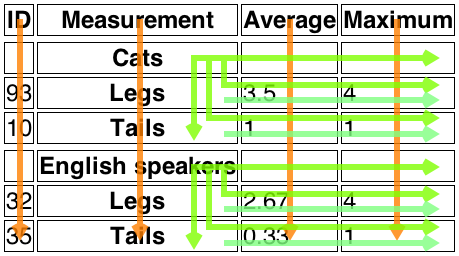






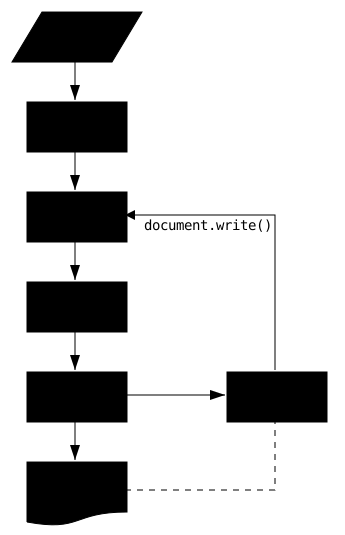
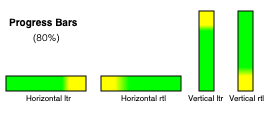 When the element is wider than it is tall, the element is
expected to be depicted as a horizontal progress bar, with the start
on the right and the end on the left if the 'direction' property on
this element has a computed value of 'rtl', and with the start on
the left and the end on the right otherwise. When the element is
taller than it is wide, it is expected to depicted as a vertical
progress bar, with the lowest value on the bottom. When the element
is square, it is expected to be depicted as a direction-independent
progress widget (e.g. a circular progress ring).
When the element is wider than it is tall, the element is
expected to be depicted as a horizontal progress bar, with the start
on the right and the end on the left if the 'direction' property on
this element has a computed value of 'rtl', and with the start on
the left and the end on the right otherwise. When the element is
taller than it is wide, it is expected to depicted as a vertical
progress bar, with the lowest value on the bottom. When the element
is square, it is expected to be depicted as a direction-independent
progress widget (e.g. a circular progress ring).