1. Introduction
This section is non-normative.
The core concept behind CSS Regions is the ability to say, "Display this content (a named flow) over there (a region chain)." The simplest example is:
These two declarations will take
the element that matches #this,
put it into a flow named "my-flow",
and display the contents of "my-flow"
in the box from the element that matches #there.
This example has a single content source for the named flow,
and a single box for the region chain. Named flows can also have multiple sources
and use multiple boxes for the region chain.
The named flow mechanism can be used in several different ways - some of which are custom overflow handling, aggregating content, linked display boxes, magazine-style layout, and flowing content through areas in a paginated view.
<article> ...some content... </article>
<aside> ad or image content </aside>
The <aside> content will be displayed below all of the article content. On a large screen the page might display without scrolling, but on a small screen the <aside> content might not be visible until the view scrolls. If it’s important to show at least some of the <aside> content in the initial view, CSS Regions can fragment the article content across two boxes - one above the <aside> and one below.
In this example (for simplicity’s sake) we create the boxes with additional elements:
<article> ...some content... </article>

<div class="top region"></div>
<aside> ad or image content </aside>
<div class="region"></div>
article {
  flow-into: article-flow;
}
.region {
  flow-from: article-flow;
}
.top {
  max-height: 80vh;
}
So the top box in the region chain is limited to 80% of the viewport height. If the article content doesn’t fit in that box, the article will continue in the second box after the <aside> content.
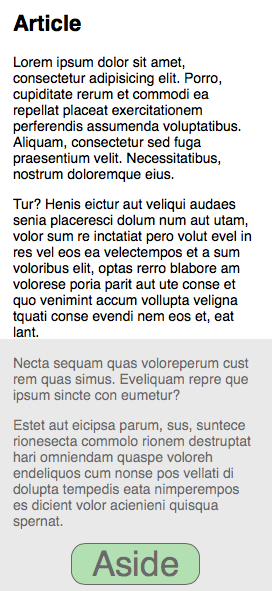
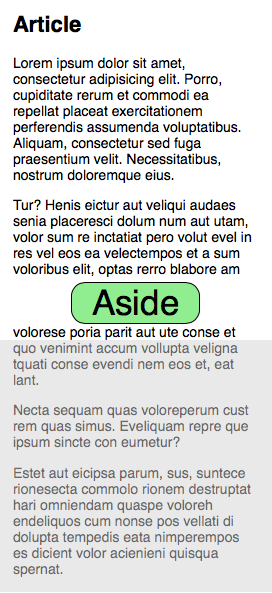
In the images above, the gray area represents the content below the screen edge in the initial view.
This example links just two boxes together, but more boxes could be added to the region chain to regularly interleave other content with the article.
Custom overflow handling can be accomplished by linking a separate overflow box. In this example, the overflow box is nestled inside a menu in the markup, and only displays if the menu is toggled.
<nav> ...some links... </nav>

<div class="menu">
  <nav></nav>
  ...some more links...
</div>
If the links in the main nav element are placed in a named flow, that flow can be directed through both the main nav element and the overflow nav box in the menu:
nav a {
  flow-into: nav-link-flow;
}
nav {
  flow-from: nav-link-flow;
}
Then the main nav element and the menu can be arranged with constraints such that when the screen is too narrow for the main nav element to display all of the navigation links, the overflow moves to the menu.
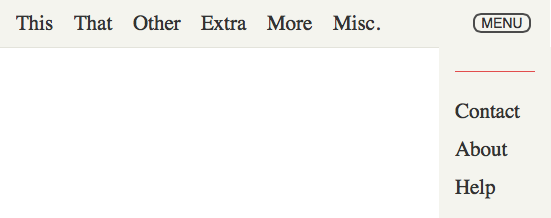
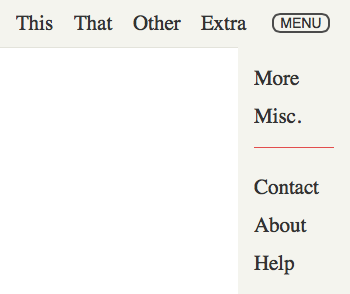
Since content is assigned to a named flow using a CSS selector, the content can come from multiple sources. The resulting aggregation can be displayed in a single box or flowed through multiple boxes as above.
So given this markup:
<div class="breaking-news"></div>

<article>News story</article>
<article class="breaking">Sports story</article>
<article>News story</article>
<article class="breaking">Entertainment story</article>
<article>Sports story</article>
You can take the "breaking" stories and display them above all the others using two lines of CSS:
.breaking {
  flow-into: breaking-news;
}
.breaking-news {
  flow-from: breaking-news;
}
Given more data accessible to CSS selectors, you could rearrange the articles in other ways (sports on top, etc.) depending on the user’s preferences.
CSS Regions are independent from layout
Any of the CSS layout facilities can be used to create, position and size boxes that can become CSS Regions.
The CSS Regions module does not define a layout mechanism and is meant to integrate with existing and future CSS layout facilities.
CSS Regions do not have to be elements
The CSS Regions module is independent of the layout of boxes and the mechanisms used to create them.
For simplicity, our examples tend to use elements to define the boxes. Any other mechanism available in markup or style to create stylable boxes could be used instead, such as pseudo-elements or the @slot rule proposed by the CSS Page Template Module [CSS3-PAGE-TEMPLATE].
The only requirement for box to become a CSS Region is that the flow-from property applies to the box.
1.1. Value Definitions
This specification follows the CSS property definition conventions from [CSS2] using the value definition syntax from [CSS-VALUES-3]. Value types not defined in this specification are defined in CSS Values & Units [CSS-VALUES-3]. Combination with other CSS modules may expand the definitions of these value types.
In addition to the property-specific values listed in their definitions, all properties defined in this specification also accept the CSS-wide keywords as their property value. For readability they have not been repeated explicitly.
2. CSS Regions concepts
2.1. Regions
A CSS Region is a block container that has an associated named flow (see the flow-from property).
2.2. Region chain
A region chain is the sequence of regions that are associated with a named flow. CSS Regions in a region chain receive content from the named flow following their order in the chain. CSS Regions are organized into a region chain according to the document order.
2.3. Last region
A CSS region is deemed to be the last usable region in a region chain if it is the first region in that chain to have layout containment, or the last region in the chain if none of them have layout containment (See [CSS-CONTAIN-1]).
2.4. Named flows
A named flow is the ordered sequence of content associated with a flow with a given identifier. Contents in a named flow are ordered according to the document order.
Content is placed into a named flow with the flow-into property. The content in a named flow is laid out in the region chain that is associated with this named flow using the flow-from property.
Content from a named flow is broken up between regions according to the regions flow breaking rules.
A named flow is created when some content is moved into the flow with the given identifier or when at least one CSS Region requests content from that flow.
2.5. Regions flow breaking rules
Breaking a named flow across a region chain is similar to breaking a document’s content across pages (see [CSS3PAGE]) or a multi-column container’s content across column boxes (see [CSS3COL]). One difference is that page boxes are generated based on the available content whereas a region chain is a set of recipient boxes for the named flow content whose dynamic generation is not in the scope of this specification.
Each CSS Region in turn consumes content from its associated named flow. The named flow content is positioned in the current region until a natural or forced region break occurs, at which point the next region in the region chain becomes the current region. If there are no more usable CSS Regions in the region chain and there is still content in the flow, the positioning of the remaining content is controlled by the region-fragment property on the last usable CSS Region in the chain.
The CSS regions module follows the fragmentation rules defined in the CSS Fragmentation Module Level 3 (see [CSS3-BREAK]).
3. Properties
3.1. The flow-into property
[Shadow]: getFlowByName and shadow DOM
The ‘flow-into’ property can place an element or its contents into a named flow. Content that belongs to the same flow is laid out in the region chain associated with that flow.
| Name: | flow-into |
|---|---|
| Value: | none | <ident> [element | content]? |
| Initial: | none |
| Applies to: | All elements, but not pseudo-elements such as ::first-line, ::first-letter, ::before or ::after.
|
| Inherited: | no |
| Percentages: | n/a |
| Computed value: | as specified |
| Canonical order: | per grammar |
| Animation type: | not animatable |
- none
- The element is not moved to a named flow and normal CSS processing takes place.
- <ident>
- If the keyword element is present
or neither keyword is present,
then the element is taken out
of its parent’s flow
and placed into the flow
with the name '<ident>'.
If the keyword content is present,
then only the element’s contents
are placed into the named flow.
The element or content is said to have
a specified flow.
The values
none,inherit,default,autoandinitialare invalid flow names.
The flow-into property affects
the visual formatting of elements or contents
placed into a named flow and of the region chain laying out content
from a named flow.
The flow-into property does not affect
the CSS cascade and inheritance
for the elements on which it is specified.
The flow-into property does not affect the DOM [DOM] position of an element or its contents.
The flow-into property does not affect ordering
in non-visual media
(such as speech).
Likewise, flow-into does not affect
the default traversal order
of sequential navigation modes
(such as cycling through links,
see e.g. tabindex [HTML]).
A named flow needs to be associated with a region chain (one or more CSS Regions) for its content to be visually formatted. If no region chain is associated with a given named flow, the content in the named flow is not rendered: it does not generate boxes and is not displayed.
The children of an element or content with a specified flow may themselves have a specified flow, in which case they become the next sibling of the latest element or content collected in that flow. In some cases, the child can become the next sibling for one of its ancestors in the same flow.
Content in a named flow is sequenced in document order. The visual formatting model uses the relationships between content in the named flow as input, rather than the contents’ position in the DOM.
Each CSS Region in a region chain establishes a containing block for absolutely positioned elements in the named flow (see [CSS21]). That first CSS Region in a region chain establishes the initial containing block for such absolutely positioned elements. Regions don’t establish a containing block for fixed positioned elements in the named flow. Such fixed positioned elements are still positioned relative to the viewport or the page area even if they have been redirected into a named flow
The first region defines the principal writing mode for the entire flow. The writing mode on subsequent regions is ignored.
If an element has style containment (See [CSS-CONTAIN-1]), then the flow-into property must be scoped to that element.
The flow-into property moves an element into the flow and the interplay with selectors should be considered carefully.
For example,
table {flow-into: table-content}
will move all tables in the "table-content" named flow. However, the
table > * {flow-into: table-content} ...
selector will move all immediate children of all table elements into the "table-content" named flow (which may be useful as it will usually result, if the immediate children are rows, in merging rows of multiple tables), but the
table * {flow-into: table-content}
selector will move all descendants of table elements into the "table-content" named flow, transforming the element tree into a flat list in order of opening tags (which is probably not intentional). This will make all the descendants of table elements siblings in the named flow. Having the descendants become siblings in the named flow results in a different processing (see CSS 2.1’s anonymous table objects). This note illustrates how authors must exercise caution when choosing a particular selector for setting the flow-into property to avoid unintended results.
Another consequence of moving elements into named flows is that surrounding whitespace is not moved into the named flow. If you have code like this:
span {flow-into: span-content}
<span>one</span>
<span>two</span>
Then the "span-content" named flow contents will contain this:
<span>one</span><span>two</span>
Which will change the display from "one two" to "onetwo". If whitespace is significant, then moving the parent that contains the whitespace to the named flow is required.
3.2. The flow-from property
The flow-from property makes a block container a region and associates it with a named flow.
| Name: | flow-from |
|---|---|
| Value: | <ident> | none |
| Initial: | none |
| Applies to: | Non-replaced block containers. This might be expanded in future versions of the specification to allow other types of containers to receive flow content. |
| Inherited: | no |
| Percentages: | n/a |
| Computed value: | as specified |
| Canonical order: | per grammar |
| Animation type: | not animatable |
- none
- The block container is not a CSS Region.
- <ident>
- The block container becomes a CSS Region (except as detailed in the text below),
and is ordered in a region chain according to its document order.
The content from the flow
with the <ident> name will be broken
into fragments and visually formatted in the principal boxes of the regions in the region chain.
If there is no flow with name <ident>, then the block container does not format any content visually.
If the content property computes to something else than normal (or none for a pseudo-element), the block container does not become a CSS Region. If the display property of the block container or one of its ancestors computes to none, the block container does not become a CSS Region.
A CSS Region’s document children are not visually formatted unless they are directed to a named flow with an associated region chain.
Block container pseudo-elements where the value of flow-from computes to an <ident> and the value of content computes to none are generated as CSS Regions, which is an update to the behavior described in [CSS21].
If an element has style containment (See [CSS-CONTAIN-1]), then the flow-from property must be scoped to that element.
A block container becomes a CSS Region when its flow-from property is set to a valid <ident> value, even if there is no content contributing to the referenced flow. For example:
<style>
.article{
    flow-into: thread;
}
.region{
    flow-from: thread;
}
</style>
<html>
<body>
  <div class=region>div content</div>
</body>
</html>
There is no element matching
the .article selector
and therefore no content
in the thread flow.
However, the block container matching
the .region selector
is still associated with
that empty named flow and, consequently,
its children are not formatted visually.
At the time of this note-writing, the display values that
always result in a non-replaced block container include block, inline-block, table-cell, table-caption, and list-item. All of these
display values work as regions with non-replaced elements.
The flex and grid display values do not
result in block containers (they are defined as flex containers and grid
elements, respectively). So ‘flow-from’ combined with those display values
does not result in a CSS Region.
CSS Regions create a new stacking context. CSS Regions establish a new block formatting Context. Exclusions (see [CSS3-EXCLUSIONS]) potentially impact the content laid out in region chains, just as for non-regions.
With region chains, an element may be split across multiple boxes and these boxes may overlap (for example if they are absolutely positioned). So fragments of the same element can overlap each other. Since each element has a single z-index, it would be required to find another mechanism to decide in which order the fragments are rendered. Since each CSS Region creates a new stacking context, it is clear that each fragment is rendered separately and their rendering order follows the regular CSS rendering model.
Fragments rendering separately is also relevant to elements that might normally be rendered as a unit (for example, an element with its own stacking context, or with transparency). Each fragment of these elements is separately contained in the stacking context created by the CSS Region, so each fragment of these elements is rendered separately.
See the regions visual formatting details section for a description of how width and height values are resolved for CSS Region boxes.
3.2.1. Cycle Detection
named flows containing elements where the value of flow-from computes to an <ident> can produce nonsensical circular relationships, such as a named flow containing CSS Regions in its own region chain. These relationships can be easily and reliably detected and resolved, however, by keeping track of a dependency graph and using common cycle-detection algorithms.
The dependency graph consists of edges such that:
- Every named flow depends on its elements where the value of flow-from computes to an <ident>.
- Every element in a named flow where the value of flow-from computes to an <ident> depends on the named flow with the <ident> name.
If the graph contains a cycle, any elements where the value of flow-from computes to an <ident> participating in the cycle do not become CSS Regions.
For example, styling like this:
#id {
  flow-into: foolish;
  flow-from: foolish;
}
would move the #id element to a "foolish" named flow,
and try to make the #id element
a CSS Region for the "foolish" named flow.
The "foolish" named flow would then contain its own region,
creating a cycle.
So the #id element does not become a CSS Region.
The content keyword can be used to break cycles in some circumstances:
#id {
  flow-into: not-so-foolish content;
  flow-from: not-so-foolish;
}
Here only the contents of the #id element are moved to the named flow, and the box for the #id element does become a CSS Region. Since the named flow does not contain the element itself, there is no cycle. With this declaration the #id element becomes a single-box region chain for its contents, and other boxes could be added to the chain to customize overflow.
3.2.2. Nested fragmentation contexts
A CSS Region that contains a fragment of a named flow can itself be fragmented if it is nested within a fragmentation context [CSS3-BREAK], such as when a layout using a region chain is printed. In these cases break opportunities in the named flow fragment contained by the CSS Region are determined using the standard fragmentation rules. In other words, each region box and its associated fragment should break as if it were a simple div containing the fragment contents. This can be controlled by using an avoid break value on the CSS Region, if that is desired.
A CSS Region can be part of the contents of a separate named flow, as long as there are no cycles broken by the Cycle Detection described above. This case is a nested region context, which has an effect on the Visual Formatting Steps described below.
3.3. Controlling Region Flow Breaks
Fragmentation across regions can be controlled with the break-inside, break-before, and break-after properties: the generic values auto, always, and avoid affect content flowed through regions just as they do content flowed through columns or pages, and the region and avoid-region values provide region-specific breaking controls. See [CSS3-BREAK] for details.
3.4. The region-fragment property
| Name: | region-fragment |
|---|---|
| Value: | auto | break |
| Initial: | auto |
| Applies to: | CSS Regions |
| Inherited: | no |
| Percentages: | n/a |
| Computed value: | specified keyword |
| Canonical order: | per grammar |
| Animation type: | discrete |
The continue property in [css-overflow-3] is likely to replace this property.
The region-fragment property controls the behavior of the last usable region associated with a named flow.
- auto
- Content flows as it would in a regular content box. If the content exceeds the container box, it is subject to the overflow property’s computed value on the CSS Region. Region breaks must be ignored on the last usable region.
- break
-
If the content fits within the CSS Region, then this property has no effect. If the content does not fit within the CSS Region, the content breaks as if flow was going to continue in a subsequent region. See the breaking rules section. A forced region break takes precedence over a natural break point.
Flow content that follows the last break in the last usable region is not rendered.
The region-fragment property does not influence the size of the region it applies to.
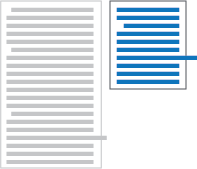
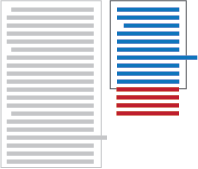
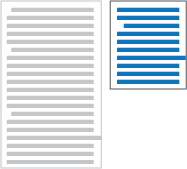
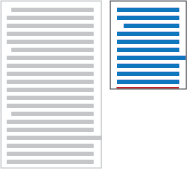
The following code sample illustrates the usage of the region-fragment property.
<style>
  article {
    flow-into: article-flow;
  }
  #region-1, #region-2 {
    flow-from: article-flow;
    region-fragment: break; /* or auto */
    overflow: visible; /* or hidden */
  }
</style>

<body>
  <article>...</article>
  <div id="region-1"></div>
  <div id="region-2"></div>
</body>
| article with two overflowing lines | region-fragment: break
| region-fragment: auto
|

| 
| 
|
region-fragment: break
| region-fragment: auto
| |
| 
|
The overflow property is honored on a region: if region content overflows, such as the borders of elements on the last line, the overflow property controls the visibility of the overflowing content. See the overflow property definition ([CSS21]).
4. CSSOM
Since content may flow into multiple regions, authors need a way to determine if there are enough regions to flow all the content from a named flow. This is especially important considering that the size of regions or the size of the content may change depending on the display context. For example, flowing the same content on a mobile phone with a small screen may require more regions than on a large desktop display. Another example is the user changing the font size of text flowing through regions. Depending on the change, new regions may be needed to accommodate for the additional space required to fit the larger text or some regions may need to be removed for smaller text.
4.1. The NamedFlow interface
The following APIs allow scripts to reference a NamedFlow object representation of a named flow.
An additional attribute on the Document interface provide access to named flows.
partial interface Document {readonly attribute NamedFlowMap namedFlows ; };
The namedFlows attribute on the Document interface returns a static snapshot
of all the current named flows in the document.
The namedFlows map must include all named flows that are currently in the CREATED state.
The list must not include named flows that are in the NULL state.
The NamedFlowMap interface provides a map of current NamedFlow instances
in the document.
The NamedFlowMap object
is a snapshot of the data,
and is read-only.
[Exposed =Window ]interface {NamedFlowMap maplike <CSSOMString ,NamedFlow >; };
The map entries in a NamedFlowMap object
are the named flow idents
paired with their NamedFlow objects.
The get() and has() methods return null and false respectively
if there is no NamedFlow with the given ident.
The set() and delete() methods always throw an InvalidAccessError exception,
as this map is read-only.
The NamedFlowMap interface
uses the rest of the default map class methods.
The NamedFlow interface offers a representation
of a named flow instance.
The NamedFlow interface
can be used for different purposes.
For example, the getRegionsByContent() method
can help navigate by bookmark:
a script can find the CSS Regions that display a particular anchor
and bring them to view.
Likewise, the interface allows authors to check if all content has been fitted into existing regions. If it has, the overset attribute would be false.
[Exposed =Window ]interface :NamedFlow EventTarget {readonly attribute CSSOMString name ;readonly attribute boolean overset ;sequence <Element >getRegions ();readonly attribute short firstEmptyRegionIndex ;sequence <Node >getContent ();sequence <Element >(getRegionsByContent Node ); };node
The name attribute
returns the name of the NamedFlow instance.
The overset attribute returns true
if there are named flow fragments
that do not fit
in the associated region chain (including the case where
there are named flow fragments
but no regions in the region chain).
Otherwise, it returns false.
The getRegions() method returns the sequence
of regions in the region chain associated with the named flow.
Regions after the last usable region, if any, are included.
Note that the returned values
is a static sequence
in document order.
The firstEmptyRegionIndex is the index of the first region
in the region chain with the regionOverset attribute
set to empty.
If all regions have the regionOverset attribute
set to fit or overset,
the value for firstEmptyRegionIndex is -1.
If there are no regions in the region chain,
the value is -1 as well.
The getContent() method returns an ordered collection
of nodes that constitute the named flow.
The returned list is a static snapshot
of the named flow content
at the time the method is invoked.
This list contains the contents
that were moved to the named flow by the flow-into property
but not any descendants
(unless the descendants are themselves
moved to the named flow).
The getRegionsByContent() method returns the sequence of regions
that contain at least part
of the target content node
if it belongs to the named flow directly
or one of its ancestors belongs to the named flow.
Otherwise, the method returns
an empty sequence.
The returned value
is a static sequence
in document order.
The named flow states are :
-
NULL: the named flow contains no content and has no region chain. -
CREATED: the named flow either contains content or has a region chain.
A NamedFlow object is live:
it always represents the named flow with the corresponding name even if
that named flow has transitioned
to the NULL state.
4.2. The Region mixin
Region is a mixin which must be included by all interfaces
( Elements,
pseudo-elements or other CSS constructs
such as slots) in an implementation which can be CSS Regions.
interface mixin {Region readonly attribute CSSOMString regionOverset ;sequence <Range >?getRegionFlowRanges (); };Element includes Region ;
The regionOverset attribute returns one of the following values:
- overset
- The region is the last usable region in the region chain and
not able to fit the remaining content from the named flow.
Note that the region’s
overflowproperty value can be used to control the visibility of the overflowing content and the region-fragment property controls whether or not fragmentation happens on the content that overflows the last usable region. - fit
- The region’s flow fragment content fits into the region’s content box. If the region is the last usable region in the region chain, it means that the content fits without overflowing. If the region is not the last usable region in the region chain, that means the named flow content may be further fitted in subsequent regions. In this last case, note that the named flow fragment may be empty (for example if the region is too small to accommodate any content). This value is returned if the Region object is not (or no longer) a region.
- empty
- All content from the named flow was fitted in prior regions.
If there is no content in the named flow, all regions associated with that named flow should have their regionOverset attribute return empty. If there is content in the flow but that content does not generate any box for visual formatting, the overset attribute on the first region in the region chain associated with the flow will return fit.
The getRegionFlowRanges() method
returns an array of Range instances corresponding to fragment
from the named flow that is laid out in the region.
If the region has not received a fragment
because it is too small to accommodate any,
the method returns a single Range where the startContainer and startOffset have the same values as
the endContainer and endOffset and therefore the collapsed attribute
on the Range is true.
In that situation,
if the region is the first
in the region chain,
the startContainer is the first Node in the named flow and the startOffset is zero.
If the region is the last usable region in the region chain (but not the first and only one),
the startContainer and startOffset are the same values as
the endContainer and endOffset on the previous region
in the region chain.
The method returns null
if the region object
is not (or no longer) a region.
A Region instance may represent an object that is no longer a region. This may happen for example if the flow-from property on the corresponding pseudo-element, element or other construct becomes none but a script is still holding a reference to the Region object.
4.3. Named flow events
NamedFlow objects are EventTargets which dispatch the following events for their respective triggers. These events are asynchronous, and fire at the end of the regions visual formatting steps.
The regionfragmentchange event is dispatched on any change to a named flow’s fragmentation through its region chain, including changes to any overset fragment.
| Type | regionfragmentchange
|
|---|---|
| Interface | UIEvent (see [DOM-LEVEL-3-EVENTS])
|
| Sync / Async | Async |
| Bubbles | No |
| Target | NamedFlow |
| Cancelable | Yes |
| Default action | none |
| Context info |
|
The regionoversetchange event is dispatched if any of the regionOverset values change in a named flow’s region chain, including when regions are added or removed from the chain.
| Type | regionoversetchange
|
|---|---|
| Interface | UIEvent (see [DOM-LEVEL-3-EVENTS])
|
| Sync / Async | Async |
| Bubbles | No |
| Target | NamedFlow |
| Cancelable | Yes |
| Default action | none |
| Context info |
|
4.4. Clarifications on pre-existing APIs
4.4.1. getClientRects() and getBoundingClientRect()
The CSSOM View Module defines how user agents compute
the bounding client rectangle
for an element (getBoundingClientRect())
and its generated boxes (getClientRects()).
This definition applies to
the (possibly) multiple boxes
generated for an element in a named flow
flowing through a region chain.
The getClientRects() method
returns the list of boxes generated
for each of the element fragments
laid out in different regions.
The getBoundingClientRect() method
operates as specified in the CSSOM View Module as well and is computed
from the set of rectangles
returned by getClientRects().
4.4.2. offsetTop, offsetLeft, offsetWidth, offsetHeight and offsetParent
The computation of the offset attributes for elements laid out in a named flow follow the specification [CSSOM]. For the purpose of these algorithms, the first CSS layout box associated with an element laid out in a named flow is the first box generated for the first region the element is laid out into. In the offsetParent algorithm, the nearest ancestor search skips from the topmost named flow elements directly to the body element.
5. Multi-column regions
A multi-column [CSS3COL] element can be assigned to a region chain. The element becomes part of the region chain for the associated named flow, and flows its content fragments through columns according to the multi-column specification [CSS3COL]. In particular, when computing the flow fragment height of a multi-column container that is associated with a named flow, the column-fill [CSS3COL] property is honored to balance the fragments of content that would flow through its columns.
Overflow of multicol regions is mostly handled according to the same rules as other CSS Regions. If the remainder of the named flow does not fit in the multicol region, then the rest of the content flows into the remaining region chain. However, if a multicol region is the last usable region in a region chain, then the multicol region must follow the overflow column rules [CSS3COL].
The following example:
<style>
  article {
      flow-into: article-flow;
  }

  #multi-col {
      column-count: 2;
      flow-from: article;
      height: 6em;
      column-gap: 1em;
  }

  #remainder {
      flow-from: article;
      height: auto;
  }
</style>

<body>
  <article>...</article>
  <div id="multicol"></div>
  <div id="remainder"></div>
</body>
is equivalent in rendering to, for example:
<style>
  article {
      flow-into: article-flow;
  }

  #flex {
      display: flex;
      flex-pack: justify;
      height: 6em;
  }

  #flex > div {
      flow-from: article;
      width: calc(50% - 0.5em);
  }

  #remainder {
      flow-from: article;
      height: auto;
  }
</style>

<body>
  <article>...</article>
  <div id="flex">
    <div />
    <div />
  </div>
  <div id="remainder"></div>
</body>
6. Pseudo-elements
It can be useful to visually mark the content to highlight that a content thread is flowing through the region chain. For example, a marker such as 'continued below' clearly indicates, at the end of a CSS Region, that there is more content in the flow which can be found by scrolling past whatever content interrupts the region chain.
The '::before' and '::after' pseudo-elements (see [SELECT]) let content authors mark the beginning and end of a region with such markers.
7. Regions visual formatting details
Regions are laid out by CSS and take part in the normal box model and other layout models offered by CSS modules such as flexible boxes ([CSS3-FLEXBOX]). However, regions lay out a fragment of their named flow instead of laying out descendant content as happens with other boxes.
This section describes the model for laying out regions and for laying out named flow content into regions. The descriptions in this section are biased towards a horizontal writing mode, using width for logical width (or measure) and height for logical height (or extent) as defined in the CSS Writing Modes Module [CSS3-WRITING-MODES]). To use this model in a vertical writing mode apply the principles described in that specification.
7.1. Processing model
The '::before' content is laid out in the region prior to any other content coming from the flow.
The '::after' content is laid out in the region after laying out the flow fragment content into the RFCB. Then, flow content is removed from the fragment to accommodate the '::after' content. Accommodating means that the '::after' content is laid out without overflowing the region.
If there is not enough room to accommodate the ::before content, the '::after' content after removing all flow fragment content, or a combination of the two, then the ::before and/or ::after content overflows that region.
7.2. The Region Flow Content Box (RFCB)
A region box lays out the following boxes:
- The boxes generated by its
::beforeand::afterpseudo-elements, if any. - The anonymous region flow content box (called RFCB in this document) which contains the fragment of the named flow that the region receives.
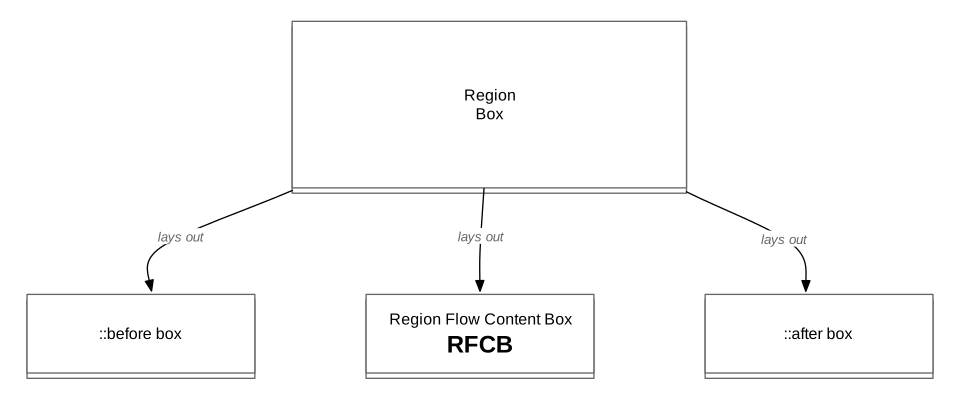
Laying out a region box follows the same processing rules as for any other block container box.
The RFCB is a block container box with a computed width of auto and whose used height is resolved as detailed below.
Since the RFCB is a block container box, the ::before box and ::after box will also be block containers, though the contents of ::before and ::after may be inline within those boxes.
7.2.1. RFCB width resolution
At various points in the visual formatting of documents containing regions,
the used width of RFCBs and regions need to be resolved.
In all cases, the resolution is done following the rules for calculating widths and margins (see [CSS21]).
Sometimes, resolving the used width value requires
measuring the content’s min-content and max-content values
(as defined in the CSS Writing Modes Module [CSS3-WRITING-MODES]).
or an RFCB, these measures are made
on the entire associated named flow content.
As a consequence,
all RFCBs of regions associated
with a given named flow share the same min-content and max-content measures.
This approach is consistent with the box model for breaking ([CSS3-BREAK]).
7.3. Regions visual formatting steps
Formatting documents that contain named flows laid out in regions is a three-step process:
- Step 1: RFCB flow fragment height resolution. In this step, the heights of fragments fitting in the regions' RFCBs are resolved.
- Step 2: document and regions layout. In this step, the document content and regions are laid out. However, named flow content is not laid out in regions yet.
- Step 3: named flow layout. In this step, the content of named flows is laid out in their respective region chains.

7.3.1. Step 1: RFCB flow fragment height resolution
Conceptually, resolving the flow fragment height is a two phase process.
7.3.1.1. RFCB flow fragment height resolution, Phase 1
The document is laid out with a used height of zero for all RFCBs. In this phase, the content of named flows is not laid out in regions. This phase yields resolved position and sizes for all regions and their RFCBs in the document.
7.3.1.2. RFCB flow fragment height resolution, Phase 2
named flows are laid out in regions. The user agent resolves the flow fragment height for the RFCBs using the remainder of the flow and accounting for fragmentation rules. This process accounts for constraints such as the height or max-height values, as described in the CSS 2.1 section on calculating heights and margins (see the Block-level non-replaced elements in normal flow... section and the complicated cases section). During this phase, generated content is laid out according to the rules described earlier in this document.
In a nested region context, this phase will trigger the beginning of Step 1 for any inner named flows whose regions are contained in the outer named flow. All of Step 1 for inner flows must recursively complete before Step 1 for an outer flow completes.
7.3.2. Step 2: region boxes layout
In this step, the document is laid out according to the normal CSS layout rules.
If a measure of the content is required to resolve the used width of the region box, the value is resolved as described in the RFCB width resolution section.
If a measure of the content is required to resolve the used height of the RFCB (for example if the region box is absolutely positioned), the flow fragment height resolved in Step 1 is used for the vertical content measure of the RFCB.
At the end of this step, regions are laid out and ready to receive content from their associated named flows.
7.3.3. Step 3: named flows layout
In this final step, the content of named flows is laid out in the regions' RFCBs along with the generated content boxes.
The used width for RFCBs is resolved as described before.
The used height of RFCBs is resolved such that none of the boxes in the region box’s normal flow overflow the region’s box. In other words, the RFCB boxes are stretched vertically to accommodate as much of the flow as possible without overflowing the region box and accounting for fragmentation rules and generated content boxes.
During this phase, generated content is laid out according to the rules described earlier in this document.
In a nested region context, this step will trigger Step 2 for inner named flows whose regions are contained in the outer named flow. Fragmentation of the inner regions may result as they are laid out in the outer region chain. Once Step 3 for an outer named flow is complete, Step 3 for the inner named flows recursively begins.
Once Step 3 for a named flow is complete, The conditions for the named flow events are checked, and if the triggers are met the events dispatch at this point.
The model for resolving auto sized regions will cause, under certain circumstances, the flow content to be overset or underset. In other words, it will not fit tightly. The model prevents having circular dependencies in the layout model. Implementations may decide to apply further layout steps to ensure that the whole flow content is displayed to the user, even in edge cases.
7.4. Regions visual formatting: implementation note
The process for resolving an RFCB’s height and the three-step process used to lay out documents containing regions and named flows are conceptual descriptions of what the layout should yield and implementations should optimize to reduce the number of steps and phases necessary wherever possible.
7.5. Regions visual formatting example
This section is non-normative.
This example considers a document where content flows between three regions, and region boxes are intermixed with the normal document content.
<style>
  article {
      flow-into: article;
  }

  #rA, #rB, #rC {
      flow-from: article;
      height: auto;

      margin: 1em 1em 0em 1em;
      padding: 1em;
      border: 3px solid #46A4E9;
  }

  #rA {
      width: auto;
  }

  #rB {
      float: left;
      width: 15em;
      max-height: 150px;
  }

  #rC {
      float: right;
      width: 12em;
  }

  #main-flow {
      padding: 0em 1em 0em 1em;
  }
</style>

<body>
    <article>
        <p style="break-after:region;">I am not a ... </p>
        <p>...</p>
    </article>

    <div id="rA"></div>
    <div id="rB"></div>
    <div id="rC"></div>

    <div id="main-flow">
        <p>Lorem ipsum dolor ...</p>
    </div>
</body>
The following sections and figures illustrate the intermediate results for the visual formatting process. In the following, we call RFCB-A, RFCB-B and RFCB-C the RFCBs for regions rA, rB and rC respectively.
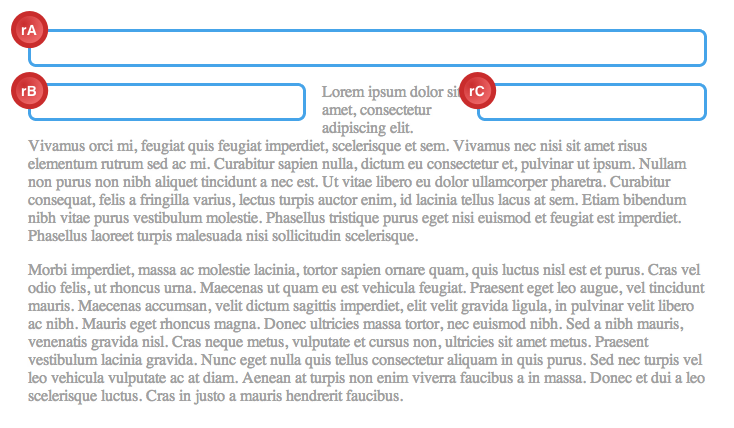
7.5.1. Step 1 - Phase 1: Laying out RFCBs with used height of zero
Applying the rules for Step 1, Phase 1, the computed auto width values for the RFCBs are resolved to used values according to the normal CSS layout rules meaning they stretch to the width of their containing block’s content box.
-
RFCB-A: stretches to fit the rA content box.
Since rA also has an auto width, its own used width is stretched to fit the
<body>content box. - RFCB-B: stretches to fit the
rBcontent box. - RFCB-C: stretches to fit the
rCcontent box.
Also applying the rules for Step 1, Phase 1, the used values for the RFCBs height properties are all zero.
Conceptually, this produces the layout illustrated below.
7.5.2. Step 1 - Phase 2: Layout flow to compute the RFCBs' flow fragments heights
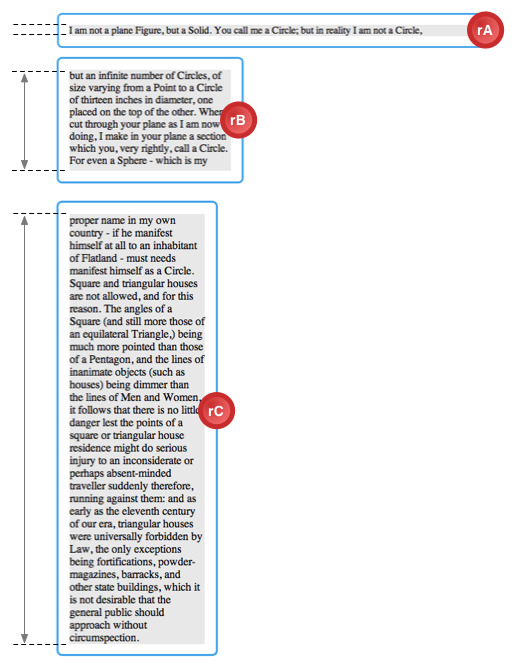
In this second phase of Step 1, the named flow is laid out in regions and the height of each fragment falling in each RFCB is computed.
The user agent lays out as much
of the flow into an area with RFCB-A’s used width.
rA’s height computes to auto and there is no vertical maximum height for RFCA’s height.
However, because there is a break after the first paragraph
in the "article" named flow,
only this first paragraph is laid out
in RFCB-A and FH-A (the flow fragment height for RFCB-A)
is resolved by laying out this first paragraph in the used width.
At this point, the user agent lays out as much
of the remaining flow as possible in RFCB-B.
Because rB’s max-height computed value is "150px",
the user agent only lays out the "article" named flow
using RFCB-B’s used width until the point where
laying out additional content would cause RFCB-B to overflow rB’s box.
The fragment height for RFCB-B is resolved: FH-B (150px).
Finally, the user agent lays out the remainder of the flow in RFCB-C. Because rC has no other constraints and no region breaks, the remaining content is laid out in RFCB-C’s used width. This results in a resolved flow fragment height: FH-C.
7.5.3. Step 2: Layout document and regions without named flows
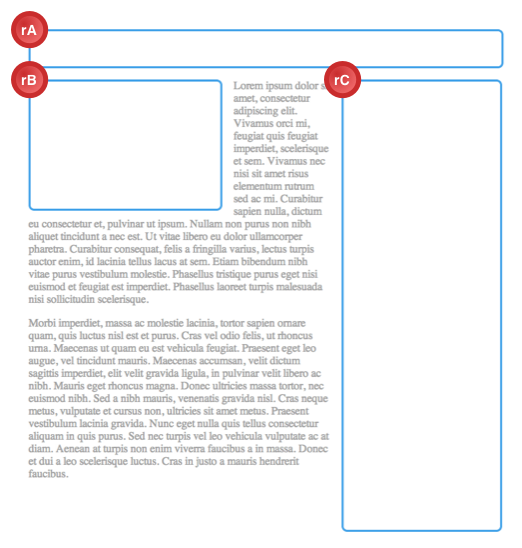
The used width of RFCB-A, RFCB-B and RFCB-C are resolved as in the previous step. However, the height is resolved differently.
Resolving the height of rA requires a content measure which is FH-A (the flow fragment height for RFCB-A).
The height of rB results from first computing its content measure and then applying the rules for max-height.
Here, the vertical content measure evaluates to FH-B.
After applying the rules for max-height and accounting for margins, padding and borders,
the used height of rB is resolved to LH-B
(150px).
The height of rC’s box results from calculating its content measure: FH-C becomes rC’s used height.
7.5.4. Step 3: named flows layout
In this final step,
the article named flow is laid out in its region chain.
The used width for each of the RFCB
is resolved as in step 1 above.
The used height for the RFCB is a result of laying out the as much of the content in the region without overflowing its content box and following the fragmentation rules.
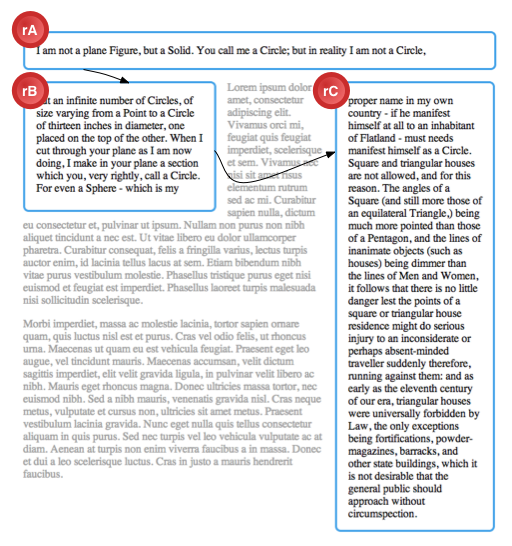
Because the computed width of the RFCB has not changed and the fragmentation rules applied are the same as in Phase 1, Step 2, the used height for RFCB-A, RFCB-B and RFCB-C are LH-A, LH-B and LH-C, respectively.
There may be situations where the used height of RFCBs resolved in Step 3 are different from the flow fragment height computed in Step 1 Phase 2.
8. Relation to document events
The CSS Regions module does not alter the normal processing of events in the document tree. In particular, if an event occurs on an element that is part of a named flow, the event’s bubble and capture phases happen following the document tree order.
This means that in most cases CSS Regions will not receive user events
that trigger on their named flow content.
Event handlers for named flow content can check getElementsFromPoint() [CSSOM-VIEW] to find the CSS Region where the user event occurred.
Future versions of CSS-UI may provide
a more general solution for user event bubbling
where the stack of elements
at the event coordinates
9. Relation to other specifications
This specification is related to other specifications as described in the references section. In addition, it is related to the following specifications:
- CSS Fragmentation Module Level 3 [CSS3-BREAK]. This module defines the rules for fragmenting content over multiple containers and applies to CSS Regions in addition to applying to multi-column and paged media.
- CSS Pagination Templates Module Level 3 [CSS3-PAGE-TEMPLATE]. This module defines a syntax to define layout templates which can be used when paginating content. The page templates use regions.
- CSS Exclusions Module [CSS3-EXCLUSIONS]. This module defines a generic way to define exclusions around which content can flow. This can be seen as an extension to CSS floats. In advanced layout designs, it is expected that the CSS Exclusions module will be commonly combined with the CSS Regions module.
- CSS Line Grid Module [CSS3-LINE-GRID]. This module defines a concept of line grid to align the position of lines in different elements. The line grid functionality is related and needed for aligning content flowing in separate regions.
10. Use Cases
Use cases are described on these pages.
11. Changes
11.1. Changes from October 9th 2014 version
- Add animation type lines
- Remove definition of break properties, since they’re already defined in [CSS3-BREAK].
- Mention effects of containment on regions.
11.2. Changes from February 18th 2014 version
- Added three simpler examples to the introduction
- Moved complex example to the CSSWG wiki
- Moved the effects of CSS containment to this specification from [CSS-CONTAIN-1].
11.3. Changes from May 28th 2013 version
- Removed region styling from this level
- Changed ::region() to ::region
- display:none elements do not become CSS Regions
- Clarify accessibility interactions with flow-into
- Change NamedFlowCollection to NamedFlowMap
- Remove mention of run-in and clarify ::before and ::after block containers
- Removed custom element syntax from examples
- Changed NamedFlowCollection getters back to null when there is no NamedFlow.
- Removed issue on user events and added note describing solution(s)
- Changed type of NamedFlow.getContent() from NodeList to sequence<Node>
11.4. Changes from August 28th 2012 version
- Changed @region rule to ::region() functional pseudo-element
- Removed CSSRegionStyleRule (see above)
- Tied named flow event triggers to visual processing model
- Described how visual formatting of nested regions works
- Added content and element keywords to flow-into
- Added regionoversetchange event
- renamed regionlayoutupdate to regionfragmentchange
- Defined offsetParent interaction
- Removed implication of DOM manipulation
- Changed Appendix A to use custom element layout.
- Noted change in pseudo-element generation with flow-from.
- Changed case of regionlayoutupdate to match other events in [DOM-LEVEL-3-EVENTS].
- Added section on fragmenting the fragmenters.
- Added section on handling circular flow-from and flow-into situations.
- Added alignment and justification to region styling properties.
- Added timing for regionLayoutUpdate event.
- Clarified interaction between content and flow-from for pseudo-elements.
- Changed NamedFlowCollection getters to return undefined when there is no NamedFlow.
- Changed region-overflow property to region-fragment.
11.5. Changes from May 3rd 2012 version
- Removed exceptions from the Region interface.
- Changed NamedFlowCollection from live to a static snapshot.
- Changed NamedFlow to inherit from EventTarget.
- Removed flowFrom from Region interface and changed method name to getComputedRegionStyle().
- Region interface is now a supplemental interface with the [NoInterfaceObject] extended attribute.
- Added note for regionLayoutUpdate dispatching in nested flows.
- Removed Document.getFlowByName() in favor of NamedFlowCollection.namedItem().
- Changed to overset:false for NULL NamedFlow.
- Changed regionLayoutUpdate to not bubble.
11.6. Older Changes
Older changelogs are archived on the CSSWG wiki.
Acknowledgments
The editors are grateful to the CSS working group for their feedback and help with the genesis of this specification.
In addition, the editors would like to thank the following individuals for their contributions, either during the conception of CSS Regions or during its development and specification review process:
Erik Arvidsson, Tab Atkins, Catalin Badea, Mihai Balan, Andrei Bucur, Razvan Caliman, Alexandru Chiculita, Phil Cupp, Arron Eicholz, John Jansen, CJ Gammon, Dimitri Glazkov, Daniel Glazman, Arno Gourdol, Catalin Grigoroscuta, David Hyatt, Brian Heuston, Ian Hickson, Jonathan Hoersch, Michael Jolson, Brad Kemper, Håkon Wium Lie, Kang-Hao (Kenny) Lu, Mihai Maerean, Markus Mielke, Robert O’Callahan, Theresa O’Connor, Mihnea Ovidenie, Virgil Palanciuc, Olga Popiv, Christoph Päper, Anton Prowse, Florian Rivoal, Peter Sorotokin, Elliott Sprehn, Radu Stavila, Christian Stockwell, Eugene Veselov, Boris Zbarsky, Stephen Zilles and the CSS Working Group members.
Privacy Considerations
No new privacy considerations have been reported on this specification.
Security Considerations
No new security considerations have been reported on this specification.